• Форум работает в архивном режиме www.old.nado.in

All mitsumi'1s Applications !! (updated daily)

  • Автор темы Автор темы mitsumi1
  • Дата начала Дата начала
Dejal Simon 5.0 5.0.1b1 macOS

bfe8807a93086b8da74144acce60befb.jpeg

File size: 16.09 MB​
Dejal Simon is the essential site monitoring tool for macOS. It checks servers for changes or failures, and notifies you via email, sound, speech, Twitter, or other means. You can use it to track updated sites, and to alert you when an important server goes down or recovers. It is a native macOS application with an intuitive and attractive interface.

Simon is very versatile. It can be used to monitor your own website and servers, track posts and new comments on your or friends' blogs, check for web mail, get notifications of updates to favorite news and entertainment websites, keep an eye on auctions, and many other uses.

Monitor Your Sites and Servers
Central to Simon is the Monitor window. It enables you to see at a glance the current status of all of your monitored websites, servers, and applications. In addition to a colorful status icon and up-time percentage, the tests list displays how long ago the last change and failure occurred, and when the next check will occur. But that's not all. This window also displays further statistics about the tests, and a log showing recent activity, including when tests start checking, and the various steps during the check (starting, stopping, service result, each filter, notifications, etc), plus other actions on tests, e.g. editing, pausing, etc. It also has logs of checks (including the check duration), changes (including the text that changed), and failures (including the error description).

Tests (and other lists) are organized into groups, and you can add your own groups and move them around as desired. This enables you to arrange tests by server, type, client, or whatever else makes sense to you.

Because sometimes you don't want to have another window cluttering up your screen, you can hide the Monitor window if you wish, and/or use the handy Dock or Status menus. The Dock menu includes quick access to Simon's windows, and some global functions. The Status menu includes all that plus displays all of your tests, complete with status icons, details via tooltip, and the option to perform a favorite action or display a sub-menu of quick-access operations for each test, so you can visit the site or other tasks without even having Simon visible.

If you prefer, Simon can be hidden from the Dock, so it is only accessed via the Status menu. Access to Simon can also be restricted, requiring a password, if you wish.

Put it to the Test
So how do you tell Simon what to monitor? That's where the Test Info pane comes in. It is accessed when the Tests list is active. It shows a summary of the test; click the heading for each line of the summary to jump right to that page. It includes an Edit button to enable modifying the test, which toggles to Done when editing to switch back to the summary.

In Edit mode, the Info pane has lots of options to help you configure each test, conveniently arranged on multiple pages:
* The Name page contains fields to name the test and write a description of it.
* The Options page enables you to specify how often to check the test (when the previous check was successful or failed), and other useful options.
* The Service page is where you choose what to check and enter the URL or whatever other information it needs. Read about services below.
* The Filters page is one of the key areas of Simon. You can easily tell the test to ignore parts of the service output, concentrate on just the area that interests you, detect changes from the previous check, and much more. Read about filters below.
* The Notifiers page can be used to indicate how to alert you when a change is detected, if the service goes down, recovers from a failure, or if a filter detects a problem. Read about notifiers below.
* The Reports page specifies whether the test should appear on some or all reports. Read about reports below.
* The Auto Pause page enables you to tell Simon not to check on specified days or time intervals. For example if you know that a server will be unavailable, perhaps during a periodic reboot or regular maintenance, or you simply don't want to know about changes at certain times, like of a blog when you should be working.

At Your Service
Several services come built-in. Services tell Simon how to check a test.

They include, among others:
* Application: Make sure an application is present, and optionally running - can re-launch if not via Launch notifier.
* DNS: Query a domain name server to ensure the domain is visible.
* Drive Status: Checks the drive capacity threshold, S.M.A.R.T. status, and RAID health.
* FTP: Look at a file on an FTP server, to detect its availability or changes.
* Incoming Mail (IMAP): Communicate with an IMAP mail server, to make sure it is available, and/or look for new messages.
* Incoming Mail (POP): Another kind of mail server (plus a SSL-enabled edition is also available).
* Network Time (NTP): Checks that a network time server is responding.
* Outgoing Mail (SMTP): Outgoing mail usually goes via a SMTP server; make sure it is available (plus a SSL variation).
* Ping: Ping any server to check responsiveness; you can specify timeout and packet loss limits.
* Port Available: Like the Port services, but simply checks if a port is open, without actually communicating on it.
* Samba SMB: Checks that a Samba SMB client is online and responding.
* Screenshot: Takes a screenshot whenever the test is checked. Useful to track activity on the machine.
* S.M.A.R.T. Status: Checks the S.M.A.R.T. status for all volumes.
* SNMP Status: Checks the status of a SNMP-connected device; it's a failure if it is not up.
* System Error Log: Results in a failure if a specified error message occurs in today's system.log.
* SSH: Converse with a remote secure shell session.
* TCP Port Scanner: Checks the status of all TCP ports on a server.
* Web Page: Check a website for changes or failures.

Usually the built-in services are ample, but what if you want to delve deeper? Sometimes you have a special requirement and want to check some other kind of server. Not a problem! You can customize the services to edit the defaults for the built-in ones, or even add new ones. Similar to the Test Info pane, the Service Info pane enables you to change the services - and lets you auto-pause a service, affecting all tests that use that service.

Prescription for Success
Simon is all about flexibility, but perhaps one of the most powerfully flexible features is the Script service plug-in. It enables you to create your own services via AppleScript, shell script, or Perl, PHP, Python, and other scripting languages.

The Script editor enables adding a description to display, custom variables to get values from tests that use the new service, selecting the script type, and of course editing the script itself.

You can get new scripts from the Simon Extras page, or if you write one that you're willing to share, you can save it and send it to us to provide for others.

Capture Your Heart's Desire
Services based on the Port service plug-in enable you to connect to any server and engage in a conversation with it, receiving text and sending responses. If the session script is successfully navigated, the check is considered a success, but if the server doesn't respond, or responds incorrectly, a failure is registered.

There are session scripts built-in for several types of servers. But how do you create your own? Simon makes it easy, with the handy Capture Session panel.

You connect to any server on a given port, select the relevant part of incoming text, type commands to continue the session, and the session script is created for you. Simple as that!

Put a Detective on the Job
But what about websites that have banners or other irrelevant content? Won't that confuse Simon into thinking the page has changed? Nope! Simon has a very useful feature called Filters, where you can tell it what part of the page to look for, e.g. a comment count on a blog, or the lead headline area on a news site. Filters can also optionally detect if the output is different than the previous time they checked.

Multiple filters can be chained to perform operations on the text output by the service. They can also look at the output of any previous filters, and other values, specified as the input for each filter.

Like services, filters can be customized as desired via the Filter Info pane and used in any number of tests. Many filters define default behavior that can be customized for each test, for maximum flexibility.

The provided filters include:
* Block: Look for two pieces of text in the filter input, and output the text between them, if found. Also detects if a change occurred from the previous time it was checked. Advanced options include the ability to look for a specific occurrence of the markers.
* Block Without Changes: Similar to the Block filter, but doesn't detect changes; useful as a filter before others.
* Change: Simply detect a change anywhere in the input text.
* Find Keyword: Find some text in the input, using simple text matching. Options include case sensitivity, finding the start or end of a word, and more. Also includes the ability to find the first occurrence, a specific one, or all, plus find and replace those variations.
* Find Regular Expression: Find some text in the input, using a regular expression. Definitely a power-user feature! A handy menu of available regex operators is included. Like for Find Keyword, several find and find & replace options are available.
* Find Required: Look for some text in the input, and result in a failure if it is not found. Useful to check for text that must be present.
* Find Unwanted: Look for some text in the input, and result in a failure if it is found. Useful for undesired text.
* HTML Body: Outputs just the contents of the HTML body. Doesn't detect changes, since you might want to do further filtering after this.
* Ignore HTML Tag Pairs, Ignore HTML Tags, Ignore Images, Ignore Links, Ignore Numbers, and Ignore Words with Digits: These filters are all similar. They strip out all occurrences of the indicated kind of item from the text. Very useful for refining the output.
* List Hyperlinks: Finds and outputs only all HTML hyperlinks from the input, separated by commas.
* Number Changed, Number Changed by 10, Number More Than 95%, Number Out of Range: These filters evaluate a number, and result in a Change or Failure depending on specified conditions. They all requires only a valid number as the input, so use another filter before this one to cut down the text to just a number, if necessary.
* Override as Unchanged: Alters the current status to Unchanged, to cancel out a Changed or Failure status. The output text remains the same.
* Override Custom: A test-configurable override. By default, alters the status to automatically detect a change, without altering the output text.
* Override No Fail: Alters a Failure to be a Success status, with the error message as the output text. The status will be Unchanged if the error is the same as last time, or Changed if the error is different.
* Simple Format: The Format filters can reformat the output text, including using variables, for example to combine the output of two filters, or wrap in codes.
* Trim Whitespace: Removes spaces, tabs, and returns from the start and end of the text.

Want to do something else? No problem: you can add custom filters by writing an AppleScript, shell script, or Perl, Python etc script. Like the Script service, the Script filter plug-in enables a virtually infinite range of filtering options.

To make it easier to find text for the Filter feature, or just to quickly view the site without leaving Simon, Preview pane is available. The Preview pane includes the rendered content, HTML source and server headers of the page, plus the output of each filter for the test. You can also easily view the sites in your preferred web browser. Preview is also available for non-web services, to see what is output by the server and the filters.

Communication is the Best Policy
Okay, so Simon monitors your tests, detecting changes, failures, and recoveries. And it displays this information in the Monitor window, Dock icon, and Status menu. But you're a busy person, and sometimes want important events to really catch your attention. You're in luck: Simon also has a notifiers feature, with several ways of telling you about things you want to know. Each test can use any number of notifiers, with separate notifiers for each type of event. So, for example, you could play a sound and go to the web page when your favorite blog changes, but email a text message to your cellphone when it goes down.

Further, you can share notifiers between multiple tests: set up a notifier once, and use it for as many tests as you like. For additional flexibility, variables enable customizing the notifier with test names, URLs, times, etc.

Available notifiers include:
* Action: Bounce the Dock icon, activate Simon, display in your web browser, and other actions.
* APC Masterswitch: Toggle an outlet on an APC Masterswitch power device.
* Email: Send an email message to you at work, a friend or client, or your cellphone.
* Launch: Start or switch to an application and/or document.
* Sound: Play a sound; several extras are provided.
* Speech: Simon talks to you!
* Web: Get or post to a web page, e.g. to perform a PHP script on the server.

As with services and filters, you can add custom notifiers by writing an AppleScript, shell script, or Perl, Python etc script. The Script notifier plug-in enables a virtually infinite range of notification options. You can also create notifiers based on port connection sessions via the Port notifier plug-in.

But as useful as notifiers are, sometimes you don't want to be bothered... perhaps during a meeting, or while you sleep if your computer is within earshot. As with tests, notifiers can be automatically paused for specified time and day ranges.

Your Reporter on the Scene
What if you're using a different computer, and don't want yet more email, or want to see more detail? Simon also offers a reports feature, that outputs multi-page HTML reports that you can view in any web browser. Simon can automatically save them to your local Personal Web Sharing folder (or any other local folder), or upload them to a remote server, at whatever frequency you like.

The reports use templates to manage layout and content, with several templates built-in, and updates and user-submitted ones available on the Simon Extras page. They aren't limited to HTML, either - there are templates for a RSS feed, tab-delimited text files, and other possibilities... including an iPhone template:
У Вас недостаточно прав для просмотра ссылок. Войдите или зарегистрируйтесь.
.

Supported Operation System:
* macOS 10.12 or later
* Apple M1 Silicon or Intel Core processor

Download link:​
Код:
[center][b]rapidgator_net[/b]:
https://rapidgator.net/file/ee3aa4b2ff3c0ef74b4b8cd145f40414/4vz4r.DejalSimon5.0.1b1HCiSO.rar.html
https://rapidgator.net/file/7dfdd7f2409a8f80a691ddc2fee13df4/4vz4r.DejalSimon5.0HCiSO.rar.html

[b]uploadgig_com[/b]:
https://uploadgig.com/file/download/2473f0d04e62607c/4vz4r.DejalSimon5.0.1b1HCiSO.rar
https://uploadgig.com/file/download/4acFebf3eA1ede39/4vz4r.DejalSimon5.0HCiSO.rar

[b]nitroflare_com[/b]:
https://nitroflare.com/view/8807A83631EB2F9/4vz4r.DejalSimon5.0.1b1HCiSO.rar
https://nitroflare.com/view/35B5B5C5DE16DE9/4vz4r.DejalSimon5.0HCiSO.rar[/center]

Links are Interchangeable - No Password - Single Extraction​
 
Diagrams 2.1.1 MAS

feb3452cb8beee5548c1cef180fdab7e.jpeg

File size: 14.14 MB​
Diagrams is a diagram editor for Mac that helps you increase the understanding of your structures and processes through visualization. Its approachable design, clean interface, crisp visual style, and streamlined canvas interactions allow you to produce beautiful diagrams and integrate them into your workflows in no time.

HOW IT WORKS

Interactive Canvas - Create diagrams on the canvas, the key area of the app, through direct manipulation of diagram objects. The canvas is fully interactive and employs powerful layout features that help streamline your workflows.

Elements & Relationships - Unlike generic vector graphics tools, Diagrams is specifically optimized for structured diagrams consisting of elements and relationships. By leveraging these core building blocks, you'll create diagrams more quickly with no fiddling around.

Types - Each element and relationship is associated with a type that defines its meaning and its visual style. Utilize reusable types to make your diagrams more consistent and comprehensive.

Palettes - A palette is a collection of types attached to each new diagram. You can pick from built-in presets, customize existing palettes, or craft personalized palettes that contain only the types you need for your particular use cases.

The app encourages you to assign meaning to types, but you can decide to which extent you want to embrace it. Opt for the universal palette without any particular semantics, or make use of your very specific palette - or something in between.

HIGHLIGHTS
* Truly native Mac experience
* Clean, distraction-free user interface
* Infinite canvas with streamlined interactions
* Smart grid layout and relationship routing
* Built-in palette presets for universal use cases and flowcharts
* Palette customization
* Variety of styling options: shapes, colors, text formatting
* Exporting to image or PDF formats

USE CASES
* Flowcharts for visualizing processes
* Software architecture design
* Simplified UML diagrams
* User interface flows
* Organizational charts
* Business, consulting, information architecture
* Planning, brainstorming, mind mapping
* ...and more!
Release Notes

In this update, we mainly focused on various quality of life improvements. As a result, the in-canvas palette is now positioned directly inside the canvas when changing the object type. You can also fully customize the toolbar and shrink the window. And, of course, we optimized and fixed bugs all over the place. Happy diagramming!

IMPROVEMENTS
* When setting types from the canvas, the palette is no longer attached to the toolbar, which broke the flow. Instead, it's presented directly in the canvas, just like when adding new elements or relationships.
* When the palette is attached to a canvas location that currently isn't visible, the canvas is automatically scrolled to that location first.
* You can now customize the toolbar to match your needs, or completely hide it should you require more space to work with.
* Document windows now can be resized to even smaller sizes to give you more flexibility.
* Improved drag-and-drop selection in the palette management interface and introduced a context menu for clicks into an empty area.
* Replaced some standard system icons in context menus with custom-crafted ones.
* Improved keyboard navigation in all grid-based interfaces (palette, palette chooser).
* Enhanced the order of controls when tabbing through in the palette editing interface.
* Added tooltips to the controls for customizing element and relationship types.
* Improved handling of pressing Return when editing a type in the in-canvas palette.
* Optimized scrolling performance within the in-canvas palette.
* Improved contrast of the default selection color in the canvas.

FIXES
* Clicking palette items with the Control key held down now correctly displays a context menu.
* Pressing Escape when editing a type in the palette now behaves correctly.
* Bottom buttons now update correctly when editing the title of a type in the palette.
* Text editing in the canvas now gets correctly committed when presenting the export panel.
* Fixed a crash that occurred when resizing a window on macOS Catalina.
* Fixed a rare crash that occurred when attempting to close a document.
* Fixed a bug that prevented the in-canvas palette from appearing under certain circumstances.

Supported Operation System:
* macOS 10.15.2 or later
* Apple M1 Silicon or Intel Core processor

Download link:​
Код:
[center][b]rapidgator_net[/b]:
https://rapidgator.net/file/0d6ab922ff70e87877bf3f69a148ee80/w4sqx.Diagrams.2.1.1.MAS.rar.html

[b]uploadgig_com[/b]:
https://uploadgig.com/file/download/139f08502015fdb0/w4sqx.Diagrams.2.1.1.MAS.rar

[b]nitroflare_com[/b]:
https://nitroflare.com/view/D98A8ACAA01E527/w4sqx.Diagrams.2.1.1.MAS.rar[/center]

Links are Interchangeable - No Password - Single Extraction​
 
DjVu Reader Pro 2.5.3 macOS

b0404f2cd1555c5de4e6392c6dae7908.jpeg

File size: 32 MB​
DjVu Reader Pro: The best application to read DjVu documents on the Mac OS. DjVu Reader Pro offers you the fantastic reading experience using Display Mode, Full Screen View, Page Thumbnail, Searching Pane,Viewing Scale and Print .

KEY FEATURES:

◆Open DjVu file quickly even very big file and read smoothly
◆Text Selecting
◆Search given content within document
◆Export to PDF, TXT
◆Quick Look Supported
◆Bookmarks Management
◆Toggle Contents Pane: Display with Thumbnails, Outline or Content only.
◆Full Screen Supported
◆Display Mode: Single Page, Single Page Continuous, Two Page, Two Page Continuous
◆Zoom: Zoom In, Zoom Actual Size , Zoom Out or Zoom to Fit
◆Previous/Next: Go to First Page, Previous Page, Next Page or Last Page
◆Printing
◆Compatible with Mojave
Release Notes
Bug fixes and stability improvements

Supported Operation Systems:
OS X 10.6 or later

Download link:​
Код:
[center][b]rapidgator_net[/b]:
https://rapidgator.net/file/562d075f5df53f493b03fa3a7a2bc6d0/e7rlo.DjVu.Reader.Pro.2.5.3.macOS.rar.html

[b]uploadgig_com[/b]:
https://uploadgig.com/file/download/9146fb1058108840/e7rlo.DjVu.Reader.Pro.2.5.3.macOS.rar

[b]nitroflare_com[/b]:
https://nitroflare.com/view/A3F451E565F12A0/e7rlo.DjVu.Reader.Pro.2.5.3.macOS.rar[/center]

Links are Interchangeable - No Password - Single Extraction​
 
Export for iTunes 2.5.0 MAS

f638535eeb1861f3d4bf928279657bd7.jpeg

File size: 11.55 MB​
Export your playlists and albums from iTunes (or from the new Music app on macOS Catalina) to any local folder, external storage, SD card or USB drive! You can transfer easily your playlists to your car stereo or any other media player. Convert aac/m4a files to mp3 for best compatibility with most sound systems.

With mp3 and aac converter. You can choose if you want to export your playlist to mp3, aac or keep the original files. Convert from any kind* of iTunes compatible audio file type (MP3, ALAC, AIFF, WAV).

Export, convert, organize your playlists and albums music files into folders and create the m3u file that let you play your playlist to any media player. For every album you can include a image file with album artwork.

You can browse and select which of your playlists or albums you want to export. See all playlist/album tracks with their metadata without open the iTunes app.

You can also export the track list from any album or playlist to Excel, so you can create an excel file with info about all your iTunes music.

Export for iTunes let you preview and export metadata like:
Title, Artist, Time, Album, Genre, File path, Kind, Bitrate

The app does not modify your iTunes library.
Export for iTunes is compatible with iTunes 11 or above.

*Can not export or convert DRM protected files like audio files from "Apple Music" streaming music service.
Release Notes

* Update app UI with artworks and new icons.

Supported Operation System:
* OS X 10.8 or later
* Apple Silicon or Intel Core processor

Download link:​
Код:
[center][b]rapidgator_net[/b]:
https://rapidgator.net/file/5c0ecbe53784e44fafb94eda0953c242/mc7wi.Export.for.iTunes.2.5.0.MAS.rar.html

[b]uploadgig_com[/b]:
https://uploadgig.com/file/download/CBa108f99b527026/mc7wi.Export.for.iTunes.2.5.0.MAS.rar

[b]nitroflare_com[/b]:
https://nitroflare.com/view/0431EA2C2DDD7EC/mc7wi.Export.for.iTunes.2.5.0.MAS.rar[/center]

Links are Interchangeable - No Password - Single Extraction​
 
FastClip - Record Enhancer 2.9.1 MAS

36079e204f277a4d4f7ea80a9b9b0eef.jpeg

File size: 16.53 MB​
More than a clipboard manager. FastClip is a light keyboard-driven efficiency gadget focusing on the clipboard. It could greatly reduce the frequency of copy and paste as well as mouse-clicking. According to the feedback, FastClip could increase your work efficiency by over 30%.

**Clipboard Manager**
FastClip will establish an index for the contents saved by the clipboard via its proprietary algorithm and file structure, and compress each record as much as possible, thereby saving everything you copy.

**Pin**
Use FastClip as a light notebook, you can classify records into different Pin Tab. With the function of auto pick, your sorting will be extremely simple.

**Sync network**
Whether you use macOS or iOS, turn on the sync network, your clipboard is synced in real-time. Also you can create different sync network for working, sharing or privacy.

**Think Bar**
When you enter the keywords, FastClip would not only search from the history of the clipboard, but also support prediction according to the content you input and thereby enhance the historical records.

* Enter 1cm, the unit will be converted into 0.39inch.
* Enter random32, 32 will be generated as a random number.
* Input 7,3,2,9,5, sorted sequence 2,3,5,7,9 will be the output.
Release Notes

* Add Apple M1 architecture.

Supported Operation System:
* macOS 10.14 or later
* Apple Silicon or Intel Core processor

Download link:​
Код:
[center][b]rapidgator_net[/b]:
https://rapidgator.net/file/b32785048a54fd667e0ca54e6566b2fd/nqd1w.FastClip..Record.Enhancer.2.9.1.MAS.rar.html

[b]uploadgig_com[/b]:
https://uploadgig.com/file/download/bA65dca0e850E276/nqd1w.FastClip..Record.Enhancer.2.9.1.MAS.rar

[b]nitroflare_com[/b]:
https://nitroflare.com/view/6AF8CC9B45CAC50/nqd1w.FastClip..Record.Enhancer.2.9.1.MAS.rar[/center]

Links are Interchangeable - No Password - Single Extraction​
 
EasyMorph 4.7.1.13 (x64)

66368a63b48d0da50bce37027c2ef310.jpeg

File Size: 27.8 MB​
With EasyMorph, you can retrieve data from various systems and automate complex data transformations, even if you are not an IT expert. No knowledge of SQL or programming is required - designing is 100% visual. EasyMorph is optimized for knowledge workers and data analysts that would like to reduce their dependency on corporate IT departments and spend less time on tedious data-related work.

Visual data preparation and ETL
Many people use Excel, or VBA/Python scripts, or SQL queries for data preparation because they are not aware of better alternatives. EasyMorph is a purpose-built application with more than 120 built-in transforms for fast and visual data preparation and transformation without coding.
With EasyMorph, you can walk away from obscure scripts and cumbersome spreadsheets, and bring your productivity to a whole new level.

Easy data retrieval
Retrieve data from databases, spreadsheets, emails and email attachments, text files, remote folders, corporate and cloud applications (e.g. SharePoint), and web (REST) APIs without programming. Use visual queries and tools to filter and extract exactly the data you need without asking the IT guys.

No-code automation
Workflow automation and ETL are so tightly intertwined in real-life cases that we believe the only way it can work well is when designed in the same application. EasyMorph seamlessly combines data preparation and automation in workflows without making a distinction between the two.

Whitepaper
Whitepaper "Modern data transformation re-thought from scratch" describes in detail the reasons behind creating EasyMorph, the application's technical design and how it addresses the shortcomings of traditional data tools.

Download link:​
Код:
[center][b]rapidgator_net[/b]:
https://rapidgator.net/file/28f45946b50a981dab0fd542a2b6b6f1/ut5kg.EasyMorph.4.7.1.13.x64.rar.html

[b]uploadgig_com[/b]:
https://uploadgig.com/file/download/4c09791F423573be/ut5kg.EasyMorph.4.7.1.13.x64.rar

[b]nitroflare_com[/b]:
https://nitroflare.com/view/3DC3E3BC522583B/ut5kg.EasyMorph.4.7.1.13.x64.rar[/center]

Links are Interchangeable - No Password - Single Extraction​
 
FanControl v83

28ca1c42b4750be8471623086e9f039f.jpeg

File Size : 3.6 Mb​

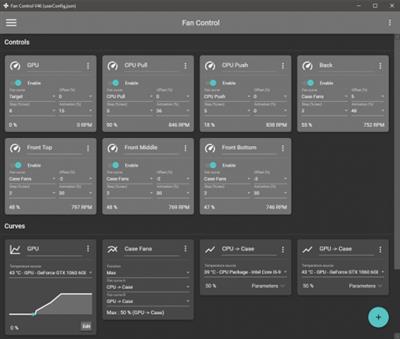
Keep every aspect of your computer's GPU and CPU fans in check with the help of this highly-customizable fan control application.

Features
Save, edit and load multiple profiles
Multiple temperature sources ( CPU, GPU, motherboard, hard drives, ".sensor" file )
Custom fan curves
Fine tune the fan control response with steps, activation %, response time and hysteresis
Mix different curves and sensors together
Modern, dashboard-style UI
Works as a background application with a customizable tray icon
Create custom external temperature sensors with *.sensor files.
And more!

Download link:​
Код:
[center][b]rapidgator_net[/b]:
https://rapidgator.net/file/4ed76ae143b88a6e22c0747d27830ca4/uel3x.FanControl.v83.zip.html

[b]uploadgig_com[/b]:
https://uploadgig.com/file/download/1dF657B75d9546c2/uel3x.FanControl.v83.zip

[b]nitroflare_com[/b]:
https://nitroflare.com/view/086897C208E6585/uel3x.FanControl.v83.zip[/center]

Links are Interchangeable - No Password - Single Extraction​
 
Freemake Video Converter 4.1.13.15 Multilingual

bcae0a6d63aa8447473f3b9857cb2cf8.jpeg

File Size: 85.5 MB​
Freemake Video Converter - Convert video to AVI, MP4, WMV, MKV, 3GP, DVD, MP3, iPad, iPhone, PSP, Android phones. Video to MP3 with one click! Rip & burn DVD. Convert YouTube to MP4, AVI, etc. with Freemake! Guaranteed result.

200+ Input Formats:
Input any video files: AVI, MP4, MKV, WMV, MPG, 3GP, 3G2, SWF, FLV, TOD, AVCHD, MOV, DV, RM, QT, TS, MTS, etc. Import music (MP3, AAC, WMA, WAV), and photos (JPG, BMP, PNG,GIF) to turn them into video free and easily! All supported formats

Output to AVI, MP4, MKV, FLV, 3GP, MP3, HTML5:
Convert video free to the most popular video formats. Rip DVD movie (unprotected) to AVI, WMV, MP4, MPEG, MKV, FLV, SWF, 3GP. Convert video to Flash and embed it directly to your web page. Create HTML5 video (Ogg, WebM, H.264) for modern web browsers.

Convert Free to iPod, iPhone, iPad, PSP, Android:
Optimize videos for Apple, Sony, and Android devices. Convert videos free to iPod Classic, iPod Touch, iPod Nano, iPod 5G, iPhone, iPad, Sony PSP, PS2, PS3, BlackBerry, Samsung, Nokia, Xbox, Apple TV, Android mobile devices, smartphones, etc.

Fastest Video Converter with CUDA and DXVA:
Freemake is the only free video converter that features integrated both CUDA and DXVA technologies for the fastest ever video conversion and less CPU usage. The software automatically detects the optimal conversion parameters and switches on/off CUDA and DXVA for better conversion results.

Burn Blu-ray Video:
Convert your movies to video Blu-ray format and burn high-quality BDs for free. Create Blu-ray discs out of any input content: video, audio, photos, URLs. Burn multiple Blu-ray copies and save the resulted Blu-ray video to HDD as an ISO image or Blu-ray folder.

Burn DVD - up to 40 hours:
Unlike other software, our free video converter doesn't have a two-hour limit and can burn DVD video up to 20h to a Standard DVD or 40h to DVD-DL. With our free video converter, you can make multiple DVD copies and save the output DVD video to your PC as an ISO image or DVD folder.

Video Converter with Subtitles Support:
Convert DVD, MKV, MOV with embedded subtitles to any video format or device for free. Add SSA/SRT/ASS external subtitles to any video with our free video converter.

Advanced Preset Editor:
Take total control of the output result by customizing conversion parameters. Create your own presets by establishing video and audio codecs, frame size, etc. Choose an icon, and save you custom preset for further usage with our free video converter.

Upload Photos and MP3 to YouTube:
Upload videos, photo slideshows, MP3 to YouTube with our free video converter. Upload AVI, WMV, MP4, 3GP, JPG, BMP, GIF, MP3 to YouTube. The program will cut videos (if required) into 15-minute parts and insert them into one YouTube playlist.

Make Slideshows and Visualizations:
Turn photos and MP3 into slideshows with background music for free. Edit your slideshow: add, delete, and shuffle photos, enable panorama effect. Create music visualizations and upload photos to YouTube for free!

Cut, Join, Rotate, Limit size, Adjust to aspect ratio:
Cut video parts from your file. Flip or rotate video. Join several videos into one file, add transitions between parts. Fit the output file size to any limit (e.g. 700 Mb, 1.4 Gb, 4.7 Gb). Adjust output video to the established aspect ratio: add black bars, stretch, zoom, auto-adjust.

Download link:​
Код:
[center][b]rapidgator_net[/b]:
https://rapidgator.net/file/a1a5c24757faaa691a82037bfcc66220/pz4uc.Freemake.Video.Converter.4.1.13.15.Multilingual.rar.html

[b]uploadgig_com[/b]:
https://uploadgig.com/file/download/ae7B3201C2e0e831/pz4uc.Freemake.Video.Converter.4.1.13.15.Multilingual.rar

[b]nitroflare_com[/b]:
https://nitroflare.com/view/1505EA387BAD3A6/pz4uc.Freemake.Video.Converter.4.1.13.15.Multilingual.rar[/center]

Links are Interchangeable - No Password - Single Extraction​
 
Google Chrome 91.0.4472.114 Multilingual

a617c1ed12d1a62baafc6149a02e0cd5.jpeg

File Size : 144 Mb​

Google Chrome is a fast and easy to use web browser that combines a minimal design with sophisticated technology to make the web safer. It has one box for everything: Type in the address bar and get suggestions for both search and web pages. Will give you thumbnails of your top sites; Access your favorite pages instantly with lightning speed from any new tab. Google Chrome is an open source web browser developed by Google. Design goals include stability, speed, security and a clean, simple and efficient user interface.

Its software architecture was engineered from scratch (using components from other open source software including WebKit and Mozilla Firefox) to cater for the changing needs of users and acknowledging that today most web sites aren't web pages but web applications.

Sandboxing. Every tab in Google Chrome is sandboxed, so that a tab can display contents of a web page and accept user input, but it will not be able to read the user's desktop or personal files.
Google say they have "taken the existing process boundary and made it into a jail". There is an exception to this rule; browser plugins such as Adobe Flash Player do not run within the boundaries of the tab jail, and so users will still be vulnerable to cross-browser exploits based on plugins, until plugins have been updated to work with the new Chrome security. Google has also developed a new phishing blacklist, which will be built into Chrome, as well as made available via a separate public API.
Privacy. Google announces a so-called incognito mode claiming that it "lets you browse the web in complete privacy because it doesn't record any of your activity". No features of this, and no implications of the default mode with respect to Google's database are given.
Speed. Speed improvements are a primary design goal.
Stability

Multiprocessing.
The Gears team were considering a multithreaded browser (noting that a problem with existing web browser implementations was that they are inherently single-threaded) and Chrome implemented this concept with a multiprocessing architecture. A separate process is allocated to each task (eg tabs, plugins), as is the case with modern operating systems. This prevents tasks from interfering with each other which is good for both security and stability; an attacker successfully gaining access to one application does not give them access to all and failure in one application results in a "Sad Tab" screen of death. This strategy exacts a fixed per-process cost up front but results in less memory bloat overall as fragmentation is confined to each process and no longer results in further memory allocations. To complement this, Google Chrome will also feature a process manager which will allow the user to see how much memory and CPU each tab is using, as well as kill unresponsive tabs.

User interface
Features. Google Chrome has added some commonly used plugin-specific features of other browsers into the default package, such as an Incognito tab mode, where no logs of the user activity are stored, and all cookies from the session are discarded. As a part of Chrome's javascript virtual machine, pop-up javascript windows will not be shown by default, and will instead appear as a small bar at the bottom of the interface until the user wishes to display or hide the window. Google Chrome will include support for web applications running alongside other local applications on the computer. Tabs can be put in a web-app mode, where the omnibar and controls will be hidden with the goal of allowing the user to use the web-app without the browser "in the way".
Rendering Engine. Google Chrome uses the WebKit rendering engine on advice from the Gears team because it is simple, memory efficient, useful on embedded devices and easy to learn for new developers.
Tabs. While all of the major tabbed web browsers (e.g. Internet Explorer, Firefox) have been designed with the window as the primary container, Chrome will put tabs first (similar to Opera). The most immediate way this will show is in the user interface: tabs will be at the top of the window, instead of below the controls, as in the other major tabbed browsers. In Chrome, each tab will be an individual process, and each will have its own browser controls and address bar (dubbed omnibox), a design that adds stability to the browser. If one tab fails only one process dies; the browser can still be used as normal with the exception of the dead tab. Chrome will also implement a New Tab Page which shows the nine most visited pages in thumbnails, along with the most searched on sites, most recently bookmarked sites, and most recently closed tabs, upon opening a new tab, similar to Opera's "Speed Dial" page.

Download link:​
Код:
[center][b]rapidgator_net[/b]:
https://rapidgator.net/file/385eff66d15dad05e5c70bce4291929d/7hxql.Google.Chrome.91.0.4472.114.Multilingual.rar.html

[b]uploadgig_com[/b]:
https://uploadgig.com/file/download/df61a7c985a91298/7hxql.Google.Chrome.91.0.4472.114.Multilingual.rar

[b]nitroflare_com[/b]:
https://nitroflare.com/view/C8B37C92D16E33A/7hxql.Google.Chrome.91.0.4472.114.Multilingual.rar[/center]

Links are Interchangeable - No Password - Single Extraction​
 
iBatsoft Data Recovery 5.0 (x64)

6f105944256ca4e1f1f73874ad57203f.jpeg

File size: 29.5 MB​
Comprehensive data recovery software tool to recover deleted pictures, videos, documents, archives, audio files and more from computer hard disks, memory cards, external hard drives, USB flash drives, etc.

Drive Formatting
Initialize, erase, or repartition the drive

Volume Problem
Partition deleted, lost or hidden

Intentional/Accidental Deletion
Shift+delete, right-click deletion, drag-n-drop to recycle bin, emptying recycle bin, command line deletion

Device Inaccessible
File system display RAW or capacity is "0",etc.

Other Reasons
System/disk crashes, OS re-installation and more

Whats New:
Updates: official site does not provide any info about changes in this version.

Download link:​
Код:
[center][b]rapidgator_net[/b]:
https://rapidgator.net/file/edbd660ebf895a583fcc44a512e32d1e/664k1.iBatsoft.Data.Recovery.5.0.x64.rar.html

[b]uploadgig_com[/b]:
https://uploadgig.com/file/download/7c3bbbe2337D8074/664k1.iBatsoft.Data.Recovery.5.0.x64.rar

[b]nitroflare_com[/b]:
https://nitroflare.com/view/4793511A6AB21D5/664k1.iBatsoft.Data.Recovery.5.0.x64.rar[/center]

Links are Interchangeable - No Password - Single Extraction​
 
LastPass Password Manager 4.74.0 Multilingual

d850d586723b9656e6751cebf7cec1cd.jpeg

File Size : 95.4 Mb​

LastPass Password Manager is a convenient program to help you keep all of your log-in information secure without having to memorize all of it. You can use LastPass to automatically log in to any site once you've entered the information once, so you'll never have to worry about forgetting your password again.

Browser integration: LastPass integrates with Chrome, Firefox, Internet Explorer, Safari, and more, so you can continue to use your favorite browser and still get all of the benefits from this app. You can choose to install only plug-ins for specific browsers, or you can use the universal installer, which will work on most major browsers and is the easiest option for novice users.

Nice interface: This app has a streamlined interface that makes the process of storing, accessing, and managing your log-ins a snap. Once you're logged in to the app, a button will pop up each time you enter log-in information for another site. Just click this button to add that log-in to the Vault, and you'll be able to manage it from there going forward.

The feature set of the basic version includes:
unlimited storage of passwords and secure notes
automatic backup and synching for one device
automated filling of login credentials and forms
Security Challenge password audit
Multi factor authentication and one time passwords

New in v4.0
New: LastPass 4.0 has received a completely new interface password vault, expand the menu browser and web stores. The new design includes enhanced web icons, simplified navigation and a deep tone;
NEW: Switch between viewing the grid and list the repository for easy management of user data. The grid used larger tiles for easy detection of a specific object, and the list of icons used less. The two viewing modes allow you to edit, share, move, and delete objects;
New: The Clearinghouse provides a convenient platform to manage all the objects that you have shared, and shared with you, including shared folders. The new component is available on the left navigation menu of storage;
NEW: including emergency access - a new feature that allows you to transfer family or authorized persons access to storage in the event of unforeseen circumstances. The new feature is available on the left navigation menu of storage;
NEW: Multiple Choice in LastPass vault. Users can now move, delete, or share by several objects in the repository.

Download link:​
Код:
[center][b]rapidgator_net[/b]:
https://rapidgator.net/file/1c4b8dca2d2beb6200a034e0630a9c1a/g9k8d.LastPass.Password.Manager.4.74.0.Multilingual.rar.html

[b]uploadgig_com[/b]:
https://uploadgig.com/file/download/06b6908FA7c4F8dC/g9k8d.LastPass.Password.Manager.4.74.0.Multilingual.rar

[b]nitroflare_com[/b]:
https://nitroflare.com/view/3A4CD2A803C055C/g9k8d.LastPass.Password.Manager.4.74.0.Multilingual.rar[/center]

Links are Interchangeable - No Password - Single Extraction​
 
MassTube Plus 14.2.0.420

26bc0a4d9d82f57d29945d6f7cb02260.jpeg

File size: 32.7 MB​
Tube is a small software utility designed to help users grab their favorite video files from YouTube in the easiest way possible. Aesthetically, it is not very impressive as it sports a simplistic interface and only a few options for downloading videos. This is a simple-to-use tool built specifically with a single goal in mind: to grab video files from YouTube, so it doesn't pack other useful features such as a built-in search engine and audio files downloader.

introduced the YouTube link in the main window. MassTube can work with multiple output formats and the video files can be exported to FLV, MP4, WebM and 3GP.

It integrates a history manager that shows all the videos you have downloaded from YouTube. The history can be cleaned, imported or exported.

Furthermore, at the end of the downloading process the app is able to open the clips with default Windows applications. It is also possible to select other programs for opening the videos.

The app works fast and no errors showed up during our testing.

Overall, Mass Tube is a small but efficient software solution for downloading clips on the go. Although it isn't the most powerful tool in its category, it packs basic features that can help you grab your favorite video files easily and it's also light on your system resources.

Whats New:
Updates: official site does not provide any info about changes in this version

Download link:​
Код:
[center][b]rapidgator_net[/b]:
https://rapidgator.net/file/4c7f253f85d07d64be8610d054c6d82f/29f2e.MassTube.Plus.14.2.0.420.rar.html

[b]uploadgig_com[/b]:
https://uploadgig.com/file/download/10836Cb8d003E2a9/29f2e.MassTube.Plus.14.2.0.420.rar

[b]nitroflare_com[/b]:
https://nitroflare.com/view/4FCA5B948249269/29f2e.MassTube.Plus.14.2.0.420.rar[/center]

Links are Interchangeable - No Password - Single Extraction​
 
Metes and Bounds Pro 5.8.2

f4a58f09a0e9b3a01df42b3b932c05b3.jpeg

File size: 36.3 MB​
Turn Metes and Bounds data into a deed Description.Auto-completion, Area Calculation, Custom Labels, Sections, Layers, GPS, Compass Rule Adjustments and more. Easy to use data entry form: Enter lines, curves, azimuths and section calls. Data can be entered using the convenient Data Entry Form or freehand using word processor style entry. Calls can also be easily drawn using the call drawing tool.

Customizable Toolbar: Create an interface that fits to your workflow.
Layers: Layers allow you to have multiple deeds on a single drawing. Layers can be free floating or locked to a common starting point.
Perform calculations: Square Feet, Acres, Hectares, perimeter distance and more.

Metes and Bounds will calculate if the survey closes or not. Calculate closure errors: closing error ratios and the call needed to close the Description. Apply Compass Rule Adjustments.
The Metes and Bounds closing error analyzer tool can look for common entry or survey errors and offer suggestions on how to correct them.

Auto-Completion of drawing. If you're missing the final segment of your land Descriptionting data, let our Metes and Bounds land Descriptionting software finish it for you. Have a bad or missing call? Enter a question mark (?) for the call and let the software find the missing call for you.
Multiple measurement types: Data can be entered using feet, meters, rods, chains, varas and many other measurement types.

Merge Layer: Layers can be easily merged into a single layer using the Merge Layer Tool.
Easy to use measuring tool. Estimate the distance between any two points on the screen.
Automatic labeling: Each line can be automatically labeled with the length and call. End points can be marked for easier recognition. End points can also be labeled with information like the interior/exterior angles and Lat/Long coordinates.

Create custom labels. Custom labels can be rotated in any direction. Drawings can include a call list:
Metes and Bounds Call List - Try our deed Descriptionter for free.
Background Pictures. Background pictures can be set to scale with your Description drawing. Background picture scale settings can be automatically set using World Files.
Custom X,Y points. Use custom X,Y points to mark and label unique land features on the metes and bounds drawing.
Split a single Description into multiple Descriptions. Split the Description by hand, or choose a starting point and let the Metes and Bounds software find the nearest halves automatically for you.

Download link:​
Код:
[center][b]rapidgator_net[/b]:
https://rapidgator.net/file/7b49a2c5fd8fe5bcafe4abd8ddfe02f6/bckp8.Metes.and.Bounds.Pro.5.8.2.rar.html

[b]uploadgig_com[/b]:
https://uploadgig.com/file/download/bf423031a8845bCD/bckp8.Metes.and.Bounds.Pro.5.8.2.rar

[b]nitroflare_com[/b]:
https://nitroflare.com/view/07EB37C55438BD4/bckp8.Metes.and.Bounds.Pro.5.8.2.rar[/center]

Links are Interchangeable - No Password - Single Extraction​
 
Microsoft Edge 91.0.864.53 Stable Multilingual

8cc68656663f9719d309224c0d1dda1b.jpeg

File Size : 198 Mb​

Introducing the new Microsoft Edge: Rebuilt from the ground up to bring you world-class compatibility and performance, the security and privacy you deserve, and new features designed to bring you the best of the web. The new Microsoft Edge is a modern web browser - designed for faster, safer browsing. Get more done on the web with built-in tools for notetaking, reading and more.

The new Microsoft Edge is based on the Chromium project, so you can use the extensions/add-ons from Google Chrome extensions web store and from Microsoft Edge extensions web store for free. Choose your style
News, images, search-choose what you want to see when you open a new tab. Select a layout best for you: Focused, Inspirational, or Informational.

Take control of your data
Microsoft Edge and Bing give you more control over your data, and more transparency into what information is being collected, while you browse with new features like Tracking Prevention and InPrivate mode.

Browse with peace of mind
Microsoft Defender SmartScreen automatically protects you online from security issues, phishing schemes, and malicious software.

Browse anywhere
The new Microsoft Edge is now available on all supported versions of Windows, macOS, iOS, and Android.

Experience 4K streaming
Get the best browser for high definition media on Windows 10 with unique support for streaming in 4K Ultra HD.

Customize with extensions
The new Microsoft Edge is now compatible with your favorite extensions, so it's easy to personalize your browsing experience.

Download link:​
Код:
[center][b]rapidgator_net[/b]:
https://rapidgator.net/file/0731fc0ca2009ef23662854fea938d72/a4r6w.Microsoft.Edge.91.0.864.53.Stable.Multilingual.rar.html

[b]uploadgig_com[/b]:
https://uploadgig.com/file/download/195301a2AfB4a38b/a4r6w.Microsoft.Edge.91.0.864.53.Stable.Multilingual.rar

[b]nitroflare_com[/b]:
https://nitroflare.com/view/75F9EBF1FB5155B/a4r6w.Microsoft.Edge.91.0.864.53.Stable.Multilingual.rar[/center]

Links are Interchangeable - No Password - Single Extraction​
 
One Commander 3.0.48.0

7c2c929b853c9d93494f989bd665527e.jpeg

File Size : 36.1 Mb​

One Commander is file manager for Microsoft Windows with improved functionality, re-imagined user interface and experience of navigating filesystem and manipulating files.

Swiftly browse, copy, move or rename files on your computer
The utility makes use of a tree view to organize your folders, subfolders and files, making sure that your current location is evident at all times. It supports multiple tabs, allowing you to easily switch between them and access the directories you need.

Depending on the format of the files, some of them can be previewed inside One Commander, while others can be opened using your default software. You can create new folders or copy, move, rename, duplicate and delete items from your PC, cloud storage or removable drives.

Furthermore, the 'Drop List' function helps you bring together files from distinct locations and process them simultaneously, letting you move them to a new directory or copy them. Batch processes are supported, thanks to the 'Taskmaster' component, which executes all operations and skips errors or other similar situations, allowing you to deal with them later.

A promising file manager
Helpful as it may be, it is quite clear that One Commander is still in its development stage, as it sometimes encounters crashes or freezes, meaning it still requires some work to improve its stability.

However, the program proves quite appealing and shows promise for the future, particularly if it continues to resolve through its minor issues and increases its response speed.

Download link:​
Код:
[center][b]rapidgator_net[/b]:
https://rapidgator.net/file/897c90009d1ffc07a161428eeabd267b/1bux8.One.Commander.3.0.48.0.zip.html

[b]uploadgig_com[/b]:
https://uploadgig.com/file/download/D13a1aF1861bb704/1bux8.One.Commander.3.0.48.0.zip

[b]nitroflare_com[/b]:
https://nitroflare.com/view/5DE0FE994CEC659/1bux8.One.Commander.3.0.48.0.zip[/center]

Links are Interchangeable - No Password - Single Extraction​
 
OpenVPN 2.5.3

749301b713f7607d9b435d9d0e7829d0.jpeg

File Size : 8.6 Mb​

The OpenVPN application was designed to be a full-featured SSL VPN solution which can accomodate a wide range of configurations, including remote access, site-to-site VPNs, WiFi security, and enterprise-scale remote access solutions with load balancing. OpenVPN implements OSI layer 2 or 3 secure network extension using the industry standard SSL/TLS protocol, supports flexible client authentication methods based on certificates, smart cards, and/or 2-factor authentication, and allows user or group-specific access control policies using firewall rules applied to the VPN virtual interface. OpenVPN is not a web application proxy and does not operate through a web browser.

Features:
Tunnel any IP subnetwork or virtual ethernet adapter over a single UDP or TCP port,
Configure a scalable, load-balanced VPN server farm using one or more machines which can handle thousands of dynamic connections from incoming VPN clients,
Use all of the encryption, authentication, and certification features of the OpenSSL library to protect your private network traffic as it transits the internet,
Use any cipher, key size, or HMAC digest (for datagram integrity checking) supported by the OpenSSL library,
Choose between static-key based conventional encryption or certificate-based public key encryption,
Use static, pre-shared keys or TLS-based dynamic key exchange,
Use real-time adaptive link compression and traffic-shaping to manage link bandwidth utilization,
Tunnel networks whose public endpoints are dynamic such as DHCP or dial-in clients,
Tunnel networks through connection-oriented stateful firewalls without having to use explicit firewall rules,
Tunnel networks over NAT,
Create secure ethernet bridges using virtual tap devices, and
control OpenVPN using a GUI on Windows or Mac OS X

Download link:​
Код:
[center][b]rapidgator_net[/b]:
https://rapidgator.net/file/670e12d41971e2c4105071ead9a085a0/7w250.OpenVPN.2.5.3.rar.html

[b]uploadgig_com[/b]:
https://uploadgig.com/file/download/84bF525b88761A67/7w250.OpenVPN.2.5.3.rar

[b]nitroflare_com[/b]:
https://nitroflare.com/view/B1932E1B3C90706/7w250.OpenVPN.2.5.3.rar[/center]

Links are Interchangeable - No Password - Single Extraction​
 
Opera 77.0.4054.90 Multilingual

a1cd5eb282484bbf45bf8e703cf1836c.jpeg

File Size : 129 Mb​

Opera is a fast and free alternative web browser, that includes tabbed browsing, pop-up blocking, integrated searches. Opera web browser is based on Chromium and Blink (the rendering engine used by Chromium). It has come up with bigger guns to enter the race for the most popular web browser, as the current leading role is played between Google Chrome, Firefox and Internet Explorer. The web browser has one intuitive, powerful location for searching and navigating the web. Search using multiple providers and view site suggestions as you type. The Discover feature gives you top-quality news and entertainment from around the globe. Opera also has the advanced functions such as Opera Mail program, the lightweight, customizable mail client that refines your email experience.

Opera displays security badges, which give you a quick glance at the security of a page. If the browser's Fraud and Malware Protection detects anything potentially dangerous, it will display a popup to warn you.
Opera has a feature called Off-Road mode, which uses server-side compression to give you better browsing speeds when you are on slow connections. If you are on dial-up or pay for your internet connection by data usage, Off-Road mode compression can save you money, too.
Private browsing ensures that your internet history and activity is removed as soon as you close the window. Private windows erase any browsing data once you close the window - history, image cache, passwords, everything. You can browse more comfortably on public computers knowing your browsing activity and passwords are removed when you close the window.
To ensure your privacy, there are ways you can control how websites monitor your web activities, and ways to keep your browsing habits and data private if you share a computer or account. You can manually set what information you want to share with specific sites.
The Heart button in Opera UI We have freshen up our heart. There is a new one on the right side of the address bar. Now it's more intuitive, you do not have to "learn" icons, just click on the new heart to open a menu. Try to add your favorite page to any of Stash, Speed Dial or the bookmarks bar and you will see the heartbeat.
Bookmarks. Now you can quickly enable or disable the bookmarks bar by selecting Show bookmark bar. If you want to bookmark a page, click the heart icon, found on the right side of the combined address and search bar. We think it's cool that Opera now suggests a thumbnail for your new bookmarks. There are a few suggestions and you can change the image if you think another works better for you.
Integrated PDF viewer. Opera has integrated a fast PDF Viewer directly into the browser so you can keep reading without changing applications.
Web notifications. Notifications are a convenient way for webpages to inform their users about events, such as the delivery of email or a comment posted on a blog. Opera has the Web notifications as native to your system as possible: You will receive them as normal Windows or Mac notifications.
Support for H.264 and MP3. H.264 video and MP3 Audio is widely used on the internet. With Opera you will have native access to such content.
Syncing Bookmarks with Android. If you install Opera browser for Android mobile and Opera on your computer, you can see cross-device syncing in action. Go ahead! Make some bookmarks on your computer and see them appear on your Android phone.
Sync open tabs between computers. In Opera for computers, you can now sync your open tabs.
MSE+MP3 on developer stream. MSE Audio now works from within Opera, enabling playback from Google Play Music and similar services.

Download link:​
Код:
[center][b]rapidgator_net[/b]:
https://rapidgator.net/file/671bc0c74aa3fc487834b050363e5813/wgzue.Opera.77.0.4054.90.Multilingual.rar.html

[b]uploadgig_com[/b]:
https://uploadgig.com/file/download/c63fE03a72ba9ec6/wgzue.Opera.77.0.4054.90.Multilingual.rar

[b]nitroflare_com[/b]:
https://nitroflare.com/view/B8780571B17E0B0/wgzue.Opera.77.0.4054.90.Multilingual.rar[/center]

Links are Interchangeable - No Password - Single Extraction​
 
PassFab iPhone Unlocker 3.0.2.8 Multilingual

e18ffcdc3302793044b7a55f5b8b346c.jpeg

File Size: 72.2 MB​
PassFab iPhone Unlocker - One click to bypass iPhone and iPad passcode for locked, disabled, broken screen. Remove Apple ID without password from any iDevices. With iPhone Unlocker you can easily remove Apple ID and locked screens when you forgot the passcode on iPhone and iPad, or you just don't know the password on a second-hand iOS device.

You'll Need It If You Are in These Troubles
With iPhone Unlocker you can easily remove Apple ID and locked screens when you forgot the passcode on iPhone and iPad, or you just don't know the password on a second-hand iOS device.

- Forgot iPhone/iPad/iPod Touch passcode after recent change.
- Unknown screen password which accidentally set by children or somebody else.
- iPad or iPhone is disabled after exceeding incorrect passcode attempt limits, but iTunes can't restore device.
- Apple ID has been disabled or locked, forgot Apple ID or password.
- The second-hand iDevice is locked by 4/6-digit passcode, Touch ID, or Face ID.
- Want to remove iCloud from iOS device without password.
- Want to wipe private data but the broken screen doesn't allow you to enter the password.
- Other similar locked situations on iOS device...

Unlock iPhone Passcode within Minutes
Your iPhone/iPad gets locked or disabled? With this tool, you can unlock lock screen in emergency situations. It safely removes passcode in just minutes and helps you regain full access to your iOS device.

Supported Lock Screen - All Types
This iPhone unlock program enables you to unlock iPhone/iPad lock screens in different situations. Also, it's fully compatible with all iOS devices and all types of lock screens on the device.

- Touch ID / Face ID
- 4-Digit/6-Digit Numeric Code
- Custom Numeric Code
- Custom Alphanumeric Code

Factory Reset iPhone - No Passcode
Want to factory reset iPhone or iPad but it asks for entering your passcode? This professional iPhone passcode removal enables you to restore factory resetting without screen passcode.

- Erase iPhone or iPad without passcode
- Erase all content and settings on iPhone or iPad without passcode
- Restore iPhone or iPad to factory settings without passcode

Bypass Apple ID without Password
Apple ID is locked or disabled for security reasons? Forgot Apple ID password and can't reset it? This application helps you remove existing Apple ID and iCloud on activated device without any hassle.

Support Activated iDevice - Multiple Scenarios
If you have the following problems when you try to enter password for existing Apple ID on activated iOS device, it's a good choice to bypass current login prompt, set up your device with another sign in account or create a new Apple ID.

- Can't sign in Apple ID with the correct password
- Can't login Apple ID with primary or rescue email address
- Can't recover Apple ID after an account recovery waiting period
- Can't unlock Apple ID with security questions, trusted phone number or device
- Can't reset Apple ID password with two-factor authentication, two-step verfication or recovery key

Enjoy Any Features & Benefits - After Removal
After bypassing original Apple ID successfully using this perfect removal tool, you can reagain all Apple ID advantages, iCloud services, iTunes store pruchase and more in a few clicks on all supported iPhone/iPad/iPod touch.

- You can switch to a different Apple ID or create a new one
- you can enable or disable Find My iPhone option
- You can listen to Apple Music and download Podcasts
- You can take full control over your iPhone, iPad or iPod touch
- You can make better use of any iCloud service and enjoy all Apple ID features
- You can update to newer iOS version wirelessly without losing newly acquired Apple ID
- Your device won't be tracked via previous(bypassed) Apple ID
- Your device won't be remotely blocked by prior Apple ID user
- Your device won't be distantly erased by previous Apple ID user
- Your device will be removed from previous iCloud account

Technical Specification:
Work for almost all iOS devices and computer systems, so there's no need to worry about the supportive problem.

Computer System:
Windows 10, 8.1, 8, 7, Vista, XP (32-bit/64-bit); macOS 10.15 Catalina, 10.14 Mojave, 10.13 High Sierra, 10.12 Sierra and below

iPhone:
iPhone 11 Pro Max/11 Pro/11, iPhone XR/XS Max/XS/X, iPhone 8/8 Plus, iPhone 7/7 Plus, iPhone 6s/6s Plus, iPhone SE, etc.

iOS System:
iOS 13.4.1/13.4/13.3/13.2/13.1/13, iPadOS 13.4.1/13.4/13.3/13.2/13.1/13, iOS 12/11/10, etc.

iPad:
New iPad Pro, iPad Air 2, iPad Air, iPad mini 4/3/2, iPad mini, iPad 4 (iPad with Retina Display), iPad 3 (the New iPad), iPad 2, iPad

iTunes:
iTunes 12.10, iTunes 12.9/12.8/12.7, etc.

iPod:
iPod touch 7/6/5/4 (including iPod touch 6G, 5G, 4G), iPod Nano, iPod shuffle, and iPod classic

Whats New:
official site does not provide any info about changes in this version.

Download link:​
Код:
[center][b]rapidgator_net[/b]:
https://rapidgator.net/file/cfc0ee4cd169eab12b961e997e1feb7e/14yxw.PassFab.iPhone.Unlocker.3.0.2.8.Multilingual.rar.html

[b]uploadgig_com[/b]:
https://uploadgig.com/file/download/c56f41b917EC1426/14yxw.PassFab.iPhone.Unlocker.3.0.2.8.Multilingual.rar

[b]nitroflare_com[/b]:
https://nitroflare.com/view/2684297A79F4039/14yxw.PassFab.iPhone.Unlocker.3.0.2.8.Multilingual.rar[/center]

Links are Interchangeable - No Password - Single Extraction​
 
PDFCreator 4.3.0

2c8c33af9ded90f13f39cf3605aa3a23.jpeg

File Size : 32.2 Mb​

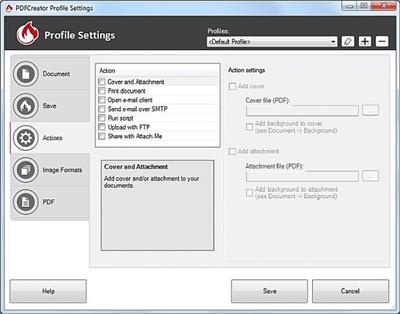
PDFCreator is an application that can build PDF files from any program which has a printing function. Besides the fact that PDFCreator creates documents in the PDF format, you can also select PNG, JPEG, BMP, PCX, TIFF, OS, EPS, PSD, PCL, RAW and SVG as output formats. Furthermore, you can combine several documents into one PDF file, and password-protect it.

Additionally, you can email a PDF, use multiple printers, create documents via the command line interface, use multiple profiles, and change its behavior in the settings menu (e.g. use auto-save, print after saving, run a program or a script after saving, set program font).

The program has a well-drawn help file, it is integrated in the Windows context menu (if this option is enabled during installation), and supports several languages, so users can get accustomed to it as fast as possible. Sometimes it takes a long time to perform a task, when you drag and drop a file into the queue, or when you open a window from the menu.

All in all, PDFCreator proves to be a pretty reliable program for printing PDFs. It needs some improvements so that users find it more intuitive (especially newbies), but it uses little memory and gets the job done.

Whats New:
Updates: official site does not provide any info about changes in this version

Download link:​
Код:
[center][b]rapidgator_net[/b]:
https://rapidgator.net/file/53768861d05d858747c7e3a1c4fbe536/xd0zd.PDFCreator.4.3.0.rar.html

[b]uploadgig_com[/b]:
https://uploadgig.com/file/download/3a7051b801A9fB82/xd0zd.PDFCreator.4.3.0.rar

[b]nitroflare_com[/b]:
https://nitroflare.com/view/86FDA7E052FB224/xd0zd.PDFCreator.4.3.0.rar[/center]

Links are Interchangeable - No Password - Single Extraction​
 
Photo Pos Pro 3.72 Build 26 Premium Edition

ff50dabfd4c64dc6fa5e2b758f4c1735.jpeg

Languages: English | File Size: 69.75 MB​
With +10,000,000 Downloads, Photo Pos Pro became one of the most popular photo editors around the world! Version 3 has free and premium photo editing features offers users a wide variety of possibilities in the fields of Image Enhancing and Image Editing and in the field of Computer Graphics Design. Using the editor you can perform various tasks, from simple basic tasks to complex tasks; you can edit existing images, create new works based on existing images, create new works from scratch and more.

V3 Top Features List
Photo Pos Pro support all standards professional features as Filters, Layers, Masks, Curves, Scripts, Effects, Brushes and etc.

- Remove/erase/replace backgrounds
- Remove unwanted objects
- Fix poor photos
- Frames and Collages
- Advanced Photo Effects
- Stunning Text Effects
- RAW Files support

Powerful tools and functions
The software support of many picture file types including RAW FILES, Support of scanners and digital cameras, Advanced Image Enhancing and editing tools and functions, Tools for creating Computer Graphics Design, Rich Text Tools, Special Effects, Selection Tools, Layers & Masks, Gradients, Patterns and Texture, Script Tools, Batch Operations and also The Ability to expand the software yourselves!

Though the Photo Pos Pro photo editor is a powerful program, it contains an extremely user-friendly interface enabling you to work intuitively. If you are a beginner you can easily begin to use the program in an intuitive fashion. The program offers beginning users a Help system which they can follow step by step into the wonderful world of Digital Picture Enhancement. With the Help system, you can turn from a beginner to a professional user.

Experienced users
If you are an experienced user, you will probably be amazed to discover the infinite possibilities which the program has to offer in the fields of Digital Image Enhancement and Computer Graphics. Advanced users will discover advanced editing and creating possibilities; they will find all they need to work in an efficient manner in the professional Help system which comes with the program.
Release Notes
What's New In Photo Pos Pro v3
Version 3 is more than 10 times(!) stronger than the previous version. The new version features new powerful yet user friendly user interface, great new functions, stunning effects, new rendering engines and much more! The software uses numerous mathematical models and image processing engines that we developed using revolutionary approaches, constituting a breakthrough in the field.

Version 3 new features partial list:
- Fully x64 bit version (32 bit version also available)
- Totally new and vast improved user interface enabling the performance of many professional tasks easily then ever before
- Virtual vector photo editing - a unique technology that is changing how professional image editing software works.
- Many new photo enhancements functions, among them:
- New Selection Brush and Magic Selection Brush tool
- Powerful Magnetic Selection tool
- New Photo Leveler tool
- Super powerful Text Block tool
- Super powerful Text Over Path tool
- New Magic Background Eraser Tool
- Powerful Recovery Brush
- New Magic Recovery Brush
- New Facial Recovery Brush
- New auto corrections functions
- New four(!) white balance methods
- New temperature and color enhancement functions
- New additional histogram adjusts functions
- Many new filters and filters improvements including many new HQ sharp functions, advanced and improved red eye and noise removal filters and much more!
- Many new effects and effects improvements with many new effects controls, commands and options
- Leading raster and vector selection tools, including sophisticated smart choice tools such as magnetic selection.
- Multiple and group object selection - a must for professional users.
- Simultaneous operation on multiple objects & layers (raster and vector operations).
- Endless masking and blend options for all raster operations on layer (image) content, mask or both.
- Recording action with batch run options.
- Highly advanced styles and vector effects, including unique interfaces that allow rapid and simple creation of an endless variety of styles and effects. No other product on the market provides such capabilities.
- Advanced and powerful vector text tools that enables texts creation in a variety of shapes and multiple tracks (including three-dimensional).
- Highly advanced geometric transformation engine.
- Upgraded and powerful shapes and lines/curves engine, including custom shapes & curves.
- New and vast improved history features
- So much more! Actually the list is so long it'll take about 10 pages to complete, so simply test it yourself :)

Minimum system requirements:
- Pentium(R) 350Mhz/equivalent processor or faster.
- 2GB of RAM.
- 300 MB of free disk space.
- 24-bit color display adapter.
- 1024x768 resolution.
- Windows XP / Vista / 7 / 8 / 10.
- MAC with Windows Apps emulator installed
Homepage
У Вас недостаточно прав для просмотра ссылок. Войдите или зарегистрируйтесь.


Download link:​
Код:
[center][b]rapidgator_net[/b]:
https://rapidgator.net/file/1d5e19e28ab68009852207a80926e093/5itxj.Photo.Pos.Pro.3.72.Build.26.Premium.Edition.rar.html

[b]uploadgig_com[/b]:
https://uploadgig.com/file/download/48F41E56f81e65ca/5itxj.Photo.Pos.Pro.3.72.Build.26.Premium.Edition.rar

[b]nitroflare_com[/b]:
https://nitroflare.com/view/340313809C3B82F/5itxj.Photo.Pos.Pro.3.72.Build.26.Premium.Edition.rar[/center]

Links are Interchangeable - No Password - Single Extraction​
 
Назад
Сверху