• Форум работает в архивном режиме www.old.nado.in

All mitsumi'1s Applications !! (updated daily)

  • Автор темы Автор темы mitsumi1
  • Дата начала Дата начала
Nevercenter Milo 2021.0 (x64)

896447959674d0c42ea8e80b98311b52.jpeg

Windows (x64) | File size: 161 MB​
Milo is a new kind of real-time renderer and VR viewer, powered by the industry-leading Unreal Engine for hyper-realistic lighting, materials, and shadows for your 3D models. Currently in Early Access and rapidly developing, it's the ideal tool for product shots, game asset visualization, ArchViz/architectural walkthroughs, portfolio renders, VR previews, turntable gifs for social media, and instantly showing all your models off in the best light possible. Included free with Silo.

Features :
Variable Edge Creasing
Blend Shapes for Animation and Modeling
Interactive Backgrounds and Lighting
Live Walkthroughs (VR/Controllers Supported)

Milo is something new:a real-time renderer built atop the industry-leading capabilities of Epic's Unreal Engine, which is used in AAA video games like Fortnite, ArchViz, film production, and more. Milo was selected by Epic for one of their prestigious Mega Grants as an investment in Milo's development. Milo takes advantage of the many features Unreal affords, such as PBR materials, VR support, and much more (real-time raytracing coming soon). Watch this space as Milo continues to actively grow.

Whats New:
Updates: official site does not provide any info about changes in this version

Download link:​
Код:
[center][b]rapidgator_net[/b]:
https://rapidgator.net/file/4808a2b540ba96a8f567a1c92635d1a1/jsdpt.Nevercenter.Milo.2021.0.x64.rar.html

[b]nitroflare_com[/b]:
https://nitroflare.com/view/AA19540B3F98637/jsdpt.Nevercenter.Milo.2021.0.x64.rar

[b]uploadgig_com[/b]:
https://uploadgig.com/file/download/96A68befa9A11f2f/jsdpt.Nevercenter.Milo.2021.0.x64.rar[/center]

Links are Interchangeable - No Password - Single Extraction​
 
Nevercenter Silo 2021.0 (x64) Professional

881a42c1c4e3f95fe0b397f8d0998bb4.jpeg

Windows (x64) | File size: 33.2 MB​
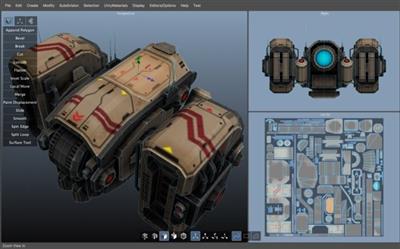
Silo 2 is a focused 3D modeling application with the ability to effortlessly switch between organically sculpting high-polygon models and precisely controlling hard-edged surfaces. It can be used for anything from creating 3D characters for video games and movies to quickly exploring 3D architectural ideas.

Silo brings 3D modeling zen to artists via a clean, focused environment and a streamlined toolset, honed over years of development. It was initially born of our own frustration with the needless complexity and slow, unmanageable workflows of all-in-one graphics software. We single-mindedly devoted Silo to modeling, discovering that the modeling workflow could be made much simpler without sacrificing any power. This unique approach has attracted in equal number students, hobbyists, and professional artists in film, games, architecture, and other fields looking to maximize their production.

Zen Workflow
Silo's careful design and its focus on pure modeling allows it to have a free, uncluttered feeling which is simply not possible in larger applications. Whether you are working to precise specifications or sketching out your thoughts, it is much easier to do so in a calm, focused modeling environment. This benefits professionals who are coming to Silo to escape slower, more complex software. It also benefits hobbyists and students, who are able to learn everything they need without having to deal with anything they don't need.

File Formats
Silo supports import and export of .sia, .sib, .obj, .3ds, .dxf, and .fac, as well as the export only of .stl, .pov, and .rib.

Advanced Polygonal Modeling
Silo offers a comprehensive set of interactive, context-sensitive tools for rapid polygonal modeling. The workflow is focused on having a few powerful, intelligent tools, rather than a separate command or option for every conceivable function. Additionally, "sticky key" functionality allows tools to behave differently if a hotkey is held down. Key modeling tools include Break, Tweak, Cut, Bevel, Slide, Scale, Extrude, Polygon Tool, Edge Tool, unlimited Undo and Redo, and more. Modeling can be performed with or without manipulators, including the Universal Manipulator which combines rotate, scale, and translate into a single manipulator.

Comprehensive Selection Tools
Robust selection tools are the key to great modeling, and a quick look at the Selection menu shows Silo's development has focused heavily on this area. Some highlights? Multi Select mode allows users to select vertices, edges and faces without changing selection modes. Tweak selection allows a user to grab, move, and deselect a component with a single click. That and many other tools work with Soft Selection, which smoothly distributes changes throughout a shape. Paint, Area, and Lasso selection types are supported. Select Visible and Select Thru functions are both available - by default, use the left mouse button for Select Visible commands, and the middle mouse button for Select Thru. A separate Undo is available for cycling through recent selections.

Subdivision Surfaces
Subdivision surfaces offer a smooth, high polygon shape, and are easily accessible in Silo. Using default shortcuts, simply press c to subdivide as many levels as you want, and v to unsubdivide. Modeling can be performed in real time at any subdivision level with updates shown directly on the subdivided shape. Edges can be creased to keep them sharp at all subdivision levels.

Unparalleled Customization
Designed to fit into any pipeline, Silo is the most customizable modeler available. That includes complete customization of the mouse, keyboard, and graphical interface, allowing it to closely emulate other applications a user may be familiar with, or perform tasks (such as assigning up to 40 different commands to a typical mouse with keyboard modifiers) which no other application can. Favorite tricks include assigning undo/redo, grow/shrink selection, and to the scrollwheel, or simply putting frequently used commands on the right mouse button with modifiers. Silo's button pages allow users to create their own multi-page interfaces, and assign any command to any image. The interface and color scheme are also highly customizable. Customizations can be easily imported, exported, and shared. Even the Primitives menu can be customized with frequently used models or settings.

Advanced UV Editing
Silo offers multiple types of unwrapping, including LSCM, Planar Region, XYZ, Per Face, and By Neighbors, which heals UVs based on the UVs based on the surrounding area. Different unwrapping methods can even be used on parts of the same mesh for optimal results. UVs are preserved during modeling operations, so modeling and UV editing can be freely interchanged with little to no cleanup. (This is particularly useful when a last-minute modeling change needs to be made to a "finished" model.) Clutter is significantly reduced by allowing regular geometry editing tools (such as Break, Merge, Tweak, Slide, and Soft Selection) to be used to edit UVs wherever it makes sense. Even the displacement brushes, particularly the Smooth brush, are very useful when applied to smoothing out UVs.

Displacement Painting
Finally, brush-based displacement painting has been well-integrated into a traditional modeling environement. Silo's brushes integrate seamlessly with the rest of the modeling toolset. If the model is subdivided, the brushes will affect the subdivided shape directly, otherwise they will affect regular geometry. As with UVs, displacement is preserved where possible during modeling changes, so the brushes can be used alongside other tools as the model develops, rather than solely at the end of the process. Painting is smooth and natural, and works well with tablets. Displacement maps and normal maps can be generated and exported from any subdivision level, or even from two completely separate objects.

Retopology
With the popularity of displacement painting in Silo and other applications, as well as the common usage of 3d scanners, modelers are frequently asked to create a new, well-formed model with a high-poly shape for reference. This process is frequently known as retopologization, and Silo's Topology Tool provides an innovative solution by allowing users to directly draw new topology onto an object using a pen-like tool. Silo also offers Surface Snapping, which effectively turns every tool into a topology tool by snapping edited geometry to an underlying shape, and the Surface Tool, which allows users to quickly in interactively draw out and tweak strips of polygons.

Scene Editor
Complex Scenes can be easily managed in Silo via the Scene Editor, which displays the scene in a tree-like structure and allows layer-like editing of objects and groups. Selection, display mode, locking, and visibility can all be quickly modified from the editor.

Numerical Editor
Silo offers precise numerical control of the position, rotation, scale, size, distance, and angle of selected geometry via the Numerical Editor.

Snapping
Three powerful snapping modes are available in Silo. Grid snapping snaps to the customizable workgrid, Component snapping snaps to the vertices, edges, and faces of an object, and Surface snapping smoothly snaps to the surface of unselected objects. These snapping modes affect nearly all geometry editing commands.

Download link:​
Код:
[center][b]rapidgator_net[/b]:
https://rapidgator.net/file/ab009e0cfadcf33558faa2a2ec2de8a5/57vrt.Nevercenter.Silo.2021.0.x64.Professional.rar.html

[b]nitroflare_com[/b]:
https://nitroflare.com/view/63545986BBFC409/57vrt.Nevercenter.Silo.2021.0.x64.Professional.rar

[b]uploadgig_com[/b]:
https://uploadgig.com/file/download/8e69372fC466eeA7/57vrt.Nevercenter.Silo.2021.0.x64.Professional.rar[/center]

Links are Interchangeable - No Password - Single Extraction​
 
n-Track Studio Suite 9.1.4 Build 3787 Beta Multilingual

fdf03cbfbc1bb4d2d9f8a7522b9461f2.jpeg

Languages: Multilingual | File size: 250 MB​
n-Track Studio 9 turns your PC into an easy to use multitrack audio recording studio. It is the perfect tool for professional quality audio recording, encoding, mixing and editing. Record, edit, overdub your audio tracks, apply effects, process audio live input, mix and then burn audio CDs or create mp3 files. n-Track Studio is an Audio and MIDI Digital Multitrack Recorder that transforms your computer into a powerful audio recording studio. You can record, playback, overdub your audio tracks exploiting the flexibility and power of today's PCs for applying effects, realtime input processing, automated aux channels sends and returns, destructive and non-destructive wave editing. The program supports 24bit-192 khz recording, 64 bit mixing, multiple channels soundcards, live input processing, CD burning, mp3 encoding and more.

Main n-Track Studio features:
* Records and plays back a virtually unlimited number of audio and MIDI tracks
* DirectX, VST and ReWire effects can be added to each channel/track
* Built-in effects include Reverb, Compression, Parametric and Graphic EQ, Echo, Auto-volume, Pitch Shift, Chorus, Multiband Compression, Spectrum analyzer
* Supports 16 and 24 bit single and multichannel soundcards at sampling frequencies up to 192 Khz using Asio, WaveRT, WDM, MME and DirectSound
* Is compatible with multichannel Asio, WaveRT, WDM and MME audio drivers, which means that n-Track can work with almost any soundcard available today with the lowest possible latency
* Supports VST Instruments and DirectX Instruments synth plug-ins. Sample-accurate MIDI tracks can be sent to VSTi/DXi software MIDI synths, without the need of expensive hardware MIDI synths.
* Adjust the effect settings and listen to the result in real time.
* Built-in effects include Reverb, Compression, Parametric and Graphic EQ, Echo, Auto-volume, Pitch Shift, Chorus, Multiband Compression, Spectrum analyzer.
* Supports third party DirectX, VST 2.0 and ReWire plug-ins.
* Realtime Audio effects can be added to each channel.
* Supports 16 and 24 bit single and multichannel soundcards at sampling frequencies up to 192 Khz using Asio, WaveRT, WDM, MME and DirectSound.
* Input processing allows to process with plug-ins live signals. Record the 'dry' (unprocessed) signal while processing and reprocess the recording later - i.e. Play a guitar through a distortion plug-in then change the distortion after the recording!

More Features:
* Supports surround mixing for creating DVD audio projects using 5.1, 6.1 and 7.1 channels surround formats
* Each audio track includes a 20 bands parametric EQ with graphical frequency response view, a full spectrum analyzer and an automatic instrument tuner. Up to 32 aux channels with fully automated sends and returns.
* Supports multiple input and output soundcards or more than one soundcard. You can record multiple tracks at a time and output to more than one stereo output. Each output channels has its own master channel effects and volume control.
* Supports technology by Propellerhead Software AB. Mix signals in realtime with n-Track's own channels from other programs (such as Reason, Ableton Live, Fruityloops and many others).
* Import and export .wav, .mp3, .wma, .mid, .ogg, .flac, .aiff, .cda, .sng, .sgw audio files
* Import and export EDL multitrack song files for exchanging songs with other multitrack programs
* Sync to other programs or external devices using SMPTE/MTC or MIDI Clock sync, acting either as master or slave
* Loads and saves MIDI tracks to standard MIDI files
* Play Videos (AVI, MPEG) in sync with the song in a dedicated video playback window
* Automated volume, pan, aux sends and returns and effects parameters. You can "program" fade-in/outs, cross fades, boost the volume of a track when there is a solo etc.

Download link:​
Код:
[center][b]rapidgator_net[/b]:
https://rapidgator.net/file/a60936858b81192f5d880dc90ee3715e/6u2kn.nTrack.Studio.Suite.9.1.4.Build.3787.Beta.Multilingual.rar.html

[b]nitroflare_com[/b]:
https://nitroflare.com/view/911D57D42CA8460/6u2kn.nTrack.Studio.Suite.9.1.4.Build.3787.Beta.Multilingual.rar

[b]uploadgig_com[/b]:
https://uploadgig.com/file/download/1ddE94265936628F/6u2kn.nTrack.Studio.Suite.9.1.4.Build.3787.Beta.Multilingual.rar[/center]

Links are Interchangeable - No Password - Single Extraction​
 
O&O DiskImage Professional / Server 16.1 Build 204

307be6cc5f3d49aa7cb68e07cfca4f2a.jpeg

File size: 231 MB​
O&O DiskImage lets you back up an entire computer or single files whenever you want - even while the computer is being used. In the event you should lose your personal data it can be quickly restored with just a few mouse clicks - even when Windows is no longer able to start. It also supports SSD drives and the latest UEFI System. O&O DiskImage lets you carry out a system restore and to duplicate or clone an entire PC or hard drive. You can even restore this backup onto a computer whose hardware is different from the original machine, for instance, where you have changed a motherboard on the target machine or have bought a brand new PC and want to restore an old backup onto it.

Features:
Backup an entire computer with the push of a button
Backup system and hard drives, clone drives and entire disks
Brand new file-based backup: now twice as fast as ever before - backup and restore individual files and/or folders
Direct creation of VHDs
Monitoring and warning of security risks
Incremental/differential backup: back up only the changes
Easily restore files, folders, drives and disks
System restore onto different hardware (M.I.R.)
Create a Windows Boot system directly from within the program with driver integration
Plug-and-play: Selected files and folders are automatically backed up and synchronized
Variable pixel density settings: adjusts to the selected DPI setting of the connected monitor
New and enhanced functions Control via Command Lines
Supports Windows 10, Windows 8.1 and Windows 8

O&O DiskImage Server Benefits:
M.I.R. Restoration onto different hardware
One-click imaging
E-mail notification of activities
Additional information bar
TrayIcon to provide information on service and job status
Also creates system partition images during operation
1:1 copies of drives (cloning)
Advanced burning functions to CD/DVD/Blu-Ray/HD-DVD
Works with Microsoft Virtual PC Disks (VHD)
Start CD with base operating system and system rescue tools
Detailed reports
Control and management of the local network possible (Only valid in combination with the O&O Enterprise Management Console)

A regular backup is still something that many users prefer to avoid. At least that is until they suffer their first loss of important files as a result of software, hardware or user error: that's when it becomes crystal clear just how valuable a reliable and up-to-date backup really is!

New in v16:
NEW: O&O DiskImage 16 with its own recovery partition
Normally with a backup or imaging program you need to create a boot medium (CD, USB) to boot up your system if something goes awry. This you have to either carry around or store somewhere safe in case disaster strikes.

Thanks to the integration into the system, the O&O DiskImage RecoveryPartition can be accessed immediately so that the last system image can be restored directly. If the Windows operating system does not start or if faulty drivers have to be uninstalled - with the integrated recovery environment, all O&O tools are available to make the system operational again as easily as possible. Not only is this much more comfortable and quicker for the user, it also provides them with an extra level of security as this medium cannot get lost or damaged as easily as a "portable", external one.

Whats New:
Updates: official site does not provide any info about changes in this version.

Download link:​
Код:
[center][b]rapidgator_net[/b]:
https://rapidgator.net/file/e5d66b6709bf3a8331c4d72d3c693d28/pqpw0.OO.DiskImage.Professional..Server.16.1.Build.204.rar.html

[b]nitroflare_com[/b]:
https://nitroflare.com/view/AE4B587996082CA/pqpw0.OO.DiskImage.Professional..Server.16.1.Build.204.rar

[b]uploadgig_com[/b]:
https://uploadgig.com/file/download/4D06338d23e1B728/pqpw0.OO.DiskImage.Professional..Server.16.1.Build.204.rar[/center]

Links are Interchangeable - No Password - Single Extraction​
 
OCCT 8.1.1 (x64) Multilingual

c882d6cc62ed4752a8c195b181886952.jpeg

File Size : 17.1 Mb​
Computer performance is very important for every user, especially those who are working with applications that require important system resources to work properly. In order to enhance it, you can use an overclocking utility, such as OCCT.

This software is designed to help you monitor system hardware components and allow you to overclock them. It provides testing tools for the CPU (benchmark OCCT and LINPACK tests), the graphics card and the power supply.

The interface is intuitive and comprises two panels, one that includes the 'Monitoring' section and the other that displays the available tests.

In its main window, OCCT displays detailed information regarding your hardware devices, such as the CPU and the motherboard. Also, there is a table where you can view the current and the overclocked CPU and bus frequencies.

The CPU and the memory usage are constantly monitored and the values are displayed in a dynamic graph. By default, the program uses HWMonitor to generate them, but it also offers support from third party monitoring software, such as AIDA64, provided that you have them installed in your PC.

Whichever test you decide to choose, overclocking can easily be turned on or stopped anytime you want. Before starting, the user has the possibility to select the test type (infinite or automatic), configure its duration and idle periods, as well as other parameters, depending on the selected hardware device.

For instance, the LINPACK test allows you to choose the memory percentage, while choosing the GPU test lets you customize the resolution and the FPS limit.

Once the selected test is started, you can immediately view the effects on your CPU and memory usage graph, as well as the new values for the CPU frequency.

Although it does not offer a wide range of options, OCCT proves to be a handy tool for enhancing the overall system performance.

Download link:​
Код:
[center][b]rapidgator_net[/b]:
https://rapidgator.net/file/0b5328869e3cca60ca0f752aa55fffc6/3e55a.OCCT.8.1.1.x64.Multilingual.rar.html

[b]nitroflare_com[/b]:
https://nitroflare.com/view/7234F351E3461EB/3e55a.OCCT.8.1.1.x64.Multilingual.rar

[b]uploadgig_com[/b]:
https://uploadgig.com/file/download/95d40Dd870a6A49a/3e55a.OCCT.8.1.1.x64.Multilingual.rar[/center]

Links are Interchangeable - No Password - Single Extraction​
 
Office Tool Plus 8.1.5.5 Multilingual

20fa73ad74b1e5a0834c8eee84f501f5.jpeg

File Size: 10.4 MB​
Office Tool Plus is a tool for managing, downloading and installing Office.Office Tool Plus is based on Microsoft's Office Deployment Tool. You can customize configure your Office installation and download installation files to install Office without Internet.

Opportunities:
1. Configure the Office installation, as well as customize the installed C2R products, such as adding and removing components, language packs, etc.
2. Download the Office installation package or the language pack, which can be downloaded using the official programs Thunder, Aria or Microsoft.
3. Configure your current Office, change the update channel, delete the product language, or delete the product, or use the built-in scripts or tools to clean the Office
4. Activate your office. Easily set the product key and configure your KMS server address or convert the Office version. (PS: the tool does not have a built-in KMS activation, it simply provides the ability to configure a KMS server.)

Supported products:
* MS Office 2016 -> Standard, Pro Plus, Mondo, Professional, Personal, Home Business, Home Student, O365 ProPlus, O365 Business, O365 Small Business, O365 Home Premium
* MS Office 2019 -> Standard, Pro Plus, Professional, Standard 2019 Volume, ProPlus 2019 Volume, Office 365, Home Business, Home Student

Download link:​
Код:
[center][b]rapidgator_net[/b]:
https://rapidgator.net/file/338d755a16e18e42f11727777d9ec839/kk7c9.Office.Tool.Plus.8.1.5.5.Multilingual.zip.html

[b]nitroflare_com[/b]:
https://nitroflare.com/view/06F055A50454F60/kk7c9.Office.Tool.Plus.8.1.5.5.Multilingual.zip

[b]uploadgig_com[/b]:
https://uploadgig.com/file/download/45f9B3db1550035F/kk7c9.Office.Tool.Plus.8.1.5.5.Multilingual.zip[/center]

Links are Interchangeable - No Password - Single Extraction​
 
Ontrack EasyRecovery Professional / Premium / Technician 15.0.0.0 Multilingual

235a3998fd7e5c85ecb4957054f697fd.jpeg

Windows x64 | File size: 555 MB (In Total)​
Kroll Ontrack offers both home users and businesses Ontrack EasyRecovery software. It is complete do-it-yourself (DIY) solution, to protect, recover and erase data. It protects your data stored on hard disk or SSD storage with proactive monitoring of your disk to prevent downtime and data loss. Ontrack EasyRecovery software is able to recover files that are damaged or deleted. As well as retrieve data from formatted or corrupt volumes - even from initialized disks.

The intuitive DIY software features a wizard-driven interface, allowing even the most novice users to easily recover data.

Ontrack EasyRecovery software is offered in versions for Windows and Mac, and is available in annually renewable licenses. All versions perform unlimited recoveries from local storage and external media, and work on all drive types.

Ontrack EasyRecovery Professional
Ontrack EasyRecovery Professional gives small to medium businesses a do-it-yourself option to effectively recover lost or deleted files, folders, documents, photos, videos and other important data after severe corruption of the drive and other data loss events caused by accidental formatting and deletion.

Ontrack EasyRecovery Premium
Recover lost or missing data from hard drives with RAID 0, 5 or 6 with Ontrack EasyRecovery Premium. Not only does this tool include all of the features of the Home and Professional versions, but it also has been designed to simplify the data recovery process for technicians.

Ontrack EasyRecovery Technician
Recover lost or missing data from hard drives with RAID 0, 5 or 6 with Ontrack EasyRecovery Technician. Not only does this tool include all of the features of the Home and Professional versions, but it also has been designed to simplify the data recovery process for technicians.

Ontrack EasyRecovery Software Features:
* Supports 300 or more File types
* Recovery of data from accidently deleted volumes
* Recovery of data from formatted volumes
* Recovery of deleted files and folders
* Recover lost partition
* Email file recovery
* Document recovery
* Multimedia file recovery
* Resume recovery
* Preview recoverable files before saving
* Optical media recovery (CD,DVD, Blu Ray Disc, HFS, HFS+, HFSX, Rock Ridge, ISO 9660, Joliet, and UDF)
* Recovers data written on discs using packet writing software (InCD, Drag To Disk, Direct CD, DLA)
* Recovers files from RAID 0, 5 and 6 storage
* Supports creation of virtual RAID
* Supports recovery from software RAID
* Raw recovery of RAID hard drives

Ontrack EasyRecovery offers for your Windows system
* Save scans and resume recovery later
* Search a specific type of files in a logical drive/specific folder
* Search a specific folder for lost and deleted data
* Simultaneously scan multiple file systems (NTFS, FAT, FAT16, FAT32 and ExFat) in a logical drive
* Recovers from hard disk, removable media, such as USB drives, memory cards and more.

What's new
* official site does not provide any info about changes in this version

Download link:​
Код:
[center][b]rapidgator_net[/b]:
https://rapidgator.net/file/0345d6bf62f02ce515efee25cf7054f6/lnrq8.EasyRecovery.Premium.15.0.0.0x64.rar.html
https://rapidgator.net/file/a0cab1a57bec7152cda77cda3645afbd/lnrq8.EasyRecovery.Professional.15.0.0.0x64.rar.html
https://rapidgator.net/file/2af2bda8d803ff5414820d74df48af73/lnrq8.EasyRecovery.Technician.15.0.0.0x64.rar.html

[b]nitroflare_com[/b]:
https://nitroflare.com/view/617A01E0C6C0083/lnrq8.EasyRecovery.Premium.15.0.0.0x64.rar
https://nitroflare.com/view/C1295F9022FA155/lnrq8.EasyRecovery.Professional.15.0.0.0x64.rar
https://nitroflare.com/view/6AA4D7E06EABBF2/lnrq8.EasyRecovery.Technician.15.0.0.0x64.rar

[b]uploadgig_com[/b]:
https://uploadgig.com/file/download/E939f9B0eE716189/lnrq8.EasyRecovery.Premium.15.0.0.0x64.rar
https://uploadgig.com/file/download/fF49c31ca3401288/lnrq8.EasyRecovery.Professional.15.0.0.0x64.rar
https://uploadgig.com/file/download/Eb751f7B1f10be28/lnrq8.EasyRecovery.Technician.15.0.0.0x64.rar[/center]

Links are Interchangeable - No Password - Single Extraction​
 
Ontrack EasyRecovery Toolkit for Windows 15.0.0.0 Multilingual

324699f742e11f1f273a221496013c31.jpeg

Windwos x64 | File size: 184 MB​
Kroll Ontrack offers both home users and businesses Ontrack EasyRecovery software. It is complete do-it-yourself (DIY) solution, to protect, recover and erase data. It protects your data stored on hard disk or SSD storage with proactive monitoring of your disk to prevent downtime and data loss. Ontrack EasyRecovery software is able to recover files that are damaged or deleted. As well as retrieve data from formatted or corrupt volumes - even from initialized disks.

The intuitive DIY software features a wizard-driven interface, allowing even the most novice users to easily recover data.

Ontrack EasyRecovery software is offered in versions for Windows and Mac, and is available in annually renewable licenses. All versions perform unlimited recoveries from local storage and external media, and work on all drive types.

Ontrack® EasyRecovery™ Toolkit
With comprehensive software tools, Ontrack EasyRecovery Toolkit gives users the tools needed to successfully perform recoveries on logically failed or corrupt Windows, Mac, and Linux operating systems and storage devices, as well as more powerful recoveries from RAID logical partitions and data from formatted hard drives and systems that fail to boot properly.

Ontrack EasyRecovery Software Features:
* Supports 300 or more File types
* Recovery of data from accidently deleted volumes
* Recovery of data from formatted volumes
* Recovery of deleted files and folders
* Recover lost partition
* Email file recovery
* Document recovery
* Multimedia file recovery
* Resume recovery
* Preview recoverable files before saving
* Optical media recovery (CD,DVD, Blu Ray Disc, HFS, HFS+, HFSX, Rock Ridge, ISO 9660, Joliet, and UDF)
* Recovers data written on discs using packet writing software (InCD, Drag To Disk, Direct CD, DLA)
* Recovers files from RAID 0, 5 and 6 storage
* Supports creation of virtual RAID
* Supports recovery from software RAID
* Raw recovery of RAID hard drives

Ontrack EasyRecovery offers for your Windows system
* Save scans and resume recovery later
* Search a specific type of files in a logical drive/specific folder
* Search a specific folder for lost and deleted data
* Simultaneously scan multiple file systems (NTFS, FAT, FAT16, FAT32 and ExFat) in a logical drive
* Recovers from hard disk, removable media, such as USB drives, memory cards and more.

What's new
* official site does not provide any info about changes in this version

Download link:​
Код:
[center][b]rapidgator_net[/b]:
https://rapidgator.net/file/1259ef2bf5c20215d19ae3b9ac76e5d0/273q2.Ontrack.EasyRecovery.Toolkit.for.Windows.15.0.0.0.Multilingual.rar.html

[b]nitroflare_com[/b]:
https://nitroflare.com/view/C9213289F40392F/273q2.Ontrack.EasyRecovery.Toolkit.for.Windows.15.0.0.0.Multilingual.rar

[b]uploadgig_com[/b]:
https://uploadgig.com/file/download/bd0Ee9f687d8F77d/273q2.Ontrack.EasyRecovery.Toolkit.for.Windows.15.0.0.0.Multilingual.rar[/center]

Links are Interchangeable - No Password - Single Extraction​
 
PDFpenPro 12.2.3 macOS

d991886afba4fd8ff5950dfa356d1a58.jpeg

Language: Multilingual | File size: 144 MB​
PDFpenPro allows users to edit PDF's easily. Add text, images and signatures. Fill out PDF forms. Merge or split PDF documents. Reorder and delete pages. Create fillable forms and tables of content with PDFpenPro! Even correct text and edit graphics!

The Pro version adds these additional features that the regular version does not:
* Create cross-platform fillable PDF forms
* Add interactive signature fields to forms
* Create and edit Table of Contents
* Convert websites into PDFs
* Correct typos in OCR text layer
* Add and edit document permissions
* Automatic form creation - detects text fields and check boxes in existing PDF and makes them fillable
More...

Features of PDFpenPro
* Add text, images and signatures to PDF
* Correct text in original PDF with editable text blocks
* Fill out interactive PDF forms and sign them
* Redact or erase text, including OCR text
* Search and redact text; search and replace text
* Export in Microsoft Word format
* Scan directly from Image Capture or TWAIN scanners
* Perform OCR (Optical Character Recognition) on scanned documents
* Viewable OCR layer for proofing OCR text from scanned pages
* Adjust resolution, color depth and contrast, skew, and size of an image or scanned document
* Sign PDF forms via interactive signature fields (not digital signatures)
* Insert and remove pages; re-order pages in a PDF by drag-and-drop; combine PDFs
* Move, resize, copy and delete images in original PDF
* Save PDFs directly to Evernote
More...
Release Notes
Updates: official site does not provide any info about changes in this version

Supported Operation Systems:
macOS 10.13 or later

Download link:​
Код:
[center][b]rapidgator_net[/b]:
https://rapidgator.net/file/cc947f06dd9da527819050ea307f0ef6/flxh1.PDFpenPro.12.2.3.macOS.rar.html

[b]nitroflare_com[/b]:
https://nitroflare.com/view/9508AD77430E63F/flxh1.PDFpenPro.12.2.3.macOS.rar

[b]uploadgig_com[/b]:
https://uploadgig.com/file/download/f7943f8a18bf88d7/flxh1.PDFpenPro.12.2.3.macOS.rar[/center]

Links are Interchangeable - No Password - Single Extraction​
 
Programming TelePrompter 2.6

968f341e90caafc4995df040623ed87f.jpeg

File Size: 4 MB​
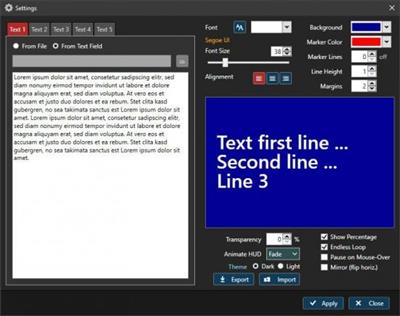
Teleprompter - smoothly scrolling text in a window or in fullscreen mode. Welcome to TelePrompter, an easy to use, modern and powerful text / presentation desktop scroller for Windows. The program can display a smoothly scrolling text in a resizable window or full screen on your desktop. It features the latest programming techniques (Microsoft .Net 4 / WPF) which are using hardware accelaration of the GPU (graphics processing unit) of the computer. For a smooth scrolling experience in a large window, the graphics card has to be powerful enough though.

Resizable window - from small to full screen - only your screen size is the limit (performance depends on the computer graphics power)
Scrolling speed is adjustable in a wide range, using a trackbar or the mouse wheel
5 text slots - load text from file or enter it manually
Selectable background and text color, font, line height, alignment and margin
Percentage label to display the elapsed percentage of the currently scrolling text (correctly adjusted on speed change)
Mirror mode to flip the text horizontally, for use with a mirror
Optional "Pause on Mouse-Over"
Optional Eye Line Marker, showing a semi-transparent border around the middle lines of the text (height and color is adjustable)
Endless Mode / Single pass through
Semi-Transparency mode (0..90%), to show another window below tele prompter
Scrub function - scroll within your text with a slider
Jump to 10%..90% of the selected text with a button click
Runs on Windows 7 / 8 / 10 (32 bit and 64 bit)

Download link:​
Код:
[center][b]rapidgator_net[/b]:
https://rapidgator.net/file/a79722679863e62d3c4d3342849293a6/z8k2o.Programming.TelePrompter.2.6.rar.html

[b]nitroflare_com[/b]:
https://nitroflare.com/view/DCC4EF6132FDB52/z8k2o.Programming.TelePrompter.2.6.rar

[b]uploadgig_com[/b]:
https://uploadgig.com/file/download/4ca7266683Ac728A/z8k2o.Programming.TelePrompter.2.6.rar[/center]

Links are Interchangeable - No Password - Single Extraction​
 
Rhino 7 v7.5.21100.03002 macOS

1ec204192391b6407f4a7bb0ae333724.jpeg

Language: Multilingual | File size: 424 MB​
Rhino - Versatile 3D modeler. Rhinoceros can create, edit, analyze, document, render, animate, and translate NURBS* curves, surfaces, and solids, point clouds, and polygon meshes. There are no limits on complexity, degree, or size beyond those of your hardware.

Special features include:
- Uninhibited free-form 3-D modeling tools like those found only in products costing 20 to 50 times more. Model any shape you can imagine.
- Accuracy needed to design, prototype, engineer, analyze, and manufacture anything from an airplane to jewelry.
- Compatibility with all your other design, drafting, CAM, engineering, analysis, rendering, animation, and illustration software.
- Read and repair meshes and extremely challenging IGES files.
- Accessible. So easy to learn and use that you can focus on design and visualization without being distracted by the software.
- Fast, even on an ordinary laptop computer. No special hardware is needed.
- Affordable. Ordinary hardware. Short learning curve. Affordable purchase price. No maintenance fees.
Release Notes
Release notes were unavailable when this listing was updated

Supported Operation Systems:
macOS 10.14 or later

Download link:​
Код:
[center][b]rapidgator_net[/b]:
https://rapidgator.net/file/e3c7934489aa9de56dbb9d66980c7cef/bazzb.Rhino.7.v7.5.21100.03002.macOS.rar.html

[b]nitroflare_com[/b]:
https://nitroflare.com/view/4CAC7D3B162B771/bazzb.Rhino.7.v7.5.21100.03002.macOS.rar

[b]uploadgig_com[/b]:
https://uploadgig.com/file/download/b442386db7056439/bazzb.Rhino.7.v7.5.21100.03002.macOS.rar[/center]

Links are Interchangeable - No Password - Single Extraction​
 
Rhinoceros 7.5.21100.03001 (x64)

6438ce40ec99a9c4c778f15bf4b1848b.jpeg

File size: 291 MB​
Rhino can create, edit, analyze, document, render, animate, and translate NURBS* curves, surfaces, and solids, point clouds, and polygon meshes. There are no limits on complexity, degree, or size beyond those of your hardware.

Special features include:
Uninhibited free-form 3D modeling tools like those found only in products costing 20 to 50 times more. Model any shape you can imagine.
Accuracy needed to design, prototype, engineer, analyze, and manufacture anything from an airplane to jewelry.
Compatibility with all your other design, drafting, CAM, engineering, analysis, rendering, animation, and illustration software.
Read and repair meshes and extremely challenging IGES files.
Accessible. So easy to learn and use that you can focus on design and visualization without being distracted by the software.
Fast, even on an ordinary laptop computer. No special hardware is needed.
Development platform for hundreds of specialty 3D products.
Affordable. Ordinary hardware. Short learning curve. Affordable purchase price. No maintenance fees.

New in Rhino 7
SubD
For designers who need to explore organic shapes quickly, SubD is a new geometry type that can create editable, highly accurate shapes. Unlike other geometry types, SubD combines free-form accuracy while still allowing quick editing.

Rhino.Inside.Revit
Rhino.Inside.Revit brings the power of Rhino and Grasshopper to the Autodesk Revit® environment.

QuadRemesh
Quickly create a quad mesh from existing surfaces, solids, meshes, or SubDs-ideal for rendering, animation, CFD, FEA, and reverse-engineering.

Presentation
In Rhino 7, we've improved the presentation tools, streamlining the workflow with a major update to the Rhino Render engine, so the same look you get in your Raytraced viewport can be rendered without any changes. We've added support for PBR materials, a LayerBook command, and more...

Rhino Refined
In Rhino 7, we've fixed hundreds of bugs, but we've also added workflow improvements like Named Selections, Mold Making tools, a Single-Line font for engraving, and improved interoperation with third-party file formats...

Display
We are always refining Rhino's display pipeline to keep up with modern graphics hardware. In Rhino 7, some models will display significantly faster on both Windows and Mac. We've also made several refinements to the Display Modes to make them even more eye-popping while you work...

Documentation
Modeling is just one part of the design process; you also need to show how to build what is on the screen. We've improved many parts of the documentation workflow while also focusing on the more graphically-rich illustration tools like transparency and gradient hatches...

Grasshopper
Grasshopper seems to be everywhere lately. As usual, we're having a hard time keeping up (you might even see that familiar canvas in other applications). In Rhino 7, we've added some new components, but we've also made it easier to turn your programs into plugins...

Development Platform
Rhino 7 brings major improvements to our free SDKs, with API refinements, better documentation, and some major new features that broaden and deepen the foundations of the geometry development platform...

System Requirements:
- 64-bit Intel or AMD processor (Not ARM)
- No more than 63 CPU Cores.
- 8 GB memory (RAM) or more is recommended.
- 600 MB disk space.
- OpenGL 4.1 capable video card is recommended.
- 4 GB Video RAM or more recommended.
- A Multiple-button mouse with a scroll wheel is recommended.
- SpaceNavigator optional
- Apple Intel hardware with Boot Camp optional.
- (Boot Camp is not supported on Apple Silicon. M1 Macs.)
- Windows 10 or 8.1.

Download link:​
Код:
[center][b]rapidgator_net[/b]:
https://rapidgator.net/file/9d1ecd115add7034a1cc92bf3bde0440/1j247.Rhinoceros.7.5.21100.03001.x64.rar.html

[b]nitroflare_com[/b]:
https://nitroflare.com/view/96298A103ACA097/1j247.Rhinoceros.7.5.21100.03001.x64.rar

[b]uploadgig_com[/b]:
https://uploadgig.com/file/download/44b3bc28dF4c6078/1j247.Rhinoceros.7.5.21100.03001.x64.rar[/center]

Links are Interchangeable - No Password - Single Extraction​
 
Screaming Frog SEO Spider 15.1

56a2e431a20447579c6c3b64c07cf445.jpeg

File size: 472 MB​
Screaming Frog SEO Spider is a software application that was developed with Java, in order to provide users with a simple means of gathering SEO information about any given site, as well as generate multiple reports and export the information to the HDD.

Clear-cut GUI
The interface you come across might seem a bit cluttered, as it consists of a menu bar and multiple tabbed panes which display various information. However, a comprehensive User Guide and some FAQs are available on the developer's website, which is going to make sure that both power and novice users can easily find their way around it, without encountering any kind of issues.

View internal and external links, filter and export them
It is possible to analyze a specified URL, and view a list of internal and external links in separate tabs. The first come along with details such as address, type of content, status code, title, meta description, keywords, size, word count, level, hash and external out links, while the latter only reveals info such as address, content, status, level and inlinks.
Both can be filtered according to HTML, JavaScript, CSS, images, PDF, Flash or other coordinates, while it is possible to export them to a CSV, XLS or XLSX format.

View further details and graphs, and generate reports
In addition to that, you can check the response time of multiple links, view page titles, their occurrences, length and pixel width. It is possible to view huge lists with meta keywords and their length, headers and images.
Graphical representations of certain situations are also available in the main window, along with a folder structure of all SEO elements analyzed, as well as stats pertaining to the depth of the website and average response time.

It is possible to use a proxy server, create a site map and save it to the HDD using an XML extension and generate multiple reports pertaining to crawl overview, redirect chains and canonical errors.

Bottom line
To conclude, Screaming Frog SEO Spider is an efficient piece of software for those which are interested in analyzing their website from a SEO standpoint. The interface requires some getting used to it, the response time is good and we did not come by any errors or bugs.
CPU and memory usage is not particularly high, which means that the computer's performance is not going to be affected most of the times.

Download link:​
Код:
[center][b]rapidgator_net[/b]:
https://rapidgator.net/file/cba8b5dd54073ba06d8555ef4a8f0406/ix771.Screaming.Frog.SEO.Spider.15.1.rar.html

[b]nitroflare_com[/b]:
https://nitroflare.com/view/E0C61EF02657818/ix771.Screaming.Frog.SEO.Spider.15.1.rar

[b]uploadgig_com[/b]:
https://uploadgig.com/file/download/69c3784a13eFd194/ix771.Screaming.Frog.SEO.Spider.15.1.rar[/center]

Links are Interchangeable - No Password - Single Extraction​
 
SolidCAM 2021 SP1HF1 Multilang for SolidWorks 2012-2021 x64

1772b1ea23fb6b9ea915be41559a0f1a.jpeg

Windows 64bit | File size: 5.5 GB​
SolidCAM - The Leading Integrated CAM Solution with the Amazing iMachining Technology. Get the 'Best-in-Class' CAM Solution for Efficient & Profitable CNC-Programming Inside Your CAD.

Amazing iMachining technology..
SolidCAM provides the great value of the revolutionary and amazing iMachining technology.
iMachining saves 70% and more in CNC machining time
iMachining extends cutting tool life dramatically
The unique iMachining Technology Wizard, provides optimal feeds and speeds, taking into account the toolpath, stock and tool material and machine specifications
iMachining will make you and your CNC machines more profitable and more competitive than ever before. Patented iMachining is completely unique both in its toolpath and by the method of programming with the patented Technology Wizard.

Complete CAM solution, seamlessly integrated in SOLIDWORKS and Autodesk Inventor
SolidCAM runs directly inside your existing SOLIDWORKS or Autodesk Inventor CAD system, with seamless integration and full tool path associativity - design changes initiate automatic tool path updates to the CAD model.
With the single-window integration, all machining operations can be defined and verified without leaving the parametric CAD assembly environment you're already used to.
Provides a complete CAM solution for all CNC applications
Works right inside your existing CAD: Seamless integration in both SOLIDWORKS and Autodesk Inventor
Saves time and frustration: Eliminates import/export challenges
Gets you up to speed fastest: Extremely short learning curve because you're already familiar with SolidCAM's interface since it runs right inside your CAD system
Get the full picture: SolidCAM works in the CAD assembly mode to graphically show Fixtures, Tooling & Vices in simulations
SolidCAM grows as you grow: SolidCAM is scalable with packages for all CNC machine types and applications
SolidCAM gives you the most for your money: The integrated CAD/CAM-Solution SOLIDWORKS + SolidCAM is available at a competitive bundle-price

У Вас недостаточно прав для просмотра ссылок. Войдите или зарегистрируйтесь.

Homepage
Код:
http://www.solidcam.com/

Download link:​
Код:
[center][b]rapidgator_net[/b]:
https://rapidgator.net/file/73a93677626825b3602e15377f01b2a6/0vww3.SolidCAM.2021.SP1HF1.Win64-SSQ.part1.rar.html
https://rapidgator.net/file/06fed01daebac3019ef512c53b52f646/0vww3.SolidCAM.2021.SP1HF1.Win64-SSQ.part2.rar.html
https://rapidgator.net/file/812bccb1d9b9bef3eefdacfaa276de6a/0vww3.SolidCAM.2021.SP1HF1.Win64-SSQ.part3.rar.html
https://rapidgator.net/file/49e6e52b04984b4dbaddfc4ce2147aab/0vww3.SolidCAM.2021.SP1HF1.Win64-SSQ.part4.rar.html
https://rapidgator.net/file/a8d422d22ccc15defd95546b961f9789/0vww3.SolidCAM.2021.SP1HF1.Win64-SSQ.part5.rar.html
https://rapidgator.net/file/715aee165229499accef6156545355fd/0vww3.SolidCAM.2021.SP1HF1.Win64-SSQ.part6.rar.html

[b]nitroflare_com[/b]:
https://nitroflare.com/view/E638FF79A3267AC/0vww3.SolidCAM.2021.SP1HF1.Win64-SSQ.part1.rar
https://nitroflare.com/view/904B286180757F3/0vww3.SolidCAM.2021.SP1HF1.Win64-SSQ.part2.rar
https://nitroflare.com/view/92DC2E3D8B17990/0vww3.SolidCAM.2021.SP1HF1.Win64-SSQ.part3.rar
https://nitroflare.com/view/3D2F1C5EA71D207/0vww3.SolidCAM.2021.SP1HF1.Win64-SSQ.part4.rar
https://nitroflare.com/view/E3D488A61D192D1/0vww3.SolidCAM.2021.SP1HF1.Win64-SSQ.part5.rar
https://nitroflare.com/view/1DA8740522159E3/0vww3.SolidCAM.2021.SP1HF1.Win64-SSQ.part6.rar

[b]uploadgig_com[/b]:
https://uploadgig.com/file/download/0b20aa481e22f764/0vww3.SolidCAM.2021.SP1HF1.Win64-SSQ.part1.rar
https://uploadgig.com/file/download/D9eA68cB37a4bC80/0vww3.SolidCAM.2021.SP1HF1.Win64-SSQ.part2.rar
https://uploadgig.com/file/download/4092bC204bf7f882/0vww3.SolidCAM.2021.SP1HF1.Win64-SSQ.part3.rar
https://uploadgig.com/file/download/07acB205f79Dbf92/0vww3.SolidCAM.2021.SP1HF1.Win64-SSQ.part4.rar
https://uploadgig.com/file/download/b56817E0ddecC1C1/0vww3.SolidCAM.2021.SP1HF1.Win64-SSQ.part5.rar
https://uploadgig.com/file/download/785f9b62e4300806/0vww3.SolidCAM.2021.SP1HF1.Win64-SSQ.part6.rar[/center]

Links are Interchangeable - No Password - Single Extraction​
 
SysTools Hard Drive Data Viewer Pro 15.0 (x64) Multilingual

ee54fbddd2f73fc16c66598d601c75e7.jpeg

File Size: 23.7 MB​
SysTools Portable Device Data Recovery Software is a perfect solution to recover deleted files from portable media device. It is all in one utility, because you can recover permanently deleted, corrupted and formatted data files from portable media drive. Simply download the software and install on your Windows computer and recover lost files from portable device easily.

Highlighted Features:
- Allows users to recover lost & deleted files from portable device
- Compatible with GPT and MBR partition in Potable Device
- Salvage data from Shift + Delete, Formatted or External Portable Device
- Retrieve permanently deleted files from portable device without data loss
- Save all the images, documents, PPTs, and many other file types
- Automatically detect attached internal or external portable Device
- Extract data from external devices like USB pen drive 3.0, 3.1
- Refresh View option to display recently connected external devices
- Software enables to maintain on-disk folder hierarchy / structure
- Preview recoverred documents, videos, images and all type of files
- Supports NTFS, FAT 16/32, ExFAT recovery on IDE, EIDE & SATA devices

Recover Deleted Files from Portable Device
If you are looking for a perfect solution to recover permanently deleted files from portable media device then you landed on right page. This software is capable to recover shift deleted data from portable disk. After recovery it will provide you complete preview. You can save complete data or selected files. The software support recovery of documents, audio, video, files, folders, photos, media files, .pdf etc.

Recover Files After Formatting Portable Device
After formatting portable media device, lost important files. Download and install this tool and after that you can recover lost files after formatting portable hard drive. It support recovery from all file system. The software also capable to retrieve files from any size portable devices. You can also use this software to recover files from a damaged portable hard drive. But the drive should be detectable.

Recover Deleted Data from Portable Device
The portable device data recovery tool is capable enough to restore all files and folders deleted by shift+ delete key without losing a single bit of data. The deleted data is highlighted by red color. It is a powerful and easy-to-use solution through which the recovery of shift deleted files will become more convenient.The software also restore data from Raw Data files like .png, .zip, ..pptx, .docx,.bmp, .avi, .gif, mpeg, .pdf, .xlsx, .wav etc. All Windows systems are supported including Windows 10 / 8.1 / 8 / 7 / XP or all below versions.

Apply Date-Based Filtering Option
Portable device files restore software provides an advance option to filter out each file by using Search Tab in left-hand side panel. This tool also supports to Search every file according to the Created date, Last Accessed Date, Modified date, and extensions. In fact, users can search all files within a certain Date Range. Also, it offers "Refresh view" feature by which users can easily detach some new information.

Save recovered Files Easily
After completing the recovery process, end users can restore and save all the retrieved files on another drive or device in the case of data recovery failure. The location can be on internal storage or external storage (like external portable device). Furthermore, the users can create a new folder from the portable device data recovery software panel itself and save them as per their need or convenience.

Keep Long File Name Intact
Another impressive feature of this portable data recovery tool is that it preserves long file names while restoring files and folders. In addition to this, the software will retain the original on-disk folder hierarchy. It also ensures that complete data is retrieved from each folder available in the system.

Scan Tab to Recover Shift Deleted Data
This portable data recovery software can restore all data items from the formatted portable device of any size. The software can automatically detect all different types of portable devices available; once you scan the portable device quickly.

Recover Files from Formatted Device
This portable data recovery software can restore all data items from the formatted portable device of any size. The software can automatically detect all different types of portable devices available; once you scan the portable device quickly.

What's New:
Read: ReleaseNotes.pdf

Download link:​
Код:
[center][b]rapidgator_net[/b]:
https://rapidgator.net/file/cb34b844f67335ad8b83d4a14f4a9473/ezb6y.SysTools.Hard.Drive.Data.Viewer.Pro.15.0.x64.Multilingual.rar.html

[b]nitroflare_com[/b]:
https://nitroflare.com/view/E664E2AF9C4A98E/ezb6y.SysTools.Hard.Drive.Data.Viewer.Pro.15.0.x64.Multilingual.rar

[b]uploadgig_com[/b]:
https://uploadgig.com/file/download/6fdcAf61468f0bf3/ezb6y.SysTools.Hard.Drive.Data.Viewer.Pro.15.0.x64.Multilingual.rar[/center]

Links are Interchangeable - No Password - Single Extraction​
 
TBProAudio Bundle 2021.4.14 (x64)

09e53e72718b57e44a27265fb705d720.jpeg

File size: 54 MB
TBProAudio - Professional Audio Tools.​

Included:
ABLM v2.1.0 - AB Loudness Match
AMM v2.0.3 - Automatic Microphone Mixer
CS-5501 v2.0.2 - Extended Channel Strip
dEQ6 v4.0.1 - Dynamic Equalizer / Multiband Compressor
dpMeter v5.1.0 - Free Multi Channel Meter
dpMeterXT v3.0.1 - Broadcast Loudness Meter
DSEQ v3.1.2 - Dynamic Spectral Equalizer
DynaRide v2.0.2 - Vocal & Bass Riding Leveller
Euphonia2 v3.0.0 - Spectrum Balancing
FinalLoud v3.0.7 - Loudness & True Peak Finalizer Tool
GainRider v3.0.2 - Vocal Gain Riding Leveller
gEQ12V4 v4.1.4 - 12-Band Graphic Equalizer
Impress v2.0.1 - Compressor
ISOL8 v2.3.1 - Free Mix Monitoring Tool
LA xLimit IV v4.0.2 - Enhanced Limiter
mvMeter2 v2.2.3 - Free Multivariable Meter
SLM2 v2.0.4 - Smart Loudness Maximizer
ST1 v2.0.2 - Spatial Tool
sTilt v2.0.6 - Free Spectrum Tilt Filter

Formats:Win64; AAX*, RTAS, VST3, VST

Download link:​
Код:
[center][b]rapidgator_net[/b]:
https://rapidgator.net/file/725255e392c212e3d5ae97630c2874bc/7thi7.TBProAudio.Bundle.2021.4.14.x64.rar.html

[b]nitroflare_com[/b]:
https://nitroflare.com/view/1BBE00FCCE313C3/7thi7.TBProAudio.Bundle.2021.4.14.x64.rar

[b]uploadgig_com[/b]:
https://uploadgig.com/file/download/656Da4291852dE72/7thi7.TBProAudio.Bundle.2021.4.14.x64.rar[/center]

Links are Interchangeable - No Password - Single Extraction​
 
Tetraface Inc Metasequoia 4.7.7

b40d7160cb446b9cabb6cb87afdcd534.jpeg

File size: 128 MB​
Three-dimensional model design, especially the creation of human or animal-like characters, requires some knowledge in this area and, most importantly, a set of suitable tools for the job. For those who made some 3D creations using various specialized software solutions and need to work on them without having to install each program again, a utility like Metasequoia can be the right choice. This application manages to provide a strong set of features and make them available from a really friendly interface. There are several modes to operate Metasequoia, namely Beginner, Modeling (string), Modeling (icon) and Mapping.

Each of these styles comes with its commands for editing the loaded model, setting the appropriate lighting and more. There is a wide variety of objects that you can select and insert in the design, as well as some tools that are meant for modifying the model you are working on.

The editing function that Metasequoia is equipped with are rather basic, but, nonetheless, cover all the necessary actions for handling objects, material faces and vertices. Each selected portion of the design can be fixed, stored or restored when needed, as well as fit to view or set as center of rotation.

There are many customizations that can be made to the application from the 'Configuration' area, so you can assign, for instance, various actions to mouse buttons and key combinations. Texture rendering imperfections and some glitches that may occur can be avoided by adjusting the Direct3D and OpenGL preview options.

All things considered, Metasequoia seems to be a worthy alternative to more complex utilities of its kind, especially thanks to the ease of use coupled with a good support for a variety of formats this software is able to work with.

Download link:​
Код:
[center][b]rapidgator_net[/b]:
https://rapidgator.net/file/279331a9b568c44af8ec91b794669333/w5fml.Tetraface.Inc.Metasequoia.4.7.7.rar.html

[b]nitroflare_com[/b]:
https://nitroflare.com/view/B0F56B48631AA1B/w5fml.Tetraface.Inc.Metasequoia.4.7.7.rar

[b]uploadgig_com[/b]:
https://uploadgig.com/file/download/9e64E4ea8FB989a6/w5fml.Tetraface.Inc.Metasequoia.4.7.7.rar[/center]

Links are Interchangeable - No Password - Single Extraction​
 
Tomabo MP4 Downloader Pro 4.2.18

17e40269963e3dfc737535cba2d6c9f5.jpeg

File size: 34 MB
MP4 Downloader Pro is simple and light but features many attractive and useful functions.
Download your favorite videos from hundreds of video sharing sites.​

Increase your download speeds by up to 500% or even more.
Download 4K, 2K, HD 1080p, HD 720p, and HQ videos from internet.
Support drag-and-drop, just drag and drop video link to the program window from Internet Explorer, Chrome, Firefox, or any other web browser to start download.
Integrate with Internet Explorer and Firefox. Add download commands to the context menu of your browser, so you can download any video with just one click.
Simultaneous downloads. Download more than one video at same time and safe time.

Pause and resume downloads. Pause, resume or cancel your downloads if you need more connection to perform other important tasks.
Search videos inside MP4 Downloader Pro and download them with one click.
Convert downloaded videos to MP4, WMV, MOV, AVI, 3GP, MPEG, DVD, or any other format, so you can store and play them on your PC, iPhone, iPad, iPod, PSP, Android phone, Android tablet, Windows Phone, or any other mobile device.
Extract audio tracks from downloaded videos and save them as mp3, wav, wma, ac3, ringtone, or any other popular audio format for any device.
Ready-made presets for all output formats.
Ability to custom output video/audio format settings.

Whats New:
Updates: official site does not provide any info about changes in this version.

Download link:​
Код:
[center][b]rapidgator_net[/b]:
https://rapidgator.net/file/5e5960209d1b2a78de6add5613ec98e5/1nf4e.Tomabo.MP4.Downloader.Pro.4.2.18.rar.html

[b]nitroflare_com[/b]:
https://nitroflare.com/view/4B289D5003FE7FE/1nf4e.Tomabo.MP4.Downloader.Pro.4.2.18.rar

[b]uploadgig_com[/b]:
https://uploadgig.com/file/download/E10393a479639e10/1nf4e.Tomabo.MP4.Downloader.Pro.4.2.18.rar[/center]

Links are Interchangeable - No Password - Single Extraction​
 
Transfer 2.0 macOS

6f672d5a5281bfdf2cf64a04843dd8f4.jpeg

File size: 8 MB​
Transfer is a reliable and fully RFC-compliant TFTP server application. The perfect alternative to the built-in TFTP server on your Mac. It's got everything you expect: real-time updates of current transfers in progress, support for broadcast requests, transfer history and basic root directory access control and file management. A feature rich TFTP server with a simple and modern user interface.

Written from the ground up, Transfer offers total control of your file transfers while playing nicely with existing TFTP clients.

Features
Real time updates of current transfers in progress
Basic file management of the root TFTP directory
Support for broadcast transfer requests
Support for common TFTP extensions and options
Transfer history
Release Notes
Updates: official site does not provide any info about changes in this version

Supported Operation Systems:
macOS 10.14.6 or later

Download link:​
Код:
[center][b]rapidgator_net[/b]:
https://rapidgator.net/file/686f824ec129f5514d0b78d5f9da61a4/dfb7z.Transfer.2.0.macOS.rar.html

[b]nitroflare_com[/b]:
https://nitroflare.com/view/8A59137CA187754/dfb7z.Transfer.2.0.macOS.rar

[b]uploadgig_com[/b]:
https://uploadgig.com/file/download/83b46cE995db44ed/dfb7z.Transfer.2.0.macOS.rar[/center]

Links are Interchangeable - No Password - Single Extraction​
 
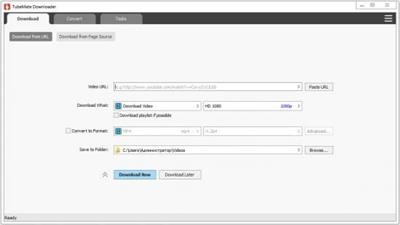
TubeMate Downloader 3.19.19

4279045484a549cfa702aa9ee6816431.jpeg

Languages: English | File size: 35.2 MB​
Windows TubeMate is a smart application that lets you snag any clip you want from the main video hosting sites and convert them while downloading or after that. If you need a simple and efficient video downloading tool, you can give it a try.

Features:

Online video downloader
TubeMate can download videos from YouTube, Facebook, Instagram, Dailymotion, and thousands of other video sites.

HD video downloader
TubeMate can download UHD 8K, 5K, 4K, QHD 2K, HD 1080p and 720p videos from YouTube.

YouTube to MP3 converter
TubeMate allows you to download only audio stream from YouTube, and save it as MP3. You don't need to download the entire video file.

Playlist downloader
TubeMate enables you to download entire or part of a playlist with just a few clicks.

Download accelerator
TubeMate features a multi-thread download acceleration engine that increases your download speeds by up to 500% or even more.

Download multiple videos at a time
TubeMate supports simultaneous downloads. It allows you to download more than one video at the same time.

Pause and resume downloads
You can pause and resume your downloads at any time.

Support drag-and-drop
You may directly drag and drop video link from your browser to the drop box or app window to start a download. You don't even need to copy and paste video URL.

Preview video/audio while downloading
While downloading, you can click the 'Preview' button to view incomplete file and make sure the content is you want.

Video and audio converter
TubeMate can convert your disk video/audio files between MP4, FLV, AVI, WMV, MOV, MP3, AAC, and any other formats for any device.

Video optimizer
TubeMate automatically optimizes downloaded videos for popular mobile devices, so you can watch downloaded videos smoothly on your iPhone, iPad, Android phone, and other devices.

Video to MP3 converter
TubeMate allows you to extract audio stream from video and save it as MP3, WAV, AC3, or other audio format.

Ready-made presets
TubeMate provides ready-made presets for all video and audio formats. You can also customize your own video/audio formats.

iTunes compatible
Optionally, TubeMate can add downloaded video/music to your iTunes library automatically, so you can easily synchronize your videos and music to your iPhone, iPad, iPod.

Media player
TubeMate contains an easy-to-use media player for playing files that Windows Media Player cannot play.

Whats New:
Updates: official site does not provide any info about changes in this version

Download link:​
Код:
[center][b]rapidgator_net[/b]:
https://rapidgator.net/file/a4b1f62520a6f3925611e3611392c0e2/pw1n5.TubeMate.Downloader.3.19.19.rar.html

[b]nitroflare_com[/b]:
https://nitroflare.com/view/C2CCC0CB68491E9/pw1n5.TubeMate.Downloader.3.19.19.rar

[b]uploadgig_com[/b]:
https://uploadgig.com/file/download/2c45055e93Bd1a06/pw1n5.TubeMate.Downloader.3.19.19.rar[/center]

Links are Interchangeable - No Password - Single Extraction​
 
Назад
Сверху