• Форум работает в архивном режиме www.old.nado.in

All mitsumi'1s Applications !! (updated daily)

  • Автор темы Автор темы mitsumi1
  • Дата начала Дата начала
Coolutils Total PDF Converter 6.1.0.63 Multilingual

2576b000b10beaa1e46ed55d696e065c.jpeg

Languages: Multilingual | File size: 242 MB​
Total PDF Converter converts PDF to DOC, RTF, TIFF, XLS, HTML, EPS, PS, TXT, CSV, PDF/A and images in batch. Unlike other batch PDF converters, the Total PDF Converter is extremely user-friendly thanks to a well-planned interface. Additionally, registered users gain direct access to command line support for quiet automatic functioning on the back end.

Unique options of Total PDF Converter
* Total PDF Converter supports PDF, PS, EPS, PRN, XPS, OXPS files. It's not a simple PRN converter, it's the all-in-one solution. New formats are constantly being added.
* Tell Total PDF Converter if you want to omit images from the source files. You can also get the new file with images only without text if you like.
* Convert PDF to PDF/A in batch. Update thousands of files in one process.
* Total PDF Converter can act as a PDF splitting utility and extract selected pages from a multi-page PDF. It can also split PDF by bookmarks or by blank pages.
* Total PDF Converter will change the date of the file or keep the original time stamps. Just check the appropriate checkbox.
* Sign PDF documents with your digital signature during the file conversion process.
* Combine several PDF files into one multi-page document with out powerful batch PDF converter.
* Total PDF Converter can automatically rotate your documents.
* PDF to Word converter supports both Doc and DOCX for your convenience.
* Convert PDF to JPG? Customize the final image to your needs. Set the desired quality of the JPEG image to compromize the file size. The app also extracts selected pages and converts them to JPEG.
* Convert PDF/PS/EPS/PRN files via our clear interface with lots of hints for beginners.
* The widest list of output file types: DOC, DOCX, RTF, XLS, HTML, BMP, JPEG, GIF, WMF, EMF, PNG, EPS, PS, TIFF, TXT, CSV, PDF/A and PDF!
* Total PDF Converter can combine several PDF files into one TIFF image. Or place every page of a multi-page PDF into a new TIFF files.
* Tune the output: set new margins in inches to your standards (ready for printing).
* Each PDF file is displayed in Preview panel. You can zoom it in/out or view the document full-sized. Preview option makes it easy to find the necessary PDF file.
* Add text or image watermarks to the header or the footer of the output file. It's perfect for stamping bates too!
* Want more order? Add pagination (sequential numbering of folders is available).
* Total PDF Converter can extract odd or even pages for you.
* Unlike free PDF converters, our app processes thousands of documents keeping the folder stucture.
* No matter what MS Office you have, our app can convert PDF to DOC and DocX.
* We also offer PDF Converter SDK for Web\SQL server\ASP\.NET\C#. With ActiveX you can easily implement our PDF converter into your application and redistribute it to the end users.
* Total PDF Converter has full command line support (get the ready-to-use command line from GUI).

Whats New:
Updates: official site does not provide any info about changes in this version
Homepage
У Вас недостаточно прав для просмотра ссылок. Войдите или зарегистрируйтесь.


Download link:​
Код:
[center][b]rapidgator_net[/b]:
https://rapidgator.net/file/d5db62503d3ddd687e747a4203ec0466/rnmxl.Coolutils.Total.PDF.Converter.6.1.0.63.Multilingual.rar.html

[b]nitroflare_com[/b]:
https://nitroflare.com/view/594ED0E5FB8EE81/rnmxl.Coolutils.Total.PDF.Converter.6.1.0.63.Multilingual.rar

[b]uploadgig_com[/b]:
https://uploadgig.com/file/download/f9e63e6cea013929/rnmxl.Coolutils.Total.PDF.Converter.6.1.0.63.Multilingual.rar[/center]

Links are Interchangeable - No Password - Single Extraction​
 
DeepL Pro 2.3.0 Multilingual

c9e68f0f3a8322ec5c50a61df7b62375.jpeg

Languages: Multilingual | File Size: 172.61 MB​
DeepL Pro: faster, safer, better. Unleash the full power of the world's best online translator for you and your team. Try out the world's best machine translation. Translate text in any and all applications on your computer. The fastest and easiest way to translate is using DeepL.

Data Confidentiality
Your texts are deleted immediately after you've received the translation.

Enhanced translator
Unlimited web translator use & fully-editable translated documents.

CAT tools
Translators can integrate DeepL's translations into their favourite translation software.

API access
The DeepL API plan allows developers to create new apps on top of DeepL's translation quality.

The World's Best Machine Translation
DeepL's neural networks are able to capture even the slightest nuances and reproduce them in translation unlike any other service. In blind tests pitting DeepL Translator against the competition, translators prefer DeepL's results by a factor of 3:1. DeepL also achieves record-breaking performance according to scientific benchmarks.

Your Data is Secure
We guarantee DeepL Pro subscribers that all texts are deleted immediately after the translation has been completed, and that the connection to our servers is always encrypted. This means that your texts are not used for any purposes other than your translation, nor can they be accessed by third parties. As a company based in Germany, all our operations comply with European Union Data Protection laws.

Translate Whole Documents
With DeepL Pro, you can translate an entire document with one click. All fonts, images, and formatting remain in place, leaving you free to edit the translated document any way you like. Get started today and let DeepL Pro translate your Microsoft Word (.docx), PowerPoint (.pptx), and text (.txt) files. Further formats coming soon!

API Access
If you sign up for the DeepL API plan, you will be able to integrate DeepL's JSON-based REST API into your own products and platforms. This allows you to incorporate the world's best machine translation technology into a variety of new applications. For example, a company could have their international service enquiries instantly translated by DeepL Pro, greatly simplifying business procedures and improving customer satisfaction.

CAT Tool Integration
Freelance translators, translation agencies, language service providers, or corporate language departments can all benefit from using DeepL Pro, the world's best machine translation technology, in their CAT Tool.
Release Notes
- Release notes were unavailable when this listing was updated.

Requirements:Windows® 10, Windows® 8/8.1, and Windows® 7
Homepage
У Вас недостаточно прав для просмотра ссылок. Войдите или зарегистрируйтесь.


Download link:​
Код:
[center][b]rapidgator_net[/b]:
https://rapidgator.net/file/eeac80b905b60c5e2b9e90c6b36f67f0/n904s.DeepL.Pro.2.3.0.Multilingual.rar.html

[b]nitroflare_com[/b]:
https://nitroflare.com/view/4FB2471ABCA46BD/n904s.DeepL.Pro.2.3.0.Multilingual.rar

[b]uploadgig_com[/b]:
https://uploadgig.com/file/download/00a67C36c4ff54F4/n904s.DeepL.Pro.2.3.0.Multilingual.rar[/center]

Links are Interchangeable - No Password - Single Extraction​
 
Elsten Software Bliss 20210316

7d15aa6ebc16dd19793cb5af00c494bb.jpeg

File size: 129 MB​
Album artwork downloaded, organized, automatically. bliss is a simple and accurate album artwork finder. Discover art for rare recordings. Free your art to view anywhere.

Album artwork finder.
Download album artwork automatically with bliss
bliss is an album artwork finder that is simple, fast and accurate. bliss finds and installs album artwork automatically. bliss is fully automated and can even add album artwork to your music in the background, as you add the music to your collection. bliss uses both reputable and expansive sources for its album art.

Music folder organizer
Assess your current music file and folder structure
Organize your music files and folders by specifying a file organisation pattern. bliss then synchronises your tags with your file names. Choose from different tags to include in the file organisation pattern, and how you want to treat whitespace. You can perform the changes automatically if you like, ideal for large collections.

Control your genres
Filter genres into a defined subset
Keep track of the genres in your music collection. Music genres are notorious for ballooning as you add more music from different sources. Some genres are general, like 'Classical', while some are specific, like 'Experimental Big Band'. bliss allows you to control which genres are allowed in your music collection.

Download link:​
Код:
[center][b]rapidgator_net[/b]:
https://rapidgator.net/file/65a6d34ea18af1979c12fc2930c1cd5d/bwbub.Elsten.Software.Bliss.20210316.rar.html

[b]nitroflare_com[/b]:
https://nitroflare.com/view/690E595B44D077F/bwbub.Elsten.Software.Bliss.20210316.rar

[b]uploadgig_com[/b]:
https://uploadgig.com/file/download/428696eE5540f950/bwbub.Elsten.Software.Bliss.20210316.rar[/center]

Links are Interchangeable - No Password - Single Extraction​
 
Extreme Picture Finder 3.53.6

c0a679570fd2c02611eac70bd2f17955.jpeg

File size: 66.1 MB​
Extreme Picture Finder is a powerful batch image downloader. Download all images from any website automatically and very fast. But not only images! It allows you to download music, video or any other files - just enter the website address, choose what files to download and where to save them and let Extreme Picture Finder do the rest for you. And you can instantly view the downloaded files in the built-in image viewer.

The program can be configured to download images from password-protected websites, forum threads, even social networks. Using advanced settings you can make Extreme Picture Finder skip certain parts of websites, like entire folders or single pages to make the download process even faster. Don't know where to start downloading? Extreme Picture Finder offers a built-in online projects database with thousands of website addresses sorted by category: Desktop Wallpapers, Cars, Girls, Nature and many, many others.

Another great feature of the program is, as the name suggests, a built-in picture finder. Just enter the keyword and the program will find and download thousands of pictures for you. It has different search modes allowing you vary the level of your interaction with the download process. You can let the program find and download only thumbnails and you'll see hundreds of images flying to you in a matter of seconds - this is the fastest search mode.

Then you can choose which full-size images to download manually. Of course, you can make Extreme Picture Finder find, download and save both thumbnails and full-size images automatically, or only full-size images. Plus the program can save all images that were found on the same page, where the original full-size image is located - the related images.

Features:
- Download your choice of images, music, video or any other files from websites automatically
- Download from TGP and password-protected sites
- Download list of URLs (fusker links)
- Built-in web picture finder
- Up to 30 simultaneous downloads - you'll have your files very fast
- Built-in database with thousands of website addresses
- Built-in picture viewer with thumbnails and slide-show mode
- User-friendly interface was translated into many languages

Download link:​
Код:
[center][b]rapidgator_net[/b]:
https://rapidgator.net/file/82590d9baea84fe081a9a9c05cb83387/up8fp.Extreme.Picture.Finder.3.53.6.rar.html

[b]nitroflare_com[/b]:
https://nitroflare.com/view/3D467ADE5CEB432/up8fp.Extreme.Picture.Finder.3.53.6.rar

[b]uploadgig_com[/b]:
https://uploadgig.com/file/download/92203b15ae82ECd6/up8fp.Extreme.Picture.Finder.3.53.6.rar[/center]

Links are Interchangeable - No Password - Single Extraction​
 
Guthrie QA-CAD 2020 A.60

5d937103afd48f348839aa457ccfa5f3.jpeg

File size: 168 MB​
QA-CAD is an essential tool in the engineering design process. If you are still Descriptionting drawings and adding numbered stamps and revisions by hand, then QA-CAD is for you! Save your valuable time and resources with our QA stamping software that overlays drawings with auto-numbered stamps and markup notes and corrections (text, sketches, boxes, lines and arrows). With just a press of a button the drawing, along with the revision stamps and markup notes/corrections, can be saved to a PDF and sent in an email. The source drawing remains untouched by the stamping and markup operations.

Features:

(QA-CAD also includes all the features and functions of CAD Viewer, CAD Markup, SymbolCAD, and also includes the valuable add-on extension CAD Viewer Batch Command.)

Export embedded data to EXCEL/CSV:
* Export embedded data to EXCEL forms for First Article Inspection, AS9102/EN 9102 and PPAP
* Export embedded data to a spreadsheet (EXCEL/ CSV) for revision management or inspection
* Export ballooned drawing to PDF
* Export bills of characters to customisable EXCEL reports.

Balloons (bubbles) drawing feature:
* You can choose to draw balloons (bubbles) or QA Stamps on AutoCAD / PDF drawing
* Overlay drawings with unlimited no. of balloons or QA stamps and Markup annotations.
* Field-based data or attributes may be embedded into balloons or QA stamps.

Support multiple formats:
* Vector (DWG, DXF, HPGL/2, DWF), pixel (TIFF, JPG, BMP) and PDF formats can be opened and stamped.
* All AutoCAD DWG/DXF versions/ formats support including AutoCAD 2019.
* Inventor DWG format support including Inventor 2019.
* Save the drawing with bubbles and markup overlays to PDF, DWG, DXF, TIFF ...

Auto-numbered Balloons:
* Stamps are automatically numbered and easily configured.
* Alter numbering system of balloons (QA Stamps) anytime during stamping process.

Balloon size, color and numbers:
* Color changer - Choose from 20 different ballooning ink (stamping inks).
* Alter each stamp to any size.
* Rotate stamps in any direction.
* Add leaders to stamps.

Capture data from CAD drawing:
* Automatically pick up dimension values from drawings.
* Automatically pick up GD&T symbols from drawings. (plan to support in near future)

Save balloon edits:
* Save balloons (QA stamps) and markup annotations separate to the drawing.

Integration with your email software:
* Send ballooned PDF by email with just the process of a button.

User-defined Stamp:
* User-defined Time / Date / 'Checked by' stamp.

Field entry control:
* Option to configure field entry controls as a dropdown list of user defined values.

Download link:​
Код:
[center][b]rapidgator_net[/b]:
https://rapidgator.net/file/f41917aafde756a75c4699db27b1a7a5/ztriy.Guthrie.QACAD.2020.A.60.rar.html

[b]nitroflare_com[/b]:
https://nitroflare.com/view/A9117D2EE24E239/ztriy.Guthrie.QACAD.2020.A.60.rar

[b]uploadgig_com[/b]:
https://uploadgig.com/file/download/19dedfc333c3d020/ztriy.Guthrie.QACAD.2020.A.60.rar[/center]

Links are Interchangeable - No Password - Single Extraction​
 
IDimager Photo Supreme 6.0.0.3635 Multilingual

e329cdae1195a124a93edc2b5aace62a.jpeg

File Size: 110.3 MB​
Do you own a digital camera? Then in no time you will have thousands of images on your computer, and finding that one image you are looking for will become a chore. But Photo Supreme can change all that. Whether you have 1,000 or 500,000 images in your archive, Photo Supreme's integrated photo cataloging and photo management features will help you quickly find and work with your desired image.

Extremely powerful yet easy-to-use
From the ground up, Photo Supreme was developed with easy-of-use as the primary focus. We were able to pack most of the features requested by our user base into a user interface that is clean and efficient, yet extremely powerful.

Photo Supreme comes with every essential image management feature you'll need to bring structure in your image archive. Assigning catalog labels, importing images to your computer, search features, etc. And once you have your images cataloged then you'll be able to find that one image you need within seconds to then view, duplicate, email, share on your favorite photo site, upload it to your FTP server, or edit it in your favorite photo editor.

Integrates with your favorite tools
Photo Supreme makes integration with your favorite photo editing tools seaminglessly. At installation it will automatically find and add the most common used image editing tools to the user interface.

Simply select an image and click on the application icon to start editing your image.

Unparalleled Speed
Digital Asset Management software uses a catalog database and should be optimized to work with thousands of images in the database. We took this seriously and were able to get the speed up, there where it belongs. Searches will return results in just milliseconds.

Always take your images with you
With Photo Supreme you can store previews of your images inside the database. Then, even if your images are physically located on your network, they travel with you. The previews can be stored in the size that you prefer, from small to large ones, up to 1680 pixels

Open architecture
Right from the start, Photo Supreme was designed with an open cataloging architecture in mind. Because existing industry standards are used to store its data, you can extract your information at any time, even without our software. Should you ever decide to switch applications (although once you've tried Photo Supreme, you'll never go back!), you won't have to repeat the time consuming operation of re-cataloging your data. After all, it is YOUR data, not the application's data!

Share with friends and family
Photo Supreme easily interfaces to public photo sharing sites like Facebook, Flickr, PicasaWeb, Zenfolio, or SmugMug. Resize or rename your images as you upload them to your on-line account without having to prepare them first. Also, add or remove your metadata, convert color space, or add your personal signature to your uploaded images.

Get started right away
If you already use some sort of image collection tool then Photo Supreme can help you get your existing data into Photo Supreme, saving you lots of time. There are import feature available for iPhoto™, Aperture™, Lightroom™ 3 and 4, iMatch™, and FotoTime™. At the same time, PSU is able to read and import meta-data that was written with XMP supporting tools, including Adobe products, Nikon software, iView™, MediaPro™.

Vocabularies
In addition there are import features to support market standard vocabularies, including David Rieck's ControlledVocabulary™, UltraTAG™, Lightroom™-Keyword Files, or any other tool that supports exporting to Formatted Vocabulary Files.

Main Features & Highlights:
Advanced search capabilities
Multi Tab Browsing
Import/Ingest images
Side-by-Side comparison (up to 6 images)
Keyword tagging
Advanced GEO Tagging
Image organization in portfolios
Duplicate Detection
Share images with Flickr, Smugmug, Zenfolio, Picasaweb, FTP, EMail
Dual Monitor Support
Creative Commons support
Face Detection
Area Tagging
Extensible metadata with Custom Fields
Take your previews with you while travelling
Color Managed
Lossless Image Editing
Fully Scriptable
Available for Windows and MacOSX platform
Multi-User network/server version available for PostgreSQL and SQLServer (Server Edition)
English, German, French, Italian, Dutch, Portuguese, and Russian locale

У Вас недостаточно прав для просмотра ссылок. Войдите или зарегистрируйтесь.

Homepage
У Вас недостаточно прав для просмотра ссылок. Войдите или зарегистрируйтесь.


Download link:​
Код:
[center][b]rapidgator_net[/b]:
https://rapidgator.net/file/8876c69d1b89b3b32a9ae710edc36b1c/3ii3u.IDimager.Photo.Supreme.6.0.0.3635.Multilingual.rar.html

[b]nitroflare_com[/b]:
https://nitroflare.com/view/1CDA21E60056F24/3ii3u.IDimager.Photo.Supreme.6.0.0.3635.Multilingual.rar

[b]uploadgig_com[/b]:
https://uploadgig.com/file/download/Ecb76f5e2a1832ca/3ii3u.IDimager.Photo.Supreme.6.0.0.3635.Multilingual.rar[/center]

Links are Interchangeable - No Password - Single Extraction​
 
iNet Network Scanner 2.7.9 macOS

45ff56b95d8bddb69d09742af8fb106a.jpeg

File size: 150 MB​
iNet - explore your network! Find out about security risks and keep your network under control. This easy to use App outlines a computer network even to the unexperienced user. Is somebody using your network without your knowledge? Which devices are currently online? Which access ports are open?

Which services are offered? What is the IP of your router? What is the IP of your router? Wake sleeping devices remotely. Add own icons to found devices ...
iNet provides you with information about networks and devices your Mac is connected to. Its very easy and user friendly design even allows the unexperienced user to get a profound and understandable overview of a network, the running services and the Wi-Fi quality.

In the current version the following functions are available:

* Network Scanner
* Bonjour Browser
* Portscan for standard ports
* Airport Monitor*
* Wake on Lan
* Help section
Release Notes
Release notes were unavailable when this listing was updated.

Supported Operation Systems:
macOS 10.8 or later

Download link:​
Код:
[center][b]rapidgator_net[/b]:
https://rapidgator.net/file/adf63ab4b14df7e7ac2eeb4df6d23214/fqx21.iNet.Network.Scanner.2.7.9.macOS.part1.rar.html
https://rapidgator.net/file/186329357f76f84d492c8344e4271e9c/fqx21.iNet.Network.Scanner.2.7.9.macOS.part2.rar.html

[b]nitroflare_com[/b]:
https://nitroflare.com/view/23E82A6DCC3BD0C/fqx21.iNet.Network.Scanner.2.7.9.macOS.part1.rar
https://nitroflare.com/view/925820231AB052B/fqx21.iNet.Network.Scanner.2.7.9.macOS.part2.rar

[b]uploadgig_com[/b]:
https://uploadgig.com/file/download/1080f9beCb44ebba/fqx21.iNet.Network.Scanner.2.7.9.macOS.part1.rar
https://uploadgig.com/file/download/b7ba7920644aDa61/fqx21.iNet.Network.Scanner.2.7.9.macOS.part2.rar[/center]

Links are Interchangeable - No Password - Single Extraction​
 
Author 6.6.2 MAS+In-App

643a597ed2ab6ea52dc15d175bfdd169.jpeg

File size: 11.38 MB​
Greater control of the authorship process with Augmented Citation Copy, Augmented Glossary, Augmented Views, Cuttings & more.
When you are ready to share your work as a PDF you get an automatically created Reference section. You can also post to WordPress.

Quick-Cite
* Copy from PDF in the companion application Reader and paste as a full citation in Author
* Paste the BibTex or DOI from an academic PDF to have it automatically turn into a full citation
* Cite quickly and easily from Books, Web pages and YouTube videos (from specified time if desired)
* Citations can easily be moved around from one document to another by clicking on the citation and choosing 'Copy Citation'.

Advanced Automatic Export Options
* Append References Section
* Create Cover Page
* Number Headings
* Specify how citations should appear: Author Date or Author Number
* Makes typed-out links live
* Option to have Visual-Meta attached
* Publish to WordPress: Supports multiple accounts and image attachments

Advanced Views
* Dynamic View: Think freely without being constrained by the traditional columns of text. Mind map, concept map and jot down thoughts, right inside Author.
* Instant Outline: Pinch on your trackpad to fold the text to see just the headings. Pinch further in or out to see more or less headings
* Advanced Find: If you only want to see sentences with a specific keyword, select the keyword cmd-f to hide all the sentences which do not have the keyword will be hidden. Click on a sentence to jump to it, cmd-f again or ESC to return to the regular view.
* Magic Margins: Double click in the margins (in full screen mode) to jot down any notes. If the notes are also in the document they will be bold and you can double-click to see all their occurrences. Note: These margins do not follow your document when you scroll, they are separate, to allow you to have an always-available space to jot notes-hence they are not like traditional margins

Cuttings
* Everything you Cut (but not Copied) is remembered by Author. CMD-shift-v to see what you have Cut and choose what to paste

Modern & Minimalist
* Makes Author fast and gives you auto saving and everything else you would expect from a modern, native macOS application including iCloud Drive (sync with Author iOS in the future)
* cmd- / cmd+ to scale all the text, you cannot change the size, colour or font of specific text in Author, only make it bold and italic, since Author is a writing application, not a layout application so therefore gives you less things to unproductively fiddle with
* Reduces eye strain and supports native macOS Dark Mode
* Including complete citation information and internal links to them. Author is minimalist but not markdown.
* ESC to go into and out of full screen. It seems like a detail but is very helpful when going between focused writing and interacting with many documents.

A Liquid Product
* Integrated with Reader (PDF reader): Provides instant citations through simply copying and pasting text using the Visual-Meta
* Integrated with Liquid actions: Provides hundreds of commands in less than one second on any selected text.
Release Notes

* Author is now free, with the option to pay In-App to enable Export, at the same cost as Author was before (US$15 or equivalent in your currency) as an annual subscription. This change is made to allow you to really try Author and decide if it's for you before you commit.

Supported Operation System:
* 64-bit processor
* macOS 10.13 or later

Download link:​
Код:
[center][b]rapidgator_net[/b]:
https://rapidgator.net/file/0561c14cae091c8139237f6e238e8d4e/1glm1.Author.6.6.2.MASInApp.rar.html

[b]nitroflare_com[/b]:
https://nitroflare.com/view/35F5905B9D0B6C0/1glm1.Author.6.6.2.MASInApp.rar

[b]uploadgig_com[/b]:
https://uploadgig.com/file/download/2380F7F785682e8b/1glm1.Author.6.6.2.MASInApp.rar[/center]

Links are Interchangeable - No Password - Single Extraction​
 
Automatic Email Processor Ultimate 2.14.5

b25848097d2d13ac4fd12660de1ae748.jpeg

File size: 35 MB​
Automatic Email Processor is the complete solution for Outlook to store and print incoming emails and their attachments automatically. For this, various filters, flexible configuration options, such as individually definable storage folders and the possibility of subsequent processing are available. For example, the path of the location where you want Automatic Email Processor to save certain emails or email attachments, can be assembled dynamically from individual properties of an email.

For storing email messages, inter alia, the output format can be specified (for example, PDF, RTF, or HTML). The Outlook message format (MSG files) is for example particularly suitable to back up e-mails. The program supports the creation of an unlimited number of rules to allow separate settings for different email accounts. Rules can be additionally applied to emails of a specific time period or to any previously received emails of an Outlook folder.

WITH AUTOMATIC EMAIL PROCESSOR, YOU CAN:
Automatically store respectively archive email attachments
Save emails automatically (as PDF file or in the original format)
Automatically print emails and email attachments (PDF files, Office documents etc.)
Monitor an unlimited number of Outlook folders
Create custom rules for different tasks
Filter by subject, sender, recipient, attachment file name ...
Receive information about the processing status via email
Create storage folders dynamically from properties of an email
Perform subsequent actions such as start a program with parameters, mark the message as read, or move the email into another Outlook folder
Re-process all emails (with certain criteria) of an Outlook email folder
Archive emails from any Outlook folder and period (e.g. as MSG files)

Download link:​
Код:
[center][b]rapidgator_net[/b]:
https://rapidgator.net/file/5c954c0cc222ca162f7ad24b299fdabb/s142e.Automatic.Email.Processor.Ultimate.2.14.5.rar.html

[b]nitroflare_com[/b]:
https://nitroflare.com/view/407375CCD1C84A3/s142e.Automatic.Email.Processor.Ultimate.2.14.5.rar

[b]uploadgig_com[/b]:
https://uploadgig.com/file/download/8Cfb8216904d5f02/s142e.Automatic.Email.Processor.Ultimate.2.14.5.rar[/center]

Links are Interchangeable - No Password - Single Extraction​
 
Cisdem ContactsMate 5.7.0 macOS

ae99e6b7e97b10ad489896597646ae25.jpeg

File size: 12 MB​
Cisdem ContactsMate (was Contact Manager) is a great contacts manager. It allows you to backup everything in Contacts; edit the Contacts fields; find, analyze, report, and fix dozens of problems with OS X Contacts; and export your address book to CSV, vCard, TXT, DocX, HTML, Excel, Numbers, and Pages formats for easy Contacts backup or sync.

Features
- Import Contacts
- Easily view, add, edit, group, tag, and manage contacts
- Delete duplicate contacts, fix formatting errors
- Share, export and back up contacts to quickly exchange information
Release Notes
Release notes were unavailable when this listing was updated

Supported Operation Systems:
macOS 10.11 or later

Download link:​
Код:
[center][b]rapidgator_net[/b]:
https://rapidgator.net/file/7d2b72b94c5f17af29fe4bb1c12e6b3b/sn9cm.Cisdem.ContactsMate.5.7.0.macOS.rar.html

[b]nitroflare_com[/b]:
https://nitroflare.com/view/2C408920F211811/sn9cm.Cisdem.ContactsMate.5.7.0.macOS.rar

[b]uploadgig_com[/b]:
https://uploadgig.com/file/download/Cb8f9B5a39E2772B/sn9cm.Cisdem.ContactsMate.5.7.0.macOS.rar[/center]

Links are Interchangeable - No Password - Single Extraction​
 
Clicker for YouTube 1.9 macOS

07a409436ec8189accc014756fbe0ac1.jpeg

File size: 10 MB​
The best standalone YouTube app for macOS. Native YouTube player that provides the same functionality as the website in an efficient Swift-based app, with a built-in ad-blocker, sleep timer, pop-out player, Touch Bar support, and more

Features

Launch YouTube right from your Dock
Picture-in-Picture w/ video controls
Built-in ad blocker
Like/Dislike and Autoplay from Touch Bar
Sleep timer w/ auto-shut off
Native push notifications
Quick access from the Menu Bar
Native macOS design language
Truly Full Screen Browsing
Upload video from within the app
Auto-switch to Dark Mode
Written in Swift for great performance
Release Notes
Updates: official site does not provide any info about changes in this version

Supported Operation Systems:
macOS 10.12 or later

Download link:​
Код:
[center][b]rapidgator_net[/b]:
https://rapidgator.net/file/89d8d5cbe76967db2843578185dac528/y3ep2.Clicker.for.YouTube.1.9.macOS.rar.html

[b]nitroflare_com[/b]:
https://nitroflare.com/view/0349F60DF78CB16/y3ep2.Clicker.for.YouTube.1.9.macOS.rar

[b]uploadgig_com[/b]:
https://uploadgig.com/file/download/d6be6e451C4dB772/y3ep2.Clicker.for.YouTube.1.9.macOS.rar[/center]

Links are Interchangeable - No Password - Single Extraction​
 
EXIF App 1.3 MAS

afcfaa62fb2731cd5a3745a19672b9e9.jpeg

File size: 5.18 MB​
EXIF App is the last EXIF viewer you'll ever need. Our app loads images in any format, including RAW. The app supports all EXIF, TIFF, EXIF-AUX, and JFIF structures as well as Maker Notes from Nikon, Canon, Pentax, Fuji, Panasonic, Olympus and many more. EXIF and location data from photos taken with mobile devices is also supported.

→ The unique simulated viewfinder reproduces what you saw when you took the shot: Shutter speed, F-stop, exposure compensation, ISO number, focus indication, flash, the focal length; if your images contain auto focus info, even the AF points are displayed, the active points highlighted in red.

→ If present, EXIF app can pull the GPS coordinates from your images and loads and centers a map that shows the spot where the photo was taken. The map is live and can be moved around zoomed in etc.

→ An annotated tree view lets you browse the EXIF data for points of interest.

→ A raw data view of the EXIF data as it comes from the selected image. For further analysis the data can be written to a text file or copied to the clipboard.

→ Finally, in the Stats tab, a tabular view of the most common EXIF data of all imported images. The table can be exported for further analysis in Numbers, Excel or other software (seehttps://softmatic.com/mac-exif-viewer.html for an example)

Note 1: Many applications strip EXIF data when exporting an image. For example, if you open a RAW image in Adobe Lightroom and export as JPEG, the Maker Notes and AF Info are stripped and not embedded into the JPEG's EXIF data.

Note 2: Please note that EXIF App is a viewer only, it is not designed to edit EXIF data or to modify the EXIF information in your images. For bulk editing of EXIF data we recommend Adobe Lightroom.
Release Notes

* Softmatic EXIF is now a Universal app for Apple Silicon and Intel CPUs with support for Apple M1
* Improved compatibility with macOS 11 "Big Sur"

Supported Operation System:
* 64-bit processor
* OS X 10.7 or later

Download link:​
Код:
[center][b]rapidgator_net[/b]:
https://rapidgator.net/file/a14cf66e59e6f7cc022ac42c1ed17320/97lvm.EXIF.App.1.3.MAS.rar.html

[b]nitroflare_com[/b]:
https://nitroflare.com/view/AD394DB5CF243CE/97lvm.EXIF.App.1.3.MAS.rar

[b]uploadgig_com[/b]:
https://uploadgig.com/file/download/0C1c3d854860D605/97lvm.EXIF.App.1.3.MAS.rar[/center]

Links are Interchangeable - No Password - Single Extraction​
 
ExpressionsinBar 2.3 MAS

2cdb91593c8ae4a4a9d2831622e2b024.jpeg

File size: 18.09 MB​
ExpressionsinBar is a simple menubar application which provides powerful computer-aided algebra computations. It's a powerful tool for evaluating mathematical expressions that lives in the menubar of your Mac ! So it is always just click away! It's the perfect app for teachers, math students, scientists, and the geek among us!

* A GORGEOUS OUTPUT
Unlike most other Equation Editors, ExpressionsinBar helps you resolve the math and then prepares a neat output for an easy insertion in your documents or presentations. Mathematical expressions are presented in high-resolution PDF form that can be pasted into your Documents or Presentations!

* A VERY SIMPLE USER INTERFACE
- Click the Menubar icon and ExpressionsinBar pops open an input expression box. Enter the expression, view the result.
- Beautiful output easily copied into text editors such as Apple Pages or Microsoft Word, or presentation programs such as Apple Keynote or Microsoft PowerPoint.
- Alternatively export the result of a computation in LaTeX syntax to TeX processors, such as TeXShop or TeXworks.
- Scrolling panels with easy to use functions
- Menu with variables, functions, syntax and tips
- Use keyboard arrows to navigate function arguments
- Easily select to render "input only", "input =", "result" and "input and result"

* KEY MATHEMATICAL FEATURES:
- Constants (π, e, etc.)
- Integers, fractions, floating numbers
- Sequences, lists, vectors, matrices, strings
- Operators (+, -, *, /, ^)
- Arithmetics on integers, rational, and floating numbers
- Arbitrary precision arithmetic, operating on signed integers, rational numbers, and floating point numbers
- Operations on fractions (integer and fractional parts, numerator, denominator, simplification, continued fraction expansion of real)
- Real functions (max, min, round, floor, sign, frac, ceil)
- Complex functions (re, im, abs, conj, arg, affix)
- Polynomials
- Factorial, binomial
- Exponential, logarithms, roots, powers
- Trigonometric functions, hyperbolic functions, and inverses
- Algebraic transformations (simplify, normal form, expand, factor)
- Trigonometric transformations
- Probabilities
- Statistics (1d and 2d)
- Polynomials algebra
- Algebraic calculus
- Numerical calculus
- Derivatives, limits and series expansion, integrals
- Equations, ordinary differential equations
- Units in operations
- Conversion of units, transformation to SI units, simplification of units
- Access to several fundamental constants of nature such as the speed-of-light, Planck constant, the elementary electric charge, etc.

* RENDER USING LaTeX SYNTAX FOR GORGEOUS TYPE-SETTING
- "//"and "@" features to interpret input with LaTeX text or math mode syntax
- Flexible and easy way to format equations
- Use it to write chemical reactions (such as @NaOH+HCl \rightarrow NaCl+H_2O)
Release Notes

* Improved Descriptionting
* Additional tutorial
* Mac OS Big Sur ready and Apple M1 native

Supported Operation System:
* 64-bit processor
* macOS 10.13 or later

Download link:​
Код:
[center][b]rapidgator_net[/b]:
https://rapidgator.net/file/98cd1da4e38b782070a49e6e760df613/izqdo.ExpressionsinBar.2.3.MAS.rar.html

[b]nitroflare_com[/b]:
https://nitroflare.com/view/286321EF4606037/izqdo.ExpressionsinBar.2.3.MAS.rar

[b]uploadgig_com[/b]:
https://uploadgig.com/file/download/2b557C09bd3ee948/izqdo.ExpressionsinBar.2.3.MAS.rar[/center]

Links are Interchangeable - No Password - Single Extraction​
 
Find Any File (FAF) 2.3b11 macOS

6a1cdc7f8f0db33f9dc49dff5230784f.jpeg

File size: 6.95 MB
Find Any File is a program for Apple's macOS that lets you search for files on your disks.​

* Contrary to Spotlight (or the search in Finder), it does not use a database but instead uses the file system driver'sfast search operations, where available. This lets you search for file properties such as name, dates, size, kind etc., and even for plain text contents quite fast.
* Find Any File can find files that Spotlight doesn't, e.g. those inside bundles and packages and in inside folders that are usually excluded from Spotlight search. It can even search in other user's folders if you use FAF's uniqueroot search mode

Find Any File doesn't replace Spotlight, but it complements it greatly:
* If you search for files by name, size, dates, kind and other directory properties, use FAF, because only then you can be sure that everything available is found.
* FAF can also find text content if it's uncompressed, as in plain text files and even most binary files. And with the new option to include Spotlight results, it can even find text in compressed PDF, Word and Excel documents if they were indexed by Spotlight.
* FAF can not find metadata stored in files, though, such as image sizes, EXIF data and GPS coordinates. If in doubt, see the manual or simply try out FAF for free, please.

Features:

Find Any File has a few gems that other search tools do not offer:

1.Better results:It offers an alternative hierarchical view for the found items. You can switch to it with cmd+2 or click on the right little icon at the top of the results window.
Note that the search above revealed hundreds of hits. If you'd look at that many results in a flat list, it would be hard to browse. With this new hierarchical view, however, you can directly look for the results in the folders that interest you.

2.Image Preview:If you're looking for pictures, the image preview browser is helpful as well (new in version 1.9):
3.Find everything on your disk:If you hold the Option key (alt ⌥) down in the Find window, the Find button turns into Find All. If you click on it then, you are asked for an administrator password - and then Find Any File will restart inroot mode, being able to find really any file on your Mac's volumes, including files in other users' home directories (something that Spotlight won't do).
Note that this will only work on local disks, not on network mounts, though.
4. You cansave your entered searchesto files (they'll have the extension ".faf"). You can then double click them in the Finder to have them start the search immediately, or use the saved search as a preset.
Release Notes

* Release notes were unavailable when this listing was updated.

Supported Operation System:
* 64-bit processor
* OS X 10.11 or later

Download link:​
Код:
[center][b]rapidgator_net[/b]:
https://rapidgator.net/file/523c91ebe6d7830d634f28d885cff8b3/5l0hb.Find.Any.File.FAF.2.3b11.macOS.rar.html

[b]nitroflare_com[/b]:
https://nitroflare.com/view/8E9BDF4CE3DA7D4/5l0hb.Find.Any.File.FAF.2.3b11.macOS.rar

[b]uploadgig_com[/b]:
https://uploadgig.com/file/download/6e2bd5Af59Cac72c/5l0hb.Find.Any.File.FAF.2.3b11.macOS.rar[/center]

Links are Interchangeable - No Password - Single Extraction​
 
Focus 2.6.5 MAS

89253d502da47fe09d256e7a26f1ac48.jpeg

File size: 4.91 MB
Focus helps you concentrate on the essentials - it can highlight the current working application and blur the rest​
.

Don't get distracted by dozens of windows, apps or flashy websites while working on important tasks and make your eyes more comfortable while looking at your screen.

Focus is a perfect fit for macOS Dark Mode since can reduce the background contrast. You will work better especially during the night and on big computer displays.

And there is more: you can also take app specific notes, notes that change depending on your current working application: some notes for Number or Excel, other notes for Safari or Mail.

FEATURES
* Highlight the current (frontmost) application and dim the rest
* The screen fades gently behind your current window and you can focus better
* Customise the screen dimmer with any colour or transparency, including visual effects
* Complement macOS Dark Mode and work better especially during the night and on big displays
* Reduce the brightness of your monitor's background
* Make application specific notes. For example, when you are working in Keynote or Numbers you can take notes that appear only when those apps are active - the notes will chance when you change the app
* The notes are easy to access in the menu bar
Release Notes

* Bug fix (Focus was freezing when the top menu was hidden)

Supported Operation System:
* 64-bit processor
* OS X 10.10 or later

Download link:​
Код:
[center][b]rapidgator_net[/b]:
https://rapidgator.net/file/2177f79772093776f8c9a7eb4bb29bd1/ezz19.Focus.2.6.5.MAS.rar.html

[b]nitroflare_com[/b]:
https://nitroflare.com/view/F99E1122ADDE6E8/ezz19.Focus.2.6.5.MAS.rar

[b]uploadgig_com[/b]:
https://uploadgig.com/file/download/af41d37f9e2FD016/ezz19.Focus.2.6.5.MAS.rar[/center]

Links are Interchangeable - No Password - Single Extraction​
 
TimeTable 3.4.2 macOS

6038a4e9b531ae7f390d42d1e5cf3b52.jpeg

File size: 8.88 MB​
Why not use the macOS Calendar app for more than just scheduling?
You already plan your life with the macOS Calendar app. TimeTable is the easy way to get that information out of your calendars so you can use it with other applications.

TimeTable makes it simple to track and bill for your time without keeping a second record outside of your calendars. You can find trends in your calendars by searching the details of your events and viewing the average, maximum and minimum times you have spent.

TimeTable can export this data to email, text or comma separated values to use the results in other tools like email, invoicing, time tracking or spreadsheet applications.

Events are edited and stored in the macOS Calendar app. TimeTable reads the events directly from the calendars in real time based on the timeframe selected. Since TimeTable only reads Calendar app data, there is nothing to save or backup. This makes it perfect for tracking and billing without keeping a second record outside of the Calendar app.

NEW IN VERSION 3.0:
- Supports macOS 10.10 Yosemite and higher
- Improved user interface
- New Calendar Groups feature
- Improved locking behavior in calendar timeframe selection
- Resizable text and notes export views
- Date selection now behaves like Calendar app
Release Notes

* Added support for app notarization

Supported Operation System:
* 64-bit processor
* OS X 10.10 or later

Download link:​
Код:
[center][b]rapidgator_net[/b]:
https://rapidgator.net/file/7c13b000a98903ce4146a15d5f24d7ba/j06my.TimeTable.3.4.2.macOS.rar.html

[b]nitroflare_com[/b]:
https://nitroflare.com/view/1A0FACF4F852F7D/j06my.TimeTable.3.4.2.macOS.rar

[b]uploadgig_com[/b]:
https://uploadgig.com/file/download/2e93a8a938e2D611/j06my.TimeTable.3.4.2.macOS.rar[/center]

Links are Interchangeable - No Password - Single Extraction​
 
Viper FTP 5.7.2 macOS

d5a580560efa0319f7890cb331c9a978.jpeg

File size: 16 MB​
Viper FTP is a handy and powerful file manager for macOS, with a tremendous user interface that makes it effortless to use. Quickly access your remote servers to manage and transfer your files. The new user interface was redesigned to be cool, clean and functional.

Viper FTP handles WebDav servers, Amazon S3 servers, LAN Bonjour servers, and even the uploading of videos directly to YouTube. It will create the HTTP URL of files you select, allowing you to easily share them via URL or email. It stores and shows your history and trace log, stores the credentials of multiple FTP accounts, and allows you to have multiple simultaneous transfers happening across different servers. The Toolbar gives you instant access to your bookmarked servers. Viper FTP has in-built ZIP, RAR, GZ, and TAR support. It has fast file searching on both your local and remote machines. You can customise many elements of the interface via preferences. You can edit remote files to make quick changes.
Top 10 Features
- Local and remote file management (FTP, SFTP, WebDav, Amazon S3, YouTube-upload)
- Last connections, Bookmarks, Bonjour, Favorites
- can be managed in one place.
- History of file operations (what, when, where with a server reply)
- Converting remote file/folder into HTTP/HTTPS address with an instant email option.
- Searching, viewing and editing files directly on a remote server.
- Using the toolbar for keeping your favorite servers gives an instant access to the remote locations.
- All files (hidden, system) are visible. To locate a file just start typing its name.
- Files/folders compare.
- Zip,rar,gz and tar management.
- Application windows can be linked (will move, show and hide together)
Release Notes

Release notes were unavailable when this listing was updated

Supported Operation Systems:
macOS 10.10 or later

Download link:​
Код:
[center][b]rapidgator_net[/b]:
https://rapidgator.net/file/d6716b9544bccdd9f790eb159d6dfb6b/97tvg.Viper.FTP.5.7.2.macOS.rar.html

[b]nitroflare_com[/b]:
https://nitroflare.com/view/768D4241394ADE6/97tvg.Viper.FTP.5.7.2.macOS.rar

[b]uploadgig_com[/b]:
https://uploadgig.com/file/download/136ada78ee771E0f/97tvg.Viper.FTP.5.7.2.macOS.rar[/center]

Links are Interchangeable - No Password - Single Extraction​
 
MediaInfo 21.03 (x64) Multilingual portable

06001dd72ee87f5c5c414113f956dbf8.jpeg

File Size : 24.4 Mb​
MediaInfo - supplies information about multimedia files (only if the information is available in that file): general information (title, author, director, album, track number, date, duration etc); information about the video (codec, aspect, fps, bitrate etc); information about the audio (codec, sample rate, channels, language, bitrate etc); information about the text (language of subtitle); information about chapters (count of chapters, list).

The MediaInfo data display includes:
Container: format, profile, commercial name of the format, duration, overall bit rate, writing application and library, title, author, director, album, track number, date, duration...
Video: format, codec id, aspect, frame rate, bit rate, color space, chroma subsampling, bit depth, scan type, scan order...
Audio: format, codec id, sample rate, channels, bit depth, language, bit rate...
Text: format, codec id, language of subtitle...
Chapters: count of chapters, list of chapters...

MediaInfo analyticals include:
Container: MPEG-4, QuickTime, Matroska, AVI, MPEG-PS (including unprotected DVD), MPEG-TS (including unprotected Blu-ray), MXF, GXF, LXF, WMV, FLV, Real...
Tags: Id3v1, Id3v2, Vorbis comments, APE tags...
Video: MPEG-1/2 Video, H.263, MPEG-4 Visual (including DivX, XviD), H.264/AVC, Dirac...
Audio: MPEG Audio (including MP3), AC3, DTS, AAC, Dolby E, AES3, FLAC...
Subtitles: CEA-608, CEA-708, DTVCC, SCTE-20, SCTE-128, ATSC/53, CDP, DVB Subtitle, Teletext, SRT, SSA, ASS, SAMI...

MediaInfo features include:
Read many video and audio file formats
View information in different formats (text, sheet, tree, HTML...)
Customise these viewing formats
Export information as text, CSV, HTML...
Graphical user interface, command line interface, or library (.dll/.so/.dylib) versions available
Integrate with the shell (drag 'n' drop, and Context menu)
Internationalisation: display any language on any operating system

Download link:​
Код:
[center][b]rapidgator_net[/b]:
https://rapidgator.net/file/258d7895ac59bd1623f05075ef048819/85dib.MediaInfo.21.03.x64.Multilingual.portable.rar.html

[b]nitroflare_com[/b]:
https://nitroflare.com/view/E0CEE4D7BB46E47/85dib.MediaInfo.21.03.x64.Multilingual.portable.rar

[b]uploadgig_com[/b]:
https://uploadgig.com/file/download/Bc0fbc23539D3898/85dib.MediaInfo.21.03.x64.Multilingual.portable.rar[/center]

Links are Interchangeable - No Password - Single Extraction​
 
Mp3tag 3.06 Multilingual portable

f0b1f9dcbd282de2f0148c09bc230044.jpeg

File Size : 5.6 Mb​
Mp3tag is a powerful and yet easy-to-use tool to edit metadata of common audio formats where it supports ID3v1, ID3v2.3, ID3v2.4, iTunes MP4, WMA, Vorbis Comments and APE Tags. It can rename files based on the tag information, replace characters or words in tags and filenames, import/export tag information, create playlists and more. Mp3tag supports online database lookups from, e.g., Amazon, discogs, or freedb, allowing you to automatically gather proper tags and cover art for your music library.

Mp3tag supports the following audio formats:
* Advanced Audio Coding (aac)
* Free Lossless Audio Codec (flac)
* Monkey's Audio (ape)
* Mpeg Layer 3 (mp3)
* MPEG-4 (mp4 / m4a / m4b / iTunes compatible)
* Musepack (mpc)
* Ogg Vorbis (ogg)
* OptimFROG (ofr)
* OptimFROG DualStream (ofs)
* Speex (spx)
* Tom's Audio Kompressor (tak)
* True Audio (tta)
* Windows Media Audio (wma)
* WavPack (wv)

Download link:​
Код:
[center][b]rapidgator_net[/b]:
https://rapidgator.net/file/6f24bfbbd228a349585a525a23d27b0c/bpyel.Mp3tag.3.06.Multilingual.portable.rar.html

[b]nitroflare_com[/b]:
https://nitroflare.com/view/8D202EE6A65591E/bpyel.Mp3tag.3.06.Multilingual.portable.rar

[b]uploadgig_com[/b]:
https://uploadgig.com/file/download/fBe7e92b1d0cce2C/bpyel.Mp3tag.3.06.Multilingual.portable.rar[/center]

Links are Interchangeable - No Password - Single Extraction​
 
FRSTrainTracker 1.1.2

099aee37764a6188793b322adaba1e6e.jpeg

File size: 8.0 MB​
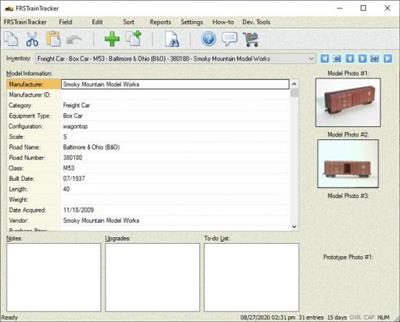
FRSTrainTracker is an inventory application to help model railroaders and collectors keep track of their collection of model trains.

Keep track of your collection for insurance and estate purposes.
Simple data entry, as much or as little as you want.
Track any number of photos for each model (prototype and model).
Add your own data fields, if so desired.
Hide or remove data fields that you will never use.
View reports of your inventory (print/export for insurance purposes).
Store DCC CV values for easy recall later on.
Generate web reports for your web site.
Thoroughly-documented functionality with the built-in Documentation Center.
Native 32- and 64-bit versions available.

The purpose of FRSTrainTracker is to help model railroaders and model train collectors to keep track of their locomotives, freight and passengers cars, cabooses, and maintenance-of-way cars.
You can add as many model entries as you wish. A large number of data-entry fields are provided by the application. However, the true power of FRSTrainTracker is the fact that it allows you to add, rename, hide, or remove data entry fields. As you get used to the application, you may want to experiment with these features (see the "Field" menu).
You can associate one or more model photos and prototype photos with each entry, if so desired. By default there are three model photos and one prototype photo field visible. There are additional fields available, by clicking on the "Field | View Hidden Fields..." menu command (two more model photo ones, and four more prototype photo ones). Once a photo is selected, a thumbnail image of that photo will be shown along the right-hand side of the main window.
In addition to photos, you can also maintain a "to-do" list for the model (see To-do List multi-line edit field below the grid). This allows you to keep track of the changes that you would still like to make to the model, things such as changing out the couplers, weathering, etc. If you have already made changes to the model, there is also a field for keeping track of those (see the Upgrades edit field below the grid).
We all know that there will come a time when we pass on to the Great Passenger Station in the Sky, so by having all your models and their specifics entered into FRSTrainTracker, you will help your spouse, family members, or friends determine what is in your estate. You can assign a "current value" of the model, so that they will be able to determine what you considered a fair-market value for the model. A fair-market value might also help in determining the overall value of your collection for insurance purposes.

Whats New:
Fixed:
* When using the "Edit | Change All Photo File Paths..." menu command, the thumbnail preview
images weren't being refreshed with the new file paths set.
* Web Reports: thumbnail images sometimes weren't shown on generated web pages.
* Web Reports: Changing the template folder for one web report always automatically changed all
the other web reports' template folder, but that was not the correct behavior; each web report can
have its own template folder set, if so desired.
* "Web Reports" window: pressing the Enter key no longer dismisses the window.
* "Web Reports" window: sorting the grid differently didn't renumber the rows.
* When adding the very first web report, it wasn't shown in the "Web Reports" window after it
was set up (it was created; just not shown in the window itself).
Added:
* Web Reports: added support for the "{IF_HAVE_DATA_BEGIN}",
"{IF_HAVE_DATA_ELSE}", "{IF_HAVE_DATA_END}" trio of tags, to identify template
content that should not be used if there is no data to show in the report.
* "Web Report Tags" window: you can copy the web tag's text without the curly-braces if you
hold the Ctrl key down while clicking on any of the "Copy" buttons.
* "Web Reports" window: added the ability to set a common parent folder for the output folder
for all the web reports (useful for when you have or want to move the output of all the web
reports to a different location on your computer. Also added that ability to change the common
templates folder. Changed the groupings of the buttons on that window a bit to group them
better.

Download link:​
Код:
[center][b]rapidgator_net[/b]:
https://rapidgator.net/file/07ec2036599ca87179417066b4507ef4/kxaz8.FRSTrainTracker.1.1.2.rar.html

[b]nitroflare_com[/b]:
https://nitroflare.com/view/32FC8998B6FA855/kxaz8.FRSTrainTracker.1.1.2.rar

[b]uploadgig_com[/b]:
https://uploadgig.com/file/download/eC460e8ccc18Ee37/kxaz8.FRSTrainTracker.1.1.2.rar[/center]

Links are Interchangeable - No Password - Single Extraction​
 
Назад
Сверху