• Старая версия форума работает в архивном режиме www.old.nado.in

All mitsumi'1s Applications !! (updated daily)

  • Автор темы Автор темы mitsumi1
  • Дата начала Дата начала
Icecream Video Editor Pro 2.34 Multilingual
f2e5d728ccaf0a33389c78dece5f4c51.jpg


Icecream Video Editor Pro 2.34 Multilingual | 63 Mb​
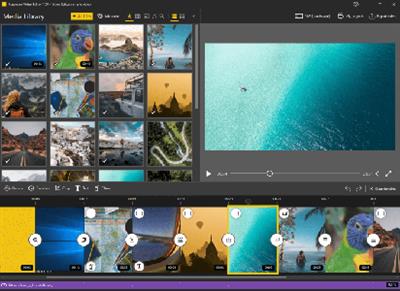
Icecream Video Editor is an easy-to-use free video editing software for Windows that enables you to edit videos and create new ones from both videos and photos in a few minutes. Combine videos and photos, add transitions, trim videos, add titles and background audio, apply visual effects. You can also rotate, speed up, blur videos and much more.

Simple video editor
Enjoy powerful video editing software with intuitive GUI.

Timeline
Merge videos and photos on a single timeline.

Add transitions
Choose one of 15 scene transitions or make it random.

Trim videos
Trim videos added to video editor.

Add video effects
Blur video, apply old movie effect or others.

Crop videos
Crop photo and video scenes if needed.

Add audio to video
Add music soundtrack or voice over.

Add titles
Add text to any video or photo scene on timeline.

Adjust image
Set brightness, contrast, saturation and hue with video editor.

System Requirements:
OS: Windows 10, Windows 8.1, Windows 8, Windows 7
2.66Ghz Intel®, AMD or any other compatible processor / faster processor for netbooks;
4GB of RAM (16GB for better performance); 100MB to 5GB of free disk space;
DirectX 11 hardware support

Home Page -
У Вас недостаточно прав для просмотра ссылок. Войдите или зарегистрируйтесь.


Download link:​
Код:
[center][b]rapidgator_net[/b]:
https://rapidgator.net/file/72e2ffddb0aa77ff1edc3604b6757eda/jcd8p.Icecream.Video.Editor.Pro.2.34.Multilingual.rar.html

[b]nitroflare_com[/b]:
https://nitroflare.com/view/EF41F92B0A4725A/jcd8p.Icecream.Video.Editor.Pro.2.34.Multilingual.rar[/center]

Links are Interchangeable - No Password - Single Extraction​
 
Living Earth - Weather & Clock 1.26 macOS

833d97a0676afd026af64408eaf935d4.jpg


Living Earth - Weather & Clock 1.26 | macOS | 95 mb​
Living Earth is the best and most beautiful world clock and weather app for your Mac! The award winning app for iPhone and iPad is now available with a single click from your Mac menu bar offering easily accessible world times and weather for millions of cities around the world. Real-time global cloud cover, live wallpaper, and screensaver features turns your desktop into a window in space.

FEATURES

* World clock and weather with a single click on the menu bar or customizable shortcut from anywhere in your Mac.
* Live clouds from near real-time satellite cloud data - updated every 3 hours. View global cloud patterns, hurricanes and tropical storms around the world.
* World clock and weather for over 3 million cities. 10 day and 2-hour forecasts.
* Live Desktop wallpaper and screensaver. Updates continuously while you work.
* Observe sunrise and sunset borders around the world live as they are happening. Watch the day and night shadow line progress across the globe through the day.
* Stars, constellations, and the Milky Way are displayed accurately in time and space.
* High resolution live 3D simulation. Enhanced for Retina display.

Compatibility: OS X 10.11 or later 64-bit

Download link:​
Код:
[center][b]rapidgator_net[/b]:
https://rapidgator.net/file/238607911d9333a28e1907547017d7c6/2rnlu.Living.Earth..Weather..Clock.1.26.rar.html

[b]nitroflare_com[/b]:
https://nitroflare.com/view/E8E2BA2335B7918/2rnlu.Living.Earth..Weather..Clock.1.26.rar[/center]

Links are Interchangeable - No Password - Single Extraction​
 
MassTube Plus 14.0.1.402 + Portable

ee9774fe8a4f3b0bc4f5793b83020bc2.jpg


MassTube Plus 14.0.1.402 + Portable | 32.7/30.8 Mb​
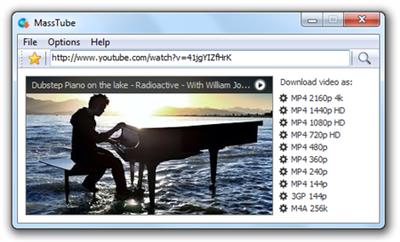
MassTube is a small-sized software utility esigned to help users grab their favorite video files from YouTube in the easiest way possible, and download them to the local disk for offline playback. It can be used to create a collection of video tutorials, for example.

Plain and simple interface
Aesthetically, it's not very impressive, as it sports a simplistic interface and just a few options for downloading videos. This is a simple-to-use tool built specifically with a single goal in mind: to grab video files from YouTube. Therefore, it doesn't come equipped with other noteworthy features, such as a built-in YouTube browser or audio extraction mode.

Straightforward video converter with history mode
Some video details are shown after introducing a YouTube link in the dedicated box, namely the resolution and audio parameters. MassTube supports multiple output formats (FLV, MP4, WebM, 3GP), which means that it gives you the possibility to convert the downloaded files to other types, as well as to select a preferred quality if there are multiple options available.

On task completion, it offers to open the downloaded clips with an external video player. It also integrates a history window that shows all the videos you have downloaded from YouTube, which can be cleared, exported to file, and imported at a later time.

Other program settings
MassTube's window can be placed on top of other frames, and it can be asked to remember the current window position whenever opening a new instance. Furthermore, it's possible to disable the internal download engine and switch to an external one, modify the default destination folder for all grabbed videos, as well as apply a proxy configuration for connecting to the Internet.

Evaluation and conclusion
The app worked smoothly in our evaluation and didn't prompt any errors. Although MassTube doesn't have an impressive skill set, it's an efficient software solution for downloading clips and converting them into other formats on the go. CPU and RAM consumption was minimal in our tests.

Operating System: Windows XP/Vista/7/8/8.1/10

Home Page -
У Вас недостаточно прав для просмотра ссылок. Войдите или зарегистрируйтесь.


Download link:​
Код:
[center][b]rapidgator_net[/b]:
https://rapidgator.net/file/a8e5006982f8325656a917177cf7bb3a/738wk.MassTube.Plus.14.Portable.rar.html
https://rapidgator.net/file/7a038f1ef841cac3e9b56ccdbf599b24/738wk.MassTubePlus14.rar.html

[b]nitroflare_com[/b]:
https://nitroflare.com/view/68A1CA10C058101/738wk.MassTube.Plus.14.Portable.rar
https://nitroflare.com/view/AB88F23EF58922D/738wk.MassTubePlus14.rar[/center]

Links are Interchangeable - No Password - Single Extraction​
 
MediaHuman YouTube Downloader 3.9.9.47 (0511) Multilingual + Portable

cf51c0a7b017d31e925bd84e743a526c.jpg


MediaHuman YouTube Downloader 3.9.9.47 (0511) (x86/x64) Multilingual + Portable | 112.1/119.4 Mb​
MediaHuman YouTube Downloader is a handy application for those who found a favorite music video or trailer of a new movie and wants to keep it on your computer for viewing offline. Or you need to download a video lesson/tutorial. Our video downloader is an ideal solution for such kind of tasks.

Simultaneous downloads
- Supports Ultra High resolutions up to 4K
- Download whole playlists and channels
- YouTube, Vimeo, Dailymotion, Soundcloud
- Extract audio track and save it as MP3
- iTunes support
- VEVO support

Operating System: Windows 7, 8/8.1, 10

Home Page -
У Вас недостаточно прав для просмотра ссылок. Войдите или зарегистрируйтесь.


Download link:​
Код:
[center][b]rapidgator_net[/b]:
https://rapidgator.net/file/41528a967d176e471600c559acd0efd7/w2f66.MediaHuman.YouTube.Downloader.3.9.9.47.0511.Portable.rar.html
https://rapidgator.net/file/2983901dfa355f0e3d1acc1f1cdf0498/w2f66.MediaHuman.YouTube.Downloader.3.9.9.47.0511.rar.html

[b]nitroflare_com[/b]:
https://nitroflare.com/view/662D06B83BC3DB0/w2f66.MediaHuman.YouTube.Downloader.3.9.9.47.0511.Portable.rar
https://nitroflare.com/view/6DBEB97037FCAF8/w2f66.MediaHuman.YouTube.Downloader.3.9.9.47.0511.rar[/center]

Links are Interchangeable - No Password - Single Extraction​
 
MediaHuman YouTube Downloader 3.9.9.48 (0511) macOS

23871325579ee4817677a772d74b70f6.jpg


MediaHuman YouTube Downloader 3.9.9.48 (0511) Multilingual macOS | 80 Mb​
MediaHuman YouTube Downloader is a handy application for those who found a favorite music video or trailer of a new movie and wants to keep it on your computer for viewing offline. Or you need to download a video lesson/tutorial. Our video downloader is an ideal solution for such kind of tasks.

- Supports Ultra High resolutions up to 4K
- Download whole playlists and channels
- YouTube, Vimeo, Dailymotion, Soundcloud
- Extract audio track and save it as MP3
- iTunes support
- VEVO support

Compatibility: OS X 10.9 or later 64-bit
Homepage -
У Вас недостаточно прав для просмотра ссылок. Войдите или зарегистрируйтесь.


Download link:​
Код:
[center][b]rapidgator_net[/b]:
https://rapidgator.net/file/b6166b111d95298d6bf1431a6c630fa6/chhvz.MediaHuman.YouTube.Downloader.3.9.9.48.0511.rar.html

[b]nitroflare_com[/b]:
https://nitroflare.com/view/05F322F7AAE7509/chhvz.MediaHuman.YouTube.Downloader.3.9.9.48.0511.rar[/center]

Links are Interchangeable - No Password - Single Extraction​
 
MediaHuman YouTube Downloader 3.9.9.48 (0511) (x64) Multilingual + Portable

2502271eb32cb4b37cb16db92441c87e.jpg


MediaHuman YouTube Downloader 3.9.9.48 (0511) (x64) Multilingual + Portable | 60.3/64.3 Mb​
MediaHuman YouTube Downloader is a handy application for those who found a favorite music video or trailer of a new movie and wants to keep it on your computer for viewing offline. Or you need to download a video lesson/tutorial. Our video downloader is an ideal solution for such kind of tasks.

Simultaneous downloads
- Supports Ultra High resolutions up to 4K
- Download whole playlists and channels
- YouTube, Vimeo, Dailymotion, Soundcloud
- Extract audio track and save it as MP3
- iTunes support
- VEVO support

Operating System: Windows 7, 8/8.1, 10 (64-bit only)

Home Page -
У Вас недостаточно прав для просмотра ссылок. Войдите или зарегистрируйтесь.


Download link:​
Код:
[center][b]rapidgator_net[/b]:
https://rapidgator.net/file/b5445f10fae1a96ceae016a983aa69b6/hvu1l.MediaHuman.YouTube.Downloader.3.9.9.48.0511.Portablex64.rar.html
https://rapidgator.net/file/41bfe1534867822fb1b302982eeb1124/hvu1l.MediaHuman.YouTube.Downloader.3.9.9.48.0511x64.rar.html

[b]nitroflare_com[/b]:
https://nitroflare.com/view/46ABD448563E7CE/hvu1l.MediaHuman.YouTube.Downloader.3.9.9.48.0511.Portablex64.rar
https://nitroflare.com/view/6F26EBDA186C23F/hvu1l.MediaHuman.YouTube.Downloader.3.9.9.48.0511x64.rar[/center]

Links are Interchangeable - No Password - Single Extraction​
 
MediaHuman YouTube To MP3 Converter 3.9.9.47 (0511) Multilingual + Portable

a74a2dd0da01c688fe78a3ec3678fd0c.jpg


MediaHuman YouTube To MP3 Converter 3.9.9.47 (0511) (x86/x64) Multilingual + Portable | 113.6/117.8 Mb​
You like to listen to music on YouTube or SoundCloud and want to save it for offline playing. Or you want to download soundtrack of a new movie. Then we recommend you to try out this software developed specifically for this purpose.

Downloads all music from playlist or channel
Downloads highest available quality up to 320 kbps
Supports YouTube, Vimeo, SoundCloud, Dailymotion, VEVO, etc.
Downloads simultaneously several tracks
Includes simple tag editor with cover art support
Works on all modern platforms (macOS, Windows, Ubuntu)
Imports into iTunes

Playlists and channels
The software supports downloading all videos of a playlist or a channel. And there is also an option for subscribing to and downloading only newly uploaded tracks.

iTunes support
In the preferences of the application you can select an option to add downloaded tracks into iTunes automatically. You can also specify iTunes playlist, where the converted track should be added.

Saves your time & traffic
The app detects audio track in YouTube video clip and downloads it, skipping the video part. As a result download speed increases dramatically, especially on HD-quality content.

Simple tag editor
Application automatically detects artist name and track title of the video and saves it in the downloaded file. But at the same time, you can easily change tags to whatever you want. You can even change a cover art image.

Original format, no conversions
You can save audio tracks in original quality without any conversion. It means that there will be no loss of quality and it greatly reduces the downloading time.

Free music
There is a great amount of music on YouTube. You can always find the one you like there. And YouTube to MP3 Converter allows you to save it on your computer for free. Just find the track you like and download it in the quality you need.

Not only YouTube
Vevo.com, Vimeo, DailyMotion, Soundcloud, Bandcamp, HypeMachine, MixCloud, UOL and many other sites are also supported. So you can download music as easy as from YouTube.

Clipboard tracking
The program tracks the content of the system clipboard. It means that you can easily add a video clip without switching from your favorite browser. Just copy an URL into the clipboard and it will be added to the download queue.

Multilingual interface
Localized to: Arabic, Armenian, Azerbaijani, Bulgarian, Catalan, Chinese (Taiwan), Croatian, Czech, Danish, Dutch, English, Esperanto, French, German, Greek, Hebrew (Israel), Hungarian, Indonesian, Italian, Japanese, Korean, Latvian, Lithuanian, Malay, Norwegian Bokmål, Polish, Portuguese, Portuguese (Brazil), Romanian, Russian, Spanish, Swedish, Turkish, Vietnamese

Operating System: Windows 7, 8/8.1, 10

Home Page -
У Вас недостаточно прав для просмотра ссылок. Войдите или зарегистрируйтесь.


Download link:​
Код:
[center][b]rapidgator_net[/b]:
https://rapidgator.net/file/cdf8b29d2a0b1b01df734755e34bfbc3/nmimb.MediaHuman.YouTube.To.MP3.Converter.3.9.9.47.0511.Portable.rar.html
https://rapidgator.net/file/30e0b71c28cf5ed726233a47e3856df2/nmimb.MediaHuman.YouTube.To.MP3.Converter.3.9.9.47.0511.rar.html

[b]nitroflare_com[/b]:
https://nitroflare.com/view/40898FE3B3EA3B3/nmimb.MediaHuman.YouTube.To.MP3.Converter.3.9.9.47.0511.Portable.rar
https://nitroflare.com/view/E6C5BCC02718209/nmimb.MediaHuman.YouTube.To.MP3.Converter.3.9.9.47.0511.rar[/center]

Links are Interchangeable - No Password - Single Extraction​
 
MediaHuman YouTube To MP3 Converter 3.9.9.48 (0511) Multilingual

c1fbb72213e5036053df3c3383ba4584.jpg


MediaHuman YouTube To MP3 Converter 3.9.9.48 (0511) (x86/x64) Multilingual | 113.9 Mb​
You like to listen to music on YouTube or SoundCloud and want to save it for offline playing. Or you want to download soundtrack of a new movie. Then we recommend you to try out this software developed specifically for this purpose.

Downloads all music from playlist or channel
Downloads highest available quality up to 320 kbps
Supports YouTube, Vimeo, SoundCloud, Dailymotion, VEVO, etc.
Downloads simultaneously several tracks
Includes simple tag editor with cover art support
Works on all modern platforms (macOS, Windows, Ubuntu)
Imports into iTunes

Playlists and channels
The software supports downloading all videos of a playlist or a channel. And there is also an option for subscribing to and downloading only newly uploaded tracks.

iTunes support
In the preferences of the application you can select an option to add downloaded tracks into iTunes automatically. You can also specify iTunes playlist, where the converted track should be added.

Saves your time & traffic
The app detects audio track in YouTube video clip and downloads it, skipping the video part. As a result download speed increases dramatically, especially on HD-quality content.

Simple tag editor
Application automatically detects artist name and track title of the video and saves it in the downloaded file. But at the same time, you can easily change tags to whatever you want. You can even change a cover art image.

Original format, no conversions
You can save audio tracks in original quality without any conversion. It means that there will be no loss of quality and it greatly reduces the downloading time.

Free music
There is a great amount of music on YouTube. You can always find the one you like there. And YouTube to MP3 Converter allows you to save it on your computer for free. Just find the track you like and download it in the quality you need.

Not only YouTube
Vevo.com, Vimeo, DailyMotion, Soundcloud, Bandcamp, HypeMachine, MixCloud, UOL and many other sites are also supported. So you can download music as easy as from YouTube.

Clipboard tracking
The program tracks the content of the system clipboard. It means that you can easily add a video clip without switching from your favorite browser. Just copy an URL into the clipboard and it will be added to the download queue.

Multilingual interface
Localized to: Arabic, Armenian, Azerbaijani, Bulgarian, Catalan, Chinese (Taiwan), Croatian, Czech, Danish, Dutch, English, Esperanto, French, German, Greek, Hebrew (Israel), Hungarian, Indonesian, Italian, Japanese, Korean, Latvian, Lithuanian, Malay, Norwegian Bokmål, Polish, Portuguese, Portuguese (Brazil), Romanian, Russian, Spanish, Swedish, Turkish, Vietnamese

Operating System: Windows 7, 8/8.1, 10

Home Page -
У Вас недостаточно прав для просмотра ссылок. Войдите или зарегистрируйтесь.


Download link:​
Код:
[center][b]rapidgator_net[/b]:
https://rapidgator.net/file/286c33412fbaa50d63738ae7b3643697/2s7pn.MediaHuman.YouTube.To.MP3.Converter.3.9.9.48.0511.Multilingual.rar.html

[b]nitroflare_com[/b]:
https://nitroflare.com/view/54BE1BA53B45EBA/2s7pn.MediaHuman.YouTube.To.MP3.Converter.3.9.9.48.0511.Multilingual.rar[/center]

Links are Interchangeable - No Password - Single Extraction​
 
NewBlue Titler Pro 7 Ultimate 7.3.201016

33dde0d6bf9db6d2718226be3cd68f46.jpg


NewBlue Titler Pro 7 Ultimate 7.3.201016 (x64) Multilingual | 682 Mb​
The faster, smarter way to add stunning titles to your video projects. Bring your audience into the story with compelling titles and graphics - without sacrificing production time. Titler Pro 7 is the industry standard in titling software for video editors. Deliver exceptional production value with stunning 3D animated titles and motion graphics-all right within your favorite editing software.

Create Professional Titles With Minimal Effort
Need inspiration? Browse our extensive collection of over 700 professionally crafted designs to find the right fit for your project. Easily customize shape, color, animation and more to match your desired look and have great-looking graphics within minutes.

Take Your Graphics To The Next Level
Your vision becomes a reality with our fast and powerful Title Designer. Easily create your own custom graphics with an intuitive interface and library of pre-built animations, effects and other creative tools.

Import Existing Designs
Import existing images and videos, PSD, AE*, and vector files. PSD and AE import features let you modify the elements of the original file directly inside Titler Pro. *Ultimate version only

Save Critical Production Time
Work smarter, not harder with Titler Pro's intelligent workflow controls. Respond quickly to last-minute requests with unique features - like Multi-Title Management and Elastic Timeline - that let you implement project-wide graphics changes in a fraction of the time.

Work Faster with the New Engine
Titler Pro 7's entirely re-tooled NTX engine delivers faster-than-ever performance and next-level flexibility. Faster, lighter compression now allows titles to be stored using less memory while simultaneously improving image quality and achieving real-time playback.

Improved Timeline Flexibility
We've reworked our Elastic Timeline to make it easier than ever for title animations to dynamically follow your trim points, allowing you to have multiple title durations from a single design.

Simplified Multi Title Management
Set a design to be used by each title and enjoy time-saving workflows for editing multiple titles at once.

Simple, Smooth Rolling Credits
Experience this game-changing new technology and overcome the common industry problem of flickering text edges. Take the complexity out of the high-quality credit rolls with just a few simple controls, all within your editor

Object Following
Not sure if your lower third will need to fit 10 characters or 50? No problem. Pick the title layer of your choice and set the rest of the design to follow suit. The other title layers will dynamically adjust scale and position based on changes made to the "lead" layer, eliminating the need for manual modification.

Style Breaks
Now when you apply separate styles - like font, color and thickness - to different words within a text box, Titler Pro can remember those style settings and automatically apply them to your other titles

Looping Assets
Set any object, like a background, to loop with specific start and end points, including delay time between loops, allowing your titles to animate for any specified duration

500+ New Designs
Titer Pro 7's rich template library has been upgraded with dozens of new versatile collections, including over 500 new professionally-crafted designs

Integrated Graphics for Live and Post
NewBlue's Titler Live and Titler Pro solutions are fully compatible - meaning the same designs used in your live broadcasts can be seamlessly leveraged in your video editor. Save time and streamline your graphics across all production environments; easily pre-edit segments or tweak live-to-tape show titles, intros, and more - with zero rework.

Compatible with the following programs:
- Adobe Premiere CC*
* May require update to latest version
- NewBlue Titler Pro 2+
- Avid Media Composer & Symphony 6+
- Grass Valley EDIUS 7, 8 & 9
- Magix VEGAS Pro 10+, VEGAS Movie Studio

Software & Hardware:
- Windows 7 or later versions
- 1GB VRAM (2GB+ recommended)
- 902Mhz base clock (1506Mhz+ recommended)
- Supports 64-bit video editing applications only.
- 2 GHz processor (multicore or multiprocessor CPU recommended for HD)
- 4 GB RAM (8 GB RAM or greater recommended for HD)
- 1.5GB minimum hard-disk space for installation

Home Page -
У Вас недостаточно прав для просмотра ссылок. Войдите или зарегистрируйтесь.


Download link:​
Код:
[center][b]rapidgator_net[/b]:
https://rapidgator.net/file/7552a312a1fe4b2131bbf123bbfbb54d/uj655.NewBlue.Titler.Pro.7.Ultimate.7.3.201016.rar.html

[b]nitroflare_com[/b]:
https://nitroflare.com/view/F1C19028F7C664F/uj655.NewBlue.Titler.Pro.7.Ultimate.7.3.201016.rar[/center]

Links are Interchangeable - No Password - Single Extraction​
 
PowerISO 7.8 Multilingual + Portable

4b65050acdc7ceb7737d38acfb46db12.jpg


PowerISO 7.8 (x86/x64) Multilingual Retail + Portable | 8.8/9.4 Mb​
PowerISO is a powerful image processing and file compression tool, which allows you to create, extract, compress, edit and convert ISO/BIN image files, and mount these files with internal virtual drive. And most of all, the compressed files can be used directly without decompressing.

* Support ISO, BIN, NRG, IMG, DAA, ...
* Open, Create, Edit, Extract ISO File...
* Compress, Encrypt, Split ISO File...
* Integrated with internal Virtual Drive...

Main Features:
* Support almost all CD/DVD-ROM image file formats (ISO, BIN, NRG, IMG, DAA and so on).
Note: DAA (Direct-Access-Archive) is an advanced format for image file, which supports some advanced features, such as compression, password protection, and splitting to multiple volumes. It can be handled directly just like other formats, such as ISO, BIN, ...
* Supports on-the-fly burning.
* Supports UDF image file.
* Create image file from hard disk files or CD/DVD-ROM.
* Edit an existing image file.
* Can edit and burn Audio CD image file.
* Extract files and folders from image file.
* Convert image files between ISO/BIN and other formats.
* Make bootable image file, get boot information from bootable image file.
* Make floppy disk image file.
* Optimize files to save disk space while saving image files.
* Mount image file with internal virtual drive. Even if the image file is saved as DAA format, the virtual drive can handle that format directly.
* Support shell integration, such as context menu, Drag and Drop, clipboard...
* Supports command-line parameters.
* Can open XBOX image file.
* Supports multiple languages

Supported operating systems:
32-bit Windows: Windows 98, Windows Me, Windows 2000, Windows XP, Windows 2003, Windows Vista, Windows 2008, Windows 7, Windows 8 / 8.1, Windows 10
64-bit Windows: Windows XP, Windows 2003, Windows Vista, Windows 2008, Windows 7, Windows 8 / 8.1, Windows 10

Language : English, Arabic, Armenian, Belarusian, Bosnian, Bulgarian, Chinese Simplified, Chinese Traditional, Croatian, Czech, Danish, Dutch, Farsi, French, German, Greek, Hungarian, Italian, Japanese, Korean, Lithuanian, Malay, Norsk, Polish, Portuguese, Russian, Serbian, Slovak, Slovenian, Spanish, Swedish, Thai, Turkish, Ukrainian, Vietnamese, Kazakh

Home Page -
У Вас недостаточно прав для просмотра ссылок. Войдите или зарегистрируйтесь.


Download link:​
Код:
[center][b]rapidgator_net[/b]:
https://rapidgator.net/file/662817711c8a4cc81bd62ac89adf0334/0ncxo.PowerISO.7.8.Portable.rar.html
https://rapidgator.net/file/d60313ad2de51885710b27a07903dadb/0ncxo.PowerISO.7.8.rar.html

[b]nitroflare_com[/b]:
https://nitroflare.com/view/B09EB23C50B758B/0ncxo.PowerISO.7.8.Portable.rar
https://nitroflare.com/view/FB03E4001F8B11C/0ncxo.PowerISO.7.8.rar[/center]

Links are Interchangeable - No Password - Single Extraction​
 
PVS-Studio 7.10.43167

cf7e42c1500f4a55e6d8ef47118c99b2.jpg


PVS-Studio 7.10.43167 | 113 Mb​
PVS-Studio performs static code analysis and generates a report that helps a programmer find and fix bugs. PVS-Studio performs a wide range of code checks, it is also useful to search for misprints and Copy-Paste errors. Examples of such errors: V501, V517, V522, V523, V3001.

The main value of static analysis is in its regular use, so that errors are identified and fixed at the earliest stages. There is no point in wasting 50 hours looking for a bug that could be found with static analysis. So, let's point out that again - the main idea of static analysis is not to find one hidden bug on the day before the release, but to fix dozens of bugs day by day.

The analyzer can be run at night on the server and warn about suspicious code fragments. Ideally, these errors can be detected and fixed before getting into the repository. PVS-Studio can automatically be launched immediately after the compiler for the files that have been just modified.

PVS-Studio can integrate into Visual Studio development environment 2010-2017. If you use this IDE, then most likely you will just have to go to the menu of PVS-Studio plugin and choose "Check Current Project".

Main features of PVS-Studio
Simple and seamless integration with Visual Studio 2010-2017
Automatic analysis of individual files after their recompilation
Online reference guide concerning all the diagnostics available in the program, on the web site and documentation (presented as a .pdf file) Up to 550 pages of documentation
Saving and loading analysis results allow doing overnight checks - during the night the analyzer does the scanning and provides you with the results in the morning.
You can save analysis results as HTML with full source code navigation.
Project analysis run from the command line: helps integrate PVS-Studio into overnight builds; a new log will be issued in the morning.
Great scalability Support of multi-core and multi-processor systems with the possibility to specify the number of the cores to use; IncrediBuild support.
Interactive filtering of the analysis results (the log file) in the PVS-Studio window: by the diagnostic number, file name, the keyword in the text of the diagnostic.
Automatic check of PVS-Studio updates (during the work in IDE and overnight builds).
BlameNotifier utility. The tool allows you to send e-mail notifications to the developers about bugs that PVS-Studio found during a night run.

Supported languages and compilers
Windows. Visual Studio 2010-2017 C, C++, C++/CLI, C++/CX (WinRT), C#
Windows IAR Embedded Workbench, C/C++ Compiler for ARM C, C++
Windows Keil µVision, DS-MDK, ARM Compiler 5/6 C, C++
Windows Texas Instruments Code Composer Studio, ARM Code Generation Tools C, C++
Windows GNU Arm Embedded Toolchain, Arm Embedded GCC compiler, C, C++
Windows Clang C, C++
Windows MinGW C, C++
Windows Java

Home Page -
У Вас недостаточно прав для просмотра ссылок. Войдите или зарегистрируйтесь.


Download link:​
Код:
[center][b]rapidgator_net[/b]:
https://rapidgator.net/file/f98768f2e5eff94a9f714e55b4a80312/bb9qc.PVSStudio.7.10.43167.rar.html

[b]nitroflare_com[/b]:
https://nitroflare.com/view/8A6632CE27C1ABC/bb9qc.PVSStudio.7.10.43167.rar[/center]

Links are Interchangeable - No Password - Single Extraction​
 
QuarkXPress 2020 16.1.2 macOS

9e62b63b7bfad6de80e974b97fdb1abe.jpg


QuarkXPress 2020 16.1.2 | macOS | 964 Mb​
QuarkXPress is the smart solution for every creative professional who wants to leverage the most modern and efficient design software in the market.

FEATURES:
Page Layout
Match the brilliance of your layout, with powerful Typography that lets you achieve your design flair effortlessly. Import and export to all major raster and vector files.

Graphics & Illustrations
Create gorgeous Illustrations, design color blends with Multi-Color Gradients, control color channels and apply non-destructive image editing that allows you to Bring your Creativity ALIVE!

Photo Editing
Create Artifacts which can be Aesthetic and/or Dramatic to Propel your Business Branding, with Superior Image Editing Capabilities.

Web Publication
Groundbreaking, modern responsive web design where you can effortlessly generate rich interactive digital publications for truly, responsive experience.

Mobile App Publication
Switch seamlessly and transition your design from Print to Digital, create Mobile Apps for iOS and Android which carry the flair of Print Design.

Compatibility: OS X 10.13 or later 64-bit
Homepage:
У Вас недостаточно прав для просмотра ссылок. Войдите или зарегистрируйтесь.


Download link:​
Код:
[center][b]rapidgator_net[/b]:
https://rapidgator.net/file/76d6327d42546bc1ba7ecd57bf2d40d1/bojmb.QuarkXPress.2020.16.1.2.rar.html

[b]nitroflare_com[/b]:
https://nitroflare.com/view/66D82EFE8ADEC65/bojmb.QuarkXPress.2020.16.1.2.rar[/center]

Links are Interchangeable - No Password - Single Extraction​
 
ScreenHunter Pro 7.0.1129

c1e3f71e109221394d1a586da2e512fb.jpg


ScreenHunter Pro 7.0.1129 | 133.1 Mb​
ScreenHunter Pro is the most advanced version of ScreenHunter with all the necessary tools included for your screen capture needs. It's the total screen capture solution to save you time and boost productivity. With ScreenHunter Pro, you can immediately see the benefits of numerous time-saving features and deliver the highest quality screenshots. As well, it offers easy-to-use user interface and maximum flexibility for a more interactive capture experience. Powerful and intelligent, ScreenHunter Pro has proven to be an incomparable helper of your business.

Capturing Features
* Rectangular area
* Adjustable rectangle
* Object / Window
* Auto-scroll
* Multi-object
* Text
* Active Window
* Fixed area (user defined)
* Specific window (lock-in window)
* Full screen
* DOS program
* DirectX / Screen saver
* Movie / video
* Freehand
* Round area (Ellipse)
* Round Rectangular area
* Polygon
* Web capture
* Scanning images

Addition Features
* Mouse pointer
* Multiple monitors
* Transparent window
* AutoText (date/time stamps, note)
* Watermark
* Border

Timing Features
* Delayed capture
* Timed auto-capture
* Scheduled auto-capture
* Recurring capture

Viewing and Editing Features
* Image editing, adding text & annotation
* Advanced image processing
* High-quality zooming, resizing & cropping
* Viewing 100 images & conversion
* Drag & drop images from desktop

Saving Features
* Automatic naming and saving to files
* Clipboard
* Auto-email
* Auto-scale
* Saving in the smallest file size
* Optimized JPEG, GIF and PNG
* High quality and transparent GIF
* Saving to TIFF

Other Features
* Screen Color Picker
* System tray
* Zoombox
* Flexible hotkey
* Multiple hotkey
* Direct printing
* Wysiwyg printing
* Developer support

Operating System: Windows 7, 8/8.1, 10

Home Page -
У Вас недостаточно прав для просмотра ссылок. Войдите или зарегистрируйтесь.


Download link:​
Код:
[center][b]rapidgator_net[/b]:
https://rapidgator.net/file/1a4ce076fa8ee5488b707572bc168d64/tvx82.ScreenHunter.Pro.7.0.1129.rar.html

[b]nitroflare_com[/b]:
https://nitroflare.com/view/A09D80B0DDDBD40/tvx82.ScreenHunter.Pro.7.0.1129.rar[/center]

Links are Interchangeable - No Password - Single Extraction​
 
Serif Affinity Publisher 1.9.0.829 (x64) Beta Multilingual

7db7180a96f1d52c62e26c22597c3624.jpg


Serif Affinity Publisher 1.9.0.829 (x64) Beta Multilingual | 530.2 Mb​
Fluid publishing powerhouse. Bring your vision to life with Affinity Publisher, the next generation of professional publishing software. From magazines, books, brochures, posters, reports and stationery to other creations, this incredibly smooth, intuitive app gives you the power to combine your images, graphics and text to make beautiful layouts ready for publication.

Engineered for advanced technology
Engineered with the same no-compromise vision as our acclaimed photo editing and graphic design apps, thousands of global professionals have contributed to the development of Affinity Publisher to meet the demands of the 21st century designer.

Pioneering performance
Superpower your layouts with the latest and greatest publishing technology. The refreshing lack of unnecessary or obsolete features in Affinity Publisher means it runs like the sweetest dream, even on the most content-heavy documents.

Spectacular layouts
With essentials like master pages, facing page spreads, grids, tables, advanced typography, text flow, full professional print output and other amazing features, Affinity Publisher has everything you need to create the perfect layout - whatever your project.

Text to match the power of your words
Free yourself from the constraints of tired, traditional text layouts. Let Affinity Publisher help you visualise your text in creative new ways and flow it seamlessly through your document.

Text styles
Link the style of your text across all pages in your document

OpenType support
Open up all stylistic features of the latest OpenType fonts

Text decorations
Add lines and borders to elements of your typography

Drop caps
Add drop capitals to any paragraph

Text on a path
Draw any curve and type along it

Artistic text
Gain creative control over titling and other stand out text

Flow options
Avoid orphaned or widowed lines, among many other features

Baseline grid
Ensure the baseline of your text is aligned across all columns and spreads

Perfect graphics
Whatever the brief calls for, you can rely on Affinity Publisher to handle all the standard file types you'd expect, leaving you free to create the most ambitious, content-rich combination designs, pulling in raster or vector assets from multiple sources.

Fine tune your images
Ensure your images match the brilliance of your layout. Affinity Publisher comes with a full collection of powerful, non-destructive adjustment layers to make crucial image corrections right there in your document.

Advanced design tools
Create and edit vector graphics in your layout using the powerful pen, node and comprehensive shape tools - all with fine control over gradients and transparency.

Unrivalled compatibility
Import and export to all major raster and vector files, including layered PSD, PDF and EPS formats.

Full colour control
Affinity Publisher can handle RGB, LAB, greyscale and CMYK colour spaces, with advanced control over professional colour requirements for print.

Professional Output
Pantone support, end-to-end CMYK and ICC colour management are just part of it. You can also open, edit and output PDF/X files, set overprint controls and add bleed, trim and crop marks for press-ready output.

And so much more...
Here are just some of the other capabilities built into this incredible app...

Instant undo history
Instantly scrub through hundreds of undo steps with the history slider. Plus, save your history with your document.

Rotate canvas
Rotate your whole document by 90, 180 and 270 degrees.

Smart colour picker
Dedicated colour picker tool to accurately pick a colour, including single point or averaged sampling over an area.

Asset management
Create sets of regularly used assets which can be instantly accessed and dragged onto your project.

Transform panel
Precisely adjust an object's position, size, rotation and shear.

Transparency tool
Drag a transparency gradient over any object, with support for linear, radial, elliptical and conical types.

Glyph browser
Browse the full set of available glyphs for any font.

Stroke panel
Offering full control over dashed line styles, arrowheads and pressure properties.

Customisable keyboard shortcuts
Affinity Publisher comes loaded with default keyboard shortcuts, but you can tailor to your own muscle memory.

Add noise
Apply noise to colour fills for a textured look to your work.

Preview mode
Instantly switch from viewing grids, guides, bleed and margins to a completely clean preview of your document.

Blistering performance
Pan, zoom and scroll through documents at 60fps.

Organisational tools
Organise your documents with the section manager and automatically generate indexes and a table of contents.

System Requirements:
- Windows 10 (1607 Anniversary update or higher)
- Windows 8.1
- Windows 7 (Service Pack 1; Aero enabled)
- Windows-based PC (64 bit) with mouse or equivalent input device
- DirectX 10-compatible Graphics Cards and above
- 4GB RAM
- 593MB of available space; more during installation
- 1280x768 display size or better

Home Page -
У Вас недостаточно прав для просмотра ссылок. Войдите или зарегистрируйтесь.


Download link:​
Код:
[center][b]rapidgator_net[/b]:
https://rapidgator.net/file/5c0ac3f26ac982f3b3ddfb8fdc03abec/41g0i.Serif.Affinity.Publisher.1.9.0.829.x64.Beta.Multilingual.rar.html

[b]nitroflare_com[/b]:
https://nitroflare.com/view/5B7903779F64EAF/41g0i.Serif.Affinity.Publisher.1.9.0.829.x64.Beta.Multilingual.rar[/center]

Links are Interchangeable - No Password - Single Extraction​
 
Solid Angle Cinema 4D to Arnold 3.2.0

d512a2672d9030ee528c310969d38e91.jpg


Solid Angle Cinema 4D to Arnold 3.2.0 | 2.3 Gb​
The Arnoldrenderer development team is pleased to announce the availability of Arnold (C4DtoA) 3.2.0 for Cinema4D. This release introduces Arnold 6.1.0.0 and is a feature release bringing a brand new post-processing framework (imagers), support for nested dielectrics, much improved progressive and adaptive sampling, on-demand texture loading on GPU, and a variety of enhancements and fixes.

Enhancements

Imagers: We're introducing a brand new framework to apply post-processing effects such as color correction, vignetting, or tone mapping. A new type of post-processing nodes called imagers operate on pixels before the output driver. Imagers can be chained. The initial set of imagers consists of:

. imager_exposure
. imager_color_correct
. imager_lens_effects
. imager_white_balance
. imager_tonemap

Imagers can be added as Post Effects (called Arnold Imager) to the Render Settings. Alternatively the list of imagers and attributes can be modified in the IPR Window on the new Imagers side panel.

065c578a1ae9c023588c7efc728bd310.jpg

Imagers work both in batch and interactive contexts. While imager parameters can change interactively during rendering, adding a new imager currently requires the render to be restarted, so it's a good idea to add the ones you will need to adjust at the beginning of an interactive session. We are looking at removing this limitation in a subsequent release. (core#8368, core#9716, core#9723, core#9724, core#9867, core#9868, core#9869, core#9938).

Nested dielectrics: Physically-correct reflection and refraction of rays in scenes with adjacent dielectrics, such as liquids in glass vessels, has been implemented by resolving overlapping, i.e. "nested", dielectrics via a priority system. This allows for more realistic renders of scenes such as glass containers with liquid contents and bubbles, correctly accounting for the change in the index of refraction as rays refract through the transparent media. The new dielectric_priority parameter on the standard_surface shader assigns a priority to the internal dielectric medium of the closed transparent object the shader is assigned to. These priorities specify that in an area of overlap of two transparent objects, only the highest priority dielectric medium exists (see the schematic glass of water below). The priority is simply a signed integer (default 0), which can be increased or decreased as needed to define the dielectric medium in the overlap areas. If priorities are made equal, then media are effectively blended in the overlap. The effect can be disabled globally with options.dielectric_priorities (Nested Dielectrics in the Advanced tab of the render settings) in case you need to revert to the legacy mode, which does not correctly compute the refractions. (core#6023)

44a0a20c5dcea3bcd6c2ab0172773ac3.jpg

Improved progressive and adaptive sampling: Better sampling now results in much faster noise convergence, especially with adaptive sampling enabled. (core#9941)


Improved performance on Windows: Arnold now runs on average 7-8% faster overall on Windows. (core#5481, core#9876, core#9975)
Improved IPR interactivity: IPR interactivity on both CPU and GPU, especially when moving the camera in a scene with many nodes (thousands to millions of meshes, ginstances, lights, shaders, etc.), is improved. For instance, a scene with 24,433 ginstances and simple shading went from 8 fps to 14 fps on the CPU and about 3 fps to 20 fps on the GPU. (core#8662, core#9918, core#10027, core#10029)
Improved performance in Toon on Windows: The contour_filter used for toon rendering should now be faster and scale better especially on Windows, with up to 3x speedups on AMD Threadripper 2 and up to 4x speedups on AMD Threadripper 3 CPUs. (core#7844)
Toon AOV prefix : The toon shader has a new optional aov_prefix that will be prepended to the toon AOVs' names. For instance, if aov_prefix is "toon_", the toon diffuse AOV will be written out to "toon_diffuse". This can be used when you need to access both the toon AOVs and the core's LPE AOVs. (core#9823)
Improved soft creases in adaptive subdivision: Normals for soft creases follow the geometry closer for low iterations. (core#9971)

GPU Enhancements

Improved on-demand loading of textures: The GPU renderer can now partially load textures which results in important GPU memory savings when using tiled and mipmapped textures, such as from .tx textures. In a typical scene, the amount of memory needed for textures could be reduced to be up to 5x smaller. A recent driver is needed for this feature (core#9984).

Arnold for Cinema4D (C4DtoA) supports most Cinema 4D features such as instances, cloners, deformers, generators, MoGraph geometry, hair, and ThinkingParticles. It also supports both animation and single frame distributed rendering in Team Render, allowing the use of all computers in a local network to speed-up Arnold rendering. Third-party plugins TurbulenceFD and X-Particles are natively supported, allowing artists to render high quality smoke, fire, and particle effects with fully interactive feedback. Other features include volume rendering with OpenVDB, a node-based material editor and a comprehensive list of shaders and utilities, including vertex maps and per-face materials.

Solid Angle SL is the technology company behind the Arnold rendering software, with offices in Madrid and London and customers throughout the world including Framestore, DreamWorks, ILM, Sony Pictures Imageworks, MPC, The Mill, Mikros Image and Rising Sun Pictures. Arnold was designed from the ground up to efficiently raytrace the complex geometric datasets required for feature*-length CGI animation and big* budget visual effects, while at the same time simplifying the pipeline, reducing the number of passes, minimizing storage requirements and greatly enhancing interactivity for lighting artists.

Product: Solid Angle Cinema4D to Arnold
Version: 3.2.0
Supported Architectures: x64
Website Home Page :
У Вас недостаточно прав для просмотра ссылок. Войдите или зарегистрируйтесь.

Language: english
System Requirements: PC / macOs *
Size: 2.3 Gb

Requirements & Platforms

Supported Cinema 4D versions:
- R20.057 and above
- R21.026 and above
- S22.016 and above
- R23.008 and above

- Windows 7 or later, with the Visual Studio 2019 redistributable.
- OSX 10.11 or later.
- CPUs need to support the SSE4.1 instruction set.
- GPU rendering works on Windows and Linux only and requires an NVIDIA GPU of the Turing, Volta, Pascal, or Maxwell architecture. We recommend using the 450.57 or higher drivers on Linux and 451.77 or higher on Windows. See Getting Started with Arnold GPU for more information.
- Optix denoiser requires an NVidia GPU with CUDA Compute Capability 5.0 and above.

Download link:​
Код:
[center][b]rapidgator_net[/b]:
https://rapidgator.net/file/f268af5bb597fef25d20a61c4c7c42b8/3ltrf.Solid.Angle.Cinema4D.To.Arnold.v3.2.0.For.Cinema4D.R20.MACOSX.rar.html
https://rapidgator.net/file/f04ad46b6c8921e8d2cc6433a4c65743/3ltrf.Solid.Angle.Cinema4D.To.Arnold.v3.2.0.For.Cinema4D.R20.rar.html
https://rapidgator.net/file/6bcdda2fd71f5afa23e07017ee4ac08d/3ltrf.Solid.Angle.Cinema4D.To.Arnold.v3.2.0.For.Cinema4D.R21.MACOSX.rar.html
https://rapidgator.net/file/0c1b5bde2527d3ca3182deb25927deb7/3ltrf.Solid.Angle.Cinema4D.To.Arnold.v3.2.0.For.Cinema4D.R21.rar.html
https://rapidgator.net/file/988bb91f33ef4cc8c97d96bd353cec37/3ltrf.Solid.Angle.Cinema4D.To.Arnold.v3.2.0.For.Cinema4D.R22.MACOSX.rar.html
https://rapidgator.net/file/36aaf04efe1753265a4a72c28596567f/3ltrf.Solid.Angle.Cinema4D.To.Arnold.v3.2.0.For.Cinema4D.R22.rar.html
https://rapidgator.net/file/8781c6f1d8f73a26ca47e3ff0455dc96/3ltrf.Solid.Angle.Cinema4D.To.Arnold.v3.2.0.For.Cinema4D.R23.MACOSX.rar.html
https://rapidgator.net/file/1f12f81f733305419131ee6690e1a3ee/3ltrf.Solid.Angle.Cinema4D.To.Arnold.v3.2.0.For.Cinema4D.R23.rar.html

[b]nitroflare_com[/b]:
https://nitroflare.com/view/D7A1876D5B19276/3ltrf.Solid.Angle.Cinema4D.To.Arnold.v3.2.0.For.Cinema4D.R20.MACOSX.rar
https://nitroflare.com/view/1679303DE74FF4D/3ltrf.Solid.Angle.Cinema4D.To.Arnold.v3.2.0.For.Cinema4D.R20.rar
https://nitroflare.com/view/83BC7EB6A047AED/3ltrf.Solid.Angle.Cinema4D.To.Arnold.v3.2.0.For.Cinema4D.R21.MACOSX.rar
https://nitroflare.com/view/91C2334FFA36BC8/3ltrf.Solid.Angle.Cinema4D.To.Arnold.v3.2.0.For.Cinema4D.R21.rar
https://nitroflare.com/view/08FA2405C683848/3ltrf.Solid.Angle.Cinema4D.To.Arnold.v3.2.0.For.Cinema4D.R22.MACOSX.rar
https://nitroflare.com/view/92A5C3C0EEA5F64/3ltrf.Solid.Angle.Cinema4D.To.Arnold.v3.2.0.For.Cinema4D.R22.rar
https://nitroflare.com/view/9B9A32B4129CF16/3ltrf.Solid.Angle.Cinema4D.To.Arnold.v3.2.0.For.Cinema4D.R23.MACOSX.rar
https://nitroflare.com/view/5BFD30B8F91DA63/3ltrf.Solid.Angle.Cinema4D.To.Arnold.v3.2.0.For.Cinema4D.R23.rar[/center]

Links are Interchangeable - No Password - Single Extraction​
 
Trimble Tekla Structures 2020 SP3 build 62435 Update Only

43379dd18faa68ea845f444da00e8980.jpg


Trimble Tekla Structures 2020 SP3 build 62435 Update Only | 2.9 Gb
Languages: English, 中文, Čeština, Nederlands, Français, Deutsch, Magyar, Italiano,
日本語, 한국어, Polski, Português, Русский, Español
​
Trimble introduced the last version of Tekla software for advanced Building Information Modeling (BIM) - Tekla Structures 2020 SP3 build 62435. This re-release includes fixes to various user-reported issues the Service Pack 3, providing an overall more stable experience.

Tekla Structures is advanced structural BIM software for creating, combining, managing and sharing multi-material 3D models packed with constructible data. From conceptual planning to fabrication, construction and maintenance, to design, detailing and information management, Tekla models contain all the structural data needed to build and maintain any type of structure.

Tekla Structures 2020 delivers enhancements, improvements and new features that enable efficient workflows for better productivity, increased mobility and collaboration across project teams, including easier modeling of complex shapes with geometry improvements. More specifically, Trimble has enhanced the creation of lofted plates and lofted slabs. For example, in addition to using construction lines, arcs, or circles to create the lofted parts that were possible with the previous release, users can now model complex curved shapes by using polycurve construction objects.

In Tekla Structures 2020, the creation of lofted plates and lofted slabs has been enhanced as well. For example, in addition to using construction lines, arcs or circles to create lofted parts, users can now model complex curved shapes by using polycurve construction objects. Lofted plates in single-part drawings can now be unfolded. With that flat plate, the drawing provides the instructions they need to create a complex shape.

Trimble Connect is now included with Tekla Structures Maintenance! See how to quickly upload models to Trimble Connect using the brand new interface in Tekla Structures 2020.

Trimble is transforming the way the world works by delivering products and services that connect the physical and digital worlds. Core technologies in positioning, modeling, connectivity and data analytics enable customers to improve productivity, quality, safety, and sustainability. From purpose-built products to enterprise lifecycle solutions, Trimble software, hardware, and services are transforming industries such as agriculture, construction, geospatial and transportation.

Product: Trimble Tekla Structures
Version: 2020 SP3 build 62435 Update *
Supported Architectures: x64
Website Home Page :
У Вас недостаточно прав для просмотра ссылок. Войдите или зарегистрируйтесь.

Language: multilanguage
System Requirements: PC **
Size: 2.9 Gb

- Tekla Structures 2020 SP3 build 62435 Update
- Tekla Structures 2020 SP3 build 62435 Enviromenets All Languages

Tekla Structures 2020 hardware recommendations

Operating system requirements

Tekla Structures 2020 runs on the following operating systems:
- 64-bit Windows 10
- 64-bit Windows 8.1

Other operating systems are not supported.

Recommended hardware for Tekla Structures workstations

The table below presents two different hardware configurations. The recommendations are mainly for desktop computers, but the same guidelines can also be applied when purchasing laptops. These hardware recommendations are based on proven set-ups that are used in testing Tekla Structures. Other set-ups can be used if they are more optimal for your intended use.

Download link:​
Код:
[center][b]rapidgator_net[/b]:
https://rapidgator.net/file/33cf16f0be433d4d50e7bf17a7fc9f2c/dugok.Trimble.Tekla.Structures.2020.SP3.build.62435.Update.Only.part01.rar.html
https://rapidgator.net/file/50a24a4d48647a42bcb624b1a6429390/dugok.Trimble.Tekla.Structures.2020.SP3.build.62435.Update.Only.part02.rar.html
https://rapidgator.net/file/b79b38b225d6a61424444ac3fe887be6/dugok.Trimble.Tekla.Structures.2020.SP3.build.62435.Update.Only.part03.rar.html
https://rapidgator.net/file/6d10f158b3bbba31e751108105f135b0/dugok.Trimble.Tekla.Structures.2020.SP3.build.62435.Update.Only.part04.rar.html
https://rapidgator.net/file/64c005075fbedaebc62dc66d1b324b2c/dugok.Trimble.Tekla.Structures.2020.SP3.build.62435.Update.Only.part05.rar.html
https://rapidgator.net/file/82968f99236c943592c4eed6d5a79492/dugok.Trimble.Tekla.Structures.2020.SP3.build.62435.Update.Only.part06.rar.html
https://rapidgator.net/file/cdfb2ce50dff4207a3a1188f90e504cd/dugok.Trimble.Tekla.Structures.2020.SP3.build.62435.Update.Only.part07.rar.html
https://rapidgator.net/file/b0f0251896dd093a662f95b06cad31e4/dugok.Trimble.Tekla.Structures.2020.SP3.build.62435.Update.Only.part08.rar.html
https://rapidgator.net/file/b1d7bb3b2b5c1b572bd48438acde01f6/dugok.Trimble.Tekla.Structures.2020.SP3.build.62435.Update.Only.part09.rar.html

[b]nitroflare_com[/b]:
https://nitroflare.com/view/A10BF97EDE5B3D7/dugok.Trimble.Tekla.Structures.2020.SP3.build.62435.Update.Only.part01.rar
https://nitroflare.com/view/0FC10A0ED7C5B2C/dugok.Trimble.Tekla.Structures.2020.SP3.build.62435.Update.Only.part02.rar
https://nitroflare.com/view/DF2948FEC8BA4F4/dugok.Trimble.Tekla.Structures.2020.SP3.build.62435.Update.Only.part03.rar
https://nitroflare.com/view/0C0AEB6BEC76CA9/dugok.Trimble.Tekla.Structures.2020.SP3.build.62435.Update.Only.part04.rar
https://nitroflare.com/view/EB1390D9FF07E05/dugok.Trimble.Tekla.Structures.2020.SP3.build.62435.Update.Only.part05.rar
https://nitroflare.com/view/C51355B45449762/dugok.Trimble.Tekla.Structures.2020.SP3.build.62435.Update.Only.part06.rar
https://nitroflare.com/view/10301988EF2F2AE/dugok.Trimble.Tekla.Structures.2020.SP3.build.62435.Update.Only.part07.rar
https://nitroflare.com/view/2ADA7F4649298CA/dugok.Trimble.Tekla.Structures.2020.SP3.build.62435.Update.Only.part08.rar
https://nitroflare.com/view/B6DF5A16144FB9A/dugok.Trimble.Tekla.Structures.2020.SP3.build.62435.Update.Only.part09.rar[/center]

Links are Interchangeable - No Password - Single Extraction​
 
TubeMate Downloader 3.18.2 + Portable

0bca835a63c7e16a7626e8713dbbd6a0.jpg


TubeMate Downloader 3.18.2 + Portable | 31.6/30 Mb​
Windows TubeMate is a smart application that lets you snag any clip you want from the main video hosting sites and convert them while downloading or after that. If you need a simple and efficient video downloading tool, you can give it a try.

Online video downloader
TubeMate can download videos from YouTube, Facebook, Instagram, Dailymotion, and thousands of other video sites.

HD video downloader
TubeMate can download UHD 8K, 5K, 4K, QHD 2K, HD 1080p and 720p videos from YouTube.

YouTube to MP3 converter
TubeMate allows you to download only audio stream from YouTube, and save it as MP3. You don't need to download the entire video file.

Playlist downloader
TubeMate enables you to download entire or part of a playlist with just a few clicks.

Download accelerator
TubeMate features a multi-thread download acceleration engine that increases your download speeds by up to 500% or even more.

Download multiple videos at a time
TubeMate supports simultaneous downloads. It allows you to download more than one video at the same time.

Pause and resume downloads
You can pause and resume your downloads at any time.

Support drag-and-drop
You may directly drag and drop video link from your browser to the drop box or app window to start a download. You don't even need to copy and paste video URL.

Preview video/audio while downloading
While downloading, you can click the 'Preview' button to view incomplete file and make sure the content is you want.

Video and audio converter
TubeMate can convert your disk video/audio files between MP4, FLV, AVI, WMV, MOV, MP3, AAC, and any other formats for any device.

Video optimizer
TubeMate automatically optimizes downloaded videos for popular mobile devices, so you can watch downloaded videos smoothly on your iPhone, iPad, Android phone, and other devices.

Video to MP3 converter
TubeMate allows you to extract audio stream from video and save it as MP3, WAV, AC3, or other audio format.

Ready-made presets
TubeMate provides ready-made presets for all video and audio formats. You can also customize your own video/audio formats.

iTunes compatible
Optionally, TubeMate can add downloaded video/music to your iTunes library automatically, so you can easily synchronize your videos and music to your iPhone, iPad, iPod.

Media player
TubeMate contains an easy-to-use media player for playing files that Windows Media Player cannot play.

Operating System: Windows 10/8/7/Vista/XP/2000

Home Page -
У Вас недостаточно прав для просмотра ссылок. Войдите или зарегистрируйтесь.


Download link:​
Код:
[center][b]rapidgator_net[/b]:
https://rapidgator.net/file/f79817a83ceed0de5bc4f268886c36b4/koar9.TubeMate.Downloader.3.18.2.Portable.rar.html
https://rapidgator.net/file/80772ab14cdaf05f2e1e7091b4a724cb/koar9.TubeMate.Downloader.3.18.2.rar.html

[b]nitroflare_com[/b]:
https://nitroflare.com/view/C1FD518EE17848C/koar9.TubeMate.Downloader.3.18.2.Portable.rar
https://nitroflare.com/view/ADFC65C91D094A2/koar9.TubeMate.Downloader.3.18.2.rar[/center]

Links are Interchangeable - No Password - Single Extraction​
 
TuneFab Apple Music Converter 6.8.0 Multilingual

8def8ac216b0e601ed9ba87b1f16b651.jpg


TuneFab Apple Music Converter 6.8.0 Multilingual | 54.2 Mb​
Lots of people like to listen o music on their portable devices, such as iPod shuffle, iPod nano, MP3 player, Zune player, etc. But not all devices support Apple Music format (.m4p) and you may think if there is a way to make Apple Music songs compatible with these non-Apple devices.

Bingo! TuneFab Apple Music Converter is a dedicated Apple Music to MP3 converter which lets you convert Apple Music M4P songs to MP3, M4A, AAC or other popular audio formats. You can play the music on any device you want afterwards!

All-in-one Solution for Getting the Most from Your Apple Music Subscription
TuneFab Apple Music Converter is a must-have tool for streaming Apple Music anytime, anywhere and on any device. It can convert songs, albums & playlists downloaded from Apple Music to more compatible formats!

Losslessly Record Apple Music Songs
Record Apple Music songs, iTunes M4P songs, iTunes/Audible audiobook smoothly.

Excellent Apple Music Conversion
Convert Apple Music to MP3, M4A, AAC, AC3, FLAC, etc. with nearly no quality loss.

Unlimited Apple Music Songs Backup
Make the latest backup of your downloaded Apple Music songs for offline playback.

Preserve Original Music Quality and ID3 Tags
TuneFab Apple Music Converter is built with a smart recording engine which can record Apple Music songs in the background with original quality kept. And all ID3 tags will be preserved as well after conversion.
Keep Apple tracks's original quality: 256 Kbps, 44.1 kHz.
Retain the ID3 tags and meta data info: Title, Artist, Album, Year, Genre, etc.
Customize audio parameters like Bitrate, Codec, Sample Rate and Channels.

Up to 16X Faster Conversion Speed
TuneFab Apple Music Converter for Windows allows you to manually adjust conversion speed. You can accelerate the downloading and converting process by changing the speed from 1X to 16X. (Mac version only supports converting music at 1X currently. )
Choose the maximum speed, save the boring waiting time!
Support batch converting, get the job done fast and effortlessly!

Enjoy Apple Music Offline on Any Device, Easier Than Ever
Access all Apple Music tracks on as many devices as you like, such as iPod nano, iPod classic, iPod shuffle, iPhone, Zune, PSP, Android tablet, Xbox one, Apple Watch and more.
Stream Apple Music at multiple device at once without family plan.
Truly get paid music for personal use: burn music to cd, make Apple Music ringtone, etc.
Enjoy Apple Music song the way you like, no more restriction.

System Requirements:
Operating System: Windows 10/8.1/8/7 (32 bit or 64 bit)
Processor: 1G Hz processor or above
Resolution: 1024x768 display or above
RAM: 512MB or higher of RAM
iTunes: iTunes 12.2 or later version released (Latest version of iTunes is recommended)

Home Page -
У Вас недостаточно прав для просмотра ссылок. Войдите или зарегистрируйтесь.


Download link:​
Код:
[center][b]rapidgator_net[/b]:
https://rapidgator.net/file/d01d566ddcebc2f2ac4c8f73c9685db5/h23tm.TuneFab.Apple.Music.Converter.6.8.0.Multilingual.rar.html

[b]nitroflare_com[/b]:
https://nitroflare.com/view/B798EF502DEED0D/h23tm.TuneFab.Apple.Music.Converter.6.8.0.Multilingual.rar[/center]

Links are Interchangeable - No Password - Single Extraction​
 
TurboPDF 4 v9.7.2.29547 + Portable

0e12c9e6aa63f59e73582b107e282736.jpg


TurboPDF 4 v9.7.2.29547 Multilingual + Portable | 596/376 Mb​
Fast, Affordable, and Secure PDF Solution for Less. TurboPDF is a feature rich PDF solution which can be used to produce professional looking PDF documents quickly, affordably, and securely. Create, view, and edit PDF documents, scan and OCR, mark up, convert and export to multiple formats, encrypt to secure, digitally sign and more.

PDF Collaborate, Annotate, and Share!
TurboPDF is a feature rich PDF solution which can be used to produce professional looking PDF documents quickly, affordably, and securely. It everything you need to create, collaborate, edit, and secure PDF documents at an affordable price.

Key Features and Benefits:

PDF Editing
Change text; add headers, footers, page numbers, images and video; add and delete pages; design forms; and more.

Scan and OCR
OCR support allows users to convert scanned or image-based content into selectable and searchable text.

Collaborate and Share
Markup and add comments to PDF documents for easy workgroup collaboration

Convert and Export
Users can export PDF to Microsoft Office®, text, RTF, HTML, and popular image formats.

Protect and Sign
Comprehensive security features can safeguard documents through the use of password encryption, certificate encryption, and digital signatures.

What's New?
TurboPDF v4 is a major version which focuses on "Connected PDF" - the ability to manage, track, collaborate on and secure your documents through the Cloud. TurboPDF also has added a series of new capabilities, Integration with Visual Basic for Applications (VBA), Reflow editing mode, Search and replace, Layer editing, and Microsoft Windows Information Protection (WIP) Support. It has also enhanced the user experience for the existing features, such as Advanced Search, Comment Management, Simplified workflow for iManage integration, as well as some bug fixes. Click the "New Features" tab for more details.

Why you need TurboPDF?
PDF has become the overwhelming file format of choice because it is a robust and open standard for document display and it works with just about any application, hardware device, and operating system. However, you no longer need to pay hundreds of dollars on Adobe Acrobat to create, edit, collaborate, and secure PDF documents. TurboPDF offers all the features you need (and more) at an affordable price. Its ISO 32000-1 / PDF 1.7 standard compliant and works with all your existing PDF documents and forms so migrating over is easy and it will cost far less than the list price to upgrade to the next version for Adobe Acrobat.

TurboPDF is perfect for:
- Producing and signing documents
- Implementing workgroup collaboration
- Designing forms
- Producing marketing collateral
- Securing confidential information
- Archiving company documents

Operating Systems:
- Windows 10, Windows 8 (Full Version), or Windows 7 (32-bit & 64-bit)
- Microsoft Office® 2007 or later version (required for some PDF creation features)
- Verified as Citrix Ready® with Citrix XenApp® 6

Recommended Hardware for Better Performance:
- 1.3 GHz or faster processor
- 512 MB RAM (Recommended: 1 GB RAM or greater)
- 2 GB of available hard drive space
- 1024*768 screen resolution

Home Page -
У Вас недостаточно прав для просмотра ссылок. Войдите или зарегистрируйтесь.


Download link:​
Код:
[center][b]rapidgator_net[/b]:
https://rapidgator.net/file/9dac8aafc2eb8b8ba8799091cadcfd52/auayj.FoxitPhantomPDF.rar.html
https://rapidgator.net/file/066dfd69cd3b0d0d932b4c3fee59b859/auayj.TurboPDF.4.v9.7.2.29547.rar.html

[b]nitroflare_com[/b]:
https://nitroflare.com/view/EA23683BC59A46B/auayj.FoxitPhantomPDF.rar
https://nitroflare.com/view/2E25D6BF2B84470/auayj.TurboPDF.4.v9.7.2.29547.rar[/center]

Links are Interchangeable - No Password - Single Extraction​
 
WinToUSB 5.8 Multilingual + Portable

4829e8e4b9e6a0491bbd31ba379459ac.jpg


WinToUSB 5.8 Multilingual All Editions + Portable | 7/33.4 Mb​
WinToUSB is the best Windows To Go Creator that allows you to install and run Windows operating system on a USB hard drive or USB flash drive, using an ISO image or CD/DVD drive as the source of installation. Starting from version 2.0, you can clone current Windows OS installation (Windows 7 or later) to a USB drive as a Windows To Go Workspace. WinToUSB also supports creating a bootable WinPE USB drive, it can help you transfer the contents of WinPE to a USB drive and make the drive bootable.

WinToUSB's key features include:
Easy-to-use wizard interface that provides step-by-step instructions for creating a Windows To Go USB drive.
Creation of Windows To Go from an ISO image file or CD/DVD drive.
Clone an existing Windows OS (Windows 7 or later) to a USB Drive as a Windows To Go Workspace.
Use of a Non-Enterprise Edition of Windows 10/8.1/8/7 to create Windows To Go Workspace.
Creation of Windows To Go on Non-Certified Windows To Go USB Drive.
Support for creating VHD-based/VHDX-based Windows To Go Workspace.

Operating System: Windows XP or later (64 & 32 bits)

Home Page -
У Вас недостаточно прав для просмотра ссылок. Войдите или зарегистрируйтесь.


Download link:​
Код:
[center][b]rapidgator_net[/b]:
https://rapidgator.net/file/32a1de55c98165f9b733a9f25efe229f/6rtzl.WinToUSB.5.8.Portable.rar.html
https://rapidgator.net/file/463b6f889e22312ccbae7c54bf737af2/6rtzl.WinToUSB5.rar.html

[b]nitroflare_com[/b]:
https://nitroflare.com/view/306024B87ACE570/6rtzl.WinToUSB.5.8.Portable.rar
https://nitroflare.com/view/E79D97F14D2B675/6rtzl.WinToUSB5.rar[/center]

Links are Interchangeable - No Password - Single Extraction​
 
Назад
Сверху