• Старая версия форума работает в архивном режиме www.old.nado.in

All mitsumi'1s Applications !! (updated daily)

  • Автор темы Автор темы mitsumi1
  • Дата начала Дата начала
GRAPHISOFT ARCHICAD 24 Build 3022 (x64)

adb4d987fc62acc1b1a83429e508ba45.jpg


GRAPHISOFT ARCHICAD 24 Build 3022 (x64) Full + Update Only | 2.5 Gb / 555 Mb​
Work smarter, not harder. Design and deliver projects of any size with Archicad's powerful suite of built-in tools and user-friendly interface that make it the most efficient and intuitive BIM software on the market. Featuring out-of-the-box design documentation, one-click publishing, photo-realistic rendering, and best-in-class analysis. Archicad lets you focus on what you do best: design great buildings.

Design
Unleash your creativity with the leading building information modeling software developed by architects just like you. Algorithmic design tools and large model support let you do what you do best: design great architecture.

Analyze
Spend your time designing great buildings - not worrying about the quality of your model. By connecting Archicad with the best-in-class analysis tools on the market, you'll identify and solve issues in the earliest stages of the design. All this adds up to a more accurate design that's easier to build and less expensive to operate.

Collaborate
Work with teams around the corner or around the world on projects of any size or complexity. No more waiting thanks to real-time instant messaging. Clash detection and resolution are fast and easy regardless of what other software team members may be using.

Document
Complete 'out of the box' documentation sets, combined with a powerful publishing workflow that complies with local BIM requirements, means you can focus on your designs, not the paperwork.

Visualize
Bring your models to life with Archicad's built-in palette of architectural visualization software. Our VR and rendering tools were designed to help anyone understand and navigate the BIM model. Understanding the model means decisions and changes can be made in the early design phases, saving time, money and aggravation on the building site.

Minimum Hardware Requirements:
- 64-bit Intel or AMD multi-core processor
- 5+ GB of free space
- OpenGL 3.3 compatible graphics card
- Windows 10 64-bit

Home Page -
У Вас недостаточно прав для просмотра ссылок. Войдите или зарегистрируйтесь.


Download link:​
Код:
[center][b]rapidgator_net[/b]:
https://rapidgator.net/file/d2d35ae404f722b01cd5ac8663bae13b/ts52d.ARC.243022.part1.rar.html
https://rapidgator.net/file/ec67bc7cad98d9170436d7e57ae8e45b/ts52d.ARC.243022.part2.rar.html
https://rapidgator.net/file/5e427d34b9dfd59b2287fba1a788af62/ts52d.ARC.243022.part3.rar.html
https://rapidgator.net/file/026de7c6200b3c397abbde9fb4bbc1f1/ts52d.ARC.243022.Upd.rar.html

[b]nitroflare_com[/b]:
https://nitroflare.com/view/AEFD878AAE24FD7/ts52d.ARC.243022.part1.rar
https://nitroflare.com/view/F2366AB6F18AA24/ts52d.ARC.243022.part2.rar
https://nitroflare.com/view/17784D1BF1B28AD/ts52d.ARC.243022.part3.rar
https://nitroflare.com/view/B7D264558AAF1D1/ts52d.ARC.243022.Upd.rar

[b]alfafile_net[/b]:
http://alfafile.net/file/8QWCD/ts52d.ARC.243022.part1.rar
http://alfafile.net/file/8QWwD/ts52d.ARC.243022.part2.rar
http://alfafile.net/file/8QW4D/ts52d.ARC.243022.part3.rar
http://alfafile.net/file/8QW4N/ts52d.ARC.243022.Upd.rar[/center]

Links are Interchangeable - No Password - Single Extraction​
 
JixiPix Premium Pack 1.2 macOS

1774cd61fab059e0daed75a93a5142bd.jpg


JixiPix Premium Pack 1.2 | macOS | 741 mb​
Standalone Product that bundles 18 incredible products in one powerful package. Also includes plugin for Photoshop, Elements, Lightroom and PaintShop Pro

For maximum savings and convenience, the Premium Pack bundles 18 incredible creative apps into one powerful package: Aquarella, Artista Haiku, Artista Oil, Artista Sketch, Artoon, Chalkspiration, Dramatic Black&White, Grungetastic, Kyoobik Photo, Moku Hanga, NIR Color, Pop Dot Comics, Portrait Painter, Rainy Daze, Romantic Photo, Simply HDR, Snow Daze and Vintage Scene. The Premium Pack comes wrapped together for convenience - one application, one installer, one interface, and a plugin for Photoshop, Elements, Lightroom and PaintShop Pro.

PREMIUM PACK
Created for convenience with one installer and one interface. Includes 5 Photography, 8 Artistic and 5 Creative Apps for Mac.
Included in the Premium Pack is a Plugin-which is the perfect complement to Photoshop, Elements, Lightroom and PaintShop Pro. Having the products within Adobe's applications saves valuable time with batch processing and actions, while the products themselves offer a level of creativity beyond using Photoshop alone.

PHOTOSHOP PLUGIN
Allows quick access to 18 Jixi products from inside Photoshop, Elements, Lightroom and PaintShop Pro. Supports actions, transparency, blending, last filter command, batch processing and 16bit RGB/Greyscale modes.

PLUGIN HOST REQUIRMENTS
Adobe Photoshop CC 2018 , CC2019, 2020, Photoshop Elements 10+ and Lightroom 4+

Compatibility: OS X 10.9 or later 64-bit
Homepage:
У Вас недостаточно прав для просмотра ссылок. Войдите или зарегистрируйтесь.


Download link:​
Код:
[center][b]rapidgator_net[/b]:
https://rapidgator.net/file/3028d8476f767aacae6f4c18729c23c8/zj6j5.JixiPix.Premium.Pack.1.2.part1.rar.html
https://rapidgator.net/file/164639f38a295b18bd5b19a64dd281c0/zj6j5.JixiPix.Premium.Pack.1.2.part2.rar.html

[b]nitroflare_com[/b]:
https://nitroflare.com/view/407E6309D07AC6E/zj6j5.JixiPix.Premium.Pack.1.2.part1.rar
https://nitroflare.com/view/8FD4716865801E6/zj6j5.JixiPix.Premium.Pack.1.2.part2.rar

[b]alfafile_net[/b]:
http://alfafile.net/file/8QWgB/zj6j5.JixiPix.Premium.Pack.1.2.part1.rar
http://alfafile.net/file/8QWgg/zj6j5.JixiPix.Premium.Pack.1.2.part2.rar[/center]

Links are Interchangeable - No Password - Single Extraction​
 
Macrium Reflect 7.3.5281 (x64)

e3971cf8ead45221e21922bd2de48288.jpg


Macrium Reflect Workstation / Server / Server Plus 7.3.5281 (x64) | 370 Mb​
Macrium Reflect - backup and recovery for individual PCs and servers. Reflect Workstation - Designed for endpoint backup of business-critical PCs and workstations. Peace of mind for organisations when backing up Windows PCs.

Solution highlights:
- New Backup Engine: Incremental and differential images up to 60 times faster
- Instant virtual booting of backup images: instantly create, start and manage Microsoft Hyper-V virtual machines
- Ultra-fast Live imaging of windows systems, physical and virtual
- Restore images to dissimilar hardware using Macrium ReDeploy
- Greatly simplified administration including pre-defined Backup Plans for popular backup strategies
- Fully featured file and folder level backup and recovery
- Updated support for all the latest Windows Operating Systems and disk formats

Macrium Reflect 7 Features:
- Backup your entire PC to a single compressed image file.
- Backup files and folders to a single compressed archive file.
- Recover partitions and entire disk images with just a few clicks of your mouse
- Dynamic disk support
- MBR and GPT disk support
- Restore images to dissimilar hardware using Macrium ReDeploy

Operating System: Windows XP, Vista, 7/8/10 (64-bit only)

Home Page -
У Вас недостаточно прав для просмотра ссылок. Войдите или зарегистрируйтесь.


Download link:​
Код:
[center][b]rapidgator_net[/b]:
https://rapidgator.net/file/d33e69d866e5f08ab9328cb48e375a2f/oxq9m.Macrium.Reflect.7.3.5281.x64.rar.html

[b]nitroflare_com[/b]:
https://nitroflare.com/view/E92FF003549D485/oxq9m.Macrium.Reflect.7.3.5281.x64.rar

[b]alfafile_net[/b]:
http://alfafile.net/file/8QWB6/oxq9m.Macrium.Reflect.7.3.5281.x64.rar[/center]

Links are Interchangeable - No Password - Single Extraction​
 
Macrium Reflect 7.3.5281 Server Plus WinPE (x64)

e609ab47572e37dc043f0787abe77e80.jpg


Macrium Reflect 7.3.5281 Server Plus WinPE (x64) | 445.6 Mb​
Macrium Reflect - backup and recovery for individual PCs and servers. Reflect Workstation - Designed for endpoint backup of business-critical PCs and workstations. Peace of mind for organisations when backing up Windows PCs.

Solution highlights:
- New Backup Engine: Incremental and differential images up to 60 times faster
- Instant virtual booting of backup images: instantly create, start and manage Microsoft Hyper-V virtual machines
- Ultra-fast Live imaging of windows systems, physical and virtual
- Restore images to dissimilar hardware using Macrium ReDeploy
- Greatly simplified administration including pre-defined Backup Plans for popular backup strategies
- Fully featured file and folder level backup and recovery
- Updated support for all the latest Windows Operating Systems and disk formats

Macrium Reflect 7 Features:
- Backup your entire PC to a single compressed image file.
- Backup files and folders to a single compressed archive file.
- Recover partitions and entire disk images with just a few clicks of your mouse
- Dynamic disk support
- MBR and GPT disk support
- Restore images to dissimilar hardware using Macrium ReDeploy

Operating System: Windows XP, Vista, 7/8/10 (64-bit only)

Home Page -
У Вас недостаточно прав для просмотра ссылок. Войдите или зарегистрируйтесь.


Download link:​
Код:
[center][b]rapidgator_net[/b]:
https://rapidgator.net/file/7c823dbde8ed65890287cd3586182b13/55vqv.Macrium.Reflect.7.3.5281.Server.Plus.WinPE.x64.iso.html

[b]nitroflare_com[/b]:
https://nitroflare.com/view/11C2BF4ABF1002C/55vqv.Macrium.Reflect.7.3.5281.Server.Plus.WinPE.x64.iso

[b]alfafile_net[/b]:
http://alfafile.net/file/8Q2yL/55vqv.Macrium.Reflect.7.3.5281.Server.Plus.WinPE.x64.iso[/center]

Links are Interchangeable - No Password - Single Extraction​
 
MaxCut Business Edition 2.8.1.90

088406c87efa90295cddd6ac6650b8cc.jpg


MaxCut Business Edition 2.8.1.90 Multilingual | 53.6 Mb​
Create accurate cutting diagrams and costing estimates for the wood, cabinetry and metalwork industry. It's easy! You input the sizes and materials, MaxCut does the rest! Produce optimized cutting diagrams, generate cost estimates, purchase orders and labels - it's just one click away.

Intuitive design quickly gets you up and running
Running the application brings up a pretty clean and polished interface that quickly gets you up and running. Most of the space represents the edit area, with major functions being cleverly stored in tabs. Right from the start, you are taken through a series of steps in order to configure default layout values, object positioning on the sheet and a few more technical aspects.

Set up items and customer database
To make it easier later on, you can take your time and set up some more aspects, such as company, provider and customer details, as well as configuring the objects and materials you work with. Contact details are easily filled in by writing down related details. There's also the possibility to configure currency details so if you handle transactions you only need to select work items from the lists you create.

Create and preview cutting patterns
The input items tab can be populated with three types of entries, namely sheets, edges and hardware components. Creation windows are easy to understand and equipped with a real time updating preview of your item, which comes in handy since you get to work with numerical values for size and other details. All of them are displayed in a list along with related info. You can arrange them as you see fit, and even run an optimization tool based on the settings you managed with the initial wizard. For a better preview, accessing the optimization sheet visually displays a representation of your project with cutting patterns emphasized and accompanied by necessary size specifications, materials and more.

Analyze statistics and export data files
Nearly all types of data you add can be saved to file for further processing. Some degree of flexibility is provided, because you can directly print the design, or save TXT, CSV or XLS lists. You can also analyze financial impact, with a summary displaying pie charts with the amount and distribution of used materials and items. Cost is displayed, with a total amount under the currency symbol you specified.

Business Edition Features:
- Presaved Library Items - Unlimited
- Parts allowed per project - Unlimited
- Quantities allowed per part - Unlimited
- Custom Blade Thickness per Sheet Material Type
- Accurate Holes & Grooving Detail for Panels
- Mass change selected items by Material, Part Tag, Dimension, etc
- Customize reports to include your Company Logo
- MaxCut Advertising removed from all Reports/Labels
- No time delayed start up screen when opening the program
- Grouping and Ungrouping of items
- Optimize Waste or Time to Cut
- Copy / Paste to and from Excel
- File Export
- Calculate Edge Banding
- Create Customer Proposals
- Pricing Tool
- Shared Materials (multi-users)
- Raw Materials Import

System Requirements:
- MaxCut requires Windows 7 or higher.
- Minimum screen resolution of 1024 x 768
- Microsoft .Net Framework v4

Home Page -
У Вас недостаточно прав для просмотра ссылок. Войдите или зарегистрируйтесь.


Download link:​
Код:
[center][b]rapidgator_net[/b]:
https://rapidgator.net/file/00002ce6b464137ed17c29eb5622906c/ss1w9.MaxCut.Business.Edition.2.8.1.90.rar.html

[b]nitroflare_com[/b]:
https://nitroflare.com/view/C73F1CB1E145B16/ss1w9.MaxCut.Business.Edition.2.8.1.90.rar

[b]alfafile_net[/b]:
http://alfafile.net/file/8QWCK/ss1w9.MaxCut.Business.Edition.2.8.1.90.rar[/center]

Links are Interchangeable - No Password - Single Extraction​
 
MovieMator Video Editor Pro 3.1 macOS

2ef5b8b054b3249c1909acf8c4a26bd4.jpg


MovieMator Video Editor Pro 3.1 | macOS | 108 mb​
MovieMator Video Editor Pro is a full-featured video editor for creating videos in minutes. It allows users to edit video in many ways, like trimming, cropping, splitting, rotating, and more. With 40+ filter effects supported by keyframes techniques, it is possible to create videos with a variety of eye-catching animation effects.

MovieMator Video Editor Mac Pro comes with unlimited video and audio tracks and fully supports all media formats like 4K UltraHD, H.265, MP3, OGG, JPG, SVG, etc. It also supports many export formats, which helps you to save your video for YouTube, Facebook, and Instagram.

Create smooth animations by key frames, which will greatly enhance your video quality in many ways:
* Text animation: text varies from one frame to another; this feature can be used to add subtitles to your video
* Blur animation: add smooth transition by blurring some frames; it makes your video more eye-catching
* Rotate animation: zoom in and zoom out video to make a popular vlog; you can also use this feature to spin you video
* White balance animation: color your video in different frame of your clip; 6his feature can be used to color some scenes, for example, making the color of sunset and sunrise deeper
* Unlimited video tracks and audio tracks help users handle all projects
* Import and mix music tracks to make music video like a pro
* Seamlessly assemble clips and edit them frame by frame in the timeline
* Separate the audio track from a video file with ease
* Create your vivid slideshows with photos, music, and fades
* Make a video tutorial/advertisement and create your personalized greetings for special occasions
* Full of visual effects: blur, old film, sharpen, stabilize, vignette, white balance
* Create the fantastic animation videos with keyframe animation
* Play multiple videos at the same time with the picture-in-picture effect
* Stabilize your shaky action camera footage in one click
* Create Fast/Slow-motion video by adjusting the playback speed as you like
* Support volume adjustment and various audio filters to create a perfect sound effect
* Set fade in/out time for videos and audios freely
* Enhance your movie by adding personalized subtitles and stunning transitions
* 20+ stunning transitions: dissolve, iris circle, clock top, cut, bar vertical
* Standalone video file to share online or put on portable devices
* The interface is intuitive and real-time preview feature ensures what you see is what you get
* Easy-to-use cut, copy, and paste operations
* Hide, mute, and lock the video /audio track by one-click
* Supports all popular video/audio/image formats
* Import all videos/photos from iPhone 6s, GoPro, camcorder or other devices
* Support videos/images downloaded from Facebook, Instagram, Flickr, and more sites
* Support voice-over videos that recorded by any screen recording software
* Support all popular video/audio/image formats: MP4, AVI, MPEG, WMV, MKV, MPG, RMVB, M4V, 3GP, FLV, TS, M4V, VOB, F4V, MP3, WAV, MKA, OGG, FLAC, AAC, JPG, PNG, TIF, BMP, and SVG
* Work natively with a broad range of formats including ProRes, RED, XAVC, AVCHD, H.264 from DSLR, and more

Compatibility: OS X 10.10 or later 64-bit
Homepage:
У Вас недостаточно прав для просмотра ссылок. Войдите или зарегистрируйтесь.


Download link:​
Код:
[center][b]rapidgator_net[/b]:
https://rapidgator.net/file/240cadd5daa57aa5451e0f1c3c5cf463/i9k3i.MovieMator.Video.Editor.Pro.3.1.rar.html

[b]nitroflare_com[/b]:
https://nitroflare.com/view/FCF90E09F079B3A/i9k3i.MovieMator.Video.Editor.Pro.3.1.rar

[b]alfafile_net[/b]:
http://alfafile.net/file/8Q2mV/i9k3i.MovieMator.Video.Editor.Pro.3.1.rar[/center]

Links are Interchangeable - No Password - Single Extraction​
 
Nero Video 2021 v23.0.1.12 Multilingual

81a4de9c108e6187a4ae88585c3eefe2.jpg


Nero Video 2021 v23.0.1.12 Multilingual | Incl. Content Packs | 2.77 Gb​
Nero Video 2021 - The video professional for everyone. Nero Video leaves nothing to be desired when it comes to creating videos and slideshows quickly, easily and professionally.

Features in Nero Video:
Nero Video now has a whole range of special features ready for you. With over 1000 movie themes and effects, there are virtually no limits to your creativity. Discover the benefits of Nero Video today.

Manage
Get started: Easily transfer your videos and image files from your mobile devices, external hard drives, USB sticks, camcorders and HD- and 4K cameras to your computer and store them centrally in your Nero MediaHome media library for further processing, along with a wealth of information such as recording date, locations or people depicted. Here you can now also archive and watch your movies and TV series in absolutely no time at all. Movie titles and movie posters are created automatically. New: Access your OneDrive online files (Files On Demand) and download your pictures, videos and music only when you need them in a project, thus saving yourself a lot of storage space on your PC.

Create
Put your photos in the limelight: Create perfect movies and slideshows with 1-Click Video Story. Complete with music, effects, entry and exit, you can share your movies in a flash. Captivate your audience with countless effects, such as tiltshift, old film, slow-motion, titles, transitions, audio filters, keyframe animations and much more, via express- or advanced video editing. With the new 1-click bar remover, you can enhance your photo- and video material and get it ready for the optimum film experience on a large TV screen.

Templates
Create professional videos quickly and easily: Add a wholly personal touch to your videos with over 1000 movie templates and other effects. With the diverse range of new film templates, including effect drop zone, you can automatically create your own very personal films on themes such as family, parties, children, travel, action and more. Black bars on widescreen TV are now a thing of the past. Even upright videos and photos from your phone can be easily imported as vertical video, edited and perfectly staged thanks to Vertical Video Templates.

Export & Burn
Best films for happy viewers: Nero Video doesn't compromise when it comes to format selection either. Edit the highest quality 4K, Full HD and SD movies. Export even single scenes from long movies in one go. Give your DVD-Videos™ and Blu-ray Discs™ the finishing touch with numerous high-quality disc menus on many themes. Then easily design your disc cases with Nero CoverDesigner and play your video disc professionally, complete with menu and chapter selection, on your DVD and Blu-ray player in your living room.

Stream
Transform your living room into a cinema: Nero Video convinces with extensive streaming functions. Slideshows or videos on your TV, music from your smartphone media library, videos on your tablet? Everything is possible with the free Nero Streaming Player app. And with the free WiFi+Transfer app, you can transfer your videos and pictures wirelessly from your mobile device to your PC and vice versa in no time at all. Both apps are available for iOS and Android devices.

Play
Decide for yourself when prime time is: Morning, noon or evening: play audio and video files in a variety of formats exactly when you feel like it. Playback of photos, stylish slideshows, video DVDs and 4K/Ultra HD videos is now even easier. You can also easily manage and play your archive of films and TV series, which is exactly what one should expect for primetime nowadays.

System Requirements:
- Windows® 7 SP1 Home Premium, Professional or Ultimate (32/64 bit), Windows® 8 (32/64 bit), Windows® 8.1 (32/64 bit) with April 2014 Update, Windows® 10 (32/64 bit)
- 2 GHz AMD or Intel® processor
- 1 GB RAM
- For SD Video Editing and Authoring: 2 GHz AMD or Intel® processor, 1 GB RAM
- For HD Video Editing and Authoring: Intel® Core™ II Duo 2.2 GHz processor, AMD Athlon 64 X2 5200+ 2.6GHz or above, 2 GB RAM
- 5 GB hard drive space for a typical installation of all components (including templates, content and temporary disk space)
- Microsoft DirectX® 9.0 compliant graphics card with 3D acceleration, 16-bit color, and a minimum of 128 MB video memory is required (32-bit, true color, 256 MB dedicated video RAM, and support for Shader Model 3.0 is recommended)
- DVD disc drive for installation and playback
- CD, DVD, or Blu-ray Disc recordable or rewritable drive for burning and video authoring
- DirectX® 9.0c revision 30 (August 2006)
- Windows Media® Player 9
- Internet Explorer 11 and higher
- Third party components such as Microsoft .NET® 4.5.2 or Microsoft® DirectX® or Adobe Flash are shipped with the product or automated downloaded if not included in the package

Home Page -
У Вас недостаточно прав для просмотра ссылок. Войдите или зарегистрируйтесь.


Download link:​
Код:
[center][b]rapidgator_net[/b]:
https://rapidgator.net/file/cf2c827ecd8758adff5e2b6ddc2cd131/0x78h.Nero.Video.2021.v23.0.1.12.Multilingual.part1.rar.html
https://rapidgator.net/file/dc0f902bd20b38729241f80ff14c1795/0x78h.Nero.Video.2021.v23.0.1.12.Multilingual.part2.rar.html
https://rapidgator.net/file/c6bafac848d3e05d0affae1837cd204d/0x78h.Nero.Video.2021.v23.0.1.12.Multilingual.part3.rar.html

[b]nitroflare_com[/b]:
https://nitroflare.com/view/AAFA79AC6D44695/0x78h.Nero.Video.2021.v23.0.1.12.Multilingual.part1.rar
https://nitroflare.com/view/6D9AC4115007FA9/0x78h.Nero.Video.2021.v23.0.1.12.Multilingual.part2.rar
https://nitroflare.com/view/34DC74D047F2B9A/0x78h.Nero.Video.2021.v23.0.1.12.Multilingual.part3.rar

[b]alfafile_net[/b]:
http://alfafile.net/file/8Q2yM/0x78h.Nero.Video.2021.v23.0.1.12.Multilingual.part1.rar
http://alfafile.net/file/8Q2y5/0x78h.Nero.Video.2021.v23.0.1.12.Multilingual.part2.rar
http://alfafile.net/file/8Q2y2/0x78h.Nero.Video.2021.v23.0.1.12.Multilingual.part3.rar[/center]

Links are Interchangeable - No Password - Single Extraction​
 
Next FlipBook Maker 2.7.4

dd2f568c48920c3e2bd69b395798d8d8.jpg


Next FlipBook Maker 2.7.4 | 254 Mb​
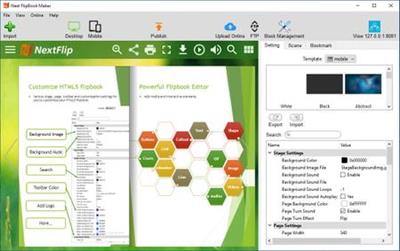
Interactive Flash/HTML5 flipbook app. Convert PDF into interactive, realistic Flash&HTML5 flipbook in minutes. Next FlipBook Maker Pro for Windows is a professional HTML5 flipbook software for both professionals and novices to create interactive digital HTML5 flipbooks. It provides an easy way for you to convert static PDF publications to digital HTML5 flipbooks and upload them online. Add buttons, links, images, local/YouTube/Vimeo video, music, chart, etc. to your HTML5 flipbook to create interactive flipbooks.

Flipbook with multimedia
Embed YouTube/Vimeo video, local video, music, image, button, chart, link, etc. to make interactive HTML5 flipbook.

HTML5 Mobile Flipbooks
Online HTML5 flipbooks can be accessed from any Mac, PC, iOS, Android or other mobile devices.

HTML5 Flipbook Online
Upload HTML5 flipbook to your website, embed to webpage, share to social networks or store on our cloud hosting.

Google Analytics/SEO
Flipbook Integration with Google Analytics. Use Google Analytics to measure the traffic HTML5 flipbooks.

Design your Flash/HTML5 flipbook
PDF to flipbook converter allows you to customize how your Flash/HTML5 flipbook looks with different templates, scenes, background images, background music, languages, buttons, logo, etc.

- Includes 12 editable flipbook templates
- Includes 18 pre-designed animated scenes
- Enable/disable full screen, bookmark, search, text selection, thumbnail, social share, zoom button, etc. as you like.
- Add flipbook logo with URL.
- Multilingual flipbook toolbar.

Online Flash/HTML5 flipbook
Flash&HTML5 Flipbook Maker offers a user-friendly hosting service that allows you to easily store and manage your online Flash&HTML5 flipbooks with an account. You can also share Flash&HTML5 flipbooks on Facebook, Twitter, LinkedIn, Google+, etc.

Mobile-friendly HTML5 flipbook
PDF to flip book conversion software supports creating mobile friendly HTML5 flipbook to view on any iPhone, iPad and Android devices.

Flipbook APP, EXE, Plugin
With this flipbook software, you can create realistic page-flipping Flash&HTML5 magazines, catalog, brochures, e-Books, etc. from static PDFs with ease. Easily share your flipbooks by exporting to HTML, ZIP, APP and EXE flipbooks.

Use the best Powerful flipbook editor
Intuitive and easy to use. Flipbook Maker provides a powerful page flip book editor. Use the convenient Page Editor to edit your Flash&HTML5 flipbooks. Embed line, shape, callout, text, image, GIF, music, local video, YouTube video, Vimeo video, chart, number icon, link and button to your Flash&HTML5 flipbook and make it more interactive.

More Features:

Flipbook logo
View HTML5 flipbook with logo in browsers of any Mac, PC, iPhone, iPad, iPod, Android and other mobile devices.

Flipbook bookmark
Keep original bookmarks from PDF or add new bookmark with this HTML5 flipbook maker.

Flipbook SEO
Accurate title, keywords, and description help your HTML5 flipbook get better ranking in search results.

Flipbook hyperlinks
Keep original links from your original PDF to your flipbook or add new links with Page Editor of this HTML5
Flipbook Maker.

Flipbook privacy settings
Add password to protect the whole HTML5 flipbook or partial pages.

Flipbook Batch Converter
If you have multiple PDF files to convert to page-turning books, use HTML5 flipbook maker's batch converter.

Search/copy flipbook content
Enable/disable flipbook content search/copy feature for your flipbook readers.

Flipbook Social Sharing
Enable sharing feature for readers to share Flash/HTML5 flipbooks to their Facebook, Twitter, LinkedIn. etc.

Operating System: Windows 7, 8/8.1, 10

Home Page -
У Вас недостаточно прав для просмотра ссылок. Войдите или зарегистрируйтесь.


Download link:​
Код:
[center][b]rapidgator_net[/b]:
https://rapidgator.net/file/d7f416b1c84e2cb3e852c6a90237e2fc/nq48a.Next.FlipBook.Maker.2.7.4.rar.html

[b]nitroflare_com[/b]:
https://nitroflare.com/view/3CAEF341D34BFC5/nq48a.Next.FlipBook.Maker.2.7.4.rar

[b]alfafile_net[/b]:
http://alfafile.net/file/8QWBD/nq48a.Next.FlipBook.Maker.2.7.4.rar[/center]

Links are Interchangeable - No Password - Single Extraction​
 
Next FlipBook Maker Pro 2.7.4

aa43301a5c80ea6ac772b2c9bfc8f758.jpg


Next FlipBook Maker Pro 2.7.4 | 324 Mb​
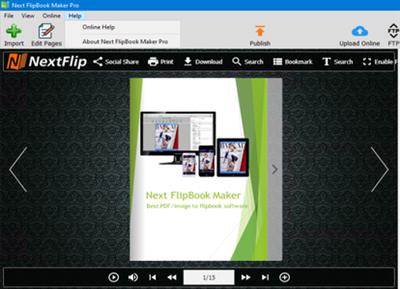
Next FlipBook Maker for Windows, a feature rich flipbook software application on Windows, helps you convert PDF/images to stunning Flash&HTML5 flipbooks with a truly immersive page turning experience. It provides a variety of customizable flipbook templates and animated swf scenes. Upload flipbook online with just one click within the Flipbook Maker.

- Convert PDF to flipbook on Windows
- Convert images to flipbook
- Preserve PDF bookmark and hyperlink
- Flipbook templates and scenes
- LAN Preview
- Create Flash/HTML5 flipbook
- Publish offline flipbook
- Upload flipbook online
- Built-in FTP
- Flipbook privacy setting

Flipbook template/scene
Convert PDF/images to digital page turning books with customizable template, animated scenes, background images.

Flash/HTML5 flipbook
Create FLASH flipbooks for desktop/laptop readers and HTML5 flipbook for mobile device readers.

Flipbook Online/Offline
Convert PDF/images to offline flipbook as html, zip, app or exe. Upload flipbook to your website or our hosting site.

Customize flipbook the way you want
Next Flipbook Maker for Windows is extremely easy to use! After importing the PDF you want to convert to flipbook, you can see the page flipping effec and how your flipbook wil llook like in the Preview window. Click LAN Preview to preview the flipbook on any other devices. If you are satisfy with the flipbook, choose your next step: publish offline flipbook(html, zip, app, exe) or Publish WordPress Plugin (Joomla Module, Drupal Module), or upload flipbook online.

Flipbook Maker also provides multiple options for you to customize the flipbook: try various pre-designed flipbook templates and animated scenes and choose the most suitable one. Optimize your flipbook with logos, background music, background images, privacy settings, etc. Choose Minime Style if you want to remove all the stuffs.

Mobile compatible
Create digital HTML5 flipbook to view on mobile devices.

Flipbook bookmark
Preserve original PDF bookmarks or add new ones.

Flipbook links
Preserve all internal or external links from the original PDF to your flipbook.

Flipbook privacy
Add password to the whole flipbook or to partial pages of the flipbook.

Flipbook background music
Add background music to your flipbook and readers can control the play.

Add your logo
Flipbook readers can know more about your business through the logo linked to your website.

Flipbook Google Analytics
Add Google Analytics ID to your flipbook and get insight into how visitors find and use your flipbook.

SEO friendly
Add title, keywords, description which are important for SEO to your flipbooks.

Bookcase
Manage all your online flipbooks with the user-friendly Flipbook Management.

Home Page:
У Вас недостаточно прав для просмотра ссылок. Войдите или зарегистрируйтесь.


Language: English

Download link:​
Код:
[center][b]rapidgator_net[/b]:
https://rapidgator.net/file/09d2c4cc2d653631595944948f0263cc/md06h.Next.FlipBook.Maker.Pro.2.7.4.rar.html

[b]nitroflare_com[/b]:
https://nitroflare.com/view/3BCC75F0BB23088/md06h.Next.FlipBook.Maker.Pro.2.7.4.rar

[b]alfafile_net[/b]:
http://alfafile.net/file/8QWeA/md06h.Next.FlipBook.Maker.Pro.2.7.4.rar[/center]

Links are Interchangeable - No Password - Single Extraction​
 
Notability 4.4 macOS

4296cf87d26bd1a0e23cc2b25ad760fa.jpg


Notability 4.4 | Multilingual | macOS | 100 mb​
Notability is a powerful note-taker to annotate documents, sketch ideas, record lectures, take notes and more. It combines, typing, handwriting, audio recording, and photos so you can create notes that fit your needs. With iCloud support, your notes are always available on iPad, iPhone and Mac. Anytime, anywhere.

- Quickly create notes by dragging documents, photos, or audio recordings from the desktop and dropping onto the library.
- Enhance notes by dragging photos, audio recordings, and PDFs from the desktop and dropping onto a note.
- Get more done with smart keyboard shortcuts.
- Handwriting and sketches can be scaled, transformed, free and constrained rotated, nudged (with arrow keys), and restyled.

*** You need to disable the System Integrity Protection (SIP) to perform the selected Application.

Compatibility: macOS 10.13 or later 64-bit
Mac App Store:
У Вас недостаточно прав для просмотра ссылок. Войдите или зарегистрируйтесь.


Download link:​
Код:
[center][b]rapidgator_net[/b]:
https://rapidgator.net/file/48a5c9d4c2158548b6fe9c91d8a49c84/y44nx.Notability.4.4.rar.html

[b]nitroflare_com[/b]:
https://nitroflare.com/view/D88586FC2F03FAE/y44nx.Notability.4.4.rar

[b]alfafile_net[/b]:
http://alfafile.net/file/8QWgj/y44nx.Notability.4.4.rar[/center]

Links are Interchangeable - No Password - Single Extraction​
 
PDF Annotator 8.0.0.814 (x64) Multilingual

1e9ba2f3e4b034f510642c92e4dbe7dd.jpg


PDF Annotator 8.0.0.814 (x64) Multilingual | 92.6 Mb​
PDF Annotator lets the user open any PDF file and add annotations, using the mouse or a Tablet PC pen, directly on the PDF file's pages. The annotated documents can then be saved directly back to PDF format. In this way, anyone can read or print the annotated PDF documents. Annotated documents can also be easily attached to emails.

Previously, annotating, commenting or proofreading a document received for review in PDF file format was possible only by using multiple software products in a row-or only by printing the document and adding comments manually. With PDF Annotator, annotations can also be added in a natural way-using a pen-but everything remains in digital format. PDF Annotator allows commenting of PDF files in a single step.

Annotation Manager in the Sidebar
* Get a quick overview of all annotations in a document.
* Navigate to any annotations quickly.
* Perform operations on any selection of annotations.

Filter Annotations
* Only display a filtered subset of your annotations in the new Annotations sidebar.
* Filter by type, color, or page number.

Print Annotations Overviews
* Print a detailed list with small previews of every single annotation in a document.
* Print an overview only outlining the pages containing annotations.

Operating System: Windows 7, 8.1, 10 (64-bit only)

Home Page -
У Вас недостаточно прав для просмотра ссылок. Войдите или зарегистрируйтесь.


Download link:​
Код:
[center][b]rapidgator_net[/b]:
https://rapidgator.net/file/83c4914a9cff6554827f8a7e08ceab7a/elvs0.PDF.Annotator.8.0.0.814.x64.Multilingual.rar.html

[b]nitroflare_com[/b]:
https://nitroflare.com/view/8E123CCBA42F171/elvs0.PDF.Annotator.8.0.0.814.x64.Multilingual.rar

[b]alfafile_net[/b]:
http://alfafile.net/file/8Q27z/elvs0.PDF.Annotator.8.0.0.814.x64.Multilingual.rar[/center]

Links are Interchangeable - No Password - Single Extraction​
 
PointWise 18.4 R1 build 2020-10-08

b3ea6cf11214b0c5f2f93870311af202.jpg


PointWise 18.4 R1 build 2020-10-08 | 1.7 Gb​
The Pointwise CFD product team is pleased to announce the availability of Pointwise 18.4 Release 1. The latest release includes automatic surface meshing, the first component of a planned suite of automation features called Flashpoint.

Pointwise version 18.4 R1 Release Notes - Date: October 2020

New Features
- Unstructured domains can be generated automatically using the first in a suite of tools we call Flashpoint for models by specifying surface meshing resolution goals and grid quality constraints. In addition, target edge lengths can be visualized prior to meshing, local sizing can be applied for specific quilts, and anisotropic stretching enabled or disabled depending on boundary curvature classification.
- A new option has been added to the Diagonalize command which links a structured domain to the newly created triangulated unstructured domain. Any changes to the connectors of either results in both being updated immediately in a manner that retains the structured nature of the unstructured domain.
- Diagonalized domains can now automatically replace structured domains in an unstructured block.
- The Size Field tab has been added to Grid, Solve for domains. Grid entities and sources can now influence domain initialization without the domain being part of a block.
- Aspect Ratio and Maximum Aspect Ratio have been added as T-Rex boundary conditions. These will set the initial step size to a specific aspect ratio either based upon the largest cell on the edge, or the cell itself.
- The import and export of the Stanford PLY and Wavefront OBJ discrete file formats are now supported for both grid and database.
- Pointwise tutorials have now been split off to their own download file. This dramatically decreased the size of the Pointwise installer to under 300 MB.
- Glyph functions have been added to print selection links to XYZ points, entities, and files in the Messages window.
- Boundary and Volume Condition data can be imported for some formats. The user manual reflects these capabilities.

PW-17985 Two database models were unable to be trimmed by a plane.
PW-18654 An incorrect error was being printed when three models failed to join.
PW-19670 Errors for each model that failed to assemble were not being printed.
PW-20103 Wing-Pylon tutorial now has full layers developed around the entire wing.
PW-21989 A large number of boundary conditions caused a Pointwise file to take excessively long to open.
PW-22206 A Pointwise file was unable to be opened because the process was being incorrectly divided among too many processors.
PW-22275 CAE Export would fail depending on the Full Layers and Push Attributes T-Rex parameters
PW-22293 A volume grid was not initializing T-Rex layers correctly resulting in large maximum included angles.
PW-22535 Fluent files with slight variations to format would not import
PW-22602 There was a typo in the glyph reference manual that prevented a piece of code from being executed when run in Pointwise.
PW-22668 Panels were disappearing on a Mac when Pointwise was being hidden.
PW-22786 Misaligned volume cells in a problematic corner cause CAE export error
PW-22853 FUN3D export creates phantom internal face cell
PW-22866 Typo on the T-Rex boundary conditions page of the User Manual
PW-22872 Plugin fails to compile on MacOSX
PW-22883 An unexpected exit occurred when appending an older Pointwise project file
PW-22893 Removed distributions of Fortran and Intel math libraries no longer supported
PW-22898 Splitting an unstructured block was causing an adjacent unstructured block to be emptied
PW-22925 Free-stream, Transient, and Attach STAR-CD boundary conditions are now exported
PW-22950 Accessing panels and menus was taking longer than expected for a medium (3GB) file.
PW-22960 Added support for importing surface-only ANSYS Fluent grid files
PW-22961 Progress messages were not available when exporting a high order mesh in batch mode
PW-23023 Initializing a voxel block led to an unintentional exit
PW-23048 A voxel block was incorrectly reporting a "Voxel block is invalid" error.
PW-23054 With only a source selected, entering the Build Farfield, Voxel tool failed to create a farfield.
PW-23065 A voxel block was not initializing with the, "One or more entities could not be initialized."
PW-23068 An intersection that worked in previous versions stopped being recognized in V18.3R2.
PW-23086 Fixed an issue where some unstructured block initialization failures would not trigger problem coordinates.
PW-23089 In Create, Patch, selecting specific boundaries was causing an unexpected exit.
PW-23095 A block was shown to be initialized, however, the interior cells could not be examined.
PW-23096 A domain could be re-initialized but would not update until Apply was used.
PW-23099 The Grid, Solve, Size Field panel had an inconsistency between a decimal and a comma when using an alternate numbering convention.
PW-23127 The Examine drop down menu in Grid, Solve would become empty and unselectable after block initialization.
PW-23128 A source cloud caused strange adaption behavior to domains when using Initialize Boundary Only.
PW-23158 A structured extrusion caused a memory allocation error followed by an unexpected exit.

Pointwise is a software system for the generation of two-dimensional (2D) and three-dimensional (3D) grids. Many of the grid generation methods used in Pointwise were developed and fine-tuned over the past 25 years in Pointwise's predecessor, Gridgen. Pointwise combines the grid generation expertise and history embedded in Gridgen with more modern software engineering and graphical interfaces to make grid generation as simple as possible.

The product features a modern software framework and workflow and provides tools like 64-bit support, multi-threading, and Windows/Linux/Mac portability.

Pointwise, the Choice for CFD Mesh Generation.

Pointwise, Inc. is solving the top problem facing computational fluid dynamics (CFD) today - reliably generating high-fidelity meshes. The company's Pointwise software generates structured, unstructured, overset and hybrid meshes; interfaces with CFD solvers such as ANSYS FLUENT, STAR-CCM+, OpenFOAM, and SU2 as well as many neutral formats, such as CGNS; runs on Windows, Linux, and Mac, and has a scripting language, Glyph, that can automate CFD meshing. Manufacturing firms and research organizations worldwide have relied on Pointwise as their complete CFD preprocessing solution since 1994.

Product: PointWise
Version: 18.4 R1 build 2020-10-08
Supported Architectures: x64
Website Home Page :
У Вас недостаточно прав для просмотра ссылок. Войдите или зарегистрируйтесь.

Language: english
System Requirements: Windows / Linux / macOs*
Size: 1.7 Gb

Platform Support

Minimum Requirements for All Platforms:

- 2 GB RAM (8 GB recommended)
- 2 GB disk space
- Ethernet card
- OpenGL capable color display monitor
- 1280x1024 screen resolution (4K monitor support now included)
- Graphics adapter supporting 3D hardware-accelerated OpenGL and 24-bit RGB double-buffering
- Up-to-date graphics accelerator drivers

Note: Pointwise V18.0 R1 and later will not be supported on 32-bit platforms.

Microsoft Windows
- Windows 8.1
- Windows 10
Linux
- CentOS 6
- Red Hat Enterprise Linux 6
- SUSE Enterprise Linux Desktop 12 SP1
- Ubuntu Desktop 14.04
MacOsx
- El Capitan 10.11
- Sierra 10.12
- High Sierra 10.13

Download link:​
Код:
[center][b]rapidgator_net[/b]:
https://rapidgator.net/file/cb7d54b60c306b25218efd98a8fd2e81/j1vj2.linux64.rar.html
https://rapidgator.net/file/769f2a03fb12d732ea9c6a2f96e7d14c/j1vj2.macosx.rar.html
https://rapidgator.net/file/67bf7b511847668524e11460b8e5e930/j1vj2.tutorials.rar.html
https://rapidgator.net/file/385cd1da26970a494a9038c12d1df5e3/j1vj2.win64.rar.html

[b]nitroflare_com[/b]:
https://nitroflare.com/view/F99B14D15ABD2B0/j1vj2.linux64.rar
https://nitroflare.com/view/4B1F2C41FB80C11/j1vj2.macosx.rar
https://nitroflare.com/view/419D1CDCBE19FC3/j1vj2.tutorials.rar
https://nitroflare.com/view/94333FA74B63EB5/j1vj2.win64.rar

[b]alfafile_net[/b]:
http://alfafile.net/file/8Q2mw/j1vj2.linux64.rar
http://alfafile.net/file/8Q2bW/j1vj2.macosx.rar
http://alfafile.net/file/8Q2bP/j1vj2.tutorials.rar
http://alfafile.net/file/8Q2j2/j1vj2.win64.rar[/center]

Links are Interchangeable - No Password - Single Extraction​
 
Richardson Software RazorSQL 9.2.2

d4e105cd1876980881a19a448aad9851.jpg


Richardson Software RazorSQL 9.2.2 | 127.2 Mb​
RazorSQL is an SQL query tool, database browser, SQL editor, and database administration tool for Windows, Mac OS X, Linux, and Solaris.

Advanced Connection Features
* Built-in support for DB2, Derby / JavaDB, Firebird, FrontBase, HSQLDB, Informix, MySQL, OpenBase, Oracle, PostgreSQL, SQLite, SQL Server, Sybase Adaptive Server Enterprise, and Sybase SQL Anywhere. Also can connect to any database that supports JDBC or ODBC (Windows only) such as Access, Daffodil, H2, Ingres, Interbase, Mimer SQL, Mckoi, Paradox, Pervasive, Pointbase, Solid, and Teradata.
* MySQL, PostgreSQL, and MS SQL Server PHP bridges for connecting to MySQL, PostgreSQL, and SQL Server databases via PHP. Allows remote access to MySQL, PostgreSQL or SQL Server databases running behind PHP enabled web servers
* A MS SQL Server ASP bridge for connecting to SQL Server databases via ASP. Allows remote access to SQL Server databases running behind ASP enabled web servers
* A RazorSQL JDBC Bridge for connecting to databases via a JEE/J2EE Application Server or Servlet Container

Database Tools Database and SQL Tools
* Create, Alter, and Drop Tables and Views
* *Create and Drop Indexes and Sequences
* *Create and Drop Stored Procedures, Functions, Packages, and Triggers
* *Create and Drop Databases and Users
* Edit Table Tool
* *Edit Stored Procedures, Functions, Packages, and Triggers
* Describe Tables and Views
* Generate DDL Tool for generating table, view, and index DDL.
* View contents of Tables and Views
* *View contents of Stored Procedures, Functions, Packages, and Triggers
* SQL Query Builder for Select, Insert, Update, and Delete Statements
* Export Data in text, HTML, XML, Excel, delimited file format or as insert statements
* Import Data into tables from delimited files, Excel files, or fixed width files
* Execute Stored Procedures
* *SQL Explain Plan Tool
* SQL Query Scheduler
* Compare Table Data or Query Results
* File Compare Tool
* Zip Utility for viewing/extracting Zip and Jar files
* File System Browser
* Database Meta Data Viewer (Functions, Types, etc.)
* Command Line Interface for running RazorSQL tools from the command line.

SQL Editor SQL Editor
* Syntax Highlighting for SQL, PL/SQL, TransactSQL, SQL PL, Batch, C, COBOL, CSS, C++, C#, Java, JavaScript, JSP, HTML, PHP, Perl, Python, Ruby, Shell Script, and XML
* Auto Completion for tables and columns
* Automatic Column Lookup
* Automatic Table Lookup
* SQL Formatter
* Support for parameterized queries
* Execute, Execute Fetch All, and Execute Batch functions
* Multi-Tabular Display of Query Results
* Sortable Query Results
* Filterable Query Results
* Searchable Query Results
* SQL History for All Queries, and Query Logging Per Connection
* Auto-function lookup for all supported programming languages and auto-method lookup for Java and JSP
* Query List, Tag List, and Function / Method List options for clickable display of queries, tags, or functions / methods contained in the editor
* File tools such as head, tail, get section, search / regex search, move, copy, rename, delete, size, and get info.
* Key Ahead functionality for one-click population of user-defined text
* Regular Expression Find, Find/Replace, Find/Replace in Files
* Bracket Matching, Tag Matching, and Goto Line commands
* Printing Support for Editor Content and Query Results
* Support for dozens of file encodings
* Built-in and Custom User Templates
* Connection Keep-Alive
* Plugin API (Allows users to add custom functionality to RazorSQL)

Database Browser Database Browser
* A tree structure to navigate database objects
* Use RazorSQL provided database specific system queries or user supplied queries for database navigation, or navigate the database structures using the default JDBC/ODBC driver settings.
* Single click content viewing on tables, views, etc.
* Column information including column name, keys, data type, nullable information, etc.
* *Displays information on objects such as procedures, functions, triggers, indexes, constraints, sequences, etc.
* Single-click generation of DDL for tables, views, and indexes.
* Search tables and view data.
* Single-click generation of SQL select, insert, update, and delete queries.

Installation Instructions and Requirements
Windows (Native Installer)
For best results, use of one of the following operating systems is recommended: Windows 10, Windows 8, Windows 7, Windows Vista, Windows XP, Windows Server 2008 or 2003, or Windows 2000. The 32-bit version of RazorSQL runs on both 32-bit and 64-bit versions of Windows. The 64-bit version only runs on 64-bit versions of Windows. If using ODBC drivers to connect, make sure to use the version of RazorSQL that matches up with the architecture of the ODBC driver. For example, if using 32-bit ODBC drivers, the 32-bit version of RazorSQL is required.

Home Page -
У Вас недостаточно прав для просмотра ссылок. Войдите или зарегистрируйтесь.


Download link:​
Код:
[center][b]rapidgator_net[/b]:
https://rapidgator.net/file/e60bbe0711a476d24ff8575e9be942dc/ilqsh.Richardson.Software.RazorSQL.9.2.2.rar.html

[b]nitroflare_com[/b]:
https://nitroflare.com/view/A4AB97621A6F0CB/ilqsh.Richardson.Software.RazorSQL.9.2.2.rar

[b]alfafile_net[/b]:
http://alfafile.net/file/8Q2mB/ilqsh.Richardson.Software.RazorSQL.9.2.2.rar[/center]

Links are Interchangeable - No Password - Single Extraction​
 
SoftColor Automata Pro 1.9.986

0cde146beac6b33cd20080d8dc7fd063.jpg


SoftColor Automata Pro 1.9.986 | 43.9 Mb​
SoftColor Automata is a workflow automation software for advanced color correction, image editing and color management. Automata works independently on the background and can work with multiple simultaneously workflows.

Automata can have unlimited number of different workflows and it has support for file logistics operations. It loads automatically new and changed image files from the input folder and after processing it saves images to the output folder.

Automata's automatic color correction algorithm corrects color balance, exposure and contrast problems from original image in single step. White balance, exposure and contrast adjustments are processed as separate layers. Automata has support for standard ICC profile based color management.

Automata has tools and filters for resizing, cropping, rotating, straightening, sharping and de- noising the original image. Image editing tools and filters can be used together with color correction or separately.

Automata uses nondestructive layer based processing for color and image adjustments. This gives to you a full control to tune automatic correction adjustments.

You can also chain Automata's workflows to work together.

Operating System: Windows 7, 8/8.1, 10

Home Page -
У Вас недостаточно прав для просмотра ссылок. Войдите или зарегистрируйтесь.


Download link:​
Код:
[center][b]rapidgator_net[/b]:
https://rapidgator.net/file/239d97892d1cf518a9b61926d8d6f6c9/3tpon.SoftColor.Automata.Pro.1.9.986.rar.html

[b]nitroflare_com[/b]:
https://nitroflare.com/view/4F128106C908E1A/3tpon.SoftColor.Automata.Pro.1.9.986.rar

[b]alfafile_net[/b]:
http://alfafile.net/file/8Q2yB/3tpon.SoftColor.Automata.Pro.1.9.986.rar[/center]

Links are Interchangeable - No Password - Single Extraction​
 
Telestream Wirecast Pro 14.0.3 (x64) Multilingual

1268856b2b093538497a4ee024d4853e.jpg


Telestream Wirecast Pro 14.0.3 (x64) Multilingual | 249.9 Mb​
Easily stream professional-looking video with Wirecast. What are you waiting for? Communicate your message to the world with Wirecast, the award-winning video production software. Go live with just your webcam or connect multiple cameras, scoreboards, graphics and remote guests. Wirecast makes it easy to stream amazing-looking live and pre-recorded video to Facebook Live, YouTube, Twitter, Periscope and more.

Education
Live stream graduations, award ceremonies, student news and sports, guest lectures, and classroom lessons to your community. Wirecast is used at every level of education.

Houses of Worship
Engage and expand your remote congregation with live streams of your services and events. Reach out and touch more people.

Live Event Production
Live stream conferences, concerts, interviews and more. Wirecast provides everything you need to stream professional live events.

Sports
Capture the action! Use Wirecast's professional features like clocks, scoreboards and instant Replay to bring your audience to the game.

Television, Radio & News Broadcasters
Stream your programming to OTT and social platforms or augment your premium content with second-screen live and interactive offerings.

Digital Marketing & Social Media
Wirecast is the perfect live video marketing tool. Engage real-time with customers, fans and prospects using Wirecast's native integrations with Facebook Live, Twitter, Periscope, YouTube and more.

Professional live broadcasting features:

Easy to Use
Mix and swap video and audio shots with the click of a mouse. Move, drag, and resize sources and stack them in any order so you can get the look you want.

Unlimited Destinations
Stream to Facebook Live, Twitter, YouTube, Vimeo Live, or ANY RTMP destination. Stream to more than one at a time.

Stream & Record
Stream and record at the same time. Great for archiving or off-line editing, record MP4 or MOV files to any drive.

Unlimited Video Sources
Cameras, microphones, webcams, IP cams, capture cards, and more. See a full list of compatible third-party capture devices.

Conferencing & Remote Production
Rendezvous peer-to-peer conferencing comes built-in to Wirecast. Send guests a link to join your live broadcast.

Beautiful Graphics & Animated Titles
Over 100 built-in graphics and titles. NewBlue Titler Live, free with Wirecast, is the best way to display animated graphics and titles with Wirecast.

Social Media Comments
Built in Twitter comment curation and display. Display Facebook comments in animated titles using NewBlue Titler Live Express or NewBlue Titler Live Social.

Replay, Scoreboards, Clocks & Timers
Great for sports producers. Wirecast has professional features let your live viewers follow the action in the moment, and never miss an important play.

Professional Audio
Multi-channel audio ingest, support for ASIO, WASAPI and CoreAudio compatible devices. Mix up to 8 independent audio tracks, and add FX and processing.

Free Wireless Camera App
Use Wirecast Go (iOS only) to bring in live mobile video from any Wi-Fi or LTE (cellular) connection.

Desktop, NDI & Web Capture
Capture a variety of IP sources or anything on your computer screen or other computers. Automatically detect NDI and Syphon sources. Built-in web-browser can display live web pages.

Controllers
Check out the new X-keys controller for Wirecast Mac or Windows. See a full list of devices.

System Requirements:
- Windows 10 version 1803 or higher (64-bit).
- i5 dual-core @ 2.3GHz
- 4GB RAM
- 2GB2, 7200 RPM for record to disk
- Intel HD3, DirectX 11 capable

Languages Supported:
- English
- Brazilian Portuguese
- Chinese (Simplified)
- Czech
- Dutch
- French
- German
- Italian
- Japanese
- Korean
- Spanish
- Swedish

Home Page -
У Вас недостаточно прав для просмотра ссылок. Войдите или зарегистрируйтесь.


Download link:​
Код:
[center][b]rapidgator_net[/b]:
https://rapidgator.net/file/ea8c0992f1783c1d9be28a1755f8ca6b/e37x8.Telestream.Wirecast.Pro.14.0.3.x64.Multilingual.rar.html

[b]nitroflare_com[/b]:
https://nitroflare.com/view/4DCE2F31B97BAA4/e37x8.Telestream.Wirecast.Pro.14.0.3.x64.Multilingual.rar

[b]alfafile_net[/b]:
http://alfafile.net/file/8Q27i/e37x8.Telestream.Wirecast.Pro.14.0.3.x64.Multilingual.rar[/center]

Links are Interchangeable - No Password - Single Extraction​
 
Tipard DVD to iPad Converter 9.2.26 Multilingual

f8d9152ef6b320bf53ecdbef3d9b6d37.jpg


Tipard DVD to iPad Converter 9.2.26 Multilingual | 39.2 Mb​
Tipard DVD to iPad Converter provides you with powerful function of ripping DVD to iPad video formats and extracting audio from DVD file to any popular audio format as you like. It also possesses mighty editing functions. It enables you to crop, trim, merge and watermark video to get customized video effect. Also you can adjust the video effect on brightness, contrast and saturation. Plus, after comprehensive upgrade, DVD to iPad Converter has adopted NVIDIA® CUDA™ technology , AMD APP Acceleration and multi-core CPUs supporting technology, the converting performance is superior than ever before.

Rip DVD to iPad video formats
Extract iPad audio file from any DVD
Edit your video- trim, crop, merge, watermark.
Preview video and capture image

Powerful DVD to iPad converting functions. Convert any DVD to iPad video and audio format

Convert DVD to iPad
Tipard DVD to iPad Converter enables you to convert any DVD to iPad compatible video formats, such as MPEG-4, H.264/MPEG-4 AVC, MOV, and M4V.

Extract audio from DVD
This DVD to iPad converting software can help you extract audio from DVD file and convert it to AAC, MP3, WAV, AIFF, M4A audio formats.

Capture image
You are endows the ability to capture your favorite image of the video frame and save it in the default folder.

System requirements:
OS Supported: Windows XP (SP2 or later), Windows Vista, Windows 7, Windows 8, Windows 10
CPU: 1.2GHz Intel or AMD CPU, or above
RAM: 1G RAM or more

Home Page -
У Вас недостаточно прав для просмотра ссылок. Войдите или зарегистрируйтесь.


Download link:​
Код:
[center][b]rapidgator_net[/b]:
https://rapidgator.net/file/e5d419aaa1f89e178bc4cada8e77fd8a/c44x1.Tipard.DVD.to.iPad.Converter.9.2.26.Multilingual.rar.html

[b]nitroflare_com[/b]:
https://nitroflare.com/view/12769434D3F4D4A/c44x1.Tipard.DVD.to.iPad.Converter.9.2.26.Multilingual.rar

[b]alfafile_net[/b]:
http://alfafile.net/file/8Q27m/c44x1.Tipard.DVD.to.iPad.Converter.9.2.26.Multilingual.rar[/center]

Links are Interchangeable - No Password - Single Extraction​
 
Tipard HD Video Converter 9.2.26 Multilingual

918d9baa8fdb9f7b9c280ba221c8c02e.jpg


Tipard HD Video Converter 9.2.26 Multilingual | 39.1 Mb​
Tipard HD Video Converter can convert 4K video, 1080p HD video, which recorded from 4K or AVCHD camcorders, such as TS, MTS, M2TS, MXF, AVI, WMV, MOV and even more. The converted video files are compatible with media players and portable devices. It becomes a simple thing to enjoy HD videos on iPad, iPhone, iPod, HTC One, Samsung Galaxy series, Android devices and others. It also supports importing SD video.

Convert 4K UHD video to 1080p HD video with amazing converting speed
Convert 4K and 1080p HD video to MP4, AVI, FLV, MKV, WMV, WebM and more
Extract audio from HD and SD video files
Edit video file by trimming, cropping, adding watermark, merging etc

System Requirements:
OS Supported: Windows XP (SP2 or later), Windows Vista, Windows 7, Windows 8, Windows 10
CPU: 1.2GHz Intel or AMD CPU, or above
RAM: 1G RAM or higher recommended

Home Page -
У Вас недостаточно прав для просмотра ссылок. Войдите или зарегистрируйтесь.


Download link:​
Код:
[center][b]rapidgator_net[/b]:
https://rapidgator.net/file/b8a6b38b8ba49c833fc8675bd901b1b7/580sk.Tipard.HD.Video.Converter.9.2.26.Multilingual.rar.html

[b]nitroflare_com[/b]:
https://nitroflare.com/view/839F98819396276/580sk.Tipard.HD.Video.Converter.9.2.26.Multilingual.rar

[b]alfafile_net[/b]:
http://alfafile.net/file/8Q2yo/580sk.Tipard.HD.Video.Converter.9.2.26.Multilingual.rar[/center]

Links are Interchangeable - No Password - Single Extraction​
 
Tipard MKV Video Converter 9.2.22 Multilingual

7820df93a441633c3e06958b49af8478.jpg


Tipard MKV Video Converter 9.2.22 Multilingual | 39.15 Mb​
Tipard MKV Video Converter can help you convert MKV files to the formats fitting your portable players. This best MKV Video Converter can easily convert MKV, MPEG, HD MPEG, etc. to AVI, MPG, MP4, HD videos... and extract audio from MKV and other videos to AAC, AC3, AIFF, AMR, AU, MP3, M4A, MP2, OGG, WMA, WAV etc. The strong editing functions, such as splitting, cropping, merging, watermarking... video, accompanied with Tipard MKV Video Converter can further perfect your converted files. Plus, with newly adopted NVIDIA® CUDA™ technology Nvidia and multi-core CPUs supporting technology, the converting speed is 6X faster now.

Define output video. Output MKV file to any video/audio at will

Support converting MKV to popular videos and HD videos
Tipard MKV Video Converter gives you a hand to get what you want video/audio formats, including HD WMV, HD AVI from MKV video formats and other popular, even from the High Deification videos easily.

Extract audio from MKV
You are allowed to convert MKV and other video format to AAC, AC3, AIFF, AMR, AU, FLAC, MP3, M4A, etc. audio format.

Capture favorite pictures
Capture your favorite pictures when preview your video and you can choose to save it as JPEG, GIF or BMP formats. You can also set the saved folder or it will be saved automatically in the defaulted folder.

Output Settings. Adjust output settings

Set the Video Encoder, Resolution, Frame Rate, Video Bitrate; Set the Audio Encoder, Sample Rate, Channels, Audio Bitrate. You also can save all the output settings as your preference, which is saved in the user-defined column automatically.

Select what you want profile
Tipard MKV Video Converter sorts the profile by the devices, General video, General audio, HD videos, etc, then it's easy for you to find what you want one.

Output one file to different formats with only one conversion
Get multiple files with the same content at one time by adding multiple profiles to one source simultaneously.

Select audio track and subtitle
Gives you the ability to select you need audio track or subtitle for your output video.

System Requirements:
OS Supported: Windows 2003/XP and Windows Vista, Windows 7, Windows 8, Windows 10
CPU: 800MHz Intel or AMD CPU, or above
RAM: 512MB RAM or more

Home Page -
У Вас недостаточно прав для просмотра ссылок. Войдите или зарегистрируйтесь.


Download link:​
Код:
[center][b]rapidgator_net[/b]:
https://rapidgator.net/file/521d8ab5e75f8d3c9e6c938e77b302e0/grqd0.Tipard.MKV.Video.Converter.9.2.22.Multilingual.rar.html

[b]nitroflare_com[/b]:
https://nitroflare.com/view/6E1F15D7967D591/grqd0.Tipard.MKV.Video.Converter.9.2.22.Multilingual.rar

[b]alfafile_net[/b]:
http://alfafile.net/file/8Q2mf/grqd0.Tipard.MKV.Video.Converter.9.2.22.Multilingual.rar[/center]

Links are Interchangeable - No Password - Single Extraction​
 
Tipard MP4 Video Converter 9.2.22 Multilingual

1497c08030a260d57bd7781ad8a091f1.jpg


Tipard MP4 Video Converter 9.2.22 Multilingual | 39.14 Mb​
Tipard MP4 Video Converter can support converting abundant video formats such as AVI, MKV, MOV, FLV, M4V, MPEG, VOB, etc to MP4, and convert any HD videos to MP4 easily. Also, it can convert any downloaded online video to MP4 with ease. In addition, the software can extract audios from any videos including online video and convert them to general audios (AAC, AC3, MP3, M4A, etc.) and lossless audios (FLAC, WAV, WMA, etc). With simple and smart interface, the software makes MP4 conversion fast and easy.

Convert any online video, MKV, WMV, MOV, AVI, etc. to MP4, WMV, AVI, MOV, MP3 and so on
This MP4 Video Converter has professional functions of converting any videos to MP4, and it supports such as MPG, MPEG, MPEG 2, VOB, M4V, AVI, FLV, WMV, MKV, MOV, etc. to MP4 video. It also supports HD video to MP4 converting, like HD MTS to MP4, HD M2TS to MP4 and so on. Besides, if you need to convert downloaded online video to MP4 or other formats, this Online Video to MP4 Converter also help you a lot. For free enjoyment, its abundant supporting formats makes the converter compatible with most present popular portable devices, like iPhone XS/XS Max/XR/X/8/7, iPhone SE, iPhone 6s, iPhone 6s plus, iPhone 6, iPhone 6 plus, iPhone 5/5s/5c, iPod, iPad Pro, iPad Air, Samsung Galaxy Series and more Android phone and multimedia players, etc. Any Video to MP4 Converter also can extract and convert audios from online video or MP4 files to MP3, AAC, FLAC, ALAC, WMA and more. This function makes you save the classical original music of the videos permanently.

High Speed and Flexible Settings
With the NVIDIA CUDA & AMD APP encoding technology, the speed of converting online video to MP4 is 6X faster now. The newly adopted NVIDIA® CUDA™ technology can totally accelerate your PC GPU, so as to finish your converting task with ultra-high speed and best output quality. This MP4 and online video converter also supports multi-core CPUs, which can take full advantage of your computer power to accelerate the conversion speed. In addition, you can choose the settings of Video Encoder, Resolution, Frame Rate, Video Bitrate, and you can also directly customize the settings of Audio Encoder, Sample Rate, etc. For example, you can input the Resolution as the form of 1080*1920. So feel free to download and use the best MP4 Converter with ease.

Magical editing functions
Powerful editing functions of this Any MP4 Video Converter are good enough for users who want to change the video effects in their own style. The MP4 Converting software provides numerous editing functions to help you make unique videos. You can trim video or audio to cut a classic clip of a masterpiece to save time on which you like, and you can change playing region by Crop. To make your video special, it is also available to reset the Brightness, Saturation and Contrast of the video by Effect. You can add watermark to your online video and MP4 video, and you can customize the watermark font-family, font-style, color, etc. Beyond that, you can make several video files together into one file by Merge functions.

User-friendly experience
Any Video to MP4 Conversion app is a convenient Converting Software and a great Video Editor, and it does not require professional knowledge and technical operation. The fantastic software provides you simple interface and easy operation, and even beginners are able to convert and edit the videos effortlessly.

System Requirements:
OS Supported: Windows XP (SP2 or later), Windows Vista, Windows 7, Windows 8, Windows 10
CPU: 1.2GHz Intel or AMD CPU, or above
RAM: 1G RAM or higher recommended

Home Page -
У Вас недостаточно прав для просмотра ссылок. Войдите или зарегистрируйтесь.


Download link:​
Код:
[center][b]rapidgator_net[/b]:
https://rapidgator.net/file/81c41ab3c49c87196ef154c1394cb331/94pa7.Tipard.MP4.Video.Converter.9.2.22.Multilingual.rar.html

[b]nitroflare_com[/b]:
https://nitroflare.com/view/93E01128B46B868/94pa7.Tipard.MP4.Video.Converter.9.2.22.Multilingual.rar

[b]alfafile_net[/b]:
http://alfafile.net/file/8Q2EE/94pa7.Tipard.MP4.Video.Converter.9.2.22.Multilingual.rar[/center]

Links are Interchangeable - No Password - Single Extraction​
 
Tipard MTS Converter 7.1.62 Multilingual

03073fcd94888cdcc9a1c62233406a34.jpg


Tipard MTS Converter 7.1.62 Multilingual | 39.1 Mb​
Tipard MTS Converter gives you the power to convert Any Camcorder AVCHD MTS videos files from AVCHD/HD cameras/camcorder to AVI, MP4, MKV, WMV, FLV, 3GP, etc. compatible with Apple/Android devices like iPhone and editing software like iMovie.

Convert MTS/HD MTS to any HD video, AVI, MP4, MOV, M4V, MKV, Divx, Xvid, FLV, etc. formats
Easily convert MTS video for editing in popular video editors such as Adobe Premier Pro, iMovie, Final Cut Pro, etc.
Extract and convert MP3 audio from MTS videos or convert between audio formats like WMA, WAV, etc.
The converted .mts profile are supported by iPhone, iPad, iPod, Samsung, HTC, LG, more Android devices and media players

Convert MTS files to a wide range of video/audio formats like MP4, MOV and MP3 on Windows
Tipard MTS Video Converter is well designed for you to convert any MTS or HD MTS files to MOV, M4V, AVI, MP4, WMV, MKV, even HD videos, etc. and extract audio from .mts files and convert them to MP3, WMA, OGG, AAC, M4A, WAV and AC3 for your music enjoyment. It accepts TS, M2TS and other video or audio files recorded from Sony camcorders, JVC camcorders, Canon camcorders and Panasonic camcorders as inputting file, as well as it can converts other MP4/AVI/WMV and more video formats to MTS easily.

When converting, you can select the output format according to your device, such as iPhone 11/11 Pro/11 Pro Max, iPhone XS/XS Max/XR/X, iPhone 8/8 Plus, iPhone 7/7 Plus, iPhone 6/6 Plus, iPad Pro/iPad Air/iPad mini, iPod, Samsung, HTC, PSP, PS3, more Android devices, Zune and other hundreds of digital devices/players. Besides portable devices and players, you can convert any MTS video to special movie editors such as Adobe Premier Pro, Sony Vegas, Adobe After Effects, iMovie and Final Cut Pro, etc.

Free practical and powerful editing functions
With the MTS file Converter, you can enhance video quality, rotate video direction, remove the black edges around your movie video and customize the aspect ratio for better enjoyment. You can merge several scattered MTS segment video into whole one for the long movie enjoyment. You can trim MTS video segment or remove unwanted part by Trim function. Either you can drag the two slider blocks by mouse, or set the start and end time precisely. You can add your favorite picture or image as watermark on the video to make your video special. It enables you to customize the content of the watermark as you like. For example, change the font-family, size, color as well as the pictures. You are able to improve your video effect by adjusting Brightness, Contrast, Saturation, Hue and Volume. Download this MTS video editor and enjoy the powerful editing function freely.

Free set output parameters
You can free set the output video parameters with this MTS Converter. You can set multiple output formats for one video at once. This software can also help you convert several MTS videos to one file with faster and easier conversion process. For video resolution, you can input your own one if the provided choices cannot meet your needs. Then the well-customized settings can be saved as User-Defined profile for your later use of directly choosing it. You can adjust more detailed video and audio settings, such as set video Encoder, Frame Rate, Video Bitrate as well as set Audio Encoder, Sample Rate, Channel, Audio Bitrate according to your preference.

Friendly user experience and easy to use
The clear and simple interface of this MTS Converting app gives you so convenient operation that even beginners can finish the converting process within few seconds by following easy-to-understand introductions. There is a built-in player, which supports previewing the source video and output video at the same time. Thus, you can see the converted video effect more clearly. This video converter provides you with a function of upgrading. So once connected the Internet, your computer will detect automatically if there are upgrade information. The auto-upgrade function will always you own the newest version of the program.

System Requirements:
OS Supported: Windows XP (SP2 or later), Windows Vista, Windows 7, Windows 8, Windows 10
CPU: 1.2GHz Intel or AMD CPU, or above
RAM: 1G RAM or higher recommended

Home Page -
У Вас недостаточно прав для просмотра ссылок. Войдите или зарегистрируйтесь.


Download link:​
Код:
[center][b]rapidgator_net[/b]:
https://rapidgator.net/file/12f97ae059952aec963304eed6cbbdb9/yb8xt.Tipard.MTS.Converter.7.1.62.Multilingual.rar.html

[b]nitroflare_com[/b]:
https://nitroflare.com/view/DD081BADF4A0876/yb8xt.Tipard.MTS.Converter.7.1.62.Multilingual.rar

[b]alfafile_net[/b]:
http://alfafile.net/file/8QWgv/yb8xt.Tipard.MTS.Converter.7.1.62.Multilingual.rar[/center]

Links are Interchangeable - No Password - Single Extraction​
 
Назад
Сверху