• Старая версия форума работает в архивном режиме www.old.nado.in

All mitsumi'1s Applications !! (updated daily)

  • Автор темы Автор темы mitsumi1
  • Дата начала Дата начала
IDimager Photo Supreme 5.6.0.3188 Multilingual

5911d45a9a228afebc004d08c694d39e.jpg


IDimager Photo Supreme 5.6.0.3188 Multilingual | 107.5 Mb​
Do you own a digital camera or do you have a large collection of images to manage? Then in no time finding that one image you're looking for becomes a chore. But Photo Supreme can change all that. Photo Supreme's integrated cataloging and management features will help you quickly find and work with your desired image.

Highlights

Advanced search capabilities
When looking for that one image, Photo Supreme will help you with deep text searches, tag searches, duplicate detection, similarity detection, dynamic search combinations and advanced filtering.

Limit access to those who need it
The Server Edition allows you to control who can access your Catalog. You control who can add or delete. You control who sees what in their screen.

Multi tab browsing
Photo Supreme brings tabbed browsing to your image archive. Take advantage of having multiple sets open at the same time.

Import & ingest images
Import your images in your Catalog the way you want. You can define naming conventions, apply metadata on import, version rules, and of course copy files.

Keyword tagging
Tagging your images has never been easier. GEO tagging, parent cascading, face tagging, and automatic metadata enrichment are just a few of many features.

Get organized
Organize your images in Portfolios and Collections.

Multi version control
Logically hold your pictures together so you can find them again more easily.

Features
Advanced search capabilities
Multi tab browsing
Import & ingest images
Side-by-side comparison (up to 6 images)
Keyword tagging
Advanced GEO tagging
Image organization in portfolios
Duplicate detection
Share images with Flickr, Smugmug, Zenfolio, Google+ (former Picasaweb), FTP, EMail
Dual monitor support
Creative Commons support
Lossless image editing
Supports Darwin Core metadata
Dynamic collections
Face detection
Area tagging
Extensible metadata with custom field definitions
Take your previews with you while travelling
Color managed
Fully scriptable
English, German, French, Italian, and Dutch locale
Full HD, 2K, 4K, 5K, Retina screen resolutions supported

Operating System: Windows Vista or higher

Home Page -
У Вас недостаточно прав для просмотра ссылок. Войдите или зарегистрируйтесь.


Download link:​
Код:
[center][b]rapidgator_net[/b]:
https://rapidgator.net/file/ddf23d44088227919e92ba2020ed9f04/yvukp.IDimager.Photo.Supreme.5.6.0.3188.Multilingual.rar.html

[b]nitroflare_com[/b]:
https://nitroflare.com/view/C3DDEB9C2908EF7/yvukp.IDimager.Photo.Supreme.5.6.0.3188.Multilingual.rar

[b]alfafile_net[/b]:
http://alfafile.net/file/8Qssn/yvukp.IDimager.Photo.Supreme.5.6.0.3188.Multilingual.rar[/center]

Links are Interchangeable - No Password - Single Extraction​
 
MAMP PRO 6.0 macOS

bb25ad07380060ca3caa719aa56b5a32.jpg


MAMP PRO 6.0 Multilingual | macOS | 458 mb​
MAMP PRO is the commercial, professional grade version of the classic local server environment for OS X: MAMP. Designed for professional Web developers and programmers, MAMP Pro allows easy installation and administration of their development environment under OS X.

As a professional Web or WordPress developer you have to test your programs in detail. In addition, you need a highly configurable developing environment with all the components also used by most ISPs: Apache, MySQL and PHP in the latest stable versions. No matter whether you want to test your latest AJAX creation, or realize a new page with webEdition: MAMP Pro supports you during the tests of your developments. You can set up any number of servers to carry out tests without danger for your live system. Besides, the local name resolution is performed by MAMP Pro. To simulate a very authentic environment, the MAMP Pro also switches on the local mail server, so that dispatching mails by PHP scripts is possible.

The freely available standard design "MAMP" is automatically coinstalled with MAMP Pro. Thus all MAMP features are available to you immediately:

- Apache Web server
- MySQL database server
- phpMyAdmin to access the MySQL database
- PHP as a module for the Web server
- Company of Web server and database on standard or individual port

Compatibility: OS X 10.12 or later 64-bit
Homepage:
У Вас недостаточно прав для просмотра ссылок. Войдите или зарегистрируйтесь.


Download link:​
Код:
[center][b]rapidgator_net[/b]:
https://rapidgator.net/file/ef17fcc9d84eb6fa82479ed7bf29ca70/tb2x9.MAMP.PRO.6.0.rar.html

[b]nitroflare_com[/b]:
https://nitroflare.com/view/F244388016815DC/tb2x9.MAMP.PRO.6.0.rar

[b]alfafile_net[/b]:
http://alfafile.net/file/8Qsac/tb2x9.MAMP.PRO.6.0.rar[/center]

Links are Interchangeable - No Password - Single Extraction​
 
Microsoft Office 2019 for Mac v16.42 VL Multilingual

8aafbe88a5808fdc06d079ac98bdfa36.jpg


Microsoft Office 2019 for Mac v16.42 VL Multilingual | 1.5 GB
Languages: English, العربية, 中文, Čeština, Dansk, Nederlands, Suomi, Français, Deutsch, Ελληνικά,
עברית, Magyar, Bahasa Indonesia, Italiano, 日本語, 한국어, Norsk, Polski, Português,
Русский, Slovenčina, Español, Svenska, ภาษาไทย, Türkçe
​
Office 2019 for Mac is designed from the ground up to take advantage of the latest Mac features, including Retina display, full screen view support, and even scroll bounce. It's the perfect combination of the Office you know and trust, and the Mac you love.

Word
Create and share professional-looking documents with state-of-the-art editing, reviewing, and sharing tools. The new Design tab provides quick access to features, and Smart Lookup shows relevant contextual information from the web directly inside Word.

Excel
Analyze and visualize your data in new and intuitive ways with a fresh user interface plus your favorite keyboard shortcuts. Leverage features like Analysis Toolpak, Slicers, and Formula Builder to save time, so you can focus on insights.

PowerPoint
Create, collaborate, and effectively present your ideas with new slide transitions and an improved Animations task pane. Threaded comments alongside your slides help you incorporate feedback into your presentations. And Presenter View displays the current slide, next slide, speaker notes, and a timer on your Mac, while projecting only the presentation to your audience on the big screen.

OneNote
It's your very own digital notebook, so you can keep notes, ideas, web pages, photos, even audio and video all in one place. Whether you're at home, in the office, or on the move, you can take it all with you wherever you go while sharing and collaborating with others. It's great for school assignments, work projects, travel plans, party planning, and more.

Outlook
Easily manage your email, calendar, contacts, and tasks. Push email support keeps your inbox up to date, conversation view groups related messages, and calendars can be viewed side-by-side for planning.

Download link:​
Код:
[center][b]rapidgator_net[/b]:
https://rapidgator.net/file/711a6a4d5c8cd64d21b3f46831896816/hfyr0.Microsoft.Office.2019.for.Mac.v16.42.VL.Multilingual.rar.html

[b]nitroflare_com[/b]:
https://nitroflare.com/view/B8ECFD99DFC3C17/hfyr0.Microsoft.Office.2019.for.Mac.v16.42.VL.Multilingual.rar

[b]alfafile_net[/b]:
http://alfafile.net/file/8QsDP/hfyr0.Microsoft.Office.2019.for.Mac.v16.42.VL.Multilingual.rar[/center]

Links are Interchangeable - No Password - Single Extraction​
 
Serif Affinity Publisher 1.9.0.796 (x64) Beta Multilingual

39e6288eb4653ba7a845720ce28b74c0.jpg


Serif Affinity Publisher 1.9.0.796 (x64) Beta Multilingual | 509.6 Mb​
Fluid publishing powerhouse. Bring your vision to life with Affinity Publisher, the next generation of professional publishing software. From magazines, books, brochures, posters, reports and stationery to other creations, this incredibly smooth, intuitive app gives you the power to combine your images, graphics and text to make beautiful layouts ready for publication.

Engineered for advanced technology
Engineered with the same no-compromise vision as our acclaimed photo editing and graphic design apps, thousands of global professionals have contributed to the development of Affinity Publisher to meet the demands of the 21st century designer.

Pioneering performance
Superpower your layouts with the latest and greatest publishing technology. The refreshing lack of unnecessary or obsolete features in Affinity Publisher means it runs like the sweetest dream, even on the most content-heavy documents.

Spectacular layouts
With essentials like master pages, facing page spreads, grids, tables, advanced typography, text flow, full professional print output and other amazing features, Affinity Publisher has everything you need to create the perfect layout - whatever your project.

Text to match the power of your words
Free yourself from the constraints of tired, traditional text layouts. Let Affinity Publisher help you visualise your text in creative new ways and flow it seamlessly through your document.

Text styles
Link the style of your text across all pages in your document

OpenType support
Open up all stylistic features of the latest OpenType fonts

Text decorations
Add lines and borders to elements of your typography

Drop caps
Add drop capitals to any paragraph

Text on a path
Draw any curve and type along it

Artistic text
Gain creative control over titling and other stand out text

Flow options
Avoid orphaned or widowed lines, among many other features

Baseline grid
Ensure the baseline of your text is aligned across all columns and spreads

Perfect graphics
Whatever the brief calls for, you can rely on Affinity Publisher to handle all the standard file types you'd expect, leaving you free to create the most ambitious, content-rich combination designs, pulling in raster or vector assets from multiple sources.

Fine tune your images
Ensure your images match the brilliance of your layout. Affinity Publisher comes with a full collection of powerful, non-destructive adjustment layers to make crucial image corrections right there in your document.

Advanced design tools
Create and edit vector graphics in your layout using the powerful pen, node and comprehensive shape tools - all with fine control over gradients and transparency.

Unrivalled compatibility
Import and export to all major raster and vector files, including layered PSD, PDF and EPS formats.

Full colour control
Affinity Publisher can handle RGB, LAB, greyscale and CMYK colour spaces, with advanced control over professional colour requirements for print.

Professional Output
Pantone support, end-to-end CMYK and ICC colour management are just part of it. You can also open, edit and output PDF/X files, set overprint controls and add bleed, trim and crop marks for press-ready output.

And so much more...
Here are just some of the other capabilities built into this incredible app...

Instant undo history
Instantly scrub through hundreds of undo steps with the history slider. Plus, save your history with your document.

Rotate canvas
Rotate your whole document by 90, 180 and 270 degrees.

Smart colour picker
Dedicated colour picker tool to accurately pick a colour, including single point or averaged sampling over an area.

Asset management
Create sets of regularly used assets which can be instantly accessed and dragged onto your project.

Transform panel
Precisely adjust an object's position, size, rotation and shear.

Transparency tool
Drag a transparency gradient over any object, with support for linear, radial, elliptical and conical types.

Glyph browser
Browse the full set of available glyphs for any font.

Stroke panel
Offering full control over dashed line styles, arrowheads and pressure properties.

Customisable keyboard shortcuts
Affinity Publisher comes loaded with default keyboard shortcuts, but you can tailor to your own muscle memory.

Add noise
Apply noise to colour fills for a textured look to your work.

Preview mode
Instantly switch from viewing grids, guides, bleed and margins to a completely clean preview of your document.

Blistering performance
Pan, zoom and scroll through documents at 60fps.

Organisational tools
Organise your documents with the section manager and automatically generate indexes and a table of contents.

System Requirements:
- Windows® 10 (1607 Anniversary update or higher)
- Windows® 8.1
- Windows® 7 (Service Pack 1; Aero enabled)
- Windows-based PC (64 bit) with mouse or equivalent input device
- DirectX 10-compatible Graphics Cards and above
- 4GB RAM
- 593MB of available space; more during installation
- 1280x768 display size or better

Home Page -
У Вас недостаточно прав для просмотра ссылок. Войдите или зарегистрируйтесь.


Download link:​
Код:
[center][b]rapidgator_net[/b]:
https://rapidgator.net/file/fd3b45157e932eaa1622085f935075bc/gpu2k.Serif.Affinity.Publisher.1.9.0.796.x64.Beta.Multilingual.rar.html

[b]nitroflare_com[/b]:
https://nitroflare.com/view/3EB8F12C0F446A0/gpu2k.Serif.Affinity.Publisher.1.9.0.796.x64.Beta.Multilingual.rar

[b]alfafile_net[/b]:
http://alfafile.net/file/8QsD2/gpu2k.Serif.Affinity.Publisher.1.9.0.796.x64.Beta.Multilingual.rar[/center]

Links are Interchangeable - No Password - Single Extraction​
 
SILKYPIX Developer Studio Pro 10.0.8.0 macOS

c12d486b3cb66c58ab22a6f4215cb204.jpg


SILKYPIX Developer Studio Pro 10.0.8.0 | macOS | 402 mb​
SILKYPIX Developer Studio Pro10 is equipped with a new function for compositing multiple RAWs which enables the user a previously unprecedented level of creative photographic expression. The latest transformative enhancement to the software's capabilites is the "Fine detail" mode which enables the optimal noise reduction. In addition, the "Select" section enables high-speed display of a large number of high-resolution images.

SILKYPIX Developer Studio Pro adds new functions that were highly desired
in addition to the rich features of SILKYPIX so far.

- Tone- Dehaze Slider
- Exposure bias-Highlight / Shadow slider
- Lens aberration correction - Distortion correction function by lens profile
- Lens aberration correction - Distortion correction function
using simultaneous recording JPEG
- Effect - Blurred / Sharp periphery
- Partial correction tool - Curve / Polygon area selection / Select color
to be corrected
- Automatic adjustment button
- Noise Reduction - Level of shadow noise reduction
- Search in the thumbnail
- Independent arrangement of initialization button
- Add user mark color
- Open in another application
- Control Palette
- Customize toolbar
- Show / hide information box

Compatibility: macOS 10.13 or later, 64 bit
Homepage:
У Вас недостаточно прав для просмотра ссылок. Войдите или зарегистрируйтесь.


Download link:​
Код:
[center][b]rapidgator_net[/b]:
https://rapidgator.net/file/960fe6b3385f82e86f00725d0d01bf6b/2hxef.SILKYPIX.Developer.Studio.Pro.10.0.8.0.rar.html

[b]nitroflare_com[/b]:
https://nitroflare.com/view/0693B59AF5B2251/2hxef.SILKYPIX.Developer.Studio.Pro.10.0.8.0.rar

[b]alfafile_net[/b]:
http://alfafile.net/file/8QsKf/2hxef.SILKYPIX.Developer.Studio.Pro.10.0.8.0.rar[/center]

Links are Interchangeable - No Password - Single Extraction​
 
TechSmith Snagit 2020.1.5 Build 7133

33c87ee9b583ca9767ab1f7969fa0d53.jpg


TechSmith Snagit 2020.1.5 Build 7133 (x86/x64) | 293.1/323.6 Mb​
Techsmith Snagit - the award-winning screen-capture software. Using SnagIt, you can select and capture anything on your screen, then easily add text, arrows, or effects, and save the capture to a file or share it immediately by e-mail or IM. Capture and share an article, image, or Web page directly from your screen. Or, capture and share any part of any application that runs on your PC. Automatically save in one of 23 file formats, or send to the printer, to your e-mail, or to the clipboard.

Use SnagIt's built-in editors to modify, annotate, and enhance your images and the Catalog Browser to organize your files. Increase your productivity while quickly creating professional presentations and flawless documentation. With powerful new features that allow you to edit previously placed objects, capture embedded links and add interactivity to your captures,SnagIt 8 makes it easier than ever before to capture, edit, and share anything on your screen.

Features of SnagIt:
» Capture - if you can see it, you can snag it!
» Don't waste time cropping your captures. Snag exactly what you need, with just a click.
» Profiles make it easy. SnagIt comes with eleven preset buttons that make screen capture a cinch! Capture a region of your screen, text from a window, the contents of a tall page that scrolls, all the images on a Web page, you get the idea.
» Custom suits you. Don't feel limited by the eleven profiles-create your own combinations for nearly unlimited capture possibilites. What's that? You want to set up a keystroke that captures a menu along with the mouse pointer...adds a drop shadow...and sends the image directly to your ***** dot com blog? Sure, no problem!

Edit - the right tools, right now!
» You don't need a million confusing options, you need the right tools at the right time. Unlike expensive, complex image editing suites,SnagIt makes everyday screen capture tasks one-click easy.
» Say more with pictures+words. Use an arrow to direct attention. Add a text callout to explain clearly. Apply ready-made objects from the menus...and your picture is worth 1,000 more words!
» Look like a pro. Make your screenshot pop with a drop shadow. Give it perspective, spotlight an area, or add other nifty effects.
» Convey complex ideas simply. Combine multiple images, callouts, shapes, and clip art stamps into a rich and detailed information graphic.
» Have fun! Add a speech balloon to that photo of your cat.

Share - send captures where they need to go...instantly!
» Yes, you can save your captures in all the common-and a few uncommon-image formats. But with SnagIt's free output accessories you can do so much more!
» Collaborate in a flash. Click a button to send a screen capture by email, AIM, or Skype.
» Be social. Share screenshots on Flickr. Post images directly to your blog. Publish to your Web site via FTP. No technical degree required!
» Get projects done quicker. Embed images directly into your Microsoft Office projects, MindManager map, or OneNote page.

Organize - SnagIt keeps track, so you don't have to
» Save nothing...save everything. SnagIt stores every capture automatically and keeps the most recent visible. A huge timesaver!
» Find your stuff. Whether or not you saved it, find that capture later with the new visual search pane. Remember just one detail-like the approximate date or the Web site you captured-and find your capture instantly.
» Get organized (if you want to). As you capture images for next month's big project, tag them with "big project" or set the "Important" flag. No need to save anything in folders...just come back next month and view all your big project files with a click!

System Requirements:
Microsoft Windows 10 (1703, 1607, and 1511), Windows 8.1, Windows 7 SP1, Windows Server 2016, or Windows Server 2012 R2 (64-bit only)
.NET 4.6 or later
2.4 GHz single core processor (dual core i5 required for video capture)
1 GB of RAM (4 GB required for video capture)
500 MB of hard-disk space for program installation
Video and Panoramic capture on Windows N requires the Media Feature Pack for Windows N
We recommend the 64-bit Snagit installation when using multiple monitors or a 4k display

Home Page -
У Вас недостаточно прав для просмотра ссылок. Войдите или зарегистрируйтесь.


Download link:​
Код:
[center][b]rapidgator_net[/b]:
https://rapidgator.net/file/3150742b235eb8320f5929b77456902d/ugxpw.TechSmith.Snagit.2020.rar.html
https://rapidgator.net/file/d5504498ff1553c9136f3911dfa1faf5/ugxpw.TechSmith.Snagit.2020.x86.rar.html

[b]nitroflare_com[/b]:
https://nitroflare.com/view/F7A9BB1618AA6CF/ugxpw.TechSmith.Snagit.2020.rar
https://nitroflare.com/view/A7E2AF51BDBE360/ugxpw.TechSmith.Snagit.2020.x86.rar

[b]alfafile_net[/b]:
http://alfafile.net/file/8QsWx/ugxpw.TechSmith.Snagit.2020.rar
http://alfafile.net/file/8QsWd/ugxpw.TechSmith.Snagit.2020.x86.rar[/center]

Links are Interchangeable - No Password - Single Extraction​
 
Wirecast Pro 14.0.1 macOS

453f900d74841b31fc0f8b6c231c83b4.jpg


Wirecast Pro 14.0.1 | macOS | 202 mb​
Wirecast is an all-in-one live streaming production application that provides the required tools to capture video, encode it and broadcast it to multiple servers and platforms at the same time.

You can use Wirecast with an unlimited number of camera inputs ranging from web cams to DV/HDV, SDI cameras to IP and web-based sources and wireless devices. You just have to plugin your device and Wirecast will automatically recognize it as a live feed. The supported input sources include USB, Web cams, SDI, composite, S-Video, DV/HDV, Component, HD-SDI, HDMI sources, IP Cameras, ONVIF, Web stream source and screen capture sources.

Moreover, Wirecast features support for up to 35 layers of live compositing. Hence, you can effortlessly place watermarks, background music and other visual elements over your webcast. As expected, you can also add titles and lower thirds, with more than 30 built-in professional looking broadcast title themes. You just have to select the one that fits your content, type in the text and apply it to your broadcast.

FEATURES
- Support DV, HDV (1) and USB cameras
- Real-time transition and effect generator
- Built-in GPU accelerated green and blue screen solution
- Professional broadcast quality titles themes.
- Generates fully ISO-compliant MPEG-4 video streams
- GPU accelerated Core Image filter and transition library
- Keynote integration
- H.264 video codec support
- Multi-language

Compatibility: macOS 10.13 or later 64-bit
Homepage:
У Вас недостаточно прав для просмотра ссылок. Войдите или зарегистрируйтесь.


Download link:​
Код:
[center][b]rapidgator_net[/b]:
https://rapidgator.net/file/8eff80a38d9cdb0d0e3a98dec1682d8a/7s4xx.Wirecast.Pro.14.0.1.rar.html

[b]nitroflare_com[/b]:
https://nitroflare.com/view/10CD4FC4766E611/7s4xx.Wirecast.Pro.14.0.1.rar

[b]alfafile_net[/b]:
http://alfafile.net/file/8QsKU/7s4xx.Wirecast.Pro.14.0.1.rar[/center]

Links are Interchangeable - No Password - Single Extraction​
 
Tetraface Inc Metasequoia 4.7.5

3ec592bb1c298ac2bba18c0d102a98a4.jpg


Tetraface Inc Metasequoia 4.7.5 (x86/x64) | 139.4 Mb​
Three-dimensional model design, especially the creation of human or animal-like characters, requires some knowledge in this area and, most importantly, a set of suitable tools for the job. For those who made some 3D creations using various specialized software solutions and need to work on them without having to install each program again, a utility like Metasequoia can be the right choice.

This application manages to provide a strong set of features and make them available from a really friendly interface. There are several modes to operate Metasequoia, namely Beginner, Modeling (string), Modeling (icon) and Mapping.

Each of these styles comes with its commands for editing the loaded model, setting the appropriate lighting and more. There is a wide variety of objects that you can select and insert in the design, as well as some tools that are meant for modifying the model you are working on.

The editing function that Metasequoia is equipped with are rather basic, but, nonetheless, cover all the necessary actions for handling objects, material faces and vertices. Each selected portion of the design can be fixed, stored or restored when needed, as well as fit to view or set as center of rotation.

There are many customizations that can be made to the application from the 'Configuration' area, so you can assign, for instance, various actions to mouse buttons and key combinations. Texture rendering imperfections and some glitches that may occur can be avoided by adjusting the Direct3D and OpenGL preview options.

All things considered, Metasequoia seems to be a worthy alternative to more complex utilities of its kind, especially thanks to the ease of use coupled with a good support for a variety of formats this software is able to work with.

Operating System: Windows 7, 8/8.1, 10

Home Page -
У Вас недостаточно прав для просмотра ссылок. Войдите или зарегистрируйтесь.


Download link:​
Код:
[center][b]rapidgator_net[/b]:
https://rapidgator.net/file/de4f2c568d0e74efdadea10a9ef8fc2a/tx95z.Tetraface.Inc.Metasequoia.4.7.5.rar.html

[b]nitroflare_com[/b]:
https://nitroflare.com/view/94318CDDFADF846/tx95z.Tetraface.Inc.Metasequoia.4.7.5.rar

[b]alfafile_net[/b]:
http://alfafile.net/file/8QsWm/tx95z.Tetraface.Inc.Metasequoia.4.7.5.rar[/center]

Links are Interchangeable - No Password - Single Extraction​
 
Posterino 3.8.4 macOS

e20621a08b34a35e069663f32845e703.jpg


Posterino 3.8.4 Multilingual | macOS | 106 mb​
Posterino lets causal users and professional photographers create beautiful photo collages from postcard to poster size. The only limit of this ideal photo app is your imagination.

COLLAGE YOUR MEMORIES WITH POSTERINO

Design collages in minutes. Our innovative interface enables a large degree of customization through a variety of templates featuring grid, tiled, circular and random layouts. Adjust frames, filters and backgrounds to your liking. The result is a beautiful collage ready to be printed and displayed.

* Create posters, calendars, postcards, photo frames or contact sheets
* Enjoy a variety of gorgeous templates, frames, backgrounds, and caption styles
* Get creative with easy custom calendars
* Sleek user interface with large workspace is especially suited for MacBook
* Edit your document in full-screen mode

Compatibility: OS X 10.9 or later 64-bit
Homepage:
У Вас недостаточно прав для просмотра ссылок. Войдите или зарегистрируйтесь.


Download link:​
Код:
[center][b]rapidgator_net[/b]:
https://rapidgator.net/file/72ec9c967fb63f9b358b111684c72c5d/8a5s0.Posterino.3.8.4.rar.html

[b]nitroflare_com[/b]:
https://nitroflare.com/view/4DEAD3824E7B01F/8a5s0.Posterino.3.8.4.rar

[b]alfafile_net[/b]:
http://alfafile.net/file/8QsKB/8a5s0.Posterino.3.8.4.rar[/center]

Links are Interchangeable - No Password - Single Extraction​
 
PassMark PerformanceTest 10.0 Build 1010 Multilingual

4b1535b88eff4cc3afb615d7956afb1e.jpg


PassMark PerformanceTest 10.0 Build 1010 Multilingual | 65.6 Mb​
Fast, easy to use, PC speed testing and benchmarking. PassMark PerformanceTest allows you to objectively benchmark a PC using a variety of different speed tests and compare the results to other computers.

- Find out if your PC is performing at its best.
- Compare the performance of your machine to similar machines.
- Measure the effect of configuration changes and upgrades.
- Avoid paying big bucks for poor performance.
- Make objective independent measurements on which to base your purchasing decision.
- Use the advanced tests to create you own benchmark scenarios

Standard test suites
- CPU tests Mathematical operations, compression, encryption, physics.
- 2D graphics tests Vectors, bitmaps, fonts, text, and GUI elements.
- 3D graphics tests DirectX 9 to DirectX 12 in 4K resolution. DirectCompute & OpenCL
- Disk tests Reading, writing & seeking within disk files + IOPS
- Memory tests Memory access speeds and latency

Advanced configurable tests
- Advanced Disk
- Advanced CD / DVD
- Advanced 3D graphics
- Advanced Networking (for Ethernet, Internet and Wireless)
- Advanced Memory
- Advanced Visualized Physics
- Advanced DirectCompute

The application includes the following additional features:
- Comprehensive online help
- Supports hyper-threading, and multiple CPUs testing
- Detailed disk speed graphs
- Supports printing results
- The ability to save your benchmark results to disk as a new baseline
- A customizable "Notes" field for storing your own information along with the saved Benchmark result.
- Support for copying the results to other applications (eg. MS-Word)
- Export results to HTML, text, GIF, and BMP formats
- Single test execution, execution of a test suite or execution of all tests with a single mouse click.
- A summary 'Mark' figure for each test suite plus the calculation of the PassMark Rating figure.
- An easy to use point and click interface
- A summary system information screen including CPU type, CPU speed, Total RAM, Video Hardware, Cluster size, etc..
- The ability to compare the performance of your computer to multiple 'Baseline' computers at the one time.
- Flexible license, move the software

Operating System: XP SP3, Vista, Server 2003, 2008, 2012, 2016, Windows 7, Windows 8, Windows 10

Home Page -
У Вас недостаточно прав для просмотра ссылок. Войдите или зарегистрируйтесь.


Download link:​
Код:
[center][b]rapidgator_net[/b]:
https://rapidgator.net/file/6c5e4c20fe4a568b7b022eed39bb9435/jbcwj.PassMark.PerformanceTest.10.0.Build.1010.Multilingual.rar.html

[b]nitroflare_com[/b]:
https://nitroflare.com/view/F85CA50D9E28C5F/jbcwj.PassMark.PerformanceTest.10.0.Build.1010.Multilingual.rar

[b]alfafile_net[/b]:
http://alfafile.net/file/8QsM5/jbcwj.PassMark.PerformanceTest.10.0.Build.1010.Multilingual.rar[/center]

Links are Interchangeable - No Password - Single Extraction​
 
Next FlipBook Maker Pro 2.7.3

a4b136fde09e672c7ec18c7a06ccfc7a.jpg


Next FlipBook Maker Pro 2.7.3 | 338.2 Mb​
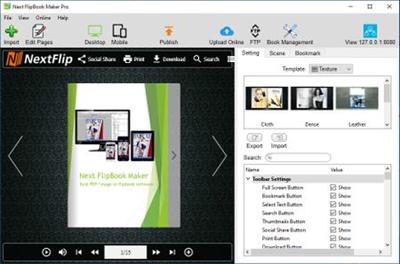
Next FlipBook Maker Pro for Windows is a professional HTML5 flipbook software for both professionals and novices to create interactive digital HTML5 flipbooks.

It provides an easy way for you to convert static PDF publications to digital HTML5 flipbooks and upload them online.
Add buttons, links, images, local/YouTube/Vimeo video, music, chart, etc. to your HTML5 flipbook to create interactive flipbooks.

Design your Flash/HTML5 flipbook
PDF to flipbook converter allows you to customize how your Flash/HTML5 flipbook looks with different templates, scenes, background images, background music, languages, buttons, logo, etc.

Includes 12 editable flipbook templates
Includes 18 pre-designed animated scenes
Enable/disable full screen, bookmark, search, text selection, thumbnail, social share, zoom button, etc. as you like.
Add flipbook logo with URL.
Multilingual flipbook toolbar.

Online Flash/HTML5 flipbook
Flash&HTML5 Flipbook Maker offers a user-friendly hosting service that allows you to easily store and manage your online Flash&HTML5 flipbooks with an account. You can also share Flash&HTML5 flipbooks on Facebook, Twitter, LinkedIn, Google+, etc.

Mobile-friendly HTML5 flipbook
PDF to flip book conversion software supports creating mobile friendly HTML5 flipbook to view on any iPhone, iPad and Android devices.

Flipbook APP, EXE, Plugin
With this flipbook software, you can create realistic page-flipping Flash&HTML5 magazines, catalog, brochures, e-Books, etc. from static PDFs with ease. Easily share your flipbooks by exporting to HTML, ZIP, APP and EXE flipbooks.

Publish HTML5 flipbook as WordPress plugin, Joomla module or Drupal module to install on your websites built on them.

Use the best Powerful flipbook editor
Intuitive and easy to use. Flipbook Maker provides a powerful page flip book editor. Use the convenient Page Editor to edit your Flash&HTML5 flipbooks. Embed line, shape, callout, text, image, GIF, music, local video, YouTube video, Vimeo video, chart, number icon, link and button to your Flash&HTML5 flipbook and make it more interactive.

Organize digital flip book pages: Page Editor also allows you to adjust flip book page order, add pages, delete pages or combine pages from multiple PDF files to create one Flash&HTML5 flipbook.

Operating System: Windows 7, 8/8.1, 10

Home Page -
У Вас недостаточно прав для просмотра ссылок. Войдите или зарегистрируйтесь.


Download link:​
Код:
[center][b]rapidgator_net[/b]:
https://rapidgator.net/file/d308d4172d3e9f222fd36320b46c7402/37u96.Next.FlipBook.Maker.Pro.2.7.3.rar.html

[b]nitroflare_com[/b]:
https://nitroflare.com/view/DBD8E3F8C78E8D5/37u96.Next.FlipBook.Maker.Pro.2.7.3.rar

[b]alfafile_net[/b]:
http://alfafile.net/file/8QsK5/37u96.Next.FlipBook.Maker.Pro.2.7.3.rar[/center]

Links are Interchangeable - No Password - Single Extraction​
 
Next FlipBook Maker 2.7.3

c527397b21bdd67b0f76869af558d33e.jpg


Next FlipBook Maker 2.7.3 | 251.7 Mb​
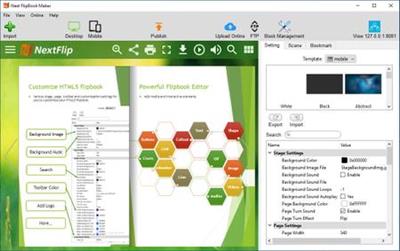
Interactive Flash/HTML5 flipbook app. Convert PDF into interactive, realistic Flash&HTML5 flipbook in minutes. Next FlipBook Maker Pro for Windows is a professional HTML5 flipbook software for both professionals and novices to create interactive digital HTML5 flipbooks. It provides an easy way for you to convert static PDF publications to digital HTML5 flipbooks and upload them online. Add buttons, links, images, local/YouTube/Vimeo video, music, chart, etc. to your HTML5 flipbook to create interactive flipbooks.

Flipbook with multimedia
Embed YouTube/Vimeo video, local video, music, image, button, chart, link, etc. to make interactive HTML5 flipbook.

HTML5 Mobile Flipbooks
Online HTML5 flipbooks can be accessed from any Mac, PC, iOS, Android or other mobile devices.

HTML5 Flipbook Online
Upload HTML5 flipbook to your website, embed to webpage, share to social networks or store on our cloud hosting.

Google Analytics/SEO
Flipbook Integration with Google Analytics. Use Google Analytics to measure the traffic HTML5 flipbooks.

Design your Flash/HTML5 flipbook
PDF to flipbook converter allows you to customize how your Flash/HTML5 flipbook looks with different templates, scenes, background images, background music, languages, buttons, logo, etc.

- Includes 12 editable flipbook templates
- Includes 18 pre-designed animated scenes
- Enable/disable full screen, bookmark, search, text selection, thumbnail, social share, zoom button, etc. as you like.
- Add flipbook logo with URL.
- Multilingual flipbook toolbar.

Online Flash/HTML5 flipbook
Flash&HTML5 Flipbook Maker offers a user-friendly hosting service that allows you to easily store and manage your online Flash&HTML5 flipbooks with an account. You can also share Flash&HTML5 flipbooks on Facebook, Twitter, LinkedIn, Google+, etc.

Mobile-friendly HTML5 flipbook
PDF to flip book conversion software supports creating mobile friendly HTML5 flipbook to view on any iPhone, iPad and Android devices.

Flipbook APP, EXE, Plugin
With this flipbook software, you can create realistic page-flipping Flash&HTML5 magazines, catalog, brochures, e-Books, etc. from static PDFs with ease. Easily share your flipbooks by exporting to HTML, ZIP, APP and EXE flipbooks.

Use the best Powerful flipbook editor
Intuitive and easy to use. Flipbook Maker provides a powerful page flip book editor. Use the convenient Page Editor to edit your Flash&HTML5 flipbooks. Embed line, shape, callout, text, image, GIF, music, local video, YouTube video, Vimeo video, chart, number icon, link and button to your Flash&HTML5 flipbook and make it more interactive.

More Features:

Flipbook logo
View HTML5 flipbook with logo in browsers of any Mac, PC, iPhone, iPad, iPod, Android and other mobile devices.

Flipbook bookmark
Keep original bookmarks from PDF or add new bookmark with this HTML5 flipbook maker.

Flipbook SEO
Accurate title, keywords, and description help your HTML5 flipbook get better ranking in search results.

Flipbook hyperlinks
Keep original links from your original PDF to your flipbook or add new links with Page Editor of this HTML5
Flipbook Maker.

Flipbook privacy settings
Add password to protect the whole HTML5 flipbook or partial pages.

Flipbook Batch Converter
If you have multiple PDF files to convert to page-turning books, use HTML5 flipbook maker's batch converter.

Search/copy flipbook content
Enable/disable flipbook content search/copy feature for your flipbook readers.

Flipbook Social Sharing
Enable sharing feature for readers to share Flash/HTML5 flipbooks to their Facebook, Twitter, LinkedIn. etc.

Operating System: Windows 7, 8/8.1, 10

Home Page -
У Вас недостаточно прав для просмотра ссылок. Войдите или зарегистрируйтесь.


Download link:​
Код:
[center][b]rapidgator_net[/b]:
https://rapidgator.net/file/ddff6df2a9fa186f6f71e142c9f7732e/uli1m.Next.FlipBook.Maker.2.7.3.rar.html

[b]nitroflare_com[/b]:
https://nitroflare.com/view/83FDA872E18A829/uli1m.Next.FlipBook.Maker.2.7.3.rar

[b]alfafile_net[/b]:
http://alfafile.net/file/8QssY/uli1m.Next.FlipBook.Maker.2.7.3.rar[/center]

Links are Interchangeable - No Password - Single Extraction​
 
iMazing 2.12.4 macOS

48fa253cd479d66a1d6633fa4dfdbc89.jpg


iMazing 2.12.4 Multilingual | macOS | 166 mb​
iMazing is a comprehensive macOS software solution that provides a clean and organized interface for browsing the contents of any device running iOS. Moreover, the iMazing app is able to detect any iOS device as soon you connect it to your Mac and will automatically load its contents for easy and simple browsing.

Manage your iPhone. Your way. Get a trusted software to transfer and save your music, messages, files and data. Safely back up any iPhone, iPad or iPod touch. Powerful and user-friendly, iMazing is simply the best iOS device manager for Mac and PC.

Compatibility: OS X 10.9 or later 64-bit
Homepage:
У Вас недостаточно прав для просмотра ссылок. Войдите или зарегистрируйтесь.


Download link:​
Код:
[center][b]rapidgator_net[/b]:
https://rapidgator.net/file/5a29397f65a952cb1e733d1ca41cd3e6/wy8nx.iMazing.2.12.4.rar.html

[b]nitroflare_com[/b]:
https://nitroflare.com/view/F8F2584B56531D0/wy8nx.iMazing.2.12.4.rar

[b]alfafile_net[/b]:
http://alfafile.net/file/8QssJ/wy8nx.iMazing.2.12.4.rar[/center]

Links are Interchangeable - No Password - Single Extraction​
 
ExpanDrive 7.6.4

a2088740fc72f35597aa6d0e7c88e88e.jpg


ExpanDrive 7.6.4 | 143.5 MB​
The Best Gets Even Better - Say Hello to ExpanDrive 7. ExpanDrive is a fast network drive and browser for cloud storage. Securely access the cloud from any application, including Finder and Explorer.

New Features:

Built into Finder and Explorer
ExpanDrive adds cloud storage like Google Drive, Dropbox, Amazon S3, SFTP, Box, OneDrive and Sharepoint to Finder and Explorer. Don't bother with an extra app just to move data around. ExpanDrive connects cloud storage to every application on your computer including Office 365, Photoshop, and VS Code.

Smart Offline Sync (New!)
Choose files for offline access and work without an internet connection. Synchronization to the cloud takes place automatically when you're back online. Other files are accessed on-demand from the cloud, taking no disk space.

Hello, Linux (New!)
Major storage providers have left you behind and we're here to help. ExpanDrive adds native cloud storage access into Linux for all major Linux distributions, including Ubuntu, Mint, CentOS, Redhat, and more.

Integrated Search (New!)
ExpanDrive hooks into Spotlight Search on Mac and Windows file search. Quickly search your remote storage for whatever you're looking for. The integrated storage browser has additional support for blazing-fast server side search.

Multi-user file locking (New!)
ExpanDrive now propagates lock files in Microsoft Office documents across the cloud. If a user is editing an Office document, other users will only be able to open that document read-only until the editing user closes it.

File Version Management (New!)
Easily access older versions of files on cloud storage backends that support versioning, including Box, Dropbox, S3, Google Drive, OneDrive and Sharepoint.

Connect to any Cloud
Connect to all major cloud storage providers, or your own server. With a single app you can connect to:

* Dropbox
* Google Drive and Google Team Drives
* Amazon Drive
* Box
* OneDrive and OneDrive for Business
* Sharepoint
* Nextcloud (New!)
* Wasabi (New!)
* Backblaze B2
* SFTP/FTP, WebDAV
* SMB/Windows File Sharing

Cloud storage in every application
Add cloud storage, like Google, Dropbox, Amazon S3, Sharepoint, and more to every application on your computer. ExpanDrive builds a secure connection from the filesystem to the cloud. Open, edit, and save files to remote computers from within your favorite programs - even when they are on a server half a world away.

Super-fast background uploads (New!)
ExpanDrive has multi-threaded connection engine that is up to 500% faster that previous version. ExpanDrive performs parallel transfers in the background so that you have a reliable transfer even in the face of unreliable internet. Keep working and stop waiting for transfers to complete.

System Requirements:
* Windows 7 through Windows 10 including Windows Server
* Supports 32-bit and 64-bit installations
* Supports Windows Server editions, including terminal server
* Contact support for a multi-user MSI based installer
* Does not support Windows RT

Home Page -
У Вас недостаточно прав для просмотра ссылок. Войдите или зарегистрируйтесь.


Download link:​
Код:
[center][b]rapidgator_net[/b]:
https://rapidgator.net/file/1ee97a6c68de7725893abe7e7059f3fa/nwt0o.ExpanDrive.7.6.4.rar.html

[b]nitroflare_com[/b]:
https://nitroflare.com/view/24ED850A26B721B/nwt0o.ExpanDrive.7.6.4.rar

[b]alfafile_net[/b]:
http://alfafile.net/file/8Qsa6/nwt0o.ExpanDrive.7.6.4.rar[/center]

Links are Interchangeable - No Password - Single Extraction​
 
AceThinker Music Recorder 1.2.5 (Build 10/13/2020) Multilingual

debc08dcae0cd8683944334c9aecb564.jpg


AceThinker Music Recorder 1.2.5 (Build 10/13/2020) Multilingual | 31.4 Mb​
Do you want to know how to download a song from a streaming music site to enjoy whenever you want, record a meeting, or even record your own voice to create a live tutorial? Music Recorder is the solution you have been looking for. It lets you record audio from both your microphone and computer simultaneously. The audio is then saved in a high-quality recording ready to be played back on your devices, uploaded to a music community, and shared with friends, family, and followers.

Enjoy Music with Premium Features
By utilizing this robust tool, you can easily record songs from any music streaming sites with ease. In a few clicks, Music Recorder will add your desired songs into library and identify them for you. The ID3 tags will be added to these songs automatically.

Add ID3 Tags to Music Files Automatically
You do not need to edit the information on your song manually after recording it. Music Recorded can recognize the title, album, year, genre, and artist of your songs. It can even recognize the cover art. This feature is great for music fans and collectors. Music Recorder can recognize batches of music files at once to save you time editing each file individually. Of course, you are free to edit the tags manually if you so choose.

Convert Audio for Playback on Other Devices
The power to listen to a recorded file on any device is just a click away. Music Recorder features an internal audio converter that can convert audio files so they are ready to play on any device. It can even convert files in bulk to save time. It can also combine several audio clips into a single file. It can convert online videos into a range of formats including WMA, MP3, FLAC, OGG, and more, ready for you to listen to whenever and wherever you want.

Operating System: Windows 7, 8/8.1, 10

Home Page -
У Вас недостаточно прав для просмотра ссылок. Войдите или зарегистрируйтесь.


Download link:​
Код:
[center][b]rapidgator_net[/b]:
https://rapidgator.net/file/969cb3b41b30bb0547e73a3825a98fc0/gz9mv.AceThinker.Music.Recorder.1.2.5.Build.10132020.Multilingual.rar.html

[b]nitroflare_com[/b]:
https://nitroflare.com/view/8E78D46035D4BF6/gz9mv.AceThinker.Music.Recorder.1.2.5.Build.10132020.Multilingual.rar

[b]alfafile_net[/b]:
http://alfafile.net/file/8QsDq/gz9mv.AceThinker.Music.Recorder.1.2.5.Build.10132020.Multilingual.rar[/center]

Links are Interchangeable - No Password - Single Extraction​
 
Steganos Safe 21.1.0 Revision 12679 Multilingual

da619798d8e13b9fc372e0968f59db7f.jpg


Steganos Safe 21.1.0 Revision 12679 Multilingual | 42.3 Mb​
Confidential documents, business records and TAN lists all belong in a safe place. Steganos® Safe™ 21 is a digital vault that protects everything you don't want anyone else to see. The clearly structured new user interface ensures that this highly professional security software package is intuitive and very easy to use.

Data protection made in Germany - with the click of a button, Steganos® Safe™ 21 protects all types of sensitive data on your PC, in networks or in the cloud thanks to state-of-the-art 384-bit AES-XEX encryption with AES-NI-Hardware acceleration.

Safely encrypt sensitive data
- Several user interface themes for you to choose from (NEW!)
- Clearer Safe creation with more assistance (NEW!)
- Use several Portable Safes on one drive (NEW!)
- AES-XEX encryption with 384 bits (IEEE P1619) with NI-hardware acceleration for optimal protection against thieves, snoops and intelligence services
- The unlocked safe seamlessly integrates itself in Windows as a disk drive and can be used from within any application
- Maximum safe size: 2 TB
- Supports data encryption in Dropbox, Microsoft OneDrive, Google Drive and MagentaCLOUD
- Easily configure safes in your home network
- Two-factor authentication for your Safes (supports Authy, Google Authenticator and more)
- Numerous functions and possibilities when creating a safe: Define the storage location and the safe drive letter yourself
- Automatically expanding safes that save you precious Flash Drive space
- USB stick as safe key: once ejected, the virtual vault closes and sensitive data is protected
- Safes are now simple to move and delete

System Requirements:
- Microsoft® Windows® 10, 8 or 7: min. 1 GB RAM (32 & 64 Bit)
- 200MB available disk space

Home Page -
У Вас недостаточно прав для просмотра ссылок. Войдите или зарегистрируйтесь.


Download link:​
Код:
[center][b]rapidgator_net[/b]:
https://rapidgator.net/file/85c03dba902364d68817f2654624ddcd/yrslv.Steganos.Safe.21.1.0.Revision.12679.Multilingual.rar.html

[b]nitroflare_com[/b]:
https://nitroflare.com/view/DF39C4A1AB1CC9F/yrslv.Steganos.Safe.21.1.0.Revision.12679.Multilingual.rar

[b]alfafile_net[/b]:
http://alfafile.net/file/8Qssp/yrslv.Steganos.Safe.21.1.0.Revision.12679.Multilingual.rar[/center]

Links are Interchangeable - No Password - Single Extraction​
 
1CLICK DVD Converter 3.2.1.5

762b1757ed7f6dfaa280e653fb0fffa0.jpg


1CLICK DVD Converter 3.2.1.5 | 13.8 Mb​
Use 1CLICK DVD Converter to convert your episode and movie DVDs into media files. You can select a custom profile for the following devices: Acer Tablet (All Versions); Amazon - Kindle (All Versions); Apple - iPod, Nano, Touch, iPhone and iPad; Apple TV; Archos - 705,704,605,604,504,405,404; Asus Tablet (All Versions); Barnes and Nobel - Nook (All Versions); BlackBerry Playbook - (All Versions); Creative Labs - Zen Vision; Generic DivX; Google Nexus - Tablets and Phones; Microsoft Windows - Tablets and Phones; Microsoft XBox (All Versions); Microsoft - Zune (MPEG-4); Samsung Galaxy - Tablets and Phones; Sony - PSP; Sony Tablet (All Versions).

You can convert all your favorite DVDs with just one click. Unlike other software with complex settings and multiple steps, 1CLICK DVD Converter is easy to use. Movie and episode detection is automatic and doesn't require you to preview or try and guess which files to include. Just click the Start button and return to find your DVD converted.

Even though it's easy to use, there are advanced features for those who want more control. A preview window shows you exactly how the converted video will appear on your portable device. There are options to set zoom, resolution and video quality. Switching between mobile devices is as simple as one click. You can even convert a DVD to DivX compatible format which is compatible with streaming video players and media centers.

Key Features
Windows 10 Compatible.
CPRx technology for converting newer DVD movies.
Supports the most popular video players.
Automatically selects the movie and adjusts the settings for best results.
Automatically converts episodes to a single file per episode.
Blazing fast encoding - 3X faster than other types of encoders.
Multi-threaded encoding supports multi-core processors.
Supports zoom for wide-screen to full-screen conversion.
Video preview shows you exactly what the video will look like.
Quality slider makes quality and file size adjustments easy.
Supports both NTSC and PAL DVD movies.
Convert DVDs movies to DivX compatible video files.
Supports subtitle language selection.

System requirements:
Windows 10, 8, 7, Vista, or XP
A DVD reader
One or more of the following mobile video devices: Acer Tablet (All Versions), Amazon - Kindle (All Versions), Apple - iPod, Nano, Touch, iPhone and iPad, Apple TV, Archos - 705,704,605,604,504,405,404, Asus Tablet (All Versions), Barnes and Nobel - Nook (All Versions), BlackBerry Playbook - (All Versions), Creative Labs - Zen Vision, Generic DivX, Google Nexus - Tablets and Phones, Microsoft Windows - Tablets and Phones, Microsoft XBox (All Versions), Microsoft - Zune (MPEG-4), Samsung Galaxy - Tablets and Phones, Sony - PSP, Sony Tablet (All Versions) or any DivX/MPEG-4 compatible video player.

Home Page -
У Вас недостаточно прав для просмотра ссылок. Войдите или зарегистрируйтесь.


Download link:​
Код:
[center][b]rapidgator_net[/b]:
https://rapidgator.net/file/529b9866d842216351e34edeffda5c77/62v1m.1CLICK.DVD.Converter.3.2.1.5.rar.html

[b]nitroflare_com[/b]:
https://nitroflare.com/view/FA73D4C69F37246/62v1m.1CLICK.DVD.Converter.3.2.1.5.rar

[b]alfafile_net[/b]:
http://alfafile.net/file/8QsK7/62v1m.1CLICK.DVD.Converter.3.2.1.5.rar[/center]

Links are Interchangeable - No Password - Single Extraction​
 
1CLICK DVD Copy Pro 5.2.2.0 Multilingual

e63678d61194bfb85589bfe324a2ebce.jpg


1CLICK DVD Copy Pro 5.2.2.0 Multilingual | 8.7 Mb​
1CLICK DVD COPY - PRO is a fast, easy-to-use, full featured program for copying DVD movies onto DVD discs. The latest version now incorporates CPRx technology to ensure the highest level of success copying the latest generation of DVD movies. You now have complete control over the final copy. Use the Copy Presets; or the more advanced features to select what content will be copied and how much compression will be used. With 1CLICK DVD COPY - PRO, you can make a perfect copy with just one click.

Key Features
Windows 10 Compatible.
CPRx technology for copying new DVD movies.
Copy Presets - One click preset for each type of DVD copy.
Preview the movie, extras and menus.
Include or exclude movie and menus based on preview.
Select individual audio, video, and subtitles streams.
Control the amount of video compression used.
Make additional backup copies without re-copying the DVD.
Copy Episodic DVD Movies, TV Series, etc.
Copy a movie to your hard drive - great for laptops.
Supports copying of Multi-Channel Audio (Dolby Digital 5.1, DTS).
Supports both NTSC and PAL DVD movies.
Supports Dual Layer media.

System requirements:
Windows 10, 8, 7, Vista, or XP
Up to 9 GB available hard disc space for DVD images and temporary DVD files
DVD reader (DVD writer required for burning DVDs)

Home Page -
У Вас недостаточно прав для просмотра ссылок. Войдите или зарегистрируйтесь.


Download link:​
Код:
[center][b]rapidgator_net[/b]:
https://rapidgator.net/file/c9fc03a6ba6cfd4361b83917ff9ccb41/01emu.1CLICK.DVD.Copy.Pro.5.2.2.0.Multilingual.rar.html

[b]nitroflare_com[/b]:
https://nitroflare.com/view/76337B737554166/01emu.1CLICK.DVD.Copy.Pro.5.2.2.0.Multilingual.rar

[b]alfafile_net[/b]:
http://alfafile.net/file/8QsfS/01emu.1CLICK.DVD.Copy.Pro.5.2.2.0.Multilingual.rar[/center]

Links are Interchangeable - No Password - Single Extraction​
 
Advik Email Backup Wizard 11.2

02fb8e84d5675457c440497773c51b86.jpg


Advik Email Backup Wizard 11.2 | 24.1 Mb​
Advik Email Backup Tool is an advance single email backup wizard with multi-functionality. Using this software you can create and export backup of Desktop Based, Web Based and Cloud Based email services to your local system.

This software support backup of several popular email service providers such as Gmail, G Suite, Office 365, Windows Live Mail, Yahoo Mail, Rediffmail Pro, AOL, Webmail, Rackspace, Business Email Service, GoDaddy, Yandex, Earthlink, Amazon Workmail etc.

Complete Backup Solution
With Advik Email Backup Wizard you can download all the messages from each folder of your desired email service client. The utility will export/transfer all the emails from Inbox, Outbox, Sent Items, Draft and all other customized folders of your respective email account to local drive.

Multiple File Formats
This backup utility allows your to download and convert Email Backup to PST, EML, MBOX, HTML, MSG, DOC, TEXT, PDF, XPS, EMLX etc file formats. So that you can later access or import mail backup in Outlook, Gmail, Windows Live Mail, Adobe Reader, MS Word, Lotus Notes, Outlook Express etc.

Selective Backup
Personal Email Archive Software allows you to backup your selective emails with the help of Advance Filter Option designated at the interface. This feature will help you to save your valuable time by quickly exporting of your desired email messages from complete mailbox.

Preserve Meta Data
After exporting email backup to PST, EML, MSG, MBOX etc. file formats the software keeps the original formatting of emails unchanged. Also the key elements or meta properties like To, Cc, Bc, sender's email, recipient's email, attachments etc. remain intact after Email backup is completed.

Business Email Service Backup
You don't have to purchase a different product for Business Email Service Backup. You can easily convert & download business email backup of Gmail, G Suite, Office 365, Yahoo Mail Pro, Rediffmail Pro, Amazon Mail, Godaddy Email, Earthlink, Yandex.Mail for Domain etc. to local hard disk.

cPanel Email Backup
This Email Backup Solution is all-in-one utility which also provide web based email backup solution. Advik Email Backup Software allows you to download complete mailbox of any email hosting backup (Godaddy, Hostgator, Bluehost, Inmotion, iPage etc.) to your desktop in multiple file formats.

IMAP Backup Option
This is the main key highlight of Email Backup Wizard. In case your desired email service provider is not not available, you can directly retrieve the email messages from any web based or cloud based email service provider using IMAP saving option.

Support All Windows OS:
Advik Email Backup Software is compatible with all version or edition of Windows like XP/10/7/8/2000 etc. It doesn't matter which Windows platform you are using as it supports both 32 Bit as well as 64 Bit Operating System.

Home Page -
У Вас недостаточно прав для просмотра ссылок. Войдите или зарегистрируйтесь.


Download link:​
Код:
[center][b]rapidgator_net[/b]:
https://rapidgator.net/file/3270c0a9a96d39a203ce4a33017c8c90/8gqdn.Advik.Email.Backup.Wizard.11.2.rar.html

[b]nitroflare_com[/b]:
https://nitroflare.com/view/8F5B899A4A3C430/8gqdn.Advik.Email.Backup.Wizard.11.2.rar

[b]alfafile_net[/b]:
http://alfafile.net/file/8QsKg/8gqdn.Advik.Email.Backup.Wizard.11.2.rar[/center]

Links are Interchangeable - No Password - Single Extraction​
 
Airy Pro 3.19 (305) macOS

fdb1fe3bc0786afc420143752ad47c41.jpg


Airy Pro 3.19 (305) Multilingual | macOS | 26 mb​
YouTube video & MP3 downloader for Mac. If you really like some video on YouTube and want to have it available even when there is no Internet connection at hand - Airy will help. Airy is an essential YouTube downloader for Mac that can easily save YouTube video right to your computer. You can also download MP3 files directly from YouTube.

Airy will help you save YouTube video on your computer so that you can always watch it even if there is no Internet available. Airy is a utility for downloading videos from YouTube in a simple and efficient way.

Compatibility: OS X 10.9 or later 64 bit
Homepage:
У Вас недостаточно прав для просмотра ссылок. Войдите или зарегистрируйтесь.


Download link:​
Код:
[center][b]rapidgator_net[/b]:
https://rapidgator.net/file/c5bbbf6bd571d55423921442f6618486/z4jig.Airy.Pro.3.19.305.rar.html

[b]nitroflare_com[/b]:
https://nitroflare.com/view/298B37AFB935576/z4jig.Airy.Pro.3.19.305.rar

[b]alfafile_net[/b]:
http://alfafile.net/file/8QssE/z4jig.Airy.Pro.3.19.305.rar[/center]

Links are Interchangeable - No Password - Single Extraction​
 
Назад
Сверху