• Форум работает в архивном режиме www.old.nado.in

All mitsumi'1s Applications !! (updated daily)

  • Автор темы Автор темы mitsumi1
  • Дата начала Дата начала
Icecream Video Editor Pro 2.14 Multilingual

454d5730ad3e77f1dbb0af574892b6a4.jpg


Icecream Video Editor Pro 2.14 Multilingual | 65 Mb​
Icecream Video Editor is an easy-to-use free video editing software for Windows that enables you to edit videos and create new ones from both videos and photos in a few minutes. Combine videos and photos, add transitions, trim videos, add titles and background audio, apply visual effects. You can also rotate, speed up, blur videos and much more.

Simple video editor
Enjoy powerful video editing software with intuitive GUI.

Timeline
Merge videos and photos on a single timeline.

Add transitions
Choose one of 15 scene transitions or make it random.

Trim videos
Trim videos added to video editor.

Add video effects
Blur video, apply old movie effect or others.

Crop videos
Crop photo and video scenes if needed.

Add audio to video
Add music soundtrack or voice over.

Add titles
Add text to any video or photo scene on timeline.

Adjust image
Set brightness, contrast, saturation and hue with video editor.

System Requirements:
OS: Windows 10, Windows 8.1, Windows 8, Windows 7
2.66Ghz Intel®, AMD or any other compatible processor / faster processor for netbooks;
4GB of RAM (16GB for better performance); 100MB to 5GB of free disk space;
DirectX 11 hardware support

Home Page -
У Вас недостаточно прав для просмотра ссылок. Войдите или зарегистрируйтесь.


Download link:​
Код:
[center][b]rapidgator_net[/b]:
https://rapidgator.net/file/62eae0ef42dc2642c029d8e5d0d9d84b/0svca.Icecream.Video.Editor.Pro.2.14.Multilingual.rar.html

[b]nitroflare_com[/b]:
https://nitroflare.com/view/F1D396B600592AA/0svca.Icecream.Video.Editor.Pro.2.14.Multilingual.rar

[b]uploadgig_com[/b]:
http://uploadgig.com/file/download/3e2f60d11572B05f/0svca.Icecream.Video.Editor.Pro.2.14.Multilingual.rar[/center]

Links are Interchangeable - No Password - Single Extraction​
 
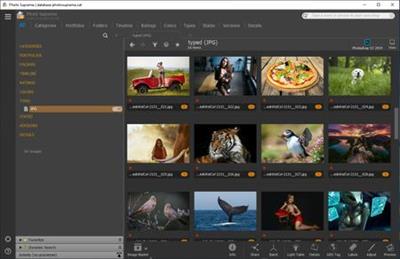
IDimager Photo Supreme 5.4.1.2945 Multilingual

684f0bb508104ac6b1b15240f0a34f1a.jpg


IDimager Photo Supreme 5.4.1.2945 Multilingual | 111 Mb​
Do you own a digital camera or do you have a large collection of images to manage? Then in no time finding that one image you're looking for becomes a chore. But Photo Supreme can change all that. Photo Supreme's integrated cataloging and management features will help you quickly find and work with your desired image.

Highlights

Advanced search capabilities
When looking for that one image, Photo Supreme will help you with deep text searches, tag searches, duplicate detection, similarity detection, dynamic search combinations and advanced filtering.

Limit access to those who need it
The Server Edition allows you to control who can access your Catalog. You control who can add or delete. You control who sees what in their screen.

Multi tab browsing
Photo Supreme brings tabbed browsing to your image archive. Take advantage of having multiple sets open at the same time.

Import & ingest images
Import your images in your Catalog the way you want. You can define naming conventions, apply metadata on import, version rules, and of course copy files.

Keyword tagging
Tagging your images has never been easier. GEO tagging, parent cascading, face tagging, and automatic metadata enrichment are just a few of many features.

Get organized
Organize your images in Portfolios and Collections.

Multi version control
Logically hold your pictures together so you can find them again more easily.

Features
Advanced search capabilities
Multi tab browsing
Import & ingest images
Side-by-side comparison (up to 6 images)
Keyword tagging
Advanced GEO tagging
Image organization in portfolios
Duplicate detection
Share images with Flickr, Smugmug, Zenfolio, Google+ (former Picasaweb), FTP, EMail
Dual monitor support
Creative Commons support
Lossless image editing
Supports Darwin Core metadata
Dynamic collections
Face detection
Area tagging
Extensible metadata with custom field definitions
Take your previews with you while travelling
Color managed
Fully scriptable
English, German, French, Italian, and Dutch locale
Full HD, 2K, 4K, 5K, Retina screen resolutions supported

Operating System: Windows Vista or higher

Home Page -
У Вас недостаточно прав для просмотра ссылок. Войдите или зарегистрируйтесь.


Download link:​
Код:
[center][b]rapidgator_net[/b]:
https://rapidgator.net/file/7ade905f2a5b2ff79d00a4462444edf7/ynre0.IDimager.Photo.Supreme.5.4.1.2945.Multilingual.rar.html

[b]nitroflare_com[/b]:
https://nitroflare.com/view/FF2E80CEA3DF519/ynre0.IDimager.Photo.Supreme.5.4.1.2945.Multilingual.rar

[b]uploadgig_com[/b]:
http://uploadgig.com/file/download/dc001052b9f6a647/ynre0.IDimager.Photo.Supreme.5.4.1.2945.Multilingual.rar[/center]

Links are Interchangeable - No Password - Single Extraction​
 
InPixio Photo Cutter 10.3.7447.32390 Portable

7db3fd9ace88b0fc18fd4ceeae92b583.jpg


InPixio Photo Cutter 10.3.7447.32390 Portable | 197 Mb​
inPixio Photo Cutter lets you produce creative and realistic photomontages in just a few clicks. Thanks to these powerful digital scissors, no more time is wasted cutting out your images down to the nearest pixel since Photo Cutter does it all for you. The time saved can be devoted to coming up with original photomontages that are bound to impress your friends and family.

Create photomontages in a few clicks
- Cut out your photos easily
- Crop your photos to your liking
- Add a wallpaper from among the themes on offer or import your own images
- NEW! + 100 stickers and text templates
- NEW! Import several images into your photo montages

Cutting out in a few clicks
With inPixio Photo Cutter, your digital scissors, cut out any detail, individual, object or even landscape in your photos. Select the outline of the person using the slider or the background to erase, and the Photo Cutter algorithm then runs automatically! Conversely, you can use the "keep" slider for important features to make sure your cut-out is perfect. Even hair, drops of water and the finest details are removed from the background down to the nearest pixel.

Choose a background:
Then put the cut objects on the available backgrounds to make photomontages or collages in an instant! Just select your background pattern from the new original images, or download your own images for unique photomontages.

Even easier use and infinite creations
You can now import multiple photos in a single edit for spectacular and unexpected results. Also find over 100 stickers and text templates to add style to your photos and photomontages. Original content for every special occasion (birthdays, greetings, invitations, etc.).

Find tutorial videos for each Photo Cutter module
To get the most out of Photo Cutter 9's features, mini videos have been added to each of the software program's modules in the form of tooltips, making it easier and more effective to use. The old and new features of the program are explained in a fun and dynamic way. Simply hover over one of the features to reveal a demonstration of what you can do with it.

Solid-coloured wallpapers
In addition to the themed wallpapers, you can simply choose a solid colour in the background. You can choose from a wide range of colours while colour gradients are also an option.

System Requirements:
- OS : Windows 7/8/10
- Processor Intel® or AMD
- 1 GB RAM
- 100 MB free disk space
- Screen Resolution 1024 x 768

Home Page -
У Вас недостаточно прав для просмотра ссылок. Войдите или зарегистрируйтесь.


Download link:​
Код:
[center][b]rapidgator_net[/b]:
https://rapidgator.net/file/d0b95ddf397958eb9ec670c67a32ebed/w5rb7.InPixio.Photo.Cutter.10.3.7447.32390.Portable.rar.html

[b]nitroflare_com[/b]:
https://nitroflare.com/view/926C9E7F380644E/w5rb7.InPixio.Photo.Cutter.10.3.7447.32390.Portable.rar

[b]uploadgig_com[/b]:
http://uploadgig.com/file/download/2f6F469C457c0c51/w5rb7.InPixio.Photo.Cutter.10.3.7447.32390.Portable.rar[/center]

Links are Interchangeable - No Password - Single Extraction​
 
InPixio Photo Eraser 10.3.7447.32534 Portable

95f920deae5049125fcfacb157bfed8d.jpg


InPixio Photo Eraser 10.3.7447.32534 Portable | 35.6 Mb​
Tired of taking pictures with all those unwanted background images? Have you ever wanted to just get rid of that sign behind your or those people walking by? Well now you can erase anything in your picture that you don't want there with Photo Eraser for PC. All you need to do is decide which image you want to erase, select it, and click! If there are any slight marks left behind, use the clone tool to blend the colours back in for smooth, seamless appearance.

No one will ever know you erased anything and you will have that perfect picture you were trying to capture in the first place.

Remove unwanted elements like magic!
So often we spend too much time trying to get that ultimate family photo. Or, we want to take the most spectacular pictures from our trip to show our friends. It seems almost impossible to get exactly what we want out of our pictures and we end up having to just settle for what we take. With Photo Eraser for PC there is no need to worry anymore about background images ruining our photos and waiting and waiting for people to pass so we can get only our family in the picture and not a bunch of strangers. You can now easily erase things like people, signs, wires, shadows, and numbers or dates.

Don't lose the magic in your photos
Don't let people roaming in the background of your shots spoil your vacation photos. Erase them easily and maintain a natural look in the backgrounds of your images.

Once in a lifetime moment
Its difficult enough to capture that special moment let alone have an unwanted object in the shot. Don't let it happen, quickly remove the object with just a few clicks.

Ordinary into extraordinary
Take an existing photo and erase objects that take away from the mood of the occasion. Sometimes even the smallest changes can enhance the beauty of a landscape or romantic setting.

The perfect shot
No need to worry about waiting for that perfect picture in a tourist hotspot during your vacation. Just quickly take your picture, and then take out all the other tourists when you get home using Photo Eraser.

Pixel by pixel
Photo Eraser erases the unwanted object and restores your picture pixel by pixel.

Everyday objects
Completely remove unwanted objects from your picture. Things like, signs, wires, people, or any image that distracts you from what you are trying to capture are gone.

A natural look
The technical features of Photo Eraser automatically identify the sections of an image that need to be filled in and make your new photo look natural and seamless.

No need to be exact
Take the hassle out of trying to carefully cut out images that take time and concentration. Other image processing programs require you to be exact and it can be quite noticeable that you have altered your picture in some way.

System Requirements:
- Windows 10, Windows 8, Windows 7
- 1 GHz Intel® Pentium® processor or equivalent
- 1 GB RAM CD/DVD ROM drive
- 100 MB hard disk space, mouse and keyboard

Home Page -
У Вас недостаточно прав для просмотра ссылок. Войдите или зарегистрируйтесь.


Download link:​
Код:
[center][b]rapidgator_net[/b]:
https://rapidgator.net/file/7f20398155c304c6cd7e40f46244ff91/ywyx2.InPixio.Photo.Eraser.10.3.7447.32534.Portable.rar.html

[b]nitroflare_com[/b]:
https://nitroflare.com/view/22449850D8F656B/ywyx2.InPixio.Photo.Eraser.10.3.7447.32534.Portable.rar

[b]uploadgig_com[/b]:
http://uploadgig.com/file/download/42826231fB8a4396/ywyx2.InPixio.Photo.Eraser.10.3.7447.32534.Portable.rar[/center]

Links are Interchangeable - No Password - Single Extraction​
 
InPixio Photo Focus Pro 4.10.7447.32475 Portable

07b3e2dc9a4a6384250f82eef52e1b74.jpg


InPixio Photo Focus Pro 4.10.7447.32475 Portable | 38.4 Mb​
Improve sharpness! Getting sharp photos is not always easy - especially with spontaneous snapshots. InPixio Photo Focus solves this problem in a flash and creates clear, high-resolution images.

Improve the sharpness of your photos
- Improve the sharpness of your photos
- Simple 1-click sharpening tool
- Reinforce & accentuate the focus
- Includes Tilt-Shift & Artistic Blur effects that bring the subject of the photo to life!

ONLY IN THE PRO VERSION:
- Create professional looking photos with oval frames (vignetting)
- Add customised artistic blur to achieve the perfect finish
- Save personal presets that can be used in a single click for future projects

Improve sharpness
Getting sharp photos is not always easy - especially with spontaneous snapshots. InPixio Photo Focus solves this problem in a flash and creates clear, high-resolution images.

Increase focus
You can add sharpness, soft focus and blurred areas to your images. This helps you to further accentuate the difference between the background and the sharp centre of the image.

Refocus
Not all images are always correctly centred. Redefine the centre of your images and focus the attention towards the centre of the image.

Impressive effects with tilt-shift and soft focus functions
Add horizontal soft focus (tilt-shift) to your images. This creates fantastic miniature effects that allow the focal object of your image to look like miniature!

Create structure and details
Emphasise the finest details in your images. Manage contrast and clarity - for impressive and detailed photos!

Resharpening
You can get so much more from all your photos! Even the sharpest photos can be resharpened - for perfect prints or an extremely sharp impression!

Simple
During the development stage of InPixio Photo Focus, particular attention was given to making sure the software is easy to use. The programme is intuitive and helps you through with the various 1-Click Assistants. If you need help when using the software, there are tool tips offering brief explanations next to each function.

Only in the Professional Version:

MORE! Creative Blur
Add a selected blurred area to your image through iris blurring (only available with PRO version). In photography, this effect is achieved through maximum fade-in.

MORE! Add Presets
Store your personal optimisation settings (presets) Create and save your own presets with 1 click for future use.

MORE! Vignetting module
Add oval picture frame to your photos to (vignetting) Create atmospheric shots from your photos with an oval picture frame in black or white. You can select the transparency of the frame to suit your taste and choose sharp or blurred transitions.

What's New in Version 4:

NEW! Advanced cropping module with rotation and horizon correction
Crop your photos manually or choose from the suggested crop formats: 1/1; 16/9; 3/4 etc. You can also rotate your images and adjust the angle.

NEW! Tone Curves Module
Play with the tone curves to obtain light or dark hues and adjust the RGB (Red, Green, Blue) curves one by one.

IMPROVED! interface and workspace
The new version has an attractive, ultra-modern user interface designed for even easier use.

NEW! Find tutorial videos for each Photo Focus module
To get the most out of Photo Focus features, mini videos have been added to each of the software program's modules in the form of tooltips, making it easier and more effective to use.

System Requirements:
- Windows 7, Windows 8 and Windows 10 (32-bit & 64-bit)
- Intel® Pentium® 1 GHz processor or equivalent
- 2 GB of RAM - (4 recommended)
- 500 MB of free disk space, mouse and keyboard

Home Page -
У Вас недостаточно прав для просмотра ссылок. Войдите или зарегистрируйтесь.


Download link:​
Код:
[center][b]rapidgator_net[/b]:
https://rapidgator.net/file/23cbd3cc6165559f189a936c448244ed/nlin2.InPixio.Photo.Focus.Pro.4.10.7447.32475.Portable.rar.html

[b]nitroflare_com[/b]:
https://nitroflare.com/view/9A2EFD3242A059E/nlin2.InPixio.Photo.Focus.Pro.4.10.7447.32475.Portable.rar

[b]uploadgig_com[/b]:
http://uploadgig.com/file/download/5f9aD689db0Df36B/nlin2.InPixio.Photo.Focus.Pro.4.10.7447.32475.Portable.rar[/center]

Links are Interchangeable - No Password - Single Extraction​
 
InPixio Photo Maximizer Pro 5.10.7447.32333 Portable

6c2e40307ca95372b030410f359a6fa3.jpg


InPixio Photo Maximizer Pro 5.10.7447.32333 Portable | 54.3 Mb​
Ultra powerful zoom function which can enlarge images by up to 1000%. With 7 zoom algorithms, Photo Maximizer can tell you the target size of the image in pixels or centimeters.

The required resolution can also be adjusted to give you flawless results. This is particularly important when printing your photos and guarantees you the highest quality results. High precision zoom without quality loss
- Magnify up to 1000%
- NEW! Ultra-powerful zoom - 7 algorithms
- NEW! Define presets and process in batches
- NEW! Print oversized images and posters
- NEW! Simple, intuitive interface
- NEW! Touch-ups and enhancements in one click
- IMPROVED! Enlarge your photos and improve their quality

3 Simple Steps!
InPixio Photo Maximizer has been designed to be user-friendly and even includes a helpful wizard.

- Upload an image.
- Select the subject of your photograph
- Select the zoom setting: and that's it!

Before/after comparison
Display up to four different zoom settings simultaneously! Compare the images and choose the best result!

Enlarge photos on your PC, mobile, camera, etc.
Simply transfer your photos to your PC and zoom away!

Zoom your images and maintain extremely sharp edges
Usually when you enlarge an image you get pixilation and deterioration of colour and brightness. Photo Maximizer maintains image quality and undesirable noise. With InPixio Photo Maximizer say goodbye to pixelated, grainy and blurred photos when zooming in.

Batch processing - one thousand photos in one step
Define your zoom settings and Photo Maximizer will batch process up to 1000 images simultaneously!

Print projects
Print your enlarged images as posters, photos for framing, t-shirts, postcards and more.

Settings module - New!
Temperature, Hue, Brightness, Contrast, Shadows, Highlights, Clarity, Saturation

Share Module - New!
Facebook, Twitter FlickR, InstaCards - Share your photos with your friends and family on social networks, via email or as one-of-a-kind postcards (first card free)

Noise-reduction module - Improved! (Only in Pro Version)
Use this tool to effectively limit the noise in your enlarged image.

Sharpness module - Improved! (Only in Pro Version)
Reinforce sharpness to reveal all the details of your enlarged images.

Film grain module - New! (Only in Pro Version)
Enhance your prints by adding great-looking film grain.

Print and Formatting functions - New!
Determine image quality and easily print your photos from home

Photo roll - New!
One-click access to photos! All photos in the current folder are displayed and viewable in a preview area. Now you don't have to use the Open function to view photos!

InPixio bridge - New!
With a single click, switch from one editing function (e.g. cut) to the next (e.g. delete)!

"InPixio" enlargement algorithm - Improved!
The "InPixio" enlargement method has been significantly improved, so you can enlarge images and still get enhanced definition and quality during processing. The outlines of enlarged areas are also more precise.

Creating presets - Improved! (Only in Pro Version)
Create and save your own settings (presets) so you can use them again later: turn your photos into works of art! Each image processing setting can be saved as a preset for subsequent use. Simplify your work without having to reconfigure your settings!

Batch processing - Improved! (Only in Pro Version)
Make it easier on yourself: apply a preset to 1,000 or more photos and automate the image-processing step. Process large amounts of images with a single click.

New interface and workspace - New!
The new version has an attractive, ultra-modern user interface designed for even easier use.

Home screen - New!
Access all functions directly from a centralised start-up screen!

Getting started tutorial - Improved!
Interactive introductory lesson (tutorial) This short demonstration teaches you how to use the software and repeat the exact same steps on your own.

System Requirements:
- Windows 7, Windows 8, Windows 10
- Pentium IV 1.2 GHz and compatible processors
- 1 GB RAM (2 GB RAM for Windows 7/Vista)
- 15 MB hard disk memory

Home Page -
У Вас недостаточно прав для просмотра ссылок. Войдите или зарегистрируйтесь.


Download link:​
Код:
[center][b]rapidgator_net[/b]:
https://rapidgator.net/file/3e813ee9c6405b8c86f55e68ae4827e1/l9mtp.InPixio.Photo.Maximizer.Pro.5.10.7447.32333.Portable.rar.html

[b]nitroflare_com[/b]:
https://nitroflare.com/view/7DFBD1B9B6DE927/l9mtp.InPixio.Photo.Maximizer.Pro.5.10.7447.32333.Portable.rar

[b]uploadgig_com[/b]:
http://uploadgig.com/file/download/1fb8b6BBaE0f1945/l9mtp.InPixio.Photo.Maximizer.Pro.5.10.7447.32333.Portable.rar[/center]

Links are Interchangeable - No Password - Single Extraction​
 
InPixio Photo Studio Ultimate 10.03.0 Portable

a36fdee05d2f63330a89414302c3c995.jpg


InPixio Photo Studio Ultimate 10.03.0 Portable | 394.2 MB​
Photo Studio describes exactly what our software is today: a fully-fledged editing program that lets you create your pictures in your way. We're really excited about this new identity and hope you like the new name as much as we do. And rest-assured, the name might be changing but all the things our users love about Photo Clip are here to stay: Photo Studio 10 will still be a user-friendly photo editing software, full of fun content to help you create the perfect photos and photo montages. Read on to find out more about all the new features and improvements in Photo Studio 10.

Photo Clip is now Photo Studio
The first thing to know about version 10 of Photo Clip is that it has a new name: Photo Studio. Why change the name? Because the latest version of the software is so packed full of features that we decided it was time for an upgrade. Our flagship Photo Clip software has evolved a lot over the years, from a program for making background cutouts to a multi-functional suite of applications, covering a range of editing needs from erasing to enhancing.

Cutout and background erasing is now just one aspect of the program. Recent versions of the software also include:
- Advanced photomontage possibilities, such as adding new images, backgrounds, text and stickers to a photo.
- Erase tools, which remove distracting items from your photos, while preserving the original background.
- Tools for correcting and enhancing your photos. For example, the auto-correction function, which adds color and brightness to photos with just a single click.

New in Photo Studio 10:
As with every new release, we have updated Photo Studio to provide even more editing possibilities. This time, we have also put a big focus on improving performance and usability so that you can edit better and faster than ever. Here is a selection of the top new features to look forward to in Photo Studio 10.

Perspective tool
The perspective tool is a smart new feature that is useful for correcting photos of buildings and architecture.

You have probably had that experience where you want to photograph a beautiful building but you can't get far enough way to get it in shot, so instead you have to shoot "upwards" or from an angle. This leads to something called perspective distortion in your image, where the lines of your building don't appear straight. For example, if you photograph a tall building, such as a cathedral, from below, the result may look tilted as if the structure is leaning away from you.

The Perspective tool helps you to remove this distortion and correct any tilted or skewed appearance in your photos. If this sounds complicated, don't worry: the tool is very easy to use with three automatic settings, for horizontal, vertical and full correction. After the auto correct has done its work, you can use simple sliders to make the final adjustments yourself. Finally, if you want to have full control over the process there is also a manual mode where you can apply guides to your photo to make a precise correction. In short, you can say goodbye to (unwanted) slanting in your architecture photos, thanks to this new tool.

inPixio Photo Transfer
To coincide with the launch of Photo Studio, we are releasing a complimentary new app that you can download from the App Store or Google Play. With the inPixio Photo Transfer app, you can copy photos easily from your smartphone to your PC or Mac using Wi-Fi.

The app was designed as a helpful tool to facilitate photo editing with PC and Mac-based inPixio software. With a few clicks and a Wi-Fi connection, you can transfer your entire photo library to your laptop and download images ready for editing in Photo Studio. There is no need for a cable, cloud service, or software and your photos remain safe with no external storage. The app is also a useful way to back up your photos to your computer and save space on your cell phone.

EXIF data and Histogram
EXIF metadata is a set of information attached to a photo and stored automatically in your camera or smartphone. This can include date, location and more. When you upload a photo to Photo Studio, you can now view and edit all of this information. For example, you can add tags and ratings or even copyright information to a photo. This is useful for organizing your photos to help you quickly find what you're looking for. It's also especially useful if you upload your photos to online platforms such as Flickr.

Another new source of information in Photo Studio 10 is the Histogram. This measures exposure levels in your photo so you can get a better idea of the light and dark areas in an image. Referring to the histogram when editing exposure settings can help you to get the right level of brightness in your image.

New Local Adjustments
The selective retouching tab allows you to adjust specific sections of your photo with gradients or the paintbrush.

In Photo Studio 10, we have added new sliders to the selective retouching tab, meaning that you can now make even more edits to your photos. The new local adjustments are hue, whites, blacks, dehaze, sharpness and noise reduction.

RAW Images
Photo Studio 10 now supports RAW format images. Raw images are not pre-processed and compressed like standard image formats such as JPEG, meaning they take up a lot of disk space. Because raw images are heavy and because the format varies between camera manufacturers, it is often difficult to open them in software programs. However, thanks to improvements made by inPixio developers, now you can open and edit all you raw images in Photo Studio.

Interactive Film Strip
We mentioned usability improvements, and this is one of the big ones. The filmstrip is the panel at the bottom of the Photo Studio interface that displays all the images in a selected file. In Version 10, it is now fully interactive. This means that in Photo Editor you can filter images easily by date taken, camera, file type and a range of other criteria. You can also apply edits directly from the filmstrip. For example, you can autocorrect an image with a simple right-click without opening it in the workspace. You can also delete edits in the same way.

Video Tutorials
Even with the easiest software, you may need a little extra help from time to time. Our video tutorials are designed to guide you through some of the main tools and the main uses of Photo Studio, so that you can get to know the program more quickly and get the best possible results. Photo Studio 10 comes with a new section for Video Tutorials: simply click on the link to access the playlist of tutorials. A database of support resources is also available from the Assistance section of the menu.

New Content
Our users requested it and we are more than happy to oblige! In Photo Studio 10, you will find a selection of new backgrounds and other visual content in both the Photo Cutter and Photo Editor modules. Try personalizing the new stickers by editing colors and more. And of course, don't forget to try out the new backgrounds in your photomontages. We particularly love the new Hollywood background and cannot wait to see what our users do with this!

System Requirements:
- Windows 10, Windows 8, Windows 7
- 1 GHz Intel® Pentium® processor or equivalent
- 1 GB RAM CD/DVD ROM drive
- 100 MB hard disk space, mouse and keyboard

Homepage -
У Вас недостаточно прав для просмотра ссылок. Войдите или зарегистрируйтесь.


Download link:​
Код:
[center][b]rapidgator_net[/b]:
https://rapidgator.net/file/4afa222600a8c25ac576758ccbe545e0/faqft.InPixio.Photo.Studio.Ultimate.10.03.0.Portable.rar.html

[b]nitroflare_com[/b]:
https://nitroflare.com/view/29BA50AA74BFE66/faqft.InPixio.Photo.Studio.Ultimate.10.03.0.Portable.rar

[b]uploadgig_com[/b]:
http://uploadgig.com/file/download/Fd3fc8af781770e1/faqft.InPixio.Photo.Studio.Ultimate.10.03.0.Portable.rar[/center]

Links are Interchangeable - No Password - Single Extraction​
 
Microsoft Visual Studio Enterprise 2019 v16.6.1 Multilingual

1d21f141b29dea5d43ff9ebf44da3aa7.jpg


Microsoft Visual Studio Enterprise 2019 v16.6.1 Multilingual | 27.9 GB
Languages: English,, Čeština, Español, Français, Deutsch, Italiano,
, Polski, Русский, Português do Brasil, Türkçe
​
Whether you're new to coding or ready for your next project, Visual Studio 2019 streamlines your experience so you can get right down to focused work. You'll find more screen space for your code and you can search for anything from one place. You can keep your code tidy with one-click code clean-up. When you're debugging, you'll notice better stepping performance and you'll get search capabilities within the Autos, Locals, and Watch windows to quickly find that elusive object or value.

Top Issues Fixed in Visual Studio 2019 version 16.6.1
Fixed issue when using HotRestart to deploy iOS application.Fixed and issue where Xamarin.iOS fails to build with MessagingRemoteException.Fixed an issue which would place constant-initialized static local 'const' variables in 'inline' functions which were previously dynamically-initialized in the read-only data segment. This can cause compatibility issues when linking against OBJs compiled with older toolsets.Fixed a build error in Xamarin.Android projects that could be encountered when Android layout files contain certain characters.Fixed an issue with .resx localization at runtime for Xamarin.Android applications.C++ IntelliSense vcpkgsrv.exe frequently crashes with set_parent_scope_on_push.Fixed WMI Provider component installation failure.Fixed a crash in some cases when displaying the Quick Info tooltip for C++ code.Fixed a crash when closing Visual Studio.Adds Xcode 11.5 SDK supportRemoves abstract modifier to BGTask

63c0ce0257a45509c92e122bf591c40e.jpg


c60f94505328fde9dce46502ac8a8f48.jpg


82f6d13f084ee3b1d0e2868dc277788c.jpg


Download link:​
Код:
[center][b]rapidgator_net[/b]:
https://rapidgator.net/file/52139bdb2d49933657041c74bedd0924/jroeg.Microsoft.Visual.Studio.Enterprise.2019.v16.6.1.Multilingual.part1.rar.html
https://rapidgator.net/file/c85f9d968ecb242653c254e840e05b69/jroeg.Microsoft.Visual.Studio.Enterprise.2019.v16.6.1.Multilingual.part2.rar.html
https://rapidgator.net/file/c23e87d0170e7248bb798dcef1197b35/jroeg.Microsoft.Visual.Studio.Enterprise.2019.v16.6.1.Multilingual.part3.rar.html
https://rapidgator.net/file/be86621983fccc6daa67b2d8c15d3240/jroeg.Microsoft.Visual.Studio.Enterprise.2019.v16.6.1.Multilingual.part4.rar.html
https://rapidgator.net/file/52466cdb3f67bee06a95b064f131ea7f/jroeg.Microsoft.Visual.Studio.Enterprise.2019.v16.6.1.Multilingual.part5.rar.html
https://rapidgator.net/file/9addcc58712e131bd3b08f08c1185254/jroeg.Microsoft.Visual.Studio.Enterprise.2019.v16.6.1.Multilingual.part6.rar.html

[b]nitroflare_com[/b]:
https://nitroflare.com/view/33683C58DF60CFD/jroeg.Microsoft.Visual.Studio.Enterprise.2019.v16.6.1.Multilingual.part1.rar
https://nitroflare.com/view/B3C3F1D2C189317/jroeg.Microsoft.Visual.Studio.Enterprise.2019.v16.6.1.Multilingual.part2.rar
https://nitroflare.com/view/1AEF444EB8E27B0/jroeg.Microsoft.Visual.Studio.Enterprise.2019.v16.6.1.Multilingual.part3.rar
https://nitroflare.com/view/8B3733A34807852/jroeg.Microsoft.Visual.Studio.Enterprise.2019.v16.6.1.Multilingual.part4.rar
https://nitroflare.com/view/643119CF335E08A/jroeg.Microsoft.Visual.Studio.Enterprise.2019.v16.6.1.Multilingual.part5.rar
https://nitroflare.com/view/D2CFD9B17ED7ABA/jroeg.Microsoft.Visual.Studio.Enterprise.2019.v16.6.1.Multilingual.part6.rar

[b]uploadgig_com[/b]:
http://uploadgig.com/file/download/2f72BdA8d721a498/jroeg.Microsoft.Visual.Studio.Enterprise.2019.v16.6.1.Multilingual.part1.rar
http://uploadgig.com/file/download/948491447f5c0175/jroeg.Microsoft.Visual.Studio.Enterprise.2019.v16.6.1.Multilingual.part2.rar
http://uploadgig.com/file/download/dd339C4aa1ff080d/jroeg.Microsoft.Visual.Studio.Enterprise.2019.v16.6.1.Multilingual.part3.rar
http://uploadgig.com/file/download/778997b9B7fde78c/jroeg.Microsoft.Visual.Studio.Enterprise.2019.v16.6.1.Multilingual.part4.rar
http://uploadgig.com/file/download/e604f26493f5D0ad/jroeg.Microsoft.Visual.Studio.Enterprise.2019.v16.6.1.Multilingual.part5.rar
http://uploadgig.com/file/download/70Fe704c11081f43/jroeg.Microsoft.Visual.Studio.Enterprise.2019.v16.6.1.Multilingual.part6.rar[/center]

Links are Interchangeable - No Password - Single Extraction​
 
Ontrack EasyRecovery Professional / Premium / Technician 14.0.0.4 Multilingual

278fa081dc9075cfc0adaad0683b0bf4.jpg


Ontrack EasyRecovery Professional / Premium / Technician 14.0.0.4 Multilingual | 201/194/206.5 Mb​
Ontrack EasyRecovery is an advanced application specialized in recovering lost or deleted files from hard drives, optical drives or removable storage devices. Additionally, the program is able to recover formatted, lost or damaged drives.

User-friendly interface
The software makes use of a built-in wizard which comes in handy especially for rookies, as they are offered guidance throughout the entire configuration process.

Recovery options
Ontrack EasyRecovery gives you the possibility to select the media that best fits your data loss problem, namely hard drive (be they internal or external storage devices), memory device (for example: SD, CF, MMC connected via USB or Firewire), optical media (e.g. CD, DVD), multimedia/mobile device (digital camera, MP3 player, smartphone), or RAID system.

If you opt for recovering data from hard drives, you are allowed to select the volume that you want to scan.

What's more, you can choose the recovery scenario from several preset options, such as explore a valid volume in an Explorer-like interface (no scanning process is required), look for accidently deleted files, recover data from a formatted volume (the process may take some time as the tool scans every block of a volume in detail), diagnose disk problems related to bad blocks, as well as work with a handy set of tools used for disk imaging and manipulation.

For each of the aforementioned scenarios, the application lets you select the desired partitions, namely FAT12, FAT16, FAT32, NTFS, HFS/HFS+, EXT2, EXT3, and ISO9660 file systems.

Scanning operations and results
A useful step included in the recovery process allows you to revise the configurations settings made so far and go back to change one of the options or continue with the operation.

You may pause the scanning task and browse throughout the collection of restored files using the Explorer interface. You can view thumbnails and extra details about each item, such as name, type, size, modified date, ID and file system, check out logs for additional information, as well as select the files that you want to save on the disk.

Email recovery mode
Ontrack EasyRecovery helps you recover email data, view info about the subject, sender, date and other details, and print or save the information. It provides support for the following software: Outlook Express, Outlook, Eudora, Mozilla, Becky! Internet Mail and Windows Live Mail.
Get info about your disk and create VHD files

Leaving aside its powerful recovery features, the utility helps you view detailed information about each disk, such as volume, file system, capacity and free space, and create VHD files with fixed or dynamic size.

Other extras tools include the possibility to generate reports which can be printed or exported to plain text file format and check out the properties for the selected disk (e.g. name, identifier, disk type, partition type, size, block size, lock count).

Several configuration settings to play with
Ontrack EasyRecovery comes with a set of dedicated parameters designed specifically for helping you apply filters by file extensions, namely image (e.g. JPG, MPO, PCX), video (e.g. MP4, M2TS), audio (e.g. WAV, MID), application (e.g. EXE, DOC, XLS, PUB), Office (e.g. DOC, XLS, PPT), or text files (HTM). Additionally, you may manually select the desired file types.

Other notable features worth being mentioned enable you to limit the scan process to a certain range of the disk in order to speed up the process and reduce the number of detected files on very large disks, skip blocks used by the file system for a given volume, enable the automatic file renaming option, ignore all errors during the scan, and choose between different wiping modes (write zeros, random numbers).

A rich-featured and powerful recovery app
All in all, Ontrack EasyRecovery provides a user-friendly approach and an advanced feature pack for helping you recover deleted files. Rookies may follow the step-by-step approach and easily gain access to lost data, while power users may configure the process in detail.

Operating System: Windows XP, Vista, 7, 8, 8.1 and Windows 10

Home Page -
У Вас недостаточно прав для просмотра ссылок. Войдите или зарегистрируйтесь.


Download link:​
Код:
[center][b]rapidgator_net[/b]:
https://rapidgator.net/file/df5ecf46fb304a7944801ad90450401b/7wpvc.EasyRecovery.Premium.14.0.0.4.rar.html
https://rapidgator.net/file/0db4a9cdbcc33852d17875b8388ed1fa/7wpvc.EasyRecovery.Professional.14.0.0.4.rar.html
https://rapidgator.net/file/2d2dca1be9e0ec670526d90510646225/7wpvc.EasyRecovery.Technician.14.0.0.4.rar.html

[b]nitroflare_com[/b]:
https://nitroflare.com/view/DE020AD6589D688/7wpvc.EasyRecovery.Premium.14.0.0.4.rar
https://nitroflare.com/view/0D00EA0B02E6A2E/7wpvc.EasyRecovery.Professional.14.0.0.4.rar
https://nitroflare.com/view/93E4C5C39679B16/7wpvc.EasyRecovery.Technician.14.0.0.4.rar

[b]uploadgig_com[/b]:
http://uploadgig.com/file/download/2676310be927d86F/7wpvc.EasyRecovery.Premium.14.0.0.4.rar
http://uploadgig.com/file/download/456ca7003824d04f/7wpvc.EasyRecovery.Professional.14.0.0.4.rar
http://uploadgig.com/file/download/e7d12BDe2507e384/7wpvc.EasyRecovery.Technician.14.0.0.4.rar[/center]

Links are Interchangeable - No Password - Single Extraction​
 
Ontrack EasyRecovery Toolkit for Windows 14.0.0.4 Multilingual

a15a53b725f2ef4a08b4530d78a8ab23.jpg


Ontrack EasyRecovery Toolkit for Windows 14.0.0.4 Multilingual | 210.8 Mb​
Kroll Ontrack offers both home users and businesses Ontrack EasyRecovery software. It is complete do-it-yourself (DIY) solution, to protect, recover and erase data. It protects your data stored on hard disk or SSD storage with proactive monitoring of your disk to prevent downtime and data loss. Ontrack EasyRecovery software is able to recover files that are damaged or deleted. As well as retrieve data from formatted or corrupt volumes - even from initialized disks.

The intuitive DIY software features a wizard-driven interface, allowing even the most novice users to easily recover data.

Ontrack EasyRecovery software is offered in versions for Windows and Mac, and is available in annually renewable licenses. All versions perform unlimited recoveries from local storage and external media, and work on all drive types.

Ontrack® EasyRecovery Toolkit
With comprehensive software tools, Ontrack EasyRecovery Toolkit gives users the tools needed to successfully perform recoveries on logically failed or corrupt Windows, Mac, and Linux operating systems and storage devices, as well as more powerful recoveries from RAID logical partitions and data from formatted hard drives and systems that fail to boot properly.

Ontrack EasyRecovery Software Features:
Supports 300 or more File types
Recovery of data from accidently deleted volumes
Recovery of data from formatted volumes
Recovery of deleted files and folders
Recover lost partition
Email file recovery
Document recovery
Multimedia file recovery
Resume recovery
Preview recoverable files before saving
Optical media recovery (CD,DVD, Blu Ray Disc, HFS, HFS+, HFSX, Rock Ridge, ISO 9660, Joliet, and UDF)
Recovers data written on discs using packet writing software (InCD, Drag To Disk, Direct CD, DLA)
Recovers files from RAID 0, 5 and 6 storage
Supports creation of virtual RAID
Supports recovery from software RAID
Raw recovery of RAID hard drives

Ontrack EasyRecovery offers for your Windows system
Save scans and resume recovery later
Search a specific type of files in a logical drive/specific folder
Search a specific folder for lost and deleted data
Simultaneously scan multiple file systems (NTFS, FAT, FAT16, FAT32 and ExFat) in a logical drive
Recovers from hard disk, removable media, such as USB drives, memory cards and more.

Operating System: Windows 7, 8/8.1, 10

Home Page -
У Вас недостаточно прав для просмотра ссылок. Войдите или зарегистрируйтесь.


Download link:​
Код:
[center][b]rapidgator_net[/b]:
https://rapidgator.net/file/e5a221ab8441682e48b5b606c0f1a8e1/e02jy.Ontrack.EasyRecovery.Toolkit.for.Windows.14.0.0.4.Multilingual.rar.html

[b]nitroflare_com[/b]:
https://nitroflare.com/view/055B2AECC919A5D/e02jy.Ontrack.EasyRecovery.Toolkit.for.Windows.14.0.0.4.Multilingual.rar

[b]uploadgig_com[/b]:
http://uploadgig.com/file/download/60C318e5d349134C/e02jy.Ontrack.EasyRecovery.Toolkit.for.Windows.14.0.0.4.Multilingual.rar[/center]

Links are Interchangeable - No Password - Single Extraction​
 
Overloud Gem Comp76 v2.0.3

84daa4b95cc47423c00a5ccf3aa78ea8.jpg


Overloud Gem Comp76 v2.0.3 | 272/274 Mb​
Comp76 is the ultimate tool for professional engineers who mix with no compromises. The revolutionary simulation of legendary fet compressor-limiter beyond the hardware.

NEW in v2! Three revisions in one plugin!
Built-in Mid-Side Processing
Built-in Parallel Compression
NEW in v2! Low frequency sensitivity control
NEW in v2! Harmonics amount control
NEW in v2! Oversample control, including ultra-oversampling mode
Hyper-realistic simulation of the original unit thanks to the 4th generation dsp technology
Simulation of all transformers in the original unit
Emulates the original All-buttons-in mode
Low cpu usage (more than 1000 instances on a Macbook Pro Retina)
Lots of presets designed in real mixing sessions
Scribble Strips: take notes anywhere on the plugin panel
Meter Calibration: calibrate the VU meters at 5 different sensibilities

BEYOND THE ORIGINAL HARDWARE
Comp76 extends the features of the original hardware: it combines the flexibility of the digital world to the sound character of the analog processing.

MODEL SELECTION
Select between three different revisions: Rev. A (the older and warmer one), Rev. D (the classic "Low Noise" version) and the Rev. F (modern, faster and crisper).

SIDECHAIN FILTER
You can tweak a Low Cut filter on the Sidechain to reduce the compressor sensitivity to low frequencies. The amount of harmonic generation can be controlled as well.

PARALLEL COMPRESSION
Parallel compression is a powerful mixing technique which helps improve the overall impact of the track while leaving the transients intact. It is achieved by summing the compressor output to the original track

BUILT-IN MID-SIDE PROCESSING
You can separately compress the mono and stereo elements of the track, using different compression settings for each. This gives you complete control of the dynamics: you can squeeze the stereo aspect to tighten the room mics and get an in-your-face drum sound.

WINDOWS SYSTEM COMPATIBILITY:
Comp76 is available as VST, AAX32 (ProTools 10.3.5 and above), AAX64 (ProTools 11 and 12) plugins, as well as a standalone application.
32bit and 64bit are natively supported.
You can authorize Comp76 on up to three computers that you own and one USB stick with a simple one-click software procedure (no hardware key needed).

WINDOWS SYSTEM REQUIREMENTS:
Core i3 1.4GHz with 4Gb of RAM, 1280x800 video.
Windows Vista, Windows 7, Windows 8 and Windows® 10 are supported.

Home Page -
У Вас недостаточно прав для просмотра ссылок. Войдите или зарегистрируйтесь.


Download link:​
Код:
[center][b]rapidgator_net[/b]:
https://rapidgator.net/file/e3e81acb933c533ab77833d50c1c61a7/lqh4x.Overloud.Gem.Comp76v2.0.3.rar.html
https://rapidgator.net/file/504db7c99cfe08162cd3697bb0ea3af3/lqh4x.Overloud.Gem.Comp76v2.0.3x64.rar.html

[b]nitroflare_com[/b]:
https://nitroflare.com/view/9183B02E893C763/lqh4x.Overloud.Gem.Comp76v2.0.3.rar
https://nitroflare.com/view/DD0E22EC2F0F1EB/lqh4x.Overloud.Gem.Comp76v2.0.3x64.rar

[b]uploadgig_com[/b]:
http://uploadgig.com/file/download/209a026a62a4fE71/lqh4x.Overloud.Gem.Comp76v2.0.3.rar
http://uploadgig.com/file/download/09bb0d4bdCF0923b/lqh4x.Overloud.Gem.Comp76v2.0.3x64.rar[/center]

Links are Interchangeable - No Password - Single Extraction​
 
PDF Expert 2.5.7 macOS

8205e9bb8171682df704d088c63fde03.jpg


PDF Expert 2.5.7 Multilingual | macOS | 46 mb​
PDF Expert springs into action with smooth scrolling and fast search from the first document you select. PDFs open instantly, whether they are just small email attachments or 2000-page reports.

- Professional Annotation Tool
- Read - An award-winning, lightning-fast, tabbed document viewer will get you through multiple PDFs faster than ever.
- Excellent for Form Filling
- An Easy Way to Sign Documents
- Wide Sharing Options
- Works across all your devices

Compatibility: macOS 10.12 or later, 64bit
Mac App Store:
У Вас недостаточно прав для просмотра ссылок. Войдите или зарегистрируйтесь.


Download link:​
Код:
[center][b]rapidgator_net[/b]:
https://rapidgator.net/file/f70530d429918350d4ac7f09daf30822/01fcu.PDF.Expert.2.5.7.rar.html

[b]nitroflare_com[/b]:
https://nitroflare.com/view/42EB5BB90F89197/01fcu.PDF.Expert.2.5.7.rar

[b]uploadgig_com[/b]:
http://uploadgig.com/file/download/25981CF9A1af5f64/01fcu.PDF.Expert.2.5.7.rar[/center]

Links are Interchangeable - No Password - Single Extraction​
 
Permute 3.4.10 macOS

245b8fe491fa717e3994c253ff22f7b9.jpg


Permute 3.4.10 Multilingual | macOS | 58 mb​
Video, audio and image files come in many different kinds and shapes, but sometimes you need a specific format since your iPad or DVD player won't play that video. That is what Permute is for - easily convert your media files to various different formats.

Key Features

Easy to Use - built from the ground up, Permute is a perfect example of what a Mac app should be. With a gorgeous interface and drag & drop simplicity no need for complicated options.

Insanely Fast - Permute was engineered to be incredibly fast. Let us take care of the hard stuff. Just select the video format you want and it'll be done faster than you can say "hardware acceleration" - MP4 and HEVC presets now take advantage of your machine's hardware acceleration capabitlities, speeding up HEVC conversions more than 3 times over previous versions of Permute!

PDF Support - Permute 3 now includes support for stitching multiple images into a single PDF.

Everything Included - It doesn't matter if you're converting home movies or processing images. Permute can do it all. We support nearly every format and have plenty of device presets to choose from.

Looks Amazing - Whether you use dark mode or not, Permute will look amazing. Taking advantage of the modern technologies, Permute will even change its icon in dark mode.

Keep the Schedule - Video re-encoding is quite demanding on computer resources. This is why you can now schedule Permute to convert videos e.g. at night when you're not using your computer.

And so much more! - There are so many other great features in Permute - adjust volume of an audio file or an audio track in a video. Batch-resize, rotate and flip images and videos. And more!

Compatibility: OS X 10.11 or later 64-bit
Homepage:
У Вас недостаточно прав для просмотра ссылок. Войдите или зарегистрируйтесь.


Download link:​
Код:
[center][b]rapidgator_net[/b]:
https://rapidgator.net/file/982cd93a7951e115bcfb9a6e0ec9d9e1/j62od.Permute.3.4.10.rar.html

[b]nitroflare_com[/b]:
https://nitroflare.com/view/15CC702DC055062/j62od.Permute.3.4.10.rar

[b]uploadgig_com[/b]:
http://uploadgig.com/file/download/83a01D325b6576d7/j62od.Permute.3.4.10.rar[/center]

Links are Interchangeable - No Password - Single Extraction​
 
ProPresenter 7.1.1 (117506309)

95c45c9a80ccb2756b15f2cc4228f6a4.jpg


ProPresenter 7.1.1 (117506309) | 95.5 Mb​
ProPresenter is a cross-platform (Mac and Windows) presentation & production application for live events. It seamlessly displays lyrics, slides, and media, making high-quality live productions easy. It is the indispensible tool for worship gatherings, sporting events, conferences, trade shows, and studio broadcasts.

ProPresenter operators control presentations on one screen, while dynamically presenting to an audience on one or more additional screens.
- No separate edit and present modes
- Outputs are always live
- Completely non-linear flexibility
- On demand Scripture lookup
- Separate Outputs, for lobby, auditorium, and stage displays
- Volunteer friendly
- On the fly run-of-show changes

Tell Your Story. Extraordinarily
Whatever the story you want to tell, ProPresenter has the tools to help you tell it in the most engaging way possible. With a completely revamped video engine that is equally suitable for powering presentations in a room of 100 people or 100,000, the quality and professionalism of ProPresenter's output is unprecedented.

High quality video output
The ability to create high-quality video is becoming increasingly easy, making the use of videos in productions more prevalent than ever. The ProPresenter video engine (the same as is at the heart of PVP3) is the perfect way to present your final edit.

You can import and play videos instantly in ProPresenter. It also includes the ability to set in and out points dynamically, effect color, brightness, and volume, and crop/scale videos dynamically. Video effects empower you to leverage your video library to create limitless new looks for your pre-produced content. In addition, these same effects and manipulations can also be used on live video sources.

MULTI-LAYERED ARCHITECTURE
A multi-layered architecture allows for backgrounds, live video layers, slides, props, and masks to be controlled independently.

- High-quality transistions
- Announcements layer to show rolling announcements on one screen while rehearsing on another
- Individual slide settings for transitions and object builds
- Scale and cropping of media
- Data-driven text boxes (such as current time and countdown timers)
- Dynamically overlaid content
- Context driven visibility (clear a timer when it reaches the end)

Advanced Features - Now included!
ProPresenter 7 has a number of advanced features previously sold separately in Pro6 as add-on, paid for "modules" that offered additional features and capabilities beyond what your typical church needed. The typical church these days, however, has grown more sophisticated in their productions. We love seeing this and want to see more of it so Renewed Vision is now including these advanced features in Pro7 at no additional cost (a $2,593 value if all were purchased separately)!

Multi-Screen
Output to multiple displays with different combinations of content all at once, including multiple stage displays

Alpha Keyer
Output Broadcast-quality key and fill channels

Edge Blending
Project onto wide screens with multiple projectors and blend their edges to create one seemless, extra wide image

Master Control
Control multiple ProPresenter machines from a single computer (coming soon)

Communications
Control ProPresenter's functions from MIDI, DMX, or broadcast video

SDI / NDI
Send video out over SDI (coaxial cable) or over your network (Ethernet).

Stage Display
A sophisticated Stage Display output empowers you to communicate information to the people on stage. Show the content your stage talent needs to see including clocks, timers, current slide, next slide, slide notes, and stage announcements. Maintain flexibility of your Stage Display layouts using our advanced editor. With the output capabilities of ProPresenter you can use any layout on as many stage displays that you have available.

You deserve software that's easy to use
Regardless of how powerful a tool is, its value is determined by how easy it is to access that power. ProPresenter was designed from the beginning to allow beginners to feel confident in running the software with only a few minutes of training. We make all of our training available online via free video tutorials you can access before you even purchase the software. Here are just some of the ways that we make it easy for you to create the presentations that tell your story.

System Requirements:
- Windows 10: Version 1903 (build 18362) or newer
- GPU: If you are outputting to more than 4 HD screens, you should have a dedicated (meaning, not integrated) GPU.
- Video compression: H264 or H265 (HEVC) at 30mbps or less for HD, 50mbps for 4K; For videos with Alpha channels, ProRes 4444 is recommended.

Homepage -
У Вас недостаточно прав для просмотра ссылок. Войдите или зарегистрируйтесь.


Download link:​
Код:
[center][b]rapidgator_net[/b]:
https://rapidgator.net/file/0d158a30901e23ec079b311be61fcee8/jmcrt.ProPresenter.7.1.1.117506309.rar.html

[b]nitroflare_com[/b]:
https://nitroflare.com/view/136C107205A848E/jmcrt.ProPresenter.7.1.1.117506309.rar

[b]uploadgig_com[/b]:
http://uploadgig.com/file/download/6278B9c0fd6aF6fd/jmcrt.ProPresenter.7.1.1.117506309.rar[/center]

Links are Interchangeable - No Password - Single Extraction​
 
SysTools Pen Drive Recovery 10.0.0.0 Multilingual

de82d706a70b6bfad3576fe174dafaed.jpg


SysTools Pen Drive Recovery 10.0.0.0 Multilingual | 9.01 Mb​
SysTools Pen Drive Recovery Tool is a powerful and safe solution to recover permanently deleted data from pen drive. The software is designed in such a manner that it can retrieve and restore data even after formatting the pen drive Flash Drive / Pen Drive. It supports recovery from FAT, exFAT, and NTFS formatted pen drives and recover files after formatting pen drive in a few simple clicks.

Highlights:
- Recover & Restore videos, images, documents, etc. from pen drive
- Supports recovery from exFAT, FAT and NTFS formatted external storage drives
- Recover & preview the complete data with associated attributes
- Support recovery from pen drive, flash drive, memory card
- Filter Based Advance Search Option: Find items within recovery results
- Separate option for Formatted Scan and Normal Scan
- Software provides Refresh button to view newly attached pen drive
- Software support to recover permanently deleted data from pen drive
- Supports recovery from all brand pen drive of any size
- Provides option to Save either selected files or complete files after recovery
- After recovering permanently deleted files from pen drive, it will Highlight in Red color
- Install Pen Drive Data Recovery Software on any Version of Windows OS

Recover Corrupt Pen Drive Data
Pen drives are the most commonly used storage devices to exchange or transfer data. While connecting the pen drives on various machines, sometimes due to virus attack, trojan infections or improper ejecting the pen drive, it may get corrupt or show error message. Now with this tool, you can successfully recover the data from corrupt pen drive easily.

2 Options to Recover Pen Drive Files
The pen drive recovery software,allows you to recover external storage drive deleted data in two different ways:

- Scan: for corrupted and deleted pen drive data
- Formatted Scan: For formatted pen drive data recovery

Recover Normal Data from Pen Drive
With this option, you can recover the complete data from of a pen drive & retrieve it. The pen drive data recovery software scans the pen drive and load complete data present in it. Later, you can extract the data to save it at any desirable location. With this recovery mode, you can recover the deleted files and folders of the pen drive.

Deleted Files or Folder Recovery
If you have connected your thumb drive in any machine and mistakenly deleted some of the files or folders from it then recovery is possible with Pen drive recovery tool. This software thoroughly scan the pen drive data and load all the files present in it. Further, you can extract and restore the lost or deleted data in your pen drive.

Recover Formatted Pen Drive Files
Formatting of a Pen Drive is a very common practice when the pen drives get corrupt. Although it makes the pen drive clean & virus free but you also lose your crucial data. But now you can quickly retrieve the data from a formatted partition with pen drive recovery tool. Software also supports to recover all the raw Data files like PNG, ZIP, DOCX, JPEG, PPTX, XLSX,GIF, PDF, MPEG, AVI, WAV, BMP etc.

Powerful Search Option to Find Files
Powerful search engine of the tool helps find desired files and folders from recovery results. Use a text / term matching the file name to search for it. This will facilitate in extracting only the needed files and folders selectively from the entire pen drive data.

FAT and NTFS Formatted Pen Drive Recovery
This sophisticated solution recovers data from FAT and NTFS file system pen drives. The affected data could be in; corrupt, formatted, or deleted form. Integration of the advance algorithms of the tool helps recovering data from data stick of any file system successfully.

Live Pen Drive Partition Scanning Report
After selecting the removable disk and scan type for device scanning; software shows a live scan report in a pop up window. The details shown are: selected drive, total size, bytes read, number of folders and files scanned. Once done, you can proceed to preview items within the pen drive or search for particular items instead.

Discover Detectable Devices Automatically
Once the tool is installed and operated, detectable devices with removable storage will be listed via automatic scan. The respective pen drive(s) connected to your system will be shown on software panel. Proceed with desired recovery type by selecting preferred thumb drive. Recover permanently deleted files from pen drive easily.

Preview Chosen Partition Details
On the selection of desired removable disk as Pen Drive; software shows entire details associated with it. These details include: Model, Disc, Name, Type, Total size, and Free size. This gives complete awareness of the scanned device before attempting data recovery on it. Tool can recover data from Pen Drive of any brand as long as it is detectable on Windows OS.

Extract Selective Files/Folder from Pen Drive
After previewing items recovered from the scanned external storage drive, you can extract them at a location of your choice on your machine. Software supports selective Files and Folder extraction. Extract selective folders by using check boxes provided against each of them or hold down CTRL button to select preferred files.

Extended Support for All Windows OS
Pen Drive Data Recovery is a Windows based tool and supports all of its versions. Successfully perform corrupt / deleted / formatted data recovery from connected removable storage device with this software on Windows 10 and any of the below versions without encountering limitations.

Supported Editions:
- Microsoft Windows - 2000, 2003, 2008, XP, Vista, or Windows 7/8/8.1,10 2008/2012 (32-bit & 64-bit)
- Supports File Systems - FAT 32, FAT 16, ExFAT , NTFS File System & Cross-Formats between NTFS & Other Formats like FAT16 & FAT32
- Supports Brands Like - SanDisk, HP, Moser Baer, Kingston, Sony, Toshiba, etc.

System Specifications:
- 100 MB of free hard disk space required
- 2 GB RAM is recommended
- Intel® Pentium 1 GHz processor (x86, x64) or equivalent

Application Pre-Requisites:
- If you are using Window 10/8.1/8/7 or Vista, then please launch the tool as "Run as Administrator".
- Microsoft .NET framework 4.5 or above

Home Page
У Вас недостаточно прав для просмотра ссылок. Войдите или зарегистрируйтесь.


Language: Multilingual

Download link:​
Код:
[center][b]rapidgator_net[/b]:
https://rapidgator.net/file/fb78413eb12912393868ca662ba70188/5hm5i.SysTools.Pen.Drive.Recovery.10.0.0.0.Multilingual.rar.html

[b]nitroflare_com[/b]:
https://nitroflare.com/view/5920D7F28AD8F17/5hm5i.SysTools.Pen.Drive.Recovery.10.0.0.0.Multilingual.rar

[b]uploadgig_com[/b]:
http://uploadgig.com/file/download/C5d6643fFab5f77B/5hm5i.SysTools.Pen.Drive.Recovery.10.0.0.0.Multilingual.rar[/center]

Links are Interchangeable - No Password - Single Extraction​
 
SysTools SSD Data Recovery 7.0 Multilingual

668b189fbd2bc6f2d5f7d16fd7b0967c.jpg


SysTools SSD Data Recovery 7.0 Multilingual | 9.3 Mb​
Loss of crucial data from SSD drive is a great disaster that demands a reliable solution to rescue the missing files. SysTools SSD Data Recovery Software is an automated tool, specially designed to recover permanently deleted, formatted, corrupted and lost data items from exFAT, FAT, and NTFS partitions of SSD drives in Windows OS. This Solid State Drive Data Recovery Software is reviewed by MVP and marked it as best.

Highlights:
- Successfully recover deleted data from solid state disk drive
- Restores and saves shift deleted files and folders from SSD
- Retrieves lost files from corrupt and formatted solid state drive
- Supports recovering data from SSD drive: Internal and External
- Provides formatted SSD data recovery from exFat, Fat & NTFS systems
- Ability to restore multimedia, documents, Images, and all other file types
- SSD recovery tool perform recovery from m.2 and NVMe type SSD disk
- Easily detects any connected external SSD drive with Refresh option
- Capable of restoring lost files from GPT & MBR partitions of SSD disk
- Red mark indicates recovered permanently deleted data from SSD
- Software support to recover data from all brand Solid State Drive
- Install Solid State Drive Recovery Tool All Windows Operating System Versions

Recover Files from Corrupted SSD
The improper functioning of controller chip, presence of bad sectors in SSD drives, and some other dangerous factors makes SSD drive data inaccessible. The Advanced SSD Recovery Tool is capable enough to recover data from a minor level or highly corrupted SSD disk drives. It scans all corrupted files/ folders and recovers them in a healthy state within a few simple clicks.

Recover Deleted Data From SSD Drive
With this SSD Recovery Tool, you can easily recuperate data files that have been lost due to intentional or accidental deletion. It performs deep scanning of drive and recovers entire shift deleted data items within a few minutes. In order to avoid inconvenience, it highlights permanently deleted data in red color after performing recovery. So, it is the best utility to recover permanently deleted data from SSD.

- Recover normal deleted data from SSD drives
- Recover permanently deleted (shift + delete) files from SSD
- Retrieve and export deleted files and folders from SSD computer
- Support recovery from internal and external SSD drives
- Recover images, docs, and all other multimedia items from SSD
- Extract data from GPT and MBR partitions of SSD disk

Recover Data After Formatting SSD Drives
Solid State Drive uses solid-state flash memory to store crucial data items. However, sometimes due to data accumulation and other external threats, users need to format their SSD drives. In such cases, the SSD Recovery Software proves handy as it is has a strong potential to rescue entire lost files even if the Solid State Drives gets formatted. Follow the steps below to recover files after formatting SSD:

- Launch SSD Recovery Tool and select the SSD partition
- Click on Formatted Scan and scanning process will begin
- All the recovered files and folders will be listed by the tool
- Search desired files as per their file type and apply date filter
- Save selected or entire recovered data items in a single go
- Support recover after formatting SSD in FAT and NTFS file system

Recover Lost Data from SSD Laptop
If you are using solid state drive on your computer, laptop or pc. And thinking that your saved files, images, videos, documents and other files are safe. Then, you are wrong, the data loss can also be occur in SSD. In this, you need a reliable solution to recover lost files from solid state drive. The SysTools SSD file recovery software is the best utility for tech and non-tech users.

- Recover deleted files from inbuilt SSD in computer
- Retrieve lost files from external SSD on Laptop
- Get Back files from SSD after formatting computer
- Complete data recovery from solid state drive laptop

Complete SSD Data Recovery
SSD drives contain all types of file including data files, documents, audio/ video files, images, PDFs, etc. This tool is capable of recovering all data contained by an SSD disk drive. It can restore any file from SSD drive in their original format.

Recover Formatted SSD Drive Data
Formatting in NTFS or FAT, usually removes all files and folders from a solid state drive. However, SSD Data Recovery software is capable of recovering files from a formatted or reformatted solid state drive. During scanning, it will detect the available partitions and show these to the users.

Restore Data from m.2 and NVMe SSD
There are two types of SSD drive available in the market: NVMe and m.2. This tool is designed to restore deleted files from both types of SSD disk drive (NVMe recovery and m.2 Recovery). No matter which type of SSD you own, this utility will come handy for you.

Recover Permanently Deleted Files from SSD
Often, important files get accidentally shift-deleted from SSD disks. In that case, users should take help of SSD Data Recovery Software. It can retrieve shift deleted files and folders from both FAT and NTFS type SSD drive without a short time. Download the software and recover permanently deleted files from solid state drive easily.

Recover Files from Corrupted SSD
Damaged or corrupted SSD disks can become the cause of user inconvenience. Usually, files of a corrupted SSD disk become irretrievable, but not in the case of SSD Data Recovery Software. The application is capable of restoring files even from highly corrupted solid state drives.

Selective Saving of Recovered Data
Besides recovering data from corrupted SSD disk, this SSD recovery software also allows users to extract and save the data. From the Preview, users can select the files they need to save. The tool will save only those files on any location of the local system.

Features of Quick Scan and Preview
Two useful features of this software provide convenience to its users. Quick Scan recovers deleted files from SSD drive in a short time. Preview shows the retrieved files with attributes like file name, type, creation date, modification date, size, etc. For permanently deleted file recovery from ssd select Scan option and for formatted ssd recovery hit on Formatted Scan.

Search Option within Retrieved Items
Once the lost or deleted SSD drive files are found, users can find out any particular file out of these. The smart searching option offers filters such as "creation date" or "modification date". Using these filters, users can easily locate any file of their choice. The software easily list recovered data into solid state drive file recovery software panel.

Retains On-Disk Folder Structure
You can recover all the corrupted, lost, and formatted data from your SSD in a couple of clicks using this professional SSD recovery software and save the recovered data without any manipulation. In order to avoid user inconvenience, the entire data recovered by the tool will be saved with its original folder hierarchy.

GPT and MBR Partition Recovery
No matter if your SSD is failed, corrupted or inaccessible, the SSD Recovery Tool is an efficient way to recover all the data from it. You can use this software to restore lost multimedia items from GPT as well as MBR partitions of your Solid State Drive. It allows to fix SSD unallocated partition issue.

Auto Detect New Attached External SSD
The software is designed in such a manner that it can auto-detect all the connected external solid state drives to a computer. Users can select any desired drive and check all its basic attributes such as Device ID, Device Media Type, Device Model, File System Type, Total Space, Free Space etc.

Supports all Versions of Windows OS
Solid State Drive Recovery Tool can be operated in any Windows OS. You can download and run this tool on Windows 10, Windows 8, Windows 7, and all below versions of Microsoft Windows OS to retrieve data from any brands' SSD regardless of its size.

Supported Editions:
- Microsoft Windows - 2000, 2003, 2008, XP, Vista, or Windows 7/8/8.1,10 2008/2012 (32-bit & 64-bit)
- Supports Recovery for File Systems - FAT 32, FAT 16, ExFAT , NTFS File System & Cross-Formats between NTFS & Other Formats like FAT16 & FAT32
- Supported Partition - GPT and MBR

Application Pre-Requisites:
- If you are using Window 10/8.1/8/7 or Vista, then please launch the tool as "Run as Administrator".
- Microsoft .NET framework 4.5 or above

Home Page -
У Вас недостаточно прав для просмотра ссылок. Войдите или зарегистрируйтесь.


Download link:​
Код:
[center][b]rapidgator_net[/b]:
https://rapidgator.net/file/5b1e2dfd7a06020051cb6dc800b6cc7a/2di5b.SysTools.SSD.Data.Recovery.7.0.Multilingual.rar.html

[b]nitroflare_com[/b]:
https://nitroflare.com/view/E2EFADA5D4028D2/2di5b.SysTools.SSD.Data.Recovery.7.0.Multilingual.rar

[b]uploadgig_com[/b]:
http://uploadgig.com/file/download/4beAf6Fe0480636e/2di5b.SysTools.SSD.Data.Recovery.7.0.Multilingual.rar[/center]

Links are Interchangeable - No Password - Single Extraction​
 
TuneFab WeTrans 2.0.20

a8e15ca1f90f1e3c5deef298963343f9.jpg


TuneFab WeTrans 2.0.20 | 90 Mb
A new iOS transfer to sync music, videos, photos, contacts and more between iOS device and PC.​

iOS Device to Computer
One-click transfer iPhone/iPad/iPod files to computer

Computer to iOS Device
Import/export media files from PC to iOS devices directly

iOS Device to iOS Device
Must-have tool to sync files across iPhone, iPad and iPod

Transfer Music Between iPhone, iPad, iPod and PC
The way you transfer music between iOS device and PC is about to change forever. TuneFab WeTrans, a professional iOS Data Transfer, is committed to providing a better solution to transfer iPhone/iPod/iPad music from iOS device to PC and vice versa. With it, you can finally get rid of the cumbersome iTunes.

System Requirement:
Supported OS: Windows 10/8.1/8/7/Vista/XP
Supported iOS: iOS 6.0 and higher versions (iOS 10.3, iOS 11, iOS 12 included)
iTunes Version: 10.7 and above

Home Page -
У Вас недостаточно прав для просмотра ссылок. Войдите или зарегистрируйтесь.


Download link:​
Код:
[center][b]rapidgator_net[/b]:
https://rapidgator.net/file/ad3ca947990fd7089133132927a6c03b/pyhyh.TuneFab.WeTrans.2.0.20.rar.html

[b]nitroflare_com[/b]:
https://nitroflare.com/view/CFC35ABF96EAB6E/pyhyh.TuneFab.WeTrans.2.0.20.rar

[b]uploadgig_com[/b]:
http://uploadgig.com/file/download/f9C7044D43860027/pyhyh.TuneFab.WeTrans.2.0.20.rar[/center]

Links are Interchangeable - No Password - Single Extraction​
 
Vidmore 1.0.58 All-in-One Multilingual

42815218855f74d61927021177370495.jpg


Vidmore 1.0.58 All-in-One Multilingual | 59.51 Mb​
idmore All-in-One is a Complete Solutions for Video Converting, DVD & Blu-ray Ripping
Vidmore is committed to developing desktop programs and online services, to help people improve the working efficiency, save considerable time and increase productivity.

Vidmore Video Converter :
Vidmore Video Converter supports converting all popular video formats. It allows you to export video files into a wide range of formats and devices. You can easily choose an output format and convert your videos with ease. New formats are constantly added, making the software more powerful.

Rip DVD to Phone, Tablet, TV and More :
Vidmore DVD Ripper is the best utility for DVD ripping and enables you to watch your favorite DVD movies on any devices. You can easily choose from various optimized presets for all common devices, such as iPhone, iPad, Samsung, Huawei, LG, Xiaomi, Sony, Apple TV, Xbox, PS4 and more. With this DVD software, it's more convenient than ever to watch your DVD discs anywhere and anytime.

Rip Blu-ray Fast with 100% Original Quality :
This Blu-ray ripping software supports Blu-ray discs of any kind. It adapts the most advanced transcoding and encoding technology, which makes the ripping process 6x faster than other competitors, without losing any quality.

System Requirements: Windows: Windows 10, Windows 8.1, Windows 8, Windows 7

Home Page:
У Вас недостаточно прав для просмотра ссылок. Войдите или зарегистрируйтесь.


Language: Multilingual

Download link:​
Код:
[center][b]rapidgator_net[/b]:
https://rapidgator.net/file/9ec330eddc9992889d2e97b234c7f849/m47pb.Vidmore.1.0.58.AllinOne.Multilingual.rar.html

[b]nitroflare_com[/b]:
https://nitroflare.com/view/8556E98118D71D1/m47pb.Vidmore.1.0.58.AllinOne.Multilingual.rar

[b]uploadgig_com[/b]:
http://uploadgig.com/file/download/b95108a78b3eB9f8/m47pb.Vidmore.1.0.58.AllinOne.Multilingual.rar[/center]

Links are Interchangeable - No Password - Single Extraction​
 
WinZip Privacy Protector 4.0.3

0476e3b449c04a399a1ee9c36bec8ea3.jpg


WinZip Privacy Protector 4.0.3 Multilingual | 9.2 Mb​
Privacy Protector scans your entire PC looking for hidden traces of your private information and personal online activities that can be exposed to hackers. Privacy Protector will help you safely remove these traces so you can keep your privacy secure.

Keep your personal information and internet activities private.
* Protect yourself from cyber criminals
* Erase your online tracks
* Defend your personal and financial information

Ultimate Privacy
Privacy Protector scans your drives to find privacy issues before hackers can. It scans for sensitive information like phone numbers, email, passwords and saved credit card information that have been stored on your computer that you may not know about. You can choose which personal information to delete and which information needs attention.

Powerful Protection
Privacy Protector will perform a deep sweep of your browser and find undesirable cookies that threaten your privacy and potentially expose your personal information to cyber criminals. You decide which website history, passwords, and usernames to delete. Cover your tracks and protect yourself from aggressive and malicious advertisers that want to jeopardize your privacy.

Full Control
Set Privacy Protector to start when your computer does for round-the-clock protection. Customize the scan to check certain areas of your hard drive or let it scan everything for ultimate protection. You decide the perfect privacy protection plan to help wipe out your digital footprint on the Internet.

Trusted and Recommended
WinZip products have been awarded the highest of accolades from industry experts. You can rest easy knowing your PC is in safe hands with Privacy Protector.

Operating System:
Windows® 10, Windows® 8 / 8.1, Windows® 7

Home Page -
У Вас недостаточно прав для просмотра ссылок. Войдите или зарегистрируйтесь.


Download link:​
Код:
[center][b]rapidgator_net[/b]:
https://rapidgator.net/file/64201346db77a41c857a5e6aa89e82ff/j5ity.WinZip.Privacy.Protector.4.0.3.rar.html

[b]nitroflare_com[/b]:
https://nitroflare.com/view/83144478D14A6A6/j5ity.WinZip.Privacy.Protector.4.0.3.rar

[b]uploadgig_com[/b]:
http://uploadgig.com/file/download/f213dfb4D1131265/j5ity.WinZip.Privacy.Protector.4.0.3.rar[/center]

Links are Interchangeable - No Password - Single Extraction​
 
Zoner Photo Studio X 19.2004.2.250

801a706277d029c3f797b6e9b3dbbf2a.jpg


Zoner Photo Studio X 19.2004.2.250 | 108 MB​
Zoner Photo Studio X helps you take control of your photos. Zoner Photo Studio is a complete toolbox for managing and processing digital photos. Acquire pictures from your camera, organize your archive, and edit and share your photos - it's never been easier! Zoner Photo Studio is useful for beginners, advanced users, and experienced photographers, who can select one out of four different variants.

This software also provides effects from fun (e.g. oil painting and posterization) to highly professional (e.g. framing and text-in-image).
* Just connect your camera, and Zoner Photo Studio handles the rest. Your imported photos are automatically sorted, and you can also rename them and back them up.
* Keep your photos organized, no matter whether you've got 100, 1,000, or 100,000. Add colored labels, rate photos, and give them map locations.
* Add color to your photos or brighten them effortlessly. The new Develop module lets you enhance photos non-destructively - your full-quality original is always at hand.
* Edit your photos, right to the last pixel. Zoner Photo Studio is your friend for collages, portrait retouching, adjusting objects' colors, and making beautiful panoramas. Its advanced photo editor will help with all this and more.

Bitmap formats: JPEG, GIF, TIFF, PNG, PSD, PSB, PCD, BMP, PCX, TGA, ICO, RLE, WPG, DIB, BMI, PSP, PSPIMAGE, THM, HDP, WDP, JP2, J2K, JPC, PNM, PPM, PAM, PBM, PGM, WBMP, BMS, JPS, PNS, DCM, KDC, MPO, JXR, HDR, ZPS

RAW formats: CRW, CR2, DNG, MRW, NEF, ORF, PEF, ARW, SRF, SR2, MEF, ERF, RAW, RAF, FFF, RWZ, RWL, 3FR, CS1, SRW
For viewing purposes only, you can expand the range of supported formats by installing extra WIC codecs (e.g. WebP)

Video formats: ASF, AVI, M1V, MOV, MP4, MPE, MPEG, MPG, MTS, OGV, QT, WMV
Install MPlayer to add support for these formats: 3GP, DIVX, DV, DVR*MS, FLV, M2T, M2TS, M2V, M4V, MKV, MPV, MQV, NSV, OGG, OGM, RAM, REC, RM, RMVB, TS, VCD, VFW, VOB

Zoner Photo Studio X Highlights:
* Optimized and faster RAW module
* Catalog, advanced picture management and archival
* Multi-exposures help you to do the "impossible"
* Transparency support
* Healing Brush and Selection Brush tool
* Direct upload to Facebook, Flickr, and Picassa Web Albums
* 64-bit program version
* A wide array of edits and effects for photo enthusiasts
* HDR, panoramas, 3D photo maker
* Convenient, time saving batch operations
* Support for GPS map data
* Easy and direct web publishing
* Templates for calendars, contact lists, and more

Operating System:
Windows® 10, Windows® 8 / 8.1, Windows® 7

Homepage -
У Вас недостаточно прав для просмотра ссылок. Войдите или зарегистрируйтесь.


Download link:​
Код:
[center][b]rapidgator_net[/b]:
https://rapidgator.net/file/666a77a0fa6b1a9ddabd35bbe6fe0f95/qrwtv.Zoner.Photo.Studio.X.19.2004.2.250.rar.html

[b]nitroflare_com[/b]:
https://nitroflare.com/view/4ED599959E57ED1/qrwtv.Zoner.Photo.Studio.X.19.2004.2.250.rar

[b]uploadgig_com[/b]:
http://uploadgig.com/file/download/5a12b7304d550d45/qrwtv.Zoner.Photo.Studio.X.19.2004.2.250.rar[/center]

Links are Interchangeable - No Password - Single Extraction​
 
Назад
Сверху