• Форум работает в архивном режиме www.old.nado.in

All mitsumi'1s Applications !! (updated daily)

  • Автор темы Автор темы mitsumi1
  • Дата начала Дата начала
Navicat for MongoDB 12.1.21

005843b0_medium.jpg


Navicat for MongoDB 12.1.21 (x86/x64) | 71.1 Mb​
Navicat for MongoDB gives you a highly effective GUI interface for MongoDB database management, administration and development. Connect to local/remote MongoDB servers with MongoDB Atlas and Huawei Cloud compatibility. Navicat for MongoDB offers remarkable features for managing, monitoring, querying, and visualizing your data. You can easily increase productivity of routine MongoDB operations.

Features

Seamless Data Migration
Data Transfer and Data Synchronization help you migrate your data easier and faster for less overhead. Deliver detailed, step-by-step guidelines for transferring data across databases. Compare and synchronize databases with Data Synchronization. Set up and deploy the comparisons in seconds, and get the detailed script to specify the changes you want to execute.

Diversified Manipulation Tool
Use Import Wizard to transfer data into a database from diverse formats, or from ODBC after setting up a data source connection. Export data from collections, views, or query results to formats such as Excel, Access, CSV and more. Add, modify, and delete documents with our built-in editors and MongoDB 4 Transaction support, you can facilitate your edits in Tree View, JSON View, and the classic spreadsheet-like Grid View. With MongoDB 4 Transaction support, Navicat gives you the tools you need to manage your data efficiently and ensure a smooth process.

Easy Query Editing
Visual Query Builder will help you create, edit and run queries without having to worry about syntax and proper usage of commands. Code fast with Code Completion and customizable Code Snippet by getting suggestions for keywords and stripping the repetition from coding.

Intelligent Object Designer
Create, modify, and manage all database objects using our professional object designers. Preview results on each step and debug the sampled data before running your MapReduce jobs. Store and retrieve files from your MongoDB databases using our well-designed GridFS form that allows parallel upload/download process.

Increase Your Productivity
Our intuitive GUI for MongoDBDump Utility guides you through the backup process and minimizes potential errors. Set an automation for repeatable deployment process like MapReduce job and script execution at a specific time or day. No matter where you are, you can always get the job done.

Smart Schema Analyzer
Discover and explore your schema with our built-in schema visualization tool. Analyze your documents and displays rich structures within your collections, so you can understand your data's schema, find schema anomalies, and inspect outliers easily.

Make Collaboration Easy
Synchronize your connection settings, queries and virtual groups to our Navicat Cloud service so you can get real-time access to them, and share them with your coworkers anytime and anywhere. With Navicat Cloud, you can leverage every minute of your day to maximize your productivity.

Advanced Secure Connection
Establish secure connections through SSH Tunneling and SSL ensure every connection is secure, stable, and reliable. Support different authentication methods of database servers such as Kerberos and X.509 authentication. Navicat 12 provides more authentication mechanisms and high-performance environments so you never have to worry about connecting over an insecure network.

Operating System: Windows 7, 8/8.1, 10, Windows Server 2008 R2, 2012, 2016

Home Page -
Код:
 https://www.navicat.com/

Download link:​
Код:
[center][b]rapidgator_net[/b]:
https://rapidgator.net/file/8b0e10b5e8956747c3e952ac112f3636/rbkon.Navicat.for.MongoDB.12.1.21.rar.html

[b]nitroflare_com[/b]:
http://nitroflare.com/view/F77B5F0A8F46D80/rbkon.Navicat.for.MongoDB.12.1.21.rar

[b]uploadgig_com[/b]:
https://uploadgig.com/file/download/1340eea7c06b9785/rbkon.Navicat.for.MongoDB.12.1.21.rar[/center]

Links are Interchangeable - No Password - Single Extraction​
 
Navicat for MySQL 12.1.21

004f9d59_medium.jpg


Navicat for MySQL 12.1.21 (x86/x64) | 63.1 Mb​
Navicat for MySQL is the ideal solution for MySQL/MariaDB administration and development. It is a single application that allows you to connect to MySQL and MariaDB databases simultaneously. Compatible with cloud databases like Amazon RDS, Amazon Aurora, Oracle Cloud and Google Cloud. This all-inclusive frontend provides an intuitive and powerful graphical interface for database management, development, and maintenance.

Features:

Seamless Data Migration
Data Transfer, Data Synchronization and Structure Synchronization help you migrate your data easier and faster for less overhead. Deliver detailed, step-by-step guidelines for transferring data across databases. Compare and synchronize databases with Data and Structure Synchronization. Set up and deploy the comparisons in seconds, and get the detailed script to specify the changes you want to execute.

Diversified Manipulation Tool
Use Import Wizard to transfer data into a database from diverse formats, or from ODBC after setting up a data source connection. Export data from tables, views, or query results to formats like Excel, Access, CSV and more. Add, modify, and delete records with our spreadsheet-like Grid View together with an array of data editing tools to facilitate your edits. Navicat gives you the tools you need to manage your data efficiently and ensure a smooth process.

Easy SQL Editing
Visual SQL Builder will help you create, edit and run SQL statements without having to worry about syntax and proper usage of commands. Code fast with Code Completion and customizable Code Snippet by getting suggestions for keywords and stripping the repetition from coding.

Intelligent Database Designer
Create, modify and manage all database objects using our professional object designers. Convert your databases into graphical representations using a sophisticated database design and modeling tool so you can model, create, and understand complex databases with ease.

Increase your Productivity
Our powerful local backup/restore solution guides you through the backup process and reduces the potential for errors. Compile professional high-quality reports in minutes using an interactive design interface and efficient workflow, and set an automation for repeatable deployment process like report generation, database backup, and script execution at a specific time or day. No matter where you are, you can always get the job done.

Make Collaboration Easy
Synchronize your connection settings, models, queries and virtual groups to our Navicat Cloud service so you can get real-time access to them, and share them with your coworkers anytime and anywhere. With Navicat Cloud, you can leverage every minute of your day to maximize your productivity.

Advanced Secure Connection
Establish secure connections through SSH Tunneling and SSL ensure every connection is secure, stable, and reliable. Support different authentication methods of database servers such as PAM authentication. Navicat 12 provides more authentication mechanisms and high-performance environments so you never have to worry about connecting over an insecure network.

Operating System: Windows 7, 8/8.1, 10, Windows Server 2008 R2, 2012, 2016

Home Page -
Код:
https://www.navicat.com/

Download link:​
Код:
[center][b]rapidgator_net[/b]:
https://rapidgator.net/file/81325f45fee79e2daeeb9781e800c867/dmpeu.Navicat.for.MySQL.12.1.21.rar.html

[b]nitroflare_com[/b]:
http://nitroflare.com/view/57F773BCF0031F7/dmpeu.Navicat.for.MySQL.12.1.21.rar

[b]uploadgig_com[/b]:
https://uploadgig.com/file/download/d137691e276a50b0/dmpeu.Navicat.for.MySQL.12.1.21.rar[/center]

Links are Interchangeable - No Password - Single Extraction​
 
Navicat for Oracle 12.1.21

004f9d76_medium.jpg


Navicat for Oracle 12.1.21 (x86/x64) | 81.7 Mb​
Navicat for Oracle improves the efficiency and productivity of Oracle developers and administrators with a streamlined working environment. Optimizing your Oracle development - create, organize, access, and share information quickly and securely. Navicat for Oracle is compatible with cloud databases like Amazon RDS and Oracle Cloud, and supports local/remote Oracle servers.

Features:

Seamless Data Migration
Data Transfer, Data Synchronization and Structure Synchronization help you migrate your data easier and faster for less overhead. Deliver detailed, step-by-step guidelines for transferring data across databases. Compare and synchronize databases with Data and Structure Synchronization. Set up and deploy the comparisons in seconds, and get the detailed script to specify the changes you want to execute.

Diversified Manipulation Tool
Use Import Wizard to transfer data into a database from diverse formats, or from ODBC after setting up a data source connection. Export data from tables, views, or query results to formats like Excel, Access, CSV and more. Add, modify, and delete records with our spreadsheet-like Grid View together with an array of data editing tools to facilitate your edits. Navicat gives you the tools you need to manage your data efficiently and ensure a smooth process.

Easy SQL Editing
Visual SQL Builder will help you create, edit and run SQL statements without having to worry about syntax and proper usage of commands. Code fast with Code Completion and customizable Code Snippet by getting suggestions for keywords and stripping the repetition from coding.

Intelligent Database Designer
Create, modify and manage all database objects using our professional object designers. Convert your databases into graphical representations using a sophisticated database design and modeling tool so you can model, create, and understand complex databases with ease.

Increase your Productivity
Our powerful local backup/restore solution guides you through the backup process and reduces the potential for errors. Compile professional high-quality reports in minutes using an interactive design interface and efficient workflow, and set an automation for repeatable deployment process like report generation, database backup, and script execution at a specific time or day. No matter where you are, you can always get the job done.

Make Collaboration Easy
Synchronize your connection settings, models, queries and virtual groups to our Navicat Cloud service so you can get real-time access to them, and share them with your coworkers anytime and anywhere. With Navicat Cloud, you can leverage every minute of your day to maximize your productivity.

Advanced Secure Connection
Establish secure connections through SSH Tunneling and SSL ensure every connection is secure, stable, and reliable. Support different authentication methods of database servers such as PAM authentication. Navicat 12 provides more authentication mechanisms and high-performance environments so you never have to worry about connecting over an insecure network.

Operating System: Windows 7, 8/8.1, 10, Windows Server 2008 R2, 2012, 2016.

Home Page -
Код:
https://www.navicat.com/

Download link:​
Код:
[center][b]rapidgator_net[/b]:
https://rapidgator.net/file/5295ff3ab4e015cfcef89bab58a06a2d/gwumm.Navicat.for.Oracle.12.1.21.rar.html

[b]nitroflare_com[/b]:
http://nitroflare.com/view/AD75C2814B9BD2E/gwumm.Navicat.for.Oracle.12.1.21.rar

[b]uploadgig_com[/b]:
https://uploadgig.com/file/download/79eeBe73b0c9d4dF/gwumm.Navicat.for.Oracle.12.1.21.rar[/center]

Links are Interchangeable - No Password - Single Extraction​
 
Navicat for PostgreSQL 12.1.21

004f9d69_medium.jpg


Navicat for PostgreSQL 12.1.21 (x86/x64) | 62.1 Mb​
Navicat for PostgreSQL is an easy-to-use graphical tool for PostgreSQL database development. From writing simple SQL queries to developing complex databases, Navicat for PostgreSQL is designed to accommodate a wide range of users, from PostgreSQL beginners to seasoned developers. Connect to local/remote PostgreSQL servers and compatible with cloud databases like Amazon Redshift, Amazon Aurora, Amazon RDS and Google Cloud, and all PostgreSQL database objects.

Features:

Seamless Data Migration
Data Transfer, Data Synchronization and Structure Synchronization help you migrate your data easier and faster for less overhead. Deliver detailed, step-by-step guidelines for transferring data across databases. Compare and synchronize databases with Data and Structure Synchronization. Set up and deploy the comparisons in seconds, and get the detailed script to specify the changes you want to execute.

Diversified Manipulation Tool
Use Import Wizard to transfer data into a database from diverse formats, or from ODBC after setting up a data source connection. Export data from tables, views, or query results to formats like Excel, Access, CSV and more. Add, modify, and delete records with our spreadsheet-like Grid View together with an array of data editing tools to facilitate your edits. Navicat gives you the tools you need to manage your data efficiently and ensure a smooth process.

Easy SQL Editing
Visual SQL Builder will help you create, edit and run SQL statements without having to worry about syntax and proper usage of commands. Code fast with Code Completion and customizable Code Snippet by getting suggestions for keywords and stripping the repetition from coding.

Intelligent Database Designer
Create, modify and manage all database objects using our professional object designers. Convert your databases into graphical representations using a sophisticated database design and modeling tool so you can model, create, and understand complex databases with ease.

Increase your Productivity
Our powerful local backup/restore solution guides you through the backup process and reduces the potential for errors. Compile professional high-quality reports in minutes using an interactive design interface and efficient workflow, and set an automation for repeatable deployment process like report generation, database backup, and script execution at a specific time or day. No matter where you are, you can always get the job done.

Make Collaboration Easy
Synchronize your connection settings, models, queries and virtual groups to our Navicat Cloud service so you can get real-time access to them, and share them with your coworkers anytime and anywhere. With Navicat Cloud, you can leverage every minute of your day to maximize your productivity.

Advanced Secure Connection
Establish secure connections through SSH Tunneling and SSL ensure every connection is secure, stable, and reliable. Support different authentication methods of database servers such as PAM authentication. Navicat 12 provides more authentication mechanisms and high-performance environments so you never have to worry about connecting over an insecure network.

Operating System: Windows 7, 8/8.1, 10, Windows Server 2008 R2, 2012, 2016.

Home Page -
Код:
https://www.navicat.com

Download link:​
Код:
[center][b]rapidgator_net[/b]:
https://rapidgator.net/file/c48ae22dcbc7e6e563d86fdf21b4f6a2/t77x5.Navicat.for.PostgreSQL.12.1.21.rar.html

[b]nitroflare_com[/b]:
http://nitroflare.com/view/BE39C444B457BCA/t77x5.Navicat.for.PostgreSQL.12.1.21.rar

[b]uploadgig_com[/b]:
https://uploadgig.com/file/download/0b805b860931E8e0/t77x5.Navicat.for.PostgreSQL.12.1.21.rar[/center]

Links are Interchangeable - No Password - Single Extraction​
 
Navicat for SQLite 12.1.21

004f9d63_medium.jpg


Navicat for SQLite 12.1.21 (x86/x64) | 60.8 Mb​
Navicat for SQLite is a powerful and comprehensive SQLite GUI that provides a complete set of functions for database management and development. Optimizing your SQLite workflow and productivity - you can quickly and securely create, organize, access, and share information.

Features:

Seamless Data Migration
Data Transfer, Data Synchronization and Structure Synchronization help you migrate your data easier and faster for less overhead. Deliver detailed, step-by-step guidelines for transferring data across databases. Compare and synchronize databases with Data and Structure Synchronization. Set up and deploy the comparisons in seconds, and get the detailed script to specify the changes you want to execute.

Diversified Manipulation Tool
Use Import Wizard to transfer data into a database from diverse formats, or from ODBC after setting up a data source connection. Export data from tables, views, or query results to formats like Excel, Access, CSV and more. Add, modify, and delete records with our spreadsheet-like Grid View together with an array of data editing tools to facilitate your edits. Navicat gives you the tools you need to manage your data efficiently and ensure a smooth process.

Easy SQL Editing
Visual SQL Builder will help you create, edit and run SQL statements without having to worry about syntax and proper usage of commands. Code fast with Code Completion and customizable Code Snippet by getting suggestions for keywords and stripping the repetition from coding.

Intelligent Database Designer
Create, modify and manage all database objects using our professional object designers. Convert your databases into graphical representations using a sophisticated database design and modeling tool so you can model, create, and understand complex databases with ease.

Increase your Productivity
Our powerful local backup/restore solution guides you through the backup process and reduces the potential for errors. Compile professional high-quality reports in minutes using an interactive design interface and efficient workflow, and set an automation for repeatable deployment process like report generation, database backup, and script execution at a specific time or day. No matter where you are, you can always get the job done.

Make Collaboration Easy
Synchronize your connection settings, models, queries and virtual groups to our Navicat Cloud service so you can get real-time access to them, and share them with your coworkers anytime and anywhere. With Navicat Cloud, you can leverage every minute of your day to maximize your productivity.

Advanced Secure Connection
Establish secure connections through SSH Tunneling and SSL ensure every connection is secure, stable, and reliable. Support different authentication methods of database servers such as PAM authentication. Navicat 12 provides more authentication mechanisms and high-performance environments so you never have to worry about connecting over an insecure network.

Operating System: Windows 7, 8/8.1, 10, Windows Server 2008 R2, 2012, 2016.

Home Page -
Код:
https://www.navicat.com/

Download link:​
Код:
[center][b]rapidgator_net[/b]:
https://rapidgator.net/file/0e9dc864ce45cdfb00ab7c4def1e8708/kc81n.Navicat.for.SQLite.12.1.21.rar.html

[b]nitroflare_com[/b]:
http://nitroflare.com/view/1F474DC4D6F41A0/kc81n.Navicat.for.SQLite.12.1.21.rar

[b]uploadgig_com[/b]:
https://uploadgig.com/file/download/1A7e1649236cfe6c/kc81n.Navicat.for.SQLite.12.1.21.rar[/center]

Links are Interchangeable - No Password - Single Extraction​
 
Navicat for SQL Server 12.1.21

004f9d96_medium.jpg


Navicat for SQL Server 12.1.21 (x86/x64) | 81.5 Mb​
Navicat for SQL Server gives you a fully graphical approach to database management and development. Quickly and easily create, edit, and delete all database objects, or execute SQL queries and scripts. Connect to any local/remote SQL Server, and compatible with cloud databases like Amazon RDS and SQL Azure.

Features:

Seamless Data Migration
Data Transfer, Data Synchronization and Structure Synchronization help you migrate your data easier and faster for less overhead. Deliver detailed, step-by-step guidelines for transferring data across databases. Compare and synchronize databases with Data and Structure Synchronization. Set up and deploy the comparisons in seconds, and get the detailed script to specify the changes you want to execute.

Diversified Manipulation Tool
Use Import Wizard to transfer data into a database from diverse formats, or from ODBC after setting up a data source connection. Export data from tables, views, or query results to formats like Excel, Access, CSV and more. Add, modify, and delete records with our spreadsheet-like Grid View together with an array of data editing tools to facilitate your edits. Navicat gives you the tools you need to manage your data efficiently and ensure a smooth process.

Easy SQL Editing
Visual SQL Builder will help you create, edit and run SQL statements without having to worry about syntax and proper usage of commands. Code fast with Code Completion and customizable Code Snippet by getting suggestions for keywords and stripping the repetition from coding.

Intelligent Database Designer
Create, modify and manage all database objects using our professional object designers. Convert your databases into graphical representations using a sophisticated database design and modeling tool so you can model, create, and understand complex databases with ease.

Increase your Productivity
Our powerful local backup/restore solution guides you through the backup process and reduces the potential for errors. Compile professional high-quality reports in minutes using an interactive design interface and efficient workflow, and set an automation for repeatable deployment process like report generation, database backup, and script execution at a specific time or day. No matter where you are, you can always get the job done.

Make Collaboration Easy
Synchronize your connection settings, models, queries and virtual groups to our Navicat Cloud service so you can get real-time access to them, and share them with your coworkers anytime and anywhere. With Navicat Cloud, you can leverage every minute of your day to maximize your productivity.

Advanced Secure Connection
Establish secure connections through SSH Tunneling and SSL ensure every connection is secure, stable, and reliable. Support different authentication methods of database servers such as PAM authentication. Navicat 12 provides more authentication mechanisms and high-performance environments so you never have to worry about connecting over an insecure network.

Operating System: Windows 7, 8/8.1, 10, Windows Server 2008 R2, 2012, 2016.

Home Page -
Код:
https://www.navicat.com

Download link:​
Код:
[center][b]rapidgator_net[/b]:
https://rapidgator.net/file/75b6cf5c0c191c45209e3a1da3d8b7c3/ud0xm.Navicat.for.SQL.Server.12.1.21.rar.html

[b]nitroflare_com[/b]:
http://nitroflare.com/view/ECF71A897AD7574/ud0xm.Navicat.for.SQL.Server.12.1.21.rar

[b]uploadgig_com[/b]:
https://uploadgig.com/file/download/Db0Aa7e1561e0Def/ud0xm.Navicat.for.SQL.Server.12.1.21.rar[/center]

Links are Interchangeable - No Password - Single Extraction​
 
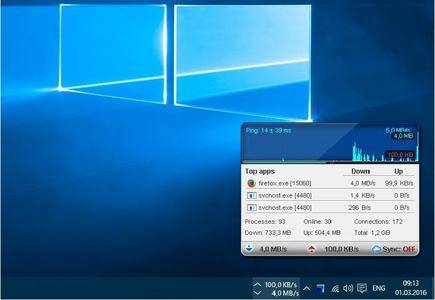
NetBalancer 9.12.9.2037 Multilingual

003e7bc7_medium.jpg


NetBalancer 9.12.9.2037 Multilingual | 7.33 MB​
NetBalancer - Traffic Control and Monitoring Tool - Browse and do any internet activity comfortably even when your download manager or torrent client downloads huge files from internet - just lower their network priority with NetBalancer. With NetBalancer you can choose specifically how much you want to limit traffic available to a process.

With NetBalancer you can:
- Set for any process a download and/or upload network priority or limit
- Manage priorities and limits for each network adapter separately
- Define detailed network traffic rules
- Group local network computers and balance their traffic synchronised
- Set global traffic limits
- Show network traffic in system tray

NetBalancer Features Include:
- Set download and upload network priority or limit for any process
- Supported priorities: High, Normal, Low, Block, Ignore, Limit, Drop, Delay
- Automatically load priorities and limits from a network located file
- Automatically load rules from a network located file
- Define detailed network traffic rules
- Business usage
- Group local network computers and balance their traffic synchronised
- Protect all settings and priorities with a password to prevent unauthorised changes
- Show all system processes with their in and out network traffic speed + +
- Show current connections for any process + +
- Detailed download and upload traffic history for any process since first NetBlancer's install
- View overall system traffic as a graph
- Show network traffic in system tray
- Fine tune priorities (see Level Severity setting)
- Native 64 bit support for best performance
- Full IPv6 support
- Set global traffic limits

Operating System:
Windows® 10, Windows® 8 / 8.1, Windows® 7

Home Page -
Код:
http://www.seriousbit.com/

Language: Multilingual

Download link:​
Код:
[center][b]rapidgator_net[/b]:
https://rapidgator.net/file/60d3138a40acfb9dde3d9c7e0b564a93/2n932.NetBalancer.9.12.9.2037.Multilingual.rar.html

[b]nitroflare_com[/b]:
http://nitroflare.com/view/88144A7F50A06A7/2n932.NetBalancer.9.12.9.2037.Multilingual.rar

[b]uploadgig_com[/b]:
https://uploadgig.com/file/download/37B8041a86841577/2n932.NetBalancer.9.12.9.2037.Multilingual.rar[/center]

Links are Interchangeable - No Password - Single Extraction​
 
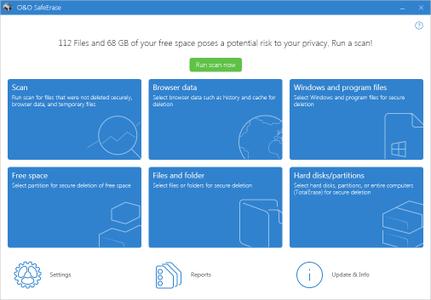
O&O SafeErase Professional Workstation Server 14.3 Build 524

00671bd6_medium.jpg


O&O SafeErase Professional / Workstation / Server 14.3 Build 524 (x86/x64) | 52.7/52.7/52.7 Mb​
Your personal photos and confidential documents can easily fall into the wrong hands when you sell, give away or dispose of your old PC or hard drives. Identity theft is now a widespread security threat. This is because clicking on "Delete" does not mean your files are permanently deleted. Even formatting the hard disk is not enough to permanently delete data. O&O SafeErase permanently deletes your confidential files using recognized methods so that a recovery is never possible, not even when using the best file recovery software.

There is a good chance your personal photos or business data will easily fall into the wrong hands whenever you want to sell, give away or dispose of your old computer. This is because clicking on "Delete" doesn't automatically mean your data is irrevocably destroyed. Even formatting the hard disk is not enough to completely destroy your data. O&O SafeErase allows you to permanently delete your data using recognized methods so that a recovery is never possible, not even when using specialized software.

New and enhanced functions
In addition to many minor enhancements, O&O SafeErase includes an analytical tool that scans your computer for temporary and unsafely deleted files. With just a few clicks, you can clean your computer so that unauthorized parties never have a chance to spy out old files for possible misuse. SSDs can also be detected, and deletions made on them will be done sparing resources. Advanced and improved management of reports make using O&O SafeErase even more convenient.

Internet security
When surfing the Internet, your browser usually stores Internet files unnoticed on your hard drive. These files can provide information about websites you've visited or the passwords you've entered. It makes no difference whether it involves cookies, data entered on forms, or browsing history - O&O SafeErase lists all the information saved for each browser you use, and you can then delete them individually or together. Once deleted, nobody will be able to detect your Internet traces and your online accounts are protected from data thieves or hackers. Version 14 supports Microsoft Edge, the successor to Internet Explorer, as well as Internet Explorer, Google Chrome and Firefox.

Safe erase your entire computer
Deleting the entire computer allows you to permanently delete all confidential files before you dispose of, sell, or give your computer away. All files, settings, applications and the operating system itself are deleted so that a file recovery is impossible. You can be sure that nobody will ever restore your confidential information and misuse it, protecting yourself against identity theft. With O&O SafeErase you can even delete your entire computer without a start medium (e.g. a Boot CD).

Six deletion methods for maximum security
O&O SafeErase allows you to choose from among six different deletion methods. The methods of deletion differ in the number of runs and the type of overwriting process. These methods ensure maximum security, whatever your requirements. In addition to standardized deletion methods of the U. S. Department of Defense (DoD) and the German Federal Office for Information Security (BSI) you can also select a complex mathematical method (the Gutmann method), which complies with the highest security levels. In this scientifically approved method of data deletion, corresponding areas of the hard disk are overwritten 35 times using precisely defined rules along with fixed and random values. In this way, O&O SafeErase exceeds even the requirements of the DoD and the BSI. Quick deletion can also be made by just overwriting data with zeros.

SolidErase
As of version 12.3, O&O SafeErase includes the feature SolidErase, which was developed especially for the deletion of SSDs. SolidErase uses resources sparingly and thoroughly so that the data is not recoverable and the SSD is exposed to the least possible strain.

Product features
"Instant Erase": Selecting files over the context menu prompts a mini-dialog from where deletion can immediately take place
Permanent deletion of files, folders, Memory cards and USB sticks
Delete an entire computer, no boot medium necessary
Delete internet traces and temporary program files
Six methods to permanently delete confidential data
Detailed reports as proof of deletion
Analysis tool to search for unsafe deleted files
Adapted deletion method for SSDs (Solid State Disks) with SolidErase (link to paragraph with further infos)
Enhanced report and activity management
.Net Framework 4.7.1

Operating System: Windows 7, 8/8.1, 10

Home Page -
Код:
https://www.oo-software.com/

Download link:​
Код:
[center][b]rapidgator_net[/b]:
https://rapidgator.net/file/2be1c3ef35c4d88da06cee5bfa03c583/k48y7.SafeErase.14.3.524.Pro.rar.html
https://rapidgator.net/file/95b0d724d88b96255e4d7f7a30451f43/k48y7.SafeErase.14.3.524.Server.rar.html
https://rapidgator.net/file/2e4f22d75a8275a880e3fb9268a1f645/k48y7.SafeErase.14.3.524.Works.rar.html

[b]nitroflare_com[/b]:
http://nitroflare.com/view/DF4129A5CC01FE8/k48y7.SafeErase.14.3.524.Pro.rar
http://nitroflare.com/view/CE096ED9089AEAA/k48y7.SafeErase.14.3.524.Server.rar
http://nitroflare.com/view/0864D381BCA02E0/k48y7.SafeErase.14.3.524.Works.rar

[b]uploadgig_com[/b]:
https://uploadgig.com/file/download/e00C035b37E64094/k48y7.SafeErase.14.3.524.Pro.rar
https://uploadgig.com/file/download/194e5145e69dE62F/k48y7.SafeErase.14.3.524.Server.rar
https://uploadgig.com/file/download/be3F7c9888650840/k48y7.SafeErase.14.3.524.Works.rar[/center]

Links are Interchangeable - No Password - Single Extraction​
 
ON1 Photo RAW 2019.6 v13.6.0.7353 (x64)

00673232_medium.jpg


ON1 Photo RAW 2019.6 v13.6.0.7353 (x64) | 1.3 GB​
ON1 Photo RAW 2019 includes the essential tools and features every photographer needs in their workflow. Our super fast, non-destructive, and state-of-the-art processing engine gives you an ultra smooth and efficient editing experience. ON1 Photo RAW is focused on allowing you to get the most out of every photo. Photographers now have a tool with fast photo management, hundreds of customizable photo effects, fast and beautiful HDR, panos, masking and selection tools, layers, and much more-in one app.

Fast Browsing, Organizing, & Batch Processing
Quickly browse, organize, manage and catalog photos in your photo editing workflow. The ultra-fast photo browser and organizer is perfect for rapidly viewing and culling through photos without having to wait on previews to generate or an import process.

New Layers Workflow
Layers integration sits at the heart of ON1 Photo RAW 2019 allowing for raw processing on multiple raw photos, keeping all the non-destructive settings for each photo, and have it done within one workflow.

RAW Processing & Non-Destructive Editing
A state-of-the-art processing engine providing a fast, smooth, comfortable, and fun photo editing experience while producing the highest quality results for your photos.

Effortless Retouching
The tools for retouching portraits, photo restoration, and enhancing photos are available in ON1 Photo RAW 2019.

Masking, Blending, and Brushing
ON1 Photo RAW 2019 includes the best set of masking tools for beginners and advanced users. Whether replacing backgrounds, skies or selectively applying an adjustment with a mask or selection.

Photo Effects, Filters, Presets, LUTs
Includes hundreds of fast, non-destructive, stackable, re-editable, and customizable photo effects and filters providing endless creative possibilities.

HDR Merge
Tone mapping and merging exposure brackets has never been faster or easier.

Panorama Stitching
Stitch together multiple photos into a single panorama or matrix photo. Automatically aligns photos blends them together seamlessly.

Image Resizing & Printing
ON1 Photo RAW 2019 includes everything you need to resize, export, and print your photos.

What's New in ON1 Photo RAW 2019:

A New & Faster Editing Workflow
We've combined all of the modules to create a single place to do your editing. The different editing modules are now available as tabs to allow you to work in each seamlessly at once.

A New Workflow for Layers
Layers will no longer be a separate module. Instead, the power of layers will be accessible within the non-destructive workflow inside of Develop and Effects.

Lightroom Photo Settings Migration
New AI-powered algorithms will give customers the ability to transfer Lightroom-edited photos, keep the non-destructive settings, and move them into ON1 Photo RAW 2019.

Text Tool
Perfect for creating posters, adding your byline or adding editing annotations. Easily control font size, color, position, and more, then save to a preset to add the same text overlay to a batch of photos quickly.

Master Keyword List
Now you can see every keyword that you use in a single, searchable list. You can quickly apply, clear, edit, or delete keywords.

Layered HDR Workflow
With the powerful new non-destructive layers you can combine other photos, text, or alternate exposures with your HDR photos. You can even use the powerful masking tools to combine multiple HDR renditions.

Portrait Tools
The new Portrait tools will automatically detect faces in your photo and will retouch to smooth skin, brighten and sharpen eyes, and whiten teeth.

User Interface
Overall contrast has been reduced to make photos stand out along with a new font to help increase readability. New icons, tabs, and sliders will also take up less visual space.

Focus Stacking
Blend multiple photos at different focus distances to increase depth-of-field.

Auto-Align Layers
Easily combine mulitple photos as layers, then automatically align them based on image content.

Improved Local Adjustments
Local adjustments will be updated to use the raw processing data. This allows for more highlight and shadow details with more tonal range.

Filter Options in Effects
We have added dedicated film grain, curves, and color adjustment filters to Effects. There's also a new way to select and browse filters.

System Requirements:
- Windows 7, Windows 8, or Windows 10 (current maintenance releases, 64-bit only)
- Intel Core 2 Duo, Xeon, or better
- 4 GB (8 GB when used as a Photoshop plug-in)
- 1.5 GB for installation
- OpenGL 3.3-compatible video card with 256 MB video RAM, 1280x720 resolution (at 100% scale factor)

Optional App Integration:
- Photoshop CS6 and above
- Photoshop Elements 14 and above
- Photoshop Lightroom Classic 6 and above

Home Page -
Код:
https://www.on1.com/

Download link:​
Код:
[center][b]rapidgator_net[/b]:
https://rapidgator.net/file/d35dd376709e446f7b26022564d71c26/kuwdp.ON1.Photo.RAW.2019.6.v13.6.0.7353.x64.part1.rar.html
https://rapidgator.net/file/daf88800dbb04d4f1c8f88564a40bd21/kuwdp.ON1.Photo.RAW.2019.6.v13.6.0.7353.x64.part2.rar.html
https://rapidgator.net/file/ac51084cf0b6335ad4688a50f57727e8/kuwdp.ON1.Photo.RAW.2019.6.v13.6.0.7353.x64.part3.rar.html

[b]nitroflare_com[/b]:
http://nitroflare.com/view/6D2E3A3D9D21E6D/kuwdp.ON1.Photo.RAW.2019.6.v13.6.0.7353.x64.part1.rar
http://nitroflare.com/view/539743505D88DAD/kuwdp.ON1.Photo.RAW.2019.6.v13.6.0.7353.x64.part2.rar
http://nitroflare.com/view/FB52AE5B4CB6C96/kuwdp.ON1.Photo.RAW.2019.6.v13.6.0.7353.x64.part3.rar

[b]uploadgig_com[/b]:
https://uploadgig.com/file/download/5A60ac5Ac3c15288/kuwdp.ON1.Photo.RAW.2019.6.v13.6.0.7353.x64.part1.rar
https://uploadgig.com/file/download/cb190068411F7bb5/kuwdp.ON1.Photo.RAW.2019.6.v13.6.0.7353.x64.part2.rar
https://uploadgig.com/file/download/9C4f4aDd87367c97/kuwdp.ON1.Photo.RAW.2019.6.v13.6.0.7353.x64.part3.rar[/center]

Links are Interchangeable - No Password - Single Extraction​
 
PDF Shaper Professional Premium 9.2 Multilingual

0052085e_medium.jpg


PDF Shaper Professional / Premium 9.2 Multilingual | 22 Mb​
PDF Shaper is a feature-rich PDF software that makes it simple to split, merge, update and improve PDF documents. The software operates in batch mode, allowing users to perform its functions while doing other work on their computers. PDF Shaper is optimized for low CPU resource usage, even during the CPU-intensive conversion operations. PDF Shaper's clean, intuitive interface allows users to become productive in just a few minutes.

Key Benefits
PDF Shaper's clean, intuitive interface allows users to become productive in just a few minutes. PDF Shaper is optimized for high-DPI monitors and low CPU resource usage, even during the CPU-intensive conversion operations.

Advanced Tools
With its emphasis on security and privacy, PDF Shaper lets users update or remove PDF metadata fields such as author, title, and dates. PDF files can be encrypted with owner and user passwords. In addition, the software can protect content, set user access permissions, sign PDF files, and decrypt previously encrypted files.

Operating System: Windows XP, Vista, 7, 8, 8.1, 10 (32 and 64 bits)

Home Page -
Код:
http://www.pdfshaper.com/

Download link:​
Код:
[center][b]rapidgator_net[/b]:
https://rapidgator.net/file/0b648c2d0647c26b4b5219f72f551c9b/fkwug.PDF.Shaper.Professional..Premium.9.2.Multilingual.rar.html

[b]nitroflare_com[/b]:
http://nitroflare.com/view/6B143C4A13D2B0B/fkwug.PDF.Shaper.Professional..Premium.9.2.Multilingual.rar

[b]uploadgig_com[/b]:
https://uploadgig.com/file/download/b99d420364F286e9/fkwug.PDF.Shaper.Professional..Premium.9.2.Multilingual.rar[/center]

Links are Interchangeable - No Password - Single Extraction​
 
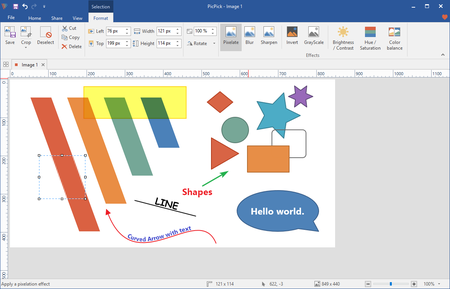
PicPick Professional 5.0.6 Multilingual

005863b6_medium.png


PicPick Professional 5.0.6 Multilingual | 15.9 Mb​
PicPick is an all-in-one software for software developers, graphic designers and home user. It has an intuitive interface and simple, elegant operation. After starting the software, you simply select one of the tool from the PicPick Tools trayicon menu when you want. It features a powerful capture tool, image editor, color picker, color palette, pixel ruler, protractor, crosshair, whiteboard and etc.

Features

Capture anything
Take screenshots of an entire screen, an active window, the scrolling windows and any specific region of your desktop, etc.

Edit your images
Annotate and highlight your images: text, arrows, shapes and more with the built-in image editor that includes the latest Ribbon style menu.

Enhance with effects
Easily add effects to your images: drop shadows, frames, watermarks, mosaic, motion blur, brightness control and more.

Share everywhere
Save, share, or send your images via Web, email, ftp, Dropbox, Google Drive, SkyDrive, Box, Evernote, Facebook, Twitter and more.

Graphic Accessories
Variety of graphic design accessories including color picker, color palette, pixel ruler, protractor, crosshair, magnifier, whiteboard.

Customizable setting
With highly advanced settings, you can customize hotkeys, file naming, image quality, and many other options that fits your needs.

Operating System: Windows 10, 8.1, 8, 7, Vista and XP including both 32-bit and 64-bit versions.

Home Page -
Код:
https://picpick.app/en/

Download link:​
Код:
[center][b]rapidgator_net[/b]:
https://rapidgator.net/file/54e8e1660732e052f3eb01ec9515b693/y0n78.PicPick.Professional.5.0.6.Multilingual.rar.html

[b]nitroflare_com[/b]:
http://nitroflare.com/view/BC957F7F6678D0A/y0n78.PicPick.Professional.5.0.6.Multilingual.rar

[b]uploadgig_com[/b]:
https://uploadgig.com/file/download/F426F94F9b37c62d/y0n78.PicPick.Professional.5.0.6.Multilingual.rar[/center]

Links are Interchangeable - No Password - Single Extraction​
 
progeCAD 2020 Professional 20.0.4.21 (x64)

006a38b8_medium.jpg


progeCAD 2020 Professional 20.0.4.21 (x64) | 678 Mb​
progeCAD is an AutoCAD® compatible 2D/3D CAD application that works with AutoCAD® DWG files from v. 2.5 to v. 2020 and imports Autodesk Revit® and IFC files! The best solution for AEC, MCAD and all generic CAD usages. progeCAD sells with perpetual licensing and offers more CAD functions than AutoCAD® LT at a fraction of the cost of AutoCAD®, ArchiCAD® or Microstation®.

10 Reasons for progeCAD Professional:
* Perpetual Licensing! No annual fee. You decide when to upgrade
* Nothing to learn, if you are AutoCAD® users
* Works natively with DWG! Fully compatible with AutoCAD® without conversion
* Import BIM projects and objects (Autodesk Revit® and IFC)
* PDF to DWG conversion included
* Convert your old paper draughts into CAD!
* Create architectural layouts in a flash with the EasyArch parametric plug-in
* 22.000 blocks ready to use + customizable blocks manager
* Import/Export - STEP, IGES, PDF, 3D PDF, DWF, 3DS, DAE, LWO, POV, Maya, OBJ, BMP, JPG, WMF, EMF, SVG
* Professional Artisan Render Engine included

progeCAD Advanced Features:
* PDF Export with Layers - includes PDF/A ISO19005 Standard export
* PDF to DWG conversion
* Insert BIM models into DWG. IFC and Autodesk Revit® files supported
* Exports STEP, IGES, PDF, DWF, 3DS, DAE (Collada), STL, LWO, POV, MA(Maya), OBJ(Wavefront), BMP, JPG, WMF, EMF, SVG
* Imports STEP, IGES, IFC, Rvt/Rfa (Revit®), ESRI-SHAPE SHP, 3DS, DGN(Microstation), LWO, OBJ, STL, IFC, RGT, KMZ, DXF, DWF, DWFx
* PointCloud import (ReCap® .rcp, .rcs, .pcg, .isd, .xyz, .ply, .las, .laz)
* Customizable Toolpalettes for Blocks, Hatches and frequently used Commands
* 3D Print - STL export for 3D Printer output
* iCADLib Blocks Manager. More than 22.000 2D/3D ready-to-use blocks
* Direct access to Traceparts, Cadenas and BIM&CO with millions of blocks and BIM objects ready-to-use
* Dynamic blocks editing
* EasyArch - 2D and 3D building plugin for architects
* SuperHatch
* Helix and Loft Commands
* Multileaders
* ADDSELECTED - create a new object of the same type and general properties of a selected object.
* Gradient Hatch
* Bitmap/Raster support - Jpeg, TIFF, Png, Gif, ECW, MrSID and Jpeg 2000
* Bitmap polygonal clipping
* Description Margin Customization - cover the entire sheet area
* Digital signatures to .dwg files
* AUTOSEZ automatic creation of surface profiles (Topographic Sections - AutoCAD Civil 3D Feature)
* SLOPE creation of slope patterns
* Block Editor (BEDIT)
* Availability of industrial standard Pantone® and RAL™ Color Books
* Optimization for 4K displays
* Dynamic UCS
* Dynamic Input
* AEC, Civil, GeoMaps, Mechanical objects support
* Flatshot command - Generates an accurate flat view of a 3D model
* AREATEXT - Calculate boundary area and place the text with the value in the center of the area.
* Formulas in Tables: table cells can contain formulas
* ARRAYPATH - Place object copies uniformly along a path or a portion of a path
* Find and Replace
* Express Tools - A complete set of Extra functions for Blocks, Layers, Texts
* Annotative Objects
* Arc Aligned Text
* Multigrip Editing
* Render engine - progeCAD integrates for free the Artisan Renderer module
* Automatic Perspective image correction
* 3DConnection SpaceMouse support
* eTransmit - Compacting and transmitting DWG files with dependences by email
* Eattedit - Advanced Attribute editing
* Advanced Data Extraction
* QDIM - Quick dimensioning
* Google EarthTM Integration
* Spell Checker
* Publish (Batch Description)
* Raster to Vector converter - Convert your paper drawings to editable DWG files
* Cloud - Share files on Cloud - Supports the major cloud services for file sharing and syncing like DropBox, Google Drive and Microsoft One Drive
* BetterWMF Integration

System Requirements:
* CPU: Intel or AMD Pentium equivalent, or more powerful processor
* Disk space: 2 Gb free hard disk space
* Memory (RAM): 256 Mb RAM minimum (2 Gb or more recommended)

Operating Systems:
* Windows Vista
* Windows 7
* Windows 8
* Windows 10
Homepage

Home Page -
Код:
https://www.progesoft.com

Download link:​
Код:
[center][b]rapidgator_net[/b]:
https://rapidgator.net/file/9d1b7566e3f903156ca38cf9e9c114f3/ip8g4.progeCAD.2020.Professional.20.0.4.21.rar.html

[b]nitroflare_com[/b]:
http://nitroflare.com/view/60BBCAE7799C71F/ip8g4.progeCAD.2020.Professional.20.0.4.21.rar

[b]uploadgig_com[/b]:
https://uploadgig.com/file/download/95b615224d80b179/ip8g4.progeCAD.2020.Professional.20.0.4.21.rar[/center]

Links are Interchangeable - No Password - Single Extraction​
 
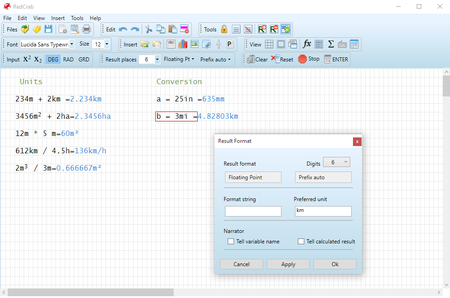
RedCrab Calculator PLUS 7.7.2.717

00638647_medium.png


RedCrab Calculator PLUS 7.7.2.717 | 14 Mb​
RedCrab Calculator is a mathematics software with fullscreen editor for the free placement of algebraic formulas on the worksheet in mathematical notation.Results can be displayed in different numeric formats and in diagrams. Images and texts can be inserted.

RedCrab PLUS
The shareware RedCrab PLUS extends the range of functions with additional functions for statistics, finances, matrices and special applications, as well as calculating with complex numbers and units of measure. Descriptionting of 2D graphics and charts.

Features:
- Free placement of mathematical formulas in natural notation
- Numerics formats of results
- Decimal fixed point, floating point, exponent
- Hexadecimal, octal or binary
- Date- and time format
- Optionaly with text
- With units of measurement
- With prefix
- Individual assignment of output formats to variables
- Audible announcement of the results
- Number of chart types for graphical display of the results
- 2D function Descriptionter
- Calculating with units of measure. Automatic conversion of different systems in a formula (km, miles, acres, liter, yard). Automatische Umrechnung verschiedener Systeme in einer Formel (km, Meilen, Hektar, Liter, Yard)
- Defining your own mathematical functions
- Accuracy digits: 14 / 28
- Print selected areas of the worksheet
- Insert of text boxes
- Integrated functions: >250
- Tooltips and online help in German and English
- Interface (API) to perform its own functions in external programs
- Slider for variable data input

System requirement:
- Windows XP,
- Windows Server 2008, 2012,
- Windows Vista, Windows 7,
- Windows 8, Windows 10
- Net Framework 4.0

Home Page -
Код:
https://www.redcrab-software.com/en/RedCrab/Index

Download link:​
Код:
[center][b]rapidgator_net[/b]:
https://rapidgator.net/file/78c36f876954e23e6d2480b8199dbb26/q596r.RedCrab.Calculator.PLUS.7.7.2.717.rar.html

[b]nitroflare_com[/b]:
http://nitroflare.com/view/B4FBAE1FD16C50E/q596r.RedCrab.Calculator.PLUS.7.7.2.717.rar

[b]uploadgig_com[/b]:
https://uploadgig.com/file/download/f856b691953c3De0/q596r.RedCrab.Calculator.PLUS.7.7.2.717.rar[/center]

Links are Interchangeable - No Password - Single Extraction​
 
Remo Recover Windows 5.0.0.40

0063da77_medium.jpg


Remo Recover Windows 5.0.0.40 | 56.4 Mb​
Remo Recover (Windows) is the best solution to recover your deleted or lost data in an easy way. Data lost due to emptying Recycle Bin, formatting, corrupt partitions, accidental deletion using Shift + Delete keys or due to any other reason will be recovered. With its friendly interface, even a non-tech savvy user can recover data without any hindrances.

Remo Data Recovery software is designed with strong scanning mechanisms that helps in restoring data lost even in complex data loss situations like improper partitioning, unbootable drives, after OS reinstallation etc. You might have lost your text documents, spreadsheets, PowerPoint presentations, pictures, videos, RAW images, PDFs, EXE files etc., the software restored them all back, and actually it can restore more than 300 types of files.

Key Features:
- Deleted file recovery, even after using "Shift+Del"
- Recover files Emptied from recycle bin
- Choose and recover variety of files using Raw search
- Recover professional RAW Photo files
- Recover photos, videos and music files
- Create disk images to skip bad sectors
- Recover data from disk images created using Remo Recover
- Recover data after Windows Re-Installation
- Add new file types for recovery using Raw Signature Search
- Recover data from accidentally formatted, re-formatted partitions
- Recover data from lost / deleted partitions
- Recover data from re-partitioned drives

System Requirements
Operating System - Microsoft Windows 10, Windows 8.1, Windows 8.0, Windows 7, Vista, XP, Windows Server 2003, Windows Server 2008 and Windows Server 2012
RAM - 512 MB (Recommended, 1 GB RAM)
Free disk space - 50 MB (for installation)
You must log in to your Windows PC as Local System Administrator to install and use this software
Supports 32-bit, 64-bit PC

Home Page -
Код:
https://www.remosoftware.com/remo-recover-windows

Download link:​
Код:
[center][b]rapidgator_net[/b]:
https://rapidgator.net/file/327531689075fee36e386c9c64f4606f/msxzi.Remo.Recover.Windows.5.0.0.40.rar.html

[b]nitroflare_com[/b]:
http://nitroflare.com/view/C6CCCCD221944C7/msxzi.Remo.Recover.Windows.5.0.0.40.rar

[b]uploadgig_com[/b]:
https://uploadgig.com/file/download/01df7bee0C20b56a/msxzi.Remo.Recover.Windows.5.0.0.40.rar[/center]

Links are Interchangeable - No Password - Single Extraction​
 
R-Wipe & Clean 20.0 Build 2245

004ca796_medium.jpg


R-Wipe & Clean 20.0 Build 2245 | 20.4 Mb​
R-Wipe & Clean is a complete R-Tools solution to remove useless files, free up your disk space, and clean various privacy-compromising information on your online and offline activity. This includes internet history and cookies, lists of downloaded files and opened documents, various data caches, temporary files, and many more items, created by the operating system, most contemporary internet browsers and communication programs, and by hundreds of third-party applications.

It is also possible to create specific lists of traces to be cleaned for unsupported applications. All small computer cleaning and file erasing jobs can be combined into large computer cleaning tasks that can be started immediately, or at scheduled time/events.

Computer Cleaning
Traces Selection helper: a tool to quickly select some of the most common traces to clean.
Cleaning Internet activity: removing traces from most contemporary browsers and communication programs.
Cleaning personal traces: removing various lists, logs, caches, temporary files, and other traces of your activity.
Cleaning system traces: removing registry traces, temp files, system history, and various log files.
Cleaning traces from various third-party programs: removing various caches, logs, temporary files, recent file lists, and other traces left by applications.
Cleaning can be performed as a background task and computer can be turn off upon its completion.

Wiping
Support for SSD devices: R-Wipe & Clean correctly recognizes SSD devices and by default wipes only necessary data on the disk preventing them from additional wear.
Strong or fast erase algorithms, including DoD-approved, for wiping files and free disk space.
Support for FAT/exFAT and NTFS file systems.
Wiping files' alternate data streams and cluster "tips", or free parts of file clusters.
Wiping files directly from File Explorer.
Wiping free space on a single disk directly from its shortcut menu.
Wiping unused space of several disks through one single wipe task.
Wipe records of small files stored directly in the NTFS Master File Table.
Predefined wipe lists of files, folders, and Registry keys to be wiped through a single task. Files or folders can be added to a current wipe list directly from File Explorer.

Advanced Features
All separate cleaning and wiping actions can be combined into large wipe and clean tasks to launch them manually or at scheduled times or events (user log-on/log-off, system start-up/shutdown, closing any or all browsers, etc.)
Detailed representation of all trace items on your computer.
Detailed logging of all wipe and clean operations.
Customization: R-Wipe & Clean can hide those items you will never want to clean.
Full system integration: Most wipe and clean operations can be performed directly from Windows.
Password protection.
R-Wipe & Clean Smart: an advanced tool to create and manage very complex wipe lists.
Cleaning and wiping task can be started from a command line.
Boss Key to close a web-browser in emergency.
Stealth mode to hide computer cleaning.
Standby/hibernate control: Your computer will not hibernate until R-Wipe & Clean finishes its long job.
Startup Renaming for files/folders locked by Windows and other programs. They will be renamed and cleaned during the next start-up.

System Requirements
An Intel-compatible platform running Windows 7/8/8.1/10 or Windows Server 2008 R2/2012/2012 R2/2016.
The administrative privileges are required during installation to install R-Wipe & Clean's Windows Explorer shell extensions.

Home Page -
Код:
https://www.r-wipe.com/

Download link:​
Код:
[center][b]rapidgator_net[/b]:
https://rapidgator.net/file/41a6a50fa30df651d205306805f5916e/4256d.RWipe..Clean.20.0.Build.2245.rar.html

[b]nitroflare_com[/b]:
http://nitroflare.com/view/42B0A50C725502C/4256d.RWipe..Clean.20.0.Build.2245.rar

[b]uploadgig_com[/b]:
https://uploadgig.com/file/download/BB9faCc9291430cd/4256d.RWipe..Clean.20.0.Build.2245.rar[/center]

Links are Interchangeable - No Password - Single Extraction​
 
Sitni Sati FumeFX 5.0.4 (x64) for 3ds Max

006a394d_medium.jpg


Sitni Sati FumeFX 5.0.4 (x64) for 3ds Max | 93.8 mb​
Sitni Sati releases FumeFX 5.0.4 update for Autodesk 3ds Max. In addition to bug fixes, this update includes GPU Viewport support for 3ds Max 2020.1 detachable viewports that allows artists to use detached view as they were using the old FumeFX preview window. FumeFX 5.0.4 adds more controls and updated preview for Turbulence Noise as well as new Affect Velocity Magnitude Mode. Another great addition is the Parameter Check dialog that allows users to quicky determine which simulation parameters were changed from their default values.

FumeFX 5.0.4 Press Release:

Viewport:
- Added compatibility with 3ds max 2020.1 undockable viewport. You can now use it in the same fashion as the old FumeFX Preview Window.
- Fixed when GPU viewport is in maximized ortho/persp/cam view and then changed to another persp/cam view it will stop displaying.
- Fixed FumeFX Wind display bug with Spherical type and Linear falloff.
- Fixed VRay lights that didn't work inside the GPU Viewport.
User Interface:
- Added Turbulence Noise rasterized view.
- Changed Turbulence noise parameter Offset renamed to Time Offset.
- Changed Simulation rollout layout.
- Changed FumeFX Wind Scale parameter is now in world units, like it is for the Turbulence Noise inside the FumeFX dialog.
- Added FumeFX Wind to the list of objects to create from obj/sources dialog.
- Added Parameter Check option to the FumeFX menu.
Simulation:
- Fixed tyFlow particle velocities that were too large.
- Added Affect Velocity Magnitude Mode to Turbulence Noise.
- Added Small Detail Scale parameter to Turbulence Noise.
- Added Small Detail Amount parameter to Turbulence Noise.
- Added Small Detail Scale parameter to FumeFX Wind.
- Added Small Detail Amount parameter to FumeFX Wind.
- Added noise preview to FumeFX Wind.
Rendering:
- FumeFX 5.0.4 is built with Arnold 5.3.1.1.
- Fixed not working Falloff with Arnold render.
- Fixed FumeFX for 3ds max 2020 that didn't show FumeFX and FusionWorks Render Elements.

Sitni Sati has released FumeFX 5.0 for 3ds Max, the latest version of the popular gaseous fluid simulator, adding a new GPU-accelerated viewport preview, and improving the detail and stability of simulations.

New features in FumeFX 5.0 include conservative advection, a new advection type that Sitni Sati says leads to more stable, detailed fluid flows, particularly when dealing with complex geometry. In addition, exported velocities or 3D textures can now be used to generate additional advected details within a fluid flow at render time.

Workflow changes include the integration of a GPU-accelerated simulation preview within the Max viewport. The new display supports volumetric shadows, "proper" geometry occlusion and real-time shader feedback. There is also a new FumeFX toolbar, which provides access to key tools and simulation controls.

Under the hood, the simulation core has been redesigned, making it possible to use more complex geometry instead of proxies without causing instability in a sim.

Performance has also been improved: FumeFX estimates that sims should calculate "up to 20% faster", and should scale better with CPU cores, resulting in consistent output regardless of the number of cores used. Retiming should result in simulations remaining smooth "regardless of simulation sub-steps and retiming scale factor". It is also now possible to retime a sim during the calculation's wavelet turbulence pass.

Sitni Sati has also introduced a new lossy compression format with support for per-channel settings and the option to mix lossless and lossy channels inside the same cache file. When generating caches in OpenVDB format rather than as native FumeFX FXD files, caches are now written in a way "that makes them easily readable inside the Arnold Volume Grid, Redshift grid and even Houdini". Caches can also now be reloaded at a user-defined resolution to make them easier to manipulate.

Other changes include direct rendering support for Corona. You can find a full list via the links below.

Sitni Sati was founded back in 1999 and quickly became recognized in the field of VFX software development. Innovative ideas and extensive research of the natural phenomena resulted in FumeFX, praised as one of the fastest and most flexible CG fluid dynamics simulation systems available on any platform. Our dedication to constantly improve the software and usage of the latest technology available helped to narrow the barrier between reality and CG imagery. Sitni Sati software was used in films like Thor, Suckerpunch, Skyline, 2012, Percy Jackson and the Olympians, X-Men: Wolverine, Iron Man, Armageddon, Matrix Reloaded and more.

Product: SitniSati FumeFX
Version: 5.0.4
Supported Architectures: x64
Website Home Page :
Код:
http://www.afterworks.com
Language: english
System Requirements: PC
Supported Operating Systems: Windows 7even or newer
Software Prerequisites: 3ds Max 2014 to 2020
Size: 93.8 mb

Download link:​
Код:
[center][b]rapidgator_net[/b]:
https://rapidgator.net/file/65c5c47b91dd74eb97a17ffad34a2297/ulsxk.Sitni.Sati.FumeFX.5.0.4.for.3ds.Max.rar.html

[b]nitroflare_com[/b]:
http://nitroflare.com/view/8F3828C2A52E22B/ulsxk.Sitni.Sati.FumeFX.5.0.4.for.3ds.Max.rar

[b]uploadgig_com[/b]:
https://uploadgig.com/file/download/fD0f8574dC8aeB13/ulsxk.Sitni.Sati.FumeFX.5.0.4.for.3ds.Max.rar[/center]

Links are Interchangeable - No Password - Single Extraction​
 
Slidepad 1.0 (1.0.12) macOS

006a3b00_medium.png


Slidepad 1.0 (1.0.12) | macOS | 9 mb
An iPad style slide over window for your web apps. No more hassle of window switching.​

An iPad slide over window
By slide in and slide out, Slidepad brings iPad style multitasking to your Mac. Using Slidepad is as easy as using your dock.

A simple sidebar to switch between apps
Slidepad borrowed the concept of sidebar from Franz and Station. It is much smoother than tabs, and it helps you quickly switch between different web apps.

An omnibox lets you open any websites, tutorials or PDFs
Unlike other similar apps, there is no limit on what can be placed on Slidepad. You can type any keywords, URLs like what you do in common browsers!

More Features
* Minimal-style sidebar
* Corner snapping
* Developer tool enabled
* Customizable sound setting
* Mobile/Desktop user-agent switching
* Display badge when receive new notifications
* On/Off live notifications
* Multi-screen support
* Drag/drop support
* Picture in Picture support
* Quicklook icon support
* Dark theme support (MacOS 10.14+)
* Global keyboard shortcut support

Compatibility: macOS 10.13.4 or later 64-bit
Homepage:
Код:
https://slidepad.xyz/index.html

Download link:​
Код:
[center][b]rapidgator_net[/b]:
https://rapidgator.net/file/d15155ffd8d8baffa8119612f96467e1/xld9g.Slidepad.1.0.1.0.12.rar.html

[b]nitroflare_com[/b]:
http://nitroflare.com/view/D1B0F126DB2DD7F/xld9g.Slidepad.1.0.1.0.12.rar

[b]uploadgig_com[/b]:
https://uploadgig.com/file/download/a93bDd54Dc936a73/xld9g.Slidepad.1.0.1.0.12.rar[/center]

Links are Interchangeable - No Password - Single Extraction​
 
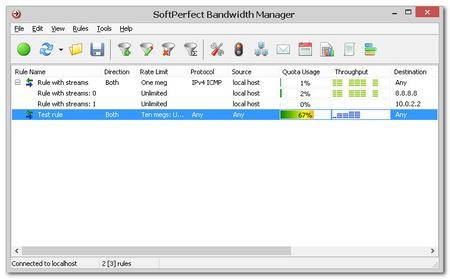
SoftPerfect Bandwidth Manager 3.2.10

0053865d_medium.jpg


SoftPerfect Bandwidth Manager 3.2.10 | 10.1 Mb​
Are your Internet usage or costs unexpectedly high? Does inappropriate use of the network or the Internet have an adverse effect on your business performance? Did the Internet access bandwidth become a major bottleneck in your network? If your network has any of these problems, SoftPerfect Bandwidth Manager will provide a cost-effective solution. The software monitors your network traffic and limits bandwidth in whatever manner you specify. The result is an immediate increase in the efficiency of your network together and a reduction in your overall bandwidth requirements while allowing important Internet applications to run at full speed.

SoftPerfect Bandwidth Manager is a full-featured traffic management tool for Windows that offers cost-effective bandwidth control and quality of service based on built-in prioritised rules. These rules can specify a bandwidth limit for each Internet user. The software of this kind is otherwise known as bandwidth limiter or traffic shaper. With its help, you can apply speed-throttling rules to specified IP and MAC addresses, ports and even network interfaces with no changes to your existing network infrastructure. The rich feature set of SoftPerfect Bandwidth Manager software is easily managed via the intuitive Windows GUI.

Key features
Centralised configuration from a single network location.
Flexible, prioritised, bidirectional rules to specify maximum data rates and usage allowances.
Rules for IP and MAC addresses, protocols, ports (for TCP/IP) and network interfaces.
Transparency for end users with no client software installation required in most cases.
Quotas, scheduler, email notifications and comprehensive usage reports.

Supported platforms
Windows XP through Windows 10,
Windows Server 2003 through 2016
32-bit and 64-bit

Home Page -
Код:
https://www.softperfect.com/products/bandwidth/

Download link:​
Код:
[center][b]rapidgator_net[/b]:
https://rapidgator.net/file/d074295092d1fd8b79f600a25b493a83/5jnjy.SoftPerfect.Bandwidth.Manager.3.2.10.rar.html

[b]nitroflare_com[/b]:
http://nitroflare.com/view/91B6D4F96EB18EB/5jnjy.SoftPerfect.Bandwidth.Manager.3.2.10.rar

[b]uploadgig_com[/b]:
https://uploadgig.com/file/download/519Fcca12d299043/5jnjy.SoftPerfect.Bandwidth.Manager.3.2.10.rar[/center]

Links are Interchangeable - No Password - Single Extraction​
 
SysTools Outlook Duplicates Remover 3.0

006a39b6_medium.png


SysTools Outlook Duplicates Remover 3.0 | 7.6 Mb​
SysTools Outlook Duplicates Remover is an advanced software to deal with duplicates in Outlook. It is capable to remove duplicate emails, contacts, calendars, etc., from Outlook PST file. It also allows provides an option to delete duplicates within the folder or across the folders of PST file.

Main Features:
* Deduplication of emails, contacts, calendars, journals, tasks, notes
* Options to delete duplicates within the folder and across the folder
* Locate & clean up duplicates via email fields i.e., subject, to, body, bcc, etc.
* Remove duplicate emails from multiple Outlook PST files in batch
* Capable to delete duplicates from Password Protected PST file
* Easy to filter out redundant mail items in Microsoft Outlook.
* No File Size Limitation: Supports Both ANSI & UNICODE File Types
* Make report for unique & deleted duplicate items in .csv extension.
* MS Outlook should be installed and set as the default email client
* Tool Support MS Outlook 2019 (32 / 64 bit) & all below versions
* Outlook Duplicate Item Remover supports Windows 10 (32-bit & 64-bit)

Batch Data Deduplication
The Outlook Duplicates Remover software allows you to eliminate the duplicates from multiple MS Outlook PST files at once. You can add a folder having multiple PST files in it and software will remove duplicates from each PST file as well as the folders in it.

Remove Duplicate Emails in Outlook
It is possible to cleanup the duplicates from all items within Outlook PST file. You can delete the duplicate items from emails, contacts, calendars, tasks, notes, journals. If required, you can check or uncheck the items for selective data deduplication.

Lists Files with Attributes
The software allows you to add multiple PST files at once. You can see all the listed PST files on the software interface along with its attributes like: File Name, File path, status, duplicates found and the name of item.

Show Deduplication Status
Once you add the PST files for data deduplication, it will show you the current status of each file. Now once the software starts removing duplicate items from Outlook folders, it will show you the status as complete with the number of items processed.

Create New Store Folder
While removing duplicates emails & other items from the PST file(s), you will be asked to choose a desired location. You can save the file at any desirable location and save the PST file. Also, if required; you can make a new folder to save the output files in it.

Supports Outlook 2019 & Below Version
Outlook Duplicate items remover support to the latest Outlook version. The tool clean up duplicate items from Microsoft Outlook 2019, 2016, 2013, 2010, 2007, 2003. You can upload PST file of any Outlook version, the software will remove duplicate from all of them in few clicks.

Export Duplicate Free PST File in CSV
When duplicate item removal process of Outlook completed successfully, a final report is generated by the tool. This report contain all details like source path, destination path, duplicate count, and item count. It will get auto-saved at selected destination location in CSV format. You can check the report it for any details regarding the process.

Generate Duplicate Items Report
After cleaning up duplicates from Outlook PST file, a report containing all details of duplicates is generated by the tool. This report stores information like file name, folder name, subject, and senders address. All this information is with respect to the duplicates removed by Outlook Duplicate Remover. The report will get auto-saved on the selected destination location in CSV format. You can use it for details whenever required.

System Requirements:
* 10, 8.1, 8, 7 & All Below Versions
* 100 MB of free hard disk space required
* Outlook 2000, 2003, 2007, 2010, 2013, 2016, 2019 (32 / 64 bit Versions)
* If you are using Window 10/8.1/8/7 or Vista, then please launch the tool as "Run as Administrator".
* 2 GB RAM
* 1GHz processor (2.4 GHz is recommended)

Homepage -
Код:
https://www.systoolsgroup.com

Download link:​
Код:
[center][b]rapidgator_net[/b]:
https://rapidgator.net/file/6085424beb011576d44aefff37f2b8ec/4soj9.SysTools.Outlook.Duplicates.Remover.3.0.rar.html

[b]nitroflare_com[/b]:
http://nitroflare.com/view/1E237FD299D06D7/4soj9.SysTools.Outlook.Duplicates.Remover.3.0.rar

[b]uploadgig_com[/b]:
https://uploadgig.com/file/download/326f61277c6fC17d/4soj9.SysTools.Outlook.Duplicates.Remover.3.0.rar[/center]

Links are Interchangeable - No Password - Single Extraction​
 
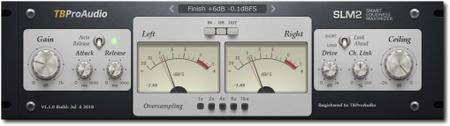
TBProAudio Plugins Bundle 2019.7.5 WiN

00577fff_medium.jpg


TBProAudio Plugins Bundle 2019.7.5 WiN | 44 Mb​
SLM2 is a smart stereo loudness maximizer including "analog spice" and 16x over-sampling. The goal of the design was to maximize the loudness of the audio signal while maintaining transparency.

The SLM2 DSP analyses every sample of the incoming stereo signal within a defined time frame and calculates the optimal volume increase. This guarantees maximum possible transparency. The overall loudness can be further increased by the following, optional clipper stage. Signal aliasing can be reduced by enabling over-sampling. SLM2 is used in all limiting situation like track/bus and master limiting.

Included:
AB_LM v1.6.4 - AB Loudness Match
AMM v1.0.6 - Automatic Microphone Mixer
CS-3301 v1.5.8 - Channel Strip
CS-5501 v1.0.2 - Extended Channel Strip
dEQ6 v2.1.5 - Dynamic Equalizer / Multiband Compressor
dpMeter 4 v4.0.1 - Free Multi Channel Meter
dpMeterXT v1.3.5 - Broadcast Loudness Meter
DynaRide v1.1.5 - Vocal & Bass Riding Leveller
Euphonia v2.0.4 - Spectrum Balancing
FinalLoud v1.0.8 - Loudness & True Peak Finalizer Tool
GainRider 2 v1.0.11 - Vocal Gain Riding Leveller
gEQ12 v2.2.2 - 12-Band Graphic Equalizer
Impress v1.9.16 - Compressor
ISOL8 v2.0.1 - Free Mix Monitoring Tool
LA xLimit II v1.3.4 - Limiter
mvMeter2 v1.0.19 - Free Multivariable Meter
SLM2 v1.3.5 - Smart Loudness Maximizer
ST1 v1.0.3 - Spatial Tool
sTilt v1.4.4 - Free Spectrum Tilt Filter

Download link:​
Код:
[center][b]rapidgator_net[/b]:
https://rapidgator.net/file/68e5aca4793508e7da4a6a6a1fd67f10/ueisw.TBProAudio.Plugins.Bundle.2019.7.5.WiN.rar.html

[b]nitroflare_com[/b]:
http://nitroflare.com/view/117042A06FEF3B8/ueisw.TBProAudio.Plugins.Bundle.2019.7.5.WiN.rar

[b]uploadgig_com[/b]:
https://uploadgig.com/file/download/f73ef9aF3b90047d/ueisw.TBProAudio.Plugins.Bundle.2019.7.5.WiN.rar[/center]

Links are Interchangeable - No Password - Single Extraction​
 
Назад
Сверху