• Форум работает в архивном режиме www.old.nado.in

All mitsumi'1s Applications !! (updated daily)

  • Автор темы Автор темы mitsumi1
  • Дата начала Дата начала
Capture One 23 Pro / Enterprise 16.1.1.14 Multilingual


25dcd6acfd10be532d8afc00f3998d1c.jpeg


Capture One 23 Pro / Enterprise 16.1.1.14 Multilingual
Windows x64 | File size: 633.61 MB​

Capture One Pro - Powerful photo editing on desktop. Superior image quality and true-to-life colors thanks to tailored profiles for nearly 600 camera models and lenses. Lightning-fast tethered shooting and precise photo editing tools. An interface you can personalize for a faster workflow.

True-to-life colors and superb image quality
Get incredible color accuracy and image quality right from the start. Our powerful RAW converter is customized for nearly 600 camera profiles and over 700 lenses. Thanks to this, our true-to-life color processing gives you even more vibrant images - so you can spend less time tweaking and deliver even better results.
Lightning-fast tethered shooting
Shoot directly into your computer with lightning-fast tethering for a quick and more efficient workflow. Get a full screen view of your images within seconds, letting you quality control shots in the moment with teams or clients and make the changes you need on set right then and there. With Live View, you can see what your camera sees from your screen, have full control of your camera settings from your computer, and organize images immediately from the get-go.
Get even more space to create with no cords holding you back with Wireless Tethering - available for select Canon and Nikon cameras.
Work quicker with speedy tools
Cull quickly by browsing images with zero delay. Easily choose your top selects by getting an overview of similar shots that are automatically grouped together. Edit with tools that do the work for you. Features like Smart Adjustments let you cut down on editing time with AI-driven adjustments that give you a similar look across photos shot under different lighting conditions by auto adjusting Exposure and White Balance specific to each photo.
Make rapid changes and set your own shortcut keys with Speed Edit, meaning you never need to take your eyes off your image to adjust sliders, letting you edit a single image or make batch edits even faster.
Collaborate quickly with clients around the world
Remote collaboration is made easier with Capture One Live, our timesaving collab tool that lets you get instant feedback from teams and clients anywhere. By sharing images from your photoshoot with a simple link, they can view, comment, rate, and color tag photos directly on any device without needing to download a single file - no third-party software or emailing large files back and forth needed.
The power of Capture One for a studio photographer
Lagos-born, Atlanta-based photographer Daniella Almona works to highlight blackness in all forms in her work. Playing with highly saturated tones in backdrops, clothes, and make-up to bring out her subjects' features, Capture One Pro is key to Daniella's workflow, including her culling and editing processes, control of color, and more.
New in Capture One Pro 23
Faster Culling
Cull your images even faster. Rate and tag images directly in the importer or using the dedicated cull view once your images are already in Capture One Pro. Get an easier overview of similar images with automatic group view, letting you choose your top selects even quicker. Plus, instant browsing allows you to click through your images with zero delay.
Smart Adjustments
Reduce editing time massively with Smart Adjustments. Get a similar look across photos that are shot under different lighting conditions by automatically adjusting Exposure and White Balance - optimized for portraits, weddings, or other jobs featuring people.
Layers In Styles
Have more control over editing and full flexibility over your Style workflow with the ability to include Layers in Styles. Apply your edits to multiple Layers from a single Style, allowing for easy opacity control and versatility. Save your own Styles with Layers in them or get layered versions of Capture One Style Packs.
Change Capture Time
Ensure accurate order of photos for easier culling by changing capture time. When shooting with two or more cameras that are out of sync or capture time is set to the wrong time zone, easily adjust the time on each image so they appear chronologically. Culling is made easier by being presented with all images from certain moments or similar shots in the right order.
Variants in Albums
Easily sort different variants of the same image into separate albums, allowing for more efficient photo organization.
Код:
https://support.captureone.com/hc/en-us/categories/360000430178-Release-Notes
System Requirements
- Intel® Core™ i3 (1st generation) / AMD Jaguar family
- 8 GB of RAM
- 10 GB of free hard disk space
- Calibrated monitor with 1280x800, 24-bit resolution at 96dpi
- Windows 8.1® 64-bit or Windows 10® 64-bit* or Windows 11® (64-bit)
* Windows 10 is supported for builds from 1607 through to build 22H2.

Homepage:
Код:
https://captureone.com/

Download link

rapidgator.net:
Код:
https://rapidgator.net/file/522fdae8ae2e4a656bf75c043220578a/xjwkx.Capture.One.23.Pro..Enterprise.16.1.1.14.Multilingual.rar.html

uploadgig.com:
Код:
https://uploadgig.com/file/download/21D67b6894a5A9ae/xjwkx.Capture.One.23.Pro..Enterprise.16.1.1.14.Multilingual.rar

nitroflare.com:
Код:
https://nitroflare.com/view/87C9C2547D1EAD1/xjwkx.Capture.One.23.Pro..Enterprise.16.1.1.14.Multilingual.rar

1dl.net:
Код:
https://1dl.net/t76w4jug71nb/xjwkx.Capture.One.23.Pro..Enterprise.16.1.1.14.Multilingual.rar


 
Capture One 23 Pro / Enterprise 16.1.1.16 macOS


32598712caedd75e96bfb5065aeceee3.jpeg


Capture One 23 Pro / Enterprise 16.1.1.16 macOS
Language: Multilingual | File size: 711/711 MB​

Capture One creates powerful photo editing software for all kinds of photographers. Its authentic true-to-life color processing, seamless editing experience, and fastest tethering in the industry gives you total creative control, making it a household name in studios across the world. Based in Copenhagen, Denmark, Capture One empowers photographers with cutting-edge features to keep your photography one step ahead.

Capture One creates powerful photo editing software for all kinds of photographers. Its authentic true-to-life color processing, seamless editing experience, and fastest tethering in the industry gives you total creative control, making it a household name in studios across the world. Based in Copenhagen, Denmark, Capture One empowers photographers with cutting-edge features to keep your photography one step ahead.
Capture One is a professional RAW converter offering you ultimate image quality with beautiful colors and incredible detail for more than 500 high-end cameras. It offers state- of-the-art tethered capture, powerful digital asset management, extensive adjustment tools and a flexible workflow through customizable workspaces.
Capture One Enterprise is designed for high-volume studios where efficiency is paramount. It comes with the same imaging benefits that Capture One Pro offers but with extra functionality specifi- cally designed for a streamlined workflow. Enterprise users benefit from an expanded tool-box and automation solutions that can be tailored to the way their business work
Release Notes
Updates: official site does not provide any info about changes in this version

Supported Operation Systems
macOS 10.15 or later

Homepage:
Код:
https://www.phaseone.com

Download link

rapidgator.net:
Код:
https://rapidgator.net/file/811fe2d16d94460e3e3d677a80675a53/yqhpw.CaptureOneEnt16.1.1.16TNT.dmg.html
https://rapidgator.net/file/9eb393e078805f5c11182d6a5d83a7a2/yqhpw.CaptureOnePro16.1.1.16TNT.dmg.html

uploadgig.com:
Код:
https://uploadgig.com/file/download/41dB8e229857A6a5/yqhpw.CaptureOneEnt16.1.1.16TNT.dmg
https://uploadgig.com/file/download/bd4Ae9d498BFf454/yqhpw.CaptureOnePro16.1.1.16TNT.dmg

nitroflare.com:
Код:
https://nitroflare.com/view/40F8B9548B37AB9/yqhpw.CaptureOneEnt16.1.1.16TNT.dmg
https://nitroflare.com/view/FB033A1AD367F76/yqhpw.CaptureOnePro16.1.1.16TNT.dmg

1dl.net:
Код:
https://1dl.net/6lj7qpitz9qn/yqhpw.CaptureOneEnt16.1.1.16TNT.dmg
https://1dl.net/ebmopzdrgsht/yqhpw.CaptureOnePro16.1.1.16TNT.dmg
 
Cisdem Video Converter 7.4.0 macOS


263c65277fa027e39cc8960b3a531d95.jpeg


Cisdem Video Converter 7.4.0 macOS
File size: 98.68 MB​

Cisdem Video Converter prepares your video and audio files in any format for instant playback on a range of devices, it supports all encoding formats, including H.265/HEVC, H.264, Xvid, VP8, VP9, etc., also exports videos in latest 4K UHD. It delivers reliable and satisfactory conversion result without sacrificing the quality. If you have tons of videos to convert, you can add and convert multiple files at once, this app will technically accelerate the conversions and bring your fast outputs.

Excellent format support
Convert various videos and audios to 600+ popular and obscure formats, including MP4, AVI, MKV, MOV, WMV, MP3, M4A, FLAC, AAC, WAV, etc. It also inputs and outputs files in HD MP4, HD AVI, HD MKV, 4K MP4, 4K MKV, etc.
Quick device presets
Select from an impressive list of 300+ ready presets for Apple devices, Android devices, game consoles, etc. It will pick the appropriate format for you to play files on specific device.
Full quality
Convert without quality loss. The built-in video enhancer keeps the original quality to the maximum or even better. Also, there are quality configuration options.
30X faster speed
With the latest converting and enhancing engine, the video converting speed has been improved 30X faster than before, especially in 4K/HD converting.
Rip DVD to video and audio with 100% original quality preserved
Rip and convert DVD to standard, HD even 4K videos in the format of MP4, MKV, MOV, H.265 MP4, H.264 MKV, etc. Extract audio from source DVD and save in various audio formats like MP3, M4A, FLAC, AAC, WAV, etc. It allows directly setting device model as output profile, which makes it simple to transfer and watch DVD contents on Apple devices, Android devices, TVs, etc.
Support all kinds of DVD discs
Support DVD discs protected by CSS encryption, multi-angle DVD discs, DVD discs from any region, and DVD discs from any movie studio. Besides DVD discs, it also accepts DVD folders.
Flawless 1:1 quality
With adjustable parameters, original quality of source DVD content can be 100% retained by setting the same Resolution, Frame Rate or Aspect Ratio as that of original.
Blazing fast ripping speed
Boosted by advanced accelerating technology and world-leading disc decryption technique, Cisdem Video Converter handles DVD ripping and converting much faster than its competitors.
Quickly edit videos and make them unique
Touch up your videos with an array of basic editing features and have a precise control of your video conversion.
Download video and music from 1000+ sites safely and successfully
Save video and music from 1000+ hosting sites for offline watching, including YouTube, Facebook, Twitter, Vimeo, Dailymotion, etc. It is safe to use and won't leak your information. Powered by a sharp video analyzer, it can download videos without failure or quality degradation. The batch downloading mode optimizes your efficiency by processing multiple downloads at one time.
Release Notes
Код:
https://www.cisdem.com/video-converter-mac/release-notes.html

Supported Operation System
• macOS 10.12 or later
• Intel Core processor

Homepage:
Код:
http://www.cisdem.com/video-converter-mac.html

Download link

rapidgator.net:
Код:
https://rapidgator.net/file/91f3427553181b071a368ce87d77dddf/souxc.Cisdem.Video.Converter.7.4.0.macOS.dmg.html

uploadgig.com:
Код:
https://uploadgig.com/file/download/1b8f3Dda724666d4/souxc.Cisdem.Video.Converter.7.4.0.macOS.dmg

nitroflare.com:
Код:
https://nitroflare.com/view/E629FA66B14484D/souxc.Cisdem.Video.Converter.7.4.0.macOS.dmg

1dl.net:
Код:
https://1dl.net/o335upgvobl0/souxc.Cisdem.Video.Converter.7.4.0.macOS.dmg
 
Contacts Journal CRM 3.3.2 macOS


5411ff596697b52e842234f2a24520a2.jpeg


Contacts Journal CRM 3.3.2 macOS
File size: 25 MB​

Contacts Journal is a powerful tool that will transform your business and personal relationships: save notes of important meetings, set follow ups and meetings, create custom contact fields, and attach important documents to each of your contacts. Available on the Mac, iPhone and iPad, with seamless iCloud syncing across all devices.

KEY FEATURES
• Import and link contacts directly from the Contacts app
• Create Private Contacts and Private Groups to keep information separate from your Contacts app
• Create Email Templates with personalization tags, to send prepared emails quickly but with a personal touch
• Define and create your custom fields, and attach custom data for each contact
• See all your contacts and notes on a single Map view
• Attach Files to your contacts; import using file picker, or drag and drop documents into app
• Drag emails from the Mail app and attach to contact
• Add ToDos with alerts in Notification Center for important follow-ups
• Create events in Calendar app for your ToDos
• Call (using Skype, Facetime Audio, or iPhone over WiFi), message or email your contacts directly from the app
• Export your data for reporting by email, CSV, or PDF
• No recurring billing, no hosted service. Works offline
• Featuring automatic, seamless syncing with iCloud between Mac, iPhone and iPad apps
• DropBox sync also available
Release Notes
Код:
https://geo.itunes.apple.com/app/id916377538

Supported Operation Systems
macOS 11.0 or later

Homepage:
Код:
https://geo.itunes.apple.com/app/id916377538

Download link

rapidgator.net:
Код:
https://rapidgator.net/file/01439166e187dfbc32ade500d822c322/ujgju.Contacts.Journal.CRM.3.3.2.macOS.dmg.html

uploadgig.com:
Код:
https://uploadgig.com/file/download/dafa31b84644fAf6/ujgju.Contacts.Journal.CRM.3.3.2.macOS.dmg

nitroflare.com:
Код:
https://nitroflare.com/view/B20F78870A98BC3/ujgju.Contacts.Journal.CRM.3.3.2.macOS.dmg

1dl.net:
Код:
https://1dl.net/0jt6lqdahecg/ujgju.Contacts.Journal.CRM.3.3.2.macOS.dmg
 
DayRate 5.7 macOS


dfb8cffeddb4179267a7471aaa107c78.jpeg


DayRate 5.7 macOS
File size: 14.22 MB

Convert exchange rates for over 160 currencies and 100 cryptocurrencies.​

• Support 12 languages
• Custom theme colors.
• Support for over 160 world currencies
• Exchange rate auto-updates
• Historical chart
• Make quick currency calculations into multiple currencies
• Beautiful flags are shown for every currency
• Allow sharing currency rate
Release Notes
Код:
http://geo.itunes.apple.com/app/id1128069918

Supported Operation System
• OS X 10.10 or later
• Apple Silicon or Intel Core processor

Homepage:
Код:
http://apps.apple.com/app/dayrate-currency-converter/id1128069918

Download link

rapidgator.net:
Код:
https://rapidgator.net/file/e8e3eef5866a816cc2e8cd249d931c9f/hqvbu.DayRate.5.7.macOS.dmg.html

uploadgig.com:
Код:
https://uploadgig.com/file/download/3ff7F9b67568b213/hqvbu.DayRate.5.7.macOS.dmg

nitroflare.com:
Код:
https://nitroflare.com/view/2481D800BE735BD/hqvbu.DayRate.5.7.macOS.dmg

1dl.net:
Код:
https://1dl.net/vmsrtcpnzdbj/hqvbu.DayRate.5.7.macOS.dmg
 
ExactScan Pro / Enterprise 22.12 (22.12.2) macOS


afb3fa6d9bb344c7ca1634a8f59cae2a.jpeg


ExactScan Pro / Enterprise 22.12 (22.12.2) macOS
Language: Multilingual | File size: 19 / 19 MB​

ExactScan is the professional scan solution for a paperless office on the Mac. ExactScan comes with over 400 drivers for professional document scanners from Avision, Canon DR-series, Fujitsu fi-series, Kodak, Oki, Panasonic, Visioneer and Xerox, which otherwise do not come with a Mac driver.

Scan all your documents for fast retrieval, and get rid of dusty paper archives. Find searchable PDF everywhere with Spotlight in a snap.
• Over 400 native built-in drivers for professional document scanners from Avision, Canon, Fujitsu, HP, Kodak, Oki, Panasonic, Visioneer and Xerox
• Support for a variety of third party scanners via ImageCapture and TWAIN drivers
• Save to PDF, TIFF, JPEG, JPEG 2000, PNG, BMP, PNM
• Advanced and intelligent image processing algorithms
• Auto-crop & de-skew
• Blank page removal
• Direct scan to print
• Profiles to configure scan workflow
• AppleScript support for professionals
ExactScan Pro additionally includes
• OCR to directly create searchable PDF files
• Content based page de-skew
• Automatic rotation, color- and source detection
• Imprinter to print flexible text into the scanned image
• Barcode recognition to file stacks by barcodes
• Batch processing of existing image files
The following languages are supported by the OCR
Bulgarian, Croatian, Czech, Danish, Dutch, English, Estonian, French, German, Hungarian, Italian, Latvian, Lithuanian, Polish, Portuguese, Rumanian, Russian, Serbian, Slovenian, Spanish, Swedish, Turkish, Ukrainian, and
Release Notes
Release notes were unavailable when this listing was updated

Supported Operation Systems
macOS 10.9 or later

Homepage:
Код:
http://exactscan.com

Download link

rapidgator.net:
Код:
https://rapidgator.net/file/64b8e431c2604b4b2309023d4e4bdac9/mqklr.ExactScanEnterprise22.12.222.12.2TNT.dmg.html
https://rapidgator.net/file/01a41bc659cfc07b2f6e035d077c6fd0/mqklr.ExactScanPro22.12.222.12.2TNT.dmg.html

uploadgig.com:
Код:
https://uploadgig.com/file/download/e84c0adfE1423217/mqklr.ExactScanEnterprise22.12.222.12.2TNT.dmg
https://uploadgig.com/file/download/0cE100ec1ba8d8dd/mqklr.ExactScanPro22.12.222.12.2TNT.dmg

nitroflare.com:
Код:
https://nitroflare.com/view/434999D9BEA48E4/mqklr.ExactScanEnterprise22.12.222.12.2TNT.dmg
https://nitroflare.com/view/8F57E79237793B2/mqklr.ExactScanPro22.12.222.12.2TNT.dmg

1dl.net:
Код:
https://1dl.net/kdj93sustj0w/mqklr.ExactScanEnterprise22.12.222.12.2TNT.dmg
https://1dl.net/59i93xuunvo5/mqklr.ExactScanPro22.12.222.12.2TNT.dmg
 
File List Export 2.7.9 macOS


95c676529306492bc68df5c6ce5b4200.jpeg


File List Export 2.7.9 macOS
File size: 24.36 MB​

An easy to use application that will help you create list of files for any need. List all your photos, all your videos or all your files. If you need to create list of files this app is for you.

New version with Exif metadata for your photos!
Just select a folder or drag and drop files to get a list with all files and folders to Excel or to a CVS file. You can choose if you want to include the files from all subfolders. Preview and edit the list before export to file. Easily search and filter the file list records.
You can select a specific kind of file to list. For example, you can choose to export to Excel a list with all the audio files of your iTunes Music folder or all the pdf files from your Documents folder.
For every file you can get this info
1. File name
2. Date modified
3. Date created
4. Kind
5. Size
6. Path (the location of the file)
7. Comments
8. Tags
9. Version
10. Pages
11. Authors/Artist
12. Title
13. Album
14. Track NO
15. Genre
16. Year
17. Duration
18. Audio BitRate
19. Audio Encoding Application
20. Audio Sample Rate
21. Audio Channels
22. Dimensions
23. Pixel Width
24. Pixel Height
25. Total Pixels
26. Height DPI
27. Width DPI
28. Color Space
29. Color Profile
30. Alpha Channel
31. Creator
32. Video Bit Rate
33. Total Bit Rate
34. Codecs
35. md5
36. sha256
+Exif metadata for your photos
• Camera Make
• Description
• Camera Model Name
• Owner Name
• Serial Number
• Copyright
• Software
• Date Taken
• Lens Make
• Lens Model
• Lens Serial Number
• ISO
• FNumber
• Focal Length
• Flash
• Orientation
• Latitude
• Longitude
• Maps URL
Release Notes
Код:
http://geo.itunes.apple.com/app/id852692251

Supported Operation System
• OS X 10.9 or later
• Apple Silicon or Intel Core processor

Homepage:
Код:
http://itunes.apple.com/app/id852692251

Download link

rapidgator.net:
Код:
https://rapidgator.net/file/3490e92379ddf7f2ac3af6225505042c/zgldl.File.List.Export.2.7.9.macOS.dmg.html

uploadgig.com:
Код:
https://uploadgig.com/file/download/6fa370a611317dd8/zgldl.File.List.Export.2.7.9.macOS.dmg

nitroflare.com:
Код:
https://nitroflare.com/view/065485D6417F9B7/zgldl.File.List.Export.2.7.9.macOS.dmg

1dl.net:
Код:
https://1dl.net/nq636x71kgld/zgldl.File.List.Export.2.7.9.macOS.dmg
 
iTubeGo YouTube Downloader 6.9.0 macOS


977f2d34eae4cc5c3597d3e396710c65.jpeg


iTubeGo YouTube Downloader 6.9.0 macOS
File size: 49 MB​

Download full HD/4K/8K videos from YouTube and more than 10,000+ websites at high speed

As a powerful HD video downloader for YouTube, Dailymotion, Facebook, and other streaming sites, iTubeGo HD Video Downloader provides 10X faster speed to download high-quality videos in bulk. Moreover, it provides a built-in browser to download video and music easily and cut Youtube to MP4, MP3, and more.
iTubeGo YouTube Downloader allows you to download videos from YouTube, Facebook, Instagram, Dailymotion, Vimeo, TikTok, Pornhub, Xvideos, SpankBang, xHamster and other websites. iTubeGo provides various SD and UHD video quality options, including 480p, 720, 1080p, 2K, 4K, 8K etc.
Besides downloading videos, iTubeGo can also extract audio from video and save it as high quality 320kbps MP3 format. It supports mp3 download from most music sites.
Release Notes
Updates: official site does not provide any info about changes in this version

Supported Operation Systems
macOS 10.10 or later

Homepage:
Код:
https://itubego.com

Download link

rapidgator.net:
Код:
https://rapidgator.net/file/584ed4516170631d9087acfbc582ba49/tqrki.iTubeGo.YouTube.Downloader.6.9.0.macOS.dmg.html

uploadgig.com:
Код:
https://uploadgig.com/file/download/1b6c0e05CC4a9315/tqrki.iTubeGo.YouTube.Downloader.6.9.0.macOS.dmg

nitroflare.com:
Код:
https://nitroflare.com/view/C1190596D612CD5/tqrki.iTubeGo.YouTube.Downloader.6.9.0.macOS.dmg

1dl.net:
Код:
https://1dl.net/wlo4aq8qe6ed/tqrki.iTubeGo.YouTube.Downloader.6.9.0.macOS.dmg
 
Live Home 3D Pro 4.6.1 U2B macOS


dc1042d7d254fbc21bc7a589d2f96469.jpeg


Live Home 3D Pro 4.6.1 U2B macOS
File size: 472.14 MB​

Live Home 3D Pro combines all the powerful features of our home, interior and landscape design app. In addition to offering advanced home and terrain design tools, Pro edition provides superior export quality, Elevation View mode and an array of tools for light and material editing.

General
• Create detailed 2D floor plans.
• Beautiful real-time 3D rendering.
• Unlimited floor levels.
• A collection of in-depth video tutorials.
• Built-in Help Assistant and free, quick tech support service.
• Project Gallery with house projects and sample rooms.
Floor Plan Tools
• Draw complete rooms using the Room tool.
• Use Arc and Straight Wall tools for drawing walls.
• Use Terrain, Elevation Line, Elevation Spline, Pit and Pathway tools to recreate an identical copy of landscape around your house.
• Design your future garden in both 2D and 3D modes.
• Elevation view.
• "Auto outline" vector-based 2D representation for furniture.
• View real-time measurements for walls, ceilings and floors when drawing in 2D Plan view.
• Select the necessary measurement units (inches, feet, meters, etc).
• Use the smart Dimension tool to set the distance between underlying objects or walls.
• Precise positioning thanks to smart guides and object snapping.
Real-Time 3D Environment
• Adjust the lighting, add and move objects, apply materials and more, right in 3D.
• All changes, made in 3D or 2D, are rendered in 3D in real time.
• Walk through your 3D interior.
• Beautiful physically based materials guarantee a realistic look of interior renderings.
• FOV (field of view) and parallel camera projection.
• Set multiple cameras to view the house from different points of view.
• Achieve natural lighting by setting up true Geo position, daytime and overcast.
• Adjust light fixtures throughout your project to achieve a realistic lighting scene.
• Light editor helps to add a light source to imported objects.
• Create corner windows and complex openings using the advanced program technology.
• Level of details tool allows you to optimize 3D objects and speed up the project.
• Professional Shadow Map technique makes shadows look soft and natural.
3D Models and Materials
• 2,000+ furniture and other models.
• Import models seamlessly from the Trimble 3D Warehouse™ (previously Google 3D Warehouse™).
• 2,100+ supplied materials.
• Drag and drop any image from the Finder to apply it to any surface as custom material.
• Advanced material editor.
• Set the exact size of a material tile to know how much of the material is needed for your house renovation project.
• Import objects in SketchUp, COLLADA, KMZ, FBX, OBJ or 3DS formats by simply dragging and dropping them into your project.
• Polygonal-based Block tool for drawing balconies, porches and more.
Roofs and Dormers
• Roof Assistant with 12 customizable roof templates.
• Custom-shaped roofs.
• Add custom segments to fully customize your roof.
• 16 customizable dormers.
Export and Share the Result
• Export 3D views to JPEG, TIFF, PNG and BMP (up to 16,000 x 16,000).
• Render a realistic video walkthrough (up to Ultra HD).
• Create Stereo 3D Video, 360° Video and even Stereo 3D 360° Video.
• Quickly send a copy of your project via Mail, Messages or AirDrop.
• Export the entire project or selected objects to DAE, 3DS, FBX, USDZ, SCN, SCNZ, OBJ, SKP, VRML Version 2.0 or X3D format.
• iCloud support.
Release Notes
Код:
http://www.livehome3d.com/mac/release-notes

Supported Operation System
• macOS 10.14 or later
• Apple Silicon or Intel Core processor

Homepage:
Код:
http://www.livehome3d.com/mac/live-home-3d

Download link

rapidgator.net:
Код:
https://rapidgator.net/file/cecd941271f24d2f74565c4fdd143d4d/komob.Live.Home.3D.Pro.4.6.1.U2B.macOS.dmg.html

uploadgig.com:
Код:
https://uploadgig.com/file/download/c62daAa97c14Bd0B/komob.Live.Home.3D.Pro.4.6.1.U2B.macOS.dmg

nitroflare.com:
Код:
https://nitroflare.com/view/4FEAAFF98CD8321/komob.Live.Home.3D.Pro.4.6.1.U2B.macOS.dmg

1dl.net:
Код:
https://1dl.net/byz7dvleravn/komob.Live.Home.3D.Pro.4.6.1.U2B.macOS.dmg
 
CPU-Z 2.05


da375224dfd93798ecf7b1a8359fee70.jpeg


CPU-Z 2.05
File size: 2.0 MB​

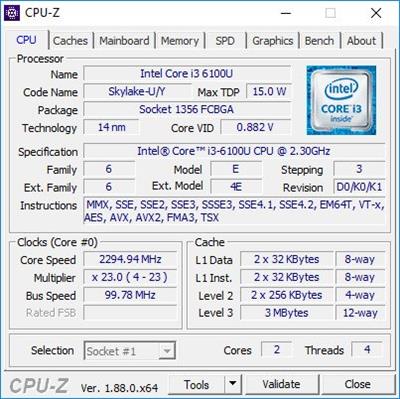
Anyone who expects their PC to be in tip-top shape must first and foremost be aware of its capabilities and potential, and for that, it's best to employ a dedicated software utility. CPU-Z is one such application serving an informative purpose, what with its ability to reveal all sorts of details on your processor, memory, cores, and more, so that you know how to make the best of your computer.

Data-packed GUI that helps you explore your PC from A to Z
Before taking a closer look at the functionality the app integrates, it is worth bringing into discussion the fact that the user interface it prompts you with should feel approachable, which is no surprise, considering the niche the program belongs to.
As such, a multi-tabbed GUI comprises a multitude of details on the most important devices of your system. You can thus take a glimpse of the specifics of your processor and browse through info such as name, package, technology, specification, family, and instructions. Plus, the app gathers some data on your clocks' core speed and bus speed.
Offers details on the processor, mainboard, memory, graphics
Aside from that, if you are curious about the cache levels, you can rest assured that the program provides you with relevant information about that as well. When it comes to the mainboard, you can find out its manufacturer, model, chipset, and more, along with some interesting details about the BIOS.
Regarding your system's memory, its type, size, and timings are shown. You might also want to know that the SPD tab, which entails data on module specifications, is quite generous as well. What it includes is data on the module size, maximum bandwidth, part and serial number, not to mention that timing tables are integrated as well.
Can assess your system's performance in real time
You don't have to be a connoisseur in order to be interested in your computer's graphics, and CPU-Z can reveal this sort of details for you.
Last but not least, the Bench tab offers a real-time assessment of your computer's performance. To be more specific, it can carry out a single- or multi-thread analysis, with the possibility of using a multitude of references in order to make relevant comparisons.
On an ending note, CPU-Z offers a comprehensive evaluation of your PC's capabilities that you can turn into HTML or TXT reports in the blink of an eye. The app has an almost invisible memory footprint, proposes a clear-cut user interface, and all the data it gathers is offered in real time, so all things considered, it has all the prerogatives of a reliable tool of its kind.
Whats New
AMD Ryzen Threadripper 3000 preliminary support
Intel Ice-Lake preliminary support
NVIDIA RTX 2070 and 2080 Super

Homepage:
Код:
http://www.cpuid.com

Download link

rapidgator.net:
Код:
https://rapidgator.net/file/5f29ca3037b95cf840b06c0eef9a092e/syqfw.CPUZ.2.05.rar.html

uploadgig.com:
Код:
https://uploadgig.com/file/download/24f97e83911A7B8d/syqfw.CPUZ.2.05.rar

nitroflare.com:
Код:
https://nitroflare.com/view/1F96613687742B0/syqfw.CPUZ.2.05.rar

1dl.net:
Код:
https://1dl.net/hwuw6qt8whfs/syqfw.CPUZ.2.05.rar
 
Display Driver Uninstaller 18.0.6.1


51026ca1f6f687adaed446ef0903316f.jpeg


Display Driver Uninstaller 18.0.6.1
File size: 1.3 MB​

Display Driver Uninstaller is a driver removal utility that can help you completely uninstall AMD/NVIDIA graphics card drivers and packages from your system, without leaving leftovers behind (including registry keys, folders and files, driver store). The AMD/NVIDIA video drivers can normally be uninstalled from the Windows Control panel, this driver uninstaller program was designed to be used in cases where the standard driver uninstall fails, or anyway when you need to thoroughly delete NVIDIA and ATI video card drivers.

Portability advantages
Since there is no installation involved, you can extract the program files to any part of the hard disk and just click the executable to run.
Another possibility is to save Display Driver Uninstaller to a USB flash disk or similar storage unit, to be able to run it on any PC with minimum effort, as long as it has .NET Framework installed.
Clear-cut interface and options
At startup, Display Driver Uninstaller warns users that it plans to modify Windows registry settings, and recommends them to create a system restore point in order to reset settings to default if any stability issues occur afterward, as well as to restart the computer in safe mode.
The interface is user-friendly, based on a single window with a regular structure, where the app shows the Windows version and lets you select the graphics driver. So, you can ask the tool to clean and restart the PC, do not reboot it, or shut it down completely.
In addition, it can remove the driver folders from the computer, as well as create and save log files in the startup path. It is also possible to set the Windows Automatic Driver installation to default.
Код:
https://www.wagnardsoft.com/blog

Homepage:
Код:
https://www.wagnardsoft.com

Download link

rapidgator.net:
Код:
https://rapidgator.net/file/79dc4b713bb937a4754640414c777b7e/lzenq.Display.Driver.Uninstaller.18.0.6.1.rar.html

uploadgig.com:
Код:
https://uploadgig.com/file/download/0A43Bc77999f5e32/lzenq.Display.Driver.Uninstaller.18.0.6.1.rar

nitroflare.com:
Код:
https://nitroflare.com/view/A6C9D8FE0EF9996/lzenq.Display.Driver.Uninstaller.18.0.6.1.rar

1dl.net:
Код:
https://1dl.net/p6phr4s61gzc/lzenq.Display.Driver.Uninstaller.18.0.6.1.rar
 
DocuFreezer 4.0.2302.28220


af618c24d2fdada1227b80e4f3f00a71.jpeg


DocuFreezer 4.0.2302.28220
Languages: Multilingual
File Size: 187.11 MB​

Batch File Converter for Windows. DocuFreezer is a desktop application that converts your documents and images to PDF, TXT, JPG, TIFF, or PNG formats, "freezing" the look of the input documents and protecting them from any amendments. No matter which device the document will be displayed on, it will look exactly the same as the original.

Why DocuFreezer?
DocuFreezer advantages Converting an Adobe PDF document, Word document, Excel spreadsheet, Outlook e-mail, PowerPoint presentation, HTML page, Photoshop image file, XPS file, text file, or JPEG image to another format is usually not a problem. But what if you need to batch convert many files and don't want to repeat the same operations over and over again? Free file converter DocuFreezer can save your time every day.

Simple & easy-to-use interface
The program interface is intuitive: drag-and-drop your files, select the output format, and click Start. You can add several files, entire folders, RAR, ZIP, and 7ZIP archives with documents directly on the main window. DocuFreezer keeps it simple - you can use the default settings to get great results. However, you can adjust many things by yourself with numerous settings and options.

Keeping original file contents
DocuFreezer helps you easily convert your files and protect them from being modified. After conversion, the output files will keep the original files' structure, page layout, text formatting, fonts, and hyperlinks. DocuFreezer can also preserve the original file names, metadata, folder structure, attachments, and color attributes of source files.

Saving your files to PDF or images
If you need to archive documents, save them as a backup, or if you want to provide a non-editable copy to someone, DocuFreezer will help you convert almost any document to PDF, JPG, TXT, TIFF. This will let you have your files accessible on any modern device, keep them safe and open several years later.

Conversion of multiple files at once
DocuFreezer software is designed to batch process documents and images quickly and automatically via a drag-and-drop interface. Add dozens or even hundreds of documents to the list and have them converted in one go without any user attention. You no longer need to open each file and convert it by yourself! Besides, you can configure page rotation, page range, filter mask, and post-processing actions for faster workflows.

80+ supported input file formats
DocuFreezer supports over 80 input file types (and the number is growing!), including all popular types of documents and images such as Adobe PDF files (.PDF), Microsoft Word documents (.DOC, .DOCX), Microsoft Excel worksheets (.XLS, .XLSX), Microsoft PowerPoint presentations (.PPT, .PPTX), plain and rich text files (.TXT, .RTF), XPS files (.XPS, .OXPS), AutoCAD files (.DWG, .DXF), and more.

Merge, combine & split options for PDF
With DocuFreezer, you can add several PDFs to combine and merge them into one multi-page document. Or create a merged PDF from various files like JPG, XPS, HTML, DOCX, TIF. Or split a large PDF - extract all pages into many single-page files. Moreover, you can add new pages to an existing PDF, e.g., add a cover page to the beginning or an additional page to the end of the document. Merge and split options are available for PDF and TIFF.

Convert multiple files at once: PDF to JPG, Word to PDF, TIFF to JPG, HTML to PDF, etc.
Most programs, such as Microsoft Word, OpenOffice, Excel, PowerPoint, and Adobe Acrobat, make it possible to export documents to PDF format without installing any third-party applications. This is convenient when there are just a few documents to process. Still, when there are dozens of them to be converted, the task becomes pretty tedious: you will need to handle each document individually. Opening each file, saving it as a PDF file, closing the document, and then repeating the same steps with the next file can be very time-consuming.

DocuFreezer is designed specifically for processing a large number of documents or images that need to be changed to other formats. Try our software and see how much time you can save!

With DocuFreezer you can convert
- MS Word DOC to JPG / TIFF
- HTML to JPG / PNG
- JPEG to TIFF / TIFF to JPEG
- PDF to JPG / TIFF / TXT
- Publisher PUB files to JPG
- MS Word to TIFF
- TIFF to JPEG / PNG
- ODF / ODT to JPG
- PPTX / PPSX to PDF
- TXT to JPG

You can also
- Convert any number of files to PDF or raster images
- Convert e-mail files with attachments in different ways
- Merge, split, and combine PDF / TIFF files
- Add text or image watermark to document pages
- Convert CAD files into a multipage PDF or separate pages
- Set color space (color scheme), DPI, and image quality
- Set filename of output multipage PDF / TIFF
- Save and load file lists for regular use
- OCR scans, images into TXT or searchable PDF
- Set page rotation or auto rotation (Portrait/Landscape)

Release Notes
Version 4.0
- New supported formats: iPhone HEIC images (.heic, .heif), vCard electronic business cards (.vcf)
- New rotation and auto-rotation operations
- Ability convert XLS, XLSX files without Microsoft Excel installed
- Ability to convert DOC, DOCX, RTF files without Microsoft Word installed
- Ability to convert MSG and EML files without Microsoft Outlook installed
- Added tooltips for each setting in the Advanced Settings
- Renewed Settings panel: Page range selection added to the Common tab
- New updated commercial component for converting DWG and DXF drawings
- File association with EML is no longer necessary for Apple Mail File Format (EMLX)
- Updated Features and DocuFreezer Settings website sections
- Fixed issue with Corel Draw CDR files processing
- Fixed issue with processing Outlook PST and OST files
- Fixed issue with the Make PDF Searchable (OCR) function

System Requirements
- Microsoft Windows 11 / 10 / 8 / 7 / XP Service Pack 3 (32-bit or 64-bit system) or Microsoft Windows Server 2003 / 2008 / 2012 / 2016 / 2019 or newer versions
- Intel Core i3 or AMD Athlon II X2 processor or faster processor
- 8 GB RAM or more
- Free space on hard drive: 412 MB
- Required software: Microsoft NET Framework 4.0

rapidgator.net:
Код:
https://rapidgator.net/file/e61ca4d28263cee1fe9db8ec11c666cf/hbudn.DocuFreezer.4.0.2302.28220.rar.html

uploadgig.com:
Код:
https://uploadgig.com/file/download/af37eB5731D3cac6/hbudn.DocuFreezer.4.0.2302.28220.rar

nitroflare.com:
Код:
https://nitroflare.com/view/1490979AD083177/hbudn.DocuFreezer.4.0.2302.28220.rar

1dl.net:
Код:
https://1dl.net/leho5akc65t0/hbudn.DocuFreezer.4.0.2302.28220.rar
 
ExplorerPatcher 22621.1344.53.1


30eee6fa8a938267711d811a77d098aa.jpeg


ExplorerPatcher 22621.1344.53.1
File Size : 1.7 Mb​

Restore the functionality of Windows 10 on Windows 11, including most menus and taskbar, using this simple and straightforward patcher.

Without trying to undermine the many great features of Windows 11, working with it sometimes just doesn't feel right. Blame it on the course of habit, but the Taskbar and menus seem counterintuitive at times and you may feel that you need to take extra steps just to do an action you could do with a click of a button in previous Windows versions.
Explorer Patcher for Windows 11 is not exactly an application, but rather a DLL file that aims to restore the classic functionality of the new operating system. The patcher has been tested for the latest stable version of Windows 11, but it may work on other builds as well.
Place it in the C:\Windows folder to enable the old functionality
As the name suggests, this is not an application, but rather a patcher that you need to place in the main Windows 11 folder. According to the developer, the role of the DLL file is to enable extra functionality in the new operating system including, but not limited to the classic taskbar of Windows 10, option to hide the search bar, showing the 'All apps' list, restoring the classic power user menu, so on and so forth.
To complete the setup, you need to make sure that your Internet connection is active and restart the Explorer. At this point, the OS will start grabbing additional files from Microsoft and once the download is complete, restart the Explorer again for the changes to apply.
It comes with a configuration interface that is worth exploring
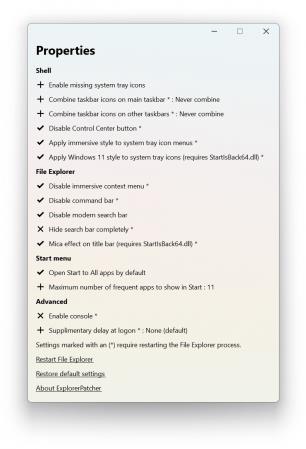
The developer added a GUI configuration option that enables you to customize the classic functionality based on your needs and preferences. To access it, access Properties available when right clicking on the Start button. The developer provides numerous details about the customization of the configuration GUI, so do not hesitate to check it out.
In the eventuality that you upgraded to Windows 11, but prefer to use the classic commands, menus and the old Taskbar, then perhaps you can consider giving Explorer Patcher for Windows 11 a try.
Код:
https://github.com/valinet/ExplorerPatcher/releases

Homepage:
Код:
https://github.com/valinet/ExplorerPatcher

Download link

rapidgator.net:
Код:
https://rapidgator.net/file/904adbf94bd5b9e9f8257d9ce2dbbcc8/lindh.ExplorerPatcher.22621.1344.53.1.rar.html

uploadgig.com:
Код:
https://uploadgig.com/file/download/13287255Abed1125/lindh.ExplorerPatcher.22621.1344.53.1.rar

nitroflare.com:
Код:
https://nitroflare.com/view/E13096FFF5B6F9F/lindh.ExplorerPatcher.22621.1344.53.1.rar

1dl.net:
Код:
https://1dl.net/zwx7r0mlvje7/lindh.ExplorerPatcher.22621.1344.53.1.rar
 
EZ CD Audio Converter 10.3.0.1 (x64) Multilingual


d2639df059b9a52c85c68bf2f797da6e.jpeg


EZ CD Audio Converter 10.3.0.1 (x64) Multilingual
File size: 50 MB​

EZ CD Audio Converter (formerly Easy CD-DA Extractor) is all-in-one software: Audio CD Ripper, Audio Converter, Metadata Editor, and Disc Burner. It is easy to use and provides best audio quality. The software can rip audio CDs, make copies of discs, convert mp3, convert audio files, and burn audio CDs, MP3 CDs, and data discs. EZ CD Audio Converter is easy to use, fast, and has best audio quality.

EZ CD Audio Converter supports all popular audio file formats. Such as 3G2, 3GP, MP1, MP2, MP3, Windows Media Audio (WMA), Ogg Vorbis (OGG), MP4, M4A (AAC and Apple Lossless), AAC, aacPlus (HE-AAC, AAC+, HE-AAC+PS, eAAC+). Also supports FLAC, Musepack (MPC), WavPack (WV), WAV, AIFF, Monkey's Audio (APE), CUE and M3U.
Furthermore, the Nero Digital (Nero AAC) is supported if you have the Nero Burning ROM installed on your computer.
State-of-the-art audio encoding technology. EZ CD Audio Converter includes the most advanced audio codec available, the aacPlus from the Coding Technologies. In addition, EZ CD Audio Converter also supports command line (.exe) encoders.
Key features
Easy to use
Reliable
Best audio quality
Secure audio CD ripping with error detection
Converts between all audio formats with metadata preservation
Burn audio CDs, mp3 discs, and data discs
Best audio codecs are included
Automatic updates (free lifetime updates also included)
Automatic high-quality cover art downloads
Features ReplayGain, normalization, silence removal
Convert audio from video files
Makes 1:1 copies of CDs and DVDs
Power features
Fast audio converter, can convert up to 8 files in parallel
Automatically download metadata with high quality cover art from multiple services (GD3, MusicBrainz, Freedb)
Utilizes multi-core processors and special processor multimedia instructions (SSE, MMX) for best performance
Gapless audio conversion, gapless sample rate conversion
Supports Cue Sheets (.cue), all types
Full ReplayGain support
Rips hidden audio tracks (HTOA)
CD-Text, ISRC, pre-gap, and pre-emphasis detection
Код:
https://www.poikosoft.com/help/history

Homepage:
Код:
https://www.poikosoft.com

Download link

rapidgator.net:
Код:
https://rapidgator.net/file/1b5e75085dd47494dc41b0f8f8504d67/yyoqj.EZ.CD.Audio.Converter.10.3.0.1.x64.Multilingual.rar.html

uploadgig.com:
Код:
https://uploadgig.com/file/download/1AB9395A5ba37af1/yyoqj.EZ.CD.Audio.Converter.10.3.0.1.x64.Multilingual.rar

nitroflare.com:
Код:
https://nitroflare.com/view/93DDCA96976565F/yyoqj.EZ.CD.Audio.Converter.10.3.0.1.x64.Multilingual.rar

1dl.net:
Код:
https://1dl.net/a0m2nwcog7s9/yyoqj.EZ.CD.Audio.Converter.10.3.0.1.x64.Multilingual.rar
 
Gillmeister Automatic PDF Processor 1.22


49f34022417d526c32f9eded5b98fff6.jpeg


Gillmeister Automatic PDF Processor 1.22
File size: 127 MB​

With Automatic PDF Processor, PDF files can be processed automatically. Any number of folders can be monitored in order to automatically print, rename or move incoming PDF files to dynamically named folders. Numerous metadata of the PDF document can be used in addition to the content, for example to include invoice information in the file path. The PDF files to be processed can be narrowed down with various profile-specific filters - the document text, PDF metadata and general file information are available as filters.

Extraction of data from the text of PDF files is optional. An unlimited number of extraction rules can be created within a profile. The extracted data can be used (after optional validation and formatting) for naming folders or the file name, and can be saved as an extract in a CSV file. Another task that can be automated with the Automatic PDF Processor is the extraction of attachments from PDF files, for example to save ZUGFeRD XML files, XRechnung attachments or similar as part of a PDF invoice in the same folder.

Monitor any number of folders
Examine incoming PDF files and apply individual rules

Store PDF files in a structured manner
Automatically rename PDF files and save them in dynamically created folders

Print PDF files automatically
Send certain PDF documents directly to the printer (e.g., invoices or quotations)

Optional further processing
Perform subsequent tasks, e.g., run a program with the filename of the PDF file passed as parameter

rapidgator.net:
Код:
https://rapidgator.net/file/ca43a5346804dcc486f5847a13daa5bc/qqmgv.Gillmeister.Automatic.PDF.Processor.1.22.rar.html

uploadgig.com:
Код:
https://uploadgig.com/file/download/d77Af7fF7902f4b0/qqmgv.Gillmeister.Automatic.PDF.Processor.1.22.rar

nitroflare.com:
Код:
https://nitroflare.com/view/68E7F13CE5D0F95/qqmgv.Gillmeister.Automatic.PDF.Processor.1.22.rar

1dl.net:
Код:
https://1dl.net/a3q46nvf2wjt/qqmgv.Gillmeister.Automatic.PDF.Processor.1.22.rar
 
Heredis 2023 v23.3


728b14cdcdeda09d0b49f4e8619b6d0b.jpeg


Heredis 2023 v23.3
Languages: English
File Size: 334.66 MB​

Family tree software for desktop, native Windows. Heredis helps 100,000 genealogy enthusiasts and professionals each day to discover their ancestors and create impressive family trees. From researching documents to analyzing statistics, discover more than 150 features and carry out an incredible investigation to trace back your origins.

Easy to install
Download, install, and start working on your genealogy right away.
Unlimited pedigree charts
Dozens of chart formats, designs, settings and options (ancestors, descendants or hourglass types).
Searching for ancestors
Launch searches from Heredis using some major search engines, or communicating with FamilySearch.
Sharing documents
Print and share your genealogy data: charts, illustrated books, personal website, photo slideshows, etc.
Dashboard
Track and follow the progress of your genealogy while publishing meaningful statistics.
Helpful tools
Capturing acts and records, editing images, indexes, data merging, consistency checking, etc.
GEDCOM compatible
Any file from any other genealogy software or website can be imported into Heredis.
Release Notes
Код:
https://www.heredis.com/en/new-features-2023/

System Requirements
- Windows 10 and 11
- 500 MB disk space required
- 4 MB of RAM
- Screen 1366x768 minimum (11″)
- Local administrator account

Homepage:
Код:
https://www.heredis.com

Download link

rapidgator.net:
Код:
https://rapidgator.net/file/c389cf7a06ac756c8674dd77c15603b7/aiibz.Heredis.2023.v23.3.rar.html

uploadgig.com:
Код:
https://uploadgig.com/file/download/1c0b56959F8D3666/aiibz.Heredis.2023.v23.3.rar

nitroflare.com:
Код:
https://nitroflare.com/view/D92D1D0BE7E9B3D/aiibz.Heredis.2023.v23.3.rar

1dl.net:
Код:
https://1dl.net/zs2g9z4x5yc5/aiibz.Heredis.2023.v23.3.rar
 
Hex Editor Neo Ultimate 7.25.02.8467


c7bebe8dd0ebda8ab8c07bd6ce2fd579.jpeg


Hex Editor Neo Ultimate 7.25.02.8467
File size: 21.1 MB​

Hex Editor allows you to set colors of almost every editor windows element. Select an element in a list and then select a color using color picker control. You can also set the color to "automatic". The sample window layout below immediately reflects changes you make. Pressing Apply button also immediately applies your current coloring scheme to all opened editor windows.

Hex Code Editing, Binary Data and Files Modifying Software
The unique hex code editing and manipulation software
High performance and code optimized tool that helps developers to manipulate binary files quick and easy
Invaluable utility for software developers since it helps them to edit the raw and exact content of a file directly, researching the functionality of any .exe file
Solution for editing files of ANY size
Powerful binary files editor with outstanding performance and reasonable price

Hex Editor Neo is a binary files editing software utility for Windows with best functionality/price ratio. It's rich and handy set of features will help all software and hardware developers working with ASCII, hex, decimal, float, double and binary data.

Highly optimized performance, carefully tuned user interface among with new level of application stability will save a lot of your time, money and precious nerves while working with binary files.

Make patches with just two mouse clicks; manipulate your EXE, DLL, DAT, AVI, MP3, JPG files with unlimited undo/redo. Taste the visual operation history with branching.

Features: Editing Files of ANY Size; Built-In Explorer; Unlimited Undo/Redo; Multiple Selection; Selection Save and Load; Find All; Replace All; History Browsing; History Save and Load; Patch Creation; Clipboard Operations; Bytes, Words, Double Words, Quad Words, Floats and Doubles Edit Mode; Pattern Coloring; Data Inspector; Bookmarks; Base Converter; Advanced copy & export; Encodings.

Hex Editor Neo is highly optimized to quickly perform the requested actions. It also allows you to continue working with a document while another document is busy performing a lengthy operation.

HexEdit can be successfully used for
editing binary files of any size at highest speed
searching and replacing your data in a binary file
writing your microcode programs
researching the functionality of any executable file
streamlining your work using Undo/Redo and other features
HexEdit can be successfully used by
software developers
private users
beta-testers
university students
coders

HexEdit usage areas
Binary files
Patches
EXE files
DLL data
DAT files
AVI data
MP3 data
JPG data
HexEdit Features

rapidgator.net:
Код:
https://rapidgator.net/file/12df4784a7abc9bd4fc7c45e4e264779/ctpsp.Hex.Editor.Neo.Ultimate.7.25.02.8467.rar.html

uploadgig.com:
Код:
https://uploadgig.com/file/download/21B464f337fFd47e/ctpsp.Hex.Editor.Neo.Ultimate.7.25.02.8467.rar

nitroflare.com:
Код:
https://nitroflare.com/view/3BE57AD0CFF626F/ctpsp.Hex.Editor.Neo.Ultimate.7.25.02.8467.rar

1dl.net:
Код:
https://1dl.net/qcp8mvhie39o/ctpsp.Hex.Editor.Neo.Ultimate.7.25.02.8467.rar
 
Hosts File Editor+ 1.5.12 Multilingual


4e253ae6b12d06c020a46b52e325a3a5.jpeg


Hosts File Editor+ 1.5.12 Multilingual
File Size: 2.5 MB​

The hosts file is a list of computer names and their associated IP addresses. Hosts files are used by Microsoft Windows and other network operating systems as an optional means to redirect TCP/IP traffic in special circumstances. These files are not required to use ordinary network and Internet applications. The hosts file is designed to be edited by a computer administrator, knowledgeable user or automated script program.

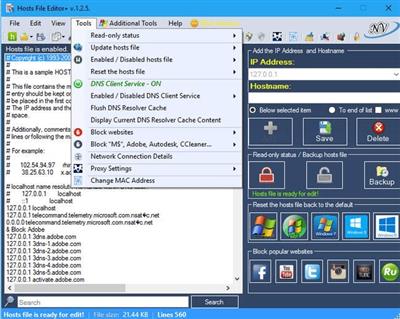
The functions of this program
- Add new host ( IP Address and Hostname )
- Delete host
- Save changes
- Change Read-only status (hosts file)
- Backup hosts file
- Restore hosts file from a backup
- Create new hosts file ( If the hosts file does not exist - C:/Windows/System32/drivers/etc/ )
- Import file (.txt)
- Export hosts file
- Add blank row
- Add comment (#)
- Properties (hosts file)
- Search items
- Replace IP ( 127.0.0.1 ---> 0.0.0.0 ; 0.0.0.0 ---> 127.0.0.1 and custom )
- Edit selected comment (#) - (to enable double-click on the item ...)
- Delete duplicates items
- Comment selected
- Delete blank rows
- Delete comment lines
- Enabled / Disabled hosts file
- Enabled / Disabled DNS Client Service
- Block popular websites ( Facebook, Youtube, Twitter...)
- Block Microsoft, Telemetry, Adobe...
- Reset the hosts file back to the default (Windows XP, Windows Vista, Windows 7, Windows 8,
8.1, Windows 10,11 Windows Server)
- Download and install update list (.txt)
- Update hosts file ( install update and uninstall update )

rapidgator.net:
Код:
https://rapidgator.net/file/55229f2aa29cc4fedf9103fbaa8d3310/ynzzd.Hosts.File.Editor.1.5.12.Multilingual.zip.html

uploadgig.com:
Код:
https://uploadgig.com/file/download/55480aa8C9Ab2d83/ynzzd.Hosts.File.Editor.1.5.12.Multilingual.zip

nitroflare.com:
Код:
https://nitroflare.com/view/B60D1D351EDE9E6/ynzzd.Hosts.File.Editor.1.5.12.Multilingual.zip

1dl.net:
Код:
https://1dl.net/q78qn31rus16/ynzzd.Hosts.File.Editor.1.5.12.Multilingual.zip
 
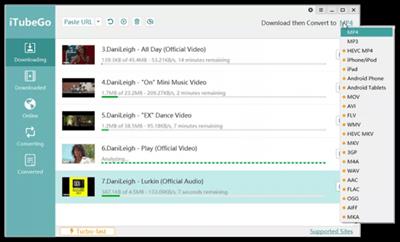
iTubeGo YouTube Downloader 6.9.0 Multilingual


69819eee3da8a4ba9effaeaa08b04c17.jpeg


iTubeGo YouTube Downloader 6.9.0 Multilingual
Windows x86/x64 | File size: 200.24 MB​

Best way to download online videos from 1000+ streaming websites. iTubeGo YouTube Downloader is a powerful downloader tool allows you save video and audio for free. The high-speed converter output format is high-quality MP4, MP3. Fully compatible with iPhone, iPad, iTunes, iMovie, Android Phone and more.

Download Videos From 1000+ Sites
Support most of video sites like YouTube, Facebook, Instagram, Dailymotion, Vimeo, Einthusan, NicoNico, Ok.ru, VK, Twitter, Fox, Lynda, YouKu, Yahoo Video, Bilibili, Coub, Vlive.TV, Liveleak, Reddit, Mgoon, Sportstadio, mediaset and more.
Download 4K & Full HD Video
iTubeGo HD Video Downloader fully supports downloading various SD or HD videos. You can download high quality videos without any loss and convert to MP4 format. No matter 720p, 1080p, 4K can be downloaded without any hassle.
1-Click to Download YouTube Playlist
iTubeGo YouTube Downloader can help you download entire YouTube playlists with one click. You only need to copy and paste one video playlist URL, eliminating the hassle of pasting video links one by one. Easier and save time.
Support Multi-Task Download
iTubeGo YouTube Downloader uses advanced technology to achieve multi-tasking download. You can set the number of multi-tasking to improve download efficiency. Multitasking will not affect your computer's performance, which will greatly speed up downloads.
Download Music as MP3
Download songs, background music, sound effects, etc. for free from music sharing sites and save as MP3. Supported sites: SoundCloud, MixCloud, FreeSound, bandcamp, VEVO and more.
Convert Video to MP3
iTubeGo provides a one-click conversion to MP3 function, so that you can directly convert videos to MP3 format after downloading from YouTube or other sites. iTubeGo perfectly preserves the original audio quality and supports high-quality 320kbps Mp3. Have high-definition music enjoyment!
Download Multiple Video/Audio in Bulk
You can enter multiple video or audio URLs in our iTubeGo downloader and download them to your computer in batches. iTubeGo does not limit the number of your URLs, you can download an unlimited amount.
Manage All Downloaded Media
iTubeGo YouTube downloader comes with a file manager. The downloaded audio and video will be automatically saved to the library in chronological order. You can search, play or delete media in the manager.
What's new
• official site does not provide any info about changes in this version
System Requirements:Windows 11/10/8/7

Homepage:
Код:
https://itubego.com/

Download link

rapidgator.net:
Код:
https://rapidgator.net/file/76e2a1a7c76c8bb6d1351c0abc890e8c/tgvbq.iTubeGo.YouTube.Downloader.6.9.0.Multilingual.rar.html

uploadgig.com:
Код:
https://uploadgig.com/file/download/a47be985ebe08A85/tgvbq.iTubeGo.YouTube.Downloader.6.9.0.Multilingual.rar

nitroflare.com:
Код:
https://nitroflare.com/view/296CF331D475DDF/tgvbq.iTubeGo.YouTube.Downloader.6.9.0.Multilingual.rar

1dl.net:
Код:
https://1dl.net/5oomomhmo15w/tgvbq.iTubeGo.YouTube.Downloader.6.9.0.Multilingual.rar
 
K-Lite Codec Pack Update 17.4.6


b14272b3032f2f8d712828d3c15e57e9.jpeg


K-Lite Codec Pack Update 17.4.6
File size: 21 MB​

The K-Lite Codec Pack is a collection of DirectShow filters, VFW/ACM codecs, and tools. Codecs and DirectShow filters are needed for encoding and decoding audio and video formats. The K-Lite Codec Pack is designed as a user-friendly solution for playing all your audio and movie files. With the K-Lite Codec Pack you should be able to play all the popular audio and video formats and even several less common formats.

This is a cumulative update for the latest version of the K-Lite Codec Pack.
The K-Lite Codec Pack gets updated frequently. However, there may be worthwhile updates to some of the included components in between releases of KLCP. This update pack can be used to keep your current installation up-to-date.
Код:
http://www.codecguide.com/klcp_update.htm

Homepage:
Код:
http://www.codecguide.com/

Download link

rapidgator.net:
Код:
https://rapidgator.net/file/5724e8df0146dd6aa91c0eadf17d017a/pkijw.KLite.Codec.Pack.Update.17.4.6.rar.html

uploadgig.com:
Код:
https://uploadgig.com/file/download/e6bd84Ef2FBc720f/pkijw.KLite.Codec.Pack.Update.17.4.6.rar

nitroflare.com:
Код:
https://nitroflare.com/view/AFA1C5145144D2A/pkijw.KLite.Codec.Pack.Update.17.4.6.rar

1dl.net:
Код:
https://1dl.net/7m9pc3gsodik/pkijw.KLite.Codec.Pack.Update.17.4.6.rar
 
Назад
Сверху