• Форум работает в архивном режиме www.old.nado.in

All mitsumi'1s Applications !! (updated daily)

  • Автор темы Автор темы mitsumi1
  • Дата начала Дата начала
ManageWirelessNetworks 1.00

fcb987ff67f59d186aeb0e6c9e7da723.jpeg

File Size : 0.1 Mb​

ManageWirelessNetworks is an alternative tool to the standard 'Manage Wireless Networks' of Windows (or 'Manage Known Networks' on Windows 10). It displays extensive information about every wireless profile on your system, even if the network adapter is not active. For every wireless profile, the following information is displayed: Profile Name, SSID, Connection Type, Connection Mode, Authentication, Encryption, Key Type, Auto Switch (Yes/No), Non Broadcast (Yes/No), Profile Position, Created Time, Modified Time, Wireless Key, and more...

ManageWirelessNetworks also allows you to edit a single profile with the standard editor of Windows, edit the XML of the wireless profile (For advanced users only !), quickly switch between manual and automatic mode, quickly switch between WPAPSK/WPA2PSK/AES/TKIP modes, rename the profile, rename the SSID, move profile position up and down, copy multiple wireless profiles to another wireless card on your system, and more...

Whats New:
Updates: official site does not provide any info about changes in this version

Download link:​
Код:
[center][b]rapidgator_net[/b]:
https://rapidgator.net/file/bceed0d03511c8caf6b2d7cc0f88b412/znllx.ManageWirelessNetworks.1.00.zip.html

[b]uploadgig_com[/b]:
https://uploadgig.com/file/download/79055e456B94ce55/znllx.ManageWirelessNetworks.1.00.zip

[b]nitroflare_com[/b]:
https://nitroflare.com/view/33322C9830AA318/znllx.ManageWirelessNetworks.1.00.zip[/center]

Links are Interchangeable - No Password - Single Extraction​
 
MediaHuman YouTube Downloader 3.9.9.55 (1705) (x64) Multilingual

408dd13510433695c0bcf900a242d1f5.jpeg

File size: 60 MB​
MediaHuman YouTube Downloader is a handy application for those who found a favorite music video or trailer of a new movie and wants to keep it on your computer for viewing offline. Or you need to download a video lesson/tutorial. Our video downloader is an ideal solution for such kind of tasks.

MediaHuman YouTube Downloader is a software tool developed specifically to help you grab clips from YouTube, as well as convert them to audio or other video formats.
The interface sports quite a modern and straightforward interface, which enables all types of users easily get around it, without facing problems.
The output format can be chosen from a pretty huge list of built-in file types, such as MP4, FLV, WEBM, MP3, M4A and OGG, as well as others suitable for various devices, including Apple TV, PSP, Wii, Xbox, iPad and iPod.

You should also know that when converting to audio, it is possible to control the bit rate and quality. Pasting an URL is possible by simply using the "Ctrl+V" hotkey or by clicking the "Paste URL" button. There is also an option which enables you to create a list of URLs.
This software utility lets you start download automatically, receive notifications when a link has been added and when grabbing has started or has been completed. You can keep the history for a day, week or month, assign a certain action when all processes are finished and input limits for simultaneous downloads and speed limit, so as not to put a strain on your computer's performance.

The output directory can be selected from the settings panel, or you can send download content to your iTunes playlist.
To sum up, MediaHuman YouTube Downloader is a useful software program with a user-friendly and feature-rich environment, many output formats available, minimal usage of CPU and memory, and a good response time.

Download link:​
Код:
[center][b]rapidgator_net[/b]:
https://rapidgator.net/file/78d975828102ba5c2f12ff0dfd02aaa2/6bqk4.MediaHuman.YouTube.Downloader.3.9.9.55.1705.x64.Multilingual.rar.html

[b]uploadgig_com[/b]:
https://uploadgig.com/file/download/c2F01B3E3ad117cb/6bqk4.MediaHuman.YouTube.Downloader.3.9.9.55.1705.x64.Multilingual.rar

[b]nitroflare_com[/b]:
https://nitroflare.com/view/1F3F7608E3A0260/6bqk4.MediaHuman.YouTube.Downloader.3.9.9.55.1705.x64.Multilingual.rar[/center]

Links are Interchangeable - No Password - Single Extraction​
 
MediaHuman YouTube Downloader 3.9.9.55 (1705) macOS

25452654471a39c65c280730efbb1c5b.jpeg

Language: Multilingual | File size: 81 MB​
MediaHuman YouTube Downloader is a handy application for those who found a favorite music video or trailer of a new movie and wants to keep it on your computer for viewing offline. Or you need to download a video lesson/tutorial. Our video downloader is an ideal solution for such kind of tasks.

- Supports Ultra High resolutions up to 4K
- Download whole playlists and channels
- YouTube, Vimeo, Dailymotion, Soundcloud
- Extract audio track and save it as MP3
- iTunes support
- VEVO support
Release Notes
Release notes were unavailable when this listing was updated

Supported Operation Systems:
macOS 10.10 or later

Download link:​
Код:
[center][b]rapidgator_net[/b]:
https://rapidgator.net/file/21bdafb60e0afd4ec0a59ed243ce6d68/m1fkz.MediaHuman.YouTube.Downloader.3.9.9.55.1705.macOS.rar.html

[b]uploadgig_com[/b]:
https://uploadgig.com/file/download/2bA6576eee58efA0/m1fkz.MediaHuman.YouTube.Downloader.3.9.9.55.1705.macOS.rar

[b]nitroflare_com[/b]:
https://nitroflare.com/view/423C223B9F40D50/m1fkz.MediaHuman.YouTube.Downloader.3.9.9.55.1705.macOS.rar[/center]

Links are Interchangeable - No Password - Single Extraction​
 
MediaHuman YouTube to MP3 Converter 3.9.9.55 (1705) (x64) Multilingual

267a8b5f8242f0b653c82b4a37792d27.jpeg

File size: 61 MB​
You like to listen to music on YouTube or SoundCloud and want to save it for offline playing. Or you want to download soundtrack of a new movie. Then we recommend you to try out this software developed specifically for this purpose.

Main Features:
Playlists and channels
The software supports downloading all videos of a playlist or a channel. And there is also an option for subscribing to and downloading only newly uploaded tracks.

iTunes support
In the preferences of the application you can select an option to add downloaded tracks into iTunes automatically. You can also specify iTunes playlist, where the converted track should be added.

Saves your time & traffic
The app detects audio track in YouTube video clip and downloads it, skipping the video part. As a result download speed increases dramatically, especially on HD-quality content.

Simple tag editor
Application automatically detects artist name and track title of the video and saves it in the downloaded file. But at the same time, you can easily change tags to whatever you want. You can even change a cover art image.

Original format, no conversions
You can save audio tracks in original quality without any conversion. It means that there will be no loss of quality and it greatly reduces the downloading time.

Free music
There is a great amount of music on YouTube. You can always find the one you like there. And YouTube to MP3 Converter allows you to save it on your computer for free. Just find the track you like and download it in the quality you need.

Not only YouTube
Vevo.com, Vimeo, DailyMotion, Soundcloud, Bandcamp, HypeMachine, MixCloud, UOL and many other sites are also supported. So you can download music as easy as from YouTube.

Clipboard tracking
The program tracks the content of the system clipboard. It means that you can easily add a video clip without switching from your favorite browser. Just copy an URL into the clipboard and it will be added to the download queue.

Multilingual interface
Localized to: Arabic, Armenian, Azerbaijani, Bulgarian, Catalan, Chinese (Taiwan), Croatian, Czech, Danish, Dutch, English, Esperanto, French, German, Greek, Hebrew (Israel), Hungarian, Indonesian, Italian, Japanese, Korean, Latvian, Lithuanian, Malay, Norwegian Bokmål, Polish, Portuguese, Portuguese (Brazil), Romanian, Russian, Spanish, Swedish, Turkish, Vietnamese

Download link:​
Код:
[center][b]rapidgator_net[/b]:
https://rapidgator.net/file/2828a3b3bcaea333d2a84d8d6f28f079/u66vv.MediaHuman.YouTube.to.MP3.Converter.3.9.9.55.1705.x64.Multilingual.rar.html

[b]uploadgig_com[/b]:
https://uploadgig.com/file/download/Cf04DfbA4C239d48/u66vv.MediaHuman.YouTube.to.MP3.Converter.3.9.9.55.1705.x64.Multilingual.rar

[b]nitroflare_com[/b]:
https://nitroflare.com/view/49DFDEFBE02F1A2/u66vv.MediaHuman.YouTube.to.MP3.Converter.3.9.9.55.1705.x64.Multilingual.rar[/center]

Links are Interchangeable - No Password - Single Extraction​
 
Mozilla Thunderbird 78.10.2

496e917b59655e30222e4b0c0b2c087c.jpeg

File size: 47/49 MB​
Thunderbird is a cross-platform email client that includes a news reader and a chat module, while it is also able to manage multiple email accounts with advanced message filtering.

Simple setup and clear-cut environment
The installation process is easy-to-follow, it only requires you to press a few "Next" buttons, after which you can get started on managing your e-mail identities.

Thunderbird sports a modern, yet user-friendly interface that concentrates all of the software's functions in a few menus. Popular features such as writing a new email, chatting or search are made available from a quick access toolbar.

Impressive security features and support for multiple tabs
Managing e-mail accounts with Thunderbird is really easy. You can open messages in new tabs, you can use labels to mark important messages and you can read news without ever leaving its interface.

In terms of security, Thunderbird is no less disappointing. The Junk email filters blocks dangerous content, while the anti-phishing feature prevents your passwords and data from being stolen. Thunderbird's security engine also includes digital signatures, certificates and encryption.

Chat with others and add extensions
The chat feature allows you to communicate with your friends in an easy and comfortable manner (it supports XMPP, IRC, Google Talk and Twitter). You can add new contacts, join a chat room and customize your status.

The last, but not the least of Thunderbird's many advantages is that it is highly customizable. New features can be added via extensions, just like in Firefox's case. The overall look and feel can also be changed by using themes or skins.

Bottom line
In conclusion, Thunderbird gets a thumbs-up from us. It allows you to manage multiple email identities, it can be used to chat and read news, and it can be adjusted to your needs with the help of add-ons. The response time is good, the system's performance is not going to be hampered, and we did not come across any errors or crashes in our tests.

Download link:​
Код:
[center][b]rapidgator_net[/b]:
https://rapidgator.net/file/42f8de3115d69facf054dccedf91c6e2/44im6.ThunderbirdSetup78.10.2.rar.html
https://rapidgator.net/file/607d87acfa800919ca472d46878cb44a/44im6.ThunderbirdSetup78.10.2x64.rar.html

[b]uploadgig_com[/b]:
https://uploadgig.com/file/download/60cc77689afd6e88/44im6.ThunderbirdSetup78.10.2.rar
https://uploadgig.com/file/download/22bf2a2Fd8615951/44im6.ThunderbirdSetup78.10.2x64.rar

[b]nitroflare_com[/b]:
https://nitroflare.com/view/72AB6FE96ED7B4B/44im6.ThunderbirdSetup78.10.2.rar
https://nitroflare.com/view/176A008796F247A/44im6.ThunderbirdSetup78.10.2x64.rar[/center]

Links are Interchangeable - No Password - Single Extraction​
 
Multitouch 1.24.11 macOS

3ed0f4a7a372d8517e2a5749414143d3.jpeg

File size: 18 MB​
Easily add gestures to macOS. Multitouch lets you tie a custom action to a specific magic trackpad or magic mouse gesture. For example, a three finger click can execute a paste. Improve your workflow by executing keyboard shortcuts, controlling your browser's tabs, performing a middle mouse click, and much more.

Features
- Privacy. No user data is gathered from the app.
- Does not require Accessibility privileges to run.
Release Notes

Release notes were unavailable when this listing was updated

Supported Operation Systems:
macOS 10.12 or later

Download link:​
Код:
[center][b]rapidgator_net[/b]:
https://rapidgator.net/file/1c5e382a152d7fa08dccc90c43f90eee/xp6il.Multitouch.1.24.11.macOS.rar.html

[b]uploadgig_com[/b]:
https://uploadgig.com/file/download/f89aa38a38ae1488/xp6il.Multitouch.1.24.11.macOS.rar

[b]nitroflare_com[/b]:
https://nitroflare.com/view/578C7A296CF136F/xp6il.Multitouch.1.24.11.macOS.rar[/center]

Links are Interchangeable - No Password - Single Extraction​
 
NCH PhotoPad Image Editor Professional 7.37 Beta

14b395aed49e9862bb6ca5071a484806.jpeg

File size: 13.32 MB​
Whether you're a professional photographer or just want to edit your personal photos, PhotoPad offers the powerful tools and features you need to improve your digital images.

Features:
Crop, rotate, resize and flip pictures
Touch up photos to remove red-eye and blemishes
Apply photo effects, including oil paint, cartoon, vignette, sepia and many more
Improve photo quality and focus with blur, sharpening and noise reduction tools
Adjust image color/hue, saturation, brightness and contrast
Create collages and photo mosaics with your photographs
Photo stitching to make your own panorama images
Load jpg, gif, png and other popular image formats
Add text and captions to photos
Insert clipart from the included clipart library
Add frames and borders around your photographs
Change the aspect ratio of an image without distorting key features using the liquid resize effect
Non-destructive editing allows easy modifications of individual photo effects on the layers list
Upload edited pictures directly to Facebook or Flickr

Download link:​
Код:
[center][b]rapidgator_net[/b]:
https://rapidgator.net/file/8af89dc58616255ad5eb93990dfd79d8/oh65x.NCH.PhotoPad.Image.Editor.Professional.7.37.Beta.rar.html

[b]uploadgig_com[/b]:
https://uploadgig.com/file/download/6a497a79fb5a93eF/oh65x.NCH.PhotoPad.Image.Editor.Professional.7.37.Beta.rar

[b]nitroflare_com[/b]:
https://nitroflare.com/view/CB860CD63A95C56/oh65x.NCH.PhotoPad.Image.Editor.Professional.7.37.Beta.rar[/center]

Links are Interchangeable - No Password - Single Extraction​
 
OcenAudio 3.10.7 Multilingual

6dfbed875990ca8283724d70ad0e347a.jpeg

File Size : 75.2 Mb​

OcenAudio is a cross-platform, easy to use, fast and functional audio editor. It is the ideal software for people who need to edit and analyze audio files without complications. OcenAudio also has powerful features that will please more advanced users. This software is based on Ocen Framework, a powerful library developed to simplify and standardize the development of audio manipulation and analysis applications across multiple platforms.

Why OcenAudio?
It works on your computer!
OcenAudio is available for all major operating systems: Microsoft Windows, Mac OS X and Linux. This means you can always rely on OcenAudio on any computer.

It stays out of your way
No matter how many files are open, OcenAudio always remains responsive. Time-consuming tasks (such as opening and saving audio files, or applying effects) run in background, allowing you to work on other files.

The user comes first
The development of OcenAudio began when a brazilian research group at the Federal University of Santa Catarina (LINSE) needed an easy-to-use audio editor loaded with features such as multiple file formats support, spectral analysis and audio signal generation. OcenAudio development focuses primarily on usability, providing the user with a cohesive and intuitive audio editing and analysis tool.

Features
VST plugins support
* OcenAudio supports VST (Virtual Studio Technology) plugins, giving its users access to numerous effects. Like the native effects, VST effects can use real-time preview to aide configuration.

Real-time preview of effects
* Applying effects such as EQ, gain and filtering is an important part of audio editing. However, it is very tricky to get the desired result by adjusting the controls configuration alone: you must listen the processed audio. To ease the configuration of audio effects, OcenAudio has a real time preview feature: you hear the processed signal while adjusting the controls.
* The effect configuration window also includes a miniature view of the selected audio signal. You can navigate on this miniature view in the same way as you do on the main interface, selecting parts that interest you and listening to the effect result in real time.

Cross-platform support
* OcenAudio is available for all major operating systems: Microsoft Windows, Mac OS X and Linux. Native applications are generated for each platform from a common source, in order to achieve excelent performance and seamless integration with the operating system. All versions of OcenAudio have a uniform set of features and the same graphical interface, so the skills you learn in one platform can be used in the others.

Multi-selection for delicate editions
* To speed up complex audio files editing, OcenAudio includes multi-selection. With this amazing tool, you can simultaneously select different portions of an audio file and listen, edit or even apply an effect to them.
* For example, if you want to normalize only the excerpts of an interview where the interviewee is talking, just select them and apply the effect.

Efficient editing of large files
* With OcenAudio, there is no limit to the length or the quantity of the audio files you can edit. Using an advanced memory management system, the application keeps your files open without wasting any of your computer's memory. Even in files several hours long, common editing operations such as copy, cut or paste happen almost instantly.

Fully featured spectrogram
* Besides offering an incredible waveform view of your audio files, OcenAudio has a powerful and complete spectrogram view. In this view, you can analyze the spectral content of your audio signal with maximum clarity.
* Advanced users will be surprised to find that the spectrogram settings are applied in real time. The display is updated immediately when altering features such as the number of frequency bands, window type and size and dynamic range of the display.

Download link:​
Код:
[center][b]rapidgator_net[/b]:
https://rapidgator.net/file/76b7def602905b2806b734d0cb9f336f/knk6t.OcenAudio.3.10.7.Multilingual.rar.html

[b]uploadgig_com[/b]:
https://uploadgig.com/file/download/B1dF2d81223E2589/knk6t.OcenAudio.3.10.7.Multilingual.rar

[b]nitroflare_com[/b]:
https://nitroflare.com/view/07ADCB4208712CB/knk6t.OcenAudio.3.10.7.Multilingual.rar[/center]

Links are Interchangeable - No Password - Single Extraction​
 
PDFsam -PDF Split and Merge 4.2.5

5c7e76d82c9607770aad4e09bbb10364.jpeg

File Size : 55.7 Mb​

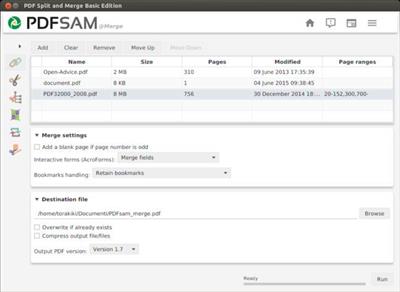
PDF Split and Merge is an easy to use tool to merge and split pdf documents. Provides a grafical interface and a command line interface to spit, merge, mix and rotate your PDF documents.

PDF Split and Merge Basic is an application that you can use to perform several actions on your PDF files, including merging, splitting, rotating and rearranging pages.

The interface of the program is plain and simple. On the left side of the window you can select an action between "Alternate Mix", "Merge/Extract", "Rotate", "Split", "Visual document" and "Visual reorder".

In the list you can view the path, number of pages and version of each PDF file, after you add them (the "drag and drop" method is supported).

So, you can configure mixing options, such as reverse the first or second document, set the number of pages to switch from the first/second document to the other.

Furthermore, you can set options for merging (PDF documents contain forms), rotation (clockwise rotation for 90, 180 or 270 degrees, for all, even or odd pages) and splitting (e.g. split even or odd pages, into single pages, after specific ones, by bookmarks level).

Plus, you can open a PDF file, rearrange, extract, delete pages and save them in a new file, zoom in and out, and more.

In the "Settings" menu, you can change the interface language and theme, set the log level, set PDF Split and Merge Basic to automatically check for updates at startup, disable alert sounds, enable to ask for confirmation when the overwrite checkbox is selected, and others.

The program uses a high amount of system resources and didn't freeze, crash or pop up errors during our tests. Unfortunately, there are no guidelines available and users might have a hard time getting around PDF Split and Merge Basic's features.

The interface could use some improvements in the way that it is easier to navigate through all functions. Nevertheless, we recommend PDF Split and Merge Basic to all users.

Download link:​
Код:
[center][b]rapidgator_net[/b]:
https://rapidgator.net/file/9480bf96558fb38e795e9b443a6cd1c7/k80fc.PDFsam.PDF.Split.and.Merge.4.2.5.rar.html

[b]uploadgig_com[/b]:
https://uploadgig.com/file/download/25C1fffd28AaaE30/k80fc.PDFsam.PDF.Split.and.Merge.4.2.5.rar

[b]nitroflare_com[/b]:
https://nitroflare.com/view/3E270AC3DAEBC8F/k80fc.PDFsam.PDF.Split.and.Merge.4.2.5.rar[/center]

Links are Interchangeable - No Password - Single Extraction​
 
Power Music Professional 5.2.1.11 Multilingual

b34875d6124296d539e82d1784043340.jpeg

Languages: Multilingual | File Size: 79.97 MB​
Much more than just a music display system. Power Music gives you total control over your music collection - sheet music and chord sheets. All your music, in one place, instantly available on-screen for practice and performance.

Free yourself from the hassles of paper
All your music, in one place, instantly available on-screen for practice and performance.

Create and manage your chord sheets
Convert chord sheets in PDF and Word documents into fully transposable chord sheets.

Find your music instantly
Search your music collections using title, composer, first line, category, or even by melody.

Share music, set lists and annotations
Give everyone in the band, group, or orchestra access to the set list and their music, fully annotated.

Effortless page turning
Move through your music and set lists using a foot pedal or touchscreen.

See your music clearly
Enlarge music and change colours to aid visually impaired musicians.

Explore the features of Power Music
No other music display system comes close to the sophistication of Power Music. Explore the amazing features of this unique software. In addition to the information on this page we have extensive help videos explaining each feature in detail in our Help Centre, and a full feature comparison table can be found here.

Display sheet music, chord sheets or both
Choose to display sheet music, chord sheets or both. Set the number of columns or pages per screen to display.

Search by multiple criteria
Incredible fast and powerful search options. Search by title, first line, words in lyrics, author, category, melody, alternative titles and copyright information. Worship musicians can choose to search by Bible reference.

Create and share playlists
Search for a song and with one click or tap, add it to a playlist (setlist). Save and recall your playlists. Re-order the list, print it, or share it on Power Music Box for the other musicians and band members you play with to see it.

Transpose chord sheets, add capo chords
You can instantly transpose a chord sheet, either by selecting a key from a drop down list or in full screen performance mode by tapping + or - to transpose up or down. Select your capo key and the chords are displayed in brackets. It even tells you what fret to use.

Page turning using keyboard, touch screen or foot pedal
Effortless page turning. Hands-free - using USB or Bluetooth foot pedal or tap the touchscreen, USB button or keyboard. Turns the page and moves through a playlist.

Full screen display in portrait or landscape
In full screen mode you make the most of all the space on the screen. Menu and icon bars are switched off. The sidebar, which can also be switched on and off, shows the playlist, a clock, your performance notes and a link to an optional audio track, for example a backing track. Press 'M' or tap the clock and a metronome appears. Automatic single page display in portrait or multiple pages in landscape.

Annotate your music
Annotate your music using tools to draw, highlight, add sticky notes, musical notation, fingering, bowing, performance marks, bar numbers for quick navigation and much more.

Quick navigation
In large pieces of music or a score with many pages, Power Music's Performance Marks and Bar Numbers allow instant navigation to any page or part of the piece of music. This feature is especially important and useful for orchestral players and accompanists during rehearsals.

Add performance notes
At a practice or rehearsal, add a performance note to a piece of music as a reminder. Use for organ registrations, intros and play order etc.

Intelligent chord sheet editor
The chord sheet editor has all the features you need to make creating and editing chord sheets a breeze. Type in your chord sheets or paste in lyrics/chord sheets. A single click places a chord above the lyrics. Automatic detection of lyrics and chords. Copy and paste from Word documents or web pages or import directly from PDF, .rtf or .txt. All chord sheets are transposable - even the ones you import from Word or PDF!

Sheet music editor - import sheet music from PDF, image files or scanner
Power Music has sophisticated PDF import features. If you want to import your paper sheet music the powerful built-in scanning software in Power Music makes life easy.

Power Music Box - share music & playlists
Power Music Box is integrated into all editions of Power Music. Power Music Box is a simple to use but incredibly powerful cloud storage system for sharing your music and playlists. At the click of a button send songs and playlists up to "My Box". Then securely download from My Box into other PCs, Macs or iPads running Power Music.

Buy songs in Power Music format
To save you the time of importing or scanning your music into Power Music, we have set up a on-line music shop called Power Music Store. All the songs you buy from Power Music Store become available in your Power Music Box account (free account available). For more information, visit powermusicstore.com.

Social network and web links
As well as tagging, indexing and referencing your music, you can add web or social network links to all your songs. Clicking on an icon takes you to the artist's Facebook page, Twitter feed, YouTube video, iTunes song, or any other link you choose.

Organise music into libraries
If you play in different bands or play different instruments or teach different music courses, you can organise your music into Libraries to make searching and displaying your music simple.

Instrumental parts
The Parts feature allows you to store multiple versions of a score in the one song then select the part you want to use. Parts could be for scores for different instruments or versions of the song in different keys.

Linked audio track
Every song in Power Music can have an audio track linked to it. This can be used to play a backing track or simply as a help when practising. The audio track can be set to auto-play as soon as a song is selected from the playlist, or it can be played using a key press or a mouse click. The mini-player allows playback control and volume adjustment.

Features for visually impaired musicians
Power Music has been hailed as the greatest tool for VI musicians. Recommended by the RNIB and overseas VI organisations, Power Music has brought new life to musicians who thought their days of reading music were over. Enlarged music and configurable colours have made reading music possible for VI musicians all over the world.

Melody search
One of Power Music's unique features is the melody search. If you know the melody to a song, by simply noting if the next note in the melody is the same (s) as the last note, or higher (u) or lower (l), for the first 8 notes then you can find the song! For example, entering "udduudd" will find Silent Night.

Guitar tuner and metronome
Visual or audio metronome which can appear automatically or by key press. A tempo can be set for each song. The guitar tuner sounds the note for each string for tuning purposes.

System Requirements:
- Windows Vista, 7, 8, 10
- Supported Languages: English, German, French.

Download link:​
Код:
[center][b]rapidgator_net[/b]:
https://rapidgator.net/file/dde73d0b47e692cf33b2424864b910e6/4w982.Power.Music.Professional.5.2.1.11.Multilingual.rar.html

[b]uploadgig_com[/b]:
https://uploadgig.com/file/download/73a6440a4e414D97/4w982.Power.Music.Professional.5.2.1.11.Multilingual.rar

[b]nitroflare_com[/b]:
https://nitroflare.com/view/F416D6F72A76ED2/4w982.Power.Music.Professional.5.2.1.11.Multilingual.rar[/center]

Links are Interchangeable - No Password - Single Extraction​
 
RedCrab Calculator PLUS 8.0.0.800

b2c8803fb35f4ad0530153c42be939a5.jpeg

File size: 5.31 MB​
RedCrab Calculator is a mathematics software with fullscreen editor for the free placement of algebraic formulas on the worksheet in mathematical notation. Results can be displayed in different numeric formats and in diagrams. Images and texts can be inserted.

RedCrab PLUS
The shareware RedCrab PLUS extends the range of functions with additional functions for statistics, finances, matrices and special applications, as well as calculating with complex numbers and units of measure. Descriptionting of 2D graphics and charts.

Features:
- Free placement of mathematical formulas in natural notation
- Numerics formats of results
- Decimal fixed point, floating point, exponent
- Hexadecimal, octal or binary
- Date- and time format
- Optionaly with text
- With units of measurement
- With prefix
- Individual assignment of output formats to variables
- Audible announcement of the results
- Number of chart types for graphical display of the results
- 2D function Descriptionter
- Calculating with units of measure. Automatic conversion of different systems in a formula (km, miles, acres, liter, yard).
- Defining your own mathematical functions
- Accuracy digits: 14 / 28
- Print selected areas of the worksheet
- Insert of text boxes
- Integrated functions: >250
- Tooltips and online help in German and English
- Interface (API) to perform its own functions in external programs
- Slider for variable data input

Download link:​
Код:
[center][b]rapidgator_net[/b]:
https://rapidgator.net/file/1524cdd6aed21e2b865ad4244bd44585/tmeh0.RedCrab.Calculator.PLUS.8.0.0.800.rar.html

[b]uploadgig_com[/b]:
https://uploadgig.com/file/download/e493713c78a6469C/tmeh0.RedCrab.Calculator.PLUS.8.0.0.800.rar

[b]nitroflare_com[/b]:
https://nitroflare.com/view/1C911FDADA64073/tmeh0.RedCrab.Calculator.PLUS.8.0.0.800.rar[/center]

Links are Interchangeable - No Password - Single Extraction​
 
R-Wipe & Clean 20.0 Build 2317

0128f25f420f275471954b7a7fb39abd.jpeg

File size: 25 MB​
R-Wipe & Clean is a complete R-Tools solution to wipe useless files and maintain your computer privacy. It irretrievably deletes private records of your online and off-line activities, such as temporary Internet files, history, cookies, autocomplete forms and passwords, swap files, recently opened documents lists, Explorer MRU (most recently used) lists, temporary files, and traces from more than 300 third-party applications, thus freeing up your disk space.

The utility wipes files and unused disk space using either fast or secure-erase algorithms. All files and folders may be entered in wipe lists to erase them in a single procedure. Supports both the FAT and NTFS file systems. You can combine separate wiping and cleaning tasks and launch them to begin erasing immediately or set them to begin erasing procedures as a background task at predefined times or events.

R-Wipe & Clean supports Windows 10, 8.1, and 8, removes traces from more than 600 third-party applications, including Microsoft Office 2016 and Skype(!), and supports all recent versions of Microsoft Edge, Internet Explorer, Mozilla/Mozilla Firefox, Opera, Safari, Flock, Netscape, AOL, MSN, Google Chrome, SeaMonkey, BT Yahoo!, Konqueror, and K-Meleon, as well as the Google, Windows Live, Yahoo!, and MSN toolbars.

Download link:​
Код:
[center][b]rapidgator_net[/b]:
https://rapidgator.net/file/32454655c646ad88c8d1eb0ba8bb8390/jfeyu.RWipe..Clean.20.0.Build.2317.rar.html

[b]uploadgig_com[/b]:
https://uploadgig.com/file/download/8a08fbBd1d63fE25/jfeyu.RWipe..Clean.20.0.Build.2317.rar

[b]nitroflare_com[/b]:
https://nitroflare.com/view/2239EEFDC68ECC3/jfeyu.RWipe..Clean.20.0.Build.2317.rar[/center]

Links are Interchangeable - No Password - Single Extraction​
 
ScreenHunter Pro 7.0.1203

a92c820f4f68b43e9eecebaa3fc7f15f.jpeg

Languages: English | File size: 139 MB​
ScreenHunter Pro is an award-winning solution to all-in-one image capture, print, edit and video recording. It's the total capture solution to save you time and boost productivity. Also with auto-scroll web pages, auto-capture, webcam and video screen capture. It captures what you see as an image even whilst recording. It has an easy-to-use interface. All the features are visible in 4 easy-to-use tabs, so everyone from beginners to professionals can use ScreenHunter 7. The process is simple, the options are easy to manage, and the results are flawless. Powerful and intelligent, ScreenHunter has proven to be an incomparable helper of your business.

The software supports full screen capture up to 6K for multiple monitors and records 4K videos for a single monitor. Supports frame rate up to 100 fps.

Using DirectX lets ScreenHunter 7 produce professional quality videos. It is a perfect tool for recording movies and courses online.

Moreover, ScreenHunter 7 captures and records windows covered by another window or even minimized windows. Optimal for automatic or scheduled captures and recording.

Furthermore, you can show your webcam anywhere at any given time, so you can integrate it into your recording the way you want.

ScreenHunter Pro 7 is the most advanced version with all the necessary tools included for your screen capture needs. It's the total capture solution to save you time and boost productivity. With this tool, you can capture screen to image or PDF files, immediately see the benefits of numerous time-saving features and deliver the highest quality screenshots. As well, it offers easy-to-use user interface and maximum flexibility for a more interactive capture experience.

Capturing Features
* Rectangular area
* Adjustable rectangle
* Object / Window
* Auto-scroll
* Multi-object
* Text
* Active Window
* Fixed area (user defined)
* Specific window (lock-in window)
* Full screen
* DOS program
* DirectX / Screen saver
* Movie / video
* Freehand
* Round area (Ellipse)
* Round Rectangular area
* Polygon
* Web capture
* Scanning images

Addition Features
* Mouse pointer
* Multiple monitors
* Transparent window
* AutoText (date/time stamps, note)
* Watermark
* Border

Timing Features
* Delayed capture
* Timed auto-capture
* Scheduled auto-capture
* Recurring capture

Viewing and Editing Features
* Image editing, adding text & annotation
* Advanced image processing
* High-quality zooming, resizing & cropping
* Viewing 100 images & conversion
* Drag & drop images from desktop

Saving Features
* Automatic naming and saving to files
* Clipboard
* Auto-email
* Auto-scale
* Saving in the smallest file size
* Optimized JPEG, GIF and PNG
* High quality and transparent GIF
* Saving to TIFF

Other Features
* Screen Color Picker
* System tray
* Zoombox
* Flexible hotkey
* Multiple hotkey
* Direct printing
* Wysiwyg printing
* Developer support

Download link:​
Код:
[center][b]rapidgator_net[/b]:
https://rapidgator.net/file/b37d92bdef5271ebfe2396addba8b70b/5smgt.ScreenHunter.Pro.7.0.1203.rar.html

[b]uploadgig_com[/b]:
https://uploadgig.com/file/download/fa13358a09B10c54/5smgt.ScreenHunter.Pro.7.0.1203.rar

[b]nitroflare_com[/b]:
https://nitroflare.com/view/4B5042570E0FE4D/5smgt.ScreenHunter.Pro.7.0.1203.rar[/center]

Links are Interchangeable - No Password - Single Extraction​
 
Skype 8.72.0.82 Multilingual

0b14865603968532cacc3d46ec35d3f4.jpeg

File size: 77 MB​
Skype lets you make Internet-based VoIP (voice over Internet protocol) phone calls for free to anyone in the world who also uses Skype on their device. Also you will able to make inexpensive calls from your device to landlines and cell phones worldwide.

Skype uses P2P (peer-to-peer) technology to connect you to other users - not to share files this time, but to talk and chat with your friends. The technology is extremely advanced - but super simple to use... You'll be making free phone calls to your friends in no time!

It's also an instant messenger as well, because has integrated chat. Skype is the simplest way to save money on your phone bill. It does more than phone calls. The app also lets you video chat and text chat as well, and send SMS messages.

Skype also features the integration with your browser. You can call any phone number you see on a Web site with one click. It will automatically recognize your headset, microphone and speakers, so you don't need to worry about configuration.

Download link:​
Код:
[center][b]rapidgator_net[/b]:
https://rapidgator.net/file/ff2277a314207499e7ac755b69ee6ac0/mmpfo.Skype.8.72.0.82.Multilingual.rar.html

[b]uploadgig_com[/b]:
https://uploadgig.com/file/download/0ff20810e0D66569/mmpfo.Skype.8.72.0.82.Multilingual.rar

[b]nitroflare_com[/b]:
https://nitroflare.com/view/CF51C473839993B/mmpfo.Skype.8.72.0.82.Multilingual.rar[/center]

Links are Interchangeable - No Password - Single Extraction​
 
SysTools Image Converter 3.0.0

b89b91b416991c1b5063a279a4e3e0ee.jpeg

File size: 30.4 MB​
Convert multiple image types such as .jpg, .jpeg, .jpe, .gif, .png, .bmp, .icon, .tiff, .emf, .exif, .wmf, .memorybmp, .jfif, .ico, .ccitt, & .tga into several file formats.

Feature List
Convert Images to PDF, DOC, DOCX, HTML, and TEXT (BASE64) file formats
Support to Export multiple Images in bulk without losing their quality
Option to Create and Save All Images in a Single DOC, DOCX file
Avail Option to Create a Single file for Each Image
Move Up and Move Down option to arrange images accordingly
Preview of added images one after one before image conversion process
Facility to Add Multiple Images in a Single DOC, DOCX and HTML file
Manage Page Size, Margin, and Set Page Orientation
Preserve the image quality even after the image file conversion
Supports Conversion on Windows OS versions 10, 8, 7 (32/64 bit)

WHat's New :
Updates: official site does not provide any info about changes in this version.

Download link:​
Код:
[center][b]rapidgator_net[/b]:
https://rapidgator.net/file/fd699258cccb880c692a8fb6ab10f799/159ef.SysTools.Image.Converter.3.0.0.rar.html

[b]uploadgig_com[/b]:
https://uploadgig.com/file/download/1Fb1e3C665dBd780/159ef.SysTools.Image.Converter.3.0.0.rar

[b]nitroflare_com[/b]:
https://nitroflare.com/view/BF494B49414F248/159ef.SysTools.Image.Converter.3.0.0.rar[/center]

Links are Interchangeable - No Password - Single Extraction​
 
Tixati 2.83.1

49a904825bb6adeccfcf2b936dca619d.jpeg

File Size : 29.1 Mb​

Tixati is a peer-to-peer file sharing program that uses the popular BitTorrent protocol. This protocol allows many peers to form a cooperative swarm and download very large files with great efficiency.

How does it work?
Once the Tixati software is installed, starting a download is easy.
First, the user finds a .torrent file on the web. A .torrent file is very small, and contains meta-data describing the much larger file that is to be downloaded from a swarm of other peers. These .torrent files can be easily found by using Google, or one of hundreds of Torrent Sites which also feature organized categories for the user to browse.

Once the user has chosen and downloaded a .torrent file from the web, they simply open it from within Tixati by clicking the 'Add' button. After the .torrent is opened, Tixati connects to other peers in the swarm and downloads the desired files automatically, leaving them in a convenient 'Downloads' folder on the user's desktop.

Why choose Tixati?
Tixati is one of the most advanced and flexible BitTorrent clients available. And unlike many other clients, Tixati contains NO SPYWARE, NO ADS, and NO GIMMICKS.

Tixati has the following features:
detailed views of all aspects of the swarm, including peers, pieces, files, and trackers
support for magnet links, so no need to download .torrent files if a simple magnet-link is available
super-efficient peer choking/unchoking algorithms ensure the fastest downloads
peer connection encryption for added security
full DHT (Distributed Hash Table) implementation for trackerless torrents, including detailed message traffic graphs and customizable event logging
advanced bandwidth charting of overall traffic and per-transfer traffic, with separate classification of protocol and file bytes, and with separate classification of outbound traffic for trading and seeding
highly flexible bandwidth throttling, including trading/seeding proportion adjustment and adjustable priority for individual transfers and peers
bitfield graphs that show the completeness of all downloaded files, what pieces other peers have available, and the health of the overall swarm
customizable event logging for each download, and individual event logs for all peers within the swarm
expert local file management functions which allow you to move files to a different partition even while downloading is still in progress
100% compatible with the BitTorrent protocol

Download link:​
Код:
[center][b]rapidgator_net[/b]:
https://rapidgator.net/file/4f117cad0eb69eb32bbf420fdf14f5bc/e698f.Tixati.2.83.1.rar.html

[b]uploadgig_com[/b]:
https://uploadgig.com/file/download/530f125ACD336cb1/e698f.Tixati.2.83.1.rar

[b]nitroflare_com[/b]:
https://nitroflare.com/view/E3B33839593DDB8/e698f.Tixati.2.83.1.rar[/center]

Links are Interchangeable - No Password - Single Extraction​
 
TuneFab Spotify Music Converter 3.2.1 Multilingual

a23dbb26a4b8af3eb4a134204c5060ba.jpeg

File size: 42.8 MB
The Perfect Spotify Music Downloader for Everyone - Bring Free to Your Spotify Music Easily​

Remove DRM from Spotify Music at Ease
TuneFab Spotify Music Converter can "unlock" the DRM restriction by recording music from Spotify and re-encoding it as DRM-free MP3, M4A, FLAC or WAV format. In this way, you can easily get rid of DRM and make it possible to use Spotify music for your personal needs, for example, you can burn music to CD.

Preserve Spotify Songs Information & Metadata
ID3 or Metadata tags of a music file allow the system to store and present the details of the music such as the name of the artist, album and genre, etc. The best thing about the TuneFab is that it preserves this information as well. Not only this, but it also retains the original sound quality of the music so that you can enjoy the good sound quality.

Support Various Music Format: MP3, M4A and More
It's not merely a Spotify DRM Remover, as it happens a Spotify Playlist Downloader that becomes of excellent service especially when somebody doesn't own the Spotify premium and still wants to enjoy the favorite tracks and convert them from OGG Vorbis to DRM-free MP3, M4A, WAV and FLAC.

3 Steps to Download Spotify Music to MP3
TuneFab Spotify Music Converter is one of the best tools on the market if you want to quickly convert your Spotify files without losing audio quality. What we love about this particular product is that it only takes three steps to quickly convert your Spotify music into other playable audio files.

Powerful Spotify DRM Removal for Spotify Free & Premium
Spotify Music is encrypted by Digital Right Management (DRM) in the format of Vorbis Ogg. It is hard for Spotify Free or Premium users to remove DRM from Spotify. Hence TuneFab Spotify Music Converter is born to convert Spotify songs and save as plain MP3 format and more to enjoy Spotify easily.

Convert Spotify Music to MP3/M4A/WAV/FLAC
TuneFab Spotify Music Converter is an audio converter to allows you to add songs from Spotify and then convert Spotify Music library to MP3, M4A, WAV and FLAC with high quality (reach up to 320Kbps). What's more, it provides Spotify users with powerful functions, such as setting music parameters, batches conversion.

5X Faster Conversion Speed to Download Spotify Music for Free
By using TuneFab Spotify Music Converter for Windows, you can download Spotify Music to MP3 for free with 5X faster conversion speed and keep original output music quality. After conversion, you are able to listen to Spotify music offline without premium and Spotify app on various devices, like iPod nano, iPod touch, Xbox One, Generic MP3 Players and more.

Preserve Original ID3 Tags and Metadata Info
ID3 tags and metadata info are important for listening to Spotify Music. That's why TuneFab Spotify Music Converter provides the option for you to keep all ID3 tags and metadata with track ID preserved. Apart from this, it allows you to manage the output files folder scientifically at ease.

Whats New:
Updates: official site does not provide any info about changes in this version.

Download link:​
Код:
[center][b]rapidgator_net[/b]:
https://rapidgator.net/file/4883d90f1dbffa983083cbe10387cc8d/nrz1r.TuneFab.Spotify.Music.Converter.3.2.1.Multilingual.rar.html

[b]uploadgig_com[/b]:
https://uploadgig.com/file/download/B327282aB03c14a5/nrz1r.TuneFab.Spotify.Music.Converter.3.2.1.Multilingual.rar

[b]nitroflare_com[/b]:
https://nitroflare.com/view/E809D570E9411A7/nrz1r.TuneFab.Spotify.Music.Converter.3.2.1.Multilingual.rar[/center]

Links are Interchangeable - No Password - Single Extraction​
 
UltraCopier 2.2.4.10 Multilingual

2dfff0ae58de8b0eac1b5961f33b7f66.jpeg

File Size : 15.1 Mb​

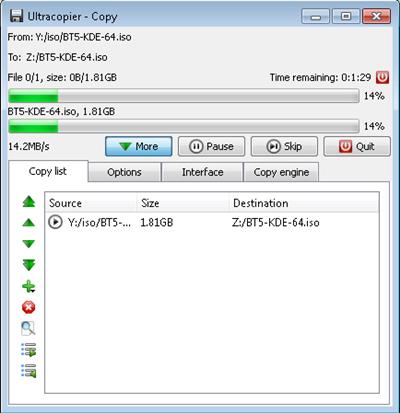
Ultracopier is advanced and yet easy to use application designed to enable users to copy or move files and folders with a few clicks. This tool was developed to provide speed limitation, error / colision management, translation and many more interesting features.

Community
Brings multiple kind of communities together (users, developers, designers, ...).

Run everywhere
Works with all devices: hard drives, usb keys, cdroms, ... Cross-platform compatibility: Windows, Linux, and Mac.

Customisable
On-demand customisation through a large choice of skins and plugins. Available in many languages.

High performance and control
Ultracopier is faster than most default system tools. It provides many advanced features such as: start/resume the copy process, speed limitation, search through the copy list ..

Error and collision management
Ultracopier predicts internal and external errors. It results in detailed information dialogs which allow you to pick up the best solution (eg. always overwrite, overwrite if newer, ...).

Download link:​
Код:
[center][b]rapidgator_net[/b]:
https://rapidgator.net/file/e632359be285ce610f36d144897c4235/vjq4l.UltraCopier.2.2.4.10.Multilingual.rar.html

[b]uploadgig_com[/b]:
https://uploadgig.com/file/download/30d10E8C8b36611F/vjq4l.UltraCopier.2.2.4.10.Multilingual.rar

[b]nitroflare_com[/b]:
https://nitroflare.com/view/7927E399A6BB04A/vjq4l.UltraCopier.2.2.4.10.Multilingual.rar[/center]

Links are Interchangeable - No Password - Single Extraction​
 
USB Redirector 6.12.0.3230 (x64)

7bf219c1a0869f9ad4dd316447e25f0c.jpeg

File Size: 9.9 MB​
USB Redirector allows to use shared USB devices remotely through a local network, WLAN or Internet, just as if they were attached to your computer directly! USB Redirector provides quick resolution of your remote USB needs! It can act as both USB server and USB client, as well as there is a separate light-weight FREE client available. USB Redirector uses a regular TCP/IP connection for communication.

USB Redirector helps to:
Access USB devices in Hyper-V virtual machine or any other virtual machine.
Organize full-featured USB Server for users in your corporate or home network.
Use USB devices on a computer where USB ports are damaged or missing.
Redirect USB devices between computers in your home network or through the Internet.
Redirect USB devices between Windows and Linux with the help of USB Redirector for Linux.
Limit physical access to USB device, but make it available for users in your network.

USB Redirector works as background service:
USB Redirector works as a background service, this means you don't have to keep the app open all the time. Once you have configured the program, you can safely close it. USB Redirector will continue to work even when no user is logged in or after reboot. All the devices that you have shared will remain shared.

System Requirements:

Windows Desktop/Laptop:
Windows 10
Windows 8.1
Windows 8
Windows 7
Windows Vista
Windows XP (SP3 or newer)

Windows Server (including Server Core and Hyper-V):
Windows 2019
Windows 2016
Windows 2012 R2
Windows 2012
Windows 2008 R2
Windows 2008
Windows 2003 (SP1 or newer)

What's New:
official site does not provide any info about changes in this version.

Download link:​
Код:
[center][b]rapidgator_net[/b]:
https://rapidgator.net/file/42987c8a876c551f7a970f862b3ec15c/t43ia.USB.Redirector.6.12.0.3230.x64.rar.html

[b]uploadgig_com[/b]:
https://uploadgig.com/file/download/3C9D16a99f670ce5/t43ia.USB.Redirector.6.12.0.3230.x64.rar

[b]nitroflare_com[/b]:
https://nitroflare.com/view/9D7DF6BB136E68E/t43ia.USB.Redirector.6.12.0.3230.x64.rar[/center]

Links are Interchangeable - No Password - Single Extraction​
 
W10Privacy 3.7.0.6 Multilingual

34e3cd482800544d37d8956371383e79.jpeg

File size: 2.3 MB​
W10Privacy can display common Windows 10 security settings that can be activated as well as deactivated within the program. It also allows importing and exporting of your changes. While there are a lot of Windows 10 privacy tools out there, many of them lack the detail this program has. Of course, this means that it might take you a bit longer to go through your choices.

For those who don't want to go into detail you can choose from 3 predefined settings. While the design is very simple, there are also 3 colors so that you can easily spot the these 3 settings:
Green - Recommended - this is a conservative mode. Yellow - Conditionally recommended - probably the best bet but look over the choices. Red - Restricted - think of this as geek mode. Better know what you're doing. Must run as administrator.

Also, other similar apps don't always have a back or set a restore point making them a bit scary. This program however does offer a save, save as and load options so you can backup and import or export your settings anytime.
W10Privacy has a built in update checker and a handful of user settings as well.

Download link:​
Код:
[center][b]rapidgator_net[/b]:
https://rapidgator.net/file/f5ab401bccf4b1dcc568117a25b727f5/qt2l4.W10Privacy.3.7.0.6.Multilingual.zip.html

[b]uploadgig_com[/b]:
https://uploadgig.com/file/download/c3e6b0b00e55F236/qt2l4.W10Privacy.3.7.0.6.Multilingual.zip

[b]nitroflare_com[/b]:
https://nitroflare.com/view/848D9A743399A83/qt2l4.W10Privacy.3.7.0.6.Multilingual.zip[/center]

Links are Interchangeable - No Password - Single Extraction​
 
Назад
Сверху