• Старая версия форума работает в архивном режиме www.old.nado.in

All mitsumi'1s Applications !! (updated daily)

  • Автор темы Автор темы mitsumi1
  • Дата начала Дата начала
4K Stogram Pro 3.2.1 macOS

d03cdfab90a6d54e223ba02cc4157488.jpg


4K Stogram Pro 3.2.1 | macOS | 27 mb​
4K Stogram is an Instagram downloader which allows you to download and backup Instagram photos and videos, even from private accounts. Download Instagram photos by hashtags or favorite locations!

Features:
* Grab photos of few account simultaneously and save it in JPEG on your desktop.
* Follow your favourite photographers and get their latest photos automatically.
* Download Instagram Stories as video or image files.
* Login with your Instagram credentials and download photos of private friends accounts.
* Access to your viewer directly from the application.
* Download Instagram video in MP4 format.
* Enjoy the minimalistic interface of application.

Compatibility: OS X 10.10 or later 64-bit
Homepage:
У Вас недостаточно прав для просмотра ссылок. Войдите или зарегистрируйтесь.


Download link:​
Код:
[center][b]rapidgator_net[/b]:
https://rapidgator.net/file/60030f001575b4206e3e05cc53a622f3/0chff.4K.Stogram.Pro.3.2.1.rar.html

[b]nitroflare_com[/b]:
https://nitroflare.com/view/FF3612C75D85E4A/0chff.4K.Stogram.Pro.3.2.1.rar

[b]uploadgig_com[/b]:
https://uploadgig.com/file/download/b7B625324F20708e/0chff.4K.Stogram.Pro.3.2.1.rar[/center]

Links are Interchangeable - No Password - Single Extraction​
 
Abelssoft MyKeyFinder Plus 2021 v10.1.10 Multilingual

a76da4a33f8d4071b55995f6725f1af3.jpg


Abelssoft MyKeyFinder Plus 2021 v10.1.10 Multilingual | 6.9 Mb​
MyKeyFinder is a tool dedicated to retrieving lost or forgotten serial numbers to various software products, including Microsoft Office and Windows.

It comes packed with an intuitive set of options that can handled by all types of users, even the ones with limited experience in such programs.

Setting up the app takes little time and minimum effort. However, it is required to enter an email address to register MyKeyFinder for free. Scanning the computer for serial keys may take a while.

The list of results shows the app name, registry key and serial number. Separate entries can be copied to the Clipboard for closer scrutiny and safekeeping. It is also possible to print selected entries as well as to export them to PDF format. A search function is available for dealing with large amounts of data.

As far as program settings are concerned, you can switch to another language for the UI, set MyKeyFinder to automatically check for updates at startup and to confirm ignoring operations for an item, as well as to create a white list or black list.

MyKeyFinder has a good response time and runs on a low quantity of CPU and RAM, so it does not concern the computer's overall performance. It can be minimized to the taskbar to become non-intrusive. We have not come across any issues throughout our evaluation, since MyKeyFinder did not hang, crash or pop up error dialogs. Thanks to its intuitive layout and overall simplicity, it can be handled by all user levels.

Operating System: Windows 7, 8/8.1, 10

Home Page -
У Вас недостаточно прав для просмотра ссылок. Войдите или зарегистрируйтесь.


Download link:​
Код:
[center][b]rapidgator_net[/b]:
https://rapidgator.net/file/95639420fa97ec845c030a0b4fa6abf8/qezom.Abelssoft.MyKeyFinder.Plus.2021.v10.1.10.Multilingual.rar.html

[b]nitroflare_com[/b]:
https://nitroflare.com/view/8DE98C99AAEE72A/qezom.Abelssoft.MyKeyFinder.Plus.2021.v10.1.10.Multilingual.rar

[b]uploadgig_com[/b]:
https://uploadgig.com/file/download/0D2942cb0296843D/qezom.Abelssoft.MyKeyFinder.Plus.2021.v10.1.10.Multilingual.rar[/center]

Links are Interchangeable - No Password - Single Extraction​
 
ZOC Terminal 8.01.3 macOS

37d02b0ff9e01e8a417ebf5101614506.jpg


ZOC Terminal 8.01.3 macOS | 10.2 MB​
ZOC Terminal is a Telnet/SSH/SSH2 client and terminal emulator. Featuring tabbed sessions, typed command history, scrollback, and multi-window support, ZOC Terminal's implemented emulations have made it the preferred tool for anyone who needs to access Unix shell accounts from a Windows or OS X platform.

User Interface
Tabbed sessions with overview screen to show thumbnails of all open sessions
Session tabs can be moved between windows
"Colorful tabs" feature to tint user interface elements with different colors depending on which host is connected
Full keyboard remapping (e.g. to send text, perform functions, execute programs, etc.)
Host directory with folders and full option set for each entry and automatic login sequences
User button bar to map texts, scripts, phone book entries, external protocols and shell commands to buttons (incl. sub-folders in the button bar)
F-Macro keys for texts, scripts, phone book entries, external shell commands, etc.
Local typing (entry field with history e.g. to type commands)
Various logging and scroll back functions
Keyboard mode for bbs door programs (doorway mode)
Compatible with current Windows 10 and macOS Sierra operating systems (more details below)

Emulation
Full Xterm emulation with 256 colors and mouse support (e.g. for use with Midnight Commander)
Linux console-like (including UTF8, colors, full keyboard)
VT52, VT100, VT102, VT220 (complete implementation incl. print through, keyboard and ANSI colors)
TN3270 (models 3278 and 3279/E with line graphics, colors and full keyboard mapping)
TN5250 for IBM iSeries access
ANSI-BBS, ANSI-SCO, Avatar
Sun-CDE
Wyse WY-30, WY-50, WY-60
TVI 9xx (TVI 920, TVI 925, TVI 950)
QNX V4
ATT4410
TTY
All emulations support line graphics with any font

Communication
Modern Secure Shell (currently based on OpenSSH 7.0) with public/private key authentication, smart-card support (pkcs#11) and port forwarding (tunneling)
Telnet (RFC-Telnet, pure TCP sockets), SSL-Telnet (with TLS 1.2 support)
IPv6 support for SSH and Telnet
Modem via serial port and TAPI (Windows modem)
Direct serial console connections via local serial port or USB/serial adaptors with FTDI chipset or Keyspan or PL2303
Supports Break-Signal for serial Connections (e.g. for CISCO devices)

Rlogin
ISDN via CAPI V2.0 (including X.25 and X.31 support)
File transfer via Ascii, Xmodem, Ymodem, Zmodem, Kermit, SCP, IND$FILE
Translation of inbound/outbound characters

SSH (Secure Shell) Features
Based on industry reference implementation OpenSSH
Client supports latest encryptions like ED25519 SHA256, SHA2 or AES-256ctr
SSH public/private key, key certificate, keyboard interactive or password authentication
Dynamic port forwarding (client as a SOCKS proxy)
X11 forwarding (lets you run X-Windows applications in the remote session)
Static port forwarding (tunneling of connections to predefined destinations)
Proxy support (client connects to server through proxy or jumpserver/jumpdrive)
SSH Agent forwarding between client and server
support for Putty-Agent (Windows) and ssh-agent (macOS)
Client side SSH key generator
SCP file transfer through terminal emulation session
SSH client protocol versions 1 and 2
SSH Keep-Alive

Logging
Scroll back in three variantes (in window, in separate Window and data view in separate window)
Auto Highlight (text on screen can be monitored and special phrases can be highlighted automatically)
Raw data trace to file (text and binary mode)
Hex debug mode on screen
File-log of all incoming data including optional time stamps
Printer log of all incoming data
Auto-Highlight (automatic color highlighting of predefined words or phrases)
Print screen and screen to clipboard functions

Automation
AutoLogin (recorded login procedures from the host directory)
REXX language for scripting (fully featured programming language with over 75 extensions to control the terminal emulator)
DDE support allows ZOC to act as a communication server (Windows)
AppleScript support with access to all internal script commands (macOS)
Auto Macros (text/functions invoked by typing certain text)
Auto Replies (text/functions invoked by receiving certain text)
Functions and special escape sequences to automatically exeute local applications (NetTerm compatible)

Requirements: Intel OS X 10.6 or later

Home Page -
У Вас недостаточно прав для просмотра ссылок. Войдите или зарегистрируйтесь.


Download link:​
Код:
[center][b]rapidgator_net[/b]:
https://rapidgator.net/file/60870b9bee52f6d5deca2f4e13fe606a/yn39r.ZOC.Terminal.8.01.3.macOS.zip.html

[b]nitroflare_com[/b]:
https://nitroflare.com/view/797710230EF19E3/yn39r.ZOC.Terminal.8.01.3.macOS.zip

[b]uploadgig_com[/b]:
https://uploadgig.com/file/download/3255c93422AEbE28/yn39r.ZOC.Terminal.8.01.3.macOS.zip[/center]

Links are Interchangeable - No Password - Single Extraction​
 
WSCC - Windows System Control Center 4.0.5.7 Commercial

6c3dc11d697f21ec4c714f388a912695.jpg


WSCC - Windows System Control Center 4.0.5.7 Commercial | 8 Mb​
WSCC allows you to install, update, execute and organize the utilities from various system utility suites. WSCC can install and update the supported utilities automatically. Alternatively, WSCC can use the http protocol to download and run the programs.

The interface is very simple and intuitive, thus allowing any type of user to find their way around it, regardless of their previous experience with the IT world. Aside from that, it consists of a folder structure and a panel in which to view details.
Upon first launching the utility, you can see a list of software products you can install, such as DiskMon, PortMon, TagsReport, Page Defrag and Autoruns, along with some short descriptions.
This tool also enables you to quickly access a console, so that you can execute command line applications.

The view type can be changed, from a detailed one, to icons and reports. In addition to that, you can show hidden items, add tools to favorites, search for them online and view properties.
From the settings panel, the application can be minimized to the tray, so as not to become obtrusive. Plus, you can view tooltips, check for updates, configure the search to look in software descriptions, scan while typing, as well as customize the console (background color, opacity and font).
To sum up, WSCC - Windows System Control Center is a useful piece of software, when it comes to managing utilities from the Windows Sysinternals suit, view, execute and add them to favorites. It does not put a strain on your PC's performance and the response time is very good. Our tests did not reveal any errors, bugs, or crashes.

Operating System: Windows 7, 8/8.1, 10

Home Page -
У Вас недостаточно прав для просмотра ссылок. Войдите или зарегистрируйтесь.


Download link:​
Код:
[center][b]rapidgator_net[/b]:
https://rapidgator.net/file/3e278fd3d01e184c863d3f3002989305/4ru3a.WSCC..Windows.System.Control.Center.4.0.5.7.Commercial.rar.html

[b]nitroflare_com[/b]:
https://nitroflare.com/view/610ED16C3F139C3/4ru3a.WSCC..Windows.System.Control.Center.4.0.5.7.Commercial.rar

[b]uploadgig_com[/b]:
https://uploadgig.com/file/download/e3c33977df909d24/4ru3a.WSCC..Windows.System.Control.Center.4.0.5.7.Commercial.rar[/center]

Links are Interchangeable - No Password - Single Extraction​
 
Wondershare AllMyMusic 3.0.2.1 macOS

9c3493c3fcfb18adc3b53c046fbd58d3.jpg


Wondershare AllMyMusic 3.0.2.1 macOS | 22.5 MB​
Wondershare AllMyMusic for Mac - Record Audio from Any Online Stream. Record audio from any streaming audio sources, including web videos, radio stations, and popular websites like YouTube, Pandora, and more.

Everything You Need to Record Streaming Audio
- Access your favorite songs, radio programs, and audio from videos files anytime, anywhere.
- Download the files to your computer with AllMyMusic for Mac and you can listen to them without an internet connection.
- AllMyMusic for Mac complies with all copyright law and is 100% legal to use.

Auto-Detect Audio Streams
- If audio is playing on your computer - whether on a video, through an online radio station, or in a program - AllMyMusic for Mac can detect it and record.
- Just hit "Record" and the software will do the rest.

Zero Quality Loss
-Record audio files with 1:1 quality.
- AllMyMusic for Mac uses a virtual sound card to record any audio played through your computer's sound card - preserving 100% of the original audio quality.

Automatically Tag Your Music
AllMyMusic for Mac automatically gathers the details of the recording (such as artist, album, and genre), splits tracks, and filters out ads. Then you can save as it is, or edit any information to personalize the files.

Compile Your Favorite Playlist into a CD
A music toolkit to help you burn your favorite playlists to CDs. It's very easy and flexible. All you need to do is a simple drag-and-drop after launching the CD Burner.

Supported OS:
macOS 10.9 or later 64-bit

* It's compatible with macOS Mojave

Home Page -
У Вас недостаточно прав для просмотра ссылок. Войдите или зарегистрируйтесь.


Download link:​
Код:
[center][b]rapidgator_net[/b]:
https://rapidgator.net/file/c628174f1af77f62309ab2f8c9e234cc/juiww.Wondershare.AllMyMusic.3.0.2.1.macOS.zip.html

[b]nitroflare_com[/b]:
https://nitroflare.com/view/4326227C247B6A9/juiww.Wondershare.AllMyMusic.3.0.2.1.macOS.zip

[b]uploadgig_com[/b]:
https://uploadgig.com/file/download/18fBd669e5B3e9d6/juiww.Wondershare.AllMyMusic.3.0.2.1.macOS.zip[/center]

Links are Interchangeable - No Password - Single Extraction​
 
TunePat Tidal Media Downloader 1.1.1 Multilingual

f40653abcc2883f93b7aeb6568505b36.jpg


TunePat Tidal Media Downloader 1.1.1 Multilingual | 73.8 Mb​
Tidal is a subscription-based music and podcast streaming service, which offers access to millions of tracks and allows subscribers to download the music for offline playback. But the music can be downloaded within the app only and it is unavailable to save the music to your computer.

To let you download and save Tidal music on the computer, TunePat offers a powerful program, called TunePat Tidal Media Downloader, to help you convert unlimited audio files from the Tidal web player which is accessible on nearly all computers.

Download and Save Tidal Music in MP3/AAC/WAV/FLAC Format
TunePat Tidal Media Downloader is a comprehensive audio downloader and converter which supports converting Tidal music to most popular formats, including MP3, AAC, WAV, or FLAC format.

With Tidal Media Downloader, you can easily transfer Tidal tracks between devices, and play Tidal music on the unsupported applications as well as players at any time.

Keep Hi-Fi Audio Quality after Conversion
Tidal offers two levels of service: Tidal Premium with lossy quality supported and Tidal Hi-Fi tier with lossless CD-quality supported. And it requires a faster download speed to listen to Hi-Fi music.

When the internet is limited, the best choice to listen to lossless CD-quality audio is to download Tidal music offline with TunePat Tidal Media Downloader. The best audio quality that TunePat can download for Hi-Fi subscribers is High Fidelity sound quality. For Tidal Premium users, TunePat supports downloading Tidal music in standard sound quality.

Fast Conversion Speed with ID3 Tags Kept
By adopting a unique and innovative technology, TunePat Tidal Media Downloader is able to convert Tidal songs in batch at up to 10X faster speed.

In addition, this program allows you to organize the output files by artists and albums as your needs and preserve the ID3 tags after conversion, including titles, artist name, album, etc.

System Requirements:
Operating System: Windows 7, 8, 10 (32-bit & 64-bit).
Processor: 1G Hz processor, or above
Monitor: Monitor with 1024x768 pixels or higher resolution.
RAM: 512MB or higher of RAM.

Home Page -
У Вас недостаточно прав для просмотра ссылок. Войдите или зарегистрируйтесь.


Download link:​
Код:
[center][b]rapidgator_net[/b]:
https://rapidgator.net/file/7fcd1355607253aa82db357d9457c7fc/0e1zt.TunePat.Tidal.Media.Downloader.1.1.1.Multilingual.rar.html

[b]nitroflare_com[/b]:
https://nitroflare.com/view/0870506658608CA/0e1zt.TunePat.Tidal.Media.Downloader.1.1.1.Multilingual.rar

[b]uploadgig_com[/b]:
https://uploadgig.com/file/download/fe0aC70f7be26a21/0e1zt.TunePat.Tidal.Media.Downloader.1.1.1.Multilingual.rar[/center]

Links are Interchangeable - No Password - Single Extraction​
 
Tipard PDF to Word Converter 3.3.32 Multilingual

7b859b09e1f010179964f35ba81a25ef.jpg


Tipard PDF to Word Converter 3.3.32 Multilingual | 121 Mb​
Tipard PDF to Word Converter is a type of stunning PDF converter and Word creator software which is able to change PDF files to Microsoft Word or RTF documents with high accuracy and at ultra-fast speed. The optional page range enables you to define any single page or page ranges to convert. With multiple languages for output selection, this conversion caters to all different areas' needs.

Accurately Convert any PDF to Word with OCR
PDF is the format with highest stability and accuracy among all text file formats to save. However, every coin has two sides. The shortage of PDF file is that it's not easy to edit and needs more professional PDF readers to preview. Also, some devices cannot support PDF reading, which caused much trouble to you with PDF file. But compared with PDF, Word is more applicable and easy to editable text format to use.

Fortunately, this PDF to Word Converter allows you to convert PDF file to Word or RTF format conveniently with the support of OCR on Windows 10/8/7/XP. It makes it easy to fulfill the conversion from any PDF to Word include Ms word 97-2003 (*.doc), Word 2007 (*.doc), Word 2010/2013 (*.doc) or .docx format as well as Rich Text Format (*.rtf). The configuration of OCR technology enables you to select conversion modes from Accuracy, Balance, speed and the accuracy mode extremely to improve the reorganization ratio to make the PDF to Word conversion more accurate and faster.

Humanely selecting page range and read/preview PDF document before conversion
As the best Adobe Acrobat alternative, this PDF to Word Converter is designed with humanized options and functions. Before converting the PDF file, free choose range from All Page, Current Page and Page options. You can select the page range, input or insert the page numbers as you want. You can also open and convert many PDF files at one time. You could use the preview function of the converter to confirm the desired pages before conversion starts. This is pretty useful in circumstances of file with too many pages while you just need a small part.

Best user experience
As professional and easy-to-use PDF to Word converter, Tipard PDF to Word Converter is devoted to provide you high quality conversion effect at super-high speed. It is designed with humanized options for you to choose. And the operation is easy enough for all users. Besides, the interface is pretty delicate and has four language versions for you to choose: English, French, German and Japanese. Being so considerate and friendly, we believe we can give you the best user experience that you ever have!

System Requirements:
OS Supported: Windows XP (SP2 or later), Windows Vista, Windows 7, Windows 8, Windows 10
CPU:1.2 GHz Intel or AMD CPU, or above
RAM: 1G RAM or higher recommended

Home Page -
У Вас недостаточно прав для просмотра ссылок. Войдите или зарегистрируйтесь.


Download link:​
Код:
[center][b]rapidgator_net[/b]:
https://rapidgator.net/file/1f05ae485c841c543280b45938155b00/26yz6.Tipard.PDF.to.Word.Converter.3.3.32.Multilingual.rar.html

[b]nitroflare_com[/b]:
https://nitroflare.com/view/B75E968A207E9DE/26yz6.Tipard.PDF.to.Word.Converter.3.3.32.Multilingual.rar

[b]uploadgig_com[/b]:
https://uploadgig.com/file/download/Affe2b68ecBc142a/26yz6.Tipard.PDF.to.Word.Converter.3.3.32.Multilingual.rar[/center]

Links are Interchangeable - No Password - Single Extraction​
 
Things 3.13.5 macOS

8e47785360bb88810a66f95a913eaeef.jpg


Things 3.13.5 Multilingual | macOS | 32 mb​
Meet the all-new Things! A complete rethinking of the original, award-winning task manager - with a perfect balance between simplicity and power, incredible new features, delightful interactions, and a timeless new design.

Our screencast is a great introduction.
- The big picture. A Leopard-style source list lets you easily focus without ever switching view modes or wrapping your head around filter criteria.
- A magical tag bar automatically appears when needed and adapts to the currently displayed list. It lets you drill down even the longest list of To-Dos. Hierarchical tags? We got you covered!
- Teamwork. Things offers convenient collaboration features. Easily delegate tasks to members of your team. (This is work in progress.)
- No columns! Whether it's multiple tags, dates or notes, To-Do items display their information on an as needed basis. No more space wasted by empty or irrelevant column cells!
- Out of your head, out of your way. A quick entry HUD lets you enter any idea the moment it hits you. Never let the thought of an unfinished business distract you again.
- Yours forever. We won't lock you in.

Compatibility: macOS 10.13 or later 64 bit

Download link:​
Код:
[center][b]rapidgator_net[/b]:
https://rapidgator.net/file/918d4db86083957206b351301b916639/zu3op.Things.3.13.5.rar.html

[b]nitroflare_com[/b]:
https://nitroflare.com/view/B893C64E0CD297A/zu3op.Things.3.13.5.rar

[b]uploadgig_com[/b]:
https://uploadgig.com/file/download/b56cF84a06aa9Aec/zu3op.Things.3.13.5.rar[/center]

Links are Interchangeable - No Password - Single Extraction​
 
Systweak Advanced Disk Recovery 2.7.1200.18366 Multilingual

e03825852e5aae21d5c75ce6059ea9e7.jpg


Systweak Advanced Disk Recovery 2.7.1200.18366 Multilingual | 5.9 Mb​
An ultimate data recovery solution to retrieve lost or deleted photos, videos, audios, documents & other files from your Hard Drive, USB & other storage media.

Recover All Types Of Data
Advanced Disk Recovery is a one-stop solution to all your data loss problems. Recover deleted photos, videos, audios & other documents in a few clicks.

Recover Unlimited Data
From text files to videos, locate and restore unlimited amount of data efficiently.

Rescue For All Data Loss Situations
No matter the situation, recover any type of deleted, formatted or lost data.

Supports Multiple Formats
Compatible with all types of file formats. Recover files and folders in few clicks.

Supports External Drives
Advanced Disk Recovery supports external Memory Cards, USB, SSD and Hard Drives.

Compatible OS: Windows 10/8.1/8/7/Vista and XP (both 32 bit and 64 bit)

Home Page -
У Вас недостаточно прав для просмотра ссылок. Войдите или зарегистрируйтесь.


Download link:​
Код:
[center][b]rapidgator_net[/b]:
https://rapidgator.net/file/4df54095705847cf04f48b7a68a14572/35jhs.Systweak.Advanced.Disk.Recovery.2.7.1200.18366.Multilingual.rar.html

[b]nitroflare_com[/b]:
https://nitroflare.com/view/A1AC9FAEB2D95DA/35jhs.Systweak.Advanced.Disk.Recovery.2.7.1200.18366.Multilingual.rar

[b]uploadgig_com[/b]:
https://uploadgig.com/file/download/A042b1a5f09eface/35jhs.Systweak.Advanced.Disk.Recovery.2.7.1200.18366.Multilingual.rar[/center]

Links are Interchangeable - No Password - Single Extraction​
 
SysGauge Ultimate / Server 7.5.12

e2d85b0d5b576fa7f6f217772e8bc5c8.jpg


SysGauge Ultimate / Server 7.5.12 (x86/x64) | 22.5 Mb​
SysGauge is a system and performance monitoring utility allowing one to monitor the CPU usage, memory usage, network transfer rate, operating system performance, the status and resource usage of running processes, file system performance, USB performance, disk space usage, disk read activity, disk write activity, disk read transfer rate, disk write transfer rate, disk read IOPS and disk write IOPS for individual logical disks or all physical disks installed in the computer.

SysGauge Main GUI Application
The main SysGauge GUI application allows one to configure a number of system and performance monitoring counters, display system monitoring charts, analyze the current system status, save various types of system monitoring reports and configure sound and E-Mail notifications.

SysGauge System Monitor
The 'System Monitor' GUI module allows one to perform various types of system monitoring operations using one or more pre-defined or user-custom system monitoring profiles. The system monitor provides the ability to add, edit or delete system monitoring counters, save various types of system monitoring reports, configure monitoring rules, actions and error E-Mail notifications.

Add Counter Dialog
The 'Add Counter' dialog provides the ability to add the CPU usage counters, memory usage counters, disk activity counters, network activity counters, USB activity counters, operating system status counters, file system counters and running processes counters.

SysGauge CPU Monitor
The 'CPU Monitor' GUI module is a dedicated CPU monitoring GUI module showing the total CPU usage, user CPU usage, kernel CPU usage, CPU interrupt time, CPU interrupt rate, the current CPU frequency, the C1 low-power state, C2 low-power state and C3 low-power state.

SysGauge Memory Monitor
The 'Memory Monitor' GUI module is a dedicated memory monitoring module showing the memory usage, the amount of free memory, the amount of used memory, the size of the memory cache, the cache peak size, the cache fault rate, the page file usage, the page file peak usage and the page fault rate.

SysGauge Process Monitor
The 'Process Monitor' GUI module is a dedicated process monitoring module showing the list of currently running processes and displaying for each process the process CPU usage, the memory usage, the number of threads, the number of handles, the number of process instances, the process data transfer rate, the process read transfer rate, the process write transfer rate, the process page fault rate and the amount of non-paged memory allocated by each running process.

Supported Operating Systems:
Windows XP, Vista, 7, 8, 8.1, 10 Server 2003, 2008, 2008 R2, 2012, 2012 R2, 2016, 2019

Home Page -
У Вас недостаточно прав для просмотра ссылок. Войдите или зарегистрируйтесь.


Download link:​
Код:
[center][b]rapidgator_net[/b]:
https://rapidgator.net/file/7a0065ea9a315e8ba6e27ec2b163f8bc/iz2lq.SysGauge.Ultimate..Server.7.5.12.rar.html

[b]nitroflare_com[/b]:
https://nitroflare.com/view/28FD918170A8E0D/iz2lq.SysGauge.Ultimate..Server.7.5.12.rar

[b]uploadgig_com[/b]:
https://uploadgig.com/file/download/b4d88Be9191F1444/iz2lq.SysGauge.Ultimate..Server.7.5.12.rar[/center]

Links are Interchangeable - No Password - Single Extraction​
 
Soft Organizer Pro 8.17 + Portable

47a5374f46986576b814ce70038111f4.jpg


Soft Organizer Pro 8.17 + Portable | 40.7/13.8 Mb​
A common problem we often face with, when uninstalling unnecessary software, is various traces left in the system: unneeded files or folders on a disk, registry entries and so on. This can happen even if an application was removed correctly with its own uninstaller - a special program provided by a vendor to uninstall the application. The Soft Organizer program is intended to solve this problem: It allows you to COMPLETELY uninstall unnecessary applications from your system.

Features

1. Very simple and intuitive operation
The simple, convenient, and non-overloaded interface doesn't distract a user from the installing and/or uninstalling process. The Soft Organizer utility looks like a simple list of installed programs, where a user merely needs to select a program and click "Uninstall". At the same time, the tool features the entire range of capabilities that even programs with much more complex interfaces have. (Most of those programs look like a space shuttle cockpit with many gauges, meters, and obscure instruments.)

2. Has only the functions you really need
Thanks to judicious selection of capabilities, Soft Organizer features only those options you really need in your work. The overall functionality of the program is similar to competitive application removal solutions.

3. Enhanced capabilities for experienced users
Due to the number of enhanced functions in Soft Organizer, experienced users can enjoy more precise control over the process. Such functions keep a low profile and do not distract other users, so installing and uninstalling applications using Soft Organizer remains simple and intuitive.

Operating System: Windows XP, Vista, 7/8.1/10 (32-bit and 64-bit)

Home Page -
У Вас недостаточно прав для просмотра ссылок. Войдите или зарегистрируйтесь.


Download link:​
Код:
[center][b]rapidgator_net[/b]:
https://rapidgator.net/file/b707b2c0585672f30067c676296fe351/jq9x4.Soft.Organizer.Pro.8.17.Portable.rar.html
https://rapidgator.net/file/8945260ca0de7c7383a44d2515ee3b52/jq9x4.Soft.Organizer.Pro.8.17.rar.html

[b]nitroflare_com[/b]:
https://nitroflare.com/view/A42E65B4CA8C915/jq9x4.Soft.Organizer.Pro.8.17.Portable.rar
https://nitroflare.com/view/427F9F89920A933/jq9x4.Soft.Organizer.Pro.8.17.rar

[b]uploadgig_com[/b]:
https://uploadgig.com/file/download/8410cE5805dbb58A/jq9x4.Soft.Organizer.Pro.8.17.Portable.rar
https://uploadgig.com/file/download/2694c8532b379df7/jq9x4.Soft.Organizer.Pro.8.17.rar[/center]

Links are Interchangeable - No Password - Single Extraction​
 
Retouch Pro for Adobe Photoshop 1.0.0 Multilingual

6b0d1aaafcfeeb8ecb971b6c291cb773.jpg


Retouch Pro for Adobe Photoshop 1.0.0 Multilingual | 14.7 Mb​
Retouch Pro is the most advanced panel to date in the photography business, the only panel with more than 150 functions and 6 languages available (English, Spanish, French, German, Italian , Russian).

RP use REAL artificial intelligence. All functions have been created and tested by the worlds best photographers.

These are some of the main functions of Retouch Pro:
- Skin Retouch
- Eyes Retouch
- Hair Retouch
- Lips Retouch
- Clothes retouch
- Artificial Intelligence: Face Recognition
- Artificial Intelligence: Body Recognition
- +20 Professional presets
- Water color
- Overlays: Snow, Rain, Sun, Dust
- Split Toning and Color Grading
- AI Realistic background Blur
- AI Realistic background color
- and much more!

Retouch Pro Panel has a very powerful and advanced Artificial intelligence system that works in line with Photoshop giving the user faster results and professional results too, you can modify Eyes, Lips, Mouth and the form of the face with a single touch or cut out the subject in the photo with 1 click.

Requirements: Adobe Photoshop CC versions from 2014 to 2021

Home Page -
У Вас недостаточно прав для просмотра ссылок. Войдите или зарегистрируйтесь.


Download link:​
Код:
[center][b]rapidgator_net[/b]:
https://rapidgator.net/file/5b2e3d89d09cb3b40948678e92f925d1/wrsri.Retouch.Pro.for.Adobe.Photoshop.1.0.0.rar.html

[b]nitroflare_com[/b]:
https://nitroflare.com/view/99C1025EAA439E7/wrsri.Retouch.Pro.for.Adobe.Photoshop.1.0.0.rar

[b]uploadgig_com[/b]:
https://uploadgig.com/file/download/90f15A58882a2e53/wrsri.Retouch.Pro.for.Adobe.Photoshop.1.0.0.rar[/center]

Links are Interchangeable - No Password - Single Extraction​
 
PhotoSweeper X 3.9.1 macOS

9cf8c3d48951dabe1a33db672e260c20.jpg


PhotoSweeper X 3.9.1 | macOS | 47 mb​
PhotoSweeper is a fast, precise & super efficient tool to eliminate similar or duplicate photos even in huge photo collections. It works with photos from Apple Photos, iPhoto, Aperture, PhaseOne Capture One and Adobe Lightroom libraries as well as photos from your hard drives and external storages.

PhotoSweeper will help you if:

* You take a series of shots of the same scene trying to get the perfect one.
* You edit photos with software like Photoshop, Pixelmator etc., and make backups just in case.
* You have photos scattered on external hard drives and local disks, in Apple Photos, iPhoto, Aperture or Lightroom libraries.
* You have a mess in your photo collection or just want to free disk space by removing junk photos.

Features

* Easy search of photos - Just drag and drop folders from your Mac to allow PhotoSweeper to find all photos inside. Add more photos from your iPhoto, Aperture or Lightroom library via the Media Browser window.

* Flexible comparison settings - Powerful multi-settings to easily find duplicates, similar photos, series of shots. The app finds duplicate photos, even those edited in external programs such Photoshop, regardless of image size or format.

* High speed and quality - PhotoSweeper was developed as a tool for extremely fast comparison of a huge number of photos. Cutting-edge technologies and unique algorithms make searching duplicates incredibly fast and gives excellent comparison results.

* Efficiency - You can regroup the results without re-comparing photos by changing matching level with a slider. Using caches makes the next comparison much faster.

* Marking duplicates automatically - Mark photos you want to get rid of manually, or use the "Auto Mark" feature to mark duplicates automatically based on the list of rules you can adjust to your needs in the Preferences.

* Comfortable viewing results - PhotoSweeper provides 3 modes for reviewing results: "One by One", "Face-to-Face" - one or two large photos with an opportunity to mark a photo with just a click, "All in One" - all groups of duplicates in one list.

* Great photo browsing - PhotoSweeper also serves as an up-to-date photo browser with a built-in search of photos by metadata, Quick Look preview, the "Info" panel with a detailed photo description, including histogram and image metadata (EXIF, IPTC etc.)

Compatibility: OS X 10.10 or later 64-bit

Download link:​
Код:
[center][b]rapidgator_net[/b]:
https://rapidgator.net/file/5675d8b5db26dc3b4e98e6ede0985c58/vsg4u.PhotoSweeper.X.3.9.1.rar.html

[b]nitroflare_com[/b]:
https://nitroflare.com/view/BEF297683B28D6B/vsg4u.PhotoSweeper.X.3.9.1.rar

[b]uploadgig_com[/b]:
https://uploadgig.com/file/download/6f4Fcd6ae02E0Ace/vsg4u.PhotoSweeper.X.3.9.1.rar[/center]

Links are Interchangeable - No Password - Single Extraction​
 
NIUBI Partition Editor Technician Edition 7.3.7 + Boot ISO

42ffb4d9c09aee006ce0cb2389d5d961.jpg


NIUBI Partition Editor Technician Edition 7.3.7 + Boot ISO | 12.6/402.5 Mb​
If you provide IT technical service to your clients and need a powerful disk partition management toolkit, NIUBI Partition Editor Technician Edition is the best choice. This partition manager software is compatible with Windows Server 2016/2012/2008/2003 and Windows 10/8/7/Vista/XP. Local/removable hard disk, VMware, Hyper-V and all types of hardware RAID are all supported.

Better than other utilities, NIUBI Partition Editor integrated unique Roll-Back data protection technology, which is able to roll back the computer to the status before resizing automatically if any hardware issue occurred, so you don't need to worry about data safety. Furthermore, the built-in unique file-moving algorithm helps resize partition 30% - 300% faster than other tools. Time is important to you and your customer!

NIUBI Partition Editor Technician Edition is the best cost-effective option for you to provide charged technical services for multiple companies and individuals. One license code can be registered on unlimited desktops, workstations and servers regardless of network size or architecture.

Operating System: Windows 10/8/7/Vista/XP and Server 2016/2012/2008/2003

Home Page -
У Вас недостаточно прав для просмотра ссылок. Войдите или зарегистрируйтесь.


Download link:​
Код:
[center][b]rapidgator_net[/b]:
https://rapidgator.net/file/87d280967087b9fb9255f98a4383e0f7/1qskv.NIUBI.Partition.Editor.Technician.Edition.7.3.7.rar.html
https://rapidgator.net/file/c4a16bfeef845a1c4d81d71d08a5f358/1qskv.PartitionEditor7.3.7.iso.html

[b]nitroflare_com[/b]:
https://nitroflare.com/view/C8EA84FB3140541/1qskv.NIUBI.Partition.Editor.Technician.Edition.7.3.7.rar
https://nitroflare.com/view/6F343CDCF96ACFF/1qskv.PartitionEditor7.3.7.iso

[b]uploadgig_com[/b]:
https://uploadgig.com/file/download/d874d40Dd8C1468e/1qskv.NIUBI.Partition.Editor.Technician.Edition.7.3.7.rar
https://uploadgig.com/file/download/17493d1c54103197/1qskv.PartitionEditor7.3.7.iso[/center]

Links are Interchangeable - No Password - Single Extraction​
 
MSI Wrapper Pro 9.0.42 Portable

72504338ff75e8aa721c73f76bb3b340.jpg


MSI Wrapper Pro 9.0.42 Portable | 2.6 Mb​
MSI Wrapper is a lightweight software application whose purpose is to help users convert EXE files to MSI file format. It sports a clean and intuitive interface that allows you perform most operations with just a few clicks. Since it offers support for a step-by-step approach, even rookies can learn to configure the dedicated parameters with minimum effort.

Wrap your exe file in an MSI package
Convert executable installers to MSI packages

Deployment via GPO and SCCM
Once your setup program is wrapped in an MSI package, you can deploy it using Group Policy Objects (GPO) or System Center Configuration Manager (SCCM).

Silent install and uninstall
If your exe supports silent installation, you can make your MSI silent too. You can add parameters to your exe when it is launched by the MSI Wrapper.

Product property control
When you build your MSI package, you can specify the properties for the package. Properties include information such as product name, manufacturer, icon, version, comments, and much more.

Single entry in installed programs
Windows can show you a list of installed programs. This is where the user typically goes to uninstall a program. The MSI Wrapper will replace the original entry from the wrapped setup and make sure that both the wrapped program and the MSI are uninstalled correctly.

Elevation level control
Some installers require elevation under certain circumstances and others do not. With the MSI wrapper, you can choose the level of elevation that fits your wrapped installer best.

Per user and per machine installations
Both "per user" and "per machine" types of installations are supported. This is used to control if an installed program is available to all users on the machine or only the installing user.

Reboot detection
Most installers can signal to the operating system that a reboot is needed to complete the installation. With this tool, you can map an exit code from the wrapped installer to make the MSI package signal the need for a reboot.

Batch mode and build script integration
Building your MSI package can be automated. This is useful if you are a software developer and want to integrate the MSI Wrapper in your build scripts.

System requirements:
This tool requires Microsoft.NET Framework 4.0 on the machine where you build the MSI. If you don't have that already, you can get it through Windows Update. Microsoft.NET is not required on the machine that runs the MSI.
Windows XP, Vista, 7, 8, 8.1, 10 and Windows Server 2008, 2008 R2, 2012, 2012 R2, 2016, 2019 is supported.

Home Page -
У Вас недостаточно прав для просмотра ссылок. Войдите или зарегистрируйтесь.


Download link:​
Код:
[center][b]rapidgator_net[/b]:
https://rapidgator.net/file/8de9bf9af7449381efbf81733399a9e1/imjkk.MSI.Wrapper.Pro.9.0.42.Portable.rar.html

[b]nitroflare_com[/b]:
https://nitroflare.com/view/3989070470EFA62/imjkk.MSI.Wrapper.Pro.9.0.42.Portable.rar

[b]uploadgig_com[/b]:
https://uploadgig.com/file/download/85Eb3a17227B2e17/imjkk.MSI.Wrapper.Pro.9.0.42.Portable.rar[/center]

Links are Interchangeable - No Password - Single Extraction​
 
Movist Pro 2.6.2 macOS

057bb62dd5cae166feb68178d1b0b9ce.jpg


Movist Pro 2.6.2 Multilingual | macOS | 72 mb​
Movist is an easy-to-use and powerful movie player. You can choose QuickTime or FFmpeg as decoder for each video codec and reopen with other decoder instantly. Movist supports many useful features to enjoy movies including H.264 video decode acceleration, digital audio out (S/PDIF), high quality subtitles, full screen navigation, convenient & beautiful user interface and so on.

Just Enjoy Movies with Movist.

* Single Window Mode or Multiple Document Mode.
* Various Window Resizing Center & Style.
* Traditional or Lion-style Full Screen.
* Desktop Background Display.
* App Sandbox supported.
* Retina Display supported.
* Full customizable Themes. *1

* Many File Format supported. *2
* Many Video & Audio Codecs supported. *3
* Codec-to-Decoder Binding.
* H.264 Video Decode Acceleration. *4
* Many Core Image Filters supported.
* Video Rotation & Flip.
* Deinterlace (FFmpeg Only).
* Under-Scan for TV out.

* Digital Audio Out (S/PDIF) (FFmpeg Only).
* System Volume Change.
* A/V Sync Adjustment.
* Audio Equalizer supported (FFmpeg Only).

* High Quality Subtitle.
* Many Subtitle Format supported. *5
* Embedded Subtitles in .mkv and .mp4 supported.
* Compressed Subtitles in .zip & .rar supported.
* 3D Subtitle supported.
* Subtitle Display on Letter Box.
* 3-Subtitles Concurrent Display.
* Fully Customizable Subtitle Display. *6
* Language-to-Subtitle Binding.
* Subtitle Text Encoding auto-detection.
* Subtitle Sync Adjustment.
* Subtitle Pre-rendering.

* Similar Named Movie Series auto-detection.
* Playlist Shuffle.
* Playlist Repeat Mode & End-Job(Sleep, Logout, Shutdown, ...).
* Playlist Load & Save.
* Various Playlist settings.
* 3-Level Seeking Intervals.
* Playback Speed Adjustment.
* Apple Remote supported.
* Media Key supported.
* Full Screen Navigation.
* Screenshot Capture.

Compatibility: OS X 10.10 or later 64-bit
Homepage:
У Вас недостаточно прав для просмотра ссылок. Войдите или зарегистрируйтесь.


Download link:​
Код:
[center][b]rapidgator_net[/b]:
https://rapidgator.net/file/8a32b8887a5d5301a450c6da275fa2be/1dxrm.Movist.Pro.2.6.2.rar.html

[b]nitroflare_com[/b]:
https://nitroflare.com/view/44843EE2EF803C5/1dxrm.Movist.Pro.2.6.2.rar

[b]uploadgig_com[/b]:
https://uploadgig.com/file/download/e5cC30d6B387591b/1dxrm.Movist.Pro.2.6.2.rar[/center]

Links are Interchangeable - No Password - Single Extraction​
 
Macrium Reflect 7.3.5365 (x64)

2a869063b2665285197f86960fe3fb87.jpg


Macrium Reflect 7.3.5365 (x64) All Editions | 370.4 Mb​
Macrium Reflect - backup and recovery for individual PCs and servers. Reflect Workstation - Designed for endpoint backup of business-critical PCs and workstations. Peace of mind for organisations when backing up Windows PCs.

Solution highlights:
- New Backup Engine: Incremental and differential images up to 60 times faster
- Instant virtual booting of backup images: instantly create, start and manage Microsoft Hyper-V virtual machines
- Ultra-fast Live imaging of windows systems, physical and virtual
- Restore images to dissimilar hardware using Macrium ReDeploy
- Greatly simplified administration including pre-defined Backup Plans for popular backup strategies
- Fully featured file and folder level backup and recovery
- Updated support for all the latest Windows Operating Systems and disk formats

Macrium Reflect 7 Features:
- Backup your entire PC to a single compressed image file.
- Backup files and folders to a single compressed archive file.
- Recover partitions and entire disk images with just a few clicks of your mouse
- Dynamic disk support
- MBR and GPT disk support
- Restore images to dissimilar hardware using Macrium ReDeploy

Operating System: Windows XP, Vista, 7/8/10 (64-bit only)

Home Page -
У Вас недостаточно прав для просмотра ссылок. Войдите или зарегистрируйтесь.


Download link:​
Код:
[center][b]rapidgator_net[/b]:
https://rapidgator.net/file/b42bc515a20e1ef9a8474ca04d35b22d/g3qy7.Macrium.Reflect.7.3.5365.x64.rar.html

[b]nitroflare_com[/b]:
https://nitroflare.com/view/AB6380FFED4DAEF/g3qy7.Macrium.Reflect.7.3.5365.x64.rar

[b]uploadgig_com[/b]:
https://uploadgig.com/file/download/Abdd54580f7389a8/g3qy7.Macrium.Reflect.7.3.5365.x64.rar[/center]

Links are Interchangeable - No Password - Single Extraction​
 
MacDroid 1.3 macOS

f4bde93840515bace42c61694f392caa.jpg


MacDroid 1.3 Multilingual | macOS | 19 mb​
MacDroid app is a very helpful solution for those who use Mac or MacBook, at the same time preferring an Android device to an iPhone. Android and macOS cannot natively work together, hence there is a vital need for an interface that would not only connect the two systems but also allow safe and smooth file transfer between them.

With MacDroid you get the convenience of connecting Mac and an Android phone or tablet and accessing the portable device's content in the Finder. You will be able to transfer photos, music, videos as well as entire folders. You'll only need a USB cable to connect your phone to computer, MacDroid will take care of everything else.

Transfer your photos
You can access your Android photos in the Finder app and easily drag them with your mouse cursor to any folder on your Mac.

Transfer music to your phone
You can add your favorite tracks to Android from your Mac or vice versa and enjoy the music on the go.

Watch videos when offline
Got some great new episodes that you want to watch, but not planning to take your computer with you? Not a problem! You can transfer them to your Android and watch on a plane, on a train, or while having an Uber ride.

Edit Android files directly from Mac
When you don't really feel like moving files around, you can edit your Android files with your favorite Mac app without actually saving them to your computer.

Compatibility: macOS 10.10 or later 64 bit
Homepage:
У Вас недостаточно прав для просмотра ссылок. Войдите или зарегистрируйтесь.


Download link:​
Код:
[center][b]rapidgator_net[/b]:
https://rapidgator.net/file/0a5f2c2cc006308e69d9ed5cf81cf218/7pmac.MacDroid.1.3.rar.html

[b]nitroflare_com[/b]:
https://nitroflare.com/view/399A34169192492/7pmac.MacDroid.1.3.rar

[b]uploadgig_com[/b]:
https://uploadgig.com/file/download/9e4A94ebbA808d48/7pmac.MacDroid.1.3.rar[/center]

Links are Interchangeable - No Password - Single Extraction​
 
Kofax OmniPage Ultimate 19.2

101f8c2c4f617dd55ae031d910b57d49.jpg


Kofax OmniPage Ultimate 19.2 Multilingual | 574.1 Mb​
Documents are critical to your organization's productivity and workflow. Yet converting paper files into PDF documents can cause inefficiencies, increase costs and lead to re-creation that affects your productivity. Digital transformation starts with a business-oriented OCR solution to accurately convert documents and make them easily editable, searchable and shareable for a seamless workflow.

Kofax OmniPage Ultimate 19.2 allows distributed businesses to accurately digitize files so any document is now easily converted, editable and searchable. With OmniPage Ultimate 19.2, your distributed workforce can reduce the amount of time spent converting files, lower operational costs, and manage and share documents.

Convert Documents for your Enterprise
Distributed organizations need seamless document transition from paper to digital to maximize productivity. OmniPage Ultimate delivers the flexibility, accuracy and accessibility required for your document conversion needs.

Digitize Documents So You Can Work Like Tomorrow
OmniPage Ultimate empowers your organization to work today like the workforce of tomorrow. Generate accurate, efficient document conversions through:

PDF search
Use eDiscovery Assistant to safely convert a single PDF or batches of PDFs in any format into completely searchable documents.

Improved accuracy
Enjoy exceptional OCR accuracy of digital camera images; document layout improvements faithfully reproduce your documents in a variety of output formats.

OmniPage Launchpad
OCR to any format, anywhere on the network, and archive and access documents on any device.

Batch processing
Schedule large volumes of files for batch processing from folders or email, with unattended automation for real-time document processing.

Scanner integration
Works with any scanner - mobile scanners, desktop scanners, all-in-one and multi-function printers.

Mobile document capture
Capture text with a digital camera or smartphone, and quickly convert pictures to text documents.

Language recognition
Process, edit and store documents from virtually anywhere in the world; the tool recognizes over 120 languages.

Supported applications
Enjoy support for the widest range of output formats, including PDF, Microsoft® Word, Excel®, PowerPoint®, Corel® WordPerfect®, HTML, ePub and many more.

OmniPage Ultimate 19.2 will work with the following:
- Windows 10 32-bit or 64-bit Edition, Windows 8 32-bit or 64-bit Edition, Windows 7 32-bit or 64-bit Edition, Windows XP 32-bit Edition with Service Pack 3
- Windows Server 2008 R2, Windows Server 2012
- A computer with a 1 GHz Intel® Pentium® or higher, or equivalent processor
- 1 GB of memory (RAM), 2 GB recommended
- Microsoft Internet Explorer 8 or above
- WIA, TWAIN or ISIS scanner driver
- 1024 x 768 pixel color monitor
- 2-megapixel digital camera with auto-focus or higher for digital camera text capture

Language Support:
- English
- Portuguese
- Spanish
- German
- Italian
- French
- Nederlands

Home Page -
У Вас недостаточно прав для просмотра ссылок. Войдите или зарегистрируйтесь.


Download link:​
Код:
[center][b]rapidgator_net[/b]:
https://rapidgator.net/file/8f6e708533f5b66a4575ac9f690e788e/4t366.Kofax.OmniPage.Ultimate.19.2.rar.html

[b]nitroflare_com[/b]:
https://nitroflare.com/view/2211E483441D701/4t366.Kofax.OmniPage.Ultimate.19.2.rar

[b]uploadgig_com[/b]:
https://uploadgig.com/file/download/c60670b590e0abe1/4t366.Kofax.OmniPage.Ultimate.19.2.rar[/center]

Links are Interchangeable - No Password - Single Extraction​
 
Insofta 3D Text Commander 5.7.0 Multilingual + Portable

dcec25cd87e11ea078c04f235f5ff3b4.jpg


Insofta 3D Text Commander 5.7.0 Multilingual + Portable | 15.6/25.7 Mb​
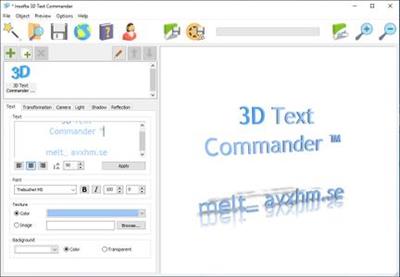
Anything wrapped in a pretty package sells quickly, and this does not only apply to palpable items. This is where Insofta 3D Text Commander comes to offer aid in creating 3D animated text which you can use to enhance presentations or various web projects.

Lights, camera, text!
The main window of the application represents your workspace, and all necessary tools to work with are found in different tabs. Firstly, text specific customization options are available, and you are able to change font and color, or use a picture from your computer as texture.

A few background options are found here, in the sense that a color can be attributed or made transparent. However, there is no possibility to set an image, which is a shame considering the possibility exists for editing text.

Further navigating through the editing tools lets you set the camera position, lights and shadows, with the possibility to save configurations as presets you can use on other projects. You have to be creative from the start, as the application has no default presets from which you can choose.

Animate your text
Navigating through the file menu leaves you wondering where animation options are, because sooner or later you come across the "Save Animation" option. Only after hitting that button will a small window giving you the possibility to modify only a few aspects.

Animation type only means rotation and can either be applied to the text itself, or the camera, with barely any noticeable difference. Aside from rotation, which can be clockwise or counterclockwise, only size and number of frames per second can be specified, leaving you with shallow animation customization options.

In conclusion
All in all, Insofta 3D Text commander wants to achieve greatness with only a little effort. It's fairly easy to use and it is a pity so little customization options are available. If you need to get ahold of a rotating text quickly, this might be the solution.

Operating System: Windows XP/2003/Vista/7/8/8.1/10

Home Page -
У Вас недостаточно прав для просмотра ссылок. Войдите или зарегистрируйтесь.


Download link:​
Код:
[center][b]rapidgator_net[/b]:
https://rapidgator.net/file/381472b9b0d901166230f7f0f7fee2b0/6q0zt.Insofta.3D.Text.Commander.5.7.0.Portable.rar.html
https://rapidgator.net/file/9a552522aad4fda25b556de7b90e447b/6q0zt.Insofta.3D.Text.Commander.5.7.0.rar.html

[b]nitroflare_com[/b]:
https://nitroflare.com/view/A03DAF85B1D5C48/6q0zt.Insofta.3D.Text.Commander.5.7.0.Portable.rar
https://nitroflare.com/view/1B307EB4CA741F0/6q0zt.Insofta.3D.Text.Commander.5.7.0.rar

[b]uploadgig_com[/b]:
https://uploadgig.com/file/download/AdE233916C42da21/6q0zt.Insofta.3D.Text.Commander.5.7.0.Portable.rar
https://uploadgig.com/file/download/D1ff904518ef1c74/6q0zt.Insofta.3D.Text.Commander.5.7.0.rar[/center]

Links are Interchangeable - No Password - Single Extraction​
 
Назад
Сверху