• Старая версия форума работает в архивном режиме www.old.nado.in

All mitsumi'1s Applications !! (updated daily)

  • Автор темы Автор темы mitsumi1
  • Дата начала Дата начала
Adobe Acrobat Pro DC 2020.013.20064 Multilingual

9c838e1d23adb185bb412932bc85aed2.jpg


Adobe Acrobat Pro DC 2020.013.20064 Multilingual | 968.1 Mb​
Adobe Acrobat Pro DC is the leading PDF converter and much more. Adobe Acrobat Pro DC software lets you deliver professional PDF communications. It's packed with smart tools that give you even more power to communicate. Create and edit PDF files with rich media included, share information more securely, and gather feedback more efficiently.

Adobe Acrobat Pro DC software is the advanced way for business professionals to create, combine, control, and deliver more secure, high-quality Adobe PDF documents for easy, more secure distribution, collaboration, and data collection.

Assemble electronic or paper files into reliable PDF documents that are easy to share with others using free Adobe Reader. You can assemble even Web sites, engineering drawings, and e-mail.

With Adobe Acrobat Pro DC you can manage document reviews, synthesizing feedback from multiple reviewers while preserving document format and integrity. Extend commenting capabilities to anyone using Adobe Reader. Windows users can design intelligent Adobe PDF forms that include business logic, such as calculations and data validations, to help increase the accuracy of data collection while reducing the costs of manual data entry.

Use Adobe Acrobat Pro DC to create high-impact PDF communications, collaborate more easily, and streamline reviews. Adobe Acrobat Dynamic PDF helps you get more done - easier, faster, better.

Edit PDF files
With Adobe Acrobat Pro DC, you can make minor edits to text and images right in your PDF file without requiring the original document or graphic. Edit text in a PDF. Fix a typo, change a font, or add a paragraph to your PDF as easily as you do in other applications using a new point-and-click interface. Edit images in a PDF. Resize, replace, and adjust images in your PDF with no need to track down the original file or graphic.

Export from PDF files
Reduce the time you spend retyping information stuck in PDF files. Convert PDF files to editable Microsoft Office documents. And save fonts, formatting, and effort.
Convert PDF files to Word. Save your PDF as a Microsoft Word document and take your fonts, formatting, and layouts with you. Convert PDF files to Excel. Turn your PDF or just part of it into an editable Excel spreadsheet you can use for data analysis right away. Convert PDF files to PowerPoint. Get a head start on new projects by saving a PDF file as a fully editable PowerPoint presentation.

Create PDF files
Stop worrying about whether the files you send will look right on other people's screens. Turn documents into PDF files anyone can reliably view with free Adobe Reader.
Convert Word, Excel, or PowerPoint to PDF. Right from your Office application in Windows, you can create PDFs, start a shared review, restrict PDF edits, and more. Print to PDF. Convert files to PDF from virtually any application that prints simply by selecting Adobe PDF as your printer. Scan to PDF. When you need to turn a paper document or form into a digital file, just scan it to create a searchable PDF file you can edit. Convert HTML pages to PDF. Save web pages as PDF files to archive web content, review the pages offline, or print them more reliably.

Create and analyze forms
Cut the time you spend creating forms, rekeying data, and correcting errors. Distribute forms online, and then collect responses and analyze results in real time.
Create new PDF and web forms. Customize professional templates or design from scratch with the Adobe FormsCentral desktop app included in Adobe Acrobat Pro DC. Collect form responses with FormsCentral. Easily collect responses by moving your PDF or web forms online with the Adobe FormsCentral online service. Convert existing forms to fillable PDFs. Type less, gather more. Quickly convert your paper, Word, or Excel forms to fillable PDF forms. Collect form responses using Adobe Acrobat tools. Compile returned forms into one PDF, or host forms using a network folder or Microsoft SharePoint server.

System Requirements:
1.5GHz or faster processor
Windows Server 2008 R2 (64 bit), 2012 (64 bit), 2012 R2 (64 bit), or 2016 (64 bit); Windows 7 (32 bit and 64 bit), Windows 8, 8.1 (32 bit and 64 bit), or Windows 10 (32 bit and 64 bit)
1GB of RAM
4.5GB of available hard-disk space
1024x768 screen resolution
Internet Explorer 11; Firefox (ESR); or Chrome
Video hardware acceleration (optional)

Home Page -
У Вас недостаточно прав для просмотра ссылок. Войдите или зарегистрируйтесь.


Download link:​
Код:
[center][b]rapidgator_net[/b]:
https://rapidgator.net/file/43cca033c6e374ff18a1c67753fc944f/1nn0i.Adobe.Acrobat.Pro.DC.2020.013.20064.Multilingual.rar.html

[b]nitroflare_com[/b]:
https://nitroflare.com/view/EBE5F7FF4F19941/1nn0i.Adobe.Acrobat.Pro.DC.2020.013.20064.Multilingual.rar

[b]uploadgig_com[/b]:
https://uploadgig.com/file/download/dAbB1a88933e4D9a/1nn0i.Adobe.Acrobat.Pro.DC.2020.013.20064.Multilingual.rar[/center]

Links are Interchangeable - No Password - Single Extraction​
 
Agisoft Metashape Professional 1.7.0 Build 11429 (x64) Multilingual

0c54b7e3105b3b772f02bf38f4c20efd.jpg


Agisoft Metashape Professional 1.7.0 Build 11429 (x64) Multilingual | 184.2 Mb​
Agisoft Metashape (formerly PhotoScan) is a stand-alone software product that performs photogrammetric processing of digital images and generates 3D spatial data to be used in GIS applications, cultural heritage documentation, and visual effects production as well as for indirect measurements of objects of various scales.

Wisely implemented digital photogrammetry technique enforced with computer vision methods results in smart automated processing system that, on the one hand, can be managed by a new-comer in the field of photogrammetry, yet, on the other hand, has a lot to offer to a specialist who can adjust the workflow to numerous specific tasks and different types of data. Throughout various case studies Metashape proves to produce quality and accurate results.

Features:

Photogrammetric triangulation
Processing of various types of imagery: aerial (nadir, oblique) & close-range.
Auto calibration: frame (incl. fisheye), spherical & cylindrical cameras.
Multi camera projects support.

Dense point cloud: editing and classification
Elaborate model editing for accurate results.
Points classification to customize geometry reconstruction.
.LAS export to benefit from classical point data processing workflow.

Digital elevation model: DSM/DTM export
Digital Surface and/or Digital Terrain Model - depending on the project.
Georeferncing based on EXIF meta data/flight log: GPS/GCPs data.
EPSG registry coordinate systems support: WGS84, UTM, etc.

Georeferenced orthomosaic export
Georeferenced orthomosaic: most-GIS-compatible GeoTIFF format; .KML file to be located on Google Earth.
Export in blocks for huge projects.
Color correction for homogeneous texture.

Measurements: distances, areas, volumes
Inbuilt tools to measure distances, areas and volumes.
To perform more sophisticated metric analysis Metashape products can be smoothly transferred to external tools thanks to a variety of export formats.

Operating System: Windows 7, 8/8.1, 10 (64-bit only)

Home Page -
У Вас недостаточно прав для просмотра ссылок. Войдите или зарегистрируйтесь.


Download link:​
Код:
[center][b]rapidgator_net[/b]:
https://rapidgator.net/file/457c98b52e02e0eac850c460f7e7c61c/hoyo6.Agisoft.Metashape.Professional.1.7.0.Build.11429.x64.Multilingual.rar.html

[b]nitroflare_com[/b]:
https://nitroflare.com/view/9BB6A72114B0638/hoyo6.Agisoft.Metashape.Professional.1.7.0.Build.11429.x64.Multilingual.rar

[b]uploadgig_com[/b]:
https://uploadgig.com/file/download/efD70f322d1a0325/hoyo6.Agisoft.Metashape.Professional.1.7.0.Build.11429.x64.Multilingual.rar[/center]

Links are Interchangeable - No Password - Single Extraction​
 
Allavsoft Video Downloader Converter 3.23.0.7610 macOS

32ec0d66d4da1632f03e5fd6d806c6fa.jpg


Allavsoft Video Downloader Converter 3.23.0.7610 macOS | 51 Mb​
This powerful Video Downloader supports downloading movies, music videos, playlist, sport videos, lectures and more from free video sharing website like Facebook, Dailymotion, eHow, and more than 100 video sharing sites.

Besides downloading video in its original format, Allavsoft also features one-click to download as well as convert the downloaded video to popular video format like MP4, AVI, WMV, MOV, MPEG-1, MPEG-2, VOB, ASF, RMVB, DV, TS, Apple ProRes, WebM, FLV, OGV and etc.

This ideal Web Video Downloader app enables selecting among all video qualities available for downloading like download videos in ultra high definition (4K), 3D video, HD 2k, HD 1080p, HD 720p, and stand definition 480p, 360p, and 240p.

This professional Video Downloading and Converting tool also helps to extract and download audio from online music video or movies as well as convert to popular audio format like MP3, WMA, WAV, AAC, AAC, Apple Lossless M4A, AIFF, RA, FLAC, OGG, AU and etc.

Batch download and convert
Allavsoft supports adding multiple video URLs and batch downloading and converting multiple videos at a time.
When download web video files, this wonderful Video Downloader will automatically detects advertisements and does not download them.
Preview and playback downloaded video files
There is a built-in video player in Allavsoft for us to preview and playback the downloaded video files.
Breakpoint Resume
You can pause and resume downloading at any time. It is very convenient to use.
Action after download done
You can set automatically shut down computer after all the download tasks are finished, if you have lots of videos to download and want to leave your Windows on to download them.
Keep history for downloading.

System Requirements
Mac OS X v10.4(Tiger), 10.5(Leopard), 10.6(Snow Leopard), 10.7(Lion), 10.8(Mountain Lion), 10.9(Mavericks), 10.10 (Yosemite), 10.11 (El Capitan), 10.12(macOS Sierra), 10.13(macOS High Sierra), and 10.14(macOS Mojave);
PowerPC® G5 or Intel® processor;
512MB RAM or more;
50MB free hard disk space for installation;
Super VGA (800 x 600) resolution, 16-bit graphics card or higher

Home Page -
У Вас недостаточно прав для просмотра ссылок. Войдите или зарегистрируйтесь.


Download link:​
Код:
[center][b]rapidgator_net[/b]:
https://rapidgator.net/file/659a225441833578ac7fa323c1bef01f/ypvqa.Allavsoft.Video.Downloader.Converter.3.23.0.7610.macOS.zip.html

[b]nitroflare_com[/b]:
https://nitroflare.com/view/FC9B1B078ADDDA1/ypvqa.Allavsoft.Video.Downloader.Converter.3.23.0.7610.macOS.zip

[b]uploadgig_com[/b]:
https://uploadgig.com/file/download/aBB9626e69702300/ypvqa.Allavsoft.Video.Downloader.Converter.3.23.0.7610.macOS.zip[/center]

Links are Interchangeable - No Password - Single Extraction​
 
Amadeus Pro 2.8.4 (2.8.4) macOS

8a456ac3e91fe0733d53ec72ecadd22f.jpg


Amadeus Pro 2.8.4 (2.8.4) | macOS | 16 mb​
Amadeus Pro lets you use your Mac for any audio-related task, such as live audio recording, digitizing tapes and records, converting between a variety of sound formats, etc. Thanks to its outstanding direct-to-disk abilities and waveform caching, edits on arbitrarily large sounds (even beyond the usual 2GB limit) are performed at lightning speed.

The handling of large sounds is furthermore facilitated by the extensive support of markers. Its outstanding sound repairing and denoising abilities make Amadeus Pro particularly suitable for transferring vinyl records on CD.

Compatibility: OS X 10.8 or later 64-bit
Homepage:
У Вас недостаточно прав для просмотра ссылок. Войдите или зарегистрируйтесь.


Download link:​
Код:
[center][b]rapidgator_net[/b]:
https://rapidgator.net/file/6047f1063798a3b300acefbc0cf6736a/e8vbj.Amadeus.Pro.2.8.4.2.8.4.rar.html

[b]nitroflare_com[/b]:
https://nitroflare.com/view/52480AE5701962D/e8vbj.Amadeus.Pro.2.8.4.2.8.4.rar

[b]uploadgig_com[/b]:
https://uploadgig.com/file/download/64aAA1a593f77d63/e8vbj.Amadeus.Pro.2.8.4.2.8.4.rar[/center]

Links are Interchangeable - No Password - Single Extraction​
 
Ample Sound - Ample Guitar Telecaster - AGTC III v3.2.0 WiN OSX

6d39f02bfa2bfed7decca53bf9e9dc32.jpg


Ample Sound - Ample Guitar Telecaster - AGTC III v3.2.0 WiN OSX | 5.78 Gb​
Ample Guitar TC aim to bring a Fender Telecaster (John English Masterbuilt) sound to your studio. CPC (Customized Parameters Control) - any controller can be controlled by MIDI CC or Automation. Double Guitar. Poly Legato and Slide Smoother.

AMP Simulator:
Built-in AMP system, including 6 classic AMP models: Metal Double (modeled on Mesa Boogie Dual), Metal Treble (modeled on Mesa Boogie Triple), Lead 800 (modeled on Marshall JCM800), Jazz 120 (modeled on Roland JC120), 65 Twang (modeled on Fender 65 Twin Reverb) and 57 Delight (modeled on Fender 57 Deluxe).
7 matching cabinets:1x12 57D, 2x12 65T, 2x12 120, 4x12 60A, 4x12 60B, 4x12 Ro and 4x12 Ri.
Each Cabinet has 8 mic options: U87, C414, MD421, SM57, E609, C414 XLS, R121 and M160.
Room Mics.
Hundreds presets, each preset featured a riff which users can go to Riffer panel and have a preview.

Riffer:
String Roll Editor: can clearly show fingering, articulation, expression and even playing noise. Every note has 8 attributes - pitch, velocity, length, off velocity, articulation, legato, vibrato and bend, with which you can make a delicate lick.
Dice - Random Riff Generator: A click will create a new inspiration because it is not simply a random algorithm. Rather, it summarizes the rules through analyzing a bunch of music scores.
Multiple selection and operation, undo and redo etc. multiple MIDI tools, including fixed velocity, length legato and restrict, select, move, draw, erase, split, glue etc.

Strummer:
14 Strum notes + 28 ways to play for every chord.
Strum Legato - legato articulations can be played while strumming.
4 humanization settings.
Select and Detect 2 chord modes, any chords could be customized.
Strum SEQ with customized rhythm.
Delicate presets with MIDI export.

FX:
High order 8-band EQ, intuitive control of frequency response, real-time visualization of input and output spectrum, support of soloing single band..
2-Line Compressor, real-time visualization of input and output signal, two detection modes RMS & Peak, support of soft knee, auto release and auto makeup.
6-Tap Echo, real-time visualization of the processing of stereo signal, can tweak the parameters of 6 echo points individually: feedback, pan, volume etc.
IR Reverb, providing four types of IR: Room, Studio, Hall, and Larger Hall. 3D visualization of IR spectrum.

Download link:​
Код:
[center][b]rapidgator_net[/b]:
https://rapidgator.net/file/3e3a8f5f423d1ae14255ef7344f31520/gjd2r.Ample.Sound..Ample.Guitar.Telecaster..AGTC.III.v3.2.0.WiN.OSX.part1.rar.html
https://rapidgator.net/file/d7763df4ab0d7ab20c5dadea506a81ac/gjd2r.Ample.Sound..Ample.Guitar.Telecaster..AGTC.III.v3.2.0.WiN.OSX.part2.rar.html
https://rapidgator.net/file/eebd2ff98c3299041ca458b1cc6134a4/gjd2r.Ample.Sound..Ample.Guitar.Telecaster..AGTC.III.v3.2.0.WiN.OSX.part3.rar.html
https://rapidgator.net/file/3f29bd97f33b82bae7cb22e31d29f29e/gjd2r.Ample.Sound..Ample.Guitar.Telecaster..AGTC.III.v3.2.0.WiN.OSX.part4.rar.html
https://rapidgator.net/file/f00f494cad45a2a95cda411d96bffd05/gjd2r.Ample.Sound..Ample.Guitar.Telecaster..AGTC.III.v3.2.0.WiN.OSX.part5.rar.html
https://rapidgator.net/file/f91c77e6488ea5ce365b5095984bf46f/gjd2r.Ample.Sound..Ample.Guitar.Telecaster..AGTC.III.v3.2.0.WiN.OSX.part6.rar.html

[b]nitroflare_com[/b]:
https://nitroflare.com/view/23430F2B9F51DAE/gjd2r.Ample.Sound..Ample.Guitar.Telecaster..AGTC.III.v3.2.0.WiN.OSX.part1.rar
https://nitroflare.com/view/9B9405F30A34F45/gjd2r.Ample.Sound..Ample.Guitar.Telecaster..AGTC.III.v3.2.0.WiN.OSX.part2.rar
https://nitroflare.com/view/30AC1289837834C/gjd2r.Ample.Sound..Ample.Guitar.Telecaster..AGTC.III.v3.2.0.WiN.OSX.part3.rar
https://nitroflare.com/view/527BA813F465F21/gjd2r.Ample.Sound..Ample.Guitar.Telecaster..AGTC.III.v3.2.0.WiN.OSX.part4.rar
https://nitroflare.com/view/954AAC467D802A9/gjd2r.Ample.Sound..Ample.Guitar.Telecaster..AGTC.III.v3.2.0.WiN.OSX.part5.rar
https://nitroflare.com/view/803AF4B69DD08EA/gjd2r.Ample.Sound..Ample.Guitar.Telecaster..AGTC.III.v3.2.0.WiN.OSX.part6.rar

[b]uploadgig_com[/b]:
https://uploadgig.com/file/download/46e851218a4Eb664/gjd2r.Ample.Sound..Ample.Guitar.Telecaster..AGTC.III.v3.2.0.WiN.OSX.part1.rar
https://uploadgig.com/file/download/71E93Fe0fd086fb6/gjd2r.Ample.Sound..Ample.Guitar.Telecaster..AGTC.III.v3.2.0.WiN.OSX.part2.rar
https://uploadgig.com/file/download/C40289fcCaFd1d39/gjd2r.Ample.Sound..Ample.Guitar.Telecaster..AGTC.III.v3.2.0.WiN.OSX.part3.rar
https://uploadgig.com/file/download/e31c433763b2122b/gjd2r.Ample.Sound..Ample.Guitar.Telecaster..AGTC.III.v3.2.0.WiN.OSX.part4.rar
https://uploadgig.com/file/download/FAfcdB18997679a3/gjd2r.Ample.Sound..Ample.Guitar.Telecaster..AGTC.III.v3.2.0.WiN.OSX.part5.rar
https://uploadgig.com/file/download/5a3f88d617eEf45d/gjd2r.Ample.Sound..Ample.Guitar.Telecaster..AGTC.III.v3.2.0.WiN.OSX.part6.rar[/center]

Links are Interchangeable - No Password - Single Extraction​
 
Axure RP 9.0.0.3721 macOS

8f73d14dad65c087d31c0b1ff7a9a40b.jpg


Axure RP 9.0.0.3721 Pro / Team / Enterprise Edition macOS | 69 Mb​
Design the right solution. Create simple click-through diagrams or highly functional, rich prototypes with conditional logic, dynamic content, animations, math functions, and data-driven interactions without writing a single line of code.

Easy to share
Click a button, and Axure RP will publish your diagrams and prototypes to Axure Share on the cloud or on-premises. Just send a link (and password) and others can view your project in a browser. On mobile devices, use a browser or the Axure Share App for iOS and Android.

Diagramming and Documentation
Create flowcharts, wireframes, mockups, user journeys, personas, idea boards and more. Quickly drag and drop elements from built-in or custom libraries to create your diagrams. Then, style it with fills, gradients, line styles, and text formatting. Annotate your diagrams and prototypes to specify functionality, keep track of tasks, or store project information. Organize your notes into separate fields for different audiences. Choose which notes to present in the HTML or in an auto-generated Word document that includes screenshots.

Easier Team Collaboration
Axure RP allows multiple people to work on the same file at the same time, making it easier for your team to work together. Create a team project on Axure share or SVN and use a check-in and check-out system to manage changes. Team projects also keep a history of changes with notes for each check-in.

System Requirements:
- Windows 7 SP1, 8, or 10
- 2 GB memory (RAM) minimum, 4 GB recommended
- 1 GHz processor
- 5 GB disk space
- For Word documentation: Microsoft Office Word 2000,
- XP, 2003, 2007, 2010. 2013, or 2016
- For generated HTML: IE/Edge, Firefox, or Chrome

macOS 10.9+

Home Page -
У Вас недостаточно прав для просмотра ссылок. Войдите или зарегистрируйтесь.


Download link:​
Код:
[center][b]rapidgator_net[/b]:
https://rapidgator.net/file/ecbdf05933e319bdeb62080a91bd6792/838t1.Axure.RP.9.0.0.3721.macOS.zip.html

[b]nitroflare_com[/b]:
https://nitroflare.com/view/96B08E7FA6E0AF0/838t1.Axure.RP.9.0.0.3721.macOS.zip

[b]uploadgig_com[/b]:
https://uploadgig.com/file/download/4de3933Eb55287F5/838t1.Axure.RP.9.0.0.3721.macOS.zip[/center]

Links are Interchangeable - No Password - Single Extraction​
 
BackupTrans Android iPhone WhatsApp Transfer Plus 3.2.143 (x64)

4ccb76664e42ec8084013e98f000fedb.jpg


BackupTrans Android iPhone WhatsApp Transfer Plus 3.2.143 (x64) | 20 Mb​
Copy Android/iPhone WhatsApp Messages to PC or another Android/iPhone. If you have two Android/iPhone devices or one Android and one iPhone, it's always wise to find a tool to help you manage WhatsApp Chat History for your Android/iPhone devices or to transfer WhatsApp Messages between Android and iPhone. Backuptrans Android iPhone WhatsApp Transfer + is the best all-in-one WhatsApp Messages manager package which lets you copy & share WhatsApp Chat Mesages for Android/iPhone on computer directly. No Root/Jailbreak required.

Backup WhatsApp Chat History from Android/iPhone to PC
Restore WhatsApp Chat History from Computer to Android/iPhone
Transfer WhatsApp Messages between Android and iPhone
Recover WhatsApp Messages from iTunes Backup to Android/iPhone
Export WhatsApp Messages to document file(Txt, Csv, Doc, Html, PDF)
Print out WhatsApp Messages in conversations on PC
Extract WhatsApp pictures videos audios etc attachments on PC
Support iPhone, Samsung, HTC, Motorola, Sony Ericsson, LG, Huawei and More

Operating System: Windows NT/2000/XP/2003/Vista/7/8/10 (64-bit only)

Home Page -
У Вас недостаточно прав для просмотра ссылок. Войдите или зарегистрируйтесь.


Download link:​
Код:
[center][b]rapidgator_net[/b]:
https://rapidgator.net/file/8de560f9025809919752e4bea1c3f972/alzkd.BackupTrans.Android.iPhone.WhatsApp.Transfer.Plus.3.2.143.x64.rar.html

[b]nitroflare_com[/b]:
https://nitroflare.com/view/D5AE799B79ECACA/alzkd.BackupTrans.Android.iPhone.WhatsApp.Transfer.Plus.3.2.143.x64.rar

[b]uploadgig_com[/b]:
https://uploadgig.com/file/download/f6929902043d1325/alzkd.BackupTrans.Android.iPhone.WhatsApp.Transfer.Plus.3.2.143.x64.rar[/center]

Links are Interchangeable - No Password - Single Extraction​
 
BitRecover Windows Live Mail Converter Wizard 7.2

9a94c5bd4439ea36f08833b440eda446.jpg


BitRecover Windows Live Mail Converter Wizard 7.2 | 20.8 Mb​
BitRecover WLM Converter gives facility to migrate from WLM to multiple generic file extensions such as PST, MSG, EML, EMLX, TXT, MBOX, HTML, MHT, XPS, RTF, DOC, Windows Live Mail, CSV, Gmail, Yahoo, TIFF, BMP, GIF, JPEG, PNG, PDF, NSF, TGZ, OLM, etc.

Import WLM to Cloud Services
Windows Mail Converter Tool gives freedom to transfer folders from Windows Live Mail to various cloud-based email services and servers i.e. Gmail, Yahoo, Outlook.com, Office 365, Exchange Server, Hosted Exchange Server, G Suite, IBM Verse, Amazon WorkMail, IMAP Server, etc.

Load Emails Automatically
The tool has an inbuilt feature to load WLM folders in software panel automatically from default storage location and it has another option to load emails manually from any other storage location. These options help of select the Windows Live Mail database to convert it into other formats.

Batch WLM Conversion
After start the tool is will automatically load over all Windows Live Mail database in software panel including all email folders in Widows explorer style so that users can choose all folders and configured profiles database at one to convert them into selected format as it supports batch conversion.

Operating System: Windows 10, 8.1, 8, 7, Vista, XP, 98, 97, 2000, etc

Home Page -
У Вас недостаточно прав для просмотра ссылок. Войдите или зарегистрируйтесь.


Download link:​
Код:
[center][b]rapidgator_net[/b]:
https://rapidgator.net/file/316e54ac64d97ca7b754dbc03bace216/qgyb9.BitRecover.Windows.Live.Mail.Converter.Wizard.7.2.rar.html

[b]nitroflare_com[/b]:
https://nitroflare.com/view/88B6D311277D45F/qgyb9.BitRecover.Windows.Live.Mail.Converter.Wizard.7.2.rar

[b]uploadgig_com[/b]:
https://uploadgig.com/file/download/1555623bdA0bE790/qgyb9.BitRecover.Windows.Live.Mail.Converter.Wizard.7.2.rar[/center]

Links are Interchangeable - No Password - Single Extraction​
 
Boom 2 v1.6.12 macOS

903530873645d24031d52601a5cf686e.jpg


Boom 2 v1.6.12 Multilingual | macOS | 22 mb​
Boom 2 is an award-winning pro audio app that completely transforms your audio. This premium version comes with free audio effects for an amazing audio experience. Designed only for OS X Yosemite and later, it self-calibrates itself according to the type of Mac for truly personalized and unique audio. Also, you get to control the features of Boom 2 and certain other Mac media players using your iPhone or iPad with a free iOS app called 'Boom 2 Remote', which can be downloaded from the iTunes App Store.

Boom 2 works its magic on all MacBook Pro, MacBook Air and iMac models. It is 64-bit compatible too, so that it runs with maximum efficiency! With a sporty interface and crisp graphics, Boom 2 is your daily companion for the best sounding audio!

In addition, with the help of an optional component, which works akin to the volume controls on your Mac, Boom 2 can effortlessly optimize any audio coming from your system on a system-wide basis with Equalizers and Audio Effects; for a crisper, clearer and a much better sounding experience.

Compatibility: OS X 10.10.5 or later 64-bit
Download link:​
Код:
[center][b]rapidgator_net[/b]:
https://rapidgator.net/file/f81c9fbafbe3f69e9fe155f339ab2a63/zk1bf.Boom.2.v1.6.12.rar.html

[b]nitroflare_com[/b]:
https://nitroflare.com/view/F5BB82E122CA52B/zk1bf.Boom.2.v1.6.12.rar

[b]uploadgig_com[/b]:
https://uploadgig.com/file/download/b1c500e2ab1462B6/zk1bf.Boom.2.v1.6.12.rar[/center]

Links are Interchangeable - No Password - Single Extraction​
 
CyberLink Screen Recorder Deluxe 4.2.5.12448

81a9eebea3fed21f4e9159eeeb38f424.jpg


CyberLink Screen Recorder Deluxe 4.2.5.12448 REPACK Multilingual | 338 Mb​
CyberLink Screen Recorder 4 delivers robust desktop capture and video streaming in a single application. No longer do game casters and online content creators need to juggle multiple applications or services for multistreaming video, or editing desktop capture to publish on YouTube or Facebook.

Screen Recorder couples the easy-to-use editing features of PowerDirector - The No.1 Choice for Video Editors - with responsive, high-quality screen casting and capturing technology, making it the all-in-one solution for recording or streaming gameplay, vlogging, or sharing screen content with an online audience.

For Gamers & Streamers
Go beyond just streaming in-game action and start creating content that engages with your followers on Twitch, YouTube or Facebook. Integrate webcam commentary into livestreams, or record and edit gameplay to focus on the best bits.

For YouTubers & Vloggers
Powered by CyberLink's industry-leading video editing tools Screen Recorder is more than just screen capturing software. Record & edit content to provide your audience with videos that are detailed, high-quality, and informative.

For Work & Business
Make presentations more interactive with screen sharing through livestreams. Record video conferences, or create more effective training material by recording your presentations and editing them quickly with easy-to-use tools.

Livestream to Twitch, YouTube and Facebook (Enhanced!)
Using Screen Recorder you can connect directly to the platform of your choice and stream video in up to Full HD quality. Livestreaming gameplay to Twitch, YouTube or Facebook is a great way to share your love of gaming with the world.

Use a Custom Streaming Server (NEW!)
Not only does Screen Recorder let you stream to your favorite platforms like Twitch, Facebook & YouTube Live, it also lets you use custom streaming servers to reach your audience.

Multistream to Twitch, YouTube, Facebook and Custom Servers (NEW!)
Screen Recorder lets you multistream to up to five different services. This means you can simultaneously livestream to Twitch, YouTube, and Facebook, plus up-to two additional custom servers. It's an easy to reach a wider audience without the need for additional relay servers.

Reduced System Footprint
We understand that CPU and GPU processing power is vital for smooth gameplay and streaming. While other screen capturing solutions consume far too much of the precious processing power that gamers require, we've taken every step possible to ensure Screen Recorder minimizes CPU & GPU load as much as possible for your gameplay.

Integrate Your Webcam into Livestreams (Enhanced!)
Share more than just your gameplay. Share your gaming secrets, reactions and commentary with your viewers by integrating webcam & microphone audio and video on top of your in-game footage, even when you're streaming from a gaming console. You can also use chroma key to apply a custom background.

Record with Chroma Key (NEW!)
Get creative when adding webcam footage to your screen recordings. Remove the background from your webcam footage thanks to a powerful chroma key engine, and replace it with your own cool, creative background image.

Add Overlay Objects to Recordings (NEW!)
Overlay objects to your desktop and webcam recordings. It's an easy way to brand your videos, promote a sponsor, or add a unique watermark to your recordings.

Customizable Hotkey Support (Enhanced!)
Get recordings started quicker, mute and unmute instantly, pause without having to touch your mouse, and quicklt take screenshots by setting customized hotkeys for recording and streaming.

Record from PC or Connected Device
Whether you're a vlogger, gamer, or how-to expert, Screen Recorder will have you producing high-quality, detailed videos in next to no time. Record your whole screen, just a window, or lock to a specific app. For gamers, you can record gameplay from your PC even in exclusive mode, and also capture directly from your gaming console!

Easy-to-use Editing Tools (Enhanced!)
Don't spend hours figuring out how to edit your footage. Screen Recorder comes with a remarkably simple editing interface that allows you to quickly import and trim your footage, add titles and transitions, and also now add two unique audio tracks.

Real-time Webcam & Mic Preview (NEW!)
Setup recordings faster with real-time webcam & mic previews. See exactly what you'll look like before you hit record using the preview window, and quickly adjust resolution and settings. The microphone preview allows you to quickly adjust volume and preview audio levels.

Record & edit presentations
Allow staff to review presentations by recording, editing, and publishing them online. Perfect for visually explaining things to collegues, creating tutorials or interactive visual training guides for your teams.

Livestream directly to your audience
It's the easiest way to hold interactive presentations and connect with customers and staff.

System Requirements:
- Microsoft Windows 10, 8.1, 7 SP1 (Windows 10 64-bit recommended)
- Intel Core™ i-series or AMD Phenom® II and above
- Desktop recording: 1GB VGA VRAM or higher
- Game recording: 3GB VGA VRAM or higher
- 2GB Memory
- 600MB for product installation
- Windows compatible sound card is required

Home Page -
У Вас недостаточно прав для просмотра ссылок. Войдите или зарегистрируйтесь.


Download link:​
Код:
[center][b]rapidgator_net[/b]:
https://rapidgator.net/file/62f0ad153c203d1882eb36e779f8e205/slh69.CyberLink.Screen.Recorder.Deluxe.4.2.5.12448.rar.html

[b]nitroflare_com[/b]:
https://nitroflare.com/view/FFBCB72D963AF35/slh69.CyberLink.Screen.Recorder.Deluxe.4.2.5.12448.rar

[b]uploadgig_com[/b]:
https://uploadgig.com/file/download/C9b396905b9324Ca/slh69.CyberLink.Screen.Recorder.Deluxe.4.2.5.12448.rar[/center]

Links are Interchangeable - No Password - Single Extraction​
 
Collectorz.com Game Collector Pro 21.0.3 Multilingual

39880d6055c4a0122436895147424029.jpg


Collectorz.com Game Collector Pro 21.0.3 Multilingual | 33.3 Mb​
Game Collector Pro is an application that helps you automatically catalog your games in a database. Just type the game title or type/scan its barcode to download all data from various sources on the internet (like Amazon), including title, publisher, developer, platform, genre and the cover image. Browse your collection by genre, publisher, platform, etc... or use the Thumbnail View to view your cover images. Sort and group on any field, print lists and export to HTML, CSV or XML. Use the integrated Loan Manager to track which games you loaned and to whom.

Catalog your video games automatically
Automatically download game information (description, publisher, developer, etc...) and cover images. Just enter the game title or scan the barcode on the box.

Browse, sort and search your game collection
Browse your game database in cover flow. Sort lists any way you want. Find games quickly and easily. Keep track of your database and wish list. Never buy dupes again.

Export your data to the mobile app, share it online
Export your game database and wish list to the CLZ Games app, available for iPhone/iPad & Android. Upload your database online, for easy access & sharing with friends.

Browse your video game database
Use Game Collector's main screen to browse, sort and search your game database. Choose from multiple views and layouts.

Easily add new game to your database, by Title or by Barcode
Adding new games to your personal game database database is quick and easy, just search our central online game database by title or by barcode and select the game and/or boxed edition you own.

CLZ Cloud storage, for online backup, syncing and sharing
Game Collector comes with free cloud storage for your collection data, using our own CLZ Cloud service.

Operating System: Microsoft Windows 7, 8/8.1, 10

Home Page -
У Вас недостаточно прав для просмотра ссылок. Войдите или зарегистрируйтесь.


Download link:​
Код:
[center][b]rapidgator_net[/b]:
https://rapidgator.net/file/ae387e55535771be3fa9483ab3d2e45a/9ieft.Collectorz.com.Game.Collector.Pro.21.0.3.Multilingual.rar.html

[b]nitroflare_com[/b]:
https://nitroflare.com/view/5470F78A8856510/9ieft.Collectorz.com.Game.Collector.Pro.21.0.3.Multilingual.rar

[b]uploadgig_com[/b]:
https://uploadgig.com/file/download/ec81e4b09dd58744/9ieft.Collectorz.com.Game.Collector.Pro.21.0.3.Multilingual.rar[/center]

Links are Interchangeable - No Password - Single Extraction​
 
DxO PhotoLab 4 ELITE Edition 4.0.1.44 macOS

61aa77348509b48c86106ec9f8a92bfc.jpg


DxO PhotoLab 4 ELITE Edition 4.0.1.44 Multilingual | macOS | 368 mb​
DxO PhotoLab (was DxO Optics Pro) provides a complete set of smart assisted corrections that you can manually fine-tune at any time. Take control on every aspect of your photos: effectively remove noise, get rid of light constraints, recover color details, apply sophisticated optical corrections, and enhance details.

Reducing digital noise in RAW images is an ongoing challenge for most photo-editing software. But with DxO DeepPRIME we are breaking new ground. The first artificial intelligence-based (AI) technology of its kind, DeepPRIME enables you to demosaic and denoise images simultaneously. Try it out - the results speak for themselves.

Demosaicing and denoising are usually two separate processes. But with DxO DeepPRIME we've combined them to achieve even better results.
The outcome is spectacular. DxO DeepPRIME removes noise and renders photographic information without reducing color detail. Transitions are smoother and more natural, and you gain nearly two ISO sensitivity values compared to our earlier version, DxO PRIME, the benchmark software for all comparable programs currently available.
If you are an expert photographer, DxO DeepPRIME will open up a world of new possibilities by enabling you to shoot at very high sensitivities. As an amateur photographer, DeepPRIME will allow you to compensate for the drawbacks of small sensors in compact and bridge cameras that produce digital noise even at low ISO sensitivities. And if you're struggling with low quality, or older-generation cameras that are no longer suitable because of the scale of digital noise, DxO DeepPRIME will give your images a new lease of life.

Features
- DxO Smart Lighting
- DxO ClearView
- DxO PRIME
- Optical Corrections
- Introducing U Point

Compatibility: OS X 10.11 or later 64-bit
Homepage:
У Вас недостаточно прав для просмотра ссылок. Войдите или зарегистрируйтесь.


Download link:​
Код:
[center][b]rapidgator_net[/b]:
https://rapidgator.net/file/58a5ad50ca6fef2fc938ac34b092e75c/xta9d.DxO.PhotoLab.4.ELITE.Edition.4.0.1.44.rar.html

[b]nitroflare_com[/b]:
https://nitroflare.com/view/8B8E83D215BBFD1/xta9d.DxO.PhotoLab.4.ELITE.Edition.4.0.1.44.rar

[b]uploadgig_com[/b]:
https://uploadgig.com/file/download/7a02e1d8530854B3/xta9d.DxO.PhotoLab.4.ELITE.Edition.4.0.1.44.rar[/center]

Links are Interchangeable - No Password - Single Extraction​
 
EaseUS Todo Backup Enterprise Technician 13.2.0.2 Build 20201030 WinPE (x64)

ac1970ada99787e15b7adec05e956dd6.jpg


EaseUS Todo Backup Enterprise Technician 13.2.0.2 Build 20201030 WinPE (x64) | 584.3 Mb​
Advanced and reliable backup & recovery software for home office and business users to perform self-service backup with comprehensive full/differential/incremental backup. Full system protection allows you to easily back up and recover your entire operating system when disaster happens.

Block-level disk imaging quickly and efficiently backs up the entire disk or volumes. File-level backup allows you to selectively back up specific files, folders or file types, including network shared files. Back up specific files and volumes without interrupting any current operations, especially for open files backup. Only back up changes made since the previous backup, saving time and storage space. Flexible backup scheduler allows backups to run based on daily, weekly, monthly or event.

Top Benefits
Business Price Leader - cost only 50% of the price of competitors without sacrificing features,benefits or performance.
Fast and Time-saving - with one click system backup & restore and other time saving features to simplify your IT admin routine.
Reliable and Secure - back up any business crucial data and protect them in a safe way to ensure your business continuity, minimize server downtime and improve productivity.
Windows Server 2016 R2 Compatible - allow to back up and restore entire Server system state (operation system and installed applications) and all the data on Windows Server 2016.
Multiple Languages Supported -English, Deutsch, Español, Français, Italiano, Português, Polski, 日本語, 中文 (繁體), 中文 (简体).

Backup
System backup - Full system protection allows you to easily back up and recover your entire operating system when disaster happens.
Disk imaging - Block-level disk imaging quickly and efficiently backs up the entire disk or volumes. It can speed up the backup process of large files as it only backs up the modified blocks of data instead of the entire file.
File backup - File-level backup allows you to selectively back up specific files, folders or file types, including network shared files.
Hot backup - Integrate with Microsoft Volume Shadow (VSS) to back up files that are in use, back up specific files and volumes without interrupting any current operations, especially for open files backup.
Outlook Email backup - Back up all emails in Outlook Express or 2003, 2007, 2010, 2013, 2016 and save them in a safe way.
Sector-by-sector backup - Store an exact copy of your disk or volume, including unused space, sector-by-sector backup assures you a 100% identical copy to the original.
Full backup - Only a full backup allows you to restore the exact configuration of your PC, including your operating system, applications and all your files.
Incremental backup - Only back up changes made since the last backup, significantly reducing backup time and storage space.
Differential backup - Only back up changes made since the last full backup, saving time and storage space.
Schedule backup - Flexible backup scheduler allows backups to run based on daily/weekly/monthly, or to be triggered by specific events (users logging in or out, system startup or shutdown).
Unattended backup - Runs as a Windows service - ideal for unattended Servers. Backs up even when system logged out, slept or hibernated.

Working Environment
No reboot required - Install EaseUS Todo Backup and begin backup immediately. No need to reboot to complete the installation.
Centralized management - Remotely manage backup/recovery tasks of your Servers using EaseUS Backup Center.
Multiple backup destinations - Store backups to multiple destinations: Tape device, CD/DVD, local hard drive, external drive, iSCSI device, NAS, DAS or network destination.
Support NAS & DAS - Work well to popular NAS products or locally attached storage.
Compatible with GPT/UEFI - Create a WinPE-based bootable media for your 64-bit Windows system resided on GPT to successfully start up PC recovery from it in case of emergency.
Support for latest HDD standard - Enjoy support for advanced format drive, 16TB or more and non-512 byte sector size drive.
Support for USB 3.0 - Manage external hard drive more effectively by using all benefits of USB 3.0 interface.
Pre-OS recovery environment - If your system won't boot, simply select EaseUS Todo Backup from boot menu to launch Pre-OS and then recover your system.

Operating System: WIndows Server 2016/2012/2008/2003 and Windows 10/8/7/Vista/XP.

Home Page -
У Вас недостаточно прав для просмотра ссылок. Войдите или зарегистрируйтесь.


Download link:​
Код:
[center][b]rapidgator_net[/b]:
https://rapidgator.net/file/956290b945aa23659f90baf139998727/h7k34.EaseUS.Todo.Backup.Enterprise.Technician.13.2.0.2.Build.20201030.WinPE.x64.iso.html

[b]nitroflare_com[/b]:
https://nitroflare.com/view/4D61AF75CC6B3AB/h7k34.EaseUS.Todo.Backup.Enterprise.Technician.13.2.0.2.Build.20201030.WinPE.x64.iso

[b]uploadgig_com[/b]:
https://uploadgig.com/file/download/C006afe25294c5f7/h7k34.EaseUS.Todo.Backup.Enterprise.Technician.13.2.0.2.Build.20201030.WinPE.x64.iso[/center]

Links are Interchangeable - No Password - Single Extraction​
 
Exposure Software Eye Candy 7.2.3.143 macOS

2dd4dbb92a9bde82bffe549d4dc5868e.jpg


Exposure Software Eye Candy 7.2.3.143 | macOS | 44 mb​
Eye Candy 7 renders realistic effects that are difficult or impossible to achieve in Photoshop alone, such as Fire, Chrome, and the new Lightning. Effects like Animal Fur, Smoke, and Reptile Skin are rendered in exquisite detail down to individual hairs, turbulent wisps, and shiny scales

Eye Candy helps you quickly explore and design looks. In Eye Candy 7, effects are chosen through easy to recognize icons rather than text menus. Presets are rapidly previewed by simply mousing over them. The theme is less clicking and more visual browsing.

Compatibility: OS X 10.10 or later, 64 bit
Homepage:
У Вас недостаточно прав для просмотра ссылок. Войдите или зарегистрируйтесь.


Download link:​
Код:
[center][b]rapidgator_net[/b]:
https://rapidgator.net/file/8b30daf5913cb69c54db919ed48d15f0/tf4w4.Exposure.Software.Eye.Candy.7.2.3.143.rar.html

[b]nitroflare_com[/b]:
https://nitroflare.com/view/5463BFE689008BF/tf4w4.Exposure.Software.Eye.Candy.7.2.3.143.rar

[b]uploadgig_com[/b]:
https://uploadgig.com/file/download/54dC461334477989/tf4w4.Exposure.Software.Eye.Candy.7.2.3.143.rar[/center]

Links are Interchangeable - No Password - Single Extraction​
 
FontLab 7.2.0.7608 Beta

c5fc5f708952119dfb427a384cb5e545.jpg


FontLab 7.2.0.7608 Beta | 178.5 Mb​
FontLab 7 for Windows is a modern, professional font editor, crafted for type designers and font geeks. It lets you create, open, modify, draw, space, kern, hint and export desktop, web, color and variable OpenType fonts for any Unicode writing system, from Latin, Cyrillic and Greek, to Arabic, Hebrew and Indic, all the way to Chinese, Japanese, emoji, symbols and icons.

Boost your design productivity
You can draw smooth, consistent glyphs, autotrace bitmaps, create overlaps, simplify paths, equalize stems, scale outlines while keeping stroke thickness. You can draw in fractional or integer coordinates, see view numeric and visual measurements, find & fix contour imperfections.

Next-generation drawing
Creating Bézier curves is no longer "mastery or mystery."

Seriously better Béziers
We love curves so much that we are making them better.

Complete color support
In FontLab 7, everything is color-enabled. Draw multi-color contours, bring in color outlines, improved SVGs and bitmap images, overlay layered fonts and create emoji or chromatic fonts for all Color OpenType-enabled platforms: Adobe Photoshop and Illustrator CC 2018+, macOS, Windows 8+, iOS, Android and modern web browsers.

Integrated ScanFont
You've made your drawings somewhere else? No problem. Copy-paste glyph outlines or color vector graphics from Adobe Illustrator, FontLab Studio, or other vector drawing or font apps, import SVG drawings, bitmap images and new PDF graphics. Arrange them on the Sketchboard, optionally turn bitmaps into smooth vector graphics using autotrace, then automatically assign the letterforms to glyphs to create a fully working font in a few minutes. No need for a separate ScanFont app!

Sketchboard
Our Sketchboard is a a virtual desk or canvas that allows you to draw and experiment outside of any glyph. It's great for collecting sketches, separating artwork into glyph images, or just drawing logos and symbols using all of FontLab's juicy Bézier magic. You can also arrange text frames showing different fonts you're working on, and export the contents into a PDF or SVG for proofing.

Pixel-savvy
Drag-drop or copy-paste pixel images in most formats, with mono, grayscale, full color and transparency support. Improved Split and autotrace or place the images into the img layer for reference to draw over them. Rotate and scale imported graphics, crop, blur, remove noise and background.

For design space explorers
A font family consists of fonts that have different locations on one or more design space Axes, such as width, weight, slant or optical size. To create interpolated instances or a variable OpenType (TT or new CFF2) font from one or more Font masters, use Font Info to add the axes and assign axis locations for all font masters within your FontLab font.

In an instance
Easily plan your Instances for an extensive font family or a variable font. With axis instances, define per-axis interpolation locations and style phrases, and FontLab will automatically build a matrix of all instances for all axes, with correct Style names and Style groups.

From Multiple Master to Variations
Thanks to our Variations engine based on MutatorMath, your Masters no longer need to stand in the MM corners, but can be placed freely within the design space. Unlimited axes, intermediate font masters, glyph masters that affect only certain glyphs give you complete freedom in designing interpolable font families and variable OpenType fonts.

Intelligent interpolation
To create intermediate designs via interpolation, you need all your glyph masters to have the same number and geometric structure of contours and nodes. FontLab can help you automatically match your masters by sorting contours, relocating start points and correcting path direction.

A match made in 7... masters
Whether you have two, four, seven or a dozen masters, the improved Matchmaker tool helps you make their point structure compatible for interpolation. Matchmaker works on Sections, which are sequences of line or curve segments.

Distraction-free spacing
Perform metrics and improved kerning editing in a multi-line Metrics Window, with an adjustable, distraction-free UI and intuitive keyboard shortcuts. Step through your phrases with the Pairs & Phrases panel, or dive into details using slanted sidebearings and the Measurement line.

Linked & adaptive metrics
Want the O sidebearing to always be 60% of H? Link metrics and set up complex spacing relationships with our live math expressions engine. Bind the sidebearings and they will remain constant-even when you change the outline. New Easily copy expressions between masters.

Kerning that just works
Class kerning is now compatible with UFO and OpenType, without key glyphs, and conflict-free. Preview the Kerning Classes clouds as you kern and compare your decisions with live autokerning suggestions. New Find visual kerning collisions with Audit Kerning.

Powerful anchors
Position Anchors manually or link their positions to other anchors or guides with math expressions. FontLab will display all matching diacritical marks in the Anchor Cloud, and will use your anchors to generate composite glyphs and the mark/mkmk OpenType features.

Components, References, and Auto layers
Use Components to build accented letters or ligatures from other glyphs - the composite glyphs you create will inherit outlines, guides and anchors from the component sources. Or turn on Auto layer, and the metrics and component positions in the composite glyph layer will always stay up-to-date.

Flag and tag glyphs
Sort glyphs by the Color Flags (marks), and organize your glyphs with Tags: assign multiple labels to your glyphs, then assign the same tags to font guidelines, stems and zones, and they'll only appear in the tagged glyphs.

Glyph and character search
Just type. We can find glyphs by glyph name, Unicode character name, script, codepage, encoding, range - you name it. FontLab also has improved friendly alternatives to standard glyph names built in. Use friendly names for development but export industry-standard fonts, with no added effort. New Batch-rename glyphs with a few clicks.

Full Unicode & OpenType
Test your OpenType features with the built-in HarfBuzz OpenType Layout engine with complete complex-script support. Search for glyphs based on Unicode character names and Unicode scripts.

TrueType Hinting
We've completely revamped FontLab's beloved visual TrueType Hinting (TTH) engine, and added TTFAutohint as an alternative engine. FontLab 7 includes a true Microsoft ClearType preview (even on the Mac version), has a streamlined user interface, allows you to attach visual TTH commands to PostScript outlines and overlapping paths, and has built-in functionality to copy TTH commands from one font to another, or from one glyph in a font to a similar one.

Express export with Profiles
Trying to duplicate a bunch of preference settings to output a specific font could be painful. In FontLab, we have introduced Profiles for font generation. Each profile is a group of settings for generating output fonts in a particular format. FontLab 7 has a set of improved profiles for all our standard output formats, and you can easily create new profiles to meet your particular needs.

Embracing your workflow
Type designers use various tools and workflows. FontLab 7 does not lock you into a proprietary file format. Got fonts in another format? FontLab opens it: OpenType (TT, PS, Variable TT, new Variable PS, SVG, sbix, CBDT, COLR, TTC), Web (WOFF2, WOFF, EOT), FontLab VFB, Fontographer, improved Glyphs, improved DesignSpace+UFO, PostScript Type 1, TrueType, Ikarus, even old Mac fonts on Windows (in a Zip container)! Instead of reinventing the wheel, FontLab 7 uses the industry's best solutions: Adobe FDK for OpenType, Microsoft ClearType, TTFAutohint, MutatorMath, fontTools with varLib, HarfBuzz, ICU, Python (APIs compatible with FontLab Studio and RoboFab), the KLTF kerning optimizer and a SpeedPunk-style curvature view.

System Requirements:
The for Windows x64 version is recommended for 64-bit Windows systems.
* The for Windows x86 version works on any modern Windows system (32- or 64-bit), and on Linux with Wine.

Home Page -
У Вас недостаточно прав для просмотра ссылок. Войдите или зарегистрируйтесь.


Download link:​
Код:
[center][b]rapidgator_net[/b]:
https://rapidgator.net/file/25f1bfd6ec651cdcc29798549d036bf3/uqslc.FontLab.7.2.0.7608.Beta.rar.html

[b]nitroflare_com[/b]:
https://nitroflare.com/view/E90609A973A6152/uqslc.FontLab.7.2.0.7608.Beta.rar

[b]uploadgig_com[/b]:
https://uploadgig.com/file/download/9C6c81081EccD828/uqslc.FontLab.7.2.0.7608.Beta.rar[/center]

Links are Interchangeable - No Password - Single Extraction​
 
FontLab 7.2.0.7608 Beta macOS

152fb4e12485f8c3a263fefd4b4372a6.jpg


FontLab 7.2.0.7608 Beta | macOS | 74 mb​
FontLab 7 for macOS is a modern, professional font editor, crafted for type designers and font geeks. It lets you create, open, modify, draw, space, kern, hint and export desktop, web, color and variable OpenType fonts for any Unicode writing system, from Latin, Cyrillic and Greek, to Arabic, Hebrew and Indic, all the way to Chinese, Japanese, emoji, symbols and icons.

FontLab also gives you groundbreaking new drawing tools and responsive contour operations to make your design process easier and more efficient, whether you're an expert or a beginner. FontLab now supports color and variability, so you can explore these new possibilities and expand your creative reach.

Compatibility: OS X 10.10 or later 64-bit
Homepage:
У Вас недостаточно прав для просмотра ссылок. Войдите или зарегистрируйтесь.


Download link:​
Код:
[center][b]rapidgator_net[/b]:
https://rapidgator.net/file/bdcbd01f7602b08d46fd664bc8c72f97/h3jla.FontLab.7.2.0.7608.Beta.rar.html

[b]nitroflare_com[/b]:
https://nitroflare.com/view/8A0DB8B237C915A/h3jla.FontLab.7.2.0.7608.Beta.rar

[b]uploadgig_com[/b]:
https://uploadgig.com/file/download/c2F7c29c012f64CA/h3jla.FontLab.7.2.0.7608.Beta.rar[/center]

Links are Interchangeable - No Password - Single Extraction​
 
Freemake Video Converter 4.1.11.98 Multilingual

b7d02062f21aeb9c951455a236f63966.jpg


Freemake Video Converter 4.1.11.98 Multilingual | 52.4 Mb​
Freemake Video Converter - Convert video free to AVI, MP4, WMV, MKV, 3GP, DVD, MP3, iPad, iPhone, PSP, Android phones. Video to MP3 with one click! Rip & burn DVD. Convert YouTube to MP4, AVI, etc. with Freemake! Guaranteed result.

200+ Input Formats:
Input any video files: AVI, MP4, MKV, WMV, MPG, 3GP, 3G2, SWF, FLV, TOD, AVCHD, MOV, DV, RM, QT, TS, MTS, etc. Import music (MP3, AAC, WMA, WAV), and photos (JPG, BMP, PNG,GIF) to turn them into video free and easily! All supported formats

Output to AVI, MP4, MKV, FLV, 3GP, MP3, HTML5:
Convert video free to the most popular video formats. Rip DVD movie (unprotected) to AVI, WMV, MP4, MPEG, MKV, FLV, SWF, 3GP. Convert video to Flash and embed it directly to your web page. Create HTML5 video (Ogg, WebM, H.264) for modern web browsers.

Convert Free to iPod, iPhone, iPad, PSP, Android:
Optimize videos for Apple, Sony, and Android devices. Convert videos free to iPod Classic, iPod Touch, iPod Nano, iPod 5G, iPhone, iPad, Sony PSP, PS2, PS3, BlackBerry, Samsung, Nokia, Xbox, Apple TV, Android mobile devices, smartphones, etc.

Fastest Video Converter with CUDA and DXVA:
Freemake is the only free video converter that features integrated both CUDA and DXVA technologies for the fastest ever video conversion and less CPU usage. The software automatically detects the optimal conversion parameters and switches on/off CUDA and DXVA for better conversion results.

Burn Blu-ray Video:
Convert your movies to video Blu-ray format and burn high-quality BDs for free. Create Blu-ray discs out of any input content: video, audio, photos, URLs. Burn multiple Blu-ray copies and save the resulted Blu-ray video to HDD as an ISO image or Blu-ray folder.

Burn DVD - up to 40 hours:
Unlike other software, our free video converter doesn't have a two-hour limit and can burn DVD video up to 20h to a Standard DVD or 40h to DVD-DL. With our free video converter, you can make multiple DVD copies and save the output DVD video to your PC as an ISO image or DVD folder.

Free Video Converter with Subtitles Support:
Convert DVD, MKV, MOV with embedded subtitles to any video format or device for free. Add SSA/SRT/ASS external subtitles to any video with our free video converter.

Advanced Preset Editor:
Take total control of the output result by customizing conversion parameters. Create your own presets by establishing video and audio codecs, frame size, etc. Choose an icon, and save you custom preset for further usage with our free video converter.

Upload Photos and MP3 to YouTube:
Upload videos, photo slideshows, MP3 to YouTube with our free video converter. Upload AVI, WMV, MP4, 3GP, JPG, BMP, GIF, MP3 to YouTube. The program will cut videos (if required) into 15-minute parts and insert them into one YouTube playlist.

Make Slideshows and Visualizations:
Turn photos and MP3 into slideshows with background music for free. Edit your slideshow: add, delete, and shuffle photos, enable panorama effect. Create music visualizations and upload photos to YouTube for free!

Cut, Join, Rotate, Limit size, Adjust to aspect ratio:
Cut video parts from your file. Flip or rotate video. Join several videos into one file, add transitions between parts. Fit the output file size to any limit (e.g. 700 Mb, 1.4 Gb, 4.7 Gb).
Adjust output video to the established aspect ratio: add black bars, stretch, zoom, auto-adjust.

Operating System: Windows Vista, 7, 8/8.1, 10

Home Page -
У Вас недостаточно прав для просмотра ссылок. Войдите или зарегистрируйтесь.


Download link:​
Код:
[center][b]rapidgator_net[/b]:
https://rapidgator.net/file/1f1f00d5b0c101691c68a50b1c349e93/uw2nk.Freemake.Video.Converter.4.1.11.98.Multilingual.rar.html

[b]nitroflare_com[/b]:
https://nitroflare.com/view/BE6DCBB293097EF/uw2nk.Freemake.Video.Converter.4.1.11.98.Multilingual.rar

[b]uploadgig_com[/b]:
https://uploadgig.com/file/download/a239f7112f2CB068/uw2nk.Freemake.Video.Converter.4.1.11.98.Multilingual.rar[/center]

Links are Interchangeable - No Password - Single Extraction​
 
GrandTotal 6.2.1 macOS

7e3ffecea98abb153a434ded816b043d.jpg


GrandTotal 6.2.1 | macOS | 38 mb​
GrandTotal is an application to create invoices and estimates based on your own templates. The built-in template editor allows you to adjust your layout to fit your company's corporate design. GrandTotal works great in conjunction with TimeLog.

Compatibility: OS X 10.10 or later 64-bit
Homepage:
У Вас недостаточно прав для просмотра ссылок. Войдите или зарегистрируйтесь.


Download link:​
Код:
[center][b]rapidgator_net[/b]:
https://rapidgator.net/file/31100c6a9195bb687bd5fed52fb23615/t9hnx.GrandTotal.6.2.1.rar.html

[b]nitroflare_com[/b]:
https://nitroflare.com/view/E2D86140B3AC400/t9hnx.GrandTotal.6.2.1.rar

[b]uploadgig_com[/b]:
https://uploadgig.com/file/download/974b8e7D9d7F5697/t9hnx.GrandTotal.6.2.1.rar[/center]

Links are Interchangeable - No Password - Single Extraction​
 
iSpring Suite 10.0.1 Build 3024 (x64)

bd5e005fef55971484e355638cf31dd7.jpg


iSpring Suite 10.0.1 Build 3024 (x64) | 255.8 Mb​
iSpring Suite simply adds a tab to the PowerPoint banner and provides access to all the advanced e-Learning features right in the familiar PowerPoint environment. Create compelling courses, video lectures, quizzes and assessments. Using a wide variety of e-Learning materials, your presentations will make the learning process far more effective for your students.

Perfect Integration with PowerPoint
Developing e-Learning content has never been so fast and easy! With iSpring Suite, you can turn your PowerPoint presentations into supercharged e-courses in a snap.

Supercharged to Develop e-Learning Fast and Easy
Take advantage of the most powerful e-Learning toolkit for PowerPoint to develop quality courses, video lectures and assessments that will work on any desktop, laptop and mobile platform.

Convert PowerPoint into E-Learning Courses
Convert your existing presentations into e-Learning courses. Use your PowerPoint skills to create tons of quality e-Learning content fast and easy without special training.

Create Video Lectures
Synchronize your video with your PowerPoint slides and publish it into a video presentation format to reach millions of viewers online.

Build Interactive Assessments
Use state-of-the art iSpring tools to create interactive assessments with rich media, video, drag-n-drops, branching, and flexible scoring and testing rules.

Record Screencasts and Teach Through Video
Now you can record screencasts right in iSpring Suite without using any 3rd-party tools. Capture all or part of your screen with the built-in Screen Recorder tool and paste the video on your slides, or use it as standalone training material.

Develop Conversation Skills
Create conversation simulations to practice your team's communication skills. The built-in TalkMaster tool includes a library of backgrounds and characters to develop realistic dialogue simulations with branching and assessments.

Create E-Learning Interactions
Make your learning materials more visual with iSpring e-Learning interactions that you can create fast and easy with iSpring Suite. Use a set of ready-made templates for creating 3D books, timelines, references, glossaries, catalogs, and FAQs.

Use Characters in Your Courses
iSpring Suite provides a Character Library for use in your training materials. The library includes characters of different ages and professions in dozens of different poses. You can also create your own characters and add them to the Character Library.

Extensive LMS Compatibility
iSpring produces content that will work well with virtually any LMS. iSpring tools perfectly support all classic and new e-Learning standards: SCORM 1.2, SCORM 2004, AICC, and xAPI (Tin Can)..

System Requirements:
Operating System: Microsoft Windows 7/8/10 (64-bit)
Microsoft PowerPoint: Microsoft PowerPoint 2007/2010/2013/2016/2019/365 (64-bit) (ISO (Non-Windows Store) versions)
Microsoft Word: Microsoft Word 2007/2010/2013/2016/2019/365 (64-bit) (ISO (Non-Windows Store) versions)
Internet Explorer: Internet Explorer 11.0

Home Page -
У Вас недостаточно прав для просмотра ссылок. Войдите или зарегистрируйтесь.


Download link:​
Код:
[center][b]rapidgator_net[/b]:
https://rapidgator.net/file/27fbb635b0149b095905cac9a7efeb57/t07bv.iSpring.Suite.10.0.1.Build.3024.x64.rar.html

[b]nitroflare_com[/b]:
https://nitroflare.com/view/926E766AB3002E8/t07bv.iSpring.Suite.10.0.1.Build.3024.x64.rar

[b]uploadgig_com[/b]:
https://uploadgig.com/file/download/538109D43c70a018/t07bv.iSpring.Suite.10.0.1.Build.3024.x64.rar[/center]

Links are Interchangeable - No Password - Single Extraction​
 
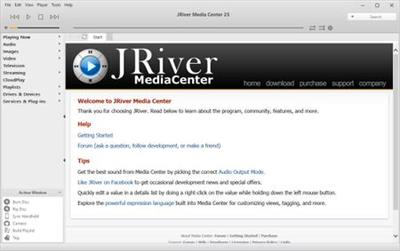
JRiver Media Center 27.0.26 (x64) Multilingual

f99a8e235e39c991533f5480bb724cb2.jpg


JRiver Media Center 27.0.26 (x64) Multilingual | 38.9 Mb​
JRiver Media Center - all-in-one media management app turns any Windows PC into an entertainment hub for complete control of your digital media: Audio, Video, Images, and Television. It connects PC to stereo, TV, remote control devices, digital cameras, scanners, and portable MP3 players. It plays all media, rips, burns, and organizes all your music, images, and video. MC encodes and plays all popular media formats.

Powerful utilities include Media Server for streaming music and images to remote PCs. Media Center is more than a world class player. It's also a Media Network, a whole house music, movie, TV, and photo solution. The leader in audiophile quality sound. The most powerful media database available; an essential tool for large collections.

Features:
- Native support of DirectShow DSP filters
- Audiophile - WASAPI exclusive output using high-end USB DACs
- Audiophile - Added ability to play files from memory instead of disk
- Audiophile - Support for high end USB DAC's with WASAPI
- Headphone DSP makes listening more natural and comfortable.
- SoundcardSwitch command for the launcher, allows soundcard selection
- 3D album view adjusts text size to display more tracks when necessary
- 3D album view allows playing, adding, shuffling, and adding as next to play

Operating System: Windows 10, Windows 8, Windows 7 and Vista

Home Page -
У Вас недостаточно прав для просмотра ссылок. Войдите или зарегистрируйтесь.


Download link:​
Код:
[center][b]rapidgator_net[/b]:
https://rapidgator.net/file/d2efedf00d5a89216b54a1e3e5967a0a/hdkhv.JRiver.Media.Center.27.0.26.x64.Multilingual.rar.html

[b]nitroflare_com[/b]:
https://nitroflare.com/view/616EA4AE128FB23/hdkhv.JRiver.Media.Center.27.0.26.x64.Multilingual.rar

[b]uploadgig_com[/b]:
https://uploadgig.com/file/download/902083Df23307959/hdkhv.JRiver.Media.Center.27.0.26.x64.Multilingual.rar[/center]

Links are Interchangeable - No Password - Single Extraction​
 
Назад
Сверху