 29.01.2026, 18:39
|
#26461
|
|
Местный
Регистрация: 15.09.2019
Сообщений: 28,439
Сказал(а) спасибо: 0
Поблагодарили 0 раз(а) в 0 сообщениях
|
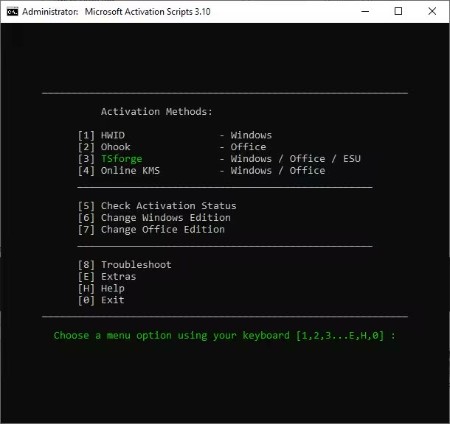
 Microsoft Activation Scripts 3.10
 File size: 0.5 MB
Microsoft Activation Script.cmd Windows and Office Activator, Open Source and clean from Antivirus Detection.
Features
HWID Activation
KMS38 Activation
Online KMS Activation
$OEM$ Folders For Preactivation
Activation Troubleshoot
Insert Windows 10-11 HWID Key
Change Windows 10-11-Server Edition
Check Windows-Office Activation Status
Available in All In One & Separate Files Version
Fully Open Source
Less antivirus detection's
Files are either transparent batch script or Official Microsoft file
Whats New
Код:
https://github.com/massgravel/Microsoft-Activation-Scripts/releases/
HomePage:
Код:
https://github.com/massgravel/Microsoft-Activation-Scripts
-:DOWNLOAD FROM LINKS:- Download From RapidGator
[Ссылки доступны только зарегистрированным пользователям
. Регистрируйся тут...]
Download From NitroFlare
[Ссылки доступны только зарегистрированным пользователям
. Регистрируйся тут...]
|

|

|
|
29.01.2026, 18:45
|
#26462
|
|
Местный
Регистрация: 15.09.2019
Сообщений: 28,439
Сказал(а) спасибо: 0
Поблагодарили 0 раз(а) в 0 сообщениях
|
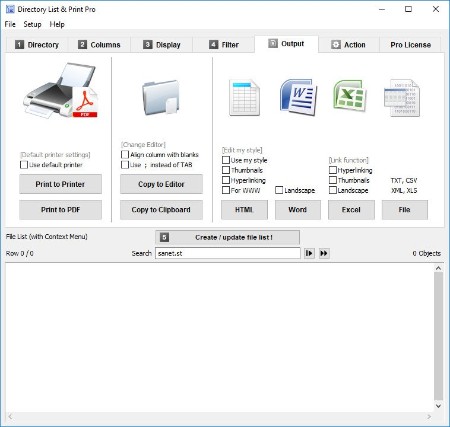
Directory List and Print Pro 4.40
 File Size: 17 MB
Directory List & Print is a software tool for Windows and enables listing and printing the content of any directory in a simplest way. In addition, the file lists can be formatted, filtered, saved to several file formats and also be further processed (delete/copy/move files). By copying to the clipboard the lists can be exported into other programs or opened directly in Word and Excel. The Free Version (Freeware) has all the basic features included, the Pro Version (Shareware) provides interesting additional features
Features
Pro Version (Shareware) and Free Version (Freeware)
- Selection of directories to be listed by a tree structure.
- Selection of directories by entering the path as a text string.
- Drag & Drop of directories (or a file) from Windows Explorer.
- Integration of "Open in Directory List & Print" in the directory context menu of Windows Explorer.
- Direct selection of important system directories as "My Documents" etc.
- Listing of sub-directories and/or files and looping through sub-directories (recursion).
- Update file list automatically or manually.
- Display of last modification date.
- Display of last modificatione time.
- Display of file size.
- Display of file name with or without directory path.
- Display of file names with or without file extensions.
- Indication of number of entries of files and directories in the list.
- Print directory listing, direct printing of corresponding list.
- Export list into other programs by copying to the clipboard. The corresponding data will be organized in columns and separated by tabs so that the list can be pasted directly into Excel Ö as a table.
- Open the list directly in Microsoft WordÖ and ExcelÖ.
- Support for connecting and disconnecting network drives.
- Automatic saving of display options when exiting the program.
- Start program with a directory path as a parameter.
- Portable Application, no installation necessary.
Pro Version only (Shareware)
- Save own directory favorites.
- Set directory recursion depth for subdirectories.
- Display of file attributes such as Read Only, Hidden, System, etc.
- Calculate CRC32 checksums for files.
- Display format of audio/video and image files.
- Display of dimensions like width, height, bit depth or frames/s.
- Display duration and title of audio and video files.
- Display of sampling and bit rates for audio files.
- Display of a continuous numbering of the objects.
- Display of column titles in the first row.
- Show number and sum of size and length of the displayed objects.
- Display of the date in many different international formats.
- Set filter to include or exclude certain file types.
- Set filter to include or exclude files and directories by certain terms.
- Output the list directly to the default printer.
- Output the list in comma- or tab-delimited file or CSV file.
- Linking of files and directories in ExcelÖ for direct open by mouse click.
Whats New
Код:
https://www.infonautics-software.ch/directorylistprint/changelog
HomePage:
Код:
https://www.infonautics-software.ch
-:DOWNLOAD FROM LINKS:- Download From RapidGator
[Ссылки доступны только зарегистрированным пользователям
. Регистрируйся тут...]
Download From NitroFlare
[Ссылки доступны только зарегистрированным пользователям
. Регистрируйся тут...]
|
|
|
|
|
29.01.2026, 18:53
|
#26463
|
|
Местный
Регистрация: 15.09.2019
Сообщений: 28,439
Сказал(а) спасибо: 0
Поблагодарили 0 раз(а) в 0 сообщениях
|
WinArchiver Pro 6.1
 File size: 6.9 MB
WinArchiver is a powerful archive utility, which can open, create, and manage archive files. It supports almost all archive formats, including zip, rar, 7z, iso, and other popular formats. WinArchiver can also mount the archive to a virtual drive without extraction.
WinArchiver supports the following file types: .zip (WinZip Files), .rar (WinRAR Files), .7z (7z Files), .mzp (Mountable Archive), .iso (CD/DVD Image File), .xdi(Extended Disc Image File), .001 (7z Sub Volume), .arj, .bz2, .bzip2, .gz, .gzip, .tar, .taz, .tbz, .tbz2, .tgz, .tpz, .cab, .cpio, .deb, .lha, .lzh, .rpm, .split, .swm, .wim (Windows Imaging File), .z, .daa (PowerISO File), .bin, .cue, .mdf, .mds, .ashdisc, .bwi, .b5i, .lcd, .img, .cdi, .cif, .p01, .pdi, .nrg (Nero Disc Image), .ncd, .pxi, .gi, .fcd, .vcd, .c2d, .dmg (Apple Disc Image), .bif, .ima, .flp, .uif (MagicISO File)
WinArchiver Virtual Drive is a free Virtual CD/DVD ROM utility. It can mount not only all popular CD/DVD image files, but also all popular archives. You can run programs or access the files from a virtual drive without original cd/dvd discs. The virtual drive works 200x faster than traditional cd/dvd rom drive.
WinArchiver Virtual Drive can mount ZIP, RAR, 7Z, and other archives as virtual drive instantly. It provides a more convenient and faster way to access files in archives. You can mount an archive as a virtual drive, then access files in the archive through the virtual drive. With this feature, you don't need unpack archives before open files in archive, which can help you save lots of time.
Main Features
Open and extract zip, rar, 7z, and other archive files. WinArchiver can unzip all popular archives.
Create zip, 7z, iso, and mzp files from hard disk files.
Edit existing archive files.
Mount zip, rar, and other files to virtual drives without extraction. You can use WinArchiver as a professional virtual drive software.
Burn image files to CD, DVD, and Blu-ray discs.
Make disc image files from CD, DVD, and Blu-ray discs.
Support unicode file names.
Support multivolume, encryption, and archive comments.
Support Windows Explorer shell integration.
Whats New
Код:
https://www.winarchiver.com/history.htm
HomePage:
Код:
https://www.winarchiver.com/
-:DOWNLOAD FROM LINKS:- Download From RapidGator
[Ссылки доступны только зарегистрированным пользователям
. Регистрируйся тут...]
Download From NitroFlare
[Ссылки доступны только зарегистрированным пользователям
. Регистрируйся тут...]
|
|
|
|
|
29.01.2026, 18:58
|
#26464
|
|
Местный
Регистрация: 15.09.2019
Сообщений: 28,439
Сказал(а) спасибо: 0
Поблагодарили 0 раз(а) в 0 сообщениях
|
R-Studio v9.5 Build 191686 Technician Multilingual WinPE
 File size: 575 MB
R-Studio is a family of powerful and cost-effective undelete and data recovery software for experienced data recovery professionals. Empowered by the new unique data recovery technologies, R-STUDIO is the most comprehensive data recovery solution for recovery files from NTFS, NTFS5, ReFS, FAT12/16/32, exFAT, HFS/HFS+ (Macintosh), Little and Big Endian variants of UFS1/UFS2 (FreeBSD/OpenBSD/NetBSD/Solaris) and Ext2/Ext3/Ext4 FS (Linux) partitions.
R-Studio also uses raw file recovery (scan for known file types) for heavily damaged or unknown file systems. It functions on local and network disks, even if such partitions are formatted, damaged or deleted. Flexible parameter settings give you absolute control over data recovery.
R-Studio functions on local and network disks, even if such partitions are formatted, damaged or deleted. Flexible parameter settings give you absolute control over data recovery.
The R-Studio data recovery software was originally developed for use by data recovery experts, system administrators, IT professionals, and advanced and experienced computer users. Some of R-Studio's features were even designed exclusively for computer forensic experts, and most R-Studio users don't need every single feature of the software.
In addition to being a full-featured data recovery utility, R-Studio also includes
An advanced RAID reconstruction module
A feature-rich text/hexadecimal editor
An entire advanced disk copying/imaging module in one single piece of software, which makes R-Studio your ideal complete solution for creating a data recovery workstation.
R-Studio utilities recover files
Deleted without Recycle Bin, or when Recycle Bin has been emptied;
Removed by virus attack or power failure;
After the partition with the files was reformatted, even for different file system;
When the partition structure on a hard disk was changed or damaged. In this case, R-Studio utilities can scan the hard disk trying to find previously existed partitions and recover files from found partitions.
From hard disk with bad sectors. R-Studio Data Recovery Software can first copy the entire disk or its part into an image file and then process such image file. This is especially useful when new bad sectors are constantly appearing on the hard disk, and remaining information must be immediately saved.
R-Studio Data Recovery Features
Standard Windows Explorer - style interface.
Host OS: Windows 2000, XP, 2003 Server, Vista, 2008 Server, Windows 7, Windows 8, Windows 10, Windows Server 2012.
Data recovery over the Network. Files can be recovered on network computers running Win2000/XP/2003/Vista/2008/Windows 7/Windows 8/Windows Server 2012, Macintosh, Linux, and UNIX.
Supported file systems: FAT12, FAT16, FAT32, exFAT, NTFS, NTFS5, ReFS (a new file system introduced in Windows 2012 Server), HFS/HFS+ (Macintosh), Little and Big Endian variants of UFS1/UFS2 (FreeBSD/OpenBSD/NetBSD/Solaris) and Ext2/Ext3/Ext4 FS (Linux).
Scan for Known File Types (raw file recovery): if the disk file system is heavily damaged or unsupported, R-Studio searches for specific data patterns ("file signatures") typical for certain file types (Microsoft Office documents, jpgs, etc.). Such known file types can be custom-defined.
Recognition and parsing Dynamic (Windows), Basic(MBR) and BSD (UNIX) partitions layout schema and Apple partition map. Dynamic partitions over GPT are supported as well as dynamic partitions over MBR.
Damaged RAID recovery. If the OS cannot recognize your RAID, you can create a virtual RAID from its components. Such virtual RAID can be processed like a real one.
Creates IMAGE FILES for an entire Hard Disk, Partition or its part. Such image files can be compressed and split into several files to put it on CD/DVD/flash or FAT16/FAT32/exFAT. Then the image files can be processed like regular disks.
Data recovery on damaged or deleted partitions, encrypted files (NTFS 5), alternative data streams (NTFS, NTFS 5).
Recovering data if
FDISK or other disk utilities have been run;
VIRUS has invaded; FAT is damaged; MBR is destroyed.
Recognizes localized names.
Recovered files can be saved on any (including network) disks accessible by the host operating system.
File or disk content can be viewed and edited with the advanced hexadecimal editor. The editor supports NTFS file attribute editing.
Integration with DeepSpar Disk Imager, a professional HDD imaging device specifically built for data recovery from hard drives with hardware issues. Such integration provides R-Studio with a low-level fine-tuned access to drives with a certain level of hardware malfunction. Moreover, it allows disk imaging and analyzing be performed simultaneously. That is, any sector R-Studio accesses on the source disk will be immediately cloned to a clone disk and any other data recovery operation will be made from that clone disk avoiding further deterioration of the source disk and great reduction in processing time.
HomePage:
Код:
https://www.r-studio.com/
-:DOWNLOAD FROM LINKS:- Download From RapidGator
[Ссылки доступны только зарегистрированным пользователям
. Регистрируйся тут...]
Download From NitroFlare
[Ссылки доступны только зарегистрированным пользователям
. Регистрируйся тут...]
|
|
|
|
|
30.01.2026, 04:52
|
#26465
|
|
Местный
Регистрация: 15.09.2019
Сообщений: 28,439
Сказал(а) спасибо: 0
Поблагодарили 0 раз(а) в 0 сообщениях
|
ASCOMP Easy Slideshow Professional 2.100
 Windows x64 | File size: 80.03 MB | Multilingual
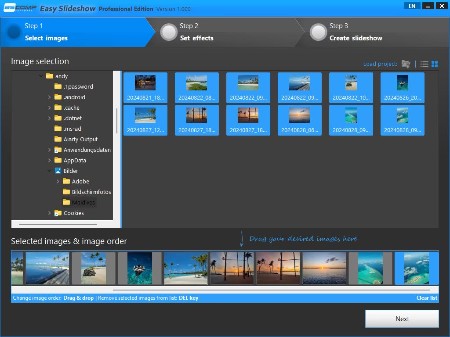
Create Stunning Slideshows with Ease! Easy Slideshow turns your photos into impressive slideshows - with music, effects, and 4K video export.
- Create slideshows with music and transitions
- Over 200 effects for creative transitions
- Export as MPEG in Full HD, 4K, or custom resolution
Select Photos. Create Slideshows. Make an Impression.
Easy Slideshow makes slideshow creation easier than ever.
More than 200 effects and MP3 support
Perfect slideshow with music and transitions
- Select photos via drag and drop
- Set display duration and order
- Add subtitles and captions
Export in Full HD, 4K, or custom resolution
Maximum image quality in compact MPEG format
- Export as MPEG/MP4
- Full HD, 4K, and custom resolutions
- No watermark in the Professional Edition
The Simple Solution for Creative Slideshows
Easy Slideshow - Stunning slideshows with music and transition effects for Windows
Discover Easy Slideshow, the user-friendly Windows software for creating stunning slideshows with music and transition effects. With Easy Slideshow, you can turn your photos into creative slideshows - quickly, intuitively, and without any prior experience. Perfect for memories, presentations, social media, or special occasions.
A special highlight: flexible video export. Create your slideshows with integrated music (MP3) and export them as high-quality videos in MPEG or MP4 format - including 4K and higher. With the Professional Edition, you benefit from ad-free use and can export your slideshows without watermarks.
Create smooth transitions with 200+ effects
A special feature: over 200 built-in effects for impressive transitions between your photos. Whether soft fades, dynamic zooms or creative slide animations - Easy Slideshow offers a wide variety of styles to match any mood or occasion. Designing visually appealing slideshows has never been easier.
Create slideshows quickly and intuitively - without any prior knowledge
Creating a slideshow has never been easier. With Easy Slideshow, simply drag and drop your photos, set the order and display duration. You can also add individual subtitles or captions to make your slideshow even more personal. Whether for personal memories, professional presentations, or creative projects - in just a few steps, you can create a professional-quality slideshow with transitions, effects, and music. Easy Slideshow is the ideal solution for anyone looking to create impressive slideshows on Windows with minimal effort.
Highest image quality thanks to MPEG export in 4K
Easy Slideshow supports exporting your slideshows in Full HD, 4K, and even custom resolutions - tailored to your needs. The final slideshow is saved in the widely used and efficiently compressed MPEG format, ensuring optimal compatibility with almost all devices. Despite the high compression, image quality remains at the highest level - perfect for razor-sharp presentations on monitors, TVs, or projectors.
Private use free of charge - without function limit, with watermark
Easy Slideshow is completely free for private use and offers full functionality. In the free version, a watermark is displayed in the exported video. This watermark is removed in the Professional Edition - for ad-free slideshows without limitations.
What's new
Код:
https://www.easy-slideshow.com/changelog_en.txt
HomePage:
Код:
https://www.ascompsoftware.com/
-:DOWNLOAD FROM LINKS:- Download From RapidGator
[Ссылки доступны только зарегистрированным пользователям
. Регистрируйся тут...]
Download From NitroFlare
[Ссылки доступны только зарегистрированным пользователям
. Регистрируйся тут...]
|
|
|
|
|
30.01.2026, 05:01
|
#26466
|
|
Местный
Регистрация: 15.09.2019
Сообщений: 28,439
Сказал(а) спасибо: 0
Поблагодарили 0 раз(а) в 0 сообщениях
|
Cinedeck cineXtools 2.0.25
 File size: 52 MB
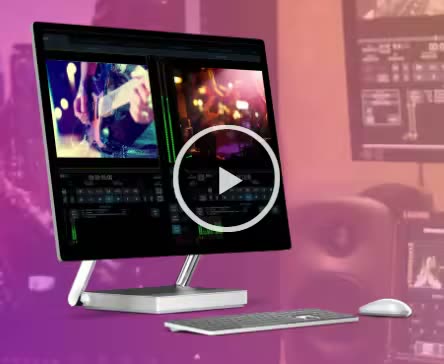
CineX Suite reduces delivery cycles by letting you update just the change without re-export, helping you to streamline your file mastering process. cineX Suite is comprised of three components, cineXtools, cineXplugins and cineXmeta, that all work together to supercharge your file deliveries.
Whats New
Updates: official site does not provide any info about changes in this version
HomePage:
Код:
https://cinextools.com/
-:DOWNLOAD FROM LINKS:- Download From RapidGator
[Ссылки доступны только зарегистрированным пользователям
. Регистрируйся тут...]
Download From NitroFlare
[Ссылки доступны только зарегистрированным пользователям
. Регистрируйся тут...]
|
|
|
|
|
30.01.2026, 05:07
|
#26467
|
|
Местный
Регистрация: 15.09.2019
Сообщений: 28,439
Сказал(а) спасибо: 0
Поблагодарили 0 раз(а) в 0 сообщениях
|
Coolmuster iOS Eraser 3.1.22
 File size: 11.38 MB | Multilingual
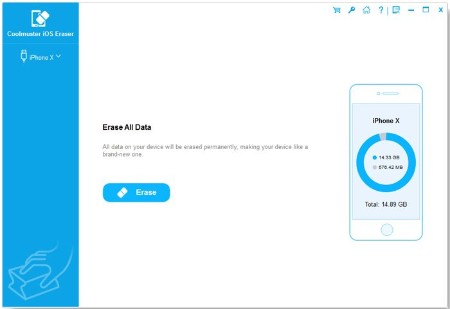
To guard against theft your data on your old iPad, iPhone and iPod when you sell, donate or trade your device, Coolmuster meticulously releases the iOS Eraser that wipes all private information, system settings, deleted files and more from the device with zero possibility of recovery. Fully compatible with iOS 13.
Features
Perfectly Erase Data on Your iDevice without Restoration
To protect your data from leakage, Coolmuster iOS Eraser can meet all of your requirement to completely and permanently delete all data on your iDevice and release more space on your device.
• Erase Private & Existing Data: Private data (e.g. bank records, accounts & passwords, financial data, etc.) and existing data (e.g. photos, videos, text messages, call logs, etc.) can be permanently erased without zero opportunity of recovery.
• Erase Deleted Files: Deleted files can also be erased and overwritten again to ensure the files can not recovered for sure.
• Space Saver: It clears all useless files and speed up your device, such as junk files and more.
Effective & Easy-to-use
iOS Eraser provides the most effective and safest data erasing ability for you to permanently delete all data from your iPad, iPhone and iPod.
• Thanks to its advanced detecting and scanning technology, all data from your iDevice can be easily detected and scanned, including private data, system settings, deleted files and more.
• Only 3 steps are required: connect your device > choose erasing level > start to erase data.
3 Different Data Erasing Levels for Your Choice
Coolmuster iOS Eraser provides three different and progressive modes to permanently erase contents from your iDevice depending on your needs
• The Low level will only erase your iPad/iPhone/iPod data quickly to save your time.
• The Medium level will leave no traceability of data erasure and use junk data to overwrite all existing and deleted data on your iDevice.
• The High level is the safest option for it overwrites all data 2 times, even though it is the most time-consuming option.
Trustworthy with Zero Data Recovery Possibility
The deletion performed by this software is permanent so that no any software can recover them back.
• Since the data erasing process performed by our tool is permanent, we kindly suggest you back up the important data that you don't want to lose beforehand.
• Using the mature over-writing technology, a permanent data erasure can be performed perfectly. No any data recovery tool can recover these deleted data from iDevices.
• iOS Eraser is completely read-only and will not modify, keep or leak any data on your device. We value your information security very much and you are the only one who can access it.
Widely Support Almost All iPhone/iPad/iPod
Coolmuster iOS Eraser works with almost all iOS devices and supports to erase all data on your iDevice.
• Supported Files: It supports text messages, contacts, call logs, videos, photos, music, apps & app data, reminders, calendars, account info (iCloud & iTunes), passwords, voice memos, bookmarks, notes, browsing history and more.
• Supported Devices: Almost all iOS devices are supported by this program, including iPhone, iPad and iPod touch.
Supported OS: Windows 11/10/Windows 8/Windows 7/Vista/Windows XP
HomePage:
Код:
https://www.coolmuster.com/
-:DOWNLOAD FROM LINKS:- Download From RapidGator
[Ссылки доступны только зарегистрированным пользователям
. Регистрируйся тут...]
Download From NitroFlare
[Ссылки доступны только зарегистрированным пользователям
. Регистрируйся тут...]
|
|
|
|
|
30.01.2026, 05:17
|
#26468
|
|
Местный
Регистрация: 15.09.2019
Сообщений: 28,439
Сказал(а) спасибо: 0
Поблагодарили 0 раз(а) в 0 сообщениях
|
TweakNow WinSecret Plus 7.9.1
 File size: 28.6 MB
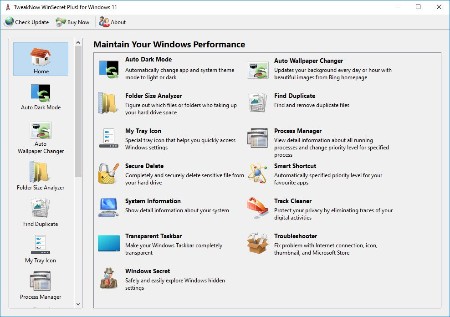
TweakNow WinSecret for Windows 10 and 11 allows users to explore the hidden settings in Windows.
This app is specifically geared for Windows, grouping numerous registry settings and delivering them from an easy and safe user interface.
With TweakNow WinSecret for Windows, you can move the Windows taskbar to the top and change the taskbar size by editing the registry value. With any app modifying the registry, it is strongly advised to have a backup to restore from in the advent of an issue.
TweakNow WinSecret for Windows makes the process easier than directly doing it via Regedit, potentially creating critical problems for a novice user. TweakNow WinSecret for Windows gives you a smooth platform to perform these tweaks in a more controlled environment.
TweakNow WinSecret for Windows is a solid option for those that want to improve their overall experience while on Windows through a simple and easy-to-navigate app.
Plus Features
Auto Dark
Automatically change app and system theme mode to light or dark
Auto Wallpaper Changer
Updates your background every day or hour with beautiful images from Bing homepage
Folder Size Analyzer
Figure out which files or folders who taking up your hard drive space
Find Duplicate
Find and remove duplicate files
Process Manager
View detail information about all running processes and change priority level for specified process
Secure Delete
Completely and securely delete sensitive file from your hard drive
Smart Shortcut
Automatically specified priority level for your favourite apps
System Information
Show detail information about your system
Track Cleaner
Protect your privacy by eliminating traces of your digital activities
Transparent Taskbar
Make your Windows Taskbar completely transparent
Troubleshooter
Fix problem with Internet connection, icon, thumbnail, and Microsoft Store
Windows Secret
Safely and easily explore Windows hidden settings
OS: Windows 10/11
Whats New
Код:
https://www.tweaknow.com/WindowsSecretPlus.php
HomePage:
Код:
https://www.tweaknow.com/
-:DOWNLOAD FROM LINKS:- Download From RapidGator
[Ссылки доступны только зарегистрированным пользователям
. Регистрируйся тут...]
Download From NitroFlare
[Ссылки доступны только зарегистрированным пользователям
. Регистрируйся тут...]
|
|
|
|
|
30.01.2026, 05:21
|
#26469
|
|
Местный
Регистрация: 15.09.2019
Сообщений: 28,439
Сказал(а) спасибо: 0
Поблагодарили 0 раз(а) в 0 сообщениях
|
SmartFTP Enterprise 10.0.3307 (x64)
 File size: 10.7 MB
SmartFTP is an FTP (File Transfer Protocol), FTPS, SFTP, WebDAV, Amazon S3, Backblaze B2, Google Drive, OneDrive, SSH, Terminal client. It allows you to transfer files between your local computer and a server on the Internet. With its many basic and advanced Features SmartFTP also offers secure, reliable and efficient transfers that make it a powerful tool.
The program can also use secure file transfer protocols such as FTPS, SFTP or SSH. Secure connections are more reliable and protect the data from unauthorized access by encrypting the information. The program allows you to quickly choose the connection type, to enter the credentials for the FTP server and to browse its content.
Transfer files with ease
Thumbnail view is available and comes in handy as it allows you to preview the images from a remote folder. The preview feature is also available for other file types such as those that include text or code (HTML or CSS). You can edit the file directly on the server without transferring it to the local folder.
To transfer files to and from the server you can simply drag and drop the files from the desktop into the program's window. The Scheduler enables you to create one-time or repeated actions that will transfer files between the computer and the FTP server. It is a good option to automatically update the content of the server with the files that are created locally.
Powerful and straightforward FTP client
You can use the program to compare two folders side by side and quickly synchronize their content by transferring files between them. The folders can be from the same connection, the local hard drive or from different FTP servers as the program allows you to open multiple FTP connections simultaneously. If there are problems with your Internet connection, the application can automatically reconnect and resume the broken transfers so you can rest assured that your files reached their destination. To check the integrity of the transfer the program uses a CRC algorithm to calculate the hash value of the file and compare it with the original.
The interface of the program is easy to use and displays the connections in separate tabs so you can use your desktop space efficiently. You can work on multiple projects at the same time as the tabbed interface can be used for both remote and local folders. Whether you need to transfer some files from a FTP server or publish a website SmartFTP is a reliable, feature-packed program that you should try.
Whats New
Код:
https://www.smartftp.com/en-us/changelog/1
HomePage:
Код:
https://www.smartftp.com/
-:DOWNLOAD FROM LINKS:- Download From RapidGator
[Ссылки доступны только зарегистрированным пользователям
. Регистрируйся тут...]
Download From NitroFlare
[Ссылки доступны только зарегистрированным пользователям
. Регистрируйся тут...]
|
|
|
|
|
30.01.2026, 05:36
|
#26470
|
|
Местный
Регистрация: 15.09.2019
Сообщений: 28,439
Сказал(а) спасибо: 0
Поблагодарили 0 раз(а) в 0 сообщениях
|
Net Monitor For Employees Pro 6.5.2
 Windows x86/x64 | File size: 100.46 MB
Powerful Employee Monitoring Software. Increasing productivity in offices is not as much a task you may think. If you are a business leader, a teacher, a chairman of a company or project supervisor, you need strong employee monitoring software to keep an eye over the screen of your students, employees and team members.
Employee Monitoring and Why It is Essential for Your Business
Businesses worldwide suffer from employees not doing what they are paid to do. With that costing business a lot of money and time, especially small businesses or those who are struggling to get on top of their competition.
Why is employee monitoring software essential for your business?
Employee monitoring software has become an essential part of any business because it helps businesses track employee activity and prevent employees from sharing confidential company data by uploading it to their personal cloud or downloading it to their USB drives.
The web opens prime avenues for employees to expose sensitive or regulated data. This makes for a major blind spot where companies can be at risk
- Of employees running application reports to collect sensitive data.
- Of employees installing remote control applications to work from home.
- Of employees uploading sensitive data to their personal cloud or downloading it to their USB drive.
What can employers track?
Employers can record and track any screen activity with Desktop Recorder and then export it as MPEG4 (video) or JPEG (pictures). This comes in very useful when employers are not on their computers or phones/tablets. They can also log and export any Internet Usage and Application Usage data using Reporting. Keystroke Logging and exporting of all presses keys in a specific time frame is also available.
Biggest benefits of employee monitoring
- Businesses can save large sums of money that they are spending on employee wages and development. It can particularly help small and struggling businesses.
- It increases productivity and lessens the time wasted of employees slacking off.
- It offers security measures to protect confidential data and the integrity of a company.
The most important features for employee monitoring
- Desktop Recorder is a great feature that runs in the background and records all desktop activity.
- Internet control is a crucial tool to block all unwanted pages like Facebook, Twitter, etc...
- Reporting lets you log web and application usage and log keystrokes.
- Remote control even allows you to control computers from a mobile/tablet.
- View and block any unwanted applications or processes.
- Restrictions allow you to restrict the use of certain devices and functions. By locking USB drives you can prevent employees from downloading or uploading any files to the PC
- Several tools allow you to turn the computer on or of, lets you run shell commands, open webpages, etc.
- Increase productivity with our integrated messaging, desktop sharing and file sharing features.
New in Version
Major new features
- Application Blocking
Additional tools like
- Disable Printing
- Disable CTRL+ALT+DEL
- Mute computers
- Limit remote computer audio volume
- Clear Desktop
What's new
• official site does not provide any info about changes in this
HomePage:
Код:
https://networklookout.com/
-:DOWNLOAD FROM LINKS:- Download From RapidGator
[Ссылки доступны только зарегистрированным пользователям
. Регистрируйся тут...]
Download From NitroFlare
[Ссылки доступны только зарегистрированным пользователям
. Регистрируйся тут...]
|
|
|
|
|
30.01.2026, 05:48
|
#26471
|
|
Местный
Регистрация: 15.09.2019
Сообщений: 28,439
Сказал(а) спасибо: 0
Поблагодарили 0 раз(а) в 0 сообщениях
|
Microsoft PowerToys for Windows 10 v0.97.1
 File Size : 381 Mb
Microsoft PowerToys is a set of utilities for power users to tune and streamline their Windows experience for greater productivity. Inspired by the Windows 95 era PowerToys project, this reboot provides power users with ways to squeeze more efficiency out of the Windows 10 shell and customize it for individual workflows.
Microsoft revealed earlier this year that PowerToys were coming back to Windows 10. PowerToys used to be useful little utilities that would let you further customize Windows. Microsoft's first PowerToys for Windows 10 are now available.
Current PowerToy Utilities
• FancyZones
FancyZones is a window manager that makes it easy to create complex window layouts and quickly position windows into those layouts.
• File Explorer Add-ons (Preview Panes)
File Explorer add-ons right now are just limited to Preview Pane additions for File Explorer. Preview Pane is an existing feature in the File Explorer. To enable it, you just click the View tab in the ribbon and then click "Preview Pane".
PowerToys will now enable two types of files to be previewed: Markdown (.md) & SVG (.svg).
• Image Resizer
Image Resizer is a Windows Shell Extension for quickly resizing images. With a simple right click from File Explorer, resize one or many images instantly.
• Keyboard Manager
Keyboard Manager allows you to customize the keyboard to be more productive by remapping keys and creating your own keyboard shortcuts. This PowerToy requires Windows 10 Version 1903 (Build 18362) or newer.
• PowerRename
PowerRename is a Windows Shell Extension for advanced bulk renaming using search and replace or regular expressions. PowerRename allows simple search and replace or more advanced regular expression matching. While you type in the search and replace input fields, the preview area will show what the items will be renamed to. PowerRename then calls into the Windows Explorer file operations engine to perform the rename. This has the benefit of allowing the rename operation to be undone after PowerRename exits.
• PowerToys Run
PowerToys Run is a new toy in PowerToys that can help you search and launch your app instantly with a simple alt-space and start typing! It is open source and modular for additional plugins. Window Walker is now inside too! This PowerToy requires Windows 10 Version 1903 (Build 18362) or newer.
• Shortcut Guide
Windows key shortcut guide appears when a user holds the Windows key down for more than one second and shows the available shortcuts for the current state of the desktop.
HomePage:
Код:
https://github.com/microsoft/PowerToys
-:DOWNLOAD FROM LINKS:- Download From RapidGator
[Ссылки доступны только зарегистрированным пользователям
. Регистрируйся тут...]
Download From NitroFlare
[Ссылки доступны только зарегистрированным пользователям
. Регистрируйся тут...]
|
|
|
|
|
30.01.2026, 06:10
|
#26472
|
|
Местный
Регистрация: 15.09.2019
Сообщений: 28,439
Сказал(а) спасибо: 0
Поблагодарили 0 раз(а) в 0 сообщениях
|
Coolmuster iOS Eraser 3.1.22
File size: 11.38 MB | Multilingual
To guard against theft your data on your old iPad, iPhone and iPod when you sell, donate or trade your device, Coolmuster meticulously releases the iOS Eraser that wipes all private information, system settings, deleted files and more from the device with zero possibility of recovery. Fully compatible with iOS 13.
Features
Perfectly Erase Data on Your iDevice without Restoration
To protect your data from leakage, Coolmuster iOS Eraser can meet all of your requirement to completely and permanently delete all data on your iDevice and release more space on your device.
• Erase Private & Existing Data: Private data (e.g. bank records, accounts & passwords, financial data, etc.) and existing data (e.g. photos, videos, text messages, call logs, etc.) can be permanently erased without zero opportunity of recovery.
• Erase Deleted Files: Deleted files can also be erased and overwritten again to ensure the files can not recovered for sure.
• Space Saver: It clears all useless files and speed up your device, such as junk files and more.
Effective & Easy-to-use
iOS Eraser provides the most effective and safest data erasing ability for you to permanently delete all data from your iPad, iPhone and iPod.
• Thanks to its advanced detecting and scanning technology, all data from your iDevice can be easily detected and scanned, including private data, system settings, deleted files and more.
• Only 3 steps are required: connect your device > choose erasing level > start to erase data.
3 Different Data Erasing Levels for Your Choice
Coolmuster iOS Eraser provides three different and progressive modes to permanently erase contents from your iDevice depending on your needs
• The Low level will only erase your iPad/iPhone/iPod data quickly to save your time.
• The Medium level will leave no traceability of data erasure and use junk data to overwrite all existing and deleted data on your iDevice.
• The High level is the safest option for it overwrites all data 2 times, even though it is the most time-consuming option.
Trustworthy with Zero Data Recovery Possibility
The deletion performed by this software is permanent so that no any software can recover them back.
• Since the data erasing process performed by our tool is permanent, we kindly suggest you back up the important data that you don't want to lose beforehand.
• Using the mature over-writing technology, a permanent data erasure can be performed perfectly. No any data recovery tool can recover these deleted data from iDevices.
• iOS Eraser is completely read-only and will not modify, keep or leak any data on your device. We value your information security very much and you are the only one who can access it.
Widely Support Almost All iPhone/iPad/iPod
Coolmuster iOS Eraser works with almost all iOS devices and supports to erase all data on your iDevice.
• Supported Files: It supports text messages, contacts, call logs, videos, photos, music, apps & app data, reminders, calendars, account info (iCloud & iTunes), passwords, voice memos, bookmarks, notes, browsing history and more.
• Supported Devices: Almost all iOS devices are supported by this program, including iPhone, iPad and iPod touch.
Supported OS: Windows 11/10/Windows 8/Windows 7/Vista/Windows XP
HomePage:
Код:
https://www.coolmuster.com/
-:DOWNLOAD FROM LINKS:- Download From RapidGator
[Ссылки доступны только зарегистрированным пользователям
. Регистрируйся тут...]
Download From NitroFlare
[Ссылки доступны только зарегистрированным пользователям
. Регистрируйся тут...]
|
|
|
|
|
30.01.2026, 06:14
|
#26473
|
|
Местный
Регистрация: 15.09.2019
Сообщений: 28,439
Сказал(а) спасибо: 0
Поблагодарили 0 раз(а) в 0 сообщениях
|
R-Studio 9.5 Build 191686 Network / Technician
 File size: 140.4 MB
R-Studio is a family of powerful and cost-effective undelete and data recovery software for experienced data recovery professionals. Empowered by the new unique data recovery technologies, R-STUDIO is the most comprehensive data recovery solution for recovery files from NTFS, NTFS5, ReFS, FAT12/16/32, exFAT, HFS/HFS+ (Macintosh), Little and Big Endian variants of UFS1/UFS2 (FreeBSD/OpenBSD/NetBSD/Solaris) and Ext2/Ext3/Ext4 FS (Linux) partitions.
R-Studio also uses raw file recovery (scan for known file types) for heavily damaged or unknown file systems. It functions on local and network disks, even if such partitions are formatted, damaged or deleted. Flexible parameter settings give you absolute control over data recovery.
R-Studio functions on local and network disks, even if such partitions are formatted, damaged or deleted. Flexible parameter settings give you absolute control over data recovery.
The R-Studio data recovery software was originally developed for use by data recovery experts, system administrators, IT professionals, and advanced and experienced computer users. Some of R-Studio's features were even designed exclusively for computer forensic experts, and most R-Studio users don't need every single feature of the software.
In addition to being a full-featured data recovery utility, R-Studio also includes
An advanced RAID reconstruction module
A feature-rich text/hexadecimal editor
An entire advanced disk copying/imaging module in one single piece of software, which makes R-Studio your ideal complete solution for creating a data recovery workstation.
R-Studio utilities recover files
Deleted without Recycle Bin, or when Recycle Bin has been emptied;
Removed by virus attack or power failure;
After the partition with the files was reformatted, even for different file system;
When the partition structure on a hard disk was changed or damaged. In this case, R-Studio utilities can scan the hard disk trying to find previously existed partitions and recover files from found partitions.
From hard disk with bad sectors. R-Studio Data Recovery Software can first copy the entire disk or its part into an image file and then process such image file. This is especially useful when new bad sectors are constantly appearing on the hard disk, and remaining information must be immediately saved.
R-Studio Data Recovery Features
Standard Windows Explorer - style interface.
Host OS: Windows 2000, XP, 2003 Server, Vista, 2008 Server, Windows 7, Windows 8, Windows 10, Windows Server 2012.
Data recovery over the Network. Files can be recovered on network computers running Win2000/XP/2003/Vista/2008/Windows 7/Windows 8/Windows Server 2012, Macintosh, Linux, and UNIX.
Supported file systems: FAT12, FAT16, FAT32, exFAT, NTFS, NTFS5, ReFS (a new file system introduced in Windows 2012 Server), HFS/HFS+ (Macintosh), Little and Big Endian variants of UFS1/UFS2 (FreeBSD/OpenBSD/NetBSD/Solaris) and Ext2/Ext3/Ext4 FS (Linux).
Scan for Known File Types (raw file recovery): if the disk file system is heavily damaged or unsupported, R-Studio searches for specific data patterns ("file signatures") typical for certain file types (Microsoft Office documents, jpgs, etc.). Such known file types can be custom-defined.
Recognition and parsing Dynamic (Windows), Basic(MBR) and BSD (UNIX) partitions layout schema and Apple partition map. Dynamic partitions over GPT are supported as well as dynamic partitions over MBR.
Damaged RAID recovery. If the OS cannot recognize your RAID, you can create a virtual RAID from its components. Such virtual RAID can be processed like a real one.
Creates IMAGE FILES for an entire Hard Disk, Partition or its part. Such image files can be compressed and split into several files to put it on CD/DVD/flash or FAT16/FAT32/exFAT. Then the image files can be processed like regular disks.
Data recovery on damaged or deleted partitions, encrypted files (NTFS 5), alternative data streams (NTFS, NTFS 5).
Recovering data if
FDISK or other disk utilities have been run;
VIRUS has invaded; FAT is damaged; MBR is destroyed.
Recognizes localized names.
Recovered files can be saved on any (including network) disks accessible by the host operating system.
File or disk content can be viewed and edited with the advanced hexadecimal editor. The editor supports NTFS file attribute editing.
Integration with DeepSpar Disk Imager, a professional HDD imaging device specifically built for data recovery from hard drives with hardware issues. Such integration provides R-Studio with a low-level fine-tuned access to drives with a certain level of hardware malfunction. Moreover, it allows disk imaging and analyzing be performed simultaneously. That is, any sector R-Studio accesses on the source disk will be immediately cloned to a clone disk and any other data recovery operation will be made from that clone disk avoiding further deterioration of the source disk and great reduction in processing time.
HomePage:
Код:
https://www.r-studio.com/
-:DOWNLOAD FROM LINKS:- Download From RapidGator
[Ссылки доступны только зарегистрированным пользователям
. Регистрируйся тут...]
Download From NitroFlare
[Ссылки доступны только зарегистрированным пользователям
. Регистрируйся тут...]
|
|
|
|
|
30.01.2026, 07:18
|
#26474
|
|
Местный
Регистрация: 15.09.2019
Сообщений: 28,439
Сказал(а) спасибо: 0
Поблагодарили 0 раз(а) в 0 сообщениях
|
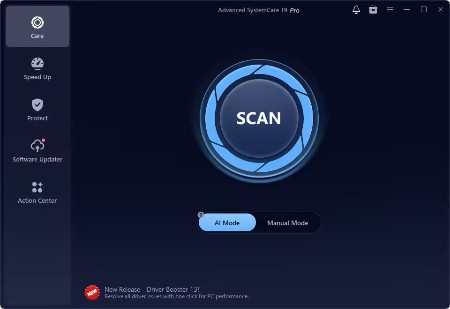
Advanced SystemCare Pro 19.2.0.188
 File size: 71.42 MB | Multilingual
Advanced SystemCare 18 provides an always-on, automated, the all-in-one PC optimization utility. It specializes in ONE-Click solutions to detect, clean, repair, speed up and eventually protect PC. With the novel system technology, Advanced SystemCare empowers you to run your computer faster. Ensures more stably and more efficiently than with any other system utilities.
Advanced SystemCare 18 Key Benefits
• Keeps your PC running at peak performance. Fully optimizes Windows for ultimate system performance and top Internet speed. It turns your PC into a business PC, a productive workstation, an entertainment center, a game machine, or a scientific computing PC.
• Defends PC security with extra protection. Detects and analyzes Windows security environment. Scans and removes spyware and adware using up-to-date definition files.
• One click to solve as many as 10 common PC problems. With one click, it scans and repairs ten PC problems and protects your PC from hidden security threats.
• Real-time optimization with ActiveBoost function. This technology actively runs in the background intelligently managing system resources in real-time. And constantly detects inactive resources and optimizes CPU and RAM usage.
• Cloud technology to keep database up-to-date. The new "Cloud" technology ensures the database is kept updated at all times. So that you can benefit from the latest definitions and configurations.
• More than 20 dedicated smart tools. The Toolbox feature has tools for system cleaning, optimizing and repairing, tools for security enhancement. Also the tools for full control over the PC system.
Other Features
• Boost your PC for working and gaming. You now have two Turbo Boost options, Work Mode and Game Mode. In addition, you can now adjust the configuration of each mode from the main screen.
• Next-generation registry deep clean and optimizer. Safely cleans registry junk, compacts registry bloats. Also defragments the whole registry for maximum performance. Finds and fixes the registry errors that other utilities miss with "Deep Scan" technology.
• Automatically works in the background. This powerful utility works continuously, automatically and quietly in the background on your PC. You can set the program on a regular schedule or just let it work automatically when your PC is idle.
• Improved Care module. The new developments in the "Care" module include features such as "Start-up Optimization", which will scan and clean your PC much more effectively.
• Powerful hard drive defragmentation. Fast, powerfully and incredibly effective Disk Defrag function to defragment hard drives. Up to 10 times faster than other defragmentation tools.
What's new
+ Expanded Anti-Spyware database to remove more threats and protect your PC in real time
+ Software Updater supports updating the latest Chrome 144, Edge 144, Firefox 147, etc.
+ Expanded Surfing Protection database for a safer and smoother browsing experience
+ Enhanced privacy cleaning to remove more privacy traces to better protect your privacy
+ Optimized multiple languages
+ Fixed all known bugs
Supported Operating Systems: Windows 7, 8, 8.1, 10, 11
HomePage:
Код:
https://www.iobit.com/
-:DOWNLOAD FROM LINKS:- Download From RapidGator
[Ссылки доступны только зарегистрированным пользователям
. Регистрируйся тут...]
Download From NitroFlare
[Ссылки доступны только зарегистрированным пользователям
. Регистрируйся тут...]
|
|
|
|
|
30.01.2026, 07:37
|
#26475
|
|
Местный
Регистрация: 15.09.2019
Сообщений: 28,439
Сказал(а) спасибо: 0
Поблагодарили 0 раз(а) в 0 сообщениях
|
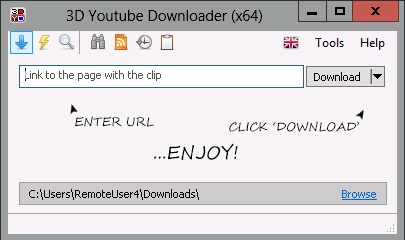
3D Youtube Downloader 1.26
 File Size : 67 Mb | Multilingual
3D Youtube Downloader is a simple yet powerful downloader from Youtube and other popular video sites.All popular video sites provide for each clip several files with different qualities (Youtube is the champion here - up to 40 qualities per clip). 3D Youtube Downloader fetches complete list of available qualities and depending on current work mode automatically selects appropriate file to download or gives you an opportunity to do this by yourself.
Main features
support for a variety of sites including Vimeo, Liveleak, Dailymotion and others
support for Youtube Adaptive Streams
support for Youtube and Dailymotion feeds (playlists, channels etc)
possibility to select quality manually
converting downloaded clips to various video and audio formats
subtitles support for Youtube and Dailymotion
search on Youtube within the program
support for 3D videos on Youtube and Dailymotion
fast processing (using multipart download for files and HTTP compression for pages)
multi language support
Portable version: download and launch any installer above and select Portable Installation.
HomePage:
Код:
https://yd.3dyd.com/home/
-:DOWNLOAD FROM LINKS:- Download From RapidGator
[Ссылки доступны только зарегистрированным пользователям
. Регистрируйся тут...]
Download From NitroFlare
[Ссылки доступны только зарегистрированным пользователям
. Регистрируйся тут...]
|
|
|
|
      
Любые журналы Актион-МЦФЭР регулярно !!! Пишите https://www.nado.in/private.php?do=newpm&u=12191 или на электронный адрес pantera@nado.ws
|
Здесь присутствуют: 1 (пользователей: 0 , гостей: 1)
|
|
|
 Ваши права в разделе
|
Вы не можете создавать новые темы
Вы не можете отвечать в темах
Вы не можете прикреплять вложения
Вы не можете редактировать свои сообщения
HTML код Выкл.
|
|
|
Текущее время: 17:21. Часовой пояс GMT +1.
| |







