 16.12.2022, 19:37
|
#21286
|
|
Местный
Регистрация: 15.09.2019
Сообщений: 28,439
Сказал(а) спасибо: 0
Поблагодарили 0 раз(а) в 0 сообщениях
|
 MediaHuman YouTube To MP3 Converter 3.9.9.77 (1412) Multilingual (x64)
 Windows x64 | File size: 67.77 MB
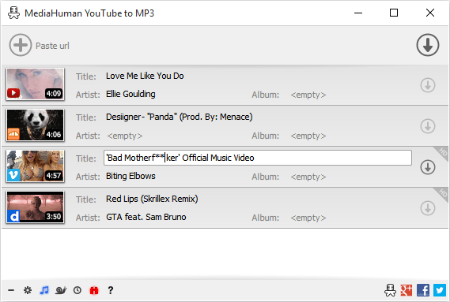
You like to listen to music on YouTube or SoundCloud and want to save it for offline playing. Or you want to download soundtrack of a new movie. Then we recommend you to try out this software developed specifically for this purpose.
• Downloads all music from playlist or channel
• Downloads highest available quality up to 320 kbps
• Supports YouTube, Vimeo, SoundCloud, Dailymotion, VEVO, etc.
• Downloads simultaneously several tracks
• Includes simple tag editor with cover art image support
• Works on all modern platforms (macOS, Windows, Ubuntu)
• Exports to iTunes
Main Features
Playlists and channels
The software supports downloading all videos of a playlist or a channel. And there is also an option for subscribing to and downloading only newly uploaded tracks.
iTunes support
In the preferences of the application you can select an option to add downloaded tracks into iTunes automatically. You can also specify iTunes playlist, where the converted track should be added.
Saves your time & traffic
The app detects audio track in YouTube video clip and downloads it, skipping the video part. As a result download speed increases dramatically, especially on HD-quality content.
Simple tag editor
Application automatically detects artist name and track title of the video and saves it in the downloaded file. But at the same time, you can easily change tags to whatever you want. You can even change a cover art image.
Original format, no conversions
You can save audio tracks in original quality without any conversion. It means that there will be no loss of quality and it greatly reduces the downloading time.
Free music
There is a great amount of music on YouTube. You can always find the one you like there. And YouTube to MP3 Converter allows you to save it on your computer for free. Just find the track you like and download it in the quality you need.
Not only YouTube
Vevo.com, Vimeo, DailyMotion, Soundcloud, Bandcamp, HypeMachine, MixCloud, UOL and many other sites are also supported. So you can download music as easy as from YouTube.
Clipboard tracking
The program tracks the content of the system clipboard. It means that you can easily add a video clip without switching from your favorite browser. Just copy an URL into the clipboard and it will be added to the download queue.
Multilingual interface
Localized to: Arabic, Armenian, Azerbaijani, Bulgarian, Catalan, Chinese (Taiwan), Croatian, Czech, Danish, Dutch, English, Esperanto, French, German, Greek, Hebrew (Israel), Hungarian, Indonesian, Italian, Japanese, Korean, Latvian, Lithuanian, Malay, Norwegian Bokmål, Polish, Portuguese, Portuguese (Brazil), Romanian, Russian, Spanish, Swedish, Turkish, Vietnamese
Version history
Код:
https://www.mediahuman.com/youtube-to-mp3-converter/changelog.html
HomePage:
Код:
https://www.mediahuman.com/
-:DOWNLOAD FROM LINKS:- Download From RapidGator
Код:
https://rapidgator.net/file/87d7e2b3c1485c7b2de28bf70d9a9061/
Download From DropApk
Download From NitroFlare
Код:
https://nitroflare.com/view/F8AEDBC737A8CAC/
|

|

|
|
16.12.2022, 19:41
|
#21287
|
|
Местный
Регистрация: 15.09.2019
Сообщений: 28,439
Сказал(а) спасибо: 0
Поблагодарили 0 раз(а) в 0 сообщениях
|
MyLanViewer 6.0.3 Enterprise
 File size: 11 MB
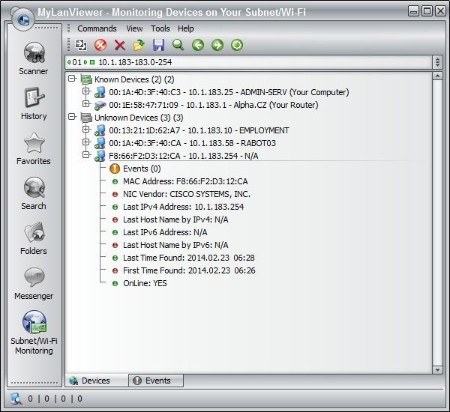
MyLanViewer is a simple LAN scanner for your home network. It displays your network computers an easy to read, buddy-list style window that provides the machine names, IP addresses, MAC addresses, shared resources and other technical details for each computer. You can also view and access shared folders, terminate user sessions and disable shared resources. Easy to install and use, has friendly and beautiful interface.
MyLanViewer Network/IP Scanner is a powerful Netbios and LAN/Network IP address scanner for Windows, whois and traceroute tool, remote shutdown and Wake On LAN (WOL) manager, wireless network scanner and monitor. This application will help you find all IP addresses, MAC addresses and shared folders of computers on your wired or wireless (Wi-Fi) network. The program scans network and displays your network computers in an easy to read, buddy-list style window that provides the computer name, IP address, MAC address, NIC vendor, OS version, logged users, shared folders and other technical details for each computer. MyLanViewer Network/IP Scanner supports remote shutdown, wake-on-lan, lock workstation, log off, sleep, hibernate, reboot and power off. It is able to monitor IP address and show notifications when the states of some computers change. MyLanViewer Network/IP Scanner can also view and access shared folders, terminate user sessions, disable shared folders, show netstat information and detect rogue DHCP servers. The software can monitor all devices (even hidden) on your subnet, and show notifications when the new devices will be found (for example, to know who is connected to your WiFi router or wireless network). The program easy to install and use, and has a user-friendly and beautiful interface.
HomePage:
Код:
http://www.mylanviewer.com
-:DOWNLOAD FROM LINKS:- Download From RapidGator
Код:
https://rapidgator.net/file/933b6835c4bea72f4230cd747bfb9bd4/
Download From DropApk
Download From NitroFlare
Код:
https://nitroflare.com/view/13C880795B743C7/
|
|
|
|
|
16.12.2022, 19:45
|
#21288
|
|
Местный
Регистрация: 15.09.2019
Сообщений: 28,439
Сказал(а) спасибо: 0
Поблагодарили 0 раз(а) в 0 сообщениях
|
MyLanViewer 6.0.3 Enterprise Portable
File size: 11 MB
MyLanViewer is a simple LAN scanner for your home network. It displays your network computers an easy to read, buddy-list style window that provides the machine names, IP addresses, MAC addresses, shared resources and other technical details for each computer. You can also view and access shared folders, terminate user sessions and disable shared resources. Easy to install and use, has friendly and beautiful interface.
MyLanViewer Network/IP Scanner is a powerful Netbios and LAN/Network IP address scanner for Windows, whois and traceroute tool, remote shutdown and Wake On LAN (WOL) manager, wireless network scanner and monitor. This application will help you find all IP addresses, MAC addresses and shared folders of computers on your wired or wireless (Wi-Fi) network. The program scans network and displays your network computers in an easy to read, buddy-list style window that provides the computer name, IP address, MAC address, NIC vendor, OS version, logged users, shared folders and other technical details for each computer. MyLanViewer Network/IP Scanner supports remote shutdown, wake-on-lan, lock workstation, log off, sleep, hibernate, reboot and power off. It is able to monitor IP address and show notifications when the states of some computers change. MyLanViewer Network/IP Scanner can also view and access shared folders, terminate user sessions, disable shared folders, show netstat information and detect rogue DHCP servers. The software can monitor all devices (even hidden) on your subnet, and show notifications when the new devices will be found (for example, to know who is connected to your WiFi router or wireless network). The program easy to install and use, and has a user-friendly and beautiful interface.
HomePage:
Код:
http://www.mylanviewer.com
-:DOWNLOAD FROM LINKS:- Download From RapidGator
Код:
https://rapidgator.net/file/5badefbcc1065a88d7843491087809ec/
Download From DropApk
Download From NitroFlare
Код:
https://nitroflare.com/view/ABA708D332B5928/
|
|
|
|
|
16.12.2022, 19:49
|
#21289
|
|
Местный
Регистрация: 15.09.2019
Сообщений: 28,439
Сказал(а) спасибо: 0
Поблагодарили 0 раз(а) в 0 сообщениях
|
NCH VideoPad Pro 12.33 Beta
 File size: 9.58 MB
Working with video files, especially editing them, is a task that requires a specialized application that can provide all the tools one needs. Among the software applications of this kind you can find VideoPad Video Editor. The interface of this utility is divided into several parts (e.g. Media List, Effects, Transitions, Files, Clips, Video Track, Audio Track, Overlay Track), which may make everything seem a little hard to operate. You can capture video from a camcorder or another device like a webcam or a TV capture card, and once you have added files and sequence clips to the queue, you can start editing them.
So, you can select position for the new clip (at slider's position, to the timeline's start or end point), add blank slides and overlays, modify media in an external editor, change playback speed and stabilize video with the Deshaker filter.
You can also create bookmarks and subtitles, import and export subtitles, select Chrome Key color, save video in the "Stereoscopic 3D" output format, apply audio effects (e.g. amplify, chorus, compressor, distortion, flanger, reverb), as well as record a narration.
Furthermore, you can apply various video effects (e.g. brightness, crop, edge detection, sepia, temperature, posterize, hue) and transitions (e.g. cross fade, reveal, split, fan, circle, diamond).
The program comes with a well-drawn help file and video tutorials while the system resource usage is moderate. It may lag sometimes between commands, but overall, VideoPad Video Editor manages to put up a good performance.
Key Features
Stunning Transition Effects
• Choose from a range of fade transitions to give your movie that professional touch.
• Preview the effects in real time.
• Customize the duration of the effect.
Amazing Audio Tools
• Import and mix music tracks like a pro.
• Make your own custom movie soundtrack.
• Record your own narrations with the click of a button.
• Import pre-recorded narrations, sound effects or music.
Complete Video Optimization
• Fine tune brightness, saturation and color for your video.
• Add photos and digital images with a click of a button.
• Apply effects like black & white, sepia tone and negative.
• Add text captions to your movie.
Share With Your Family and Friends
• Burn to DVD and watch in your living room on your TV.
• Save for Youtube and share online with friends.
• Save to PSP, iPod, iPhone or 3GP mobile phone.
• Save to your PC as a high-quality digital movie.
Input Formats
• Video: avi, mpeg, wmv, divX, Xvid, mpeg1, mpeg2, mpeg4, mp4, mov, asf, vob, ogm, .3gp, H.264, RM and many more.
• Image: bmp, gif, jpg, jif, jiff, jpeg, exif, png, tif
Output Formats
• Disc export: DVD, CD, Blu-ray Discs, HD-DVD
• Video export: avi, wmv, asf, mpg, 3gp, mp4, mov, iPod, iPhone, PSP, Mobile Phone, Pocket PC
What's new
Код:
https://www.nchsoftware.com/videopad/versions.html
System Requirements: Works on Windows 11, 10, XP, Vista, 7, 8 and 8.1
HomePage:
Код:
https://www.nchsoftware.com/
-:DOWNLOAD FROM LINKS:- Download From RapidGator
Код:
https://rapidgator.net/file/7078a6b5d96e91ca7dd69f7c5b855676/
Download From DropApk
Download From NitroFlare
Код:
https://nitroflare.com/view/AA0CC9C42DB53BB/
|
|
|
|
|
16.12.2022, 19:52
|
#21290
|
|
Местный
Регистрация: 15.09.2019
Сообщений: 28,439
Сказал(а) спасибо: 0
Поблагодарили 0 раз(а) в 0 сообщениях
|
OcenAudio 3.11.19 Multilingual
 File Size : 76.8 Mb
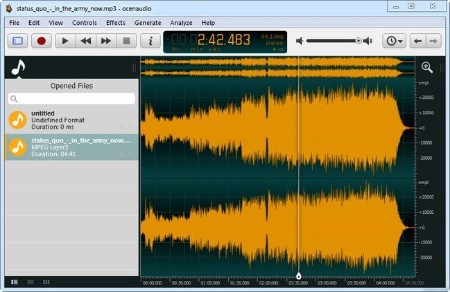
OcenAudio is a cross-platform, easy to use, fast and functional audio editor. It is the ideal software for people who need to edit and analyze audio files without complications. OcenAudio also has powerful features that will please more advanced users. This software is based on Ocen Framework, a powerful library developed to simplify and standardize the development of audio manipulation and analysis applications across multiple platforms.
Why OcenAudio?
It works on your computer!
OcenAudio is available for all major operating systems: Microsoft Windows, Mac OS X and Linux. This means you can always rely on OcenAudio on any computer.
It stays out of your way
No matter how many files are open, OcenAudio always remains responsive. Time-consuming tasks (such as opening and saving audio files, or applying effects) run in background, allowing you to work on other files.
The user comes first
The development of OcenAudio began when a brazilian research group at the Federal University of Santa Catarina (LINSE) needed an easy-to-use audio editor loaded with features such as multiple file formats support, spectral analysis and audio signal generation. OcenAudio development focuses primarily on usability, providing the user with a cohesive and intuitive audio editing and analysis tool.
Features
VST plugins support
• OcenAudio supports VST (Virtual Studio Technology) plugins, giving its users access to numerous effects. Like the native effects, VST effects can use real-time preview to aide configuration.
Real-time preview of effects
• Applying effects such as EQ, gain and filtering is an important part of audio editing. However, it is very tricky to get the desired result by adjusting the controls configuration alone: you must listen the processed audio. To ease the configuration of audio effects, OcenAudio has a real time preview feature: you hear the processed signal while adjusting the controls.
• The effect configuration window also includes a miniature view of the selected audio signal. You can navigate on this miniature view in the same way as you do on the main interface, selecting parts that interest you and listening to the effect result in real time.
Cross-platform support
• OcenAudio is available for all major operating systems: Microsoft Windows, Mac OS X and Linux. Native applications are generated for each platform from a common source, in order to achieve excelent performance and seamless integration with the operating system. All versions of OcenAudio have a uniform set of features and the same graphical interface, so the skills you learn in one platform can be used in the others.
Multi-selection for delicate editions
• To speed up complex audio files editing, OcenAudio includes multi-selection. With this amazing tool, you can simultaneously select different portions of an audio file and listen, edit or even apply an effect to them.
• For example, if you want to normalize only the excerpts of an interview where the interviewee is talking, just select them and apply the effect.
Efficient editing of large files
• With OcenAudio, there is no limit to the length or the quantity of the audio files you can edit. Using an advanced memory management system, the application keeps your files open without wasting any of your computer's memory. Even in files several hours long, common editing operations such as copy, cut or paste happen almost instantly.
Fully featured spectrogram
• Besides offering an incredible waveform view of your audio files, OcenAudio has a powerful and complete spectrogram view. In this view, you can analyze the spectral content of your audio signal with maximum clarity.
• Advanced users will be surprised to find that the spectrogram settings are applied in real time. The display is updated immediately when altering features such as the number of frequency bands, window type and size and dynamic range of the display.
HomePage:
Код:
https://www.ocenaudio.com/
-:DOWNLOAD FROM LINKS:- Download From RapidGator
Код:
https://rapidgator.net/file/c6706313582f15a63549711394cfc225/
Download From DropApk
Download From NitroFlare
Код:
https://nitroflare.com/view/92FE75ADFFA6C06/
|
|
|
|
|
16.12.2022, 19:56
|
#21291
|
|
Местный
Регистрация: 15.09.2019
Сообщений: 28,439
Сказал(а) спасибо: 0
Поблагодарили 0 раз(а) в 0 сообщениях
|
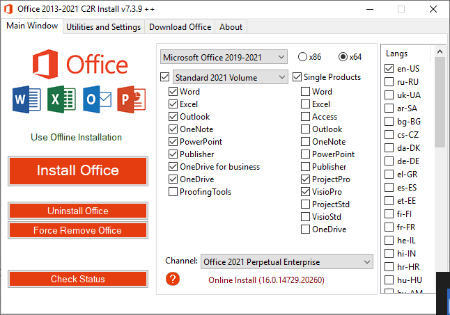
Office 2013-2021 C2R Install Install Lite 7.5.0.1
 File Size: 41.3 MB
This program designed for on-line installation and activation Microsoft Office 2013/2016/2019-2021 C2R. You also can create custom installation of Office off-line for using later.
How to use the program
1. Uninstall Office via (Control panel) applet "Add or remove Programs".
2. Uninstall Office using the "Force Remove Office" and restart your computer.
3. Install Office by clicking the "Install Office" button.
4. Go to "Utilities" tab and do the conversion "Office RETAIL => VL".
5. Then click "Activate Office" button.
or
6. Start KMSAuto Net 2016 and click "Activate Office".
How to use Bookmark Download Office
Bookmark Download Office serves to create the off-line installation varying versions and editions of Microsoft Office
with the possibility for the subsequent installation of the product without receiving files from outside..
1. Select the appropriate version of Office, bit and language. I recommend to make a full x86-x64 distribution.
To do this, select the tab-width All (the lowest). Click the Download button and choose a folder to the distribution files.
You can select the folder of the previous session of the program to further develop distribution, or will start a new session.
2. If you want to make multilingual distribution - after complete loading of the first language, switch to the pre-
Executive language, click the Download button, and select the same download folder.
3. After downloading all required bit and spoken recommend creating ISO-image office suite.
To do this, click Create ISO.
4. As a result, in the selected folder you will see a ready to use off-line installer Microsoft Office
chosen version.
In one session, downloading files does not use different versions of MS Office 2016 and 2013. It is possible to manipulate
with x86-x64 and languages, but not versions. Or use a different folder assignment is. Otherwise you will get unusable distribution.
5. Now you can create multiple projects distributions of return, additions and corrections have
downloaded. You can choice the versions builds. For Office 2013 Branch-choice and does not matter. Always will
be download the most current build. For Office 2016, you can choose the source of download (branch). Button Check version
has been added to check the build number the selected Branch.
Whats New
When creating an ISO, the files folder with the current settings is copied to the image. When you then run the program from the connected image, the settings at the time of its creation will be picked up.
HomePage:
Код:
https://msfreemicrosoft.ru/
-:DOWNLOAD FROM LINKS:- Download From RapidGator
Код:
https://rapidgator.net/file/64defe0122d6d9e94ff2741ba431614f/
Download From DropApk
Download From NitroFlare
Код:
https://nitroflare.com/view/5C7869ED2943B95/
|
|
|
|
|
16.12.2022, 20:00
|
#21292
|
|
Местный
Регистрация: 15.09.2019
Сообщений: 28,439
Сказал(а) спасибо: 0
Поблагодарили 0 раз(а) в 0 сообщениях
|
Office Timeline 7.00.04.00
 File size: 109.55 MB
The #1 PowerPoint Timeline Maker for Windows and Office. Create PowerPoint timelines or roadmaps as fast as clients and executives need them. Simple but powerful PowerPoint add-in that anyone can use to quickly make and manage impressive timelines.
Beauty trumps complexity.
Build stunning PowerPoint timelines without the effort and cost.
Free yourself from manually building and managing visual project plans.
Office Timeline helps you make timelines, Gantt charts and Swimlanes in PowerPoint almost instantly. Customize them with just a few clicks to create clear, elegant high-level presentations that everyone will understand.
User-friendly PowerPoint timeline generator. Works the way clients and colleagues do.
Office Timeline works with all versions of PowerPoint. Give them stunning PowerPoint slides that can be viewed, edited and shared by anyone who has Microsoft Office.
Manage and change data with ease.
The plugin's powerful Data wizard and drag & drop Visual Editor make timeline management agile and intuitive. Updating timelines when projects and plans change is quick and easy.
PowerPoint timelines made easy.
No complex steps. No learning curve. No hassle!
Start from scratch or pick a template.
The timeline wizard was designed to make it simple. It all starts by selecting the type of timeline you want to make.
Enter your data and click Create.
Once you've selected a timeline template, enter or import your key milestones and tasks. Set their dates, click the Create button, and voilà! Timeline created.
Arrange and style to impress.
Use Drag & Drop to instantly rearrange or update your visual. Then customize it your way - colors, shapes, date formats, task duration, percent complete. change any detail, anyway you want.
Enjoy more freedom with Plus Edition.
While the Free edition is fully functional, Office Timeline Plus brings more! Plus Edition unlocks predesigned templates and gives you the freedom to add as much data as needed, so you can create detailed, unique PowerPoint timelines and Gantt charts.
See the power of Pro Edition.
Office Timeline Pro gives you everything you get with the Plus add-in, but adds powerful extra features. Pro Edition creates impressive Swimlanes and roadmaps, so you can manage complex projects with big-picture visuals that anyone can understand.
What's new
Код:
https://www.officetimeline.com/updates
System Requirements
- Microsoft Windows Vista, Windows 7 (SP1), Windows 8, or Windows 10 (LTSB, CBB and CB). Office Timeline does not run on Windows 10 S. The add-in is functional on Windows XP and Windows Server but unsupported.
- 32-bit versions of Microsoft Office 2007 (SP3), 2010, 2013, or 2016. Although Office Timeline works with 64-bit versions of Office, we do not formally test or support it on 64-bit. The vast majority of the Office install base is the 32-bit version of Office. 32-bit is recommended by Microsoft unless you have very specific needs for 64-bit.
- .NET Framework 4.5.2 or greater.
License Type: Basic, Pro, Pro+
HomePage:
Код:
https://www.officetimeline.com
-:DOWNLOAD FROM LINKS:- Download From RapidGator
Код:
https://rapidgator.net/file/2df1dd6a144a01e9887ce7e20c2d7500/
Download From DropApk
Download From NitroFlare
Код:
https://nitroflare.com/view/1C5FDB50AFA75C2/
|
|
|
|
|
16.12.2022, 20:04
|
#21293
|
|
Местный
Регистрация: 15.09.2019
Сообщений: 28,439
Сказал(а) спасибо: 0
Поблагодарили 0 раз(а) в 0 сообщениях
|
Password Depot 17.0.1 + Corporate Edition Multilingual
 Windows x86/x64 | File size: 78.58 MB / 78.57 MB
Password Depot is a powerful and very user-friendly password manager which helps to organize all of your passwords - but also, for instance, information from your credit cards or software licenses. The software provides security for your passwords - in three respects: It safely stores your passwords, guarantees you a secure data use and helps you to have secure passwords. However, Password Depot does not only guarantee security: It also stand for convenient use, high customizability, marked flexibility in interaction with other devices and, last but not last, extreme functional versatility. From now on you will need to remember only one single password - the password which you use to open Password Depot. Your passwords are protected from external access to the best possible extent due to double encryption with AES (Rijndael 256).
You can not only save your passwords locally, but also on a USB device, mobile phone, in the network or on an FTP server. With Password Depot Server you can manage password files in the network to use them together in a team.
Password Depot is very easy to use and spares you a lot of work. You can configure Password Depot individually and in this way adapt it precisely to your needs. Password Depot is able to work together with a range of other applications, flexibly and without problems.
Safe Password Storage
* Best possible enryption . In Password Depot, your information is encrypted not merely once but in fact twice, thanks to the algorithm AES or Rijndael 256. In the US, this algorithm is approved for state documents of utmost secrecy!
* Double protection. You can secure your passwords files doubly. To start with, you select a master password that has to be entered in order to be able to open the file. Additionally, you can choose to protect your data by means of a key file that must be uploaded to open the file.
* Protection against brute-force attacks. After every time the master password is entered incorrectly, the program is locked for three seconds. This renders attacks that rely on the sheer testing of possible passwords - so called "brute-force attacks" - virtually impossible..
* Lock function. This function locks your program and thereby denies unauthorized access to your passwords. The locking conditions are determined by you yourself, for instance every time the program has not been used for a certain time.
* Backup copies. Password Depot generates backup copies of your passwords files. The backups may be stored optionally on FTP servers on the Internet (also via SFTP) or on external hard drives. You can individually define the time interval between the backup copies' creation.
Secure Data Use
* Protection from keylogging. All password fields within the program are internally protected against different types of the interception of keystrokes (Key Logging). This disables that your sensible data entries can be spied out.
* Traceless Memory. Dealing with your passwords, Password Depot does not leave any traces in your PC's working memory. Therefore, even a hacker sitting directly at your computer and searching through its memory dumps cannot find any passwords.
* Clipboard protection: Password Depot automatically detects any active clipboard viewers and masks its changes to the keyboard; after performing auto-complete, all sensitive data is automatically cleared from the clipboard.
* Virtual keyboard. The ultimate protection against keylogging. With this tool you can enter your master password or other confidential information without even touching the keyboard. Password Depot does not simulate keystrokes, but uses an internal cache, so that they can neither be intercepted software- nor hardware-based.
* Fake mouse cursors. Typing on the program's virtual keyboard, you can also set the program to show multiple fake mouse cursors instead of your usual single cursor. This additionally renders impossible to discern your keyboard activities.
Verified Passwords
* Uncrackalble passwords. The integrated Password Generator creates virtually uncrackable passwords for you. Thus in future, you will not have to use passwords such as "sweetheart" anymore, a password that may be cracked within minutes.
* Verified password quality. Let Password Depot check your passwords' quality and security! Intelligent algorithms will peruse your passwords and warn you against 'weak' passwords which you can subsequently replace with the help of the Passwords Generator.
* Password policies. You can define basic security requirements that must be met by all passwords which are added or modified. For instance, you can specify the passwords' minimum length and the characters contained therein.
* Security warnings. Password Depot contains a list of warnings which always keep an eye on your passwords' security. For instance, the program warns you in case you use the unsafe FTP protocol and in this case advices you to use SFTP instead.
* Protection against dictionary attacks. An important warning featured in Password Depot is the notification in case you are using unsafe passwords. These are passwords which are frequently used, therefore appear in hacker dictionaries and are easily crackable.
* Warning against password expiry. You can set Password Depot to warn you before your passwords expire, for instance before the expiry date of your credit card. This ensures that your password data always remains up-to-date and valid.
Convenient Access
* User-friendly interface. Password Depot's user interface is similar to that of Windows Explorer. This allows you to effectively navigate through your password lists and to quickly find any password you happen to be searching for.
* Auto-completion. If you wish, Password Depot automatically fills in your password data into websites opened within the common browsers. This function runs via an internal setting on the one hand, and via so called browser add-ons on the other hand.
* Automatic recognition. You can set the program to automatically recognize which password information corresponds to the website you have called up and to then pre-select this password entry for you - as well as, if desired, to finally automatically fill this information into the website.
* Top bar. The program's form can be reduced to a narrow bar whose position may be individually determined: whether freely movable or stuck to the screen edge (Application Desktop Toolbar). In this way, the software is always at your hand without disturbing you.
* Direct opening of websites. URLs belonging to password entries saved in Password Depot may be opened directly from within the program. This spares you the hassle of having to manually copy website addresses and then paste them into your browser.
* Usage via mouse click. Using your password information may be done super easily via simple clicks with your mouse cursor. By means of a single mouse click, you can copy data to the clipboard and can even drag it directly into the target field on the website.
* Hotkeys. Pasword Depot features keyboard shortcuts for often-used commands in Windows ("Hotkeys"). By means of these hotkeys, you can easily turn Password Depot's format into a top bar or call it into the foreground when minimized to the system tray.
* Recycle bin. Password Depot features a recycle bin that stores deleted password data and enables their restoration. In this way, data you may have accidentally deleted, for instance, is yet not lost irrevocably.
Flexible Interplay
* Server module. Password Depot features a separate server model enabling several users to access the same passwords simultaneously. The access to the password files may run either via a local network or via the Internet.
* USB stick. You can copy both your password files and the program Password Depot itself onto a USB stick. In this way, you can carry the files and the software along wherever you go, always having them ready to use.
* Cloud devices. Password Depot supports web services, among them GoogleDrive, Microsoft SkyDrive and Dropbox. In this way, Password Depot enables you to quickly and easily enter the Cloud!
* Password files on the Web. You can optionally deposit your encrypted password files on the Internet. By this means, you can always access your passwords, no matter where you are! To access, you can use the protocols HTTP, HTTPS, FTP or SFTP as required
* TAN support. Password Depot supports the input and management of TAN numbers. In this way, it facilitates the life of all of those users that refer to online banking, securely storing their sensible banking data.
* URL placeholders. Entering URLs into Password Depot, you can replace any number of characters by placeholders, namely an asterisk (*). Using this symbol, you can thus match several URLs to a single password entry instead of having to enter one entry for each URL.
What's new
Код:
https://www.password-depot.de/en/news/index.htm
Supported Operating Systems: Windows Vista, 7, 8, 8.1, 10, 11
HomePage:
Код:
https://www.password-depot.de/en/
-:DOWNLOAD FROM LINKS:- Download From RapidGator
Код:
https://rapidgator.net/file/ed1d6ea2d4cad16c31cbac725583649f/
Download From DropApk
Download From NitroFlare
Код:
https://nitroflare.com/view/D91BAEA22D90C43/
|
|
|
|
|
16.12.2022, 20:09
|
#21294
|
|
Местный
Регистрация: 15.09.2019
Сообщений: 28,439
Сказал(а) спасибо: 0
Поблагодарили 0 раз(а) в 0 сообщениях
|
Perfectly Clear WorkBench 4.2.0.2356 Multilingual
 Language: Multilingual | File size: 92 MB
Perfectly Clear Workbench is an application that uses Athentech's Perfectly Clear image correction libraries and is made available to demonstrate the capabilities of the Perfectly Clear processing libraries, face detection library and to allow a quick export of the processing settings for use.
Supported Image Formats
Perfectly Clear requires RGB-formatted images in either 8 or 16-bit color depth. Any image file that Photoshop or Lightroom can open and convert to this format may be used in Perfectly Clear. Monochrome and CMYK images must be converted to RGB before using Perfectly Clear. RAW files must be opened through Adobe Camera RAW and loaded into Photoshop to be accessible to Perfectly Clear.
What's New in Perfectly Clear WorkBench 4
1. Beautiful new interface
2. New image correction tools
a. Preprocessing section for Input Looks and "Image Ambulance" for manual exposure corrections
b. "Face Aware" exposure for more accurate auto-exposure corrections in portraits and group photos
c. Black Point tool to deepen blacks
d. New Color Vibrancy tool to complement our previous "Vibrancy" control (now renamed to Color Restoration)
e. Sky and Foliage enhancements
3. Existing tools have been improved
a. Added strength sliders to Light Diffusion and Vibrancy for better control
b. Better 'color pickers' for Skin Tone and Blush adjustments
4. Manually identify faces that are not detected automatically
5. One-click to zoom to individual faces
6. Modify facial regions to provide the best corrections
7. Histogram
8. Much improved preset management
Whats New
Код:
https://eyeq.photos/news
Supported Operation Systems
macOS 10.10 or later
HomePage:
Код:
https://eyeq.photos/
-:DOWNLOAD FROM LINKS:- Download From RapidGator
Код:
https://rapidgator.net/file/b95f0f642626ff0f248e6785eb91dc08/
Download From DropApk
Download From NitroFlare
Код:
https://nitroflare.com/view/9AE8B296AA952FD/
|
|
|
|
|
16.12.2022, 20:14
|
#21295
|
|
Местный
Регистрация: 15.09.2019
Сообщений: 28,439
Сказал(а) спасибо: 0
Поблагодарили 0 раз(а) в 0 сообщениях
|
Pixologic ZBrush 2022.0.7 (x64) Multilingual
 File size: 1.5 GB
ZBrush sets the industry standard for digital sculpting and painting. Its features enable you to use customizable brushes to shape, texture and paint virtual clay in a real-time environment that provides instant feedback. When you use ZBrush you'll be empowered by the same tools employed by film studios, game developers, toy/collectible makers, jewelry designers, automotive/aviation designers, illustrators, advertisers, scientists and other artists the world over.
In fact, we have even received an Academy Award for the technology that powers ZBrush. In short, ZBrush is an art tool created by artists, for artists. It allows you to create models and illustrations limited only by your imagination, at a speed that allows you to stand out in today's fast paced industry.
Base Mesh Generation
As with anything else in life, where you can go is usually determined by where you begin. Having a great finished model requires a quality base mesh. ZBrush provides an arsenal of tools to assist with this task, ensuring that no matter what you have in mind, there is a way to get the perfect base to then take to the next level. The best known of these systems are explained here.
Sculptris Pro
Ignore the constraints of polygon distribution and simply - sculpt! Sculptris Pro will dynamically add (tesselate) and remove (decimate) polygons wherever and whenever needed. It does this during your brush stroke in a real-time process called Tessimation. This frees you to focus entirely on the look you're trying to achieve.
Dynamesh
DynaMesh is a perfect solution for free-form sculpting because it removes all need for focusing on topological constraints. Change the overall shape of the model by pushing or pulling, adding various pieces of geometry to combine into one, or even remove geometry in a manner similar to what can be done with Boolean operations. Where Sculptris Pro dynamically adjusts the triangles in your mesh as you sculpt, DynaMesh redistributes the model's polygons as quads on command.
Mesh Detailing
Whether created in ZBrush or imported from elsewhere, once you have your base mesh it is time to start detailing. ZBrush features a robust suite of tools to accomplish this. Those listed below are just the tip of the iceberg.
Sculpting Brushes
The main workflow for creating with ZBrush is based on a system of brushes which can also be modulated using pen pressure from a graphics tablet. ZBrush will reproduce the natural feeling of a real paint brush or sculpting tool, using the pressure applied to the pen tip to transform your digital stroke in a variety of ways. There are brushes to pinch, move, build up the surface, chisel into it, slice through the model and much more. You can even use other 3D models as brushes, inserting their geometry into your surface.
Noisemaker
In addition to being able to add detail by hand, ZBrush provides a system for procedurally generating surface detail through noise patterns. Choose a detail type, adjust a few simple parameters, then apply that pattern to your model in its entirety or by restricting it to a certain region. You can even combine different noise types to create highly complex effects. The Noise system is ideal for both hard surface work and organic details.
PolyPaint
Because ZBrush works with tens of millions of polygons in real-time, you can paint directly on the surface of the model without first assigning a texture map or UV's. This offers significant advantages compared to a standard workflow. The resolution of the texture map does not need to be decided in advance. This is particularly valuable if you find you need more detailing on an area than you thought you would. Instead of repainting a new, larger texture map you can simply transfer the existing surface detail to that larger map without any reworking. You don't even need to do UV unwrapping before you begin this painting. In fact, thanks to the way that ZBrush can project details (both sculpted and painted) from one model to another you can have a fully painted model before you even have a finalized animation mesh. Instead, you can copy everything to the final base mesh once it has been signed off on.
UV Master
In order create or use a texture map, a model first needs UV's. These are 2D coordinates that tell all 3D applications how to apply a texture to your model. With most programs, creating those UV's has been a time consuming challenge that requires a high level of technical expertise and has little room for creativity. With UV Master you are able to create very efficient UV's for your model - in most cases with a single click. If you need more control over this automatic process there are features that refine where seams will be placed or increase the amount of pixel space given to certain regions of your model. It's both intuitive and fast, letting you get back to being creative with minimal fuss.
Rendering
Whether you are using ZBrush by itself as an illustration tool or as part of a production pipeline for animation, you will at some point want to show your work to others. ZBrush makes this possible through a powerful rendering system called BPR (Best Preview Render).
Whats New
Fixed
"Unsupported File Format" error with the Mac version of the Text 3D & Vector Shapes plugin.
Text 3D & Vector Shapes plugin: certain characters cause overlap in text.
Text 3D & Vector Shapes plugin: the use of certain characters causes error.
Text 3D & Vector Shapes plugin : Issue that would cause certain characters in some languages to repeat when used.
Geometry exported in .DAE format would not correctly import into Cinema 4D.
UVs not displaying correctly when imported in .ABC format.
Exporting extremely large files in GoZ format could result in broken UVs
Stager would not copy and paste the expected Home and Target stages in some situations.
Bevel Pro: Crash issue related to the "Generate Inner Part" setting.
Maxon App installation process would remove custom Macros stored in ZStartup/Macros/Misc when installing a new version over an existing installation.
Maxon App (Windows) installation process would remove GoZ application paths when installing a new version over an existing installation. It is still expected that GoZ application paths will need to be re-targeted after updating through the Maxon App on macOS.
-:DOWNLOAD FROM LINKS:- Download From RapidGator
Код:
https://rapidgator.net/file/729555d9c7cc058273b4acdd39429e64/
Download From DropApk
Download From NitroFlare
Код:
https://nitroflare.com/view/7A3CEAE280A6A0C/
|
|
|
|
|
16.12.2022, 20:17
|
#21296
|
|
Местный
Регистрация: 15.09.2019
Сообщений: 28,439
Сказал(а) спасибо: 0
Поблагодарили 0 раз(а) в 0 сообщениях
|
Pixologic ZBrush 2022.0.7 (x64) Multilingual
 File size: 1.5 GB
ZBrush sets the industry standard for digital sculpting and painting. Its features enable you to use customizable brushes to shape, texture and paint virtual clay in a real-time environment that provides instant feedback. When you use ZBrush you'll be empowered by the same tools employed by film studios, game developers, toy/collectible makers, jewelry designers, automotive/aviation designers, illustrators, advertisers, scientists and other artists the world over.
In fact, we have even received an Academy Award for the technology that powers ZBrush. In short, ZBrush is an art tool created by artists, for artists. It allows you to create models and illustrations limited only by your imagination, at a speed that allows you to stand out in today's fast paced industry.
Base Mesh Generation
As with anything else in life, where you can go is usually determined by where you begin. Having a great finished model requires a quality base mesh. ZBrush provides an arsenal of tools to assist with this task, ensuring that no matter what you have in mind, there is a way to get the perfect base to then take to the next level. The best known of these systems are explained here.
Sculptris Pro
Ignore the constraints of polygon distribution and simply - sculpt! Sculptris Pro will dynamically add (tesselate) and remove (decimate) polygons wherever and whenever needed. It does this during your brush stroke in a real-time process called Tessimation. This frees you to focus entirely on the look you're trying to achieve.
Dynamesh
DynaMesh is a perfect solution for free-form sculpting because it removes all need for focusing on topological constraints. Change the overall shape of the model by pushing or pulling, adding various pieces of geometry to combine into one, or even remove geometry in a manner similar to what can be done with Boolean operations. Where Sculptris Pro dynamically adjusts the triangles in your mesh as you sculpt, DynaMesh redistributes the model's polygons as quads on command.
Mesh Detailing
Whether created in ZBrush or imported from elsewhere, once you have your base mesh it is time to start detailing. ZBrush features a robust suite of tools to accomplish this. Those listed below are just the tip of the iceberg.
Sculpting Brushes
The main workflow for creating with ZBrush is based on a system of brushes which can also be modulated using pen pressure from a graphics tablet. ZBrush will reproduce the natural feeling of a real paint brush or sculpting tool, using the pressure applied to the pen tip to transform your digital stroke in a variety of ways. There are brushes to pinch, move, build up the surface, chisel into it, slice through the model and much more. You can even use other 3D models as brushes, inserting their geometry into your surface.
Noisemaker
In addition to being able to add detail by hand, ZBrush provides a system for procedurally generating surface detail through noise patterns. Choose a detail type, adjust a few simple parameters, then apply that pattern to your model in its entirety or by restricting it to a certain region. You can even combine different noise types to create highly complex effects. The Noise system is ideal for both hard surface work and organic details.
PolyPaint
Because ZBrush works with tens of millions of polygons in real-time, you can paint directly on the surface of the model without first assigning a texture map or UV's. This offers significant advantages compared to a standard workflow. The resolution of the texture map does not need to be decided in advance. This is particularly valuable if you find you need more detailing on an area than you thought you would. Instead of repainting a new, larger texture map you can simply transfer the existing surface detail to that larger map without any reworking. You don't even need to do UV unwrapping before you begin this painting. In fact, thanks to the way that ZBrush can project details (both sculpted and painted) from one model to another you can have a fully painted model before you even have a finalized animation mesh. Instead, you can copy everything to the final base mesh once it has been signed off on.
UV Master
In order create or use a texture map, a model first needs UV's. These are 2D coordinates that tell all 3D applications how to apply a texture to your model. With most programs, creating those UV's has been a time consuming challenge that requires a high level of technical expertise and has little room for creativity. With UV Master you are able to create very efficient UV's for your model - in most cases with a single click. If you need more control over this automatic process there are features that refine where seams will be placed or increase the amount of pixel space given to certain regions of your model. It's both intuitive and fast, letting you get back to being creative with minimal fuss.
Rendering
Whether you are using ZBrush by itself as an illustration tool or as part of a production pipeline for animation, you will at some point want to show your work to others. ZBrush makes this possible through a powerful rendering system called BPR (Best Preview Render).
Whats New
Fixed
"Unsupported File Format" error with the Mac version of the Text 3D & Vector Shapes plugin.
Text 3D & Vector Shapes plugin: certain characters cause overlap in text.
Text 3D & Vector Shapes plugin: the use of certain characters causes error.
Text 3D & Vector Shapes plugin : Issue that would cause certain characters in some languages to repeat when used.
Geometry exported in .DAE format would not correctly import into Cinema 4D.
UVs not displaying correctly when imported in .ABC format.
Exporting extremely large files in GoZ format could result in broken UVs
Stager would not copy and paste the expected Home and Target stages in some situations.
Bevel Pro: Crash issue related to the "Generate Inner Part" setting.
Maxon App installation process would remove custom Macros stored in ZStartup/Macros/Misc when installing a new version over an existing installation.
Maxon App (Windows) installation process would remove GoZ application paths when installing a new version over an existing installation. It is still expected that GoZ application paths will need to be re-targeted after updating through the Maxon App on macOS.
HomePage:
Код:
http://pixologic.com/
-:DOWNLOAD FROM LINKS:- Download From RapidGator
Код:
https://rapidgator.net/file/a714af2e050274d5acd0ee31f2bfd101/
Download From DropApk
Download From NitroFlare
Код:
https://nitroflare.com/view/530302FD7DF83D9/
|
|
|
|
|
16.12.2022, 20:22
|
#21297
|
|
Местный
Регистрация: 15.09.2019
Сообщений: 28,439
Сказал(а) спасибо: 0
Поблагодарили 0 раз(а) в 0 сообщениях
|
PlayerFab 7.0.3.2 Multilingual
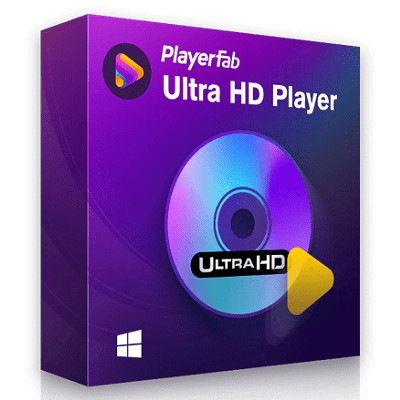 File Size: 254.9/256.9 MB
Capable of playing local videos, DVD/Blu-ray/UHD disc and streaming videos, Are you still looking for an all-inclusive media player? Armed with PlayerFab, there is no need to worry about compatibility problems. Videos that are available to PlayerFab range from local videos, DVD/Blu-ray/UHD disc to streaming videos. The software is definitely a comprehensive media player.
All-in-one platform of streaming playback
As a convergence platform of streaming playback, PlayerFab supports watching videos of a wide range of popular streaming platforms, like Amazon, Netflix, Tubi, Peacock, etc.
Users won't have to bother to search for their wanted videos on different streaming platforms, PlayerFab is completely enough.
Online playback video in FHD 1080p video quality and EAC3 audio quality
High-quality is a prerequisite and bedrock of PlayerFab. This powerful go-to free software provides an array of built-in functions, to ensure the best watching experience in FHD 1080p video quality and EAC3 5.1 audio quality.
Users gain access to superb theater-like effects with the assistance of PlayerFab.
Auto-skip ADs to save your precise time
Have you been bothered by both long and annoying advertisements at the beginning of a video? If yes, you won't suffer from it any longer.
PlayerFab will automatically skip the initial ads of most popular video websites including Amazon IMDB Free TV, Tubi, Roku, Paramount+ to ensure a smooth and comfortable watching experience.
Playback all kinds of video&audio formats with ease
PlayerFab, as an extremely versatile software, is a powerful and all-inclusive free-cost media player.
It supports all popular formats such as H.264, H.265/HEVC, MP4, MKV, MOV, FLV, VOB, M2TS and so on. As long as you have PlayerFab, there won't be compatibility problems any longer.
Navigation Menu on DVDs, Blu-rays and 4K Ultra HD Blu-rays
The upgraded 4K Media Player now offers all-round supports for navigation menu playback on DVDs, Blu-rays, and 4K Ultra Blu-rays, regardless of what form they are.
Genuine discs, as well as ripped ISO image files or folders are also supported. Equipped with TrueTheater technology, a cinema-like home theater is right at your fingertips.
Hi-Res Audio Output Support, up to Dolby Atmos & DTS:X
If you have an acoustic system at home with edgy technology, apparently this player is just right up your alley.
It is able to output lossless high-resolution audios, such as Dolby Atmos, Dolby TrueHD, DTS-HD Master and DTS:X etc., with up to 7.1 channel surround sound output.
All-Round 3D Playback on All Forms of 3D Contents
To make the most out of your 3D TV at home, player comes with all-round 3D playback support on genuine 3D Blu-ray discs, ISO files and SBS (side-by-side) or top & bottom 3D videos.
Besides, there are four 3D output modes, namely, Anaglyph Red/Cyan, 3D-Ready HDTV (Checkerboard), Micro-polarizer LCD 3D (Row-interleaved) and HDMI 1.4 enabled 3D TV.
With a pair of 3D glasses, watching 3D movies at home theater is just a breeze!
Play high-quality 4K UHD video in HDR10 effect
Nowadays, most 4K Ultra HD Blu-rays and 4K UHD videos come with HDR effect. As a variant of HDR, HDR10 can produce 1000 nits of peak brightness to make the images look more realistic to human eyes.
If your 4K TV or display is compatible with any type of those HDR variations, PlayerFab is able to deliver the best HDR effect, including HDR10, HDR10+, and Dolby Vision as well.
Manage Local Media Library by Poster Wall
Have you ever been beset with tons of movies, TV shows and music videos stored on your local HDD?
Are you searching for the best methods but end up with nothing? PlayerFab has the optimal solution.
Users are able to build and manage their own local media library through clear and plain poster walls.
By clicking on each poster wall, you will be taken to a detailed page, where all the metadata info of the movie or TV show is well displayed.
Build, Organize and Manage Smart Local Music Library
PlayerFab enables you to intelligently create a local music library.
Just add your pre-existing music files from your HDD to the 4K player software, and you will find all the desired songs are well organized according to albums, artists, or genres instantly.
Backup and import DVD/Blu-ray discs to your library
As new movies and TV Shows are constantly being released, you need to add your newly purchased DVD & Blu-ray discs to your local media library incessantly.
In this regard, the Disc Import feature of this all-powerful 4K media player comes in handy.
With only one click, it can import a DVD or Blu-ray disc from an optical drive to your local media library, saved as an ISO file for later playback.
Thus, this multi-functional player acts as a media manager as well.
Hardware Decoding on AMD, IQS, Nvidia
Armed with the latest advanced GPU acceleration technologies, PlayerFab supports hardware decoding of AMD, IQS (Intel Quick Sync) and NVIDIA CUDA.
For there are special chips responsible for decoding, users could enjoy a smoother playback experience with better image quality.
PC and TV Playback Modes Optimized for Small/Huge Screens
The all-inclusive media player features two playback modes with distinctive UI design, of which PC Mode is optimized for a truly immersive media viewing experience on computer screens.
While TV Mode is dedicated to a cinema-like audio-visual experience on large-screen smart TVs, compatible with the remote controls for Windows Media Center.
User-friendly design offers the best viewing experience
PlayerFab always puts the demands of users as a priority. Want to create a player with comprehensive features, PlayerFab promises the clearest and most intuitive experience.
What's New
Код:
https://www.dvdfab.cn/media-player-new.htm?v=7
HomePage:
Код:
https://www.dvdfab.cn
-:DOWNLOAD FROM LINKS:- Download From RapidGator
Код:
https://rapidgator.net/file/9b82626e499e3294e6586ac0d401e0f9/
Download From DropApk
Download From NitroFlare
Код:
https://nitroflare.com/view/4C1CF0894BD2A18/
|
|
|
|
|
16.12.2022, 20:25
|
#21298
|
|
Местный
Регистрация: 15.09.2019
Сообщений: 28,439
Сказал(а) спасибо: 0
Поблагодарили 0 раз(а) в 0 сообщениях
|
Raccoon 4.23.0
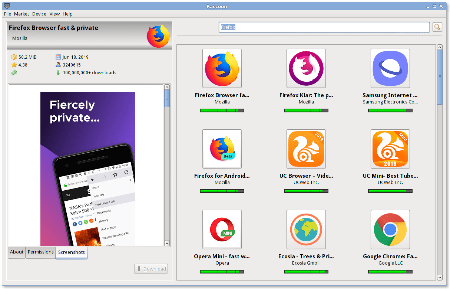 File size: 12 MB
Raccoon - The APK Downloader for Windows.
Download paid apps
Raccoon can download free and paid APKs
Bypass region restrictions
App not available in your country? No problem! Simply claim to be from abroad.
Split APK Installer
Download and install apps in Google's new 'Split APK' format.
Roll back bad updates
Not all updates are beneficial. Sometimes, you wish you'd stayed with the old version.
Store APKs locally
Your harddrive is way larger than your internal storage, make use of it!
Improve battery life
With the official Google Play app disabled, your phone's battery lasts longer.
Whats New
Код:
https://raccoon.onyxbits.de/blog/
HomePage:
Код:
https://raccoon.onyxbits.de/
-:DOWNLOAD FROM LINKS:- Download From RapidGator
Код:
https://rapidgator.net/file/ffc1f746a809f002d242b4a427db1458/
Download From DropApk
Download From NitroFlare
Код:
https://nitroflare.com/view/4DBCD67EC10B522/
|
|
|
|
|
16.12.2022, 20:29
|
#21299
|
|
Местный
Регистрация: 15.09.2019
Сообщений: 28,439
Сказал(а) спасибо: 0
Поблагодарили 0 раз(а) в 0 сообщениях
|
Ratiborus KMS Tools 15.12.2022
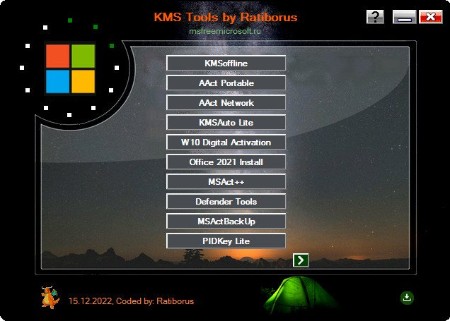 File size: 63.5 MB
All-in-one collection of activators from Ratiborus for Windows XP, Vista, 7, 8, 8.1, 10, 11, Windows Server, Office 2010/2013/2016/2019/2021.
Included programs
AAct Network v1.2.9 Portable
AAct v4.3.0 Portable
ConsoleAct v3.4 Portable
Defender Tools v1.1.5
Garbage Collector v1.3.8 x86_x64_31_10_2020
KMSAuto Lite Portable v1.7.8
KMSAuto Net 2016 v1.5.4 Portable
KMSCleaner v2.3 Portable
KMSoffline v2.3.8 RU EN
MSAct++ 2.07.5
MSActBackUp Portable v1.2.6
Office 2013-2021 C2R Install v7.5.0
Office Uninstall v1.8.7
PIDKey Lite v1.64.4 b28 RU EN and more
UniCrypt 2016 v2.2
W10 Digital Activation Program v1.4.6 Portable
Whats New
AAct Network v1.2.9 Portable
AAct v4.3.0 Portable
KMSAuto Lite Portable v1.7.8
KMSoffline v2.3.8 RU EN
Office 2013-2021 C2R Install v7.5.0
Office Uninstall v1.8.7
PIDKey Lite v1.64.4 b28 RU EN and more
HomePage:
Код:
https://msfreemicrosoft.ru/
-:DOWNLOAD FROM LINKS:- Download From RapidGator
Код:
https://rapidgator.net/file/d9228ee3e06eb4054cd9e5cf19b11510/
Download From DropApk
Download From NitroFlare
Код:
https://nitroflare.com/view/EEA3DCD48848772/
|
|
|
|
|
16.12.2022, 20:33
|
#21300
|
|
Местный
Регистрация: 15.09.2019
Сообщений: 28,439
Сказал(а) спасибо: 0
Поблагодарили 0 раз(а) в 0 сообщениях
|
Smart Driver Manager 6.3.885 Multilingual
 File size: 5.19 MB
Smart Driver Manager offers a fast, easy and safe solution for automatically managing and updating your drivers. The program scans your computer and all associated hardware devices and provides a list of all the drivers that need to be updated. With just a single click Smart Driver Manager safely installs each update on your PC. Finally, the driver database contains over 1,200,000 drivers and is constantly updated ensuring that you always download the most current drivers.
Features
Keep your devices fully optimized
Hardware manufacturers are constantly updating their product drivers in order to fix problems or improve performance. By running regular scans with Smart Driver Manager you can make sure you always have the latest driver updates installed.
Some of the biggest problems faced by users upgrading to Windows 10 is when their existing hardware is not compatible with their new operating system. Smart Driver Manager can fix these issues by identifying the problem drivers and downloading the correct version for Windows 10.
Fast & safe way to update your drivers
Smart Driver Manager has a database of over 1,200,000 drivers. We are constantly updating and editing the database to make sure that we have the best driver updates available. As a Smart Driver Manager user, you will have ongoing access to all database updates to ensure that you are always running the best drivers for your system.
Backup and Restore
If you're upgrading your operating system or just need to reinstall Windows, Smart Driver Manager can backup all the drivers on your PC or laptop. The driver backup will be compressed into a zip file that is easy to export and reinstall. In the end, Smart Driver Manager's backup and reinstall features can save you hours of searching for and installing individual device drivers.
Easy to use
Our goal is always to design simple easy to use solutions. With just one click Smart Driver Manager will analyze your PC and any attached hardware devices. The scan identifies outdated drivers and finds the correct new drivers to replace them with. With Smart Driver Manager even if you're a novice computer user you will be able to easily find, replace, backup and restore your drivers.
Built-in Scheduler means that you can set it and forget it!
Simply set the built-in scheduler to run a scan automatically at start-up or at a convenient time either daily, weekly or monthly. Smart Driver Manager lets you know when new driver updates are available for your system so that you always have the best possible drivers.
What's new
• official site does not provide any info about changes in this version
HomePage:
Код:
https://smartpctools.com
-:DOWNLOAD FROM LINKS:- Download From RapidGator
Код:
https://rapidgator.net/file/709dfc5919e9872a7aa5dda5807cf791/
Download From DropApk
Download From NitroFlare
Код:
https://nitroflare.com/view/C390820658495A4/
|
|
|
|
      
Любые журналы Актион-МЦФЭР регулярно !!! Пишите https://www.nado.in/private.php?do=newpm&u=12191 или на электронный адрес pantera@nado.ws
|
Здесь присутствуют: 4 (пользователей: 0 , гостей: 4)
|
|
|
 Ваши права в разделе
|
Вы не можете создавать новые темы
Вы не можете отвечать в темах
Вы не можете прикреплять вложения
Вы не можете редактировать свои сообщения
HTML код Выкл.
|
|
|
Текущее время: 18:34. Часовой пояс GMT +1.
| |







