 UPDF 2.5.6 (x64) Multilingual Fast Links | 229 Mb
UPDF
UPDF 2.5.6 (x64) Multilingual Fast Links | 229 Mb
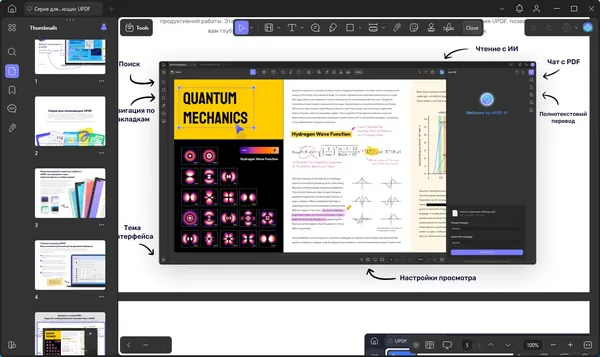
UPDF is a PDF editing application for Windows that provides tools for modifying, reviewing, converting, and managing PDF documents. The software allows users to edit text and images, add annotations, organize documents, and perform various PDF-related tasks through a streamlined interface.
UPDF is designed for professionals, students, businesses, and anyone who works with digital documents regularly. It provides tools for improving document workflows, including PDF editing, AI-assisted document analysis, translation, summarization, and format conversion.
The application also supports PDF collaboration features, allowing users to create forms, add signatures, and prepare documents for sharing and review.
Key Features:
- Edit PDF text, images, links, backgrounds, watermarks, and page layouts.
- Add annotations including notes, highlights, stamps, stickers, and underlines.
- Use AI tools to summarize, translate, explain, and interact with PDF documents.
- Analyze large PDF files and extract useful information from documents.
- Convert PDF files into multiple supported document formats.
- Create PDFs using different document creation methods.
- Create fillable PDF forms for digital data collection.
- Add signatures and prepare documents for collaboration.
- Support different reading modes and page display options.
Why Choose UPDF:
UPDF is designed for users who need a complete set of tools for working with PDF documents in one application. It combines editing, annotation, conversion, and document management features for everyday PDF workflows.
The software is suitable for office users, researchers, educators, and businesses that need to review, modify, and organize PDF files efficiently.
System Requirements:
Windows 10 and higher
FAQ:
What is UPDF used for?
UPDF is used for editing, annotating, converting, and managing PDF documents on Windows computers.
Can UPDF edit PDF text and images?
Yes. UPDF allows users to modify PDF text, images, links, and document layouts.
Does UPDF support PDF conversion?
Yes. The software can convert PDF documents into multiple supported formats.
Can UPDF analyze PDF documents?
Yes. UPDF includes AI-based tools for summarizing, translating, explaining, and interacting with PDF content.
Home Page
Код:
https://updf.com/updf/
Product Information:
- Software Name: UPDF
- Version: 2.5.6
- Architecture: x64
- Languages: Multilingual
- License type: Full Version
- File Size: 229 Mb
Код:
Rapidgator
https://rg.to/file/d66d87b8872c5abc823a553f9c239f20/10opx.UPDF.2.5.6.x64.Multilingual.zip.html
UploadCloud
DDownload
https://ddownload.com/pha7by0ylriy/10opx.UPDF.2.5.6.x64.Multilingual.zip
FreeDL
https://frdl.io/hxjm0igp9pp6/10opx.UPDF.2.5.6.x64.Multilingual.zip.html
Links are Interchangeable - No Password - Single Extraction







 UPDF 2.5.6 Multilingual (x64)











