 25.04.2026, 01:59
|
#27961
|
|
Местный
Регистрация: 15.09.2019
Сообщений: 28,124
Сказал(а) спасибо: 0
Поблагодарили 0 раз(а) в 0 сообщениях
|
 EaseUS Fixo 4.3.0 Build 20260421 Multilingual
 EaseUS Fixo 4.3.0 Build 20260421 Multilingual | File size: 199.94 MB
Videos, photos or files get corrupted or fail to open? EaseUS one-stop solution will help you repair corrupted videos, photos and files regardless of the level of damage.
All-in-one File Repair Software
Video Repair
Repair Any Corrupted or Unplayable Video
Videos become corrupted or inaccessible after sudden power surges and failures, complete system crashes, updating errors, file mishandling or some other reasons? The video repair software - EaseUS Fixo enables you to repair a wide variety of video file formats including MOV, MP4, M2TS, MKV, MTS, 3GP, and more easily, no matter how it is damaged.
- Repair video formats including MP4, MOV, M2TS, MKV, MTS, 3GP, AVI, FLV, M4V, etc.
- Repair videos corrupted during shooting, recording, transferring, editing, converting or processing.
- Repair videos from cameras, Drones, CCTV DRV, dash cams, smartphones, NAS servers or any other monitor, etc.
Photo Repair
Repair Corrupted Photos from Any Device
Photos with precious memories or essential information become corrupted and unopenable? The photo repair software - EaseUS Fixo can intelligently and smartly repair your corrupted and damaged photos from your computer or other external storage devices like USB flash drives, memory sticks, SD cards, digital camera and phones regardless of their level of damage.
- Restore corrupted, blurry, overexposed, Underexposed or pixelated photos.
- Repair photo formats including JPEG, PNG, JPG, CR3, CR2, NEF, NRW, RAF, etc.
- Repair photos from PCs, USB flash drives, memory sticks, SD cards, digital cameras and phones.
- Repair photos in batch and preview repaired photos.
File Repair
Repair Corrupted Word, Excel, PPT, and PDF Files
Office files and pdf files become corrupted, inaccessible or unreadable unexpectedly for unknown reasons? EaseUS Fixo which has anintuitive interface is the best file repair software for novices to fix the corrupted office documents, including PDF, Word, Excel, and PowerPoint files.
- Repair the corrupted PDF, Word, Excel, and PowerPoint files.
- Fix unreadable files, garbled files and files not opening.
- Repair files in batch and preview repaired files.
What's new
• official site does not provide any info about changes in this version
Support Windows 11/10/8/7/XP
HomePage:
Код:
https://www.easeus.com/
-:DOWNLOAD FROM LINKS:- Download From RapidGator
[Ссылки доступны только зарегистрированным пользователям
. Регистрируйся тут...]
Download From NitroFlare
[Ссылки доступны только зарегистрированным пользователям
. Регистрируйся тут...]
|

|

|
|
25.04.2026, 02:07
|
#27962
|
|
Местный
Регистрация: 15.09.2019
Сообщений: 28,124
Сказал(а) спасибо: 0
Поблагодарили 0 раз(а) в 0 сообщениях
|
EF AutoSync 26.04 Multilingual
 EF AutoSync 26.04 Multilingual | File size: 3.1 MB
EF AutoSync is a practical tool for automatic data synchronization between the PC and other components such as USB flash drives, external drives, another computer, etc.
The easy to use software done for you activities such as archiving, mirroring, data backup, update, takes you from the chore.
The integration of external third-party file systemn plugins in WFX format supports a variety of devices.
The following languages are included in the package: English, German, Arabic, Catalan, Chinese, Hebrew, Hungarian, Italian, Portuguese, Romanian, Serbian.
Whats New
Updates: official site does not provide any info about changes in this version
HomePage:
Код:
https://www.efsoftware.com/as/e.htm
-:DOWNLOAD FROM LINKS:- Download From RapidGator
[Ссылки доступны только зарегистрированным пользователям
. Регистрируйся тут...]
Download From NitroFlare
[Ссылки доступны только зарегистрированным пользователям
. Регистрируйся тут...]
|
|
|
|
|
25.04.2026, 02:19
|
#27963
|
|
Местный
Регистрация: 15.09.2019
Сообщений: 28,124
Сказал(а) спасибо: 0
Поблагодарили 0 раз(а) в 0 сообщениях
|
Gillmeister Automatic PDF Processor 2.1.5
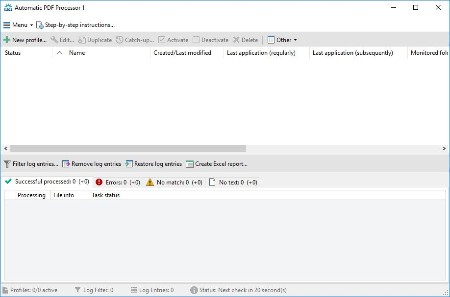 Gillmeister Automatic PDF Processor 2.1.5 | File size: 176.7 MB
With Automatic PDF Processor, PDF files can be processed automatically. Any number of folders can be monitored in order to automatically print, rename or move incoming PDF files to dynamically named folders. Numerous metadata of the PDF document can be used in addition to the content, for example to include invoice information in the file path. The PDF files to be processed can be narrowed down with various profile-specific filters - the document text, PDF metadata and general file information are available as filters.
Extraction of data from the text of PDF files is optional. An unlimited number of extraction rules can be created within a profile. The extracted data can be used (after optional validation and formatting) for naming folders or the file name, and can be saved as an extract in a CSV file. Another task that can be automated with the Automatic PDF Processor is the extraction of attachments from PDF files, for example to save ZUGFeRD XML files, XRechnung attachments or similar as part of a PDF invoice in the same folder.
Monitor any number of folders
Examine incoming PDF files and apply individual rules
Store PDF files in a structured manner
Automatically rename PDF files and save them in dynamically created folders
Print PDF files automatically
Send certain PDF documents directly to the printer (e.g., invoices or quotations)
Optional further processing
Perform subsequent tasks, e.g., run a program with the filename of the PDF file passed as parameter
Whats New
Код:
https://www.gillmeister-software.com/products/automatic-pdf-processor/changelog.aspx
HomePage:
Код:
https://www.gillmeister-software.com/
-:DOWNLOAD FROM LINKS:- Download From RapidGator
[Ссылки доступны только зарегистрированным пользователям
. Регистрируйся тут...]
Download From NitroFlare
[Ссылки доступны только зарегистрированным пользователям
. Регистрируйся тут...]
|
|
|
|
|
25.04.2026, 02:28
|
#27964
|
|
Местный
Регистрация: 15.09.2019
Сообщений: 28,124
Сказал(а) спасибо: 0
Поблагодарили 0 раз(а) в 0 сообщениях
|
Home Manager 2026 v4.10.1001
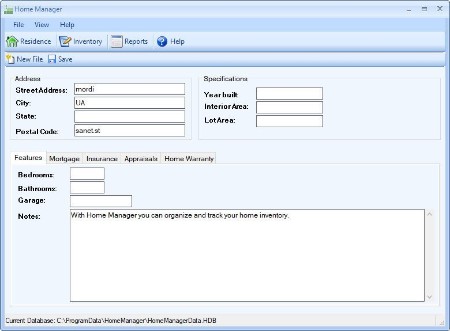 Home Manager 2026 v4.10.1001 | File size: 25.1 MB
Do you need a way to track all your "stuff"? With Home Manager you can organize and track your home inventory. Easily enter the details about your belongings, and use the built-in search feature to find it again quickly. If you already have a lot of digital pictures, simply drag and drop them into the program to automatically create new inventory items for each one.
Organize your inventory by category and location, and drag and drop items from one category to another. Keep a running maintenance and repair history for your assets. Print a home inventory report (complete with digital pictures) for your insurance agent; backup your data for safekeeping, and get the peace of mind that comes with having a full accounting of your home inventory.
Home Manager helps you get organized
You have better things to do with your time than searching through paperwork or digging through old paint cans looking for that lost color code. Now you can stop the frustrating searching and take control. With Home Manager software you can have all the information you need about your home right at your fingertips.
Be prepared for the unexpected
Sadly, every year natural disasters like earthquakes, fires, floods, tornadoes and hurricanes leave people without a home and with their possessions lost or destroyed. Without a detailed record, making an insurance claim can be a hassle at best. Whether you own your home, or rent an apartment, insurance companies recommend that you keep a current home inventory record to assist in the event of an insurance claim. Home Manager gets you started by building a complete home inventory. You can track warranty and insurance information, and even include digital pictures to assist in the unfortunate event of an insurance claim.
Features
Home Inventory Tracking for one or multiple residences.
Track costs for home improvement and repair.
Store your book and movie information in a database.
Track warranty and insurance Information.
Import an unlimited number of digital pictures.
Search your inventory to find records fast.
Backup your inventory to disk, floppy, or as an Email Attachment.
Print report for off-site storage.
Create your own custom categories and locations.
Whats New
Updates: official site does not provide any info about changes in this version
HomePage:
Код:
https://www.kzsoftware.com/
-:DOWNLOAD FROM LINKS:- Download From RapidGator
[Ссылки доступны только зарегистрированным пользователям
. Регистрируйся тут...]
Download From NitroFlare
[Ссылки доступны только зарегистрированным пользователям
. Регистрируйся тут...]
|
|
|
|
|
25.04.2026, 02:34
|
#27965
|
|
Местный
Регистрация: 15.09.2019
Сообщений: 28,124
Сказал(а) спасибо: 0
Поблагодарили 0 раз(а) в 0 сообщениях
|
JP Software Take Command 36.00.34 (x64) Multilingual
 JP Software Take Command 36.00.34 (x64) Multilingual | File Size: 57 MB
Take Command is a comprehensive interactive GUI and command line environment that makes using the Windows command prompt and creating batch files easy and far more powerful. Take Command displays your command line applications in tabbed windows, with optional Explorer-style integration for a visual look at your folders. Take Command includes hundreds of major enhancements to the command line and CMD commands such as COPY, DEL, and DIR, and adds more than 140 new commands, 460 internal variables and functions, a batch file IDE / debugger, and thousands of other features.
Take Command is also a powerful batch file programming tool, including an integrated IDE with a sophisticated editor and batch debugger. Take Command offers extensions such as DO loops, SWITCH statements, error and exception handling, system monitoring and event triggers, third-party plugins, and more than 700 built-in variables and functions.
The Windows "Command Prompt" shortcut is a Windows console (command line, or character mode) session that runs the default command processor CMD (also called the "Windows command shell"). The command prompt is essential for developers, systems administrators and advanced users. Unfortunately, CMD commands and the Windows console UI have always been woefully lacking in ability compared to what is available in most other operating systems. Because of the limitations in the Windows command prompt, users have been forced to use the GUI for inappropriate tasks, or even to write custom programs to perform simple tasks that CMD should have been able to handle.
Are you frustrated with the limitations of the CMD command line and batch scripting? Do you yearn for a real scripting language, and an integrated IDE and batch debugger? How about a Windows command processor that can do all of that, and still run your existing CMD prompt commands and batch files?
Take Command is our flagship product. For 30+ years, JP Software has been helping programmers, system administrators, technical support professionals, and advanced users save time and money, and cure their command prompt frustrations. Take Command offers a new approach to working in Windows, bringing users the power of the command line and the ease of use of the Windows GUI. Take Command includes a complete CMD replacement command shell that provides you with a vastly better Windows command line UI, and thousands of features that are not available in CMD (or even in those vaunted Linux shells).
What's New
Код:
https://jpsoft.com/help/whats-new-in-version-36.htm
HomePage:
-:DOWNLOAD FROM LINKS:- Download From RapidGator
[Ссылки доступны только зарегистрированным пользователям
. Регистрируйся тут...]
Download From NitroFlare
[Ссылки доступны только зарегистрированным пользователям
. Регистрируйся тут...]
|
|
|
|
|
25.04.2026, 10:08
|
#27966
|
|
Местный
Регистрация: 15.09.2019
Сообщений: 28,124
Сказал(а) спасибо: 0
Поблагодарили 0 раз(а) в 0 сообщениях
|
Windows and Office Genuine ISO Verifier 04.2026
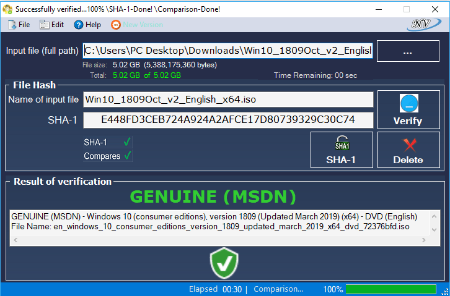 Windows and Office Genuine ISO Verifier 04.2026 | File size: 14.9 MB
The program allows verification of Windows and Office x32 x64 (ISO, EXE ...). Finds ISO hash and compares it with the official hash (MSDN, VLSC). Windows and Office Genuine ISO Verifier is a lightweight piece of software that enables you to determine whether you have a genuine copy of Windows or Office with minimal effort.
Straightforward installation and intuitive interface
Since the application comes in a portable package, the setup is a quick matter of decompressing the archive in the desired location on your hard disk. However, in case you are having a hard time accessing the file, then you should consider Unblocking the tool from Properties in the context menu.
Even though it is not exactly eye-candy, the interface is user-friendly and unlikely to cause you any real troubles while navigating. In fact, the UI is comprised of a single, medium-size window that features very intuitive fields. Consequentially, functionality-wise, using the tool entails specifying the input file and the app does the rest of the job automatically.
It supports numerous versions and languages of Office and Windows
The strong point of the program stems from the fact that it is designed to recognize a vast array of hashes that are associated with Microsoft's operating system and Office bundle. To be more precise, the utility can compare file SHA-1 to relatively old Microsoft releases, such as Office 95 and Windows XP.
On a side note, in case you already performed a scan for the file using other third party software solutions, then you can add the SHA-1 in the dedicated field and determine the authenticity of the file on the spot. Then again, verifying an ISO file is not a lengthy process and should not take too much of your time.
A useful app that can spare you legal complications
In the eventuality that you want to reinstall Windows or Office at work or home, but you do not know too much about the file you stumbled across, then perhaps Windows and Office Genuine ISO Verifier can help you determine if you have the genuine copies of the software solutions.
Requirements
Microsoft .NET Framework 4.0 Client Profile
OS: Windows XP/ Vista/ Windows 7/ Windows 8/ Windows 8.1/ Windows 8.1 With update/ Windows 10/ Windows 10 - Version 1511 and 1607(x32, x64).
Whats New
All edition of:
Window 11 x64 version 26H1, 25H2, 24H2 (Updated April 2026) MSDN, Window 11 arm64 version 26H1, 25H2, 24H2 (Updated April 2026) MSDN & VL
Languages (English, Arabic, Bulgarian, Chinese - Hong Kong SAR, Chinese-Simplified, Chinese-Taiwan,
Czech, Croatian, Danish, Dutch, Finnish, French, Estonian, German, Greek, Hebrew, Hungarian, Italian,
Latvian, Lithuanian, Japanese, Korean, Norwegian-Bokmal, Norwegian, Polish, Portuguese-
Brazil, Portuguese-Portugal, Russian, Romanian, Spanish, Serbian, Slovak, Slovenian, Swedish, Thai,
Turkish, Ukrainian).
All edition of:
Windows Server, version 2025, 2022 (x64) (Updated April 2026) MSDN & VL
Languages (English, Chinese - Hong Kong SAR, Chinese-Simplified, Chinese-Taiwan,
Czech, Dutch, French, German, Hungarian, Italian, Japanese, Korean, Polish, Portuguese-
Brazil, Portuguese-Portugal, Russian, Spanish, Swedish, Turkish).
HomePage:
Код:
https://genuine-iso-verifier.weebly.com/
-:DOWNLOAD FROM LINKS:- Download From RapidGator
[Ссылки доступны только зарегистрированным пользователям
. Регистрируйся тут...]
Download From NitroFlare
[Ссылки доступны только зарегистрированным пользователям
. Регистрируйся тут...]
|
|
|
|
|
25.04.2026, 10:19
|
#27967
|
|
Местный
Регистрация: 15.09.2019
Сообщений: 28,124
Сказал(а) спасибо: 0
Поблагодарили 0 раз(а) в 0 сообщениях
|
WinZip Driver Updater 5.44.0.8 Multilingual
 WinZip Driver Updater 5.44.0.8 Multilingual | Windows x64 | File size: 31.74 MB
WinZip® Driver Updater has an extensive database of the latest and most up-to-date drivers for software and hardware devices. Driver updater will scan your system and identify outdated Windows drivers.
When an outdated Windows driver is found you can update the driver with a single click as well as
• Update outdated drivers
• Backup and restore your drivers
• Driver exclusion list for drivers that are already up to date
• Scheduled driver scans to ensure your PC is always up-to-date
• Full compatibility with all of the latest operating systems and devices
• Developed by a Microsoft® gold certified partner
Keeping track of these updates and ensuring that you have the latest drivers for each component can be tedious and time-consuming. Moreover, accidentally installing the wrong driver can lead to system issues and device failure!
Scan for required driver updates
• With a single click, WinZip Driver Updater will scan your system, take stock of your existing device drivers, and evaluate which need to be updated based on each manufacturer's latest releases.
Choose which device drivers to download
• Before performing any updates, WinZip Driver Updater produces a summary of proposed drivers for you to choose from, giving you complete control over the changes made to your system.
Protect against device driver issues
• WinZip Driver Updater automatically creates a backup of your original Windows driver system in case you need to roll back to previous versions. This protects your system against any unforeseen device driver issues and provides you with peace of mind during each driver update!
Key Features
• Ensures peak performance of installed hardware
• Installs genuine drivers from manufacturers
• Quick and easy to use
• Automatically scans and installs most recent drivers
• 32 and 64 bit operating system support
• Compatible with Windows XP, Vista, Windows 7, and Windows 8
What's new
• official site does not provide any info about changes in this version
HomePage:
Код:
https://www.winzipsystemtools.com
-:DOWNLOAD FROM LINKS:- Download From RapidGator
[Ссылки доступны только зарегистрированным пользователям
. Регистрируйся тут...]
Download From NitroFlare
[Ссылки доступны только зарегистрированным пользователям
. Регистрируйся тут...]
|
|
|
|
|
25.04.2026, 10:27
|
#27968
|
|
Местный
Регистрация: 15.09.2019
Сообщений: 28,124
Сказал(а) спасибо: 0
Поблагодарили 0 раз(а) в 0 сообщениях
|
YT Downloader 10.3.8 (x64)
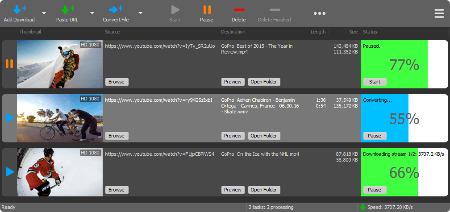 YT Downloader 10.3.8 (x64) | File size: 146.2 MB
YT Downloader (ex YTD Youtube Downloader) is a simple and easy-to-use video download application. It helps you to download and convert videos from YouTube and hundreds of other video sites. YT Downloader increases your download speeds by up to 500%.
Features
YT Downloader is the easiest and the fastest way to download and convert videos from YouTube and other video sites.
Download videos from YouTube and hundreds of video sites
YT Downloader can download videos from YouTube, Facebook, Dailymotion, Vimeo, Metacafe, and hundreds of other video sites. After downloading your video files, you'll be able to watch them smoothly using any media player, even if you don't have internet access.
Accelerate your downloads
YT Downloader features an advanced download acceleration engine that lets you download videos 500% faster than normal speed.
Download 4K, 2K, HD 1080p and 720p videos from YouTube
You can also download 3D videos from YouTube if they are available.
YouTube to MP3
YT Downloader allows you to download only audio stream from YouTube, and save it as MP3. You don't need to download the entire video file. The audio stream is small, you can download it within seconds.
Download whole playlist from YouTube
Just enter a YouTube playlist ID, YT Downloader will download all or selected videos in the playlist from YouTube for you.
Support drag-and-drop
You can directly drag and drop video link from your browser to the drop box or program window to start a download. You don't even need to copy and paste video URL.
Download multiple videos at a time
YT Downloader supports simultaneous downloads. It allows you to download more than one video at same time and safe time.
Pause and resume downloads
You can pause, resume, or cancel your downloads if you need more connection to perform other important tasks.
Preview videos while downloading
While downloading, you can click the Preview button to play incomplete video and make sure the content you are downloading is really the content of your choice.
Video and audio converter
YT Downloader is also a powerful video/audio converter. It can convert local video/audio files to any format you wish so that they are playable everywhere.
Video to MP3
YT Downloader allows you to extract audio streams from videos and save them as mp3, wav, wma, ac3, ringtone, or other audio format.
Support all popular video and audio formats
YT Downloader allows you to save downloaded videos in any format for any device, so you can watch them smoothly on your PC, iPhone, iPad, Android phone, and other device.
Ready-made presets
YT Downloader provides ready-made presets for all video and audio formats. You can also custom output video/audio format settings.
iTunes compatible
Optionally, YT Downloader can add downloaded video/music to your iTunes library automatically, so you can easily synchronize your videos and music to your iPhone, iPad, iPod.
Media Player
YT Downloader includes a simple and easy-to-use media player. If your Windows Media Player cannot play your video/audio files, you may try our Media Player.
Whats New
Updates: official site does not provide any info about changes in this version
HomePage:
Код:
https://www.ytapplications.com/
-:DOWNLOAD FROM LINKS:- Download From RapidGator
[Ссылки доступны только зарегистрированным пользователям
. Регистрируйся тут...]
Download From NitroFlare
[Ссылки доступны только зарегистрированным пользователям
. Регистрируйся тут...]
|
|
|
|
|
25.04.2026, 11:46
|
#27969
|
|
Местный
Регистрация: 15.09.2019
Сообщений: 28,124
Сказал(а) спасибо: 0
Поблагодарили 0 раз(а) в 0 сообщениях
|
Adobe Acrobat Pro DC 2026.001.21483 (x64)
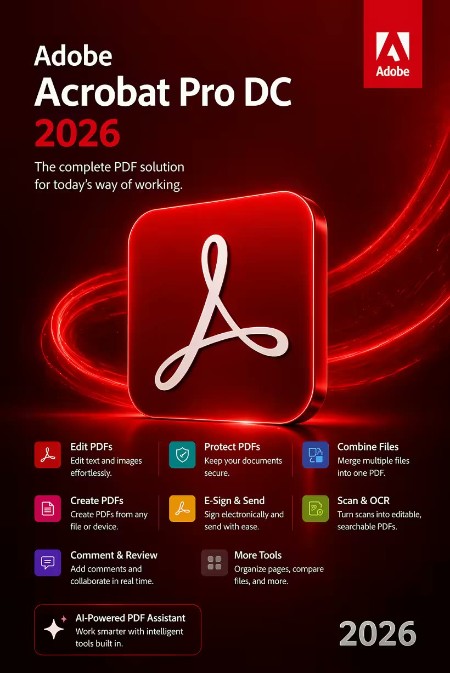 Adobe Acrobat Pro DC 2026.001.21483 (x64) Multilingual | File Size: 1.5 GB
Acrobat DC with Document Cloud services is packed with all the tools you need to convert, edit and sign PDFs. It's just as mobile as you are. So you can start a document at work, tweak it on the train and send it for approval from your living room - seamlessly, simply, without missing a beat.
It's packed with smart tools that give you even more power to communicate. Create and edit PDF files with rich media included, share information more securely, and gather feedback more efficiently.
Adobe Acrobat Pro DC software is the advanced way for business professionals to create, combine, control, and deliver more secure, high-quality Adobe PDF documents for easy, more secure distribution, collaboration, and data collection.
Adobe Acrobat Pro DC Features
Edit PDF files
With Adobe Acrobat Pro DC, you can make minor edits to text and images right in your PDF file without requiring the original document or graphic.
Edit text in a PDF. Fix a typo, change a font, or add a paragraph to your PDF as easily as you do in other applications using a new point-and-click interface.
Edit images in a PDF. Resize, replace, and adjust images in your PDF with no need to track down the original file or graphic.
Export from PDF files
Reduce the time you spend retyping information stuck in PDF files. Convert PDF files to editable Microsoft Office documents. And save fonts, formatting, and effort.
Convert PDF files to Word. Save your PDF as a Microsoft Word document and take your fonts, formatting, and layouts with you.
Convert PDF files to Excel. Turn your PDF or just part of it into an editable Excel spreadsheet you can use for data analysis right away.
Convert PDF files to PowerPoint. Get a head start on new projects by saving a PDF file as a fully editable PowerPoint presentation.
Create PDF files
Stop worrying about whether the files you send will look right on other people's screens. Turn documents into PDF files anyone can reliably view with free Adobe Reader.
Convert Word, Excel, or PowerPoint to PDF. Right from your Office application in Windows, you can create PDFs, start a shared review, restrict PDF edits, and more.
Print to PDF. Convert files to PDF from virtually any application that prints simply by selecting Adobe PDF as your printer.
Scan to PDF. When you need to turn a paper document or form into a digital file, just scan it to create a searchable PDF file you can edit.
Convert HTML pages to PDF. Save web pages as PDF files to archive web content, review the pages offline, or print them more reliably.
Create and analyze forms
Cut the time you spend creating forms, rekeying data, and correcting errors. Distribute forms online, and then collect responses and analyze results in real time.
Create new PDF and web forms. Customize professional templates or design from scratch with the Adobe FormsCentral desktop app included in Adobe Acrobat Pro DC.
Collect form responses with FormsCentral. Easily collect responses by moving your PDF or web forms online with the Adobe FormsCentral online service.
Convert existing forms to fillable PDFs. Type less, gather more. Quickly convert your paper, Word, or Excel forms to fillable PDF forms.
Collect form responses using Adobe Acrobat tools. Compile returned forms into one PDF, or host forms using a network folder or Microsoft SharePoint server.
Merge and combine files
Communicate clearly with single PDF attachments. Put multiple files into a single, organized PDF that's easy to email and simple to search.
Merge multiple files into one PDF. Make sure they don't miss a thing. Combine documents, spreadsheets, emails, and more in an organized PDF.
Combine files in a PDF Portfolio. Share your work in a PDF Portfolio that presents materials professionally with an interactive impact.
Create interactive PDF files. Bring your ideas to life by adding audio, Adobe Flash Player compatible video, and interactive media to PDFs.
Simplify reviews and approvals
Stop sorting through paper and email trails. Automate review and approval cycles with Adobe Acrobat Pro DC. Multiple reviewers can see and build on each other's comments so you can meet your deadline.
Streamline document reviews and approvals. In shared reviews, people can annotate PDFs with familiar tools. And you can track progress and consolidate comments.
Export comments to Word. Save all PDF comments back to the original Microsoft Word document, and update text faster than ever.
Approve with electronic signatures. Keep projects moving. E-sign your approval right on the PDF. No need to print, fax, or mail the document.
Get others to sign documents. Get the green light faster. Send PDFs to others for signature approval, and track them online using the Adobe EchoSign service.
Integrate with SharePoint. With Acrobat, it's simple and convenient for you to retrieve, open, and save PDFs stored on your company's SharePoint server.
Compare two file versions. Let Acrobat do the hard work of comparing two versions of a file, providing you with a detailed report of the results.
Store and access files on Acrobat.com. Use Acrobat.com to store your files in the cloud for free, accessing them from Acrobat or Reader on your desktop or mobile device.
Protect PDF files
Adobe Acrobat Pro DC makes it simple to keep your work more secure, no matter what application you're in.
Apply PDF passwords and permissions. Get expert protection without being an expert. Add copy and edit protection to any PDF - even right from Microsoft Office applications in Windows.
Remove and redact information. Don't just black out confidential data. Find and get rid of it for good, even when hidden in metadata.
Automate document security tasks. Apply document security measures the same way every time. Use a guided Action to help secure your PDF before publishing it.
Whats New
Код:
https://www.adobe.com/devnet-docs/acrobatetk/tools/ReleaseNotesDC/index.html
HomePage:
Код:
https://www.adobe.com
-:DOWNLOAD FROM LINKS:- Download From RapidGator
[Ссылки доступны только зарегистрированным пользователям
. Регистрируйся тут...]
Download From NitroFlare
[Ссылки доступны только зарегистрированным пользователям
. Регистрируйся тут...]
|
|
|
|
|
Вчера, 03:22
|
#27970
|
|
Местный
Регистрация: 15.09.2019
Сообщений: 28,124
Сказал(а) спасибо: 0
Поблагодарили 0 раз(а) в 0 сообщениях
|
Adobe Acrobat Reader DC 2026.001.21483 (x64)
 Adobe Acrobat Reader DC 2026.001.21483 (x64) | File Size: 697 MB
Adobe Acrobat Reader DC is the completely reimagined desktop version of the world's best PDF solution. And with Adobe Acrobat Reader DC, you can create, export, edit and track PDFs from anywhere - and stay connected to recent files across all your devices.
Clean feature lineup
The application allows you to write down comments and feedback using a separate frame in the right side of the window, while the reading space is not affected at all.
In fact, this is one of this tool's strong points: the interface is quite clean, but still manages to provide a lot of tools for zooming, selecting text, printing, adding bookmarks and many others.
Supported file formats and fast searches
A great thing about Adobe Reader XI is its ability to work with CAD designs and geospatial maps converted to Portable Document Format. Also, in case you need to locate any element within a PDF file, the application offers a comprehensive file searching engine that finds what you need in a matter of seconds.
Security tools
The security functions enable you to view and work with PDF documents without having to worry about malicious code being executed on your machine. The 'Protected Mode' and the 'Enhanced Security' features are designed to safeguard your computer and provide data protection and privacy.
Configuration settings
When it comes to customizing Adobe Reader XI, the Preferences area will give you the possibility to modify a wide range of settings. Comments, 3D and multimedia, measuring and reading options are available, as well as spelling or page units configurations.
In case you find Adobe Reader XI too difficult to use, the application includes a comprehensive help manual. Unfortunately you will need an Internet connection to access it, which means you won't be able to read the documentation in offline mode.
A top PDF viewer on the market
All things considered, with this software app you can't get it wrong simply because it still sets the standards insofar as PDF documents are concerned. Adobe Reader XI really works as advertised and is the leading tool for viewing Portable Document Format files.
Whats New
Код:
https://helpx.adobe.com/acrobat/release-note/release-notes-acrobat-reader.html
HomePage:
-:DOWNLOAD FROM LINKS:- Download From RapidGator
[Ссылки доступны только зарегистрированным пользователям
. Регистрируйся тут...]
Download From NitroFlare
[Ссылки доступны только зарегистрированным пользователям
. Регистрируйся тут...]
|
|
|
|
|
Вчера, 03:31
|
#27971
|
|
Местный
Регистрация: 15.09.2019
Сообщений: 28,124
Сказал(а) спасибо: 0
Поблагодарили 0 раз(а) в 0 сообщениях
|
Advanced CSV Converter 7.96
 Advanced CSV Converter 7.96 | File size: 3.2 MB
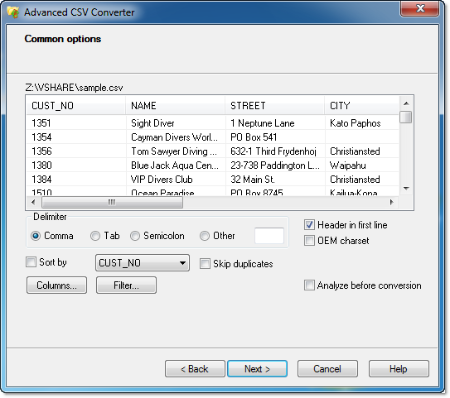
Advanced CSV Converter is a powerful tool for converting CSV to DBF, Excel(XLS,XLSX), TXT, HTML, PRG, XML, SQL, RTF. To convert a file, the program offers a wizard-driven interface, which walks you through the conversion step by step. Using the wizard, you select the input file, choose the target format and folder. If necessary, you can set the conversion filter by example and select columns you want to exclude from the process. Once the conversion is started, the program extracts data from CSV file and ports it into a list of data fields, which are then saved to the specified formats. Conversion is accurate and quick thanks to the well-written algorithm.
Below is an overview of the features you'll get by choosing Advanced CSV Converter.
Convert CSV to 10 formats. Advanced CSV Converter lets you export a CSV file to DBF (dBase III/IV, Visual Foxpro), Excel files:XLS,XLSX, SQL, TXT, Fixed Width Text, HTML, PRG, XML, RTF.
Set filters with Advanced CSV Converter. The program lets you set conversion filter by example and perform query by example. This gives you more flexibility in defining the parameters of the output file.
Batch conversion with Advanced CSV Converter. Besides single files, the program lets you convert more than one file in one go. To do so, select the folder with CSV files in the input field of the wizard, configure export settings and start conversion.
Command line support. You can use the graphical user interface to convert CSV files. However CSV Converter also lets advanced users do the conversion from the command line.
Convert CSV in 3 steps. The conversion of CSV files requires only a few steps. The first thing you need to do is to select the input file for conversion. Then you select the output format and destination folder. The third step is to set export options, such as filtering, type of delimiter and others.
Save on buying multiple apps. Usually you'll need to buy several applications if you want to do the conversion to multiple formats. With CSV Converter, you get a single tool to export CSV to other formats.Advanced CSV Converter does not require any external drivers such as ODBC or BDE.
Whats New
Код:
https://www.dbf2002.com/csv-converter/news.html
HomePage:
Код:
https://www.dbf2002.com
-:DOWNLOAD FROM LINKS:- Download From RapidGator
[Ссылки доступны только зарегистрированным пользователям
. Регистрируйся тут...]
Download From NitroFlare
[Ссылки доступны только зарегистрированным пользователям
. Регистрируйся тут...]
|
|
|
|
|
Вчера, 03:41
|
#27972
|
|
Местный
Регистрация: 15.09.2019
Сообщений: 28,124
Сказал(а) спасибо: 0
Поблагодарили 0 раз(а) в 0 сообщениях
|
Aiseesoft Burnova 1.5.56 (x64) Multilingual
 Aiseesoft Burnova 1.5.56 (x64) Multilingual | File size: 69.6 MB
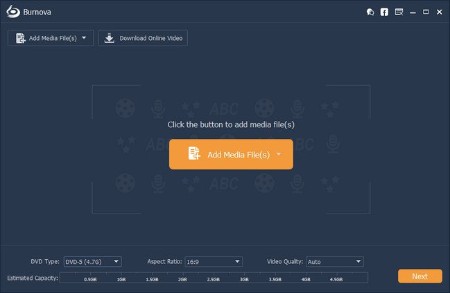
Burnova is the professional DVD, which creates local videos from computer or downloads and makes online movies from YouTube, Vimeo, etc. to DVD disc/ISO/folder. Aiseesoft Burnova is easy and capable of so much!
Burn video to DVD disc/folder/ISO file
Burnova is the DVD maker which can create DVD disc/folder/ISO file from local or downloaded video. You can make movies to various DVD types, like DVD-R, DVD+R, DVD-RW, DVD+RW, DVD+R DL, DVD-R DL, DVD-5, DVD-9,etc. and play them on any player. Moreover, you can use this DVD converter to burn ISO file or DVD folder to DVD disc, or make ISO file/DVD folder from various videos.
Burn DVD with various menu templates
If editing functions is to fulfill your video content, then menu editing will be necessary to string together all content. Burnova provides you various templates (holiday, family, travel, wedding and more styles) to specify your different type movies or videos. You can also add your own images as the background to tell your own story for the video. For the title, menu and play button, you are allowed to edit or drag the buttons to the place where you want them put. For the opening film, you are capable of importing your favorite video clips.
Edit videos before burning DVD
You can edit your DVD before you burning it with built-in editor. For your sideways video from iPad or iPhone camera, you can rotate or flip it. For those unwanted video, just clip it. The movies with annoyed letterboxing? Crop them. You could adjust the video brightness and contrast to get the ideal video, and watermark the video to give your mark. For the blur, sharpen, gray, sketch, canvas, mirror, sculpture, emboss and pixelate effects, you can also realize in the video with Burnova.
Make DVD from various video formats
Burnova is compatible with almost all video formats for DVD making. You are able to import video from MP4, AVI, WMV, MKV, M4V, MOV, M2TS/MTS, 3GP, VOB, FLV, MPEG, MPG, DV, RMVB, TOD, ASF, etc., even HD MPEG2, HD MPEG4, HD WMV, HD TS, HD MTS, HD TRP, and HD TP video files. It lets you add external audio track from MP3, AAC, AIFF, FLAC, WAV, WMA, OGG, AC3, MPA, MP2, etc. to make your own video.
Download and burn video from YouTube, Facebook
If you think it troublesome to go to YouTube to find and watch your favorite movie, then just burn the online video into DVD for long playback and preservations. Apart from burning the local video from your computer, Burnova also enables you to download and create online videos from YouTube, Facebook, Vimeo, Vevo, Yahoo, Dailymotion, youku, and more online video sites for playback and DVD making. It allows you download 3D video, high-definition (720p, 1080p and 4K) video, and music for your any player in simple steps.
Whats New
Updates: official site does not provide any info about changes in this version.
HomePage:
Код:
https://www.aiseesoft.com
-:DOWNLOAD FROM LINKS:- Download From RapidGator
[Ссылки доступны только зарегистрированным пользователям
. Регистрируйся тут...]
Download From NitroFlare
[Ссылки доступны только зарегистрированным пользователям
. Регистрируйся тут...]
|
|
|
|
|
Вчера, 03:51
|
#27973
|
|
Местный
Регистрация: 15.09.2019
Сообщений: 28,124
Сказал(а) спасибо: 0
Поблагодарили 0 раз(а) в 0 сообщениях
|
AJC Sync Professional 4.21.0.1
 AJC Sync Professional 4.21.0.1 | File size: 50 MB
AJC Sync allows you to compare or synchronize large numbers of files and folders between multiple pairs of locations. These locations may be on the same computer, another computer or device over a network, an attached drive or memory stick, FTP server, cloud service etc. AJC Sync is an ideal backup solution for your PC, laptop or server.
Files can be synchronised by transferring in one direction or both directions according to a set of comparison rules. A user friendly sync plan shows you exactly what is going to happen to your files, giving you complete confidence and control. The built in diff can show you exactly what has changed in your files.
The sync process can be run with full visual control, via the command line or on a regular basis via the scheduler. Full logging, reporting and emailing is provided to notify you about what happened. An archiving facility is provided to store multiple versions of files allowing undo to recover from mistakes.
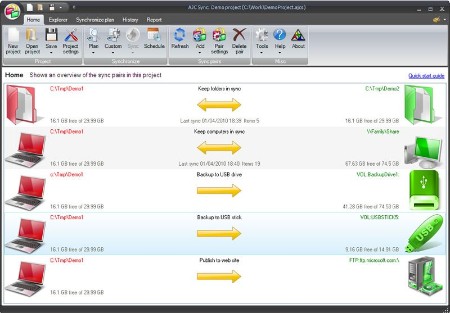
Home tab
Your synchronize or backup jobs are organised in sync projects. Each project can have one or more pairs of locations to keep in sync. Each location may be on any Windows accessible drive, network, USB stick etc or FTP server. The home tab gives you an overview of these pairs, showing a summary of the sync direction and last backup time. Different images can be selected to help you visuallise the sync locations. Throughout the application color coding is used so you can tell if files exist only on one side of the sync pair or both. Starting an interactive sync will then take you to the sync plan tab so you can see what will happen to your files
Explorer tab
The explorer allows you to browse and work with files and folders for the selected sync pair. It looks rather like Windows explorer with the folder tree down the left hand side and the items in the current folder on the right hand side. The two file structures from the sync pair are overlaid on top of each other into a combined view with color coding. You don’t use the explorer to synchronize or compare the file structures (you create a sync plan for this). The explorer is intended as a means of browsing all of your files and allowing you to work with them in a dual manner. E.g. Opening a file from both sides or one side, renaming a file on one or both sides etc.
Sync plan tab
The sync plan shows a comparison between the two file system locations on each side of the specified sync pairs and decides the actions that will be taken to bring the two sides into sync. You can use this plan just to view the comparison of the file systems if you like but normally you check and modify and actions if required and then proceed to start the synchronize process which will carry out all listed actions. A one click sync button is also availble from the Home tab to use if you are happy with your sync plans and just want to do it.
History tab
The history tab shows what happened in previous sync runs. You can see when each sync run started and stopped, how long it took, what sync pairs were involved and what happened to each file/folder. An archiving system is provided to store old versions of files that were overwritten or deleted during the sync and if you are using this you can access file archives from here to retrieve or compare against older versions of the files and undo sync actions.
Report tab
The report shows what happened during a sync plan creation or a sync run. During a sync run the report is shown as the task progresses and you can see a progress bar at the bottom of the screen.
File compare diff
The built in diff file compare facility can show you what has changed inside a file.
Whats New
Код:
https://ajcsoft.com/file-sync-versions.htm
HomePage:
Код:
https://ajcsoft.com/
-:DOWNLOAD FROM LINKS:- Download From RapidGator
[Ссылки доступны только зарегистрированным пользователям
. Регистрируйся тут...]
Download From NitroFlare
[Ссылки доступны только зарегистрированным пользователям
. Регистрируйся тут...]
|
|
|
|
|
Вчера, 04:02
|
#27974
|
|
Местный
Регистрация: 15.09.2019
Сообщений: 28,124
Сказал(а) спасибо: 0
Поблагодарили 0 раз(а) в 0 сообщениях
|
Ashampoo Snap Pro 26.0.1 (x64) Multilingual
 Ashampoo Snap Pro 26.0.1 (x64) Multilingual | File size: 235.1 MB
With Ashampoo Snap Pro 26, creating screenshots and videos is easier than ever! Everything that appears on your screen can be captured in seconds. In the image editor, you can edit, annotate, save, and share your captures instantly. New: With Live Edit, you can even mark content directly on your Desktop before the screenshot is taken. Snap Pro 26 also enhances your screenshots with graphical elements such as automatic numbering, comments, stickers, and more. Whether you're working from home, explaining something quickly, or creating detailed tutorials, Snap Pro 26 lets you get the job done faster.
Screenshots and video recordings with scrolling function, sound option and quick access via hotkeys
Direct editing with text, highlighting, numbering, blur tools and a handy screenshot library
Ideal for instructions, tutorials and documentation with flexible export as PNG, JPG, PDF and cloud upload
Live Edit-Mark directly on your desktop
Live Edit places a transparent layer like a sheet of glass over your screen. On this layer, you can draw arrows, add text, or highlight areas directly on top of the content you want to explain. Unlike traditional screenshot tools, your screen does not freeze during this process. You can switch back to your Desktop at any time to move windows, adjust content, or let a video continue playing, and then continue working on your annotations. This way, the final screenshot evolves step by step without having to restart the process.
Prepare and create screenshots faster
With Live Edit, multiple screenshots can be prepared and created within a single workflow. Annotations remain visible while you continue working on your Desktop and can be adjusted at any time. Especially with large workspaces or multi-monitor setups, Live Edit provides plenty of screen estate to organize content clearly. The final screenshot is then created directly from the Live Edit view-What you see is always what you get!
Better performance, stability and resource efficiency
The new Ashampoo Snap is built on a fully modernized technical foundation: The program starts faster, responds more quickly, and operates more smoothly overall. At the same time, memory usage and background process activity has been significantly reduced so Snap remains responsive and stable even during longer sessions. This new foundation improves everyday performance while also preparing Snap for future enhancements and new features.
Enhanced workflow and modernized interface
We have also improved many details for everyday work with Snap. The image editor's toolbar is smarter and supports your workflow even better. The properties bar has been restructured to provide a clearer and more consistent user experience. The updated color scheme improves readability and makes longer working sessions less strainful. With Quick Scroll, you also get a smart thumbnail preview that automatically appears when needed and helps you navigate large captures more easily.
More practical improvements
Many already useful features have been further refined: Cliparts now support drag & drop and image imports are more convenient, tools like the arrow tool offer better precision, and additional output formats are available for emailing images. The print dialog has also been updated and now supports margin settings in centimeters. In addition, video exports now support a quality settings to save storage space or speed up exports.
Smart desktop capturing and sharing
Once active, Snap's magic eye auto-detects elements below your mouse pointer (browser windows, program menus, images, etc.) and offers instant 1-click capturing with pixel precision. But it doesn't stop there: Snap can also capture custom rectangular or freehand regions and even supports scrolling content! Naturally, the program supports all possible kinds of sharing options, including email and Ashampoo Web!
Optical character recognition (OCR) for your screenshots
As of now, Snap no longer recognizes just 7 but over 180 languages! Our new text recognition utilizes Windows' own language packs and produces better results faster. Chances are you won't be needing over 180 languages straight away so, in the interest of simplicity, we've limited the number of initially available languages to the system languages currently installed on your machine. You can easily add additional languages via the "Add language" menu item.
Fast and easy video cutting
Not every video recording is an instant success. Ads, extra steps or pauses are a frequent bother. The same applies to screen captures. Keep the important bits and get rid of the rest with Ashampoo Snap! Remove ads, glitches or superfluous scenes or split your video into individual episodes. It doesn't matter whether you're casually pointing and capturing, creating an extensive webinar or producing a high-quality presentation: With Ashampoo Snap, every video capture comes out a success!
Create videos for any purpose
Creating instructional videos or documentaries is a breeze with Ashampoo Snap. Recordings can be annotated live with text, drawings and voice narration, and clarified with visualised mouse clicks. Take it to the next level and add live feeds from your webcam in a single click. Here's your ticket to create engaging tutorials, prepare instructive webinars and to point the way to the things that matter most to you-literally!
Perfect for different screen resolutions and multi-display environments
Ashampoo Snap fully supports multi-display setups, even with different resolution and DPI combinations, e.g. mixed Full HD and 4K environments. Each display is captured at its individual resolution for maximum crispness and results are instantly editable. And once you're in the editor, it's smooth sailing for beginners and professionals alike!
Create GIFs from any video
What would the internet be without those charming GIF animations? But GIFs can also be used in tutorials or demonstrations to great effect. Ashampoo Snap can turn any video segment into GIFs. Just set the start and end positions, fire up the built-in converter and you're done!
More than a snipping tool: extensive comfort features
Ashampoo Snap does most of the heavy lifting for you. Automatic numbering or time-delayed captures will help you make the most of your shots. Freely annotate your captures with texts and drawings or use flood fills. Put the spotlight on individual portions, blur sensitive data and use the highlighter to direct attention in style!
Capture desktop contents and save videos or images from the internet
The internet is brimming with fascinating images, texts and videos. Ashampoo Snap makes it easy to capture what you like! Save image and videos and edit them on the fly and to your liking! Anything you see on your screen, or hear through your sound card, Snap can capture!
Whats New
Код:
https://www.ashampoo.com/en-us/snap
HomePage:
Код:
https://www.ashampoo.com/en-us/snap/detail
-:DOWNLOAD FROM LINKS:- Download From RapidGator
[Ссылки доступны только зарегистрированным пользователям
. Регистрируйся тут...]
Download From NitroFlare
[Ссылки доступны только зарегистрированным пользователям
. Регистрируйся тут...]
|
|
|
|
|
Вчера, 04:13
|
#27975
|
|
Местный
Регистрация: 15.09.2019
Сообщений: 28,124
Сказал(а) спасибо: 0
Поблагодарили 0 раз(а) в 0 сообщениях
|
ButterScroll 1.5.0
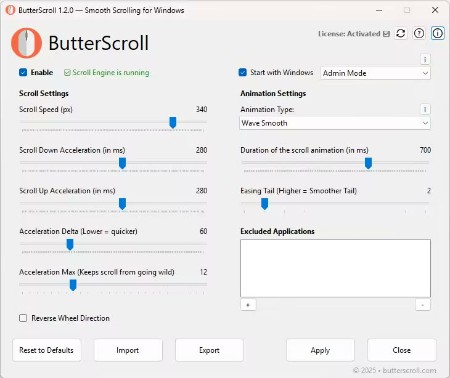 ButterScroll 1.5.0 | File size: 15.2 MB
Smooth scrolling on Windows just got better. Smooth scrolling for Windows is what ButterScroll is all about. It enhances how your mouse scrolls using custom speed and easing settings.
Looking for smooth scrolling windows experience? ButterScroll delivers exactly that.
Smooth scrolling functionality to all mice.
ButterScroll enhances your everyday scrolling experience with buttery-smooth scrolling precision, customizable control, and a satisfying feel across all your Windows apps - from browsers to spreadsheets.
Easy to setup and use
Smooth, fluid scroll animations for all apps.
Works with any mouse - no extra hardware needed.
Adjustable speed, acceleration, and easing.
Lightweight and optimized.
No tracking, no ads, full privacy control.
Whats New
Updates: official site does not provide any info about changes in this version
HomePage:
Код:
https://butterscroll.com/
-:DOWNLOAD FROM LINKS:- Download From RapidGator
[Ссылки доступны только зарегистрированным пользователям
. Регистрируйся тут...]
Download From NitroFlare
[Ссылки доступны только зарегистрированным пользователям
. Регистрируйся тут...]
|
|
|
|
      
Любые журналы Актион-МЦФЭР регулярно !!! Пишите https://www.nado.in/private.php?do=newpm&u=12191 или на электронный адрес pantera@nado.ws
|
Здесь присутствуют: 1 (пользователей: 0 , гостей: 1)
|
|
|
 Ваши права в разделе
|
Вы не можете создавать новые темы
Вы не можете отвечать в темах
Вы не можете прикреплять вложения
Вы не можете редактировать свои сообщения
HTML код Выкл.
|
|
|
Текущее время: 09:30. Часовой пояс GMT +1.
| |







